场景:需要打印出版一批文件,人工逐个打印比较费事并且可能有遗漏,同时打印完后还需要统计页码来结算费用,这时候就可以使用程序来代替人工处理了。
实现效果:
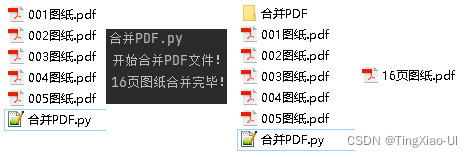
代码如下:
#!user/bin/python3
# _*_ coding:utf-8 _*_
# author TingXiao-UI
from PyPDF2 import PdfFileReader,PdfFileWriter
import os

#获取PDF文件页码
def getPdfPagesNum(p):
	reader = PdfFileReader(p)
	if reader.isEncrypted:
		reader.decrypt('')
	PdfPagesNum = reader.getNumPages()
	# print(PdfPagesNum)
	return(PdfPagesNum)
#遍历PDF文件,批量合并
def mergePdf(rp,fn):
	print('开始合并PDF文件!')
	# 实例化写入对象
	outPdf = PdfFileWriter()
	outPdfPages = 0
	#遍历PDF文件
	for root,dirs,files in os.walk(rp):
		for file in files:
			curPdf = os.path.join(file)
			curPdfPath = os.path.join(root,file)
			if curPdfPath.find('.pdf')>=0 and curPdfPath.find('合并')<0:
				# 读取PDF文件
				inPdf = PdfFileReader(open(curPdfPath, "rb"))
				# 获取源PDF文件页数
				pageNum = inPdf.getNumPages()
				outPdfPages += pageNum
				# 逐个合并PDF
				# print('合并:'+curPdf)
				for iPage in range(pageNum):
					# direction = inPdf.getPage(iPage).get('/Rotate')
					# print(direction)
					outPdf.addPage(inPdf.getPage(iPage))
	# 创建合并文件夹
	mergeFlodPath = rp + '\\合并PDF'
	a = os.path.exists(mergeFlodPath)
	if a!=True:
		os.mkdir(mergeFlodPath)
	#写入到目标PDF文件
	with open(os.path.join(mergeFlodPath+'\\'+str(outPdfPages)+'页'+fn),'wb') as outputfile:
		outPdf.write(outputfile)
	print(str(outPdfPages)+'页图纸合并完毕!')
if __name__=='__main__':
	rootPath = os.getcwd()
	# rootPath = input('请输入文件路径(结尾加上/):')
	fileName = '图纸.pdf'
	mergePdf(rootPath,fileName)#合并PDF
版权声明:本文为qingtianhaoshuai原创文章,遵循CC 4.0 BY-SA版权协议,转载请附上原文出处链接和本声明。