官方文档操作如下:
修改为动态图表展示:
目录结构:
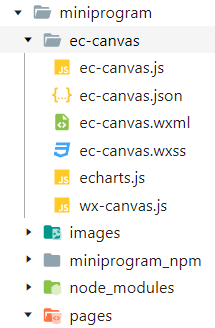
index.json代码:
{
  "usingComponents": {
    "ec-canvas": "../../ec-canvas/ec-canvas"
  }
}
index.wxml代码:
图表的标识:id="mychart-dom-bar-bt",数据绑定:ec="{{ ecbt }}"
<view class="container">
  <ec-canvas id="mychart-dom-bar-bt" canvas-id="mychart-bar" ec="{{ ecbt }}"></ec-canvas>
</view>
index.js代码:
import * as echarts from '../../ec-canvas/echarts';
Page({
  data: {
    //图表
    // ec: {
    //   onInit: initChart
    // },
    ecbt: {//类别饼图销售情况
      // onInit: initChart
      lazyLoad:true//懒加载(有加载动画)
    },
    categoryListData:[],//类别数据
    categoryListName:[],//类别名称
  },
  //今天销售金额
  sellTodayGetData(){
    wx.cloud.callFunction({
      name:"sellTodayGetData"
    }).then(res=>{
      console.log(res)
      // console.log(res.result.data[0].price)
      var tempcategoryListData=res.result.data
      console.log(tempcategoryListData)
      for(var i = 0 ; i<tempcategoryListData.length ; i++){
        var list={}
        list.value = tempcategoryListData[i].price
        list.name = tempcategoryListData[i].name
        this.data.categoryListData.push(list)
      }
      for(var i = 0 ; i<tempcategoryListData.length ; i++){
        var list= tempcategoryListData[i].name
        this.data.categoryListName.push(list)
      }
      console.log(this.data.categoryListName)
      console.log(this.data.categoryListData)
    }).then(res=>{
      // var that=this;
      this.echarCanve = this.selectComponent("#mychart-dom-bar-bt");
      this.initbt();
    })
  },
  initbt:function(){
      this.echarCanve.init((canvas, width, height)=> {
      const chart = echarts.init(canvas, null, {
        width: width,
        height: height
      });
      chart.setOption(this.getOptionbt());
      return chart;
    })
  },
  getOptionbt:function(){
    var option = {
      title: {
          // text: '今日各类别销售情况',
          // subtext: '今日各类别销售情况数据分析',
          subtext: '各类别销售分布',
          left: 'center'
      },
      tooltip: {
          trigger: 'item',
          formatter: '{b} : {c} ({d}%)'
      },
      legend: {
          orient: 'vertical',
          left: 'left',
          data: this.data.categoryListName
      },
      series: [
          {
              name: '访问来源',
              type: 'pie',
              radius: '55%',
              center: ['50%', '60%'],
              data: this.data.categoryListData,
              emphasis: {
                  itemStyle: {
                      shadowBlur: 10,
                      shadowOffsetX: 0,
                      shadowColor: 'rgba(0, 0, 0, 0.5)'
                  }
              }
          }
      ]
  };
    return option;
  },
   /**
   * 生命周期函数--监听页面加载
   */
  onLoad: function (options) {
    this.sellTodayGetData()
  }
});
实现效果:

提示:
Tips:本博客使用的云函数获取数据,如果使用静态数据配置如下
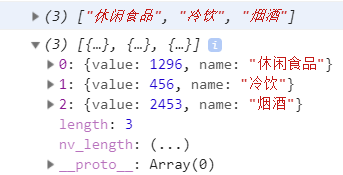
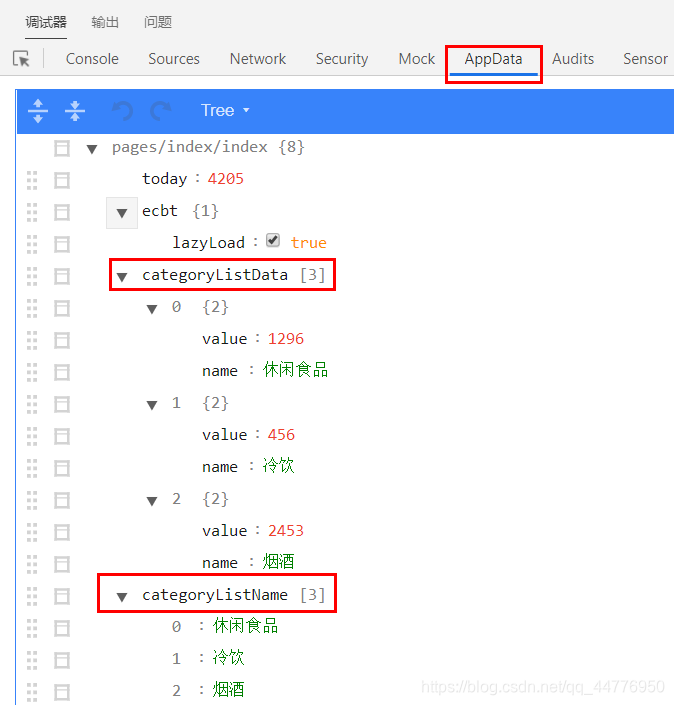
Tips:如果找不到Echarts源码请留言
版权声明:本文为qq_44776950原创文章,遵循CC 4.0 BY-SA版权协议,转载请附上原文出处链接和本声明。