问题描述
android studio 编译2012 年的项目时出现了如下问题:
FAILURE: Build failed with an exception. * What went wrong: Execution failed for task ‘:app:stripDebugDebugSymbols’. > No toolchains found in the NDK toolchains folder for ABI with prefix: arm-linux-androideabi * Try: Run with --stacktrace option to get the stack trace. Run with --info or --debug option to get more log output. Run with --scan to get full insights.
解决方法
一方面是因为jdk 版本太高的原因,另一方面是ndk版本太高的原因。
在oracle 官网上下载较低版本的JDK,并且在android studio 的ndk 管理中下载版本20以及之前的ndk。
将默认的jdk 和 ndk 加载路径修改至下载的ndk 和 jdk 路径。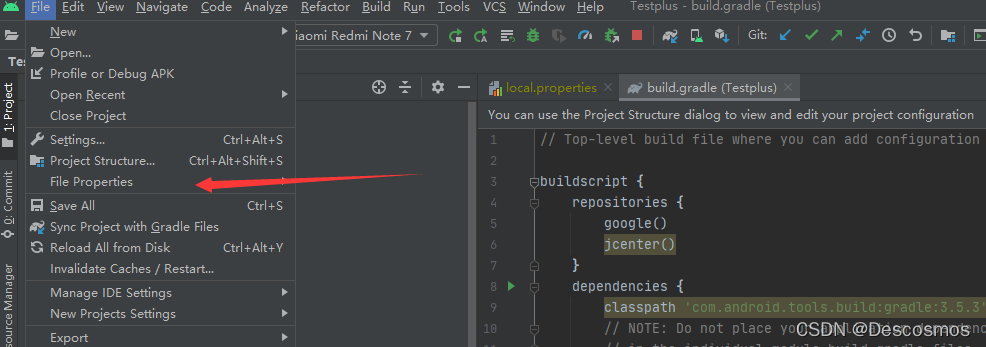
android studio 默认使用最新版本的ndk,因此也需要将ndk 的路径显式声明。
将默认路径改为下载的旧版jdk 和 ndk 路径。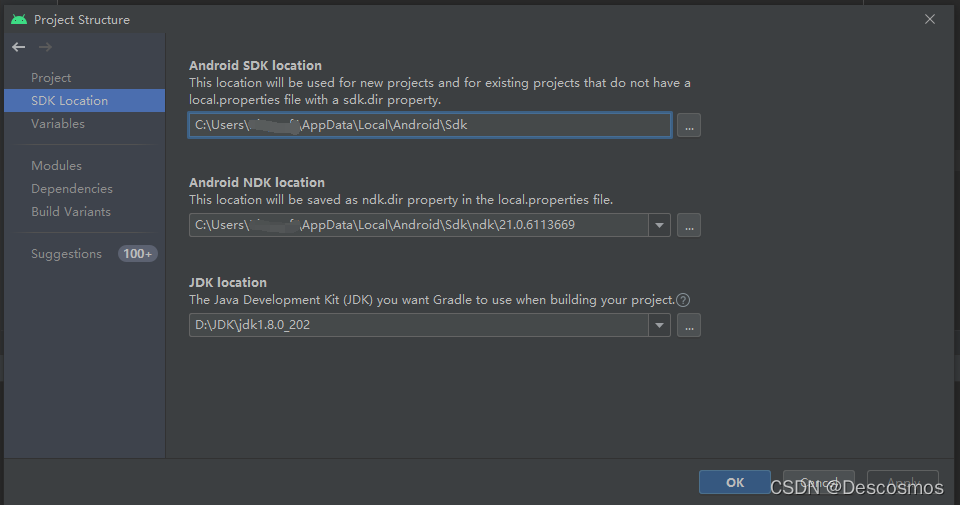
版权声明:本文为qq_41028985原创文章,遵循CC 4.0 BY-SA版权协议,转载请附上原文出处链接和本声明。