
nacos作为注册中心,相当于(eureka的springcloud config和springcloud bus),可以保证配置文件实时生效重新启动;
springboot版本2.0.5.RELEASE
pom.xml需要引入的jar包
<dependencyManagement>
        <dependencies>
            <dependency>
                <groupId>org.springframework.cloud</groupId>
                <artifactId>spring-cloud-dependencies</artifactId>
                <version>Finchley.SR1</version>
                <type>pom</type>
                <scope>import</scope>
            </dependency>
            <dependency>
                <groupId>org.springframework.cloud</groupId>
                <artifactId>spring-cloud-alibaba-dependencies</artifactId>
                <version>0.2.2.RELEASE</version>
                <type>pom</type>
                <scope>import</scope>
            </dependency>
        </dependencies>
    </dependencyManagement>
    <dependencies>
        <dependency>
            <groupId>org.springframework.boot</groupId>
            <artifactId>spring-boot-starter</artifactId>
        </dependency>
        <dependency>
            <groupId>org.springframework.boot</groupId>
            <artifactId>spring-boot-starter-web</artifactId>
        </dependency>
        <dependency>
            <groupId>org.springframework.cloud</groupId>
            <artifactId>spring-cloud-starter-alibaba-nacos-discovery</artifactId>
        </dependency>
        <dependency>
            <groupId>org.springframework.cloud</groupId>
            <artifactId>spring-cloud-starter-alibaba-nacos-config</artifactId>
        </dependency>
        <dependency>
            <groupId>org.springframework.boot</groupId>
            <artifactId>spring-boot-starter-test</artifactId>
            <scope>test</scope>
        </dependency>
    </dependencies>

    <build>
        <plugins>
            <plugin>
                <groupId>org.springframework.boot</groupId>
                <artifactId>spring-boot-maven-plugin</artifactId>
            </plugin>
        </plugins>
    </build>
配置文件bootstrap.yml
#目前文件配置中心zuul不可以用,具体问题还没找到
server:
  port: 1004

spring:
  application:
    name: apigateway
  cloud:
    nacos:
      discovery:
        server-addr: 47.93.47.181:8848
        namespace: ad5d2a77-fc87-4609-a7c4-8096af11a24b
      config:
        server-addr: 47.93.47.181:8848
        file-extension: yaml #指定yaml格式的配置
        group: DEFAULT_GROUP
        namespace: ad5d2a77-fc87-4609-a7c4-8096af11a24b
        #prefix: apigateway
  profiles:
    active: dev
启动类:application
@EnableDiscoveryClient
@SpringBootApplication
public class ApiGatewayApplication {

	public static void main(String[] args) {
		SpringApplication.run(ApiGatewayApplication.class, args);
	}
}
添加配置
添加配置
${prefix}-${spring.profile.active}.${file-extension}
配置文件名为服务名+环境配置+文件类型
apigateway-dev.yaml
测试类:
@RestController
@RefreshScope //支持controller的动态刷新
public class ConfigClientController{

    @Value("${config}")
    private String configInfo;

    @GetMapping("/config/info")
    public String getConfigInfo() {
        return configInfo;
    }
}
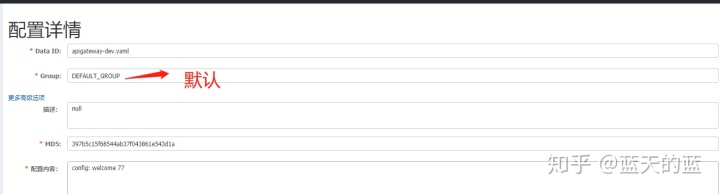
通过spring.profile.active属性就能进行多环境下配置文件的读取