首先声明:只是简单的实现了功能,但是实际与高德的还是有点区别
高德的效果:
我的效果:
Emmmm,感觉差不多吧。。。其他的还没弄呢,比如滑到最上面有阴影啊之类的。
首先说下思路,一开始,我是打算在滑动的时候,不停的监听onSlide里slideOffset这个参数,然后根据这个参数来动态设定bottomsheet的setPeekHeight,但是问题是,原生的BottomSheetBehavior里的返回参数slideOffset,是按当前高度除以从peekheight到屏幕顶部的距离来算的,也就是说,这个值是会根据peekheight的改变来改变的!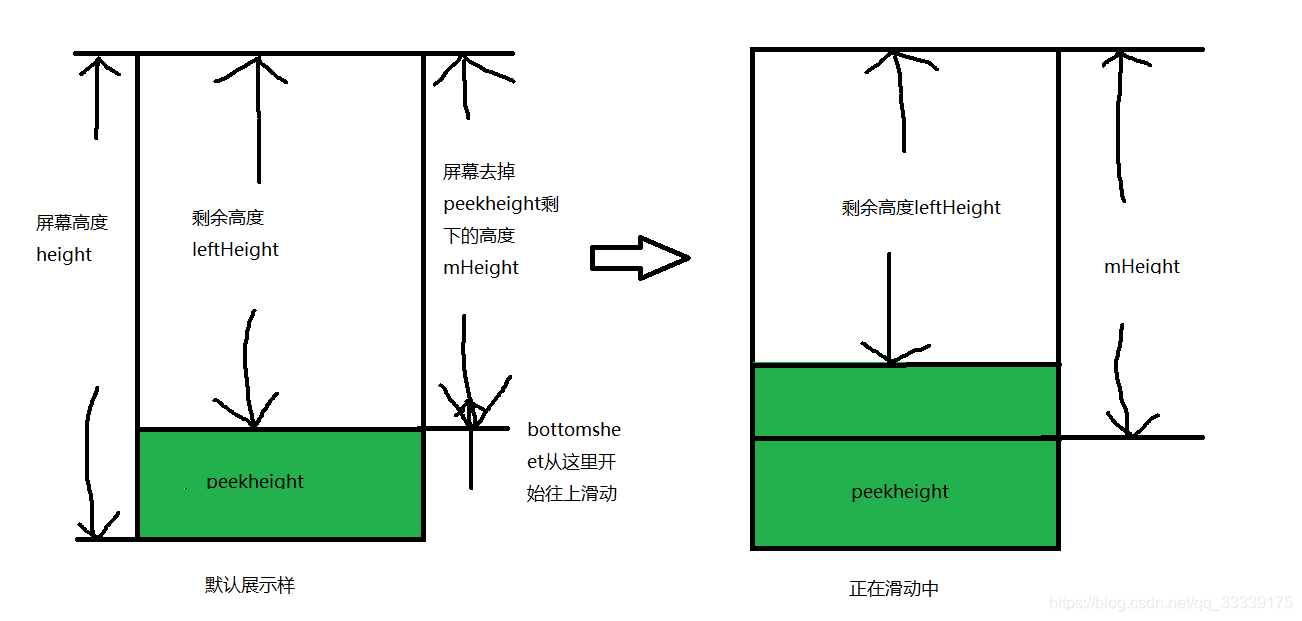
slideOffset = leftHeight / mHeight;
如果你的peekHeight改变了,那么mHeight这个参数也会改变,这就导致了slideOffset 参数的改变。
所以,我准备自定义一个BottomSheetBehavior,再它的onSlide里返回剩下的高度,也就是leftHeight这个参数,不需要进行除法。
于是我套用的这位大佬的自定义BottomSheetBehavior:重写BottomSheetBehavior
他的BottomSheet实现的功能是,滑到哪就可以停在哪,当然我是不需要这个功能的,但是,大佬的类里,实现了:通过overScroller,根据当前的位置releasedChild.getTop(),以及速度yvel,来计算最终滚动到的位置overScroller.getFinalY()
也就是当你把BottomSheet往上或者往下一滑时,它会算出这个bottomsheet最终会滑到哪里,照着这个思路,我修改了一下BottomSheetBehavior,将这个最终位置命名为finalTop,并且将它传递了出来。
这样,根据finalTop这个参数,我把屏幕分成了几个部分: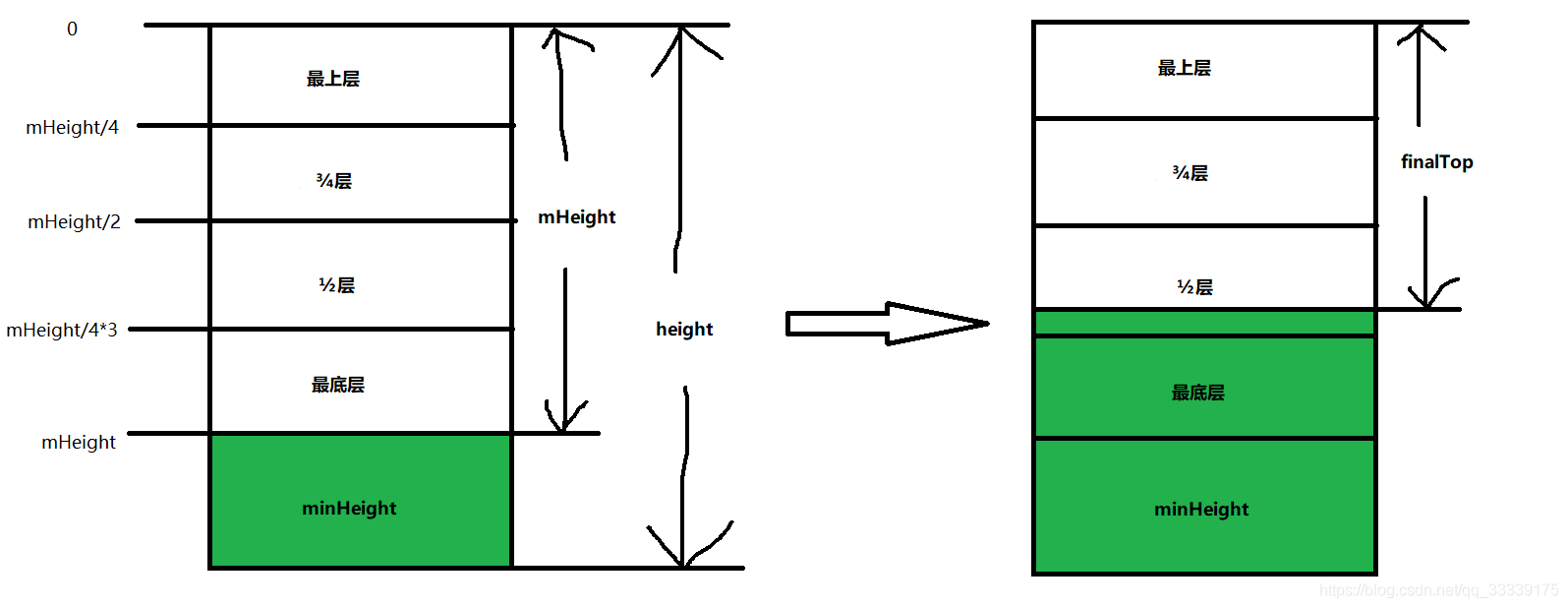
整个屏幕的高度为 height
bottomsheet的peekheight为 minHeight
整个屏幕去掉minHeight,剩下的高度为 mHeight
然后将剩下的部分四等分,分别为:最上层、3/4层、1/2层和最底层
然后bottomsheet的最终滑动位置为 finalTop
这样,剩下的思路就出来了:
当你的finaltop在最底层的时候,也就是finalTop <= mHeight && finalTop > mHeight / 4 * 3,当finaltop在这个区间的时候,属于最底层,你需要的是将bottomsheet调用setState方法,让它进入默认的折叠状态–STATE_COLLAPSED
当你的finaltop在1/2层的时候,也就是finalTop <= mHeight / 4 * 3 && finalTop > mHeight / 2,当finaltop在这个区间的时候,属于1/2层,你需要的是将bottomsheet调用setState方法,让它滑动一半的距离–STATE_HALF_EXPANDED
当你的finaltop在3/4层的时候,也就是finalTop <= mHeight / 2 && finalTop > mHeight / 4,当你的finaltop在这个区间的时候,属于3/4层,你需要的是将bottomsheet调用setState方法,让它滑动一半的距离–STATE_HALF_EXPANDED
当你的finaltop在最上层的时候,也就是finalTop <= mHeight / 4,当你的finaltop在这个区间的时候,属于最上层,你需要的是将bottomsheet调用setState方法,让它进入完全展开状态–STATE_EXPANDED
这样,四种状态就出来了—这里说一下bottomsheet的6中状态:
1.STATE_DRAGGING:过渡状态此时用户正在向上或者向下拖动bottom sheet
2.STATE_SETTLING:视图从脱离手指自由滑动到最终停下的这一小段时间
3.STATE_EXPANDED:处于完全展开的状态
4.STATE_COLLAPSED:默认的折叠状态
5.STATE_HIDDEN:下滑到完全隐藏 bottom sheet
6.STATE_HALF_EXPANDED滑动到mHeight一半的距离
我看了好多篇介绍bottomsheet的文章,不知道为啥都没写STATE_HALF_EXPANDED这个状态。。。
那么,这时候,一开始的目的已经达到了:三段式
先上代码:
自定义BottomSheetBehavior
/*
* Copyright (C) 2015 The Android Open Source Project
*
* Licensed under the Apache License, Version 2.0 (the "License");
* you may not use this file except in compliance with the License.
* You may obtain a copy of the License at
*
* http://www.apache.org/licenses/LICENSE-2.0
*
* Unless required by applicable law or agreed to in writing, software
* distributed under the License is distributed on an "AS IS" BASIS,
* WITHOUT WARRANTIES OR CONDITIONS OF ANY KIND, either express or implied.
* See the License for the specific language governing permissions and
* limitations under the License.
*/
package gxsh.xmlkd.tools;
import android.content.Context;
import android.content.res.TypedArray;
import android.os.Parcel;
import android.os.Parcelable;
import android.support.annotation.IntDef;
import android.support.annotation.NonNull;
import android.support.annotation.RestrictTo;
import android.support.annotation.VisibleForTesting;
import android.support.design.R;
import android.support.design.widget.CoordinatorLayout;
import android.support.v4.math.MathUtils;
import android.support.v4.view.AbsSavedState;
import android.support.v4.view.ViewCompat;
import android.support.v4.widget.ViewDragHelper;
import android.util.AttributeSet;
import android.util.TypedValue;
import android.view.MotionEvent;
import android.view.VelocityTracker;
import android.view.View;
import android.view.ViewConfiguration;
import android.view.ViewGroup;
import android.view.ViewParent;
import android.widget.OverScroller;
import java.lang.annotation.Retention;
import java.lang.annotation.RetentionPolicy;
import java.lang.ref.WeakReference;
import static android.support.annotation.RestrictTo.Scope.LIBRARY_GROUP;
/**
* An interaction behavior plugin for a child view of {@link CoordinatorLayout} to make it work as
* a bottom sheet.
*/
public class MyBottomSheetBehavior<V extends View> extends CoordinatorLayout.Behavior<V>
{
/**
* Callback for monitoring events about bottom sheets.
*/
public abstract static class BottomSheetCallback
{
/**
* Called when the bottom sheet changes its state.
*
* @param bottomSheet The bottom sheet view.
* @param newState The new state. This will be one of {@link #STATE_DRAGGING},
* {@link #STATE_SETTLING}, {@link #STATE_EXPANDED},
* {@link #STATE_COLLAPSED}, or {@link #STATE_HIDDEN}.
*/
public abstract void onStateChanged(@NonNull View bottomSheet, @State int newState, int finalTop);
/**
* Called when the bottom sheet is being dragged.
*
* @param bottomSheet The bottom sheet view.
* @param slideOffset The new offset of this bottom sheet within [-1,1] range. Offset
* increases as this bottom sheet is moving upward. From 0 to 1 the sheet
* is between collapsed and expanded states and from -1 to 0 it is
* between hidden and collapsed states.
*/
public abstract void onSlide(@NonNull View bottomSheet, float slideOffset);
}
/**
* The bottom sheet is dragging.
*/
public static final int STATE_DRAGGING = 1;
/**
* The bottom sheet is settling.
*/
public static final int STATE_SETTLING = 2;
/**
* The bottom sheet is expanded.
*/
public static final int STATE_EXPANDED = 3;
/**
* The bottom sheet is collapsed.
*/
public static final int STATE_COLLAPSED = 4;
/**
* The bottom sheet is hidden.
*/
public static final int STATE_HIDDEN = 5;
/**
* 一半高度
*/
public static final int STATE_HALF_EXPANDED = 6;
private int finalTop = 0;
/**
* @hide
*/
@RestrictTo(LIBRARY_GROUP)
@IntDef({STATE_EXPANDED, STATE_COLLAPSED, STATE_DRAGGING, STATE_SETTLING, STATE_HIDDEN})
@Retention(RetentionPolicy.SOURCE)
public @interface State
{
}
/**
* Peek at the 16:9 ratio keyline of its parent.
*
* <p>This can be used as a parameter for {@link #setPeekHeight(int)}.
* {@link #getPeekHeight()} will return this when the value is set.</p>
*/
public static final int PEEK_HEIGHT_AUTO = -1;
private static final float HIDE_THRESHOLD = 0.5f;
private static final float HIDE_FRICTION = 0.1f;
private float mMaximumVelocity;
private int mPeekHeight;
private boolean mPeekHeightAuto;
private int mPeekHeightMin;
int mMinOffset;
int mMaxOffset;
boolean mHideable;
private boolean mSkipCollapsed;
@State
int mState = STATE_COLLAPSED;
ViewDragHelper mViewDragHelper;
private boolean mIgnoreEvents;
private int mLastNestedScrollDy;
private boolean mNestedScrolled;
int mParentHeight;
WeakReference<V> mViewRef;
WeakReference<View> mNestedScrollingChildRef;
private BottomSheetCallback mCallback;
private VelocityTracker mVelocityTracker;
int mActivePointerId;
private int mInitialY;
boolean mTouchingScrollingChild;
/**
* Default constructor for instantiating BottomSheetBehaviors.
*/
public MyBottomSheetBehavior()
{
}
private OverScroller overScroller;
/**
* Default constructor for inflating BottomSheetBehaviors from layout.
*
* @param context The {@link Context}.
* @param attrs The {@link AttributeSet}.
*/
public MyBottomSheetBehavior(Context context, AttributeSet attrs)
{
super(context, attrs);
overScroller = new OverScroller(context);
TypedArray a = context.obtainStyledAttributes(attrs,
R.styleable.BottomSheetBehavior_Layout);
TypedValue value = a.peekValue(R.styleable.BottomSheetBehavior_Layout_behavior_peekHeight);
if (value != null && value.data == PEEK_HEIGHT_AUTO)
{
setPeekHeight(value.data);
} else
{
setPeekHeight(a.getDimensionPixelSize(
R.styleable.BottomSheetBehavior_Layout_behavior_peekHeight, PEEK_HEIGHT_AUTO));
}
setHideable(a.getBoolean(R.styleable.BottomSheetBehavior_Layout_behavior_hideable, false));
setSkipCollapsed(a.getBoolean(R.styleable.BottomSheetBehavior_Layout_behavior_skipCollapsed,
false));
a.recycle();
ViewConfiguration configuration = ViewConfiguration.get(context);
mMaximumVelocity = configuration.getScaledMaximumFlingVelocity();
}
@Override
public Parcelable onSaveInstanceState(CoordinatorLayout parent, V child)
{
return new SavedState(super.onSaveInstanceState(parent, child), mState);
}
@Override
public void onRestoreInstanceState(CoordinatorLayout parent, V child, Parcelable state)
{
SavedState ss = (SavedState) state;
super.onRestoreInstanceState(parent, child, ss.getSuperState());
// Intermediate states are restored as collapsed state
if (ss.state == STATE_DRAGGING || ss.state == STATE_SETTLING)
{
mState = STATE_COLLAPSED;
} else
{
mState = ss.state;
}
}
@Override
public boolean onLayoutChild(CoordinatorLayout parent, V child, int layoutDirection)
{
if (ViewCompat.getFitsSystemWindows(parent) && !ViewCompat.getFitsSystemWindows(child))
{
ViewCompat.setFitsSystemWindows(child, true);
}
int savedTop = child.getTop();
// First let the parent lay it out
parent.onLayoutChild(child, layoutDirection);
// Offset the bottom sheet
mParentHeight = parent.getHeight();
int peekHeight;
if (mPeekHeightAuto)
{
if (mPeekHeightMin == 0)
{
mPeekHeightMin = parent.getResources().getDimensionPixelSize(
R.dimen.design_bottom_sheet_peek_height_min);
}
peekHeight = Math.max(mPeekHeightMin, mParentHeight - parent.getWidth() * 9 / 16);
} else
{
peekHeight = mPeekHeight;
}
mMinOffset = Math.max(0, mParentHeight - child.getHeight());
mMaxOffset = Math.max(mParentHeight - peekHeight, mMinOffset);
if (mState == STATE_EXPANDED)
{
ViewCompat.offsetTopAndBottom(child, mMinOffset);
} else if (mHideable && mState == STATE_HIDDEN)
{
ViewCompat.offsetTopAndBottom(child, mParentHeight);
} else if (mState == STATE_COLLAPSED)
{
ViewCompat.offsetTopAndBottom(child, mMaxOffset);
} else if (mState == STATE_DRAGGING || mState == STATE_SETTLING)
{
ViewCompat.offsetTopAndBottom(child, savedTop - child.getTop());
}
if (mViewDragHelper == null)
{
mViewDragHelper = ViewDragHelper.create(parent, mDragCallback);
}
mViewRef = new WeakReference<>(child);
mNestedScrollingChildRef = new WeakReference<>(findScrollingChild(child));
return true;
}
@Override
public boolean onInterceptTouchEvent(CoordinatorLayout parent, V child, MotionEvent event)
{
if (!child.isShown())
{
mIgnoreEvents = true;
return false;
}
int action = event.getActionMasked();
// Record the velocity
if (action == MotionEvent.ACTION_DOWN)
{
reset();
}
if (mVelocityTracker == null)
{
mVelocityTracker = VelocityTracker.obtain();
}
mVelocityTracker.addMovement(event);
switch (action)
{
case MotionEvent.ACTION_UP:
case MotionEvent.ACTION_CANCEL:
mTouchingScrollingChild = false;
mActivePointerId = MotionEvent.INVALID_POINTER_ID;
// Reset the ignore flag
if (mIgnoreEvents)
{
mIgnoreEvents = false;
return false;
}
break;
case MotionEvent.ACTION_DOWN:
int initialX = (int) event.getX();
mInitialY = (int) event.getY();
View scroll = mNestedScrollingChildRef != null
? mNestedScrollingChildRef.get() : null;
if (scroll != null && parent.isPointInChildBounds(scroll, initialX, mInitialY))
{
mActivePointerId = event.getPointerId(event.getActionIndex());
mTouchingScrollingChild = true;
}
mIgnoreEvents = mActivePointerId == MotionEvent.INVALID_POINTER_ID &&
!parent.isPointInChildBounds(child, initialX, mInitialY);
break;
}
if (!mIgnoreEvents && mViewDragHelper.shouldInterceptTouchEvent(event))
{
return true;
}
// We have to handle cases that the ViewDragHelper does not capture the bottom sheet because
// it is not the top most view of its parent. This is not necessary when the touch event is
// happening over the scrolling content as nested scrolling logic handles that case.
View scroll = mNestedScrollingChildRef.get();
return action == MotionEvent.ACTION_MOVE && scroll != null &&
!mIgnoreEvents && mState != STATE_DRAGGING &&
!parent.isPointInChildBounds(scroll, (int) event.getX(), (int) event.getY()) &&
Math.abs(mInitialY - event.getY()) > mViewDragHelper.getTouchSlop();
}
@Override
public boolean onTouchEvent(CoordinatorLayout parent, V child, MotionEvent event)
{
if (!child.isShown())
{
return false;
}
int action = event.getActionMasked();
if (mState == STATE_DRAGGING && action == MotionEvent.ACTION_DOWN)
{
return true;
}
if (mViewDragHelper != null)
{
mViewDragHelper.processTouchEvent(event);
}
// Record the velocity
if (action == MotionEvent.ACTION_DOWN)
{
reset();
}
if (mVelocityTracker == null)
{
mVelocityTracker = VelocityTracker.obtain();
}
mVelocityTracker.addMovement(event);
// The ViewDragHelper tries to capture only the top-most View. We have to explicitly tell it
// to capture the bottom sheet in case it is not captured and the touch slop is passed.
if (action == MotionEvent.ACTION_MOVE && !mIgnoreEvents)
{
if (Math.abs(mInitialY - event.getY()) > mViewDragHelper.getTouchSlop())
{
mViewDragHelper.captureChildView(child, event.getPointerId(event.getActionIndex()));
}
}
return !mIgnoreEvents;
}
@Override
public boolean onStartNestedScroll(CoordinatorLayout coordinatorLayout, V child,
View directTargetChild, View target, int nestedScrollAxes)
{
mLastNestedScrollDy = 0;
mNestedScrolled = false;
return (nestedScrollAxes & ViewCompat.SCROLL_AXIS_VERTICAL) != 0;
}
@Override
public void onNestedPreScroll(CoordinatorLayout coordinatorLayout, V child, View target, int dx,
int dy, int[] consumed)
{
View scrollingChild = mNestedScrollingChildRef.get();
if (target != scrollingChild)
{
return;
}
int currentTop = child.getTop();
int newTop = currentTop - dy;
if (dy > 0)
{ // Upward
if (newTop < mMinOffset)
{
consumed[1] = currentTop - mMinOffset;
ViewCompat.offsetTopAndBottom(child, -consumed[1]);
setStateInternal(STATE_EXPANDED);
} else
{
consumed[1] = dy;
ViewCompat.offsetTopAndBottom(child, -dy);
setStateInternal(STATE_DRAGGING);
}
} else if (dy < 0)
{ // Downward
if (!target.canScrollVertically(-1))
{
if (newTop <= mMaxOffset || mHideable)
{
consumed[1] = dy;
ViewCompat.offsetTopAndBottom(child, -dy);
setStateInternal(STATE_DRAGGING);
} else
{
consumed[1] = currentTop - mMaxOffset;
ViewCompat.offsetTopAndBottom(child, -consumed[1]);
setStateInternal(STATE_COLLAPSED);
}
}
}
dispatchOnSlide(child.getTop());
mLastNestedScrollDy = dy;
mNestedScrolled = true;
}
@Override
public void onStopNestedScroll(CoordinatorLayout coordinatorLayout, V child, View target)
{
if (child.getTop() == mMinOffset)
{
setStateInternal(STATE_EXPANDED);
return;
}
if (mNestedScrollingChildRef == null || target != mNestedScrollingChildRef.get()
|| !mNestedScrolled)
{
return;
}
int top;
int targetState;
// if (mLastNestedScrollDy > 0) {
// top = mMinOffset;
// targetState = STATE_EXPANDED;
// } else if (mHideable && shouldHide(child, getYVelocity())) {
// top = mParentHeight;
// targetState = STATE_HIDDEN;
// } else if (mLastNestedScrollDy == 0) {
// int currentTop = child.getTop();
// if (Math.abs(currentTop - mMinOffset) < Math.abs(currentTop - mMaxOffset)) {
// top = mMinOffset;
// targetState = STATE_EXPANDED;
// } else {
// top = mMaxOffset;
// targetState = STATE_COLLAPSED;
// }
// } else {
// top = mMaxOffset;
// targetState = STATE_COLLAPSED;
// }
targetState = STATE_SETTLING;
top = child.getTop() - mLastNestedScrollDy;
if (mViewDragHelper.smoothSlideViewTo(child, child.getLeft(), top))
{
setStateInternal(STATE_SETTLING);
ViewCompat.postOnAnimation(child, new SettleRunnable(child, targetState));
} else
{
setStateInternal(targetState);
}
mNestedScrolled = false;
}
@Override
public boolean onNestedPreFling(CoordinatorLayout coordinatorLayout, V child, View target,
float velocityX, float velocityY)
{
return target == mNestedScrollingChildRef.get() &&
(mState != STATE_EXPANDED ||
super.onNestedPreFling(coordinatorLayout, child, target,
velocityX, velocityY));
}
/**
* Sets the height of the bottom sheet when it is collapsed.
*
* @param peekHeight The height of the collapsed bottom sheet in pixels, or
* {@link #PEEK_HEIGHT_AUTO} to configure the sheet to peek automatically
* at 16:9 ratio keyline.
* @attr ref android.support.design.R.styleable#BottomSheetBehavior_Layout_behavior_peekHeight
*/
public final void setPeekHeight(int peekHeight)
{
boolean layout = false;
if (peekHeight == PEEK_HEIGHT_AUTO)
{
if (!mPeekHeightAuto)
{
mPeekHeightAuto = true;
layout = true;
}
} else if (mPeekHeightAuto || mPeekHeight != peekHeight)
{
mPeekHeightAuto = false;
mPeekHeight = Math.max(0, peekHeight);
mMaxOffset = mParentHeight - peekHeight;
layout = true;
}
if (layout && mState == STATE_COLLAPSED && mViewRef != null)
{
V view = mViewRef.get();
if (view != null)
{
view.requestLayout();
}
}
}
/**
* Gets the height of the bottom sheet when it is collapsed.
*
* @return The height of the collapsed bottom sheet in pixels, or {@link #PEEK_HEIGHT_AUTO}
* if the sheet is configured to peek automatically at 16:9 ratio keyline
* @attr ref android.support.design.R.styleable#BottomSheetBehavior_Layout_behavior_peekHeight
*/
public final int getPeekHeight()
{
return mPeekHeightAuto ? PEEK_HEIGHT_AUTO : mPeekHeight;
}
/**
* Sets whether this bottom sheet can hide when it is swiped down.
*
* @param hideable {@code true} to make this bottom sheet hideable.
* @attr ref android.support.design.R.styleable#BottomSheetBehavior_Layout_behavior_hideable
*/
public void setHideable(boolean hideable)
{
mHideable = hideable;
}
/**
* Gets whether this bottom sheet can hide when it is swiped down.
*
* @return {@code true} if this bottom sheet can hide.
* @attr ref android.support.design.R.styleable#BottomSheetBehavior_Layout_behavior_hideable
*/
public boolean isHideable()
{
return mHideable;
}
/**
* Sets whether this bottom sheet should skip the collapsed state when it is being hidden
* after it is expanded once. Setting this to true has no effect unless the sheet is hideable.
*
* @param skipCollapsed True if the bottom sheet should skip the collapsed state.
* @attr ref android.support.design.R.styleable#BottomSheetBehavior_Layout_behavior_skipCollapsed
*/
public void setSkipCollapsed(boolean skipCollapsed)
{
mSkipCollapsed = skipCollapsed;
}
/**
* Sets whether this bottom sheet should skip the collapsed state when it is being hidden
* after it is expanded once.
*
* @return Whether the bottom sheet should skip the collapsed state.
* @attr ref android.support.design.R.styleable#BottomSheetBehavior_Layout_behavior_skipCollapsed
*/
public boolean getSkipCollapsed()
{
return mSkipCollapsed;
}
/**
* Sets a callback to be notified of bottom sheet events.
*
* @param callback The callback to notify when bottom sheet events occur.
*/
public void setBottomSheetCallback(BottomSheetCallback callback)
{
mCallback = callback;
}
/**
* Sets the state of the bottom sheet. The bottom sheet will transition to that state with
* animation.
*
* @param state One of {@link #STATE_COLLAPSED}, {@link #STATE_EXPANDED}, or
* {@link #STATE_HIDDEN}.
*/
public final void setState(final @State int state)
{
if (state == mState)
{
return;
}
if (mViewRef == null)
{
// The view is not laid out yet; modify mState and let onLayoutChild handle it later
if (state == STATE_COLLAPSED || state == STATE_EXPANDED ||
(mHideable && state == STATE_HIDDEN))
{
mState = state;
}
return;
}
final V child = mViewRef.get();
if (child == null)
{
return;
}
// Start the animation; wait until a pending layout if there is one.
ViewParent parent = child.getParent();
if (parent != null && parent.isLayoutRequested() && ViewCompat.isAttachedToWindow(child))
{
child.post(new Runnable()
{
@Override
public void run()
{
startSettlingAnimation(child, state);
}
});
} else
{
startSettlingAnimation(child, state);
}
}
/**
* Gets the current state of the bottom sheet.
*
* @return One of {@link #STATE_EXPANDED}, {@link #STATE_COLLAPSED}, {@link #STATE_DRAGGING},
* {@link #STATE_SETTLING}, and {@link #STATE_HIDDEN}.
*/
@State
public final int getState()
{
return mState;
}
void setStateInternal(@State int state)
{
if (mState == state)
{
return;
}
mState = state;
View bottomSheet = mViewRef.get();
if (bottomSheet != null && mCallback != null)
{
mCallback.onStateChanged(bottomSheet, state, finalTop);
}
}
private void reset()
{
mActivePointerId = ViewDragHelper.INVALID_POINTER;
if (mVelocityTracker != null)
{
mVelocityTracker.recycle();
mVelocityTracker = null;
}
}
boolean shouldHide(View child, float yvel)
{
if (mSkipCollapsed)
{
return true;
}
if (child.getTop() < mMaxOffset)
{
// It should not hide, but collapse.
return false;
}
final float newTop = child.getTop() + yvel * HIDE_FRICTION;
return Math.abs(newTop - mMaxOffset) / (float) mPeekHeight > HIDE_THRESHOLD;
}
@VisibleForTesting
View findScrollingChild(View view)
{
if (ViewCompat.isNestedScrollingEnabled(view))
{
return view;
}
if (view instanceof ViewGroup)
{
ViewGroup group = (ViewGroup) view;
for (int i = 0, count = group.getChildCount(); i < count; i++)
{
View scrollingChild = findScrollingChild(group.getChildAt(i));
if (scrollingChild != null)
{
return scrollingChild;
}
}
}
return null;
}
private float getYVelocity()
{
mVelocityTracker.computeCurrentVelocity(1000, mMaximumVelocity);
return mVelocityTracker.getYVelocity(mActivePointerId);
}
void startSettlingAnimation(View child, int state)
{
int top;
if (state == STATE_COLLAPSED)
{
top = mMaxOffset;
} else if (state == STATE_EXPANDED)
{
top = mMinOffset;
} else if (state == STATE_HALF_EXPANDED)
{
top = mParentHeight / 2;
} else if (mHideable && state == STATE_HIDDEN)
{
top = mParentHeight;
} else
{
throw new IllegalArgumentException("Illegal state argument: " + state);
}
if (mViewDragHelper.smoothSlideViewTo(child, child.getLeft(), top))
{
setStateInternal(STATE_SETTLING);
ViewCompat.postOnAnimation(child, new SettleRunnable(child, state));
} else
{
setStateInternal(state);
}
}
private final ViewDragHelper.Callback mDragCallback = new ViewDragHelper.Callback()
{
@Override
public boolean tryCaptureView(View child, int pointerId)
{
if (mState == STATE_DRAGGING)
{
return false;
}
if (mTouchingScrollingChild)
{
return false;
}
if (mState == STATE_EXPANDED && mActivePointerId == pointerId)
{
View scroll = mNestedScrollingChildRef.get();
if (scroll != null && scroll.canScrollVertically(-1))
{
// Let the content scroll up
return false;
}
}
return mViewRef != null && mViewRef.get() == child;
}
@Override
public void onViewPositionChanged(View changedView, int left, int top, int dx, int dy)
{
dispatchOnSlide(top);
}
@Override
public void onViewDragStateChanged(int state)
{
if (state == ViewDragHelper.STATE_DRAGGING)
{
setStateInternal(STATE_DRAGGING);
}
}
@Override
public void onViewReleased(View releasedChild, float xvel, float yvel)
{
int top;
@State int targetState;
// if (yvel < 0) { // Moving up
// top = mMinOffset;
// targetState = STATE_EXPANDED;
// } else if (mHideable && shouldHide(releasedChild, yvel)) {
// top = mParentHeight;
// targetState = STATE_HIDDEN;
// } else if (yvel == 0.f) {
// int currentTop = releasedChild.getTop();
// if (Math.abs(currentTop - mMinOffset) < Math.abs(currentTop - mMaxOffset)) {
// top = mMinOffset;
// targetState = STATE_EXPANDED;
// } else {
// top = mMaxOffset;
// targetState = STATE_COLLAPSED;
// }
// } else {
// top = mMaxOffset;
// targetState = STATE_COLLAPSED;
// }
targetState = STATE_SETTLING;
if (yvel != 0)
{//重新处理
overScroller.fling(releasedChild.getLeft(), releasedChild.getTop(), 0, (int) yvel, 0, 0, mMinOffset, mMaxOffset);
top = overScroller.getFinalY();
finalTop = top;
} else
{
top = releasedChild.getTop();
finalTop = top;
}
if (mViewDragHelper.settleCapturedViewAt(releasedChild.getLeft(), top))
{
setStateInternal(STATE_SETTLING);
ViewCompat.postOnAnimation(releasedChild,
new SettleRunnable(releasedChild, targetState));
} else
{
setStateInternal(targetState);
}
}
@Override
public int clampViewPositionVertical(View child, int top, int dy)
{
return MathUtils.clamp(top, mMinOffset, mHideable ? mParentHeight : mMaxOffset);
}
@Override
public int clampViewPositionHorizontal(View child, int left, int dx)
{
return child.getLeft();
}
@Override
public int getViewVerticalDragRange(View child)
{
if (mHideable)
{
return mParentHeight - mMinOffset;
} else
{
return mMaxOffset - mMinOffset;
}
}
};
void dispatchOnSlide(int top)
{
View bottomSheet = mViewRef.get();
if (bottomSheet != null && mCallback != null)
{
mCallback.onSlide(bottomSheet,
top);
}
}
@VisibleForTesting
int getPeekHeightMin()
{
return mPeekHeightMin;
}
private class SettleRunnable implements Runnable
{
private final View mView;
@State
private final int mTargetState;
SettleRunnable(View view, @State int targetState)
{
mView = view;
mTargetState = targetState;
}
@Override
public void run()
{
if (mViewDragHelper != null && mViewDragHelper.continueSettling(true))
{
ViewCompat.postOnAnimation(mView, this);
} else
{
setStateInternal(mTargetState);
}
}
}
protected static class SavedState extends AbsSavedState
{
@State
final int state;
public SavedState(Parcel source)
{
this(source, null);
}
public SavedState(Parcel source, ClassLoader loader)
{
super(source, loader);
//noinspection ResourceType
state = source.readInt();
}
public SavedState(Parcelable superState, @State int state)
{
super(superState);
this.state = state;
}
@Override
public void writeToParcel(Parcel out, int flags)
{
super.writeToParcel(out, flags);
out.writeInt(state);
}
public static final Creator<SavedState> CREATOR = new ClassLoaderCreator<SavedState>()
{
@Override
public SavedState createFromParcel(Parcel in, ClassLoader loader)
{
return new SavedState(in, loader);
}
@Override
public SavedState createFromParcel(Parcel in)
{
return new SavedState(in, null);
}
@Override
public SavedState[] newArray(int size)
{
return new SavedState[size];
}
};
}
/**
* A utility function to get the {@link MyBottomSheetBehavior} associated with the {@code view}.
*
* @param view The {@link View} with {@link MyBottomSheetBehavior}.
* @return The {@link MyBottomSheetBehavior} associated with the {@code view}.
*/
@SuppressWarnings("unchecked")
public static <V extends View> MyBottomSheetBehavior<V> from(V view)
{
ViewGroup.LayoutParams params = view.getLayoutParams();
if (!(params instanceof CoordinatorLayout.LayoutParams))
{
throw new IllegalArgumentException("The view is not a child of CoordinatorLayout");
}
CoordinatorLayout.Behavior behavior = ((CoordinatorLayout.LayoutParams) params)
.getBehavior();
if (!(behavior instanceof MyBottomSheetBehavior))
{
throw new IllegalArgumentException(
"The view is not associated with BottomSheetBehavior");
}
return (MyBottomSheetBehavior<V>) behavior;
}
}
在代码中,监听bottomsheet的滑动:
 LinearLayout bottom_sheet = findViewById(R.id.bottom_sheet); //bottomsheet
 LinearLayout layout_bottom_sheet = findViewById(R.id.layout_bottom_sheet); // bottomsheet里的布局
 MyBottomSheetBehavior<LinearLayout> behavior = MyBottomSheetBehavior.from(bottom_sheet);
 behavior.setBottomSheetCallback(new MyBottomSheetBehavior.BottomSheetCallback()
        {
            @SuppressLint("WrongConstant")
            @Override
            public void onStateChanged(@NonNull View bottomSheet, int newState, int finalTop)
            {
                if (newState == 2)
                {
                    Log.e("finalTop", "===" + finalTop);
                    if (finalTop <= mHeight && finalTop > mHeight / 4 * 3)
                    {
                        // 最底层
                        Log.e("最底层", "最底层");
                        behavior.setState(MyBottomSheetBehavior.STATE_COLLAPSED);
                    } else if (finalTop <= mHeight / 4 * 3 && finalTop > mHeight / 2)
                    {
                        Log.e("2分之1层", "2分之1层");
                        behavior.setState(MyBottomSheetBehavior.STATE_HALF_EXPANDED);
                    } else if (finalTop <= mHeight / 2 && finalTop > mHeight / 4)
                    {
                        Log.e("3分之2层", "3分之2层");
                        behavior.setState(MyBottomSheetBehavior.STATE_HALF_EXPANDED);
                    } else if (finalTop <= mHeight / 4)
                    {
                        Log.e("最上层", "最上层");
                        behavior.setState(MyBottomSheetBehavior.STATE_EXPANDED);
                    }
                }
                switch (newState)
                {
                    case 1:
                        //过渡状态此时用户正在向上或者向下拖动bottom sheet
                        Log.e("state", "====用户正在向上或者向下拖动");
                        break;
                    case 2:
                        // 视图从脱离手指自由滑动到最终停下的这一小段时间
                        Log.e("state", "====视图从脱离手指自由滑动到最终停下的这一小段时间");
                        break;
                    case 3:
                        //处于完全展开的状态
                        Log.e("state", "====处于完全展开的状态");
                        break;
                    case 4:
                        //默认的折叠状态
                        Log.e("state", "====默认的折叠状态");
                        break;
                    case 5:
                        //下滑动完全隐藏 bottom sheet
                        Log.e("state", "====下滑动完全隐藏");
                        break;
                }
            }

            @Override
            public void onSlide(@NonNull View bottomSheet, float slideOffset)
            {
                Log.e("slideOffset", "===" + slideOffset);
            }
        });
再加上布局代码: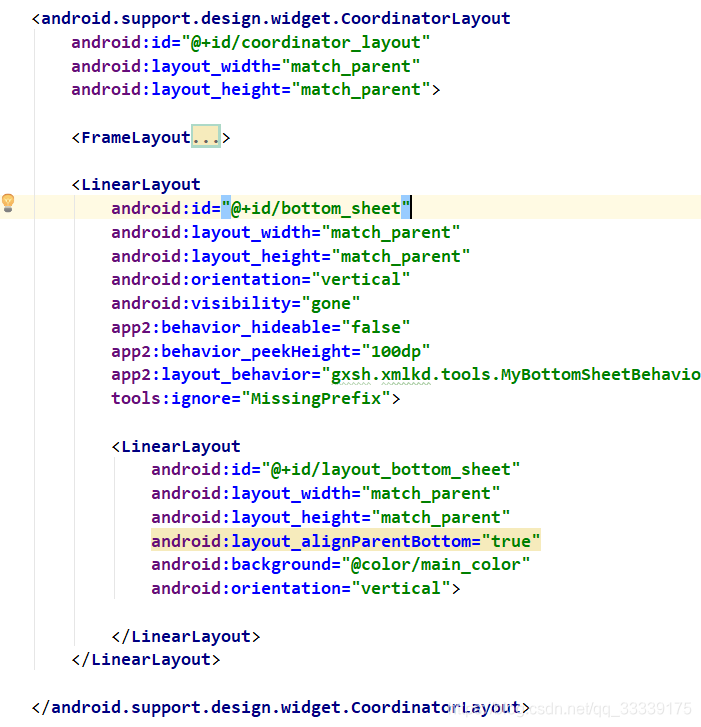
因为我这个布局CoordinatorLayout外面还有其他的布局,所以没有xmlns:tools啊之类的东西,能看懂就行,Framlayout里就是地图啊之类的布局了,这里主要看的还是bottomsheet的布局:
<LinearLayout
            android:id="@+id/bottom_sheet"
            android:layout_width="match_parent"
            android:layout_height="match_parent"
            android:orientation="vertical"
            android:visibility="gone"
            app2:behavior_hideable="false"
            app2:behavior_peekHeight="100dp"
            app2:layout_behavior="gxsh.xmlkd.tools.MyBottomSheetBehavior"
            tools:ignore="MissingPrefix">

            <LinearLayout
                android:id="@+id/layout_bottom_sheet"
                android:layout_width="match_parent"
                android:layout_height="match_parent"
                android:layout_alignParentBottom="true"
                android:background="@color/main_color"
                android:orientation="vertical">

            </LinearLayout>
        </LinearLayout>
注意,如果你使用了自定义的BottomSheetBehavior,那么app2:layout_behavior里一定要写上正确的路径,比如:gxsh.xmlkd.tools.MyBottomSheetBehavior,这是我自定义BottomSheetBehavior的路径。
此时,按照上面的代码一路走下来,直到运行,它展示的结果是这样的:
就是一个全屏的效果。
但是在高德地图里,它展示的最大展开是有一个阴影高度的,那么这个的实现就是在代码中修改bottomsheet的高度。
首先,把xml布局中,bottom_sheet和layout_bottom_sheet的layout_height,改成wrap_content:
<LinearLayout
            android:id="@+id/bottom_sheet"
            android:layout_width="match_parent"
            android:layout_height="wrap_content"
            android:orientation="vertical"
            android:visibility="gone"
            app2:behavior_hideable="false"
            app2:behavior_peekHeight="100dp"
            app2:layout_behavior="gxsh.xmlkd.tools.MyBottomSheetBehavior"
            tools:ignore="MissingPrefix">

            <LinearLayout
                android:id="@+id/layout_bottom_sheet"
                android:layout_width="match_parent"
                android:layout_height="wrap_content"
                android:layout_alignParentBottom="true"
                android:background="@color/main_color"
                android:orientation="vertical">


            </LinearLayout>
        </LinearLayout>
然后在代码中,当你findviewbyid写出layout_bottom_sheet之后,你将它的高度修改一下:ViewGroup.LayoutParams layoutParams = layout_bottom_sheet.getLayoutParams(); layoutParams.height = minHeight + mHeight / 4 * 3; layoutParams.width = mWidth; layout_bottom_sheet.setLayoutParams(layoutParams);
然后再进行MyBottomSheetBehavior.from(bottom_sheet);的操作,得到MyBottomSheetBehavior,那么按照上面的计算结果,这个bottomsheet的最大高度为:minHeight(peekheight的高度)加上剩下屏幕高度mHeight的四分之三,这样的话,这个bottomsheet完全展开的时候,就不会全屏了,同样的,它的finaltop也不会到达最上层了!
那么这样的话,当你滑动到顶之后,它的finaltop还是只会在1/2层,结果只会变成完全折叠状态,这样就不是我们要的效果了。
我的处理方法是:去掉3/4层,和最上层,将原来的3/4层再平均分一下,分成A层和B层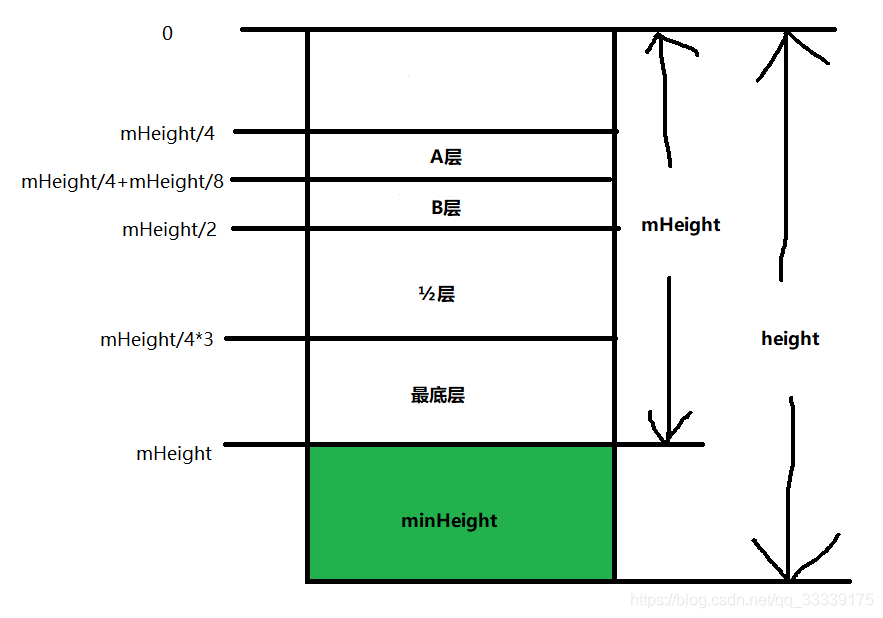
这样,与上面同理,当finaltop在A层的时候,调用STATE_EXPANDED,当finaltop在B层的时候,则调用STATE_HALF_EXPANDED,其实理论上和上面一样,只是把最上层和3/4层改成了A层和B层,而它们的区间值也改了一下而已。
 behavior.setBottomSheetCallback(new MyBottomSheetBehavior.BottomSheetCallback()
        {
            @SuppressLint("WrongConstant")
            @Override
            public void onStateChanged(@NonNull View bottomSheet, int newState, int finalTop)
            {
                if (newState == 2)
                {
                    Log.e("finalTop", "===" + finalTop);
                    if (finalTop <= mHeight && finalTop > mHeight / 4 * 3)
                    {
                        // 最底层
                        Log.e("最底层", "最底层");
                        behavior.setState(MyBottomSheetBehavior.STATE_COLLAPSED);
                    } else if (finalTop <= mHeight / 4 * 3 && finalTop > mHeight / 2)
                    {
                        Log.e("2分之1层", "2分之1层");
                        behavior.setState(MyBottomSheetBehavior.STATE_HALF_EXPANDED);
                    } else if (finalTop <= mHeight / 2 && finalTop > mHeight / 4 + mHeight / 8)
                    {
                        Log.e("B层", "B层");
                        behavior.setState(MyBottomSheetBehavior.STATE_HALF_EXPANDED);
                    } else if (finalTop <= mHeight / 4 + mHeight / 8)
                    {
                        Log.e("A层", "A层");
                        behavior.setState(MyBottomSheetBehavior.STATE_EXPANDED);
                    }
                }
            }

            @Override
            public void onSlide(@NonNull View bottomSheet, float slideOffset)
            {
                Log.e("slideOffset", "===" + slideOffset);
            }
        });
这样,就可以达到最上面第二张gif图的效果了,里面的细节等东西,可以自己去优化一下,然后参数也可以又自己去修改,达到自己要的效果。