目录
安装nginx
1. 下载nginx包
[root@localhost ~]# wget http://nginx.org/download/nginx-1.9.9.tar.gz
2. 安装依赖
[root@localhost ~]# yum -y install gcc gcc-c++ //C语言环境

[root@localhost ~]# yum -y install pcre pcre-devel //正则

[root@localhost ~]# yum -y install zlib zlib-devel //lib包

[root@localhost ~]# yum -y install openssl openssl-devel //插件
3. 安装nginx
[root@localhost ~]# tar xf nginx-1.9.9.tar.gz

[root@localhost ~]# cd nginx-1.9.9

[root@localhost nginx-1.9.9]# ./configure --prefix=/srv/nginx //默认在/usr/local

[root@localhost nginx-1.9.9]# make && make install

[root@localhost nginx-1.9.9]#  cd /srv/nginx

[root@localhost nginx]# ls // 查看nginx是否存在
bin  etc  games  include  lib  lib64  libexec  nginx  sbin  share  src

[root@localhost nginx]# cd
[root@localhost nginx]# rm -rf nginx-1.9.9 //删除原来nginx包

[root@localhost nginx]# ls
conf // 配置目录
html // 默认代理目录
logs // 日志目录
sbin // 二进制目录文件(软件启动命令)
4. 修改配置文件
[root@localhost ~]# mkdir -p /data/log/nginx #创建日志目录

[root@localhost ~]# mkdir -p /data/web/www #创建网站根目录

[root@localhost ~]# echo "hello nginx" > /data/web/www/index.html
[root@localhost ~]# vim /srv/nginx/conf/nginx.conf

5. 启动nginx
[root@localhost ~]# /srv/nginx/sbin/nginx -s reload -c /srv/nginx/conf/nginx.conf
或
[root@localhost nginx]# cd sbin/
[root@localhost nginx]# ./nginx // 启动nginx
[root@localhost nginx]# ./nginx -s reload // 重启nginx
[root@localhost sbin]# ps -ef | grep nginx //查看nginx状态
root       4334      1  0 19:19 ?        00:00:00 nginx: master process ./nginx
nobody     4335   4334  0 19:19 ?        00:00:00 nginx: worker process
root       4337   1820  0 19:19 pts/0    00:00:00 grep --color=auto nginx

[root@localhost nginx]# ./nginx -s quit // 退出或停止nginx
[root@localhost sbin]# ps -ef | grep nginx //查看nginx状态
root       4340   1820  0 19:22 pts/0    00:00:00 grep --color=auto nginx
6. 访问网页
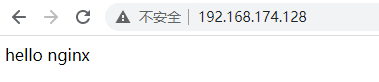
7. 打包文件
[root@localhost ~]# tar cvzf nginx.tar.gz /srv/nginx/
8. 打开一台新机,将nginx.tar.gz传送过去
[root@localhost srv]# ls
nginx  nginx.tar.gz

[root@localhost srv]# scp nginx.tar.gz root@192.168.174.129:/root
The authenticity of host '192.168.174.129 (192.168.174.129)' can't be established.
ECDSA key fingerprint is SHA256:9ICng39b6HIONm5et8vheEyb3HAXRW+8X+HSOHtU+0o.
ECDSA key fingerprint is MD5:6e:74:04:77:08:98:8d:ec:77:da:9f:bf:f4:d6:ac:30.
Are you sure you want to continue connecting (yes/no)? yes
Warning: Permanently added '192.168.174.129' (ECDSA) to the list of known hosts.
root@192.168.174.129's password:
nginx.tar.gz                                  100% 1460KB   8.3MB/s   00:00
9. 编写启动脚本和目录脚本
[root@localhost ~]# vim nginx.sh
#!/bin/bash
log="/data/log/nginx"
root="/data/web/www"
status=$(netstat -lptnu|grep nginx|wc -l)
echo "关闭防火墙"
systemctl stop firewalld;setenforce 0
if [ -d /srv/nginx ]; then
        echo "nginx目录已存在"
else
        echo "nginx目录不存在,进行解包"
        mv nginx /srv
fi
if [ -d $log ];then
        echo "$log 目录已存在"
else
        echo "$log 目录不存在,创建日志目录"
        mkdir -p $log
fi
if [ -d $root ];then
        echo "$root 目录已存在"
else
        echo "$root 目录不存在,创建网站根目录"
        mkdir -p $root
        echo "编写信息"
        echo "hello nginx" > $root/index.html
fi

case $1 in
        start)
                if [ $status -eq 0 ]; then
                        echo "nginx未运行,现在开启"
                        /srv/nginx/sbin/nginx -c /srv/nginx/conf/nginx.conf
                else
                        echo "nginx正在运行"
                fi
        ;;
        stop)
                if [ $status -eq 0 ]; then
 						echo "nginx已停止"
                else
                        echo "nginx正在运行,停止nginx"
                        /srv/nginx/sbin/nginx -s stop -c /srv/nginx/conf/nginx.conf
                fi
        ;;
        reload)
                if [ $status -eq 0 ]; then
                        echo "nginx已停止,无法重启"
                else
                        echo "nginx正在运行,重载nginx"
                        /srv/nginx/sbin/nginx -s reload -c /srv/nginx/conf/nginx.conf
                fi

        ;;
        *)
                echo "sh nginx.sh (start|stop|reload)"
esac
10. 执行脚本,访问网页
[root@localhost ~]# sh nginx.sh start

版权声明:本文为weixin_45842014原创文章,遵循CC 4.0 BY-SA版权协议,转载请附上原文出处链接和本声明。