案例源码gitee地址:https://gitee.com/BanSheng/zookeeper-demo/tree/master/rmidemo
Zookeeper 实战
实战案例介绍:使用 Zookeeper 与 RMI 技术实现一个 RPC 框架。
RPC:RPC(Remote Procedure Call)远程过程调用。
1 基于 RMI 实现远程方法调用
1.1RMI 简 介
RMI(Remote Method Invocation) 远程方法调用。
RMI 是从 JDK1.2 推出的功能,它可以实现在一个 Java 应用中可以像调用本地方法一样
调用另一个服务器中 Java 应用(JVM)中的内容。
RMI 是 Java 语言的远程调用,无法实现跨语言。
1.2执行流程

Registry(注册表)是放置所有服务器对象的命名空间。 每次服务端创建一个对象时,它都会使用 bind()或 rebind()方法注册该对象。 这些是使用称为绑定名称的唯一名称注册的。
要调用远程对象,客户端需要该对象的引用。即通过服务端绑定的名称从注册表中获取对象(lookup()方法)。
1.3RMI 的 API 介绍
1.3.1 Remote 接口
java.rmi.Remote 定义了此接口为远程调用接口。如果接口被外部调用,需要继承此接口。

1.3.2 RemoteException 类
java.rmi.RemoteException
继承了 Remote 接口的接口,如果方法是允许被远程调用的,需要抛出此异常。
1.3.3 UnicastRemoteObject 类
java.rmi.server.UnicastRemoteObject
此类实现了 Remote 接口和 Serializable 接口。
自定义接口实现类除了实现自定义接口还需要继承此类。
1.3.4 LocateRegistry 类
java.rmi.registry.LocateRegistry
可以通过 LocateRegistry 在本机上创建 Registry,通过特定的端口就可以访问这个Registry。
1.3.5 Naming 类
java.rmi.Naming
Naming 定义了发布内容可访问 RMI 名称。也是通过 Naming 获取到指定的远程方法。
1.4创建 Server 端
1.4.1 创建项目
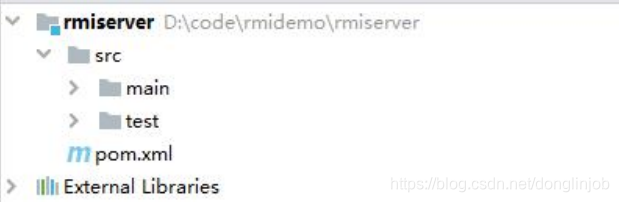
1.4.2 创建接口
/**
* 定义允许远程调用接口,该接口必须要实现 Remote 接口
* 允许被远程调用的方法必须要抛出 RemoteException
*/
public interface DemoService extends Remote {
	String demo(String str) throws RemoteException;
}
1.4.3 创建接口实现类
/**
* 接口实现类必须要继承 UnicastRemoteObject 。
* 会自动添加构造方法,需要修改为 public
*/
public class DemoServiceImpl extends UnicastRemoteObject implements DemoService {
	public DemoServiceImpl() throws RemoteException {
	}
	@Override
	public String demo(String str) throws RemoteException {
		return "Hello RMI "+str;
	}
}
1.4.4 编写主方法
public class DemoServer {
	public static void main(String[] args) throws RemoteException,
	AlreadyBoundException, MalformedURLException {
		// 将对象实例化
		DemoService demoService = new DemoServiceImpl();
		// 创建本地注册表
		LocateRegistry.createRegistry(8888);
		// 将对象绑定到注册表中
		Naming.bind("rmi://localhost:8888/demoService",demoService);
	}
}
1.5创建 Client 端
1.5.1 创建项目
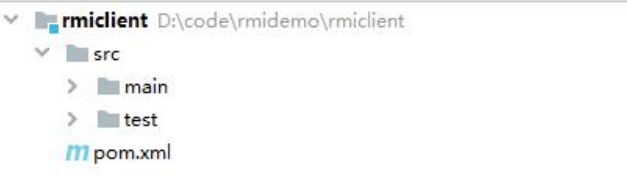
1.5.2 复制服务端接口
/**
* 定义允许远程调用接口,该接口必须要实现 Remote 接口
* 允许被远程调用的方法必须要抛出 RemoteException
*/
public interface DemoService extends Remote {
	String demo(String str) throws RemoteException;
}
1.5.3 创建主方法
public class ClientDemo {
	public static void main(String[] args) throws RemoteException,
	NotBoundException, MalformedURLException {
		DemoService demoService = (DemoService)
		Naming.lookup("rmi://localhost:8888/demoService");
		String result = demoService.demo("bjsxt");
		System.out.println(result);
	}
}
2 使用 Zookeeper 作为注册中心实现 RPC
2.1创建服务端
2.1.1 创建项目

2.1.2 修改 POM 文件添加依赖
<dependency>
	<groupId>org.apache.zookeeper</groupId>
	<artifactId>zookeeper</artifactId>
	<version>3.6.0</version>
</dependency>
2.1.3 创建接口
public interface UsersService extends Remote {
	String findUsers(String str) throws RemoteException;
}
2.1.4 创建接口实现类
public interface UsersService extends Remote {
	String findUsers(String str) throws RemoteException;
}
public class UsersServiceImpl extends UnicastRemoteObject implements UsersService {
public UsersServiceImpl() throws RemoteException {
}
@Override
public String findUsers(String str) throws RemoteException {
return "Hello Zookeeper "+str;
}
}2.1.5 编写主方法
public class ServerDemo implements Watcher {
	public static void main(String[] args) throws IOException,AlreadyBoundException, KeeperException, InterruptedException {
		UsersService usersService = new UsersServiceImpl();
		LocateRegistry.createRegistry(8888);
		String url ="rmi://localhost:8888/user";
		Naming.bind(url,usersService);
		// 将 url 信息放到 zookeeper 的节点中
		ZooKeeper zooKeeper = new ZooKeeper("192.168.233.130:2181,192.168.233.130:2182,192.168.233.
		130:2183",150000,new ServerDemo());
		// 创建 Znode
		zooKeeper.create("/bjsxt/service",url.getBytes(),
		ZooDefs.Ids.OPEN_ACL_UNSAFE, CreateMode.PERSISTENT);
		System.out.println("服务发布成功");
    }
}
2.2创建客户端
2.2.1 创建项目
2.2.2 修改 POM 文件添加依赖
<dependency>
	<groupId>org.apache.zookeeper</groupId>
	<artifactId>zookeeper</artifactId>
	<version>3.6.0</version>
</dependency>
2.2.3 创建接口
public interface UsersService {
	String findUsers(String str);
}
2.2.4 编写主方法
public class ClientDemo implements Watcher {
	public static void main(String[] args) throws IOException,
	KeeperException, InterruptedException, NotBoundException {
		ZooKeeper zooKeeper = new
		ZooKeeper("192.168.233.130:2181,192.168.233.130:2182,192.168.233.130:2183",150000,new ClientDemo());
		byte[] bytes = zooKeeper.getData("/bjsxt/service",new ClientDemo(),null);
		String url = new String(bytes);
		UsersService usersService = (UsersService)
		Naming.lookup(url);
		String result = usersService.findUsers("Bjsxt");
		System.out.println(result);
	}
	@Override
	public void process(WatchedEvent event) {
		if(event.getState() == Event.KeeperState.SyncConnected){
			System.out.println("连接成功");
		}
	}
}案例源码gitee地址:https://gitee.com/BanSheng/zookeeper-demo/tree/master/rmidemo