目录
error C:\www\vue-storefront\node_modules\node-sass: Command failed.
1、下载vue-storefront
git clone https://github.com/vuestorefront/vue-storefront.git vue-storefront2、安装
yarn installerror C:\www\vue-storefront\node_modules\node-sass: Command failed.
PS C:\www\vue-storefront> yarn install
yarn install v1.22.5
[1/5] Validating package.json...
[2/5] Resolving packages...
[3/5] Fetching packages...
info fsevents@1.2.11: The platform "win32" is incompatible with this module.
info "fsevents@1.2.11" is an optional dependency and failed compatibility check. Excluding it from installation.
info fsevents@2.1.2: The platform "win32" is incompatible with this module.
info "fsevents@2.1.2" is an optional dependency and failed compatibility check. Excluding it from installation.
[4/5] Linking dependencies...
warning " > eslint-config-standard@12.0.0" has incorrect peer dependency "eslint-plugin-node@>=7.0.0".
warning " > eslint-config-standard@12.0.0" has incorrect peer dependency "eslint-plugin-promise@>=4.0.0".
warning " > eslint-config-standard@12.0.0" has incorrect peer dependency "eslint-plugin-standard@>=4.0.0".
[5/5] Building fresh packages...
[-/8] ⠈ waiting...
[2/8] ⠈ cypress
[-/8] ⠈ waiting...
[4/8] ⠈ node-sass
error C:\www\vue-storefront\node_modules\node-sass: Command failed.
Exit code: 1
Command: node scripts/build.js
Arguments:
Directory: C:\www\vue-storefront\node_modules\node-sass
Output:
Building: C:\Program Files\nodejs\node.exe C:\www\vue-storefront\node_modules\node-gyp\bin\node-gyp.js rebuild --verbose --libsass_ext= --libsass_cflags= --libsass_ldflags= --libsass_library=
gyp info it worked if it ends with ok
gyp verb cli [
gyp verb cli   'C:\\Program Files\\nodejs\\node.exe',
gyp verb cli   'C:\\www\\vue-storefront\\node_modules\\node-gyp\\bin\\node-gyp.js',
gyp verb cli   'rebuild',
gyp verb cli   '--verbose',
gyp verb cli   '--libsass_ext=',
gyp verb cli   '--libsass_cflags=',
gyp verb cli   '--libsass_ldflags=',
gyp verb cli   '--libsass_library='
gyp verb cli ]
gyp info using node-gyp@3.8.0
gyp info using node@14.15.5 | win32 | x64
gyp verb command rebuild []
gyp verb command clean []
gyp verb clean removing "build" directory
gyp verb command configure []
gyp verb check python checking for Python executable "python2" in the PATH
gyp verb `which` failed Error: not found: python2
gyp verb `which` failed     at getNotFoundError (C:\www\vue-storefront\node_modules\which\which.js:13:12)
gyp verb `which` failed     at F (C:\www\vue-storefront\node_modules\which\which.js:68:19)
gyp verb `which` failed     at E (C:\www\vue-storefront\node_modules\which\which.js:80:29)
gyp verb `which` failed     at C:\www\vue-storefront\node_modules\which\which.js:89:16gyp verb `which` failed     at C:\www\vue-storefront\node_modules\isexe\index.js:42:5
gyp verb `which` failed     at C:\www\vue-storefront\node_modules\isexe\windows.js:36:5
gyp verb `which` failed     at FSReqCallback.oncomplete (fs.js:183:21)
gyp verb `which` failed  python2 Error: not found: python2
gyp verb `which` failed     at getNotFoundError (C:\www\vue-storefront\node_modules\which\which.js:13:12)
gyp verb `which` failed     at F (C:\www\vue-storefront\node_modules\which\which.js:68:19)
gyp verb `which` failed     at E (C:\www\vue-storefront\node_modules\which\which.js:80:29)
gyp verb `which` failed     at C:\www\vue-storefront\node_modules\which\which.js:89:16gyp verb `which` failed     at C:\www\vue-storefront\node_modules\isexe\index.js:42:5
gyp verb `which` failed     at C:\www\vue-storefront\node_modules\isexe\windows.js:36:5
gyp verb `which` failed     at FSReqCallback.oncomplete (fs.js:183:21) {
gyp verb `which` failed   code: 'ENOENT'
gyp verb `which` failed }
gyp verb check python checking for Python executable "python" in the PATH
gyp verb `which` succeeded python C:\Python\Python38\python.EXE
gyp ERR! configure error
gyp ERR! stack Error: Command failed: C:\Python\Python38\python.EXE -c import sys; print "%s.%s.%s" % sys.version_info[:3];
gyp ERR! stack   File "<string>", line 1
gyp ERR! stack     import sys; print "%s.%s.%s" % sys.version_info[:3];
gyp ERR! stack                       ^
gyp ERR! stack SyntaxError: invalid syntax
gyp ERR! stack
gyp ERR! stack     at ChildProcess.exithandler (child_process.js:308:12)
gyp ERR! stack     at ChildProcess.emit (events.js:315:20)
gyp ERR! stack     at maybeClose (internal/child_process.js:1048:16)
gyp ERR! stack     at Process.ChildProcess._handle.onexit (internal/child_process.js:288:5)
gyp ERR! System Windows_NT 10.0.19042
gyp ERR! command "C:\\Program Files\\nodejs\\node.exe" "C:\\www\\vue-storefront\\node_modules\\node-gyp\\bin\\node-gyp.js" "rebuild" "--verbose" "--libsass_ext=" "--libsass_cflags=" "--libsass_ldflags=" "--libsass_library="
gyp ERR! cwd C:\www\vue-storefront\node_modules\node-sass
gyp ERR! node -v v14.15.5
gyp ERR! node-gyp -v v3.8.0
解决方法
1.安装 windows-build-tools
管理员方式打开命令提示符,运行:
npm install --global windows-build-tools或者
yarn global add windows-build-tools 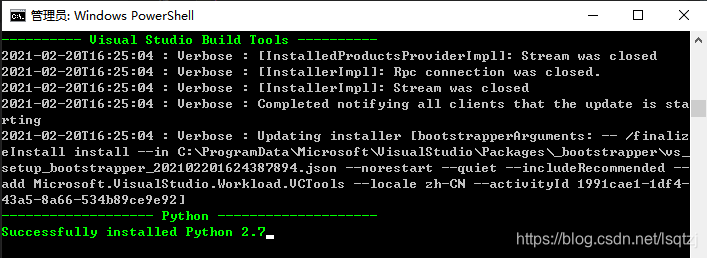
2.修改path
把现有的python路径改成新安装的python2.7,C:\Users\你的用户名\.windows-build-tools\python27\
3.重新安装验证
PS C:\www\vue-storefront> yarn install
yarn install v1.22.5
[1/5] Validating package.json...
[2/5] Resolving packages...
[3/5] Fetching packages...
info fsevents@1.2.11: The platform "win32" is incompatible with this module.
info "fsevents@1.2.11" is an optional dependency and failed compatibility check. Excluding it from installation.
info fsevents@2.1.2: The platform "win32" is incompatible with this module.
info "fsevents@2.1.2" is an optional dependency and failed compatibility check. Excluding it from installation.
[4/5] Linking dependencies...
warning " > eslint-config-standard@12.0.0" has incorrect peer dependency "eslint-plugin-node@>=7.0.0".
warning " > eslint-config-standard@12.0.0" has incorrect peer dependency "eslint-plugin-promise@>=4.0.0".
warning " > eslint-config-standard@12.0.0" has incorrect peer dependency "eslint-plugin-standard@>=4.0.0".
[5/5] Building fresh packages...
success Saved lockfile.
Done in 108.35s.
3、安装主题
1.快速安装命令
yarn installer? Would you like to use https://demo.vuestorefront.io as the backend? (Y/n) (node:37012) Warning: Accessing non-existent property 'cat' of module exports inside circular dependency
(Use `node --trace-warnings ...` to show where the warning was created)
(node:37012) Warning: Accessing non-existent property 'cd' of module exports inside circular dependency
(node:37012) Warning: Accessing non-existent property 'chmod' of module exports inside circular dependency
(node:37012) Warning: Accessing non-existent property 'cp' of module exports inside circular dependency
(node:37012) Warning: Accessing non-existent property 'dirs' of module exports inside circular dependency
(node:37012) Warning: Accessing non-existent property 'pushd' of module exports inside circular dependency
(node:37012) Warning: Accessing non-existent property 'popd' of module exports inside circular dependency
(node:37012) Warning: Accessing non-existent property 'echo' of module exports inside circular dependency
(node:37012) Warning: Accessing non-existent property 'tempdir' of module exports inside circular dependency
(node:37012) Warning: Accessing non-existent property 'pwd' of module exports inside circular dependency
(node:37012) Warning: Accessing non-existent property 'exec' of module exports inside circular dependency
(node:37012) Warning: Accessing non-existent property 'ls' of module exports inside circular dependency
(node:37012) Warning: Accessing non-existent property 'find' of module exports inside circular dependency
(node:37012) Warning: Accessing non-existent property 'grep' of module exports inside circular dependency
(node:37012) Warning: Accessing non-existent property 'head' of module exports inside circular dependency
(node:37012) Warning: Accessing non-existent property 'ln' of module exports inside circular dependency
(node:37012) Warning: Accessing non-existent property 'mkdir' of module exports inside circular dependency
(node:37012) Warning: Accessing non-existent property 'rm' of module exports inside circular dependency
(node:37012) Warning: Accessing non-existent property 'mv' of module exports inside circular dependency
(node:37012) Warning: Accessing non-existent property 'sed' of module exports inside circular dependency
(node:37012) Warning: Accessing non-existent property 'set' of module exports inside circular dependency
(node:37012) Warning: Accessing non-existent property 'sort' of module exports inside circular dependency
(node:37012) Warning: Accessing non-existent property 'tail' of module exports inside circular dependency
(node:37012) Warning: Accessing non-existent property 'test' of module exports inside circular dependency
(node:37012) Warning: Accessing non-existent property 'to' of module exports inside circular dependency
(node:37012) Warning: Accessing non-existent property 'toEnd' of module exports inside circular dependency
(node:37012) Warning: Accessing non-existent property 'touch' of module exports inside circular dependency
(node:37012) Warning: Accessing non-existent property 'uniq' of module exports inside circular dependency
(node:37012) Warning: Accessing non-existent property 'which' of module exports inside circular dependency回车确认用https://demo.vuestorefront.io官网的后台数据。
2.选择主题
? Select theme for Vue Storefront
> Capybara - based on Storefront UI
  Default
用方向键选择 > Capybara - based on Storefront UI
3.选择版本
? Select theme version (Use arrow keys)
❯ Stable version (recommended for production)
  In development branch (could be unstable!)
用方向键选择 ❯ Stable version (recommended for production)
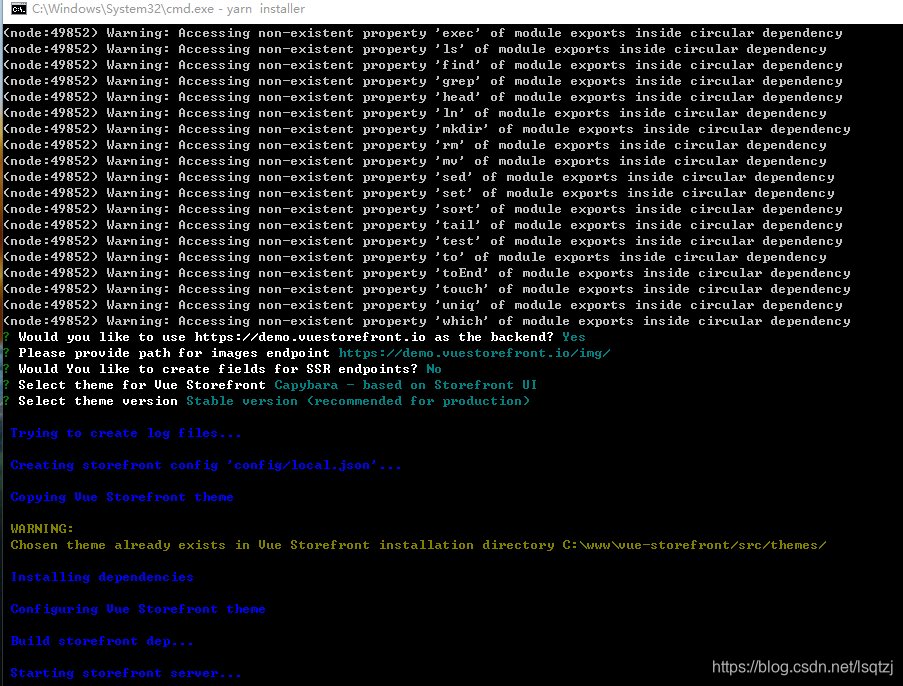
安装过程有点久,不要关闭窗口。
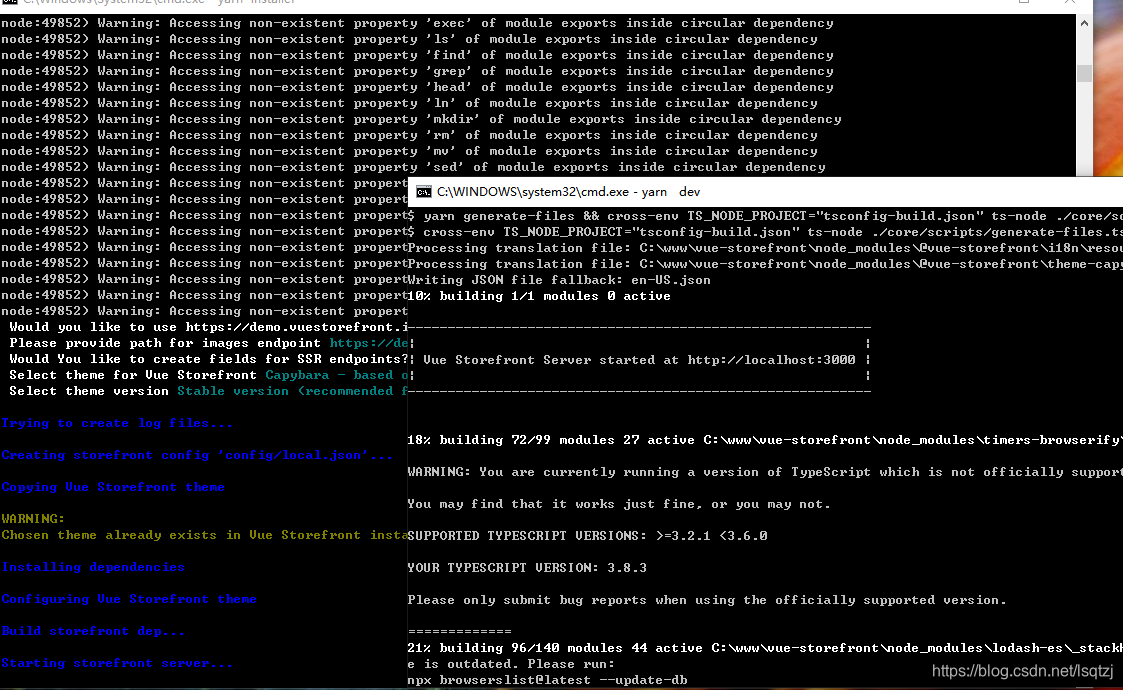
说明服务已经启动, 打开 http://localhost:3000 等待编译完成就可以访问了。
4、运行Vue Storefront Server
第二次只需运行下面的命令来启动服务
yarn devPS C:\www\vue-storefront> yarn dev
yarn run v1.22.5
$ yarn generate-files && cross-env TS_NODE_PROJECT="tsconfig-build.json" ts-node ./core/scripts/server.ts
$ cross-env TS_NODE_PROJECT="tsconfig-build.json" ts-node ./core/scripts/generate-files.ts
Processing translation file: C:\www\vue-storefront\node_modules\@vue-storefront\i18n\resource\i18n\en-US.csv
Processing translation file: C:\www\vue-storefront\node_modules\@vue-storefront\theme-capybara\resource\i18n\en-US.csv
Writing JSON file fallback: en-US.json
10% building 1/1 modules 0 active
----------------------------------------------------------
| |
| Vue Storefront Server started at http://localhost:3000 |
| |
----------------------------------------------------------
10% building 2/5 modules 3 active C:\www\vue-storefront\node_modules\webpack-hot-middleware\client-overlay.js
版权声明:本文为lsqtzj原创文章,遵循CC 4.0 BY-SA版权协议,转载请附上原文出处链接和本声明。