重要:默认过滤数据实体对象时为引用传递。
(1)若修改过滤后的值,原始值会改变。
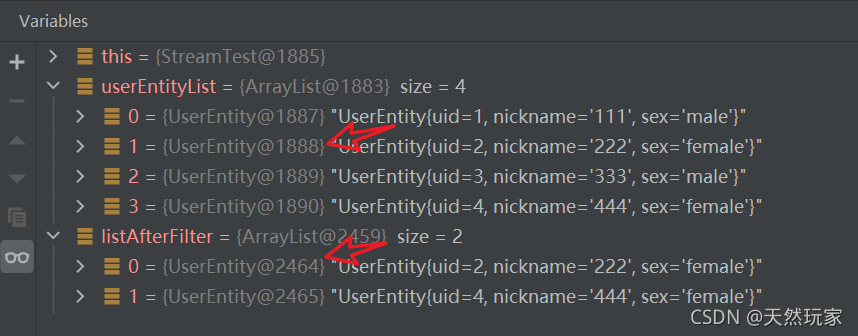
(2)若过滤后的数据需要变更,且原始值不受影响,需要过滤时新建对象。
1 filter方法
按照指定条件过滤数据,保留原始数据类型。
2 Usage
2.1 基础类型数据过滤
过滤字符串为例:构造List<String>
 /**
     * 1.1过滤数据:构造字符串列表.List<A>->List<A>
     */
    @Test
    public void filterStringWithSpecificCondition() {
        List<String> list = Stream.of("female", "male", "female", "male").collect(Collectors.toList());
        logger.info(">>>>>>>>>>原始数据:\n{}", list);
        List<String> listAfterFilter = list.stream().filter(s -> null != s && !"male".equals(s)).collect(Collectors.toList());
        logger.info(">>>>>>>>>>过滤后的数据:\n{}", listAfterFilter);
    }

2.2 对象过滤
过滤对象中满足条件的数据,返回对象
- 测试样例
/**
     * 1.2过滤数据:构造实体列表.List<A>->List<A>
     */
    @Test
    public void  filterEntityWithSpecificCondition() {
        List<UserEntity> userEntityList = new ArrayList<>();
        userEntityList.add(new UserEntity("1", "111", "male"));
        userEntityList.add(new UserEntity("2", "222", "female"));
        userEntityList.add(new UserEntity("3", "333", "male"));
        userEntityList.add(new UserEntity("4", "444", "female"));
        logger.info(">>>>>>>>>>原始数据:\n{}", userEntityList);
        List<UserEntity> listAfterFilter = userEntityList.stream().filter(s -> null != s && !"male".equals(s.getSex())).collect(Collectors.toList());
        logger.info(">>>>>>>>>>过滤后的数据:\n" + listAfterFilter);
    }
- 测试结果

- 引用传递
过滤后的数据为仍为原始的对象,因此,修改过滤后的数据,原始数据同时会变化,如果原始数据有其他用途,则需要在过滤时新建对象,保证值传递。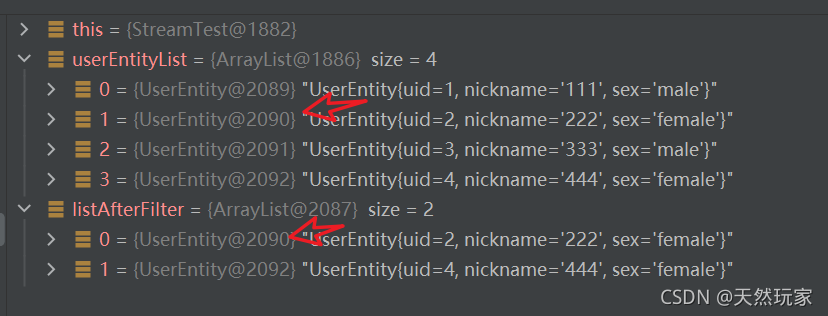
- 值传递
    /**
     * 1.3过滤数据:构造实体列表,创建新对象.List<A>->List<A>
     */
    @Test
    public void  filterEntityWithSpecificConditionAndCreateNewObject() {
        List<UserEntity> userEntityList = new ArrayList<>();
        userEntityList.add(new UserEntity("1", "111", "male"));
        userEntityList.add(new UserEntity("2", "222", "female"));
        userEntityList.add(new UserEntity("3", "333", "male"));
        userEntityList.add(new UserEntity("4", "444", "female"));
        logger.info(">>>>>>>>>>原始数据:\n{}", userEntityList);
        List<UserEntity> listAfterFilter = userEntityList.stream().filter(s -> null != s && !"male".equals(s.getSex())).map(UserEntity::copy).collect(Collectors.toList());
        logger.info(">>>>>>>>>>过滤后的数据:\n" + listAfterFilter);
    }
- UserEntity
package com.monkey.java_study.common.entity;

/**
 * User实体
 *
 * @author xindaqi
 * @since 2021-01-23
 */

public class UserEntity {

    /**
     * 用户id
     */
    private String uid;

    /**
     * 用户名称
     */
    private String nickname;

    /**
     * 用户性别
     */
    private String sex = "haha";

    public UserEntity() {
    }

    public UserEntity(String uid) {
        this.uid = uid;
    }

    public UserEntity(String uid, String nickname, String sex) {
        this.uid = uid;
        this.nickname = nickname;
        this.sex = sex;
    }

    public UserEntity copy() {
        return new UserEntity(uid, nickname, sex);
    }

    public String getUid() {
        return uid;
    }

    public void setUid(String uid) {
        this.uid = uid;
    }

    public String getNickname() {
        return nickname;
    }

    public void setNickname(String nickname) {
        this.nickname = nickname;
    }

    public String getSex() {
        return sex;
    }

    public void setSex(String sex) {
        this.sex = sex;
    }

    @Override
    public String toString() {
        return "UserEntity{" +
                "uid=" + uid +
                ", nickname='" + nickname + '\'' +
                ", sex='" + sex + '\'' +
                '}';
    }
}
3 完整样例
package com.monkey.java_study.functiontest;

import com.monkey.java_study.common.entity.UserEntity;
import org.junit.Test;
import org.slf4j.Logger;
import org.slf4j.LoggerFactory;

import java.util.ArrayList;
import java.util.List;
import java.util.stream.Collectors;
import java.util.stream.Stream;

/**
 * Stream测试.
 *
 * @author xindaqi
 * @date 2021-10-15 10:06
 */
public class StreamTest {

    private static final Logger logger = LoggerFactory.getLogger(StreamTest.class);

    /**
     * 1.1过滤数据:构造字符串列表.List<A>->List<A>
     */
    @Test
    public void filterStringWithSpecificCondition() {
        List<String> list = Stream.of("female", "male", "female", "male").collect(Collectors.toList());
        logger.info(">>>>>>>>>>原始数据:\n{}", list);
        List<String> listAfterFilter = list.stream().filter(s -> null != s && !"male".equals(s)).collect(Collectors.toList());
        logger.info(">>>>>>>>>>过滤后的数据:\n{}", listAfterFilter);
    }

    /**
     * 1.2过滤数据:构造实体列表.List<A>->List<A>
     */
    @Test
    public void  filterEntityWithSpecificCondition() {
        List<UserEntity> userEntityList = new ArrayList<>();
        userEntityList.add(new UserEntity("1", "111", "male"));
        userEntityList.add(new UserEntity("2", "222", "female"));
        userEntityList.add(new UserEntity("3", "333", "male"));
        userEntityList.add(new UserEntity("4", "444", "female"));
        logger.info(">>>>>>>>>>原始数据:\n{}", userEntityList);
        List<UserEntity> listAfterFilter = userEntityList.stream().filter(s -> null != s && !"male".equals(s.getSex())).collect(Collectors.toList());
        logger.info(">>>>>>>>>>过滤后的数据:\n" + listAfterFilter);
    }

    /**
     * 1.3过滤数据:构造实体列表,创建新对象.List<A>->List<A>
     */
    @Test
    public void  filterEntityWithSpecificConditionAndCreateNewObject() {
        List<UserEntity> userEntityList = new ArrayList<>();
        userEntityList.add(new UserEntity("1", "111", "male"));
        userEntityList.add(new UserEntity("2", "222", "female"));
        userEntityList.add(new UserEntity("3", "333", "male"));
        userEntityList.add(new UserEntity("4", "444", "female"));
        logger.info(">>>>>>>>>>原始数据:\n{}", userEntityList);
        List<UserEntity> listAfterFilter = userEntityList.stream().filter(s -> null != s && !"male".equals(s.getSex())).map(UserEntity::copy).collect(Collectors.toList());
        logger.info(">>>>>>>>>>过滤后的数据:\n" + listAfterFilter);
    }
}
版权声明:本文为Xin_101原创文章,遵循CC 4.0 BY-SA版权协议,转载请附上原文出处链接和本声明。