事件处理模型–冒泡、捕获
事件冒泡
1.当一个元素接收到事件的时候 会把他接收到的事件传给自己的父级,一直到window(自底向上)
demo1
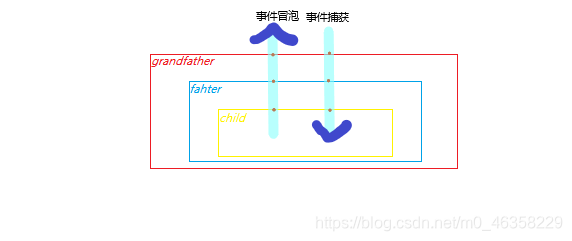
后面的demo可以结合这个图更好理解
html
html代码:
<div class="grandfather">
    <div class="father">
      <div class="child"></div>
  </div>
</div>
css代码:
.grandfather{
      width: 300px;
      height: 300px;
      background-color: red;
    }
    .father{
      width: 200px;
      height: 200px;
      background-color: blue;
    }
    .child{
      width: 100px;
      height: 100px;
      background-color: yellow;
    }
js代码:
var oGrandfather = document.getElementsByClassName("grandfather")[0];
var oFather = document.getElementsByClassName("father")[0];
var oChild = document.getElementsByClassName("child")[0];

oGrandfather.addEventListener('click',function () {
  console.log("grandfather--red")
}, false)
oFather.addEventListener('click',function () {
  console.log("father--blue")
}, false)
oChild.addEventListener('click',function () {
  console.log("child--yellow")
}, false)

只点击黄色区域,会依次触发child–yellow,father–blue,grandfather–red
2.结构上(非视觉上)嵌套关系的元素,会存在事件冒泡的功能(从代码的角度是自底向上一层层冒泡的)
demo2
在上面css基础上添加
    .father{
      margin-left: 300px;
    }
    .child{
      margin-left: 200px;
    }

点击黄色区域,还是只点击黄色区域,会依次触发child–yellow,father–blue,grandfather–red触发child–yellow,father–blue,grandfather–red。说明冒泡是基于代码结构的,而不是视觉上的
事件捕获
1.结构上(非视觉上)嵌套关系的元素,会存在事件捕获的功能,从父元素(从代码的角度是自底向上一层层冒泡的)
demo1
将js代码中的addeventListener中的false改为true,从而实现事件捕获
oGrandfather.addEventListener('click',function () {
  console.log("grandfather--red")
}, true)
oFather.addEventListener('click',function () {
  console.log("father--blue")
}, true)
oChild.addEventListener('click',function () {
  console.log("child--yellow")
}, true)

只点击黄色区域,会依次触发grandfather–red,father–blue,child–yellow,从外向内依次捕获并执行,最里面的(事件源)是按常规执行
demo2

也是只点击黄色区域,会从外向内依次触发grandfather–red,father–blue,child–yellow
先捕获后冒泡
同一对象的同一事件类型,上面绑定了两个事件处理函数,一个符合冒泡,一个符合捕获,点击一个元素后,先触发捕获再触发冒泡
demo
html,css代码沿用上面,变更部分js
oGrandfather.addEventListener('click',function () {
    console.log("grandfather--red--捕获事件")
}, true)
oFather.addEventListener('click',function () {
    console.log("father--blue--捕获事件")
}, true)
oChild.addEventListener('click',function () {
    console.log("child--yellow--捕获事件")
}, true)

oGrandfather.addEventListener('click',function () {
    console.log("grandfather--red--冒泡事件")
}, false)
oFather.addEventListener('click',function () {
    console.log("father--blue--冒泡事件")
}, false)
oChild.addEventListener('click',function () {
    console.log("child--yellow--冒泡事件")
}, false)

改变捕获和冒泡事件顺序
oGrandfather.addEventListener('click',function () {
    console.log("grandfather--red--冒泡事件")
}, false)
oFather.addEventListener('click',function () {
    console.log("father--blue--冒泡事件")
}, false)
oChild.addEventListener('click',function () {
    console.log("child--yellow--冒泡事件")
}, false)

oGrandfather.addEventListener('click',function () {
    console.log("grandfather--red--捕获事件")
}, true)
oFather.addEventListener('click',function () {
    console.log("father--blue--捕获事件")
}, true)
oChild.addEventListener('click',function () {
    console.log("child--yellow--捕获事件")
}, true)

效果图都为点击黄色区域触发
可见,事件触发顺序为先捕获后冒泡,事件源则是按照事件绑定先后触发
取消冒泡
1.W3C标准event.stopPropagation();
2.IE独有event.cancelBubble = ture;
版权声明:本文为m0_46358229原创文章,遵循CC 4.0 BY-SA版权协议,转载请附上原文出处链接和本声明。