1 线程间通信
线程间通信:ITC,Inter-Thread Communication
同一进程中线程与线程之间是共享内存的。对于可以共享的变量任何线程都可以访问和修改,但是要做好同步。 线程之间不会彼此干扰,是因为有内存管理机制。
2 Handler消息机制
在Android源码中,有两个非常重要的机制,一个是Binder IPC机制,另一个是消息机制(由Handler/Looper/MessageQueue等构成)。在Android交互中有大量的消息驱动,比如四大组件Activity、Service、Broadcast、ContentProvider的启动过程,就离不开消息机制,因此,在某种意义上可以说Android系统是一个消息驱动系统。(Android的消息机制主要是指Handler的运行机制)
系统是以ActivityThread.main()为入口开启主线程的,其内部类Activity.H定义了一系列消息类型,包含四大组件的启动停止。
public final class ActivityThread extends ClientTransactionHandler {
  class H extends Handler {
  }
}
Android建议不要在主线程中进行耗时操作(网络请求、文件处理、数据库操作等),否则会导致程序无法响应即ANR。 假如我们需要从服务端拉取一些数据并显示在UI上,这个时候就必须在子线程中进行拉取工作,拉取完毕后,通过Handler将更新UI的工作切换到主线程中去执行。因此,系统之所以提供Handler,主要原因就是为了解决在子线程中无法访问UI的问题。
ANR异常:Application Not Response应用程序无响应产生。ANR异常的原因:在主线程执行了耗时操作。 对Activity来说,主线程阻塞5秒将造成ANR异常,对BroadcastReceiver来说,主线程阻塞10秒将会造成ANR异常。 解决ANR异常的方法:耗时操作都在子线程中去执行,如果有修改UI的需求,因此需要借助Handler。
系统为什么不允许在子线程中访问UI呢? 这是因为在Android中线程可以有好多个,如果每个线程都可以对UI进行访问(多线程并发访问),可能会导致UI控件处于不可预期的状态,这是线程不安全的。
为什么系统不对UI控件的访问加上锁机制呢?缺点有两个:首先加上锁机制会让UI访问的逻辑变得复杂;其次锁机制会降低UI访问的效率,因为锁机制会阻塞某些线程的指向。 鉴于这两个缺点,最简单且高效的方式就是采用单线程模型来处理UI操作,对于开发者来说,只需要通过Handler切换UI访问的执行线程即可。
因此,Android规定只能在主线程中访问UI,如果在子线程中访问UI,那么程序就会抛出异常。
Android每次刷新UI的时候,根布局ViewRootImpl会对UI操作做验证,这个验证是由ViewRootImpl中的checkThread()方法来完成:
public final class ViewRootImpl implements ViewParent, View.AttachInfo.Callbacks,
				ThreadedRenderer.DrawCallbacks {
  void checkThread() {
    if (mThread != Thread.currentThread()) {
      throw new CalledFromWrongThreadException(
        "Only the original thread that created a view hierarchy can touch its views.");
    }
  }
}
具体来说是这样的:有时需要在子线程中进行耗时的I/O操作,可能是读取文件或者访问网络等,当耗时操作完成之后,需要在UI上做一些改变,由于Android开发的限制,我们不能在子线程中访问UI控件,否则就会触发程序异常,这个时候通过Handler就可以将更新UI的操作切换到主线程中执行。因此,本质上说Handler并不是专门用于更新UI的,它只是常常用来更新UI。
Handler是Android消息机制的上层接口,这使得在开发过程中只需要和Handler交互即可。Handler的使用过程很简单,通过它可以轻松的将一个任务切换到Handler所在的线程中去执行。很多人认为Handler的作用就是更新UI,但是更新UI仅仅是Handler的一个特殊使用场景。
消息机制主要包含:
Message: 消息分为硬件产生的消息(如按钮、触摸)和软件生成的消息,代表一个行为(what)或者一串动作(Runnable);MessageQueue: 消息队列,存放消息。单链表维护,在插入和删除上有优势,在next方法中会无限循环,判断是否有消息,如果有就返回这条消息并移除(读取会自动删除);Handler: 主要功能是向消息队列中发送各种消息事件(Handler.sendMessage)和处理相应消息事件(Handler.handleMessage);Looper:Looper创建的时候会创建一个MessageQueue,调用Looper.loop()消息循环开始,这是一个死循环,会不断调用MessageQueue.next方法,有消息时就处理,没有就阻塞在messageQueue.next方法中。当Looper.quit方法被调用的时候会调用MessageQueue.quit方法,此时MessageQueue.next会返回null,然后Looper.loop()方法也会退出;
另外,一个线程中只能有一个Looper,MessageQueue和Looper是一对一关系,Handler和Looper是多对一的关系。
总结:Handler的运行需要底层的MessageQueue和Looper支撑,MessageQueue为消息队列,它内部存储了一组消息,对外提供插入和删除的工作,虽然叫消息队列,但是它是采用单链表的数据结构来存储消息的。Looper为消息循环。MessageQueue只是一个消息的存储单元,它不能去处理消息,而Looper会以无限循环的形式去查找是否有新消息,如果有的话就处理,否则就一直等待着。
除了Handler,还有Messenger中会用到Message,Messenger可以翻译成信使,用来实现进程间通信(IPC),Messenger采用一个单线程来处理所有的消息,而且进程间的通信也是通过发消息来完成的,不能像AIDL那样直接调用对方的接口方法,这也是和AIDL的主要区别,也就是说Messenger无法处理多线程,所有的调用都是在一个线程中串行执行的。Messenger的典型代码是这样的:new Messenger(service).send(msg),它的本质还是调用了Handler.sendMessage方法。
在Handler中wait/notify的用武之地不大,因为Handler将需要的wait/notify功能封装在了Linux层。
3 生产者-消费者模型
在Handler消息机制中,在子线程中进行一些操作,当操作完毕后后会通过Handler发送一些数据给主线程,通知主线程做相应的操作。子线程、主线程构成了线程模型中的经典问题——生产者-消费者模型:生产者(子线程)和消费者(主线程)在同一时间段内共用一个存储空间(MessageQueue),生产者往存储空间中添加数据,消费者从存储空间中取走数据。

以下是Handler的一个实例:
class LooperThread extends Thread {
  public Handler mHandler;

  public void run() {
    Looper.prepare();

    mHandler = new Handler() {
      public void handleMessage(Message msg) {
        // todo 处理消息逻辑
      }
    };

    Looper.loop();
  }
}
4 Handler源码分析
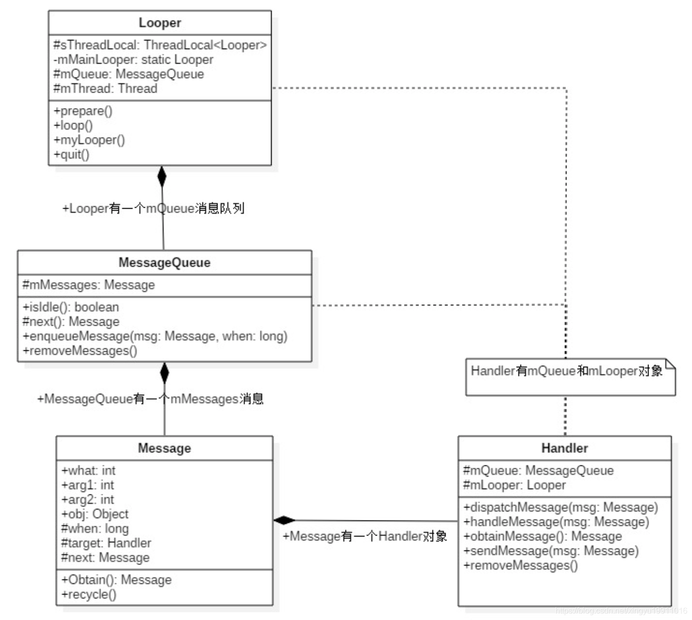
4.1 消息本体:Message
封装了需要传递的消息,本身可以作为链表的一个节点,方便MessageQueue的存储。
Message主要包括以下属性:
public int what; // 消息类别
public int arg1; // 参数1
public int arg2; // 参数2
public Object obj; // 消息内容
public long when; // 消息触发时间
Handler target; // 消息响应方
Runnable callback; // 回调方法
在使用Handler发送异步消息获取Message的时候会调用obtainMessage()获取一个Message对象:Message msg = mHandler.obtainMessage();而不是直接new一个(Message msg = new Message();)。二者的主要区别是用消息池(或缓冲池),如果在消息池中有闲置的Message就直接拿来用(可以避免过多的创建、销毁Message对象,而达到优化内存和性能的目的),如果没有则new一个新的Message;后者是直接new一个Message来用。
public static final Object sPoolSync = new Object(); // 用来保证线程安全
private static Message sPool;
private static int sPoolSize = 0;

private static final int MAX_POOL_SIZE = 50;

public Message() {
}

public static Message obtain() {
    synchronized (sPoolSync) {
        if (sPool != null) {
          Message m = sPool;
          sPool = m.next; // 将头指针指向下一个Message
          m.next = null; // 将取出的Message与消息链表断开
          m.flags = 0; // 清除flag clear in-use flag
          sPoolSize--; // 消息池的可用大小进行减一操作
          return m;
        }
    }
    return new Message(); // 当消息池为空时,直接创建Message对象
}
在以上代码中,sPool是一个Message对象,相当于一个头指针,指向消息池(缓存池)的第一个Message。 如果sPool = null,说明缓冲池中没有消息,所以new Message();如果sPool != null,说明消息池(缓冲池)中有空闲的Message可以使用,取出第一个空闲的Message,Message m = sPool;,最终m作为方法的返回值,也就是:返回消息池(缓冲池)中空闲的Message供外部使用,不需要额外的内存开销。之后,sPool指向下一个缓存对象,之后将m.next = null;,而sPoolSize用来记录缓存池中的元素个数。其实消息池(缓存池)就是用了一个数据结构——单链表。
Message.obtain总结:先判断线程池(缓存池)中是否有空闲的Message,如果存在则返回头部的Message,并且头指针移向下一个Message,然后取出的那个Message与之后的链表元素断开连接。如果消息池(缓存池)不存在空闲的Message则new Message()返回。
Message.obtain()方法是从消息池(缓存池)中取消息,而Message.recycle()方法是用于回收用完的Message,将其回收到消息池(缓存池)中:
public void recycle() {
    if (isInUse()) { // 判断消息是否正在使用
      if (gCheckRecycle) {
        throw new IllegalStateException("This message cannot be recycled because it "
                                        + "is still in use.");
      }
      return;
    }
    recycleUnchecked();
}
Message.recycle()方法中主要判断当前线程是否正在使用,如果正在使用则抛出异常,如果没有使用则调用Message.recycleUnchecked()方法:
Message next;

void recycleUnchecked() {
    // Mark the message as in use while it remains in the recycled object pool.
    // Clear out all other details.
    flags = FLAG_IN_USE;
    what = 0;
    arg1 = 0;
    arg2 = 0;
    obj = null;
    replyTo = null;
    sendingUid = UID_NONE;
    workSourceUid = UID_NONE;
    when = 0;
    target = null;
    callback = null;
    data = null;

    synchronized (sPoolSync) {
      if (sPoolSize < MAX_POOL_SIZE) { // 当消息池没有满时,将Message加入消息池
        next = sPool;
        sPool = this;
        sPoolSize++; // 消息池的可用大小进行加一操作
      }
    }
}
主要是为了清除一些当前Message的标记。MAX_POOL_SIZE就是规定的缓存池中最多缓存Message的个数,如果此时已经存储的数量小于规定的最大缓存个数,则继续向下执行。将当前Message的next指向sPool也就是消息池的头指针,此时,当前的消息和sPool指向的消息就链接了起来,然后将头指针sPool指向当前的Message,消息池(缓存池)的数量sPoolSize++。
在recycleUnchecked方法中,将待回收的Message对象字段值为空,避免因为Message过大,使静态的消息池内存泄漏,因此,无论原来的Message对象有多大,最终被缓存进消息池(缓存池)清都被置空,那么这些缓存的Message对象对于一个APP的内存可以基本忽略不计,所以消息池(缓存池)不会造成OOM。
以内置锁的方式(线程安全),判断当前线程池的大小是否小于50,若小于50,直接将Message插入链表的头部;若大于50,则丢弃掉,丢弃掉的Message将交给GC处理。
问:Message对象创建的方式有哪些区别?
Message msg = new Message();每次需要Message对象的时候都创建一个新的对象,每次都要去堆内存开辟对象存储空Message msg = Message.obtain();能避免重复Message创建对象。它先判断消息池是不是为空,如果非空的话就从消息池表头的Message取走,再把表头指向next。 如果消息池为空的话说明还没有Message被放进去,那么就new出来一个Message对象
4.2 创建/获取轮询器:Looper.prepareMainLooper()和Looper.prepare(),创建消息队列MessageQueue
Android应用程序的入口为ActivityThread.main方法,主线程的消息循环就是在这个方法中创建的:
public final class ActivityThread extends ClientTransactionHandler {

  static volatile Handler sMainThreadHandler;  // set once in main()
  final H mH = new H();

  public static void main(String[] args) {
    // 1. 初始化Looper
    Looper.prepareMainLooper();

    ActivityThread thread = new ActivityThread();
    thread.attach(false, startSeq);

    if (sMainThreadHandler == null) {
      sMainThreadHandler = thread.getHandler(); // UI线程的Handler
    }
    // 2. 开始轮询操作
    Looper.loop();
  }

  final Handler getHandler() {
    return mH;
  }

  class H extends Handler { }
}
sMainThreadHandler:当ActivityThread对象创建时,会在内部同时生成一个继承自Handler的H对象。在ActivityThread.main()中调用thread.getHandler()返回的就是mH。也就是说,ActivityThread提供了一个“事件管家”,以处理主线程中的各个消息。 主线程和普通线程的Handler不同, 普通线程生成一个与Looper绑定的Handler对象就行,而主线程是从当前线程中获取的Handler(thread.getHanlder)。
主线程使用的是prepareMainLooper(),对于普通线程,使用的是prepare(),prepareMainLooper()也要调用prepare()。 以下是Looper.prepareMainLooper()的源码:
public final class Looper {

  static final ThreadLocal<Looper> sThreadLocal = new ThreadLocal<Looper>();
  private static Looper sMainLooper;  // guarded by Looper.class

  @Deprecated
  public static void prepareMainLooper() {
    // 1. 消息队列不可以quit
    prepare(false);
    synchronized (Looper.class) {
      if (sMainLooper != null) {
        throw new IllegalStateException("The main Looper has already been prepared.");
      }
      // 3. 主线程的Looper
      sMainLooper = myLooper();
    }
  }

  public static void prepare() {
    prepare(true); // 消息队列可以quit
  }

  private static void prepare(boolean quitAllowed) {
    // 在这里ThreadLocal保证了每个线程都有各自的Looper
    // 2. 不为空表示当前线程已经创建了Looper
    if (sThreadLocal.get() != null) {
      // 如果走到这里,会崩溃,也说明了一个线程只能有一个Looper
      throw new RuntimeException("Only one Looper may be created per thread"); // ---> 重要
    }
    // 3. 创建Looper并设置给sThreadLocal,这样get的时候就不为null了
    sThreadLocal.set(new Looper(quitAllowed));
  }

  private Looper(boolean quitAllowed) {
    // 4. 创建MessageQueue并和当前线程绑定
    mQueue = new MessageQueue(quitAllowed);
    mThread = Thread.currentThread();
  }

  public static @Nullable Looper myLooper() {
    return sThreadLocal.get();
  }
}
Looper.prepare有两个重载的方法,主要看prepare(boolean quitAllowed),quiteAllowed的作用是在创建MessageQueue时标识消息队列是否可以销毁,在Looper.prepareMainLooper()中quiteAllowed = false,所以主线程中的MessageQueue不可被销毁,也可以理解成线程不允许退出。 对于无参的情况下,默认调用的是prepare(true)。
public final class MessageQueue {
  MessageQueue(boolean quitAllowed) {
    // mQuitAllowed决定队列是否可以销毁,主线程的队列不可以被销毁,需要传入false
    mQuitAllowed = quitAllowed;
    mPtr = nativeInit();
  }
}
经过prepare后,myLooper就可以得到一个本地线程ThreadLocal的Looper对象,然后赋值给sMainLooper。 从这个角度讲,主线程的sMainLooper其实和其他线程的Looper对象并没有本质的区别,其他线程如果想要获取主线程的Looper,只需要调用getMainLooper()即可:
public final class Looper {
  public static Looper getMainLooper() {
        synchronized (Looper.class) {
            return sMainLooper;
        }
    }
}
对于普通线程,它调用的是prepare(),同时也生成一个ThreadLocal的Looper对象,只不过这个对象只能在线程内通过myLooper()访问。 当然,主线程内部也可以通过这个函数访问它的Looper对象。
class LooperThread extends Thread {
  public Handler mHandler;
  @Override
  public void run() {
    Looper.prepare();
    mHandler = new Handler() {
      @Override
      public void handleMessage(@NonNull Message msg) {
      }
    };
    Looper.loop();
  }
}
Looper.prepare()在每个线程只允许执行一次,该方法会创建Looper对象,在Looper的构造方法中会创建一个MessageQueue对象,再将Looper对象保存到当前线程的TLS。如果多次调用Looper.prepare()会抛出运行时异常,提示Only one Looper my be create per thread。
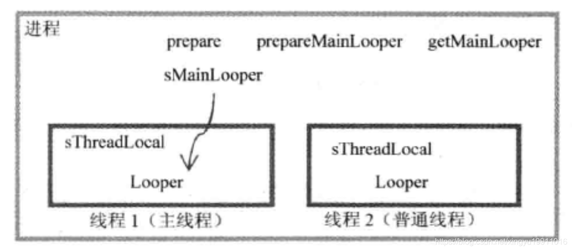
上图描述的是一个进程和它内部两个线程的Looper情况,其中线程1是主线程,线程2是普通线程。方框表示它们能访问的范围,如线程1就不能直接访问线程2中的Looper对象,但二者都可以接触到进程中的各元素。
4.3 ThreadLocal.get()和ThreadLocal.set()
ThreadLocal——线程本地存储类/线程内部存储类(Thread Local Storage,简称为TLS),每个线程都有自己的本地存储区域,不同线程之间彼此不能访问对方的TLS区域。
虽然在不同线程中访问的是同一个ThreadLocal对象,但它们通过ThreadLocal获取的值确实不一样。 因为不同线程访问同一个ThreadLocal的get()方法,ThreadLocal内部会从各自的线程中取出一个数组,然后在从数组中更加当前ThreadLocal的索引取查找出对应的value值,所以ThreadLocal可以在不同线程中维护一套数据副本且互不干扰。
TLS常用的操作方法:
ThreadLocal.set(T value):将value存储到当前的TLS区域, 以下是源码:
public class ThreadLocal<T> {
  public void set(T value) {
    Thread t = Thread.currentThread();
    ThreadLocalMap map = getMap(t);
    if (map != null)
      map.set(this, value);
    else
      createMap(t, value);
  }

  void createMap(Thread t, T firstValue) {
    t.threadLocals = new ThreadLocalMap(this, firstValue);
  }
}
ThreadLocal.get():获取当前线程TLS区域的数据, 以下是源码:
public class ThreadLocal<T> {
  public T get() {
    Thread t = Thread.currentThread();
    // 1. 获取当前线程的ThreadLocalMap
    ThreadLocalMap map = getMap(t);
    if (map != null) {
      ThreadLocalMap.Entry e = map.getEntry(this);
      if (e != null) {
        @SuppressWarnings("unchecked")
        T result = (T)e.value;
        return result;
      }
    }
    return setInitialValue();
  }

  private T setInitialValue() {
    T value = initialValue();
    Thread t = Thread.currentThread();
    ThreadLocalMap map = getMap(t);
    if (map != null)
      map.set(this, value);
    else
      createMap(t, value);
    return value;
  }
}
ThreadLocal的get()和set()方法操作的都是泛型,在ActivityThread中定义static final ThreadLocal<Looper> sThreadLocal = new ThreadLocal<Looper>();,所以sThreadLocal的get()和set()操作的类型都是Looper类型。
问:Looper是如何与Thread关联的?
Looper与Thread之间是通过ThreadLocal关联的,在Looper.prepare()方法中,有一个ThreadLocal类型的sThreadLocal静态字段,Looper通过它的get和set方法来赋值和取值。 由于ThreadLocal是与线程绑定的,所以只要把Looper与ThreadLocal绑定了,那Looper和Thread也就关联上了
4.4 消息轮询:Looper.loop()
在ActivityThread.main()方法中Looper.prepareMainLooper()后Looper.loop()开始轮询,不停的检查是否有新消息,如果有就调用最终消息中的Runnable和Handler的handleMessage方法,对应读取并处理消息:
public final class Looper {

  // loop函数是静态的,所以它只能访问静态数据。
  public static void loop() {
    // 1. 函数myLooper则调用sThreadLocal.get()来获取与之匹配的Looper实例,其实就是取出之前prepare中创建的那个Looper对象
    final Looper me = myLooper();

    me.mInLoop = true;
    // 2. Looper中自带一个MessageQueue,在Looper的构造方法中创建
    final MessageQueue queue = me.mQueue;

    // 3. 死循环,从消息队列中不断的取消息
    for (;;) {
      Message msg = queue.next(); // might block 可能会阻塞
      if (msg == null) {
        return; // 没有消息,退出循环
      }
      try {
        // 4. msg.target就是绑定的Handler,用于分发Message,所以dispatchMessage最终调用的是Handler中的处理函数
        msg.target.dispatchMessage(msg);
      } catch (Exception exception) {
      } finally {
      }

      // 5. 消息处理完毕,进行回收
      msg.recycleUnchecked();
    }
  }
}
Looper.loop()进入循环模式,直到没有消息时退出循环:
- 通过调用
MessageQueue.next方法,读取MessageQueue的下一条Message; - 把
Message分发给相应的target,即Handler; - 再把分发后的
Message回收到消息池,以便重复使用;
由于刚创建MessageQueue就开始轮询,队列里是没有消息的,等到Handler.sendMessage()->MessageQueue.enqueueMessage()后才会有消息。
4.5 消息遍历:MessageQueue.next()
MessageQueue是消息机制的Java层和C++层的连接纽带,大部分核心方法都教给native层来处理,其中MessageQueue类中涉及的native方法如下:
private native static long nativeInit(); // 初始化
private native static void nativeDestroy(long ptr);
private native void nativePollOnce(long ptr, int timeoutMillis); // 阻塞/等待
private native static void nativeWake(long ptr); // 唤醒
private native static boolean nativeIsPolling(long ptr);
private native static void nativeSetFileDescriptorEvents(long ptr, int fd, int events);
MessageQueue持有一个Message mMessages,作为消息队列内部存储数据的链表头。MessageQueue的内部实现是单链表,并不是队列。它具有两个重要操作:对消息的插入和读取,对应的方法是enqueueMessage和next。 其中enqueueMessage是往消息队列中插入一条信息,而next的作用是从消息队列中取出一条信息并将其从队列中移除。
poll [poʊl] 投票;民意测验;投票数;投票所;投票;剪短;对……进行民意测验;获得选票
MessageQueue.next()提取下一条message:
public final class MessageQueue {

  private long mPtr; // used by native code
  Message mMessages;

  Message next() {
    final long ptr = mPtr;
    if (ptr == 0) { // 当消息循环已经退出,则直接返回
      return null;
    }
    int pendingIdleHandlerCount = -1; // -1 only during first iteration 循环迭代首次为-1
    int nextPollTimeoutMillis = 0;
    for (;;) {
      if (nextPollTimeoutMillis != 0) {
        Binder.flushPendingCommands();
      }
      // 1. 阻塞操作,当等待nextPollTimeoutMillis时常,或者消息队列被唤醒,都会返回
      nativePollOnce(ptr, nextPollTimeoutMillis);
      synchronized (this) {
        final long now = SystemClock.uptimeMillis();
        Message prevMsg = null;
        Message msg = mMessages;
        // 2. 如果 msg.target == null, 那么它就是同步屏障,需要循环遍历,一直往后找到第一个异步的消息
        if (msg != null && msg.target == null) {
          do {
            prevMsg = msg;
            msg = msg.next;
          } while (msg != null && !msg.isAsynchronous());  // 当查询到异步消息,则立即退出循环
        }
        if (msg != null) {
          // 3. 当前消息是否到了应该发送的时间,如果到了就将该消息取出处理,否则就将          nextPollTimeoutMillis设置为剩余时间
          if (now < msg.when) {
            nextPollTimeoutMillis = (int) Math.min(msg.when - now, Integer.MAX_VALUE); //防止越界
          } else {
            // 获取一条消息,并返回
            mBlocked = false;
            if (prevMsg != null) {
              prevMsg.next = msg.next;
            } else {
              mMessages = msg.next;
            }
            msg.next = null;
            // 设置消息的使用状态,即flags != FLAG_IN_USE
            msg.markInUse();
            return msg; // 成功地获取MessageQueue中的下一条即将要执行的消息
          }
        } else {
          // No more messages. 没有消息
          nextPollTimeoutMillis = -1;
        }

        // 4. 在第一次循环的前提下,当消息队列为空,或者是消息未到执行时间
        if (pendingIdleHandlerCount < 0
            && (mMessages == null || now < mMessages.when)) {
          pendingIdleHandlerCount = mIdleHandlers.size();
        }
        if (pendingIdleHandlerCount <= 0) {
          // 没有idle handlers 需要运行,则循环并等待
          mBlocked = true;
          continue;
        }
        if (mPendingIdleHandlers == null) {
          mPendingIdleHandlers = new IdleHandler[Math.max(pendingIdleHandlerCount, 4)];
        }
        mPendingIdleHandlers = mIdleHandlers.toArray(mPendingIdleHandlers);
      }
      // 只有第一次循环时,会进行idle handlers,执行完成后,重置pendingIdleHandlerCount为0
      for (int i = 0; i < pendingIdleHandlerCount; i++) {
        final IdleHandler idler = mPendingIdleHandlers[i];
        mPendingIdleHandlers[i] = null; // 去掉handler的引用
        boolean keep = false;
        try {
          keep = idler.queueIdle(); // idle时执行的方法
        } catch (Throwable t) {
          Log.wtf(TAG, "IdleHandler threw exception", t);
        }
        if (!keep) {
          synchronized (this) {
            mIdleHandlers.remove(idler);
          }
        }
      }
      // 重置idle handler个数为0,以保证不会再次重复运行
      pendingIdleHandlerCount = 0;
      // 当调用一个空闲handler时,一个新message能够被分发,因此无需等待可以直接查询pending message。
      nextPollTimeoutMillis = 0;
    }
  }

}
nativePollOnce是阻塞操作,其中nextPollTimeoutMillis代表下一个消息到来前,还需要等待的时常;当nextPollTimeoutMillis = -1时,表示消息队列中无消息,会一直等待下去。当处于空闲,往往会执行IdleHandler中的方法,当nativePollOnce返回后,next()从mMessage中提取一个消息。
idle [ˈaɪdl] 闲置的;空闲的;
问:IdleHandler及其使用场景
public final class MessageQueue {
  // allback interface for discovering when a thread is going to block waiting for more messages.
  public static interface IdleHandler {
    boolean queueIdle();
  }
}
注释中明确的指出当消息队列空闲时会执行IdelHandler的queueIdle()方法,该方法返回一个boolean值,如果为false则执行完毕之后移除这条消息,如果为true则保留,等到下次空闲时会再次执行,
处理完IdleHandler后会将nextPollTimeoutMillis设置为0,也就是不阻塞消息队列, 当然要注意这里执行的代码同样不能太耗时,因为它是同步执行的,如果太耗时肯定会影响后面的message执行。
要使用IdleHandler只需要调用MessageQueue#addIdleHandler(IdleHandler handler)方法即可
问:MessageQueue是什么数据结构?
内部存储结构并不是真正的队列,而是采用单链表的数据结构来存储消息列表,这是因为消息队列是按照消息发送的时间来进行存储的,而不是像队列那样先进先出。
问:MessageQueue的next()方法内部原理
调用MessageQueue.next()方法的时候会调用Native层的nativePollOnce()方法进行精准时间的阻塞。在Native层,将进入 pullInner()方法,使用epoll_wait阻塞等待以读取管道的通知。如果没有从Native层得到消息,那么这个方法就不会返回。此时主线程会释放CPU资源进入休眠状态。
问:为什么主线程不会因为Looper.loop()里的死循环卡死?
Looper.loop() -> MessageQueue.next()
MessageQueue.next在没有消息的时候会阻塞,如何恢复? 不阻塞的原因epoll机制,在native层会有一个读取端和一个写入端,当有消息发送过来的时候会去唤醒读取端,然后进行消息发送与处理,没消息的时候是处于休眠状态,所以不会阻塞。
4.6 消息处理/分发机制:msg.target.dispatchMessage或Handler.msg.target.dispatchMessage
在Looper.loop()中,当发现有消息时,会调用目标handler,执行msg.target.dispatchMessage(msg);方法来分发消息:
public class Handler {

  final Callback mCallback;

  public interface Callback {
    boolean handleMessage(@NonNull Message msg);
  }

  public void dispatchMessage(@NonNull Message msg) {
    // 1. callback在message的构造方法中初始化或者使用handler.post(Runnable)时候才不为空
    if (msg.callback != null) { // msg.callback数据类型 Runnable callback;
      handleCallback(msg); // 当Message存在回调方法,回调msg.callback.run()方法
    } else {
      // 2. mCallback是一个callback对象,通过无参的构造方法创建出来的handler,该属性为null,此段不执行
      if (mCallback != null) { // mCallback数据类型 Callback mCallback;
        // 当Handler存在Callback成员变量时,回调方法handleMessage();
        if (mCallback.handleMessage(msg)) {
          return;
        }
      }
      // 3. 最终执行handleMessage方法
      handleMessage(msg);
    }
  }
  private static void handleCallback(Message message) {
    message.callback.run(); // Runnable callback;
  }
  public void handleMessage(@NonNull Message msg) {}
}
分发消息流程/优先级:
- 当
Message.callback(回调方法)不为空时, 则调用msg.callback.run(),其中callBack数据类型为Runnable,否则进入步骤2。 - 当
Handler.mCallback(回调方法)不为空时, 则调用mCallback.handleMessge(msg),否则进入步骤3。(mCallback在Handler构造方法中初始化,在主线程中直接通过new的无参构造函数mCallback = null)
public class Handler {
  final Looper mLooper;
  final MessageQueue mQueue;
  @UnsupportedAppUsage
  final Callback mCallback;
  final boolean mAsynchronous;

  public Handler(@NonNull Looper looper) {
    this(looper, null, false);
  }

  public Handler(@NonNull Looper looper, @Nullable Callback callback) {
    this(looper, callback, false);
  }

  public Handler(boolean async) {
    this(null, async);
  }

  public Handler(@NonNull Looper looper, @Nullable Callback callback, boolean async) {
    mLooper = looper;
    mQueue = looper.mQueue;
    mCallback = callback;
    mAsynchronous = async;
  }

  public Handler(@Nullable Callback callback, boolean async) {
    // 匿名类、内部类或本地类都必须申明为static,否则会警告可能出现内存泄漏
    if (FIND_POTENTIAL_LEAKS) {
      final Class<? extends Handler> klass = getClass();
      if ((klass.isAnonymousClass() || klass.isMemberClass() || klass.isLocalClass()) &&          (klass.getModifiers() & Modifier.STATIC) == 0) {
        Log.w(TAG, "The following Handler class should be static or leaks might occur: " +              klass.getCanonicalName());
      }
    }
    // 必须先执行Looper.prepare(),才能获取Looper对象,否则为null。
    // 注意:这里是获取Looper,而不是创建,从当前线程的TLS中获取Looper对象
    mLooper = Looper.myLooper();
    if (mLooper == null) {
      throw new RuntimeException(
        "Can't create handler inside thread " + Thread.currentThread()
        + " that has not called Looper.prepare()");
    }
    // 消息队列MessageQueue,来自Looper
    mQueue = mLooper.mQueue;
    // 初始化了回调接口
    mCallback = callback;
    // 设置消息是否为异步处理方式
    mAsynchronous = async;
  }
}
- 调用
Handler自身的回调方法handleMessage(), 该方法默认为空,Handler子类通过重写该方法来完成具体的逻辑。
在handleMessage(Message)方法中,可以拿到message对象,根据不同的需求进行处理。
以下代码为Hanlder的使用:
Handler handler = new Handler(){
  @Override
  public void handleMessage(Message msg) {
    super.handleMessage(msg);
  }
}
问:一个线程可以有几个Handler?
可以创建无数个Handler,但是它们使用的消息队列(MessageQueue)都是同一个,也就是同一个Looper。
在Looper.prepare()方法中创建了Looper对象,并放入到ThreadLocal中,并通过ThreadLocal来获取looper的对象,ThreadLocal的内部维护了一个ThreadLocalMap类,ThreadLocalMap是以当前thread做为key的,因此可以得 知,一个线程最多只能有一个Looper对象, 在Looper的构造方法中创建了MessageQueue对象。因为Looper对象只有一个,那么Messagequeue对象肯定只有一个。
问:如果线程中没有Looper会怎么样?子线程中能不能直接new Handler(),为什么主线程可以?
如果线程中没有Looper,就没有消息队列,也就无法处理消息,在线程内部也就无法使用Handler,会报Can't create handler inside thread that has not called Looper.prepare()的错误(运行时出错,编译时不出错)
主线程可以直接new Handler是因为在ActivityThread.main方法中通过Looper.prepareMainLooper()获取到Looper对象, 并通过Looper.loop()开启循环。在子线程中若要使用Handler,可先通过Loop.prepare()获取到Looper对象,并使用Looper.loop()开启循环
问:子线程中是否可以用MainLooper去创建Handler,Looper和Handler是否一定处于一个线程
可以
new Thread(new Runnable() {
  @Override
  public void run() {
    Handler handler = new Handler(Looper.getMainLooper()); // 此时两者不在同一个线程内
  }
}).start();
Handler如何与Looper关联的?通过构造方法
问:一个Looper可以被多个Handler持有,同一个Looper是怎么区分不同的Handler,换句话说,不同的Handler是怎么做到处理自己发出的消息的。
这个问题就要来到Handler.sendMessage方法中了,最终调用来的queue.enqueueMessage(msg, uptimeMillis),msg.target = this;就是将当前的Handler赋值给Message对象,这样在处理消息的时候通过msg.target就可以区分开不同的Handler。Message的obtain的各种重载方法里面也有对target的赋值。
问:Handler怎么做到的一个线程对应一个Looper,如何保证只有一个MessageQueue
ThreadLocal设计的初衷是为了解决多线程编程中的资源共享问题。使用ThreadLocal维护变量,会为每一个使用该变量的线程创建一个独立的变量副本,这样就能让各线程相互隔离,保证线程安全。
如果synchronized采取的是“以时间换空间”的策略,本质上是对关键资源上锁,让大家排队操作。 那么,ThreadLocal采取的是“以空间换时间”的思路, 它是一个线程内部的数据存储类,数据存储以后,只有在指定线程中可以获取到存储的数据, 对于其他线程就获取不到数据,可以保证本线程任何时间操纵的都是同一个对象。
实现的思路:在ThreadLocal类中有一个ThreadLocalMap,用于存储每一个线程的变量副本,ThreadLocalMap中元素的key为线程对象,而value对应线程的变量副本。
4.7 发送消息:Handler.sendMessage和Handler.postMessage
以下是postxxx源码,最终调用的也是sendxxx的相关代码:
public class Handler {
  public final boolean post(@NonNull Runnable r) {
    return sendMessageDelayed(getPostMessage(r), 0);
  }

  public final boolean postAtTime(@NonNull Runnable r, long uptimeMillis) {
    return sendMessageAtTime(getPostMessage(r), uptimeMillis);
  }

  public final boolean postDelayed(@NonNull Runnable r, long delayMillis) {
    return sendMessageDelayed(getPostMessage(r), delayMillis);
  }

  public final boolean postAtFrontOfQueue(@NonNull Runnable r) {
    return sendMessageAtFrontOfQueue(getPostMessage(r));
  }

  // 将Runnable包装成一个Message对象,将Message.callback设置成了对应的Runnable
  private static Message getPostMessage(Runnable r) {
    Message m = Message.obtain();
    m.callback = r;
    return m;
  }
}
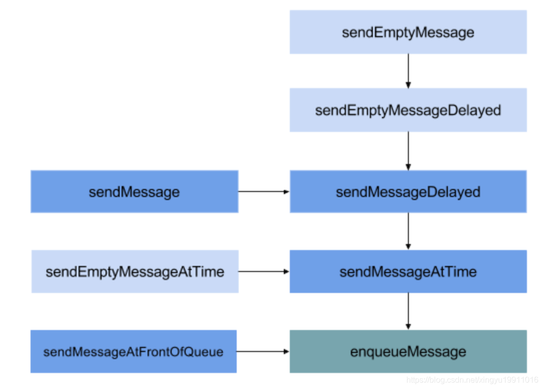
发送消息调用链:最终调用的都是MessageQueue.enqueueMessage()
以下是sendxxx源码:
public class Handler {

  final MessageQueue mQueue;
  final boolean mAsynchronous;

  public final boolean sendEmptyMessage(int what) {
    return sendEmptyMessageDelayed(what, 0);
  }

  public final boolean sendEmptyMessageDelayed(int what, long delayMillis) {
    Message msg = Message.obtain();
    msg.what = what;
    return sendMessageDelayed(msg, delayMillis);
  }

  public final boolean sendMessageDelayed(@NonNull Message msg, long delayMillis) {
    if (delayMillis < 0) {
      delayMillis = 0;
    }
    return sendMessageAtTime(msg, SystemClock.uptimeMillis() + delayMillis);
  }

  public boolean sendMessageAtTime(@NonNull Message msg, long uptimeMillis) {
    // 1. 首先拿到MessageQueue对象
    MessageQueue queue = mQueue;
    if (queue == null) {
      RuntimeException e = new RuntimeException(
        this + " sendMessageAtTime() called with no mQueue");
      Log.w("Looper", e.getMessage(), e);
      return false;
    }
    // 2. 将Message发送至MessageQueue中
    return enqueueMessage(queue, msg, uptimeMillis);
  }

  private boolean enqueueMessage(@NonNull MessageQueue queue, @NonNull Message msg,                               long uptimeMillis) {
    // 3. Message和Handler绑定
    msg.target = this;
    msg.workSourceUid = ThreadLocalWorkSource.getUid();
    // 4. 在构造函数中被赋值,如果设置为true,Handler发出的Message都会被设为Async,也就是异步消息
    if (mAsynchronous) {
      msg.setAsynchronous(true);
    }
    // 将Message加到消息队列的队头
    return queue.enqueueMessage(msg, uptimeMillis);
  }

  public final boolean sendMessageAtFrontOfQueue(@NonNull Message msg) {
    MessageQueue queue = mQueue;
    if (queue == null) {
      return false;
    }
    return enqueueMessage(queue, msg, 0);
  }
}
Handler.sendEmptyMessage()等系列方法最终调用MessageQueue.enqueueMessage(msg, uptimeMillis),将消息添加到消息队列中,其中uptimeMillis为系统当前的运行时间,不包括休眠时间。之后,由Looper取出,交给Handler.dispatchMessage进行处理。
在Handler的构造函数,默认情况下async会被设置为false。
问:Handler的postMessage与sendMessage的区别和应用场景
在post方法中会调用getPostMessage生成一个Messgae,并且把runnable赋值给message.callback。在Handler.dispatchMessage方法中,如果msg.callback != null,则直接执行post中的Runnable方法。而sendMessage中如果mCallback != null就会调用mCallback.handleMessage(msg)方法,处理消息并判断返回结果,如果返回true,消息处理结束。如果mCallback == null则直接调用handleMessage。
post方法和send方法的不同在于,调用post方法的消息是在其传递的Runnable对象的run方法中处理,而调用send方法需要重写handleMessage方法或者给Handler设置Callback,在Callback的handleMessage中处理。
post一般用于单个场景,比如单一的倒计时弹框功能;send的回调需要去实现handleMessage, Message做为参数用于多判断条件的场景。
4.8 消息入队:MessageQueue.enqueueMessage
public final class MessageQueue {

  Message mMessages;

  boolean enqueueMessage(Message msg, long when) {
    // 每一个普通Message必须有一个target,即Handler
    if (msg.target == null) {
      throw new IllegalArgumentException("Message must have a target.");
    }
    synchronized (this) {
      if (msg.isInUse()) {
        throw new IllegalStateException(msg + " This message is already in use.");
      }
      if (mQuitting) { // 正在退出时,回收msg,加入到消息池
        msg.recycle();
        return false;
      }
      msg.markInUse();
      msg.when = when;
      Message p = mMessages;
      boolean needWake;
      // 1. p为null,代表MessageQueue没有消息,或者msg的触发时间时队列中最早的,则进入该分支
      if (p == null || when == 0 || when < p.when) {
        msg.next = p;
        mMessages = msg;
        needWake = mBlocked; // 当阻塞时需要唤醒
      } else {
        // 2. 将消息按时间顺序插入到MessageQueue,一般地,不需要唤醒时间队列,除非消息队头存在barrier,并且同时Message时队列中最早的异步消息。
        needWake = mBlocked && p.target == null && msg.isAsynchronous();
        Message prev;
        for (;;) {
          prev = p;
          p = p.next;
          if (p == null || when < p.when) {
            break;
          }
          if (needWake && p.isAsynchronous()) {
            needWake = false;
          }
        }
        msg.next = p; // invariant: p == prev.next
        prev.next = msg;
      }

      if (needWake) {
        nativeWake(mPtr); // 唤醒
      }
    }
    return true;
  }
}
MessageQueue实际上维护了一个Message构成的链表,当有消息需要加入时,会从链表头开始遍历,按时间顺序插入数据。也就是说MessageQueue中的Message都是按照时间排序的,这样的话就使得,循环取出Message的时候只需要一个个地从前往后拿,这样Message都可以按时间先后顺序被消费。
问:Handler.postDelayed后消息队列有什么变化,假设先postDelayed 10s, 再postDelayed 1s,怎么处理这2条消息?
postDelayed -> sendMessageDelayed -> sendMessageAtTime -> enqueueMessage
postDelayed传入的时间,会和当前的时间SystemClock.uptimeMillis()做加和,而不是单纯的只是用延时时间。 延时消息会和当前消息队列里的消息头的执行时间做对比,如果比头的时间靠前,则会做为新的消息头,不然则会从消息头开始向后遍历,找到合适的位置插入延时消息。
postDelayed()一个10s的Runnable A,消息进入队列,MessageQueue调用nativePollOnce()阻塞,Looper阻塞;紧接着post()一个Runnable B,消息进入队列,判断现在A 间还没到,正在阻塞,把B插入消息队列的头部(A的前面),MessageQueue调用nativePollOnce()阻塞,等到B的执行时间,调用nativeWake()方法唤醒线程;MessageQueue.next()方法被唤醒后,重新开始读取消息链表,将消息B直接返回给Looper;Looper 处理完这个消息再次调用next()方法,MessageQueue继续读取消息链表,第二个消息A还没到时间,计算一下剩余时间(假如还剩9s)继续调用nativePollOnce()阻塞,直到阻塞时间到或者下一次有Message进队
问:线程同步问题
Handler是用于线程间通信的,但是它产生的根本并不只是UI处理,更多的是Handler是整个APP通信的框架,整个APP都是用它来进行线程间的协调。那么它是如何保证线程间安全的?
Handler机制中最主要的一个类是MessageQueue,这个类是所有消息的存储仓库,如何管理好这个仓库就是关键了,消息管理有两点:消息入库(enqueueMessage)、消息出库(next)。
synchronized(this)这个锁,说明的是对所有调用同一个MessageQueue对象的线程来讲,它们是互斥的。在Handler机制中,一个线程对应着唯一的一个Looper对象,Looper中有唯一的MessageQueue,因此主线程中就只有一个MessageQueue对象,也就是说,所有的子线程向主线程发送消息的时候,主线程一次只能处理一个消息,其他的都需要等待,这样就不会出现错乱。
每次都是从队列头部取消息,那么它的加锁有什么意义呢?必须要在next中加锁,因为,这样由于synchronized(this)作用范围是所有this正在访问的代码块都会有保护作用,也就是说它可以保证next和enqueueMessage实现互斥,这样才能真正的保证多线程访问的时候MessageQueue有序进行。
4.9 总结
handler.sendMessage发送消息到消息队列MessageQueue,然后Looper调用自己的loop()函数带动MessageQueue从而轮询MessageQueue里面的每个Message,当Message达到了可以执行的时间的时候开始执行,执行后就会调用Message绑定的Handler来处理消息:
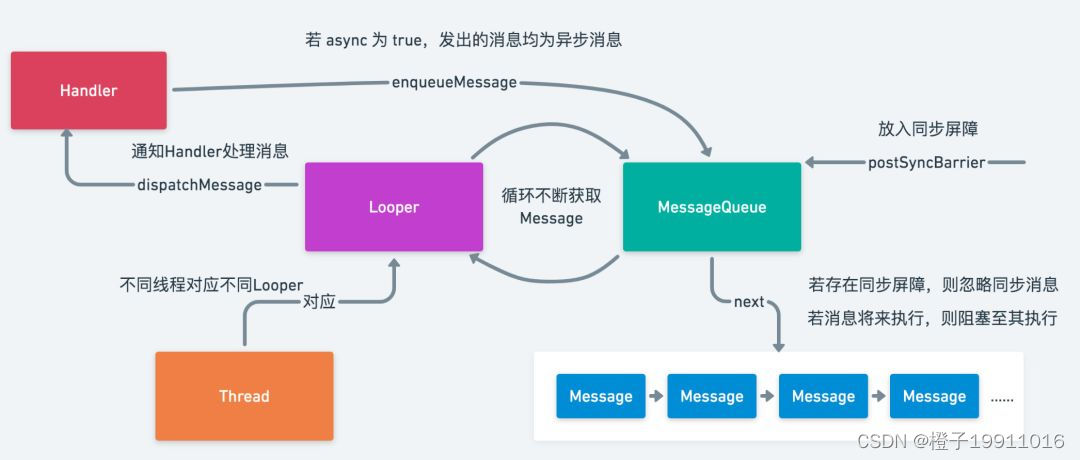
Looper.prepare():为当前线程准备消息队列,Handler默认构造方法跟当前线程中的Looper产生关联Looper.loop()不断轮询MessageQueue,取出符合触发条件的Message,并将Message交个handler来处理:msg.target.dispatchMessage(msg);- 经过
msg.target.dispatchMessage(msg);后根据需求交进行处理 Handler.sendMessage()发送消息到MessageQueue队列,并且将当前的Handler与Message绑定:msg.target = this;
问:通过Handler如何实现线程的切换?
当在A线程中创建Handler的时候,同时创建Looper和MessageQueue,Looper在A线程中调用loop()进入一个 无限的for循环,从MessageQueue中取消息,当B线程调用Handler发送一个message的时候,会通过msg.target.dispatchMessage(msg);将message插入到Handler对应的MessageQueue中,Looper发现有message插入到MessageQueue中,便取出message执行相应的逻辑,因为Looper.loop()是在A线程中启动的,所以则回到了A线程,达到了从B线程切换到A线程的目的。
4.10 其他方法
4.10.1 Handler.obtainMessage()获取消息
Handler.obtainMessage()最终调用Message.obtainMessage(this),其中this为当前的Handler对象:
public final Message obtainMessage() {
  return Message.obtain(this);
}
4.10.2 Handler.removeMessages()移除消息
public final void removeMessages(int what) {
  mQueue.removeMessages(this, what, null);
}
Handler是消息机制总非常重要的辅助类,更多的实现都是MessageQueue,Message中的方法,Handler的目的是为了更加方便的使用消息机制。
4.10.3Looper.quit()
以下是Looper.quit()的源码,最终,Looper.quit()方法的实现最终调用的是MessageQueue.quit()方法:
public void quit() {
  mQueue.quit(false); // 消息移出
}
public void quitSafely() {
  mQueue.quit(true); // 安全地消息移出
}
以下是MessageQueue.quit()源码:
void quit(boolean safe) {
  if (!mQuitAllowed) { // 当mQuitAllowed为false,表示不运行退出,强行调用quit()会抛出异常
    throw new IllegalStateException("Main thread not allowed to quit.");    }
  synchronized (this) {
    if (mQuitting) { // 防止多次执行退出操作
      return;
    }
    mQuitting = true;
    if (safe) {
      removeAllFutureMessagesLocked(); // 移除尚未触发的所有消息
    } else {
      removeAllMessagesLocked(); // 移除所有消息
    }
    // mQuitting = false 那么认定为 mPtr != 0
    nativeWake(mPtr);
  }
}
所以,当safe = true时,只移出尚未触发的消息,对正在触发的消息并不移除;当safe = false时,移除所有的消息。
问:Looper.quit/quitSafely的区别?
当调用Looper.quit方法时,实际上执行了MessageQueue.removeAllMessagesLocked方法,该方法的作用是把MessageQueue消息池中所有的消息全部清空, 无论是延迟消息(延迟消息是指通过sendMessageDelayed或通过postDelayed等方法发送的需要延迟执行的消息)还是非延迟消息。
当我们调用Looper.quitSafely方法时,实际上执行了MessageQueue.removeAllFutureMessagesLocked方法,通过名字就可以看出,该方法只会清空MessageQueue消息池中所有的延迟消息,并将消息池中所有的非延 迟消息派发出去让Handler去处理,quitSafely相比于quit方法安全之处在于清空消息之前会派发所有的非延迟消息。
4.10.4 Message.removeMessages()
void removeMessages(Handler h, int what, Object object) {
  if (h == null) {
    return;
  }
  synchronized (this) {
    Message p = mMessages;
    // Remove all messages at front. 从消息队列的头部开始,移除所有符合条件的消息
    while (p != null && p.target == h && p.what == what
           && (object == null || p.obj == object)) {
      Message n = p.next;
      mMessages = n;
      p.recycleUnchecked();
      p = n;
    }
    // Remove all messages after front. 移除剩余的符合要求的消息
    while (p != null) {
      Message n = p.next;
      if (n != null) {
        if (n.target == h && n.what == what
            && (object == null || n.obj == object)) {
          Message nn = n.next;
          n.recycleUnchecked();
          p.next = nn;
          continue;
        }
      }
      p = n;
    }
  }
}
这个移除消息的方法,采用了两个while循环,第一个循环时从队头开始,移除符合条件的消息,第二个循环时从头部移除完连续的满足条件的消息之后,再从队列后面继续查询是否有满足条件的消息需要被移除。
5 阻塞唤醒机制
Handler的阻塞唤醒机制是基于Linux的阻塞唤醒机制。
轮询器Looper不断的轮询是非常消耗资源的,如果MessageQueue中没有消息或者其中的消息并不当下要执行的,可能需要过一段时间才执行,Looper不断的轮询就是一种资源的浪费。因此,Handler设计了一种阻塞唤醒机制,当MessageQueue中没有即时执行的任务时,会阻塞在MessageQueue.next()方法中的nativePollOnce()方法中,此时线程会释放CPU进入休眠状态,就将Looper.loop()阻塞,直到下个任务的执行时间到达或者出现某些特殊的情况再将其唤醒,从而避免资源的浪费。
6 IdleHandler
在MessageQueue中有一个静态接口IdleHandler,这个接口用于在MessageQueue中没有可处理的Message的时候回调,这样就可以在UI线程在处理完所有的View事务之后,处理一些额外的事务,而不会阻塞UI线程。
public final class MessageQueue {
  public static interface IdleHandler {
    boolean queueIdle();
  }
}
接口中只有一个queueIdle方法,返回true的话,执行完queueIdle之后会保留这个IdleHandler,反之,则删除这个IdleHandler。
以下是相关源码:
public final class MessageQueue {
  Message mMessages;

  private final ArrayList<IdleHandler> mIdleHandlers = new ArrayList<IdleHandler>();
  private IdleHandler[] mPendingIdleHandlers;

  Message next() {
    // Return here if the message loop has already quit and been disposed.
    // This can happen if the application tries to restart a looper after quit
    // which is not supported.
    final long ptr = mPtr;
    if (ptr == 0) {
      return null;
    }

    int pendingIdleHandlerCount = -1; // -1 only during first iteration
    int nextPollTimeoutMillis = 0;
    for (;;) {
      if (nextPollTimeoutMillis != 0) {
        Binder.flushPendingCommands();
      }

      nativePollOnce(ptr, nextPollTimeoutMillis);

      synchronized (this) {
        // Try to retrieve the next message.  Return if found.
        /*====================== 第一部分 ==============================*/
        final long now = SystemClock.uptimeMillis();
        Message prevMsg = null;
        Message msg = mMessages;
        if (msg != null && msg.target == null) {
          // Stalled by a barrier.  Find the next asynchronous message in the queue.
          do {
            prevMsg = msg;
            msg = msg.next;
          } while (msg != null && !msg.isAsynchronous());
        }
        if (msg != null) {
          if (now < msg.when) {
            // Next message is not ready.  Set a timeout to wake up when it is ready.
            nextPollTimeoutMillis = (int) Math.min(msg.when - now, Integer.MAX_VALUE);
          } else {
            // Got a message.
            mBlocked = false;
            if (prevMsg != null) {
              prevMsg.next = msg.next;
            } else {
              mMessages = msg.next;
            }
            msg.next = null;
            if (DEBUG) Log.v(TAG, "Returning message: " + msg);
            msg.markInUse();
            return msg;
          }
        } else {
          // No more messages.
          nextPollTimeoutMillis = -1;
        }

        // Process the quit message now that all pending messages have been handled.
        if (mQuitting) {
          dispose();
          return null;
        }

        // If first time idle, then get the number of idlers to run.
        // Idle handles only run if the queue is empty or if the first message
        // in the queue (possibly a barrier) is due to be handled in the future.
         /*====================== 第二部分 ==============================*/
        if (pendingIdleHandlerCount < 0 && (mMessages == null || now < mMessages.when)) {
          pendingIdleHandlerCount = mIdleHandlers.size();
        }
        if (pendingIdleHandlerCount <= 0) {
          // No idle handlers to run.  Loop and wait some more.
          mBlocked = true;
          continue;
        }

        if (mPendingIdleHandlers == null) {
          mPendingIdleHandlers = new IdleHandler[Math.max(pendingIdleHandlerCount, 4)];
        }
        mPendingIdleHandlers = mIdleHandlers.toArray(mPendingIdleHandlers);
      }

      // Run the idle handlers.
      // We only ever reach this code block during the first iteration.
      for (int i = 0; i < pendingIdleHandlerCount; i++) {
        final IdleHandler idler = mPendingIdleHandlers[i];
        mPendingIdleHandlers[i] = null; // release the reference to the handler

        boolean keep = false;
        try {
          keep = idler.queueIdle();
        } catch (Throwable t) {
          Log.wtf(TAG, "IdleHandler threw exception", t);
        }

        if (!keep) {
          synchronized (this) {
            mIdleHandlers.remove(idler);
          }
        }
      }

      // Reset the idle handler count to 0 so we do not run them again.
      pendingIdleHandlerCount = 0;

      // While calling an idle handler, a new message could have been delivered
      // so go back and look again for a pending message without waiting.
      nextPollTimeoutMillis = 0;
    }
  }
}
在MessageQueue.next方法中,第一部分用于从MessageQueue中取出Message,第二部分用于处理IdleHandler。
从第二部分来看,首先会对当前的mMessages作一个判断,如果mMessages == null或者检测到mMessages是在将来执行的,那么就开始执行IdleHandler。所有的idleHandler都是放在mIdleHandlers中的,在执行的时候,将它们转存到mPendingIdleHandlers,接下来就是处理这些IdleHandler,如果返回值是false,那就将这个IdleHandler从mIdleHandlers中remove掉,如果返回true,则保留。处理完IdleHandler后将nextPollTimeoutMillis设置为0,也就是不阻塞消息队列,当然IdleHandler.queueIdle()执行的代码不能太耗时,因为它是同步执行的,如果太耗时会影响后面的message执行。
从本质上讲就是趁着消息队列空闲的时候做一些任务。
MessageQueue.IdleHandler使用起来也很简单,只需要调用MessageQueue.addIdleHandler(IdleHandler handler)方法即可:
mHandler.getLooper().getQueue().addIdleHandler(new MessageQueue.IdleHandler() {
  @Override
  public boolean queueIdle() {
    Log.e("CAH", "queueIdle");
    return false;
  }
});
IdleHandler的使用场景:
Activity的启动优化:onCreate、onStart、onResume中耗时较短但非必要的代码就可以放在IdleHandler中执行,减少启动时间;- 想要在一个
View绘制完成之后添加其它依赖这个View的View(也可以使用View.post也可以实现),区别就是前者在消息队列空闲时间时执行; - 发送一个返回
true的IdleHandler,在里面让某个View不停闪烁,这样当用户没有其他操作时就可以诱导用户点击这个View; - 一些第三方库中有使用,比如
LeakCandary、Glide中使用;
性能监控类库LeakCandary为了避免监控程序对APP运行时抢占资源,就会利用IdleHandler来监控主线程的休眠情况,在主线程处于休眠的时候,才会跟踪监控对象的内存泄漏,这样可以避免对UI绘制这样优先级较高的Message的影响。
7 消息机制之同步屏障
线程的消息都是放在同一个MessageQueue中,取消息的时候只能从头部取,而添加消息是按照消息的执行的先后顺序进行的排序,那么问题来了,同一个时间范围内的消息,如果它是需要立即执行的,那么应该怎么处理, 按照常规的办法,需要等到队列轮询到这个消息的时候才能执行,等待太久。所以,需要给紧急执行的消息一个绿色通道,这个绿色通道就是同步屏障的概念。
7.1 同步屏障是什么?
同步屏障的意思即为阻碍,顾名思义,同步屏障就是阻碍同步消息,异步消息优先执行。通过调用MessageQueue.postSynBarrier()开启同步屏障(SynBarrier)。
“屏障”其实就是一个Message,它的target == null,插在MessageQueue的链表头,不会被消费,仅仅作为一种标识放在消息队列中。
public final class MessageQueue {
  Message next() {
    for (;;) { // 无限循环
      synchronized (this) {
        // 关键!!!
        // 如果 target == null, 那么它就是屏障,需要循环遍历,一直往后找到第一个异步的消息
        if (msg != null && msg.target == null) {
          // Stalled by a barrier.  Find the next asynchronous message in the queue.
          do {
            prevMsg = msg;
            msg = msg.next;
          } while (msg != null && !msg.isAsynchronous());
        }
      }
    }
  }
可以通过MessageQueue.postSyncBarrier将同步屏障加入消息队列中:
public final class MessageQueue {
  public int postSyncBarrier() {
    return postSyncBarrier(SystemClock.uptimeMillis());
  }

  private int postSyncBarrier(long when) {
    // Enqueue a new sync barrier token.
    // We don't need to wake the queue because the purpose of a barrier is to stall it.
    synchronized (this) {
      final int token = mNextBarrierToken++;
      // 从消息池中获取Message
      final Message msg = Message.obtain();
      msg.markInUse();
      // 就是这里!!!初始化Message对象的时候,并没有给target赋值,因此 target==null
      msg.when = when;
      msg.arg1 = token;
      Message prev = null;
      Message p = mMessages;
      if (when != 0) {
        while (p != null && p.when <= when) {
          // 如果开启同步屏障的时间(假设记为T)T不为0,且当前的同步消息里有时间小于T,则prev也不为null
          prev = p;
          p = p.next;
        }
      }
      // 根据prev是不是为null,将msg按照时间顺序插入到消息队列(链表)的合适位置
      if (prev != null) { // invariant: p == prev.next
        msg.next = p;
        prev.next = msg;
      } else {
        msg.next = p;
        mMessages = msg;
      }
      return token;
    }
  }
}
可以看到,Message对象初始化的时候并没有个target赋值,因此,target == null的来源就找到了。上面消息的插入也做了相应的注释。这样,一条target == null的消息就进入了消息队列。
那么,开启同步屏障后,所谓的异步消息又是如何被处理的?如果对消息机制有所了解的话,应该知道消息的最终处理是在消息轮询器Looper.loop()中,而loop()循环中会调用MessageQueue.next()从消息队列中取消息。
从上面可以看出,当消息队列开启同步屏障的时候(即标识为msg.target == null),消息机制在处理消息的时候,优先处理异步消息。这样,同步屏障就起到了一种过滤和优先级的作用。
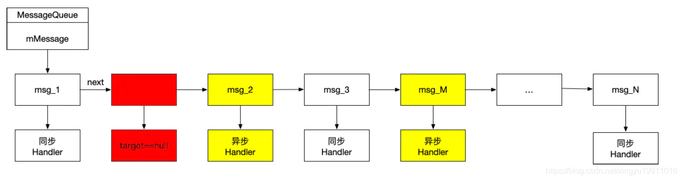
如上图所示,在消息队列中有同步消息和异步消息(黄色部分),以及一道墙——同步屏障(红色部分),有了同步屏障的存在,msg_2和msg_M着两个一步消息可以被优先处理,而后面的msg_3等同步消息则不会被处理,那么这些同步消息什么时候可以被处理呢?那就需要先一处这个同步屏障,即调用removeSyncBarrier()。
移除同步屏障
public final class MessageQueue {
  public void removeSyncBarrier(int token) {
    // Remove a sync barrier token from the queue.
    // If the queue is no longer stalled by a barrier then wake it.
    synchronized (this) {
      Message prev = null;
      Message p = mMessages;
      while (p != null && (p.target != null || p.arg1 != token)) {
        prev = p;
        p = p.next;
      }
      if (p == null) {
        throw new IllegalStateException("The specified message queue synchronization "
                   + " barrier token has not been posted or has already been removed.");
      }
      final boolean needWake;
      if (prev != null) {
        prev.next = p.next;
        needWake = false;
      } else {
        mMessages = p.next;
        needWake = mMessages == null || mMessages.target != null;
      }
      p.recycleUnchecked();

      // If the loop is quitting then it is already awake.
      // We can assume mPtr != 0 when mQuitting is false.
      if (needWake && !mQuitting) {
        nativeWake(mPtr);
      }
    }
  }
}
将同步屏障从MessageQueue中移除,一般执行完异步消息后就会通过该方法将同步屏障移除。
如何发送一个异步消息呢?
- 使用异步类型的
Handler发送的Message都是异步的。Handler有一系列的带Boolean类型的参数构造器,这个参数决定是否是异步的Handler,但是这个构造方法是无法使用的; - 给
Message标志异步;
public class Handler {
  @UnsupportedAppUsage(maxTargetSdk = Build.VERSION_CODES.R, trackingBug = 170729553)
  public Handler(boolean async) {
    this(null, async);
  }
}

public final class Message implements Parcelable {
  public void setAsynchronous(boolean async) {
    if (async) {
      flags |= FLAG_ASYNCHRONOUS;
    } else {
      flags &= ~FLAG_ASYNCHRONOUS;
    }
  }
}
问:消息屏障,同步屏障机制
同步屏障只在Looper死循环获取待处理消息时才会起作用,也就是说同步屏障在MessageQueue.next函数中发挥着作用。
在MessageQueue.next()方法中,有一个屏障的概念(message.target == null为屏障消息), 遇到target == null的Message,说明是同步屏障,循环遍历找出一条异步消息,然后处理。 在同步屏障没移除前,只会处理异步消息,处理完所有的异步消息后,就会处于堵塞状态,就是这样来实现异步消息优先执行的功能
Handler构造方法中传入async参数,设置为true,使用此Handler添加的Message都是异步的;- 创建
Message对象时,直接调用setAsynchronous(true); removeSyncBarrier()移除同步屏障;
在View更新时,draw、requestLayout、invalidate等很多地方都调用了ViewRootImpl#scheduleTraversals(Android应用框架中为了更快的响应UI刷新事件在ViewRootImpl.scheduleTraversals中使用了同步屏障)
7.2 同步消息的应用场景
Android系统中的UI更新相关的消息记为异步消息,需要优先处理。
比如,在View更新的时候,draw、requestLayout、invalidate等很多地方都调用了ViewRootImpl.scheduleTraversals(),如下:
void scheduleTraversals() {
  if (!mTraversalScheduled) {
    mTraversalScheduled = true;
    // 开启同步屏障
    mTraversalBarrier = mHandler.getLooper().getQueue().postSyncBarrier();
    // 发送异步消息
    mChoreographer.postCallback(
      Choreographer.CALLBACK_TRAVERSAL, mTraversalRunnable, null);
    notifyRendererOfFramePending();    pokeDrawLockIfNeeded();
  }
}
postCallback()最终走到了Choreographer.postCallbackDelayedInternal()
private void postCallbackDelayedInternal(int callbackType,
       Object action, Object token, long delayMillis) {
  synchronized (mLock) {
    final long now = SystemClock.uptimeMillis();
    final long dueTime = now + delayMillis;
    mCallbackQueues[callbackType].addCallbackLocked(dueTime, action, token);
    if (dueTime <= now) {
      scheduleFrameLocked(now);
    } else {
      Message msg = mHandler.obtainMessage(MSG_DO_SCHEDULE_CALLBACK, action);
      msg.arg1 = callbackType;
      msg.setAsynchronous(true); // 异步消息
      mHandler.sendMessageAtTime(msg, dueTime);
    }
  }
}
这就开启了同步屏障,并发送异步消息,由于UI更新相关的消息是优先级最高的,这样系统就会优先处理这些异步消息。
最后,当要移除同步屏障的时候需要调用ViewRootImpl.unscheduleTraversals:
void unscheduleTraversals() {
  if (mTraversalScheduled) {
    mTraversalScheduled = false;
    mHandler.getLooper().getQueue().removeSyncBarrier(mTraversalBarrier);
    mChoreographer.removeCallbacks(
      Choreographer.CALLBACK_TRAVERSAL, mTraversalRunnable, null);
  }
}
同步屏障的设置可以方便的处理那些优先级较高的异步消息。当我们调用Handler.getLooper().getQueue().postSyncBarrier()并设置消息的setAsynchronous(true)时,target即为null,也就开启了同步屏障。当消息轮询器Looper在loop()中循环处理消息时,如若开启了同步屏障,会优先处理其中的异步消息,而阻碍同步消息。
8 HandlerThread使用场景
以下是HandlerThread的源码:
public class HandlerThread extends Thread {
  Looper mLooper;
  private @Nullable Handler mHandler;

  @Override
  public void run() {
    mTid = Process.myTid();
    Looper.prepare();
    synchronized (this) {
      mLooper = Looper.myLooper();
      notifyAll();
    }
    Process.setThreadPriority(mPriority);
    onLooperPrepared();
    Looper.loop();
    mTid = -1;
  }

  public Looper getLooper() {
    if (!isAlive()) {
      return null;
    }

    boolean wasInterrupted = false;

    // If the thread has been started, wait until the looper has been created.
    synchronized (this) {
      while (isAlive() && mLooper == null) {
        try {
          wait();
        } catch (InterruptedException e) {
          wasInterrupted = true;
        }
      }
    }

    if (wasInterrupted) {
      Thread.currentThread().interrupt();
    }

    return mLooper;
  }

}
HandlerThread是一个封装了Looper的Thread类,是为了让我们在线程中更方便的使用Handler。加锁是为了保证线程安全,获取当前线程的Looper对象,获取成功之后再通过notifyAll()方法唤醒其他线程。
9 问题
9.1 一个线程中更可以有几个Handler?可以有几个Looper?如果保证?
Handler的个数与线程无关,可以在某个线程中实例化任意多个Handler。
一个线程中只有一个Looper,Looper的构造方法声明为private,也就是我们无法通过new来创建Looper的实例,唯一可以创建Looper的方法是Looper.prepare()或者Looper.prepareMainLooper(),而Looper.prepareMainLooper()最终调用的是Looper.prepare()方法。以下是相关源码:
public final class Looper {
  static final ThreadLocal<Looper> sThreadLocal = new ThreadLocal<Looper>();
  private static Looper sMainLooper;  // guarded by Looper.class

  final MessageQueue mQueue;
  final Thread mThread;

  private Looper(boolean quitAllowed) {
    mQueue = new MessageQueue(quitAllowed);
    mThread = Thread.currentThread();
  }

  public static void prepareMainLooper() {
    prepare(false);
    synchronized (Looper.class) {
      if (sMainLooper != null) {
        throw new IllegalStateException("The main Looper has already been prepared.");
      }
      sMainLooper = myLooper();
    }
  }

  public static void prepare() {
    prepare(true);
  }

  private static void prepare(boolean quitAllowed) {
    if (sThreadLocal.get() != null) {
      throw new RuntimeException("Only one Looper may be created per thread");
    }
    sThreadLocal.set(new Looper(quitAllowed));
  }

  public static @Nullable Looper myLooper() {
    return sThreadLocal.get();
  }

}
ThreadLocal是线程内部的数据存储类,当某个线程调用Looper.prepare()方法的时候,首先会通过ThreadLocal检查这个线程是否已经创建了Looper,如果没有创建,则进行创建并存储到ThreadLocal中,而如果已经创建过,则会抛出一个RunException的异常,这也就保证了一个线程中只有一个Looper。
9.2 主线程中为什么不用初始化Looper?
因为在应用启动的过程中已经初始化过主线程的Looper了,以下是相关源码:
public final class ActivityThread extends ClientTransactionHandler implements ActivityThreadInternal {

  public static void main(String[] args) {
    ...
    Looper.prepareMainLooper();
    Looper.loop();
    ...
  }

}
9.3 在子线程中怎样创建Handler?为什么可以在主线程中直接创建Handler?
new Thread(new Runnable() {
  @Override
  public void run() {
    mHandler = new Handler();
  }
}).start();
报错:

以下是相关源码:
public class Handler {
  public Handler() {
    this(null, false);
  }

  public Handler(@Nullable Callback callback, boolean async) {
    ...
    mLooper = Looper.myLooper();
    if (mLooper == null) {
      throw new RuntimeException(
        "Can't create handler inside thread " + Thread.currentThread()
        + " that has not called Looper.prepare()");
    }
    mQueue = mLooper.mQueue;
    mCallback = callback;
    mAsynchronous = async;
  }

}

public final class Looper {
  static final ThreadLocal<Looper> sThreadLocal = new ThreadLocal<Looper>();

  private static void prepare(boolean quitAllowed) {
    if (sThreadLocal.get() != null) {
      throw new RuntimeException("Only one Looper may be created per thread");
    }
    sThreadLocal.set(new Looper(quitAllowed));
  }

  public static @Nullable Looper myLooper() {
    return sThreadLocal.get();
  }
}
因此在任何线程中之遥创建Handler就要必须要拿到Looper,这个Looper可以是当前线程的Looper也可以是主线程的Looper,以下是相关代码:
new Thread(new Runnable() {
  @Override
  public void run() {
    // 1. 当前线程的Looper
    Looper.prepare();
    mHandler = new Handler();
    Looper.loop();

    // 2. 主线程的Looper
    // mHandler = new Handler(Looper.getMainLooper());
  }
}).start();
而主线程的Looper是何时创建的呢?在ActivityThread.main方法中,以下是源码:
public final class ActivityThread extends ClientTransactionHandler implements ActivityThreadInternal {

  public static void main(String[] args) {
    ...
    Looper.prepareMainLooper();
    Looper.loop();
    ...
  }

}
可以知道在子线程中已经进行过Looper.prepareMainLooper()方法了,所以在主线程中可以直接创建Handler。
9.4 Handler内存泄漏的原因以及解决方案
在Activity中使用非静态内部类或者匿名内部类创建Handler,这样Handler就默认持有外部类Activity的引用,如果Activity在需要销毁时,Handler还有未执行完或者正在执行的Message,Message持有Handler,因为message.target == handler,而Handler又持有Activity的引用,导致GC无法回收Activity,导致内存泄漏。
可以使用内部类 + 弱引用来解决,代码如下所示:
private class MyHandler extends Handler {
  private WeakReference<MainActivity> mWeakReference;
  private Activity activity;

  public MyHandler(Activity activity) {
    this.mWeakReference = new WeakReference(activity);
  }

  @Override
  public void handleMessage(@NonNull Message msg) {
    super.handleMessage(msg);
    activity = mWeakReference.get();
    if (activity != null) {

    }
  }
}
之所以不选用静态内部类是因为,如果MyHandler声明为静态内部类,只能使用外部类的static的成员变量和方法,在实际开发中会比较麻烦。
使用内部类要注意在Activity.onDestroy中,清空Handler中未执行或正在执行的Callback以及Message,并清除弱引用:
@Override
protected void onDestroy() {
  super.onDestroy();
  mHandler.removeCallbacksAndMessages(null);
  mHandler.mWeakReference.clear();
}
9.5 Handler.post(Runnable)和Handler.sendMessage方法有什么区别?
以下是源码:
public class Handler {
  public final boolean post(@NonNull Runnable r) {
    return  sendMessageDelayed(getPostMessage(r), 0);
  }

  private static Message getPostMessage(Runnable r) {
    Message m = Message.obtain();
    m.callback = r;
    return m;
  }

  public final boolean sendMessageDelayed(@NonNull Message msg, long delayMillis) {
    if (delayMillis < 0) {
      delayMillis = 0;
    }
    return sendMessageAtTime(msg, SystemClock.uptimeMillis() + delayMillis);
  }

  public boolean sendMessageAtTime(@NonNull Message msg, long uptimeMillis) {
    MessageQueue queue = mQueue;
    if (queue == null) {
      RuntimeException e = new RuntimeException(
        this + " sendMessageAtTime() called with no mQueue");
      Log.w("Looper", e.getMessage(), e);
      return false;
    }
    return enqueueMessage(queue, msg, uptimeMillis);
  }

  public void dispatchMessage(@NonNull Message msg) {
    if (msg.callback != null) {
      handleCallback(msg);
    } else {
      if (mCallback != null) {
        if (mCallback.handleMessage(msg)) {
          return;
        }
      }
      handleMessage(msg);
    }
  }

  private static void handleCallback(Message message) {
    message.callback.run();
  }

}
从源码中可以看到,Handler.post方法给Message设置了一个callback回调,在Handler.dispatchMessage中可以看到,如果msg.callback不为空,也就是通过Handler.post发送的消息,这个消息会交给Handler.handleCallback处理;如果msg.callback为空,也就是通过Handler.sendMessage发送的消息,会判断Handler.mCallback是否为空,如果不为空则交给Handler.mCallback.handleMessage处理,否则交给Handler.handleMessage方法处理。
9.6 Handler是如何保证MessageQueue并发访问安全的?
循环加锁,配合阻塞唤醒机制。
MessageQueue其实是“生产者-消费者”模型,Handler将消息存放到MessageQueue中,Looper从MessageQueue中取出消息。如果是Looper拿到了锁,但消息队列中没有消息,就会一直阻塞,因为Looper拿着锁,所以Handler无法把Message放到MessageQueue,这就造成了死锁。Handler机制的解决方案是循环加锁,以下是MessageQueue.next方法:
public final class MessageQueue {
  Message next() {
    ...
    for (;;) {
      ...
      nativePollOnce(ptr, nextPollTimeoutMillis);
      synchronized (this) {
        ...
      }
    }
  }
}
从源码中可以看到,阻塞的相关代码nativePollOnce是在锁外面,当消息队列中没有消息的时候,就会先释放锁,再进行阻塞,直到被唤醒。这样就不会造成死锁。
9.7 Handler是如何完成线程切换的?
在创建Handler的时候会为其成员变量mLooper、mQueue进行赋值,以下是相关源码:
public class Handler {
  final Looper mLooper;
  final MessageQueue mQueue;

  public Handler() {
    this(null, false);
  }

  public Handler(@Nullable Callback callback, boolean async) {
    ...
    mLooper = Looper.myLooper();
    if (mLooper == null) {
      throw new RuntimeException(
        "Can't create handler inside thread " + Thread.currentThread()
        + " that has not called Looper.prepare()");
    }
    mQueue = mLooper.mQueue;
    mCallback = callback;
    mAsynchronous = async;
  }
}

public final class Looper {
  static final ThreadLocal<Looper> sThreadLocal = new ThreadLocal<Looper>();

  public static @Nullable Looper myLooper() {
    return sThreadLocal.get();
  }

  private static void prepare(boolean quitAllowed) {
    if (sThreadLocal.get() != null) {
      throw new RuntimeException("Only one Looper may be created per thread");
    }
    sThreadLocal.set(new Looper(quitAllowed));
  }

}
首先看查看当前线程的ThreadLocal是否已经保存了Looper,如果没有则报错,如果已经有当前线程的Looper,则进行成员变量mLooper、mQueue的赋值,这样Handler就可以获取当前线程的Looper和MessageQueue。
如果Handler是在主线程中创建的,那么也就是说通过Handler可以获得主线程的Looper和MessageQueue。在子线程中通过Handler.sendMessage或Handler.postMessage发送消息的时候,最终会通过Handler.mQueue.enqueueMessage将消息插入主线程的消息队列中,再通过轮询器的不断轮询,把消息交给Handler去处理,这样就完成了线程切换。
对于当前线程的Looper是何是在Looper.prepare()方法中完成初始化的,对于主线程的Looper.prepareMainLooper()最终调用的也是Looper.loop()方法。在Looper.prepare()方法中会创建一个Looper对象,并在其构造方法中完成MessageQueue的创建。Looper对象创建完成后会被添加到ThreadLocal中,这样ThreadLocal中就存储了当前线程的Looper。
在Looper.loop()方法中,会通过Looper.myLooper()得到当前线程的Looper,进而得到当前线程的MessageQueue,接着开启死循环来轮询MessageQueue。以下是相关源码:
public final class Looper {
  static final ThreadLocal<Looper> sThreadLocal = new ThreadLocal<Looper>();
  private static Looper sMainLooper;  // guarded by Looper.class

  final MessageQueue mQueue;
  final Thread mThread;

  private Looper(boolean quitAllowed) {
    mQueue = new MessageQueue(quitAllowed);
    mThread = Thread.currentThread();
  }

  public static void prepareMainLooper() {
    prepare(false);
    synchronized (Looper.class) {
      if (sMainLooper != null) {
        throw new IllegalStateException("The main Looper has already been prepared.");
      }
      sMainLooper = myLooper();
    }
  }

  public static void prepare() {
    prepare(true);
  }

  private static void prepare(boolean quitAllowed) {
    if (sThreadLocal.get() != null) {
      throw new RuntimeException("Only one Looper may be created per thread");
    }
    sThreadLocal.set(new Looper(quitAllowed));
  }

  public static void loop() {
    final Looper me = myLooper();
    if (me == null) {
      throw new RuntimeException("No Looper; Looper.prepare() wasn't called on this thread.");
    }
    ...
    for (;;) {
      if (!loopOnce(me, ident, thresholdOverride)) {
        return;
      }
    }
  }

  public static @Nullable Looper myLooper() {
    return sThreadLocal.get();
  }

  private static boolean loopOnce(final Looper me, final long ident, final int thresholdOverride) {
    Message msg = me.mQueue.next(); // might block
    if (msg == null) {
      // No message indicates that the message queue is quitting.
      return false;
    }
    ...
  }

}
9.8 Looper.loop()死循环会消耗大量资源吗?会不会导致应用卡死/ANR?
线程默认是没有Looper的,如果需要Handler就必须为线程创建Looper。主线程/UI线程,也就是ActivityThread,ActivityThread.main方法中会初始化Looper,这也是主线程中默认可以使用Handler的原因。以下是相关源码:
public final class ActivityThread extends ClientTransactionHandler implements ActivityThreadInternal {

  public static void main(String[] args) {
    ...
    Looper.prepareMainLooper();
    Looper.loop();
    ...
  }

  public static void loop() {
    ...
    for (;;) {
      if (!loopOnce(me, ident, thresholdOverride)) {
        return;
      }
    }
  }

  private static boolean loopOnce(final Looper me, final long ident, final int thresholdOverride) {
    Message msg = me.mQueue.next(); // might block
    if (msg == null) {
      // No message indicates that the message queue is quitting.
      return false;
    }
  }

}
对于线程而言,当可执行的代码执行完了,线程的生命周期就终止了,而对于主线程而言,如果不是用户想要主动结束,最好是可以一直存活下去,死循环就可以保证线程不会退出,而在Looper.loop()方法中维护了一个死循环方法。
在主线程的MessageQueue没有消息或者没有即可要处理的消息时,便阻塞在MessageQueue.next()方法中的nativePollOnce方法中,此时主线程会释放CPU资源进入休眠状态,直到有下个消息执行,再唤醒主线程工作,这里采用的是epoll机制。主线程处于休眠状态的时候,并不会消耗大量的CPU资源。
ANR(Application Not Responding):程序长时间无响应。
在Android中,一般情况下,四大组件均是工作在主线程中的,ActivityManager和WindowManager会监控应用程序的响应情况。如果因为一些耗时操作造成主线程阻塞一段时间,那么系统就会显示ANR对话框提示用户。
以下四个条件都可以造成ANR发生:
InputDispatching Timeout:5s内无法响应屏幕触摸事件或者键盘输入事件;BroadcastQueue Timeout:在执行前台广播(BroadcastReceiver)的onReceive()函数时,10s没有处理完成,后台为60s;Service Timeout:前台服务20s内,后台服务在200s内没有执行完毕;ContentProvider Timeout:ContentProvider的publish在10s内没有完成;
真正导致主线程卡死的操作是在onCreate/onStart/onResume方法中的某些事件操作时间过长,会导致掉帧,甚至会发生ANR,Looper.loop()不会导致应用卡死。
造成ANR的原因一般有两种:
- 当前的事件没有机会得到处理,可能是主线程在处理前一个事件,没有及时完成;
- 当前事件正在处理,但是没有及时完成;
Looper.loop()方法可能引起主线程阻塞,但是只要消息循环没有被阻塞,能一直处理事件就不会产生ANR。
9.9 在子线程中是否可以直接显示Toast吗?
可以,但是需要在当前线程中初始化以一个Looper:
new Thread(new Runnable() {
  @Override
  public void run() {
    Looper.prepare();
    Toast.makeText(getBaseContext(), "text", Toast.LENGTH_SHORT).show();
  }
}).start();
为什么要初始化一个Looper呢?以下是相关源码:
public class Toast {

  public static Toast makeText(Context context, CharSequence text, @Duration int duration) {
    return makeText(context, null, text, duration);
  }

  public static Toast makeText(@NonNull Context context, @Nullable Looper looper,
                               @NonNull CharSequence text, @Duration int duration) {
    if (Compatibility.isChangeEnabled(CHANGE_TEXT_TOASTS_IN_THE_SYSTEM)) {
      Toast result = new Toast(context, looper);
      result.mText = text;
      result.mDuration = duration;
      return result;
    } else {
      Toast result = new Toast(context, looper);
      View v = ToastPresenter.getTextToastView(context, text);
      result.mNextView = v;
      result.mDuration = duration;

      return result;
    }
  }

  public Toast(@NonNull Context context, @Nullable Looper looper) {
    mContext = context;
    mToken = new Binder();
    looper = getLooper(looper);
    mHandler = new Handler(looper);
    mCallbacks = new ArrayList<>();
    mTN = new TN(context, context.getPackageName(), mToken,
                 mCallbacks, looper);
    mTN.mY = context.getResources().getDimensionPixelSize(
      com.android.internal.R.dimen.toast_y_offset);
    mTN.mGravity = context.getResources().getInteger(
      com.android.internal.R.integer.config_toastDefaultGravity);
  }

  private Looper getLooper(@Nullable Looper looper) {
    if (looper != null) {
      return looper;
    }
    return checkNotNull(Looper.myLooper(),
                        "Can't toast on a thread that has not called Looper.prepare()");
  }
}
如果Looper == null的话,会有错误提示。
9.10 Android在子线程中更新UI的几种方法?
- 方法一:
Handler+Message; - 方法二:调用
Handler.post方法; - 方法三:在子线程中直接调用
Activity.runOnUiThread(Runnable action); - 方法四:在子线程中调用
View.post()方法; - 方法五:在子线程中调用
View.postDelay()方法;
// A code block
public class MainActivity extends AppCompatActivity implements View.OnClickListener{

    private static final int CHANGE = 1;
    private TextView textView;
    private Button change1;
    private Button change2;
    private Button change3;
    private Button change4;
    private Button change5;

    private Handler handler = new Handler(Looper.getMainLooper()){
        public void handleMessage(Message message){
            switch (message.what){
                case CHANGE:
                    textView.setText("Change on Handler");
                    break;
                default:
                    break;
            }
        }
    };

    private Handler handler2 = new Handler();

    @Override
    protected void onCreate(Bundle savedInstanceState) {
        super.onCreate(savedInstanceState);
        setContentView(R.layout.activity_main);

        textView = findViewById(R.id.text);
        change1 = findViewById(R.id.change1);
        change2 = findViewById(R.id.change2);
        change3 = findViewById(R.id.change3);
        change4 = findViewById(R.id.change4);
        change5 = findViewById(R.id.change5);

        change1.setOnClickListener(this);
        change2.setOnClickListener(this);
        change3.setOnClickListener(this);
        change4.setOnClickListener(this);
        change5.setOnClickListener(this);


    }

    @Override
    public void onClick(View v) {
        switch (v.getId()){
            case R.id.change1:
                new Thread(new Runnable() {
                    @Override
                    public void run() {
                        Message message = handler.obtainMessage();
                        message.what = CHANGE;
                        // message.obj = message;
                        handler.sendMessage(message);
                    }
                }).start();
                break;
            case R.id.change2:
                runOnUiThread(new Runnable() {
                    @Override
                    public void run() {
                        textView.setText("Change in UiThread");
                    }
                });
                break;
            case R.id.change3:
                textView.post(new Runnable() {
                    @Override
                    public void run() {
                        textView.setText("Change in View.post");
                    }
                });
                break;
            case R.id.change4:
                textView.postDelayed(new Runnable() {
                    @Override
                    public void run() {
                        textView.setText("Change in View.postDelayed");
                    }
                },100);
                break;
            case R.id.change5:
                handler2.post(new Runnable() {
                    @Override
                    public void run() {
                        textView.setText("Change in Handler.post");
                    }
                });
                break;
            default:
                break;

        }

    }
}
参考
https://blog.csdn.net/qq_38685503/article/details/114602093
https://www.jianshu.com/p/1dc73c8ab6a1
https://blog.csdn.net/javazejian/article/details/52426353
IdleHandler类在android中的使用
IdleHandler分析
Android:遇到Handler中有Loop死循环,还没有阻塞主线程,这是为什么呢?大佬教你“一招”解决
在子线程中如何创建Handler?
Handler内存泄漏原因及解决方案
全网最硬核Handler面试题深度解析
【Android面试】主线程中的Looper.loop()一直无限循环为什么不会造成ANR?
android looper阻塞,Android面试:主线程中的Looper.loop()一直无限循环为什么不会造成ANR?…
Android ANR:原理分析及解决办法
Android Handler面试题总结,学会这些还怕面试官?
https://www.likecs.com/show-204322500.html
Handler面试八问
Android在子线程中更新UI的几种方法