layui的使用点击打开链接
前端jsp的页面
<%@ page language="java" contentType="text/html; charset=UTF-8"
    pageEncoding="UTF-8"%>
    <%
String path = request.getContextPath();
String basePath = request.getScheme()+"://"+request.getServerName()+":"+request.getServerPort()+path+"/";
%>
<%@taglib uri="http://java.sun.com/jsp/jstl/core" prefix="c"%>
<!DOCTYPE html PUBLIC "-//W3C//DTD HTML 4.01 Transitional//EN" "http://www.w3.org/TR/html4/loose.dtd">
<html>
<head>
  <title>layui</title>
  <meta name="renderer" content="webkit">
  <meta http-equiv="X-UA-Compatible" content="IE=edge,chrome=1">
  <meta name="viewport" content="width=device-width, initial-scale=1, maximum-scale=1">
  <link rel="stylesheet" href="<%=basePath%>js/layui/css/layui.css"  media="all">
  <!-- 注意:如果你直接复制所有代码到本地,上述css路径需要改成你本地的 -->
</head>
<body>

<table class="layui-hide" id="test"></table>


<script src="<%=basePath%>js/layui/layui.js" charset="utf-8"></script>
<!-- 注意:如果你直接复制所有代码到本地,上述js路径需要改成你本地的 -->

<script>

layui.use(['form','layer','table'], function(){
          var table = layui.table
          ,form = layui.form,$=layui.$;
          table.render({
            elem: '#test'  //绑定table id
            ,url:'/lightnote/informa/findallEmp'  //数据请求路径
            ,cellMinWidth: 80
            ,cols: [[
                  {field:'id', width:200, title: 'ID', sort: true}
                  ,{field:'enterprise', width:180, title: '企业名称'}
                  ,{field:'establishment', width:120, title: '成立时间', sort: true}
                 ,{field:'registration', width:100, title: '注册地'}
                  ,{field:'registered', width:100, title: '注册资金', minWidth: 100} //minWidth:局部定义当前单元格的最小宽度,layui 2.2.1 新增
                  ,{field:'number', width:100, title: '总人数', sort: true}
                  ,{field:'socialSecurity', width:100, title: '社保人数', sort: true}
                  ,{field:'research', width:100, title: '研发人数'}
                  ,{field:'registrationType', width:150, title: '注册类型', sort: true}
                  ,{field:'operation', width:200, title: '经营范围'}
                  ,{field:'product',  width:200, title: '主营产品', sort: true}
                  ,{fixed: 'right',title: '操作', width:180,      align:'center', toolbar: '#toolBar'}//一个工具栏  具体请查看layui官网
            ]]

            ,page: true   //开启分页
            ,limit:10   //默认十条数据一页
            ,limits:[10,20,30,50]  //数据分页条
            ,id: 'testReload'
          });
});
</script>
  </body>
</html>
后端controller的代码
@RequestMapping(value="findallEmp",produces="text/html;charset=utf-8")
        public @ResponseBody String findallEmp( int page, int limit){
            int before = limit * (page - 1) + 1;
            int after = page * limit;
            //带参数从数据库里查询出来放到eilist的集合里
            List<Information> eilist = informationService.findAllPage(before, after);
            int count = informationService.count();
            //用json来传值
            JSONArray json = JSONArray.fromObject(eilist);
            String js = json.toString();
            //*****转为layui需要的json格式,必须要这一步,博主也是没写这一步,在页面上数据就是数据接口异常
            String jso = "{\"code\":0,\"msg\":\"\",\"count\":"+count+",\"data\":"+js+"}";
            return jso;
        }
serviceimpl的代码
/**
     * 查询数据
     */
    public List<Information> findAllPage(int before,int after){
        return informationDao.findAllPage(before, after);
    }
    /**
     * 查询条数
     */
    public int count(){
        return informationDao.count();
    }
service的接口
  public List<Information> findAllPage(int before,int after);

   public int count();
dao的接口
public List<Information> findAllPage(@Param("before") int before,@Param("after") int after);
 public int count();
mapper的sql语句
<select id="findAllPage" resultMap="Information">
           select id,enterprise,establishment,registration, registered,number,
       social_security as socialSecurity,research, registration_type as registrationType,
      operation, product ,isdelete from information LIMIT #{before},#{after}
    </select>
    <select id="count" resultMap="int">
        select count(*) from information
    </select>
mapper中实体类和数据库的字段不一致时,必须registration_type as registrationType这样写上去,否则后台controller调用接口的时候没有数据。
Layui 的工具类
public class Layui  extends HashMap<String, Object> {

    public static Layui data(Integer count,List<?> data){
        Layui r = new Layui();
        r.put("code", 0);
        r.put("msg", "");
        r.put("count", count);
        r.put("data", data);
        return r;
    }

}
最后查询出来的页面
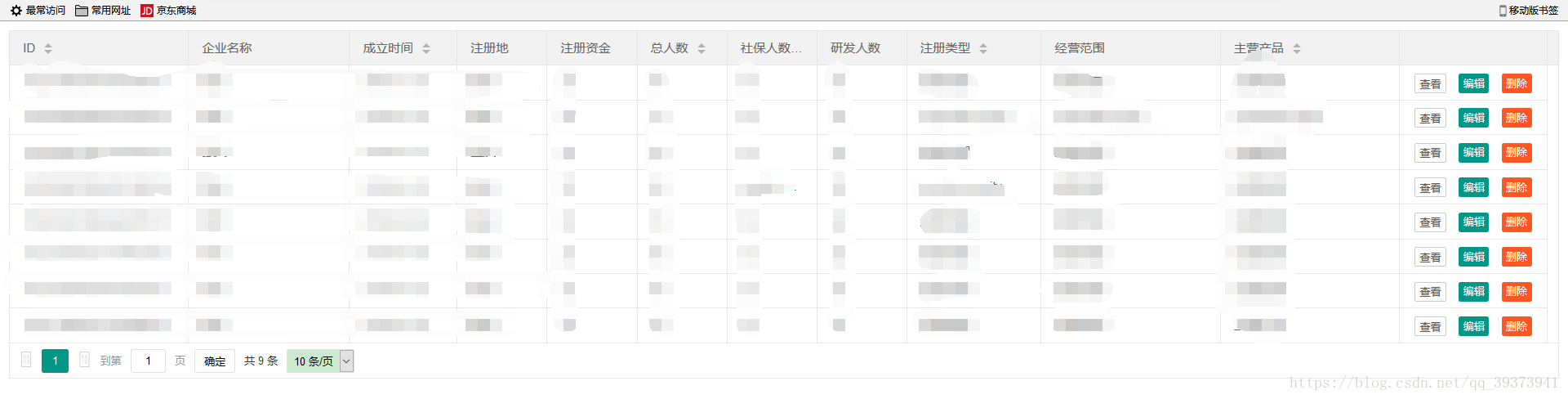
至此用layui分页查询就差不多完成了
layui的修改,删除可看点击打开链接
版权声明:本文为qq_39373941原创文章,遵循CC 4.0 BY-SA版权协议,转载请附上原文出处链接和本声明。