如何实现VMware下Ubuntu系统和Windows系统文件之间的复制和粘贴?
实现VMware下Ubuntu系统和Windows系统文件之间的复制和粘贴有以下方法:
- 安装 VMware tools
- 在linux中使用 samba服务
- 在linux中使用 ftp服务 ,使用上传、下载功能进行共享
- 安装 SSH客户端 ,连接之后,直接拖拽文件即可
- 使用 U盘 ,把文件拷到U盘,用虚拟机的linux读U盘
这其中最好的方法就是安装 VMware tools ,下面就来讲讲如何安装VMware tools
第一步:下载VMware tools
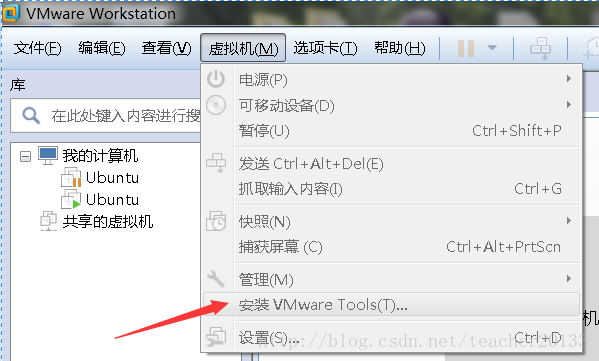
点击安装VMware tools,安装完成之后打开终端输入
su root进入超级用户
然后把文件切换到media/wy/'VMware Tools‘目录下
![[外链图片转存失败,源站可能有防盗链机制,建议将图片保存下来直接上传(img-GGOECgOS-1582702700811)(C:\Users\Administrator\AppData\Roaming\Typora\typora-user-images\1582701752525.png)]](https://img-blog.csdnimg.cn/20200226153847351.png?x-oss-process=image/watermark,type_ZmFuZ3poZW5naGVpdGk,shadow_10,text_aHR0cHM6Ly9ibG9nLmNzZG4ubmV0L1lBT0hBSVBJ,size_16,color_FFFFFF,t_70)
找到VMwareTools-10.1.6-5214329.tar.gz这个文件,将其复制到tmp目录下
cp VMwareTools-10.1.6-5214329.tar.gz /tmp![[外链图片转存失败,源站可能有防盗链机制,建议将图片保存下来直接上传(img-EMjOpdZV-1582702700813)(C:\Users\Administrator\AppData\Roaming\Typora\typora-user-images\1582701856886.png)]](https://img-blog.csdnimg.cn/20200226154003333.png?x-oss-process=image/watermark,type_ZmFuZ3poZW5naGVpdGk,shadow_10,text_aHR0cHM6Ly9ibG9nLmNzZG4ubmV0L1lBT0hBSVBJ,size_16,color_FFFFFF,t_70)
在tmp目录下解压VMwareTools-10.1.6-5214329.tar.gz
tar -xzf VMwareTools-10.1.6-5214329.tar.gz![[外链图片转存失败,源站可能有防盗链机制,建议将图片保存下来直接上传(img-kNYcBEP3-1582702700815)(C:\Users\Administrator\AppData\Roaming\Typora\typora-user-images\1582702051582.png)]](https://img-blog.csdnimg.cn/20200226154013689.png?x-oss-process=image/watermark,type_ZmFuZ3poZW5naGVpdGk,shadow_10,text_aHR0cHM6Ly9ibG9nLmNzZG4ubmV0L1lBT0hBSVBJ,size_16,color_FFFFFF,t_70)
解压以后可以看到vmware-tools-distrib文件,进入vmware-tools-distrib文件
cd vmware-tools-distrib/然后运行vmware-install.pl
./vmware-install.pl跟着提示默认按Enter键就可以了。
如果出现**what is the location of the "ifconfig"program on your machine?**输入yes之后按Enter继续就可以了
安装结束之后输入reboot重启一下就可以了。
your machine?**输入yes之后按Enter继续就可以了
安装结束之后输入reboot重启一下就可以了。
版权声明:本文为YAOHAIPI原创文章,遵循CC 4.0 BY-SA版权协议,转载请附上原文出处链接和本声明。