lz的用法是这样的,一个中古级mac mini 2011上装有vmware esxi 7.6, 然后上面挂载了lz的华芸Asustor Nas的iscsi空间,lz用的是basic volume,然后esxi上面有虚拟的黑群晖6.2.2-24922,黑群晖的docker里跑着不可描述软件,但是发现下载速度过快时,比如有好几个文件同时下载,总速度超过60MB/s以后storage manager里很容易出现volume crashed提示,之后volume就成为只读状态了,原因不了解,但是网上搜到了手动修复步骤,特此记录如下
首先用linux机器, 如果没有可以在windows上装cygwin,然后ssh到黑群晖
> ssh username@ipAdresss
# sudo 之后再次输入密码,切换到root帐号
> sudo -i
此时可以看到sdc3后面的[E] 表示他现在是错误状态
root@syno:~# cat /proc/mdstat
Personalities : [linear] [raid0] [raid1] [raid10] [raid6] [raid5] [raid4] [raidF1]
md2 : active raid1 sdb3[0]
11955200 blocks super 1.2 [1/1] [U]
md3 : active raid1 sdc3[0](E)
3738594304 blocks super 1.2 [1/1] [E]
md1 : active raid1 sdb2[0] sdc2[1]
2097088 blocks [12/2] [UU__________]
md0 : active raid1 sdb1[0]
2490176 blocks [12/1] [U___________]
unused devices:
然后记录下 Array UUID,下面的修复命令要用到
root@syno:~# mdadm --detail /dev/md3
/dev/md3:
Version : 1.2
Creation Time : Thu Jun 4 09:42:45 2020
Raid Level : raid1
Array Size : 3738594304 (3565.40 GiB 3828.32 GB)
Used Dev Size : 3738594304 (3565.40 GiB 3828.32 GB)
Raid Devices : 1
Total Devices : 1
Persistence : Superblock is persistent
Update Time : Fri Jun 19 11:56:32 2020
State : clean, FAILED
Active Devices : 1
Working Devices : 1
Failed Devices : 0
Spare Devices : 0
Name : syno:3 (local to host syno)
UUID : bf3d8440:bff1633d:8c175723:69d81786
Events : 8
Number Major Minor RaidDevice State
0 8 35 0 faulty active sync /dev/sdc3
root@syno:~# mdadm --examine /dev/sdc3
/dev/sdc3:
Magic : a92b4efc
Version : 1.2
Feature Map : 0x0
Array UUID : bf3d8440:bff1633d:8c175723:69d81786
Name : syno:3 (local to host syno)
Creation Time : Thu Jun 4 09:42:45 2020
Raid Level : raid1
Raid Devices : 1
Avail Dev Size : 7477188608 (3565.40 GiB 3828.32 GB)
Array Size : 3738594304 (3565.40 GiB 3828.32 GB)
Data Offset : 2048 sectors
Super Offset : 8 sectors
Unused Space : before=1968 sectors, after=0 sectors
State : clean
Device UUID : 2c5061d2:a9b7a58b:e455b5e1:44868b58
Update Time : Fri Jun 19 11:56:32 2020
Checksum : 1118665c - correct
Events : 8
Device Role : Active device 0
Array State : A ('A' == active, '.' == missing, 'R' == replacing)
修复的命令是
root@syno:~# mdadm -Cf /dev/md3 -e1.2 -n1 -l1 /dev/sdc3 -ubf3d8440:bff1633d:8c175723:69d81786
mdadm: super1.x cannot open /dev/sdc3: Device or resource busy
mdadm: /dev/sdc3 is not suitable for this array.
mdadm: create aborted
如果提示设备忙,可以先
root@syno:~# mdadm --stop /dev/md3
mdadm: stopped /dev/md3
如果还是忙,就先 umount /dev/md3
lz这里遇到过还是device busy,然后lz去把himedia播放器关了,把File Services里面的NFS关了,才可以,之前试过装opkg,装了lsof, 然后 lsof | grep volume2并没有找到什么进程在使用volume2,事实上opkg装完黑裙就进不了webui了,只好ssh进去synopkg uninstall ebi
如果修复命令成功了, 重启黑群晖就恢复正常了
root@syno:~# mdadm -Cf /dev/md3 -e1.2 -n1 -l1 /dev/sdc3 -ubf3d8440:bff1633d:8c175723:69d81786
mdadm: /dev/sdc3 appears to be part of a raid array:
level=raid1 devices=1 ctime=Thu Jun 4 09:42:45 2020
Continue creating array?
Continue creating array? (y/n) y
mdadm: array /dev/md3 started.
命令的帮助
root@syno:~# mdadm --help-options
Any parameter that does not start with '-' is treated as a device name
or, for --examine-bitmap, a file name.
The first such name is often the name of an md device. Subsequent
names are often names of component devices.
Some common options are:
--help -h : General help message or, after above option,
mode specific help message
--help-options : This help message
--version -V : Print version information for mdadm
--verbose -v : Be more verbose about what is happening
--quiet -q : Don't print un-necessary messages
--brief -b : Be less verbose, more brief
--export -Y : With --detail, --detail-platform or --examine use
key=value format for easy import into environment
--force -f : Override normal checks and be more forceful
--assemble -A : Assemble an array
--build -B : Build an array without metadata
--create -C : Create a new array
--detail -D : Display details of an array
--examine -E : Examine superblock on an array component
--examine-bitmap -X: Display the detail of a bitmap file
--examine-badblocks: Display list of known bad blocks on device
--monitor -F : monitor (follow) some arrays
--grow -G : resize/ reshape and array
--incremental -I : add/remove a single device to/from an array as appropriate
--query -Q : Display general information about how a
device relates to the md driver
--auto-detect : Start arrays auto-detected by the kernel
lz还遇到过重启之后打不开webui,但是可以ssh,重启nginx服务后复活
root@syno:~# synoservice -status nginx
service [nginx] status=[error]
required upstart job:
[nginx] is stop.
=======================================
root@syno:~# synoservice -start nginx
root@syno:~# synoservice -status nginx
Service [nginx] status=[enable]
required upstart job:
[nginx] is start.
=======================================
# lz有去检查log
root@syno:~# cat /var/log/nginx/error.log
...
2020/02/08 21:07:42 [notice] 16193#16193: signal process started
2020/02/08 21:07:42 [error] 16193#16193: open() "/run/nginx.pid" failed (2: No such file or directory)
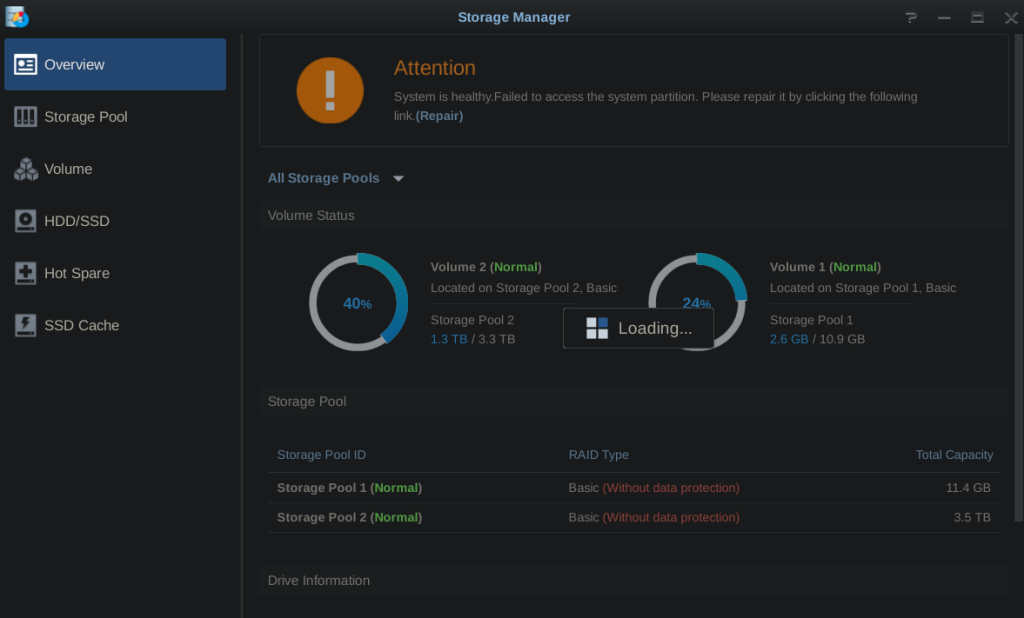
lz还遇到过这样全都做好了,可是重启又进不了webui,此时lz mount /dev/md3,然后去到storage manager里修复syste
m partition就好了(修复的时候不要mount volume2)
俗语有云,常在河边走,哪能不湿鞋,所以lz在某天华丽的挂掉了,所有数据丢失,正好趁此机会,lz更新到了jun’s 1.03 loader,手动下载了6.2.3-25426-3固件,然后重新安装了,貌似一切正常,不过下载速度过猛的时候,还是会不时出现这个volume crashed
赞过:
赞 正在加载……
相关