How to setup thin Provisioned Logical Volumes in CentOS 7 / RHEL 7
by Pradeep Kumar · Published July 15, 2016 · Updated August 3, 2017
LVM (Logical Volume Management) is a good way to use the disk space on the server more efficiently. One of the benefits of LVM is that we can take the snapshots of lvm based partitions and can create thinly provisioned logical volumes.
Thin Provisioning allows us to create the larger logical volumes than the available disk space. To use the thin provisioning we have to create a thin pool from volume group and then we can create logical volumes from that thin pool.
In this article we will demonstrate how to setup thin provisioned Logical Volumes in CentOS 7.x and RHEL7.x step by step.
Let’s assume we have Linux Server (CentOS 7.x / RHEL 7.x) and have assigned new a disk of 10 GB. We will be creating a thin pool of 10 GB, from this thin pool initially we will create two logical volumes of each 4 GB and one logical volume of size 1GB.
Refer the following steps to create thinly provisioned Logical Volumes
Step:1 Create the Physical Volume using pvcreate command
Let’s assume new disk is detected as /dev/sdb.
[root@linuxtechi ~]# pvcreate /dev/sdb
Physical volume "/dev/sdb" successfully created
[root@linuxtechi ~]#
Step:2 Create Volume group using vgcreate command
[root@linuxtechi ~]# vgcreate volgrp /dev/sdb
Volume group "volgrp" successfully created
[root@linuxtechi ~]#
Step:3 Create a thin pool from the volume group
Thin pool is like a logical volume which is created using lvcreate command
Syntax :
# lvcreate –L <Size_of_pool> -T <volume_group>/<thin_pool_name>
Where –L is used to specify the size of the pool and –T specify the thin pool
[root@linuxtechi ~]# lvcreate -L 9.90G -T volgrp/lvpool
Rounding up size to full physical extent 9.90 GiB
Logical volume "lvpool" created.
[root@linuxtechi ~]#
Verify the thin pool size.
[root@linuxtechi ~]# lvs /dev/volgrp/lvpool
LV VG Attr LSize Pool Origin Data% Meta% Move Log Cpy%Sync Convert
lvpool volgrp twi-a-tz-- 9.90g 0.00 0.59
[root@linuxtechi ~]#
Step:4 Create Logical Volumes from thin pool.
Let’s create two logical volumes of each size 4 GB.
Syntax :
# lvcreate -V <Size_of_Logical_Volume> -T <volume_group_name> /<name_of_thinpool> -n <name_of_logical_volume>
[root@linuxtechi ~]# lvcreate -V 4G -T volgrp/lvpool -n node1
Logical volume "node1" created.
[root@linuxtechi ~]# lvcreate -V 4G -T volgrp/lvpool -n node2
Logical volume "node2" created.
[root@linuxtechi ~]#
Verify the status of thin pool and logical volumes
[root@linuxtechi ~]# lvs /dev/volgrp/lvpool && lvs /dev/volgrp/node{1..2}
LV VG Attr LSize Pool Origin Data% Meta% Move Log Cpy%Sync Convert
lvpool volgrp twi-aotz-- 9.90g 0.00 0.65
LV VG Attr LSize Pool Origin Data% Meta% Move Log Cpy%Sync Convert
node1 volgrp Vwi-a-tz-- 4.00g lvpool 0.00
node2 volgrp Vwi-a-tz-- 4.00g lvpool 0.00
[root@linuxtechi ~]#
Step:5 Format the thin provisioned logical volumes
Use the mkfs command to create file system(ext4) on logical volumes.
[root@linuxtechi ~]# mkfs.ext4 /dev/volgrp/node1
[root@linuxtechi ~]# mkfs.ext4 /dev/volgrp/node2
[root@linuxtechi ~]# mkdir /opt/vol1 && mkdir /opt/vol2
[root@linuxtechi ~]# mount /dev/volgrp/node1 /opt/vol1/ && mount /dev/volgrp/node2 /opt/vol2/
[root@linuxtechi ~]#
Check the mount points
[root@linuxtechi ~]# df -Th /opt/vol1/ /opt/vol2/
Filesystem Type Size Used Avail Use% Mounted on
/dev/mapper/volgrp-node1 ext4 3.9G 16M 3.6G 1% /opt/vol1
/dev/mapper/volgrp-node2 ext4 3.9G 16M 3.6G 1% /opt/vol2
[root@linuxtechi ~]#
Write some data into the above created file systems
[root@linuxtechi ~]# dd if=/dev/zero of=/opt/vol1/file.txt bs=1M count=1024
1024+0 records in
1024+0 records out
1073741824 bytes (1.1 GB) copied, 3.26031 s, 329 MB/s
[root@linuxtechi ~]# dd if=/dev/zero of=/opt/vol2/file.txt bs=1M count=1024
1024+0 records in
1024+0 records out
1073741824 bytes (1.1 GB) copied, 2.70821 s, 396 MB/s
[root@linuxtechi ~]#
Now verify the size of thinly provisioned logical volumes using lvs command.
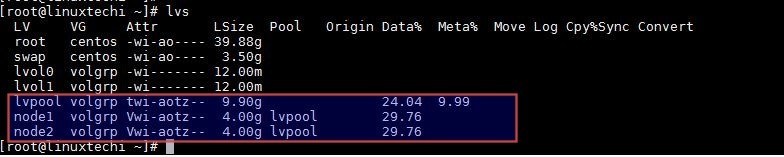
As we can see that both the logical volumes consume 29 % data.
Now try to create third logical volume from the Thin pool.
[root@linuxtechi ~]# lvcreate -V 1G -T volgrp/lvpool -n node3
Logical volume "node3" created.
[root@linuxtechi ~]#
Scenario :
Well as of now we have consume whole space of thin pool in logical volumes. If some one ask me to create one more logical volume of size 2G.
Can I create new logical volume from the thin pool… ?
What will happen ? Does it support over-committed… ?
Answers is Yes, we can create logical volume as it supports over-committed or over-provisioning but while creating logical volume it will throw an warning message. Example is shown below :
[root@linuxtechi ~]# lvcreate -V 2G -T volgrp/lvpool -n node4
WARNING: Sum of all thin volume sizes (11.00 GiB) exceeds the size of thin pool volgrp/lvpool and the size of whole volume group (10.00 GiB)!
For thin pool auto extension activation/thin_pool_autoextend_threshold should be below 100.
Logical volume "node4" created.
[root@linuxtechi ~]#
Now Verify the logical volume status again
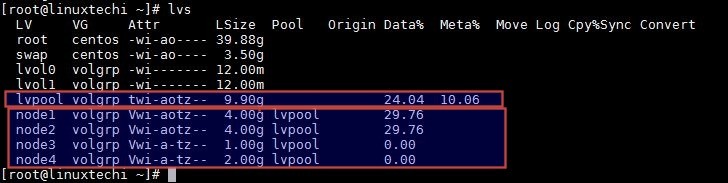
Step:6 Extend the size of thin pool using lvextend command
Lets assume one more disk of 5G is assigned to the server (/dev/sdc), we will be using this disk to extend the thin pool.
Refer the following steps
Create the physical volume and extend the volume group (volgrp)
[root@linuxtechi ~]# pvcreate /dev/sdc
Physical volume "/dev/sdc" successfully created
[root@linuxtechi ~]# vgextend volgrp /dev/sdc
Volume group "volgrp" successfully extended
[root@linuxtechi ~]#
As thin pool is a logical volume so we can extend its size by lvextend command
[root@linuxtechi ~]# lvextend -L+5G volgrp/lvpool
Now verify the thin pool size, it should be around 15 GB.
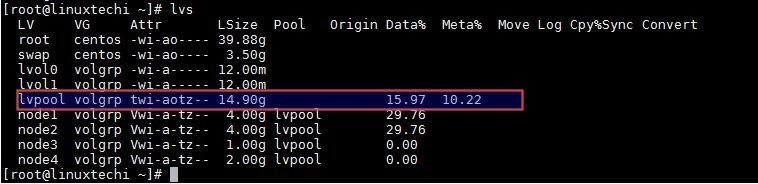
Note: We can not reduce or shrink thin pool only extension is supported