1 $ git commit -a -m 'v6'
 2
 3 *** Please tell me who you are.
 4
 5 Run
 6
 7   git config --global user.email "you@example.com"
 8   git config --global user.name "Your Name"
 9
10 to set your account's default identity.
11 Omit --global to set the identity only in this repository.
12
13 fatal: unable to auto-detect email address (got 'Administrator@WIN-20170405AQW.(
14 none)')
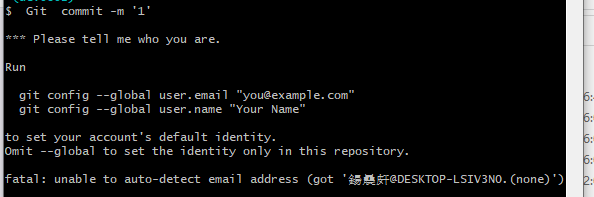
遇到这种情况,可以这样:
1.全局设置(对所有git工程都有效)
设置用户名:git config --global user.name 用户名
设置邮箱: git config --global user.email 邮箱
2.对特定branch(切换到工程目录下执行)
设置用户名:git config user.name 用户名
设置邮箱: git config user.email 邮箱
如果这些命令不行的话;就可以尝试这个了,用这个最好是只有一个git用的这样就不会冲突;
打开Git所在位置到:Git\mingw64\etc 打开etc 里的gitconfig 文件 ,在最下面添加:
[user]
name =XXXX(用户名)
email =XXXX(邮箱)
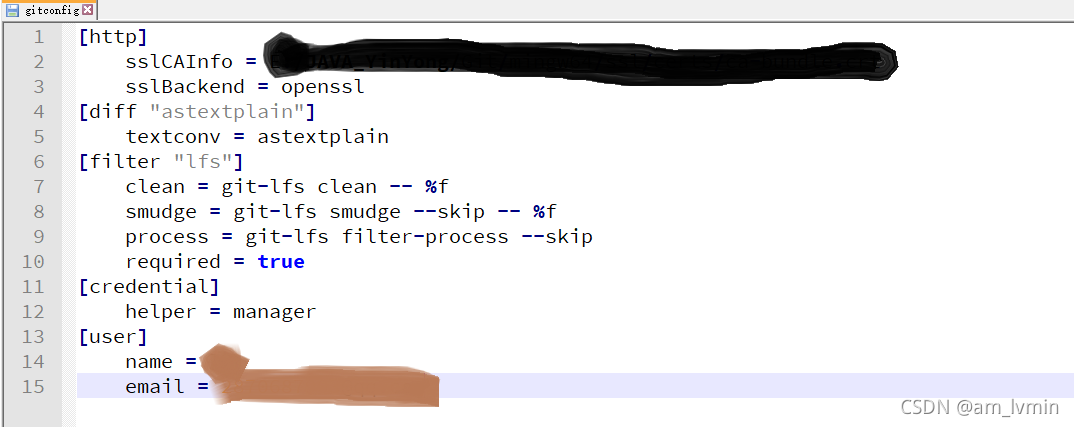
然后就OK了。
最后改完了,可以查看修改结果:
$ git config user.name
$ git config user.email
版权声明:本文为am_lvmin原创文章,遵循CC 4.0 BY-SA版权协议,转载请附上原文出处链接和本声明。