SpringSecurity OAuth2.0的学习
首先我们要知道 OAauth(开放授权)是一个开方标准,允许用户授权第三方应用访问他们的微服务应用.
OAauth2 包括以下角色
1. 客户端: 通常指 需要通过资源拥有者的授权请求资源服务器的资源,比如Android客户端,WEB端等
2. 资源拥有者: 通常为用户也可以是应用程序,即该资源的拥有者
3. 授权服务器: 用于服务商提供商对资源拥有的身份进行认证,对访问资源惊醒授权。
但是授权服务器就允许随便一个客户端就介入到它的授权服务器吗,它会给介入放一个身份用于介入是的凭证:
- client_id: 客户端标识
- client_secret: 客户端秘钥
1. OAuth2.0四种授权模式
1.1. 授权码模式 (authorization_code)
典型的例子 微信登录
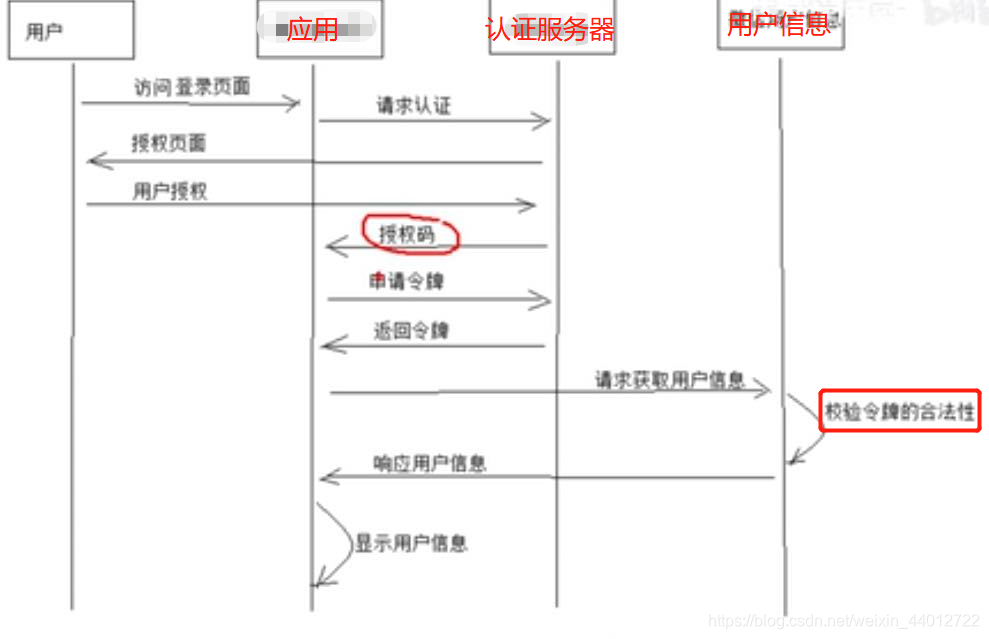
1.2. 简化模式 (implicit)
不通过第三方应用程序的服务器,直接在浏览器中向认证服务器申请令牌,跳过了"授权码"这个步骤,这个模式不常使用,如果要了解透彻看一下这篇博客 https://baijunyao.com/article/203
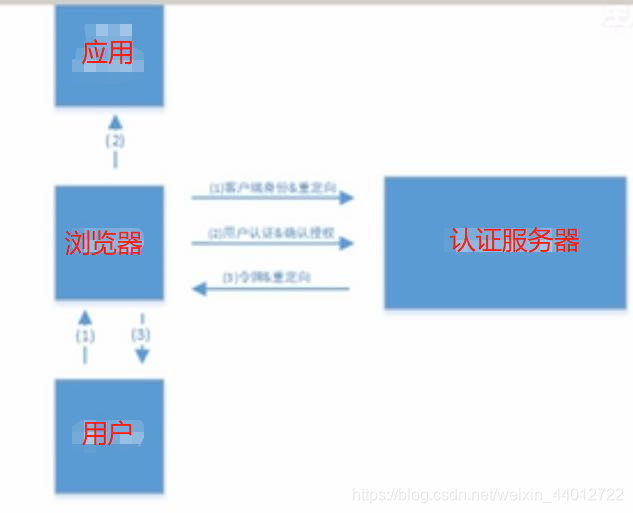
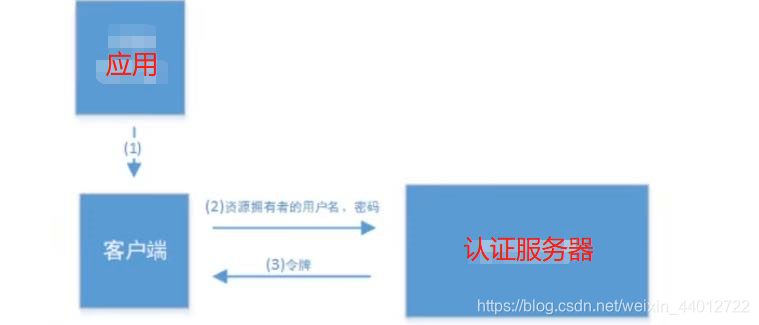
1.3. 密码模式 (password)
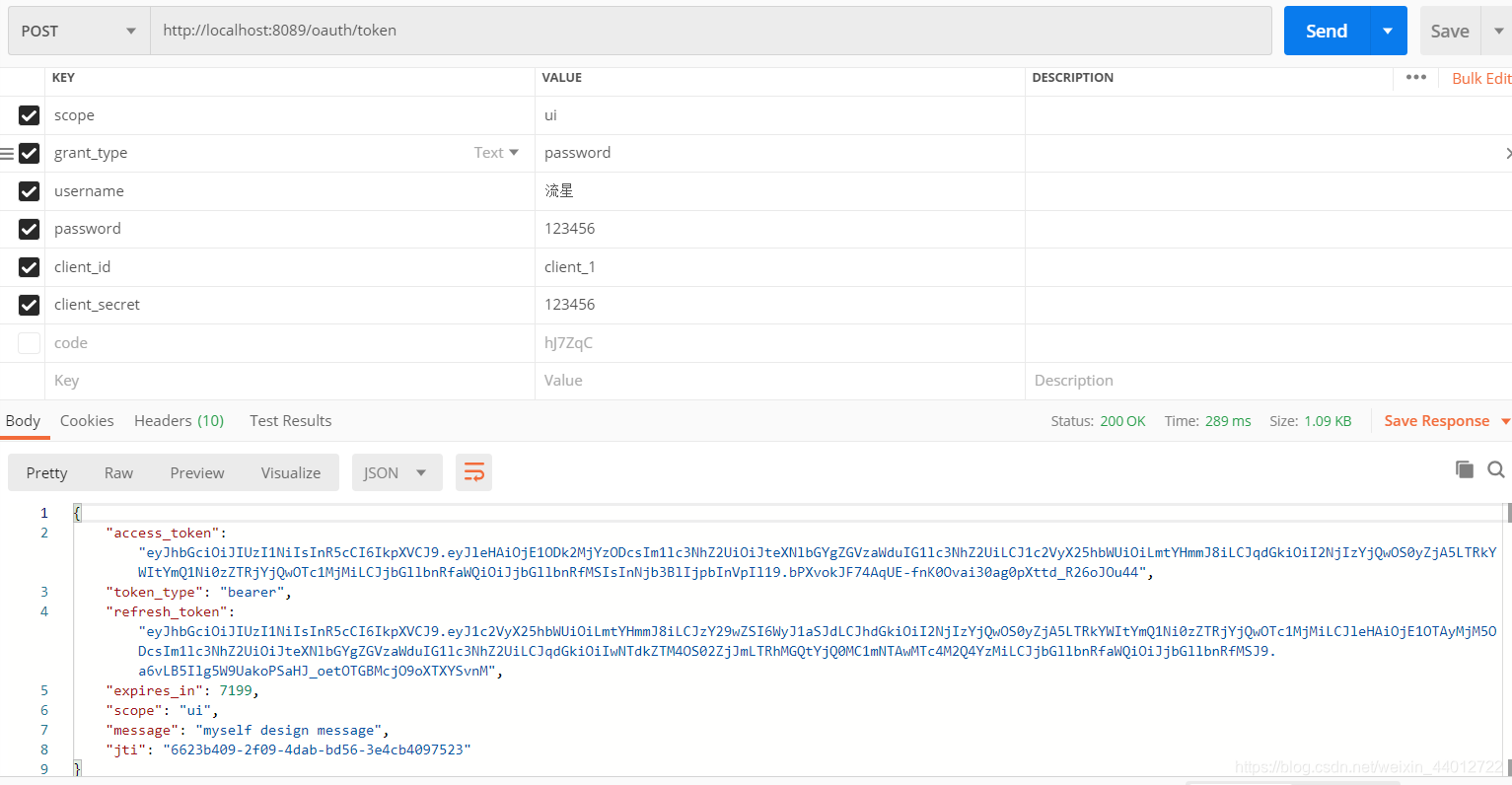
传 client_id,client_secret,grant_type,username,password
1.4.客户端模式 (client_secret)
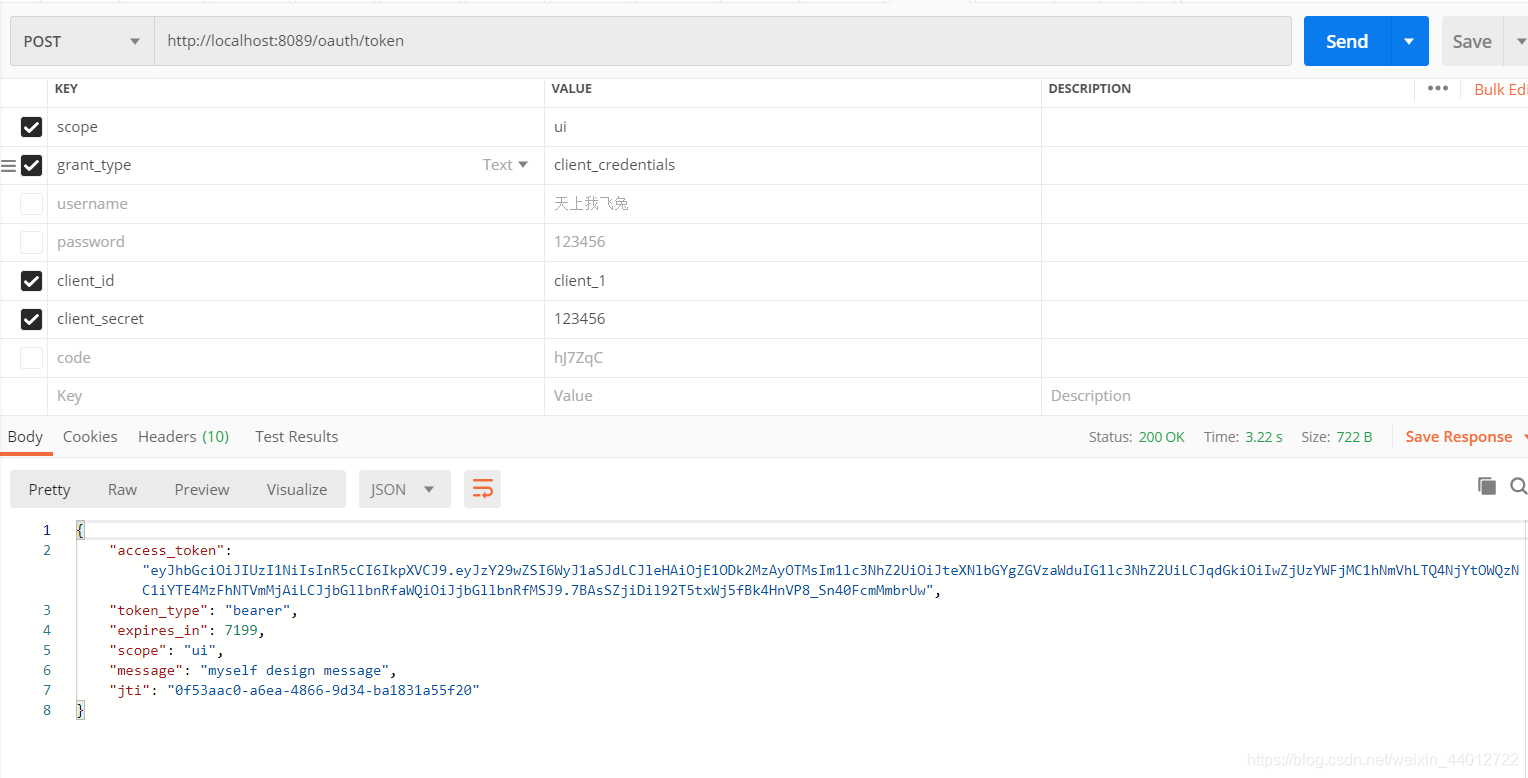
只用传 client_id,client_secret,grant_type即可,和密码模式很像就是少了不用传账户和密码
2.OAuth2.0默认的暴露的访问端点
| 地址 | 作用 |
|---|---|
| /oauth/authorize | 授权端点,申请授权码。 |
| /oauth/token | 令牌端点 |
| /oauth/confirm_access | 用户确认授权提交端点 |
| /oauth/error | 授权服务错误信息端点 |
| /oauth/check_token | 用于资源服务访问的令牌解析端点 |
| /oauth/token_key | 提供共公有秘钥的端点,如果你使用JWT令牌的话,需要注意的是授权端点这个URL应该被SpringSecurity保护起来职工授权用户访问 |
3.先搭建springcloud微服务环境
这里不多讲了 不会的请移步到我这篇博客 https://blog.csdn.net/weixin_44012722/article/details/105728396
这里我声明 我的版本是springsecurity5.x,和4.x版本有差别,差别在于你按4.x配置5.x会出一点点bug,我在这给你把我踩的坑告知你
4.搭建授权服务器配置 (授权码模式)
导入的依赖
 		<dependency>
            <groupId>org.springframework.cloud</groupId>
            <artifactId>spring-cloud-starter-oauth2</artifactId>
        </dependency>
AuthorizationServer.java 认证服务器配置类
@Configuration
@EnableAuthorizationServer
public class AuthorizationServer extends AuthorizationServerConfigurerAdapter {

    @Override
    // 配置客户端信息
    public void configure(ClientDetailsServiceConfigurer clients) throws Exception {
        String secret = "{bcrypt}" + new BCryptPasswordEncoder().encode("123456");//OAuth推荐的密码存储方式 {加密算法}加密后的密码
        clients.inMemory() // 将客户端的信息存储在内存中
                .withClient("client_1") // 客户端 id, 需唯一
                .secret(secret)//客户端密码
                .authorizedGrantTypes("client_credentials", "password", "authorization_code", "refresh_token") // 认证服务器支持的认证模式 支持刷新令牌
                .scopes("ui") // 客户端域
                .redirectUris("http://www.baidu.com"); //授权成功重定向的url
    }

    /**
     * 客户端密码编码器
     */
    @Bean
    public PasswordEncoder passwordEncoder(){
        return PasswordEncoderFactories.createDelegatingPasswordEncoder();
    }

    @Override
    public void configure(AuthorizationServerSecurityConfigurer oauthServer) throws Exception {
        oauthServer// 开启/oauth/token_key验证端口无权限访问
                .tokenKeyAccess("permitAll()")
                // 开启/oauth/check_token验证端口认证权限访问
                .checkTokenAccess("isAuthenticated()")
                //允许表单认证    请求/oauth/token的,如果不配置这个/oauth/token访问就会显示没有认证
                .allowFormAuthenticationForClients();
    }
WebSecurityConfig.java Security配置类
@Configuration
@EnableWebSecurity
public class WebSecurityConfig extends WebSecurityConfigurerAdapter {

	//SpringSecurity5.x 如果不配置此编码器,并在下面设置编码器,会报错
	public PasswordEncoder userPasswordEncoder(){
        return NoOpPasswordEncoder.getInstance();
    }

    @Override
    protected void configure(AuthenticationManagerBuilder auth) throws Exception {
        auth.inMemoryAuthentication().withUser(User.withUsername("lzj").password("123456").roles("admin")).passwordEncoder(userPasswordEncoder());
    }
}
访问 http://localhost:8089/oauth/authorize?client_id=client_1&response_type=code填写密码后,他会让你授权
用户授权后就会重定向我们指定的地址那,并把授权码code给你
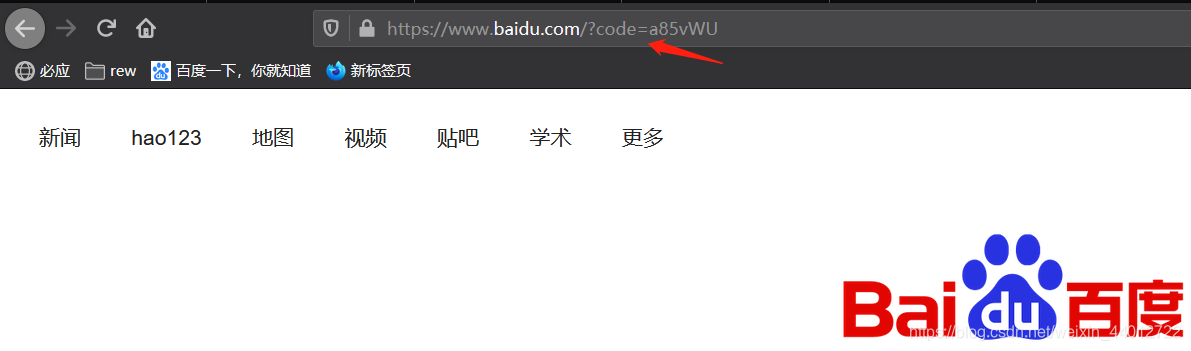
这时候把 授权码携带去认证服务器获取令牌
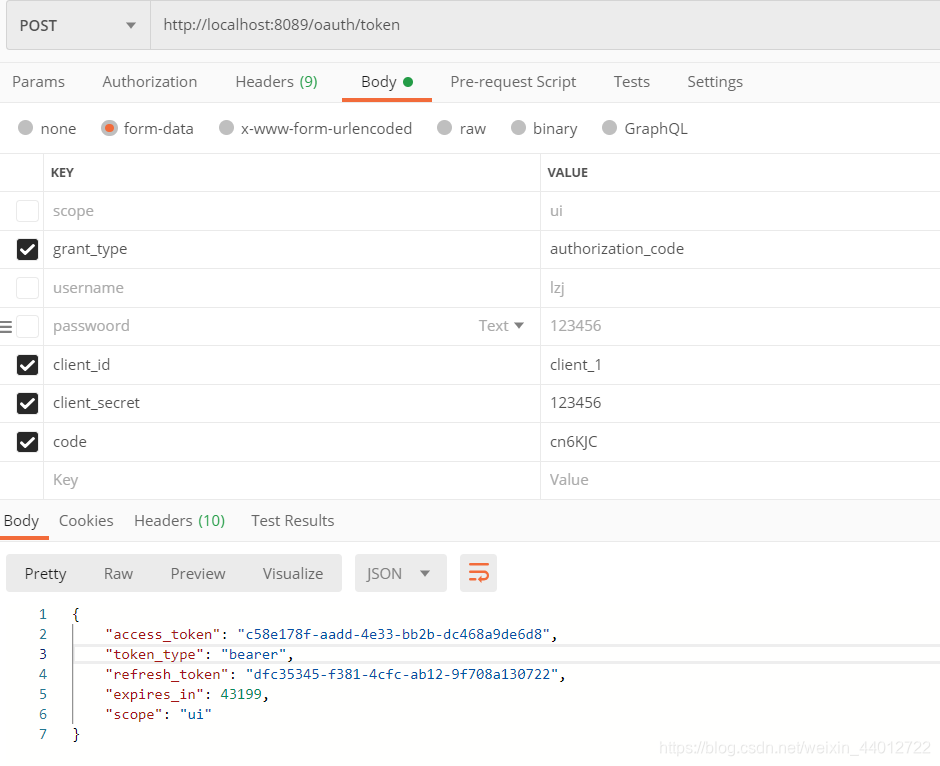
可以看到默认令牌使用UUID生成,它是无序的没有任何意义,所以我们将用JWT代替token默认令牌
令牌的管理 OAuth中预定义的有三种(他们都实现了TokenStore接口欧)
- InMemoryTokenStore (默认):令牌存储在内存中
- jdbcTokenStore: 基于JDBC实现版本,令牌会被保存在数据库中,注意要导入spring-boot-starter-jdbc
- JwtTokenStore:令牌以JWT存储
- RedisTokenStore:令牌存储在redis中
在AuthorizationServer.java中添加
@Configuration
@EnableAuthorizationServer
public class AuthorizationServer extends AuthorizationServerConfigurerAdapter {

    @Autowired
    private AuthenticationManager authenticationManager;
    @Autowired
    private JwtAccessTokenConverter accessTokenConverter;
    @Autowired
    private TokenStore tokenStore;
    @Autowired
    private TokenEnhancerChain tokenEnhancerChain;
    @Autowired
    private UserService userService;

    @Override
    // 配置客户端信息
    public void configure(ClientDetailsServiceConfigurer clients) throws Exception {
        String secret = "{bcrypt}" + new BCryptPasswordEncoder().encode("123456");//OAuth推荐的密码存储方式 {加密算法}加密后的密码
        clients.inMemory() // 将客户端的信息存储在内存中
                .withClient("client_1") // 客户端 id, 需唯一
                .secret(secret)//客户端密码
                .authorizedGrantTypes("client_credentials", "password", "authorization_code", "refresh_token") // 认证服务器支持的认证模式 支持刷新令牌
                .scopes("ui") // 客户端域
                .redirectUris("http://www.baidu.com"); //授权成功重定向的url
    }

    /**
     * 客户端密码编码器
     */
    @Bean
    public PasswordEncoder passwordEncoder(){
        return PasswordEncoderFactories.createDelegatingPasswordEncoder();
    }

    @Override
    public void configure(AuthorizationServerEndpointsConfigurer endpoints) throws Exception {

        // 设置token存储方式,这里提供redis和jwt
        endpoints
                .tokenStore(tokenStore)//临牌存储方式
                .authenticationManager(authenticationManager)//password模式要配置的认证管理器
                .accessTokenConverter(accessTokenConverter)//token转换器
                .tokenEnhancer(tokenEnhancerChain)//token加强器
                .userDetailsService(userService)//执行token刷新需要带上此参数
                .allowedTokenEndpointRequestMethods(HttpMethod.GET,HttpMethod.POST);//允许访问暴露端点的方法

    }

    @Override
    public void configure(AuthorizationServerSecurityConfigurer oauthServer) throws Exception {
        oauthServer// 开启/oauth/token_key验证端口无权限访问
                .tokenKeyAccess("permitAll()")
                // 开启/oauth/check_token验证端口认证权限访问
                .checkTokenAccess("isAuthenticated()")
                //允许表单认证    请求/oauth/token的,如果不配置这个/oauth/token访问就会显示没有认证
                .allowFormAuthenticationForClients();
    }

}
TokenStoreConfig.java token存储配置类
@Configuration
public class TokenStoreConfig {

    private String SIGNING_KEY = "lzj";

    //JWT令牌存储方案
    @Bean
    public TokenStore tokenStore(){
        return new JwtTokenStore(accessTokenConverter());
    }

    //JWT token转换器
    @Bean
    public JwtAccessTokenConverter accessTokenConverter(){
        JwtAccessTokenConverter converter = new JwtAccessTokenConverter();
        converter.setSigningKey(SIGNING_KEY);
        return converter;
    }

    //token加强器 用于存储自己想要的信息到jwt中
    @Bean
    public TokenEnhancer tokenEnhancer() {
        return new JWTTokenEnhancer();
    }

    //token加强器链 把加强器和转换器加入链中
    @Bean
    public TokenEnhancerChain tokenEnhancerChain(){
        TokenEnhancerChain enhancerChain = new TokenEnhancerChain();
        List<TokenEnhancer> enhancers = new ArrayList<>();
        enhancers.add(tokenEnhancer());
        enhancers.add(accessTokenConverter());
        enhancerChain.setTokenEnhancers(enhancers);
        return enhancerChain;
    }

}
JWTTokenEnhancer.java 自定义JWT token加强器
public class JWTTokenEnhancer implements TokenEnhancer {
    @Override
    public OAuth2AccessToken enhance(OAuth2AccessToken oAuth2AccessToken, OAuth2Authentication authentication) {
        Map<String, Object> info = new HashMap<>();
        info.put("message", "myself design message");
        ((DefaultOAuth2AccessToken) oAuth2AccessToken).setAdditionalInformation(info);
        return oAuth2AccessToken;
    }
}
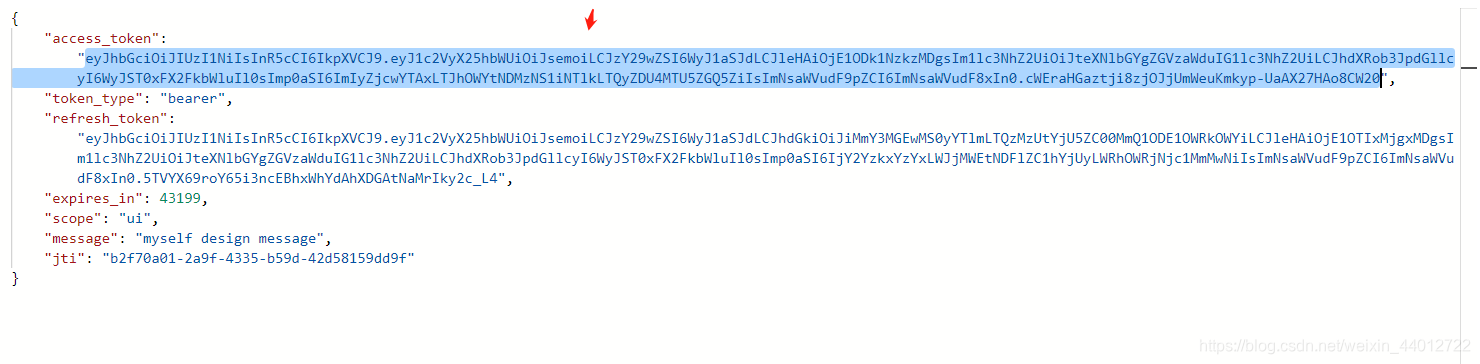
可以看到token变长了,了解过jwt的肯定知道里面是有内容
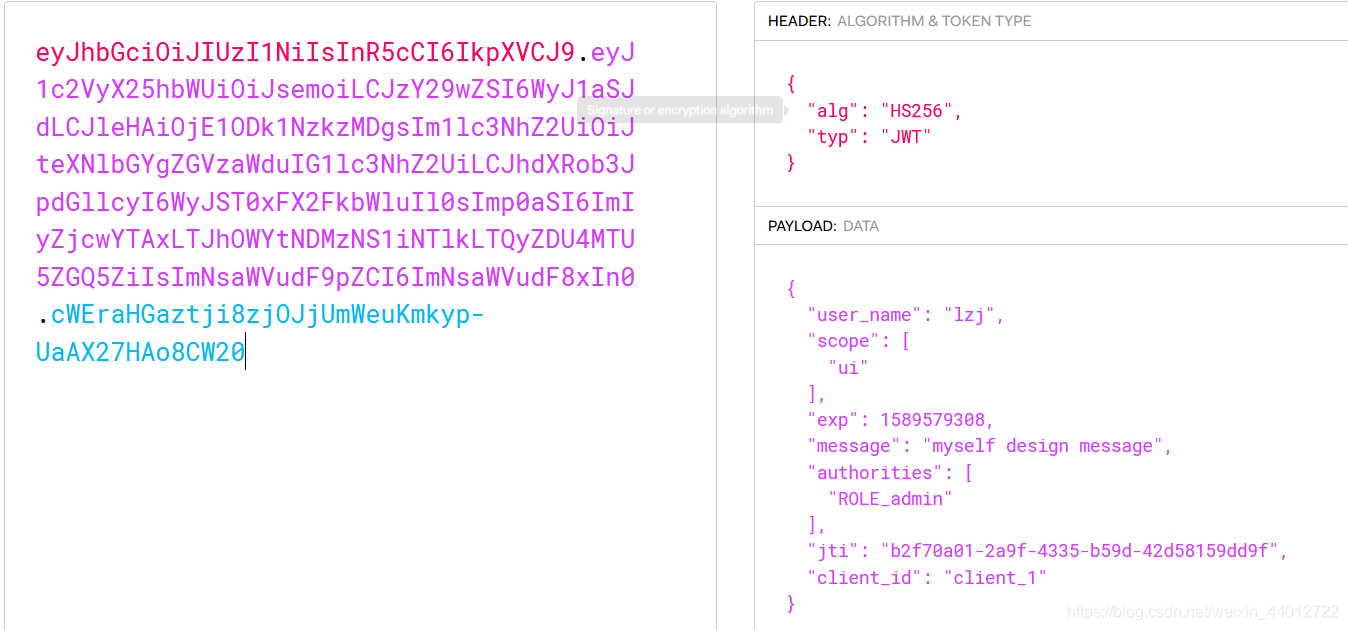
去https://jwt.io/ 解析JWT看其中的内容
这是我没有加TokenEnhancer token加强器,生成的token令牌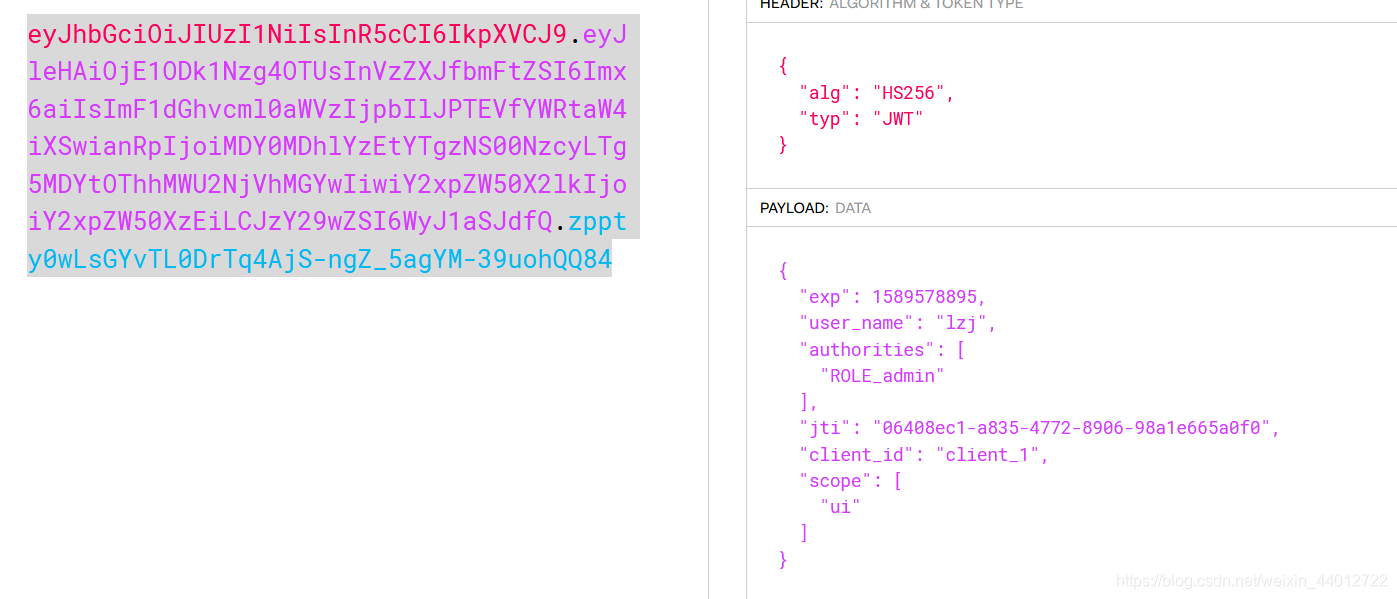
5.搭建认证服务器 密码模式(password) 用户认证采取md5 密码加盐 、客户端密码采用BCrypt加密(有前缀) 、令牌 采用JWT
AuthorizationServer.java
@Configuration
@EnableAuthorizationServer
public class AuthorizationServer extends AuthorizationServerConfigurerAdapter {

    @Autowired
    private AuthenticationManager authenticationManager;
    @Autowired
    private JwtAccessTokenConverter accessTokenConverter;
    @Autowired
    private TokenStore tokenStore;
    @Autowired
    private TokenEnhancerChain tokenEnhancerChain;
    @Autowired
    private UserService userService;

    @Override
    // 配置客户端信息
    public void configure(ClientDetailsServiceConfigurer clients) throws Exception {
        String secret = "{bcrypt}" + new BCryptPasswordEncoder().encode("123456");//OAuth推荐的密码存储方式 {加密算法}加密后的密码
//        String secret = new BCryptPasswordEncoder().encode("123456");
        clients.inMemory() // 将客户端的信息存储在内存中
                .withClient("client_1") // 客户端 id, 需唯一
                .secret(secret)//客户端密码
                .authorizedGrantTypes("client_credentials", "password", "authorization_code", "refresh_token") // 认证服务器支持的认证模式 支持刷新令牌
                .scopes("ui") // 客户端域
                .redirectUris("http://www.baidu.com")//授权成功重定向的url
                .accessTokenValiditySeconds(60 * 60 * 2) //toekn 过期时间
                .refreshTokenValiditySeconds(60 * 60 * 24 * 7);  //refresh token 过期时间
    }

    @Override
    public void configure(AuthorizationServerEndpointsConfigurer endpoints) throws Exception {

        // 设置token存储方式,这里提供redis和jwt
        endpoints
                .tokenStore(tokenStore)//令牌存储方式
                .authenticationManager(authenticationManager)//password模式要配置的认证管理器
                .accessTokenConverter(accessTokenConverter)//token转换器
                .tokenEnhancer(tokenEnhancerChain)//token加强器
				.userDetailsService(userService)//执行token刷新需要带上此参数
                .allowedTokenEndpointRequestMethods(HttpMethod.GET,HttpMethod.POST);//允许访问暴露端点的方法
    }

    @Bean
    PasswordEncoder passwordEncoder() {
        return PasswordEncoderFactories.createDelegatingPasswordEncoder();
    }

    @Override
    public void configure(AuthorizationServerSecurityConfigurer oauthServer) throws Exception {
        oauthServer// 开启/oauth/token_key验证端口无权限访问
                .tokenKeyAccess("permitAll()")
                // 开启/oauth/check_token验证端口认证权限访问
                .checkTokenAccess("isAuthenticated()")
                //允许表单认证    请求/oauth/token的,如果不配置这个/oauth/token访问就会显示没有认证
                .allowFormAuthenticationForClients();
    }

}
TokenStoreConfig.java
@Configuration
public class TokenStoreConfig {

    private String SIGNING_KEY = "lzj";

    //JWT令牌存储方案
    @Bean
    public TokenStore tokenStore(){
        return new JwtTokenStore(accessTokenConverter());
    }

    //JWT token转换器
    @Bean
    public JwtAccessTokenConverter accessTokenConverter(){
        JwtAccessTokenConverter converter = new JwtAccessTokenConverter();
        converter.setSigningKey(SIGNING_KEY);
        return converter;
    }

    //token加强器 用于存储自己想要的信息到jwt中
    @Bean
    public TokenEnhancer tokenEnhancer() {
        return new JWTTokenEnhancer();
    }

    //token加强器链 把加强器和转换器加入链中
    @Bean
    public TokenEnhancerChain tokenEnhancerChain(){
        TokenEnhancerChain enhancerChain = new TokenEnhancerChain();
        List<TokenEnhancer> enhancers = new ArrayList<>();
        enhancers.add(tokenEnhancer());
        enhancers.add(accessTokenConverter());
        enhancerChain.setTokenEnhancers(enhancers);
        return enhancerChain;
    }

}
JWTTokenEnhancer.java
public class JWTTokenEnhancer implements TokenEnhancer {
    @Override
    public OAuth2AccessToken enhance(OAuth2AccessToken oAuth2AccessToken, OAuth2Authentication authentication) {
        Map<String, Object> info = new HashMap<>();
        info.put("message", "myself design message");
        ((DefaultOAuth2AccessToken) oAuth2AccessToken).setAdditionalInformation(info);
        return oAuth2AccessToken;
    }
}
WebSecurityConfig.java
@Configuration
@EnableWebSecurity
public class WebSecurityConfig extends WebSecurityConfigurerAdapter {

    @Autowired
    private UserService userService;

    @Override
    protected void configure(HttpSecurity http) throws Exception {
        http.requestMatchers().anyRequest()
                .and()
                .authorizeRequests()
                .anyRequest().permitAll()
                .and().cors().and().csrf().disable();
    }

    /**
     * 用户密码编码器
     */
    public PasswordEncoder userPasswordEncoder(){
        return MyPasswordEncoder.getInstance();
    }

    @Override
    protected void configure(AuthenticationManagerBuilder auth) throws Exception {
        auth.userDetailsService(userService).passwordEncoder(userPasswordEncoder());
    }

	//password模式要的认证管理器
    @Override
    @Bean
    public AuthenticationManager authenticationManagerBean() throws Exception {
        return super.authenticationManagerBean();
    }

}
MyPasswordEncoder.java
public class MyPasswordEncoder implements PasswordEncoder {

    private String salt;
    private static MyPasswordEncoder instance = new MyPasswordEncoder();


    public static MyPasswordEncoder getInstance() {
        return instance;
    }

    public void setSalt(String salt) {
        this.salt = salt;
    }

    @Override
    public String encode(CharSequence rawPassword) {
        return Hashing.md5().newHasher().putString(rawPassword + salt, Charsets.UTF_8).hash().toString();
    }

    @Override
    public boolean matches(CharSequence rawPassword, String encodedPassword) {
        return encodedPassword.equals(encode(rawPassword));
    }

}
SecurityUser.java
这里认证用户对象,我在说明一下,如果要有角色这个字段,也是像权限这个字段一样,创建个对象实现GrantedAuthority 接口,然后重写的getAuthorities方法应该返回权限和角色这两个集合,注意角色前面是要有ROLE_为前缀作为区分,在我后面不管是基于方法注解或者代码进行权限控制,例如hasAuthority或hasRoles都是通过getAuthorities方法获取到改角色的权限和角色,这里注意hasRoles就不用写ROLE_作为前缀,他会自动帮你补上
public class SecurityUser implements UserDetails, Serializable {

    private String username;
    private String password;
    private List<Permission> permissions;

    public SecurityUser() { }

    public SecurityUser(String username, String password, List<Permission> permissions) {
        this.username = username;
        this.password = password;
        this.permissions = permissions;
    }

    @Override
    public Collection<? extends GrantedAuthority> getAuthorities() {
        return this.permissions;
    }

    @Override
    public String getPassword() {
        return this.password;
    }

    @Override
    public String getUsername() {
        return this.username;
    }

    public void setUsername(String username) {
        this.username = username;
    }

    public void setPassword(String password) {
        this.password = password;
    }

    @Override
    public boolean isAccountNonExpired() {
        return true;
    }

    @Override
    public boolean isAccountNonLocked() {
        return true;
    }

    @Override
    public boolean isCredentialsNonExpired() {
        return true;
    }

    @Override
    public boolean isEnabled() {
        return true;
    }
}
Permission.java
public class Permission implements GrantedAuthority {

    private Integer id;
    private String code;
    private String description;
    private String url;

    public Integer getId() {
        return id;
    }

    public void setId(Integer id) {
        this.id = id;
    }

    public String getCode() {
        return code;
    }

    public void setCode(String code) {
        this.code = code;
    }

    public String getDescription() {
        return description;
    }

    public void setDescription(String description) {
        this.description = description;
    }

    public String getUrl() {
        return url;
    }

    public void setUrl(String url) {
        this.url = url;
    }

    @Override
    public String getAuthority() {
        return this.code;
    }
}
UserService.java
@Service
public class UserService implements UserDetailsService {

    @Autowired
    private UserDao userDao;

    @Override
    public UserDetails loadUserByUsername(String username) throws UsernameNotFoundException {
        System.out.println("进入了UserService");
        User user = userDao.getUserByUsername(username);
        if(user != null){
            MyPasswordEncoder encoder = MyPasswordEncoder.getInstance();
            encoder.setSalt(user.getSalt());
            return new SecurityUser(username,user.getPassword(),userDao.findPermissionsByUserId(user.getId()));
        }
        throw new UsernameNotFoundException("用户名或密码错误!");
    }
}
但是springBoot官网手册 推荐用户加密的算法是 {加密算法}BCrypt加密后的密码
就是我上面 客户端密码加密的方式 ,这样你就不用写自己的编码器,直接公用客户端的编码器
测试 根据用户密码 获取access_token和refresh_token

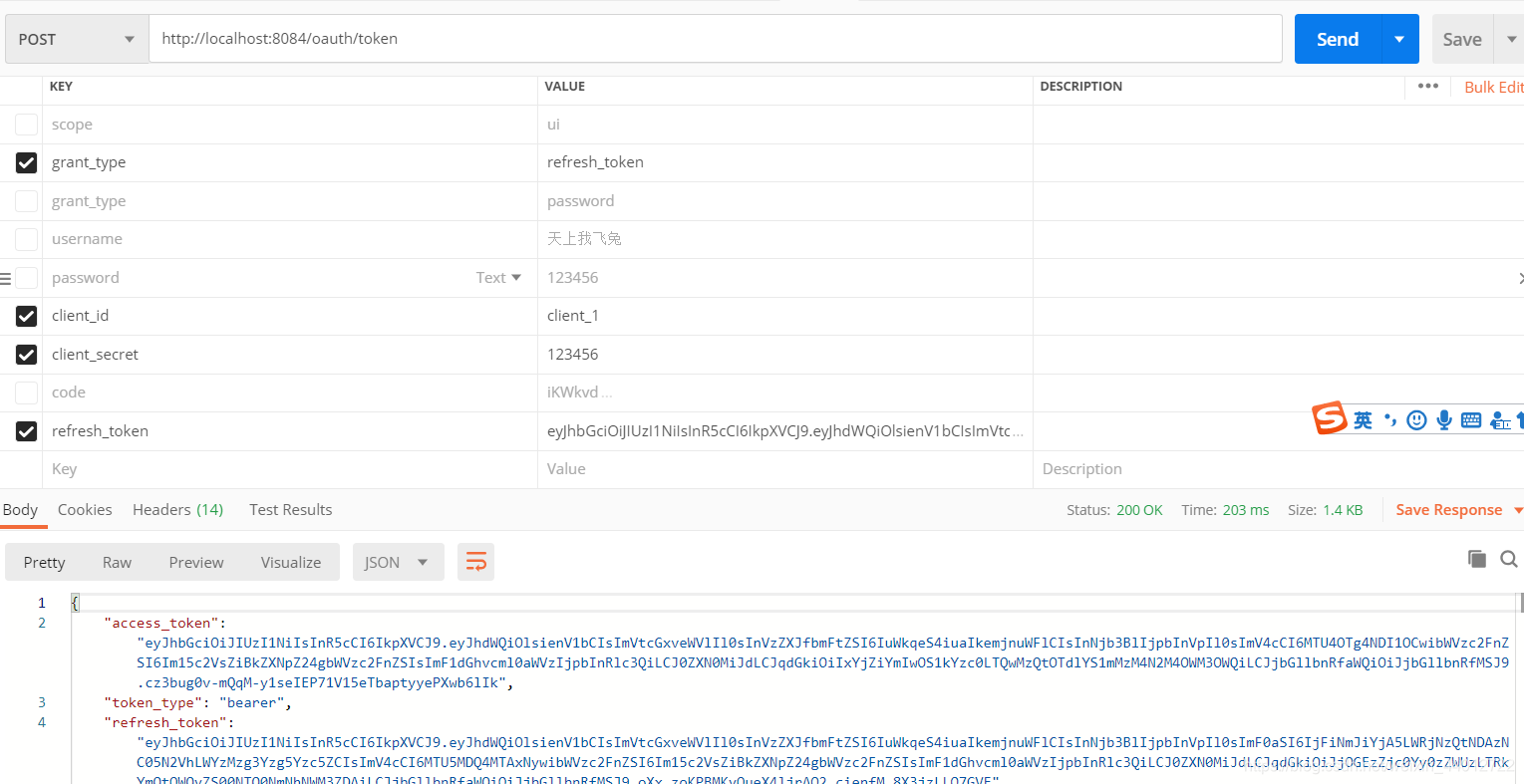
测试 refresh_token获取access_token和refresh_token
认证服务器的配置信息介绍
| 重写方法 | 作用 |
|---|---|
| configure(ClientDetailsServiceConfigurer clients) | 用来配置客户端详情服务(ClientDetailService),客户端详情信息在这里进行初始化,你能够把客户端详情信息写死在这里或者通过数据库来存储调用详情信息 |
| configure(AuthorizationServerEndpointsConfigurer endpoints) | 用来配置另配的访问端点和令牌服务 通过以下属性决定支持的授权类型(GrantTypes) |
| configure(AuthorizationServerSecurityConfigurer security) | 用来配置令牌端点的安全约束,通俗讲就是那些人能访问你暴露的令牌访问端点 |
ClientDetailsServiceConfigurer 客户端信息服务
| 配置信息 | 作用 |
|---|---|
| inMemoory | 调用内存存储客户端信息(必要) |
| clientId | 用来表示客户的id (必要) |
| secret | 客户端安全码 (必要) |
| scope | 客户端的的访问范围 (必要) |
| authorizedGrantTypes | 此客户端可以使用的授权类型,OAauth2.0五中授权类型,默认为空 (authorization_code 授权码模式,password 密码模式,implicit 简单模式,client_secret客户端模式 ) (必要) |
| authroities | 客户端的的权限范围 |
| resoutceIds | 资源列表 |
| autoApprove | false代表跳转到授权页面 |
| redirectUrls | 验证的回调地址 |
| autoapprove | true为跳过授权页面的弹出 |
AuthorizationServerEndpointsConfigurer 认证服务器端点
| 配置信息 | 作用 |
|---|---|
| authenticationManager | 认证管理器,当你选择了 password 授权类型的时候要注入一个AutheenicationManager对象 |
| userDetailService | 用户信息查询Service,执行token刷新需要带上此参数 |
| tokenGranter | token生成器 |
| tokenServices | token管理服务 |
| tokenStore | token存储策略 |
| tokenEnhancer | token加强器 |
| allowedTokenEndpointRequestMethods | 允许访问token端点的请求方式 |
| pathMapping | 修改原来的url,第一个参数 这个端点URL默认的路径 第二参数 你要进行代替的URL路径 |
AuthorizationServerSecurityConfigurer 认证服务器安全配置
| 配置信息 | 作用 |
|---|---|
| tokenKeyAccess | /oauth/token_key接口的设置 |
| checkTokenAccess | /oauth/check_token接口的设置 |
| allowFormAuthenticationForClients | 允许表单认证,不开启/oauth/token将无法访问会报无认证错误 |
| passwordEncoder | 验证客户端密码使用的编码器 |
6.客户端认证模式 (client_credentials)
3.搭建资源服务器配置
也是导入同样的依赖
		<dependency>
            <groupId>org.springframework.cloud</groupId>
            <artifactId>spring-cloud-starter-oauth2</artifactId>
        </dependency>
ResourceServer.java
@Configuration
@EnableResourceServer
public class ResourceServer extends ResourceServerConfigurerAdapter {

    @Autowired
    private TokenStore tokenStore;

    @Value("${spring.application.name}")
    public String RESOURCE_ID;

    @Override
    public void configure(ResourceServerSecurityConfigurer resources) throws Exception {
        resources
                .tokenStore(tokenStore)//令牌存储验证服务,让资源服务自己验证token
                .resourceId(RESOURCE_ID)//资源ID
                .stateless(true);//会话机制stateless开启
    }

    @Override
    public void configure(HttpSecurity http) throws Exception {
        http
                .csrf().disable()
                .authorizeRequests()
                .antMatchers("/**").authenticated()
                .and()
                .sessionManagement().sessionCreationPolicy(SessionCreationPolicy.STATELESS);
    }
}
TokenStoreConfig.java
@Configuration
public class TokenStoreConfig {

    private String SIGNING_KEY = "lzj";

    //JWT令牌存储方案
    @Bean
    public TokenStore tokenStore(){
        return new JwtTokenStore(accessTokenConverter());
    }

    //JWT token转换器
    @Bean
    public JwtAccessTokenConverter accessTokenConverter(){
        JwtAccessTokenConverter converter = new JwtAccessTokenConverter();
        converter.setSigningKey(SIGNING_KEY);
        return converter;
    }

    //token加强器 用于存储自己想要的信息到jwt中
    @Bean
    public TokenEnhancer tokenEnhancer() {
        return new JWTTokenEnhancer();
    }

    //token加强器链 把加强器和转换器加入链中
    @Bean
    public TokenEnhancerChain tokenEnhancerChain(){
        TokenEnhancerChain enhancerChain = new TokenEnhancerChain();
        List<TokenEnhancer> enhancers = new ArrayList<>();
        enhancers.add(tokenEnhancer());
        enhancers.add(accessTokenConverter());
        enhancerChain.setTokenEnhancers(enhancers);
        return enhancerChain;
    }

}
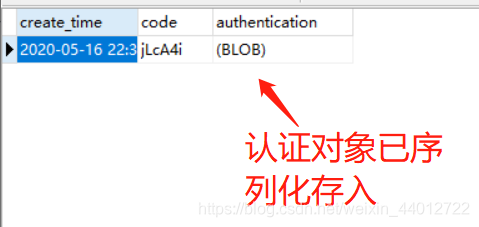
7.将客户端信息存入数据库、授权码模式的授权码存入数据库
#客户端信息表
DROP TABLE IF EXISTS `oauth_client_details`;
CREATE TABLE `oauth_client_details` (
  `client_id` varchar(48) NOT NULL,
  `resource_ids` varchar(256) DEFAULT NULL,
  `client_secret` varchar(256) DEFAULT NULL,
  `scope` varchar(256) DEFAULT NULL,
  `authorized_grant_types` varchar(256) DEFAULT NULL,
  `web_server_redirect_uri` varchar(256) DEFAULT NULL,
  `authorities` varchar(256) DEFAULT NULL,
  `access_token_validity` int(11) DEFAULT NULL,
  `refresh_token_validity` int(11) DEFAULT NULL,
  `additional_information` varchar(4096) DEFAULT NULL,
  `autoapprove` varchar(256) DEFAULT NULL,
  PRIMARY KEY (`client_id`)
) ENGINE=InnoDB DEFAULT CHARSET=utf8;

#授权码表
Drop table  if exists oauth_code;
create table oauth_code (
  create_time timestamp default now(),
  code VARCHAR(255),
  authentication BLOB
) ENGINE=InnoDB DEFAULT CHARSET=utf8;
修改AuthorizationServer认证服务器的配置
	//添加内容  注入对象
	@Autowired
    private DataSource dataSource;
    @Autowired
    private PasswordEncoder passwordEncoder;

	 @Override
    // 配置客户端信息
    public void configure(ClientDetailsServiceConfigurer clients) throws Exception {
    	//用数据库存储客户端信息
        clients.withClientDetails(clientDetails());
    }

	.......

	//以下是添加内容
	//客户端信息服务
    @Bean
    public ClientDetailsService clientDetails() {
        ClientDetailsService clientDetailsService = new JdbcClientDetailsService(dataSource);
        ((JdbcClientDetailsService) clientDetailsService).setPasswordEncoder(passwordEncoder);
        return clientDetailsService;
    }

	//授权码模式 存入jdbc中
    @Bean
    public AuthorizationCodeServices authorizationCodeServices(){
        return new JdbcAuthorizationCodeServices(dataSource);
    }

	@Override
    public void configure(AuthorizationServerEndpointsConfigurer endpoints) throws Exception {

        // 设置token存储方式,这里提供redis和jwt
        endpoints
                .tokenStore(tokenStore)//令牌存储方式
                .authenticationManager(authenticationManager)//password模式要配置的认证管理器
                .accessTokenConverter(accessTokenConverter)//token转换器
                .tokenEnhancer(tokenEnhancerChain)//token加强器
                .allowedTokenEndpointRequestMethods(HttpMethod.GET,HttpMethod.POST)//允许访问暴露端点的方法
                .authorizationCodeServices(authorizationCodeServices());//授权码服务配置
    }
你的配置文件一定要配置好数据源
spring:
  application:
    name: oauth-server
  datasource:
    username: root
    password: 123456
    url: jdbc:mysql://localhost:3306/springstudy?useUnicode=true&characterEncoding=utf-8&useSSL=true&serverTimezone=UTC
    driver-class-name: com.mysql.cj.jdbc.Driver
结果

至此OAuth的认证服务器和资源服务器的配置就告一段落 ,但是项目是SpringCloud的,认证不是直接访问资源服务器的地址的,而是所有访问资源服务器和认证服务器的请求都经过网关,通过网关去发送请求,这就涉及到Zuul的OAuth服务器配置问题,想进一步了解的请看此博客
https://blog.csdn.net/weixin_44012722/article/details/106207968
版权声明:本文为weixin_44012722原创文章,遵循CC 4.0 BY-SA版权协议,转载请附上原文出处链接和本声明。