目录
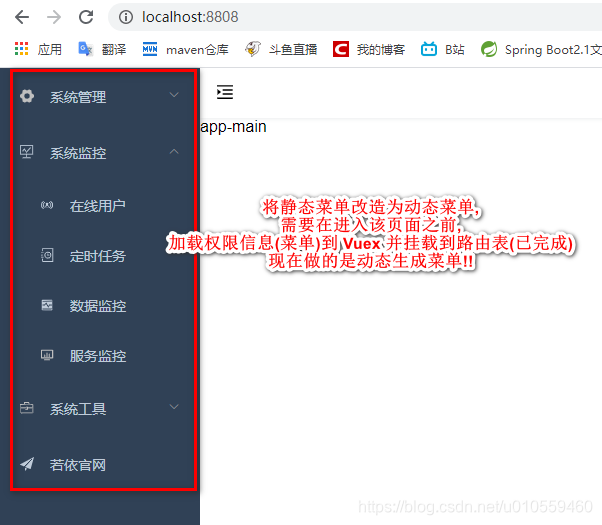
在完成 <首页-获取路由信息> 和 <首页-svg图标> 这两章后,本章将之前的<主页布局-左侧导航菜单(静态)>改造为动态菜单
效果图:
1、侧边栏组件
原来静态菜单中,我们是写死的,现在需要改造成动态生成组件的形式
1.1 侧边栏组件
修改 src / layout / components / Sidebar / index.vue
<template>
  <div class="">
    <el-scrollbar class="scrollbar-wrapper">
      <el-menu
        :default-active="activeMenu"
        :collapse="isCollapse"
        :background-color="variables.menuBg"
        :text-color="variables.menuText"
        :unique-opened="true"
        :active-text-color="variables.menuActiveText"
        :collapse-transition="false"
        mode="vertical"
      >
        <sidebar-item
          v-for="route in permission_routes"
          :key="route.path"
          :item="route"
          :base-path="route.path"
        ></sidebar-item>
      </el-menu>
    </el-scrollbar>
  </div>
</template>

<script type="text/ecmascript-6">
import { mapGetters } from 'vuex'
import SidebarItem from './SidebarItem'
import variables from '@/assets/styles/variables.scss'
export default {
  data() {
    return {}
  },
  components: { SidebarItem },
  methods: {
    handleOpen(key, keyPath) {
      console.log(key, keyPath)
    },
    handleClose(key, keyPath) {
      console.log(key, keyPath)
    }
  },
  computed: {
    ...mapGetters(['permission_routes', 'sidebar']),
    activeMenu() {
      const route = this.$route
      const { meta, path } = route
      // if set path, the sidebar will highlight the path you set
      if (meta.activeMenu) {
        return meta.activeMenu
      }
      return path
    },
    variables() {
      return variables
    },
    isCollapse() {
      return !this.sidebar.opened
    }
  }
}
</script>

<style lang="scss" scoped>
</style>
1.2、getters.js
修改 src / store / getters.js 文件
const getters = {
  roles: state => state.user.roles,
  permission_routes: state => state.permission.routes,
  sidebar: state => state.app.sidebar
}
export default getters
1.3、permission 模块
新建 src / store / modules / permission.js文件
import router from '@/router'
import { getRouters } from '@/api/menu'
import Layout from '@/layout/index'

const permission = {
  state: {
    routes: [],
    addRoutes: []
  },
  mutations: {
    SET_ROUTES: (state, routes) => {
      state.addRoutes = routes
      state.routes = router.options.routes.concat(routes)
    }
  },
  actions: {
    // 生成路由
    GenerateRoutes({ commit }) {
      return new Promise(resolve => {
        // 向后端请求路由数据
        getRouters().then(res => {
          const accessedRoutes = filterAsyncRouter(res.data)
          accessedRoutes.push({ path: '*', redirect: '/404', hidden: true })
          commit('SET_ROUTES', accessedRoutes)
          resolve(accessedRoutes)
        })
      })
    }
  }
}

// 遍历后台传来的路由字符串,转换为组件对象
function filterAsyncRouter(asyncRouterMap) {
  return asyncRouterMap.filter(route => {
    if (route.component) {
      // Layout组件特殊处理
      if (route.component === 'Layout') {
        route.component = Layout
      } else {
        route.component = loadView(route.component)
      }
    }
    if (route.children != null && route.children && route.children.length) {
      route.children = filterAsyncRouter(route.children)
    }
    return true
  })
}

export const loadView = (view) => { // 路由懒加载
  // return () => import(`@/views/${view}`) 这种写法会误报: eslint Cannot read property 'range' of null
  return () => import('@/views/' + view)
}

export default permission
1.4、app 模块
新建 src / store / modules / app.js文件
import Cookies from 'js-cookie'

const state = {
  sidebar: {
    opened: Cookies.get('sidebarStatus') ? !!+Cookies.get('sidebarStatus') : true,
    withoutAnimation: false
  }
}
const mutations = {
  TOGGLE_SIDEBAR: state => {
    state.sidebar.opened = !state.sidebar.opened
    state.sidebar.withoutAnimation = false
    if (state.sidebar.opened) {
      Cookies.set('sidebarStatus', 1)
    } else {
      Cookies.set('sidebarStatus', 0)
    }
  },
  CLOSE_SIDEBAR: (state, withoutAnimation) => {
    Cookies.set('sidebarStatus', 0)
    state.sidebar.opened = false
    state.sidebar.withoutAnimation = withoutAnimation
  }
}
const actions = {
  toggleSideBar({ commit }) {
    commit('TOGGLE_SIDEBAR')
  },
  closeSideBar({ commit }, { withoutAnimation }) {
    commit('CLOSE_SIDEBAR', withoutAnimation)
  }
}

export default {
  namespaced: true,
  state,
  mutations,
  actions
}
1.5、vuex中添加新模块
修改 src / store / index.js文件
import Vue from 'vue'
import Vuex from 'vuex'
import user from './modules/user'
import getters from './getters'
import permission from './modules/permission'
import app from './modules/app'
Vue.use(Vuex)

export default new Vuex.Store({
  state: {
  },
  mutations: {
  },
  actions: {
  },
  modules: {
    user,
    permission,
    app
  },
  getters
})
1.6、样式文件
新增 src / assets / styles / sidebar.scss 文件
#app {
  .main-container {
    min-height: 100%;
    transition: margin-left .28s;
    margin-left: $sideBarWidth;
    position: relative;
  }

  .sidebar-container {
    width: $sideBarWidth !important;
    background-color: $menuBg;
    height: 100%;
    position: fixed;
    font-size: 0px;
    top: 0;
    bottom: 0;
    left: 0;
    overflow: hidden;

    .scrollbar-wrapper {
      height: 100%;
      overflow-x: hidden !important;

      .el-scrollbar__wrap {
        overflow-x: hidden !important;
      }

      a {
        display: inline-block;
        width: 100%;
        overflow: hidden;
        text-decoration: none;
      }
      .el-menu {
        border: none;
        height: 100%;
        width: 100% !important;
      }

      .svg-icon {
        margin-right: 16px;
      }

    }


  }


}
1.7、变量scss文件
修改 src / assets / styles / variables.scss 文件
// sidebar
$sideBarWidth: 200px;
$menuBg:#304156;
$menuText:#bfcbd9;
$menuActiveText:#409EFF;

:export {
  sideBarWidth: $sideBarWidth;
  menuBg: $menuBg;
  menuText: $menuText;
  menuActiveText: $menuActiveText;
}
2、SidebarItem 组件
SidebarItem 组件是对 el-menu-item 和 el-submenu 的封装,当遍历路由项时,我们需要判断一下该条路由有没有子路由,如果有子路由我们就用 el-submenu 来渲染, 如果该条路由没有子路由,则用 el-menu-item 来渲染
2.1 SidebarIntem 组件
新建 src / layout / components / Sidebar / SidebarIntem.vue 文件
<template>
  <div v-if="!item.hidden" class="menu-wrapper">
    <!-- 当这个节点只有一个子元素,且这个节点的第一个子元素没有子元素时,显示一个特殊的菜单样式 -->
    <template v-if="hasOneShowingChild(item.children,item) && (!onlyOneChild.children||onlyOneChild.noShowingChildren)&&!item.alwaysShow">
      <app-link v-if="onlyOneChild.meta" :to="resolvePath(onlyOneChild.path)">
        <el-menu-item :index="resolvePath(onlyOneChild.path)" :class="{'submenu-title-noDropdown':!isNest}">
          <item :icon="onlyOneChild.meta.icon||(item.meta&&item.meta.icon)" :title="onlyOneChild.meta.title" />
        </el-menu-item>
      </app-link>
    </template>

    <el-submenu v-else ref="subMenu" :index="resolvePath(item.path)" popper-append-to-body>
      <template slot="title">
        <item v-if="item.meta" :icon="item.meta && item.meta.icon" :title="item.meta.title"/>
      </template>
      <sidebar-item v-for="child in item.children" :key="child.path" :is-nest="true" :item="child" :base-path="resolvePath(child.path)" class="nest-menu" />
    </el-submenu>
  </div>
</template>

<script>
import path from 'path'
import { isExternal } from '@/utils/validate'
import Item from './Item'
import AppLink from './Link'
// import FixiOSBug from './FixiOSBug'

export default {
  name: 'SidebarItem',
  components: { Item, AppLink },
  // mixins: [FixiOSBug],
  props: {
    // route object
    item: {
      type: Object,
      required: true
    },
    isNest: {
      type: Boolean,
      default: false
    },
    basePath: {
      type: String,
      default: ''
    }
  },
  data() {
    this.onlyOneChild = null
    return {}
  },
  methods: {
    hasOneShowingChild(children = [], parent) {
      const showingChildren = children.filter(item => {
        if (item.hidden) {
          return false
        } else {
          // Temp set(will be used if only has one showing child)
          this.onlyOneChild = item
          console.log(item.path)
          return true
        }
      })

      // When there is only one child router, the child router is displayed by default
      if (showingChildren.length === 1) {
        return true
      }

      // Show parent if there are no child router to display
      if (showingChildren.length === 0) {
        this.onlyOneChild = { ...parent, path: '', noShowingChildren: true }
        return true
      }

      return false
    },
    resolvePath(routePath) {
      if (isExternal(routePath)) {
        return routePath
      }
      if (isExternal(this.basePath)) {
        return this.basePath
      }
      return path.resolve(this.basePath, routePath)
    }
  }
}
</script>
2.2、验证工具类
新建 src / utils / validate.js 文件
/**
 * @param {string} path
 * @returns {Boolean}
 */
export function isExternal(path) {
  return /^(https?:|mailto:|tel:)/.test(path)
}
2.3、菜单项组件
新建 src / layout / componnents / Sidebar / Item.vue文件
<script>
export default {
  name: 'MenuItem',
  functional: true,
  props: {
    icon: {
      type: String,
      default: ''
    },
    title: {
      type: String,
      default: ''
    }
  },
  render(h, context) {
    const { icon, title } = context.props
    const vnodes = []

    if (icon) {
      vnodes.push(<svg-icon icon-class={icon}/>)
    }

    if (title) {
      vnodes.push(<span slot='title'>{(title)}</span>)
    }
    return vnodes
  }
}
</script>
2.4 链接组件
新建 src / layout / componnents / Sidebar / Link.vue文件
<template>
  <!-- eslint-disable vue/require-component-is -->
  <component v-bind="linkProps(to)">
    <slot />
  </component>
</template>

<script>
import { isExternal } from '@/utils/validate'

export default {
  props: {
    to: {
      type: String,
      required: true
    }
  },
  methods: {
    linkProps(url) {
      if (isExternal(url)) {
        return {
          is: 'a',
          href: url,
          target: '_blank',
          rel: 'noopener'
        }
      }
      return {
        is: 'router-link',
        to: url
      }
    }
  }
}
</script>
版权声明:本文为u010559460原创文章,遵循CC 4.0 BY-SA版权协议,转载请附上原文出处链接和本声明。