OCR Tesseract tess-two文字识别Android Studio实现
1、简介
OCR (Optical Character Recognition,光学字符识别)是指电子设备(例如扫描仪或数码相机)检查纸上打印的字符,通过检测暗、亮的模式确定其形状,然后用字符识别方法将形状翻译成计算机文字的过程
Tesseract是Ray Smith于1985到1995年间在惠普布里斯托实验室开发的一个OCR引擎,曾经在1995 UNLV精确度测试中名列前茅。但1996年后基本停止了开发。2006年,Google邀请Smith加盟,重启该项目。目前项目的许可证是Apache 2.0。该项目目前支持Windows、Linux和Mac OS等主流平台。但作为一个引擎,它只提供命令行工具。
因为Tesseract使用C++实现的,在Android中不能直接使用,需要封装JavaAPI才能在Android平台中进行调用,这里我们直接使用TessTwo项目,tess-two是TesseraToolsForAndroid的一个git分支,使用简单,切集成了leptonica,在使用之前需要先从git上下载源码进行编译。
2、下载
在Android平台上使用Tesseract OCR首先要下载Tess-two工程,它是专门针对Android平台编译出来的,下载地址如下:https://github.com/rmtheis/tess-two
文字识别还需要下载相应到tessdata语言包,本项目以英文包为例,下载地址如下:
https://github.com/tesseract-ocr/tessdata
选中需要用到到语言包,英文包为eng.traineddata,简体中文包为chi_sim.traineddata。
3、导入配置
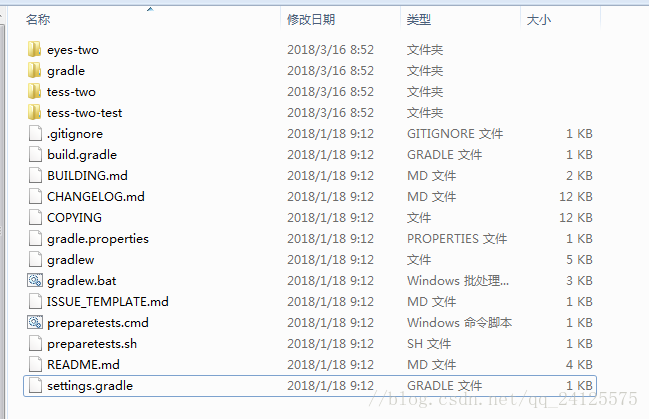
1、解压下载下来的tess-two-master文件,解压后目录如下图所示:
2、在android studio新建一个空项目,将上图中的tess-two(第三个)文件夹作为module导入到项目中(File->New->Import Module)。
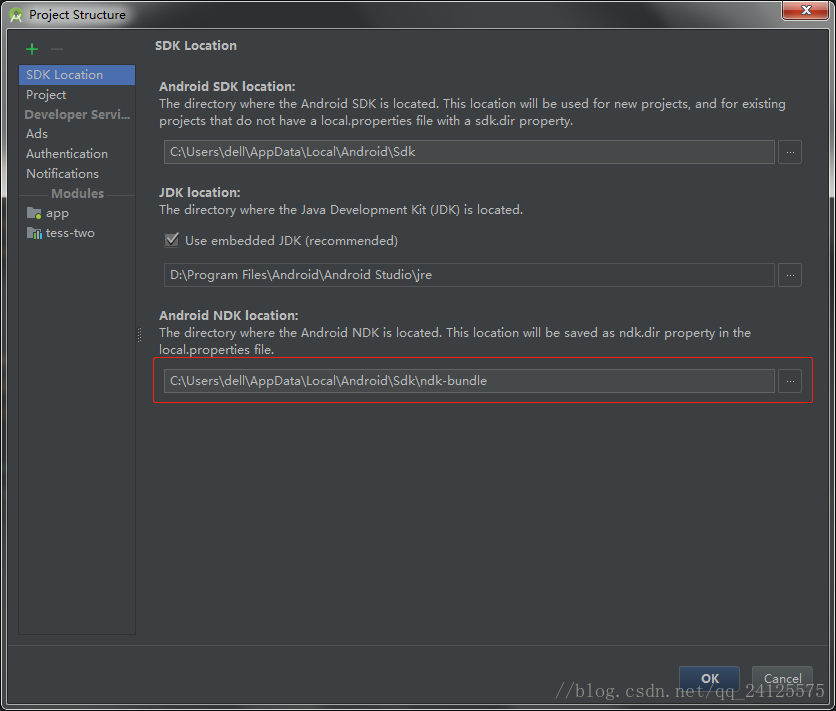
3、项目必须是支持NDK的,所以要在Project Structure中指明NDK的路径。如果没NDK就需要先下载,一般在android studio下载都自动帮你配好。原因是tess-two是个NDK项目,没有NDK支持无法完成编译
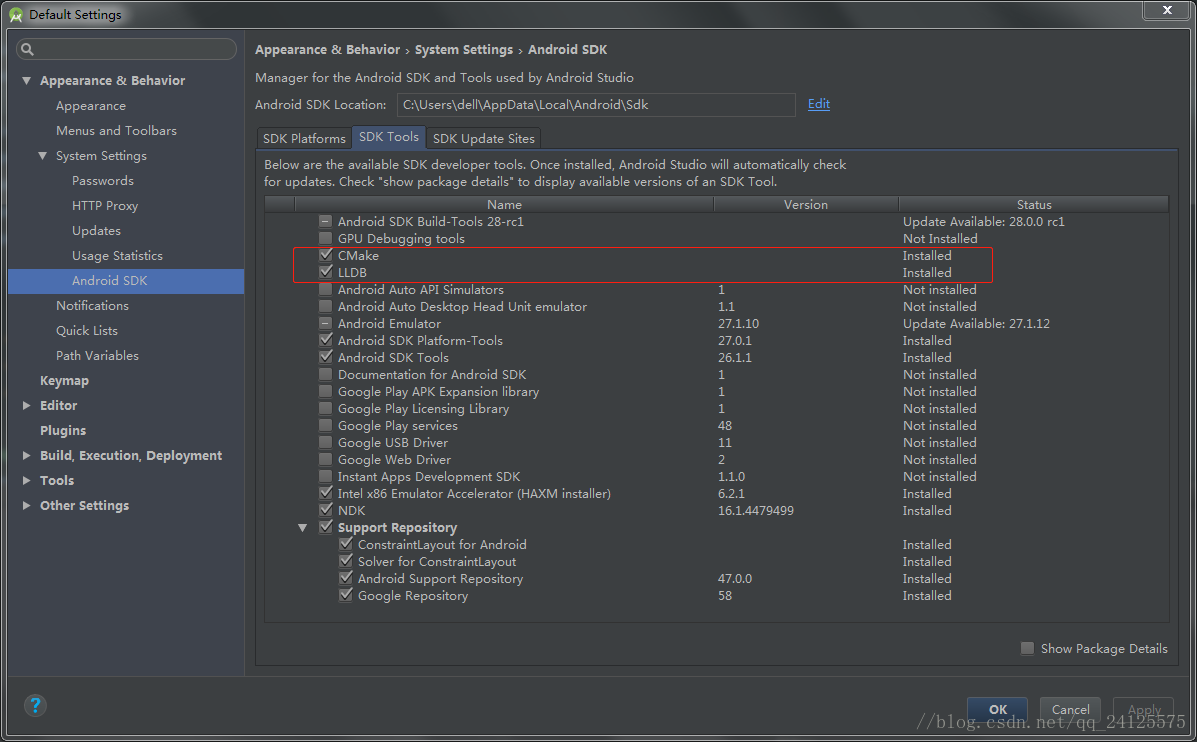
4、你还需要安装两个工具,CMake和LLDB。
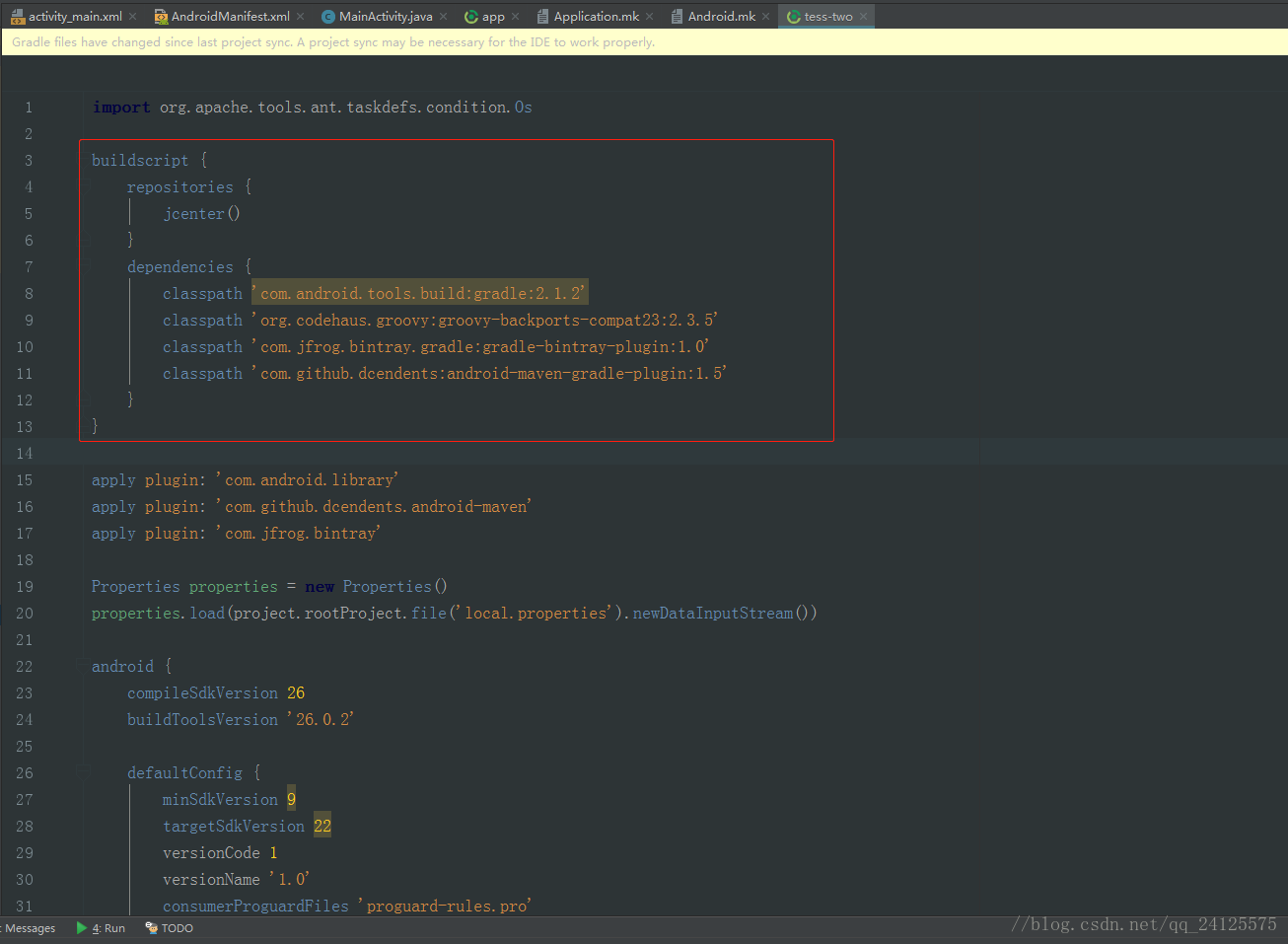
5、你可能还会遇到没有android-maven的错误,在tess-two的build.gradle文件到最前面添加以下脚本:
buildscript {
    repositories {
        jcenter()
    }
    dependencies {
        classpath 'com.android.tools.build:gradle:2.1.2'
        classpath 'org.codehaus.groovy:groovy-backports-compat23:2.3.5'
        classpath 'com.jfrog.bintray.gradle:gradle-bintray-plugin:1.0'
        classpath 'com.github.dcendents:android-maven-gradle-plugin:1.5'
    }
}
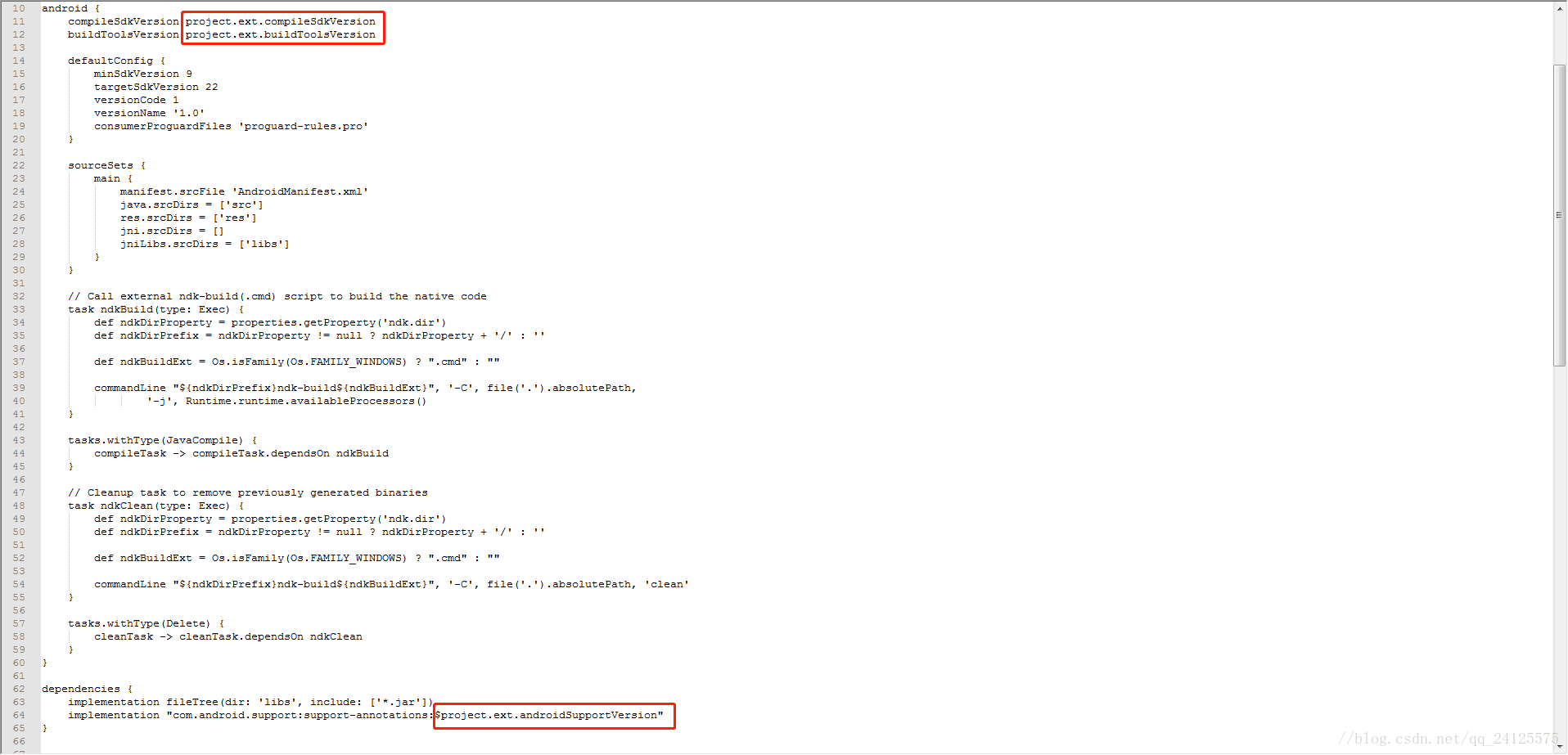
6、在tess-two的build.gradle文件里还有3处需要修改,如下图,修改为自己到版本号即可:
如我的修改后为:
7、你有可能会报如下错误:


Error:(81) Android NDK: Application targets deprecated ABI(s): mips64 armeabi mips
Error:(82) Android NDK: Support for these ABIs will be removed in a future NDK release.
现在只需要在tess-two->jni下的Application.mk文件里删掉APP_ABI里到mips即可

如果还报类似到错误,如:
Error:(81) Android NDK: Application targets deprecated ABI(s): armeabi
Error:(82) Android NDK: Support for these ABIs will be removed in a future NDK release.
就把armeabi删掉。
我的项目只留下两个:

8、将下载到语言包拷贝进手机存储里,可在任意位置创建一个tesseract文件夹,在tesseract文件夹下创建一个tessdata文件夹,然后将语言包如eng.traineddata拷进tessdata文件夹里,如果不创建tessdata文件夹会报如下错误:
Data path must contain subfolder tessdata!9、记得在项目到AndroidManifest.xml里配置读写权限,否则会报以下错误
E/Tesseract(native): Could not initialize Tesseract API with language=eng!权限如下:
<uses-permission android:name="android.permission.READ_EXTERNAL_STORAGE" />
<uses-permission android:name="android.permission.WRITE_EXTERNAL_STORAGE"/>
10、记得给tess-two module配置依赖项:

4、代码
MainActivity
import android.graphics.Bitmap;
import android.graphics.BitmapFactory;
import android.support.v7.app.AppCompatActivity;
import android.os.Bundle;
import android.util.Log;
import android.view.View;
import android.widget.Button;
import android.widget.ImageView;
import android.widget.TextView;

import com.googlecode.tesseract.android.TessBaseAPI;

import java.io.File;

public class MainActivity extends AppCompatActivity {

    TessBaseAPI mTess;
    Button button;
    Bitmap bitmap;
    String result;
    ImageView imgView;
    TextView txtView;

    @Override
    protected void onCreate(Bundle savedInstanceState) {
        super.onCreate(savedInstanceState);
        setContentView(R.layout.activity_main);
        button=findViewById(R.id.btnShot);
        imgView = (ImageView)this.findViewById(R.id.imageView);
        txtView = (TextView)this.findViewById(R.id.idCard_textView);

        bitmap = BitmapFactory.decodeResource(this.getResources(), R.drawable.textimage);//识别图片源
        imgView.setImageBitmap(bitmap);

        button.setOnClickListener(new View.OnClickListener() {
            @Override
            public void onClick(View view) {
                mTess.setImage(bitmap);
                result = mTess.getUTF8Text();
                txtView.setText("结果为:" + result);
            }
        });
        initTessBaseData();
    }

    private void initTessBaseData() {
        mTess = new TessBaseAPI();
        String datapath = "/storage/emulated/0/JW7129/tesseract/"; //语言包目录
        String language = "eng";
        File dir = new File(datapath + "tessdata/");
        if (!dir.exists()){
            Log.e("tag","文件不存在");
        }
        mTess.init(datapath, language);
    }
}
activity_main.xml
<?xml version="1.0" encoding="utf-8"?>
<android.support.constraint.ConstraintLayout xmlns:android="http://schemas.android.com/apk/res/android"
    xmlns:app="http://schemas.android.com/apk/res-auto"
    xmlns:tools="http://schemas.android.com/tools"
    android:layout_width="match_parent"
    android:layout_height="match_parent"
    tools:context="com.zhd.test8.test10.MainActivity">

    <Button
        android:id="@+id/btnShot"
        android:layout_width="wrap_content"
        android:layout_height="wrap_content"
        android:layout_marginEnd="8dp"
        android:layout_marginStart="8dp"
        android:layout_marginTop="16dp"
        android:text="识别"
        app:layout_constraintEnd_toEndOf="parent"
        app:layout_constraintStart_toStartOf="parent"
        app:layout_constraintTop_toTopOf="parent" />

    <TextView
        android:id="@+id/idCard_textView"
        android:layout_width="wrap_content"
        android:layout_height="wrap_content"
        android:text="Hello World!"
        app:layout_constraintBottom_toBottomOf="parent"
        app:layout_constraintLeft_toLeftOf="parent"
        app:layout_constraintRight_toRightOf="parent"
        app:layout_constraintTop_toTopOf="parent"
        app:layout_constraintVertical_bias="0.168" />

    <ImageView
        android:id="@+id/imageView"
        android:layout_width="match_parent"
        android:layout_height="200dp"
        android:layout_marginTop="140dp"
        app:layout_constraintEnd_toEndOf="parent"
        app:layout_constraintStart_toStartOf="parent"
        app:layout_constraintTop_toTopOf="parent" />
</android.support.constraint.ConstraintLayout>
至此,项目已能成功运行,由于ndk原因,项目build需要较长时间,本人做了简单的测试,截屏的文字基本能识别。
