说明:项目所需获取首页上的json串,
获取前提必须知道:
1、登录的URL地址
2、要获取数据的URL地址
3、该网址的账户、密码,(以及不确定参数,会在下方说明)
获取登录的URL地址:
1、进入网址登录页,输入账户名密码后,按F12打开控制台,点击登录。(如图)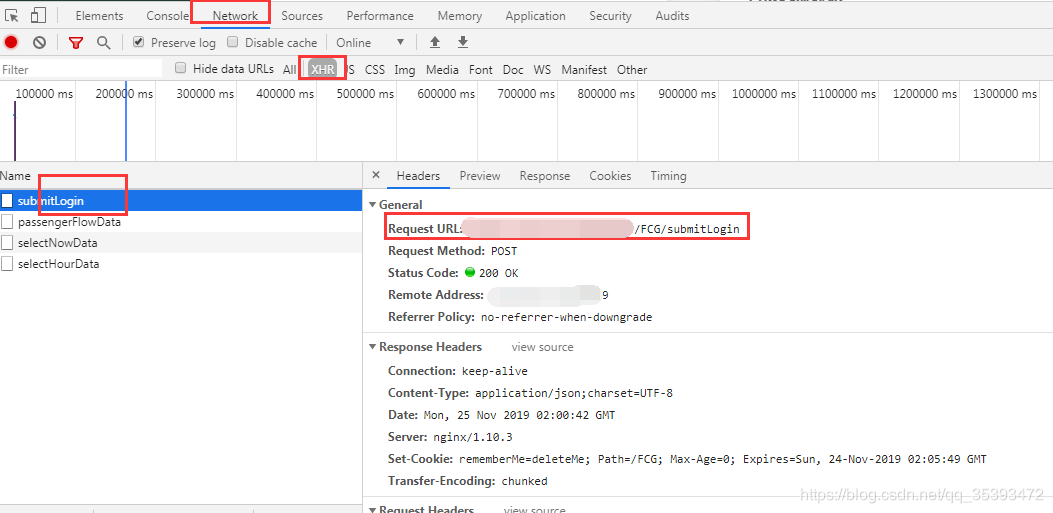
获取到登录的URL地址。第一步已完成。
获取登录所需的参数:
向下拉会看到传递的参数。注:因为这是我自己的系统,比较懒,没有做加密,明文看到账户密码以及其他的参数,验证码的验证我也关掉了。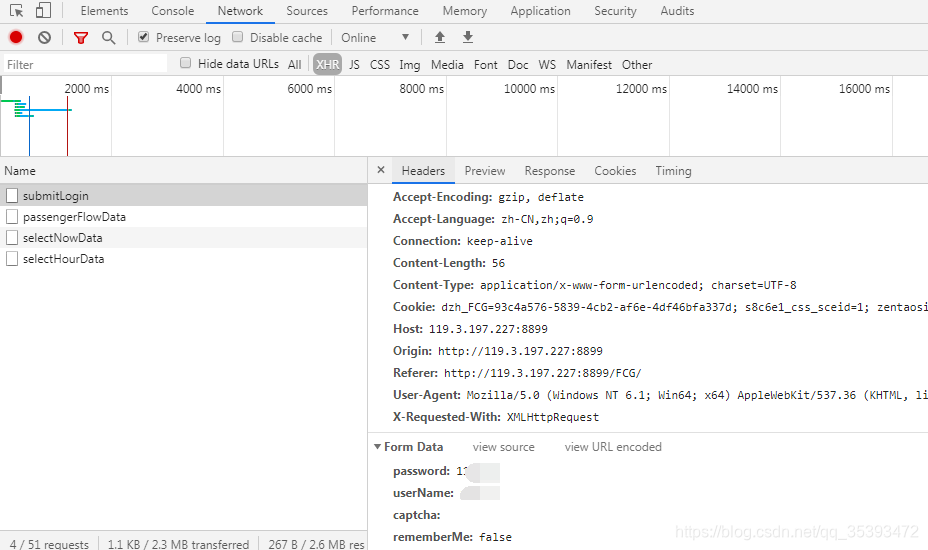
如果没有其他参数,就到代码里面找,回到登录页。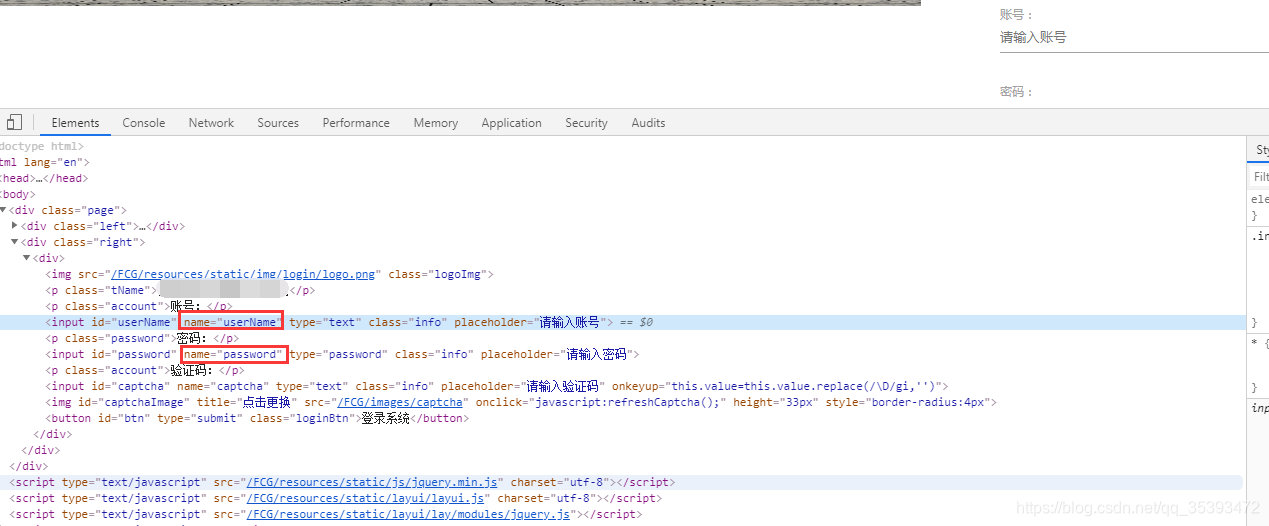
需要获取数据的URL:
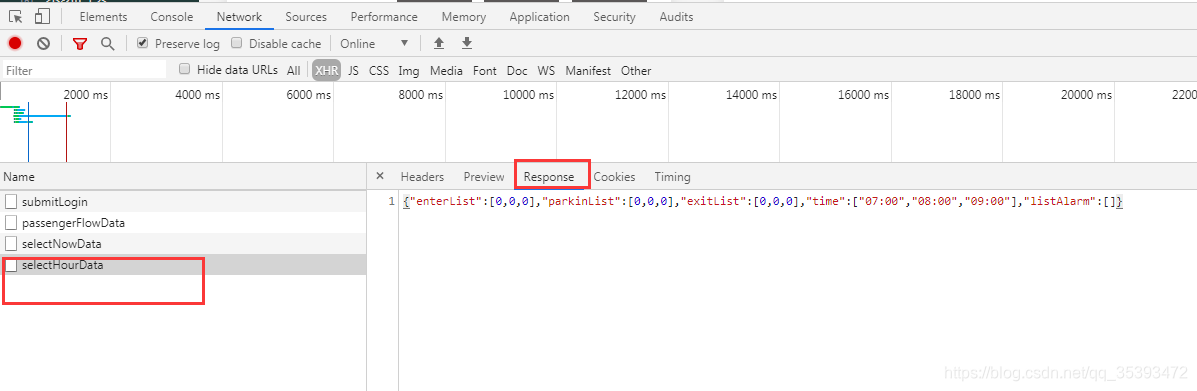
请求代码示例:
代码说明:需要导入httpclient的jar包,修改在上面获取到的参数。
       <dependency>
			<groupId>org.apache.httpcomponents</groupId>
			<artifactId>httpclient</artifactId>
			<version>4.5.6</version>
		</dependency>
import java.io.IOException;
import java.io.UnsupportedEncodingException;
import java.util.ArrayList;


import java.util.List;

import org.apache.http.Header;
import org.apache.http.HttpRequest;
import org.apache.http.HttpResponse;
import org.apache.http.NameValuePair;
import org.apache.http.client.ClientProtocolException;
import org.apache.http.client.HttpClient;
import org.apache.http.client.entity.UrlEncodedFormEntity;
import org.apache.http.client.methods.HttpPost;
import org.apache.http.client.params.CookiePolicy;
import org.apache.http.impl.client.DefaultHttpClient;
import org.apache.http.message.BasicNameValuePair;
import org.apache.http.util.EntityUtils;

@SuppressWarnings({ "deprecation", "unused" })
public class test {

	public static void main(String[] args) {
		try {
			@SuppressWarnings("resource")
			HttpClient httpclient = new DefaultHttpClient();
			//创建登录请求的URL
			HttpPost httpost = new HttpPost(""); // 登录url
			//创建登录时候所需要传递的数据
			List<NameValuePair> nvp = new ArrayList<NameValuePair>();
			//此处的key值对应你在浏览器上获取的
			nvp.add(new BasicNameValuePair("userName", "admin"));
			nvp.add(new BasicNameValuePair("password", ""));
			nvp.add(new BasicNameValuePair("rememberMe", "false"));
			String sCharSet = "utf-8";
			httpost.setEntity(new UrlEncodedFormEntity(nvp, sCharSet));

			HttpResponse response;
			String cookie = "";
			String value = null;
			response = httpclient.execute(httpost);
			String str = EntityUtils.toString(response.getEntity()); // post请求成功后的返回值
			System.out.println(str);

			//获取response中的cookie值
			Header[] headers = response.getHeaders("Set-Cookie");
			String headerstr = headers.toString();
			for (int i = 0; i < headers.length; i++) {//取出所有的cookie值
				value = headers[i].getValue();
				System.out.println("第"+i+"次的值为:"+value);
				cookie+=value;
			}
			//需要获取数据的URL
			HttpPost httpost2 = new HttpPost(
					""); // 数据接口url
			System.out.println("cookie的值为:"+cookie);
			httpost2.setHeader("Cookie", cookie); // 设置之前获取到的cookie
			httpost2.setHeader("Content-Type", "application/json;charset=UTF-8");

			HttpResponse response2 = httpclient.execute(httpost2);
			String str2 = EntityUtils.toString(response2.getEntity()); // 这里就是我们要的数据了。
			System.out.println(str2);
		} catch (UnsupportedEncodingException e) {
			e.printStackTrace();
		} catch (ClientProtocolException e) {
			e.printStackTrace();
		} catch (IOException e) {
			e.printStackTrace();
		}
	}
}
请求后发现失败了,但是返回是登录成功,下面就是我开头说的,有一些不确定的参数。
我们看一下在浏览器登录成功的的cookie值和控制台打印出来的是否一致。(建议清除浏览器缓存在试)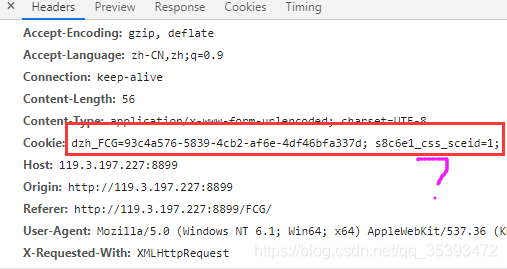
我们可以看到控制台输出的cookie值没有s8c6e1_css_sceid,这个参数是固定不变的,所以我们在拼cookie值的时候把它加上。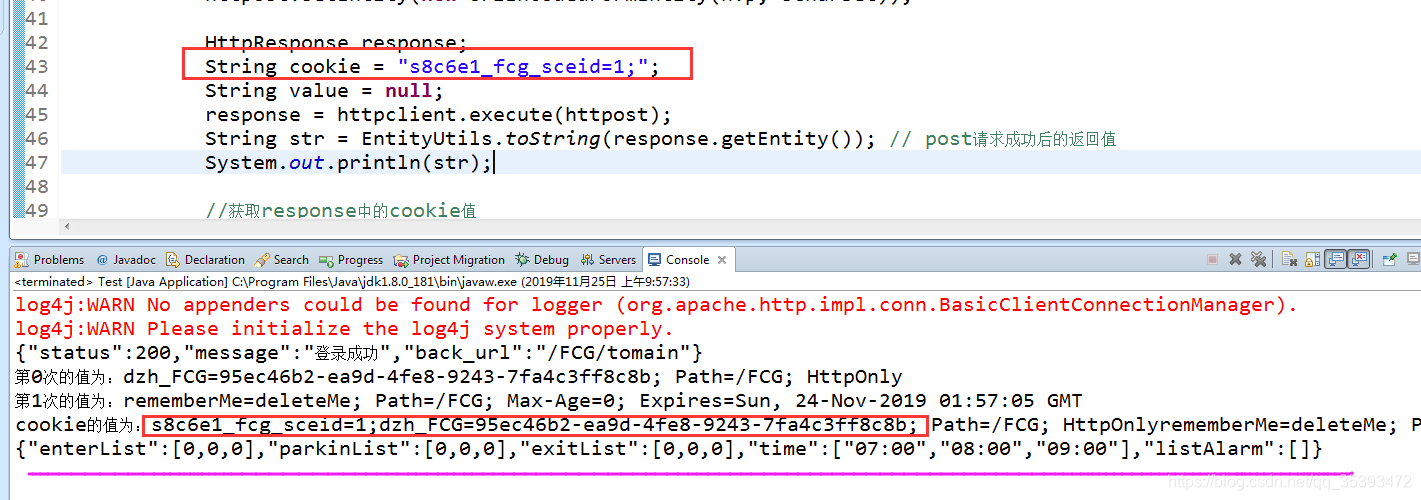
成功!!
其实最笨的测试方法就是把浏览器返回的cookie值,复制到代码里面,试试能不能成功,然后在试着去动态获取cookie值。
有疑问的欢迎留言~
版权声明:本文为qq_35393472原创文章,遵循CC 4.0 BY-SA版权协议,转载请附上原文出处链接和本声明。