前言
- 前情回顾:点击这里
- 本例子以Oculus的Quest举例
首先实现抓取功能
- 手可以先用两个cube代替,主要是实现抓取的效果
- 在VR Offset下分别创建两个空物体并命名为Right/Left Hand
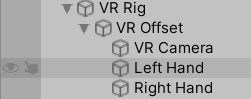
- 首先给两只手上都上一个XR Controller组件,这样,在Run的时候Sence中就已经能看到手部的旋转控制了。
- 给我们要抓取的物体上,挂载一个XR Grab Interactable组件。
- 再创建一个手的Prefab的Cube,并在上面挂载XR Direct Interactor 和一个碰撞体(这里使用的是Sphere Collider,记得一定要将碰撞体的Is Trigger 打钩,不然抓不住)

- 然后将手部作为预制体,删掉,并拖入Left和Right Hand中XR Controller的Model Rrefab中,这样Run起来的时候,方块就回出现在手上,并且能抓取空中的方块
读取游戏设备,并显示手柄
- 我们来写脚本,首先在脚本开始的时候我们去读取设备以及控制器的特征,
// 将设备放入这里
List<InputDevice> devices = new List<InputDevice>();
InputDevices.GetDevicesWithCharacteristics(controllerCharacteristics, devices);
这里用Left Hand举例,特征选择为Controller和Left

然后从SteamVR 中获取到Controller模型和Hand模型

将他们都import到项目的Asset中,并拖入脚本中

在脚本中,我们根据输入的设备,在Controller Prefabs列表中寻找对应的Controller
//注意Controller的name和device的name需要匹配
GameObject prefab = controllerPrefabs.Find(controller => controller.name == targetDevice.name);
- 如果匹配到了,那么在手的位置,生成一个controller的prefab
if (prefab)
{
    spawnedController = Instantiate(prefab, transform);
}
- 设置一个bool值用来切换Hand模型和Controller模型
if (isShowController)
{
    spawnedHandModel.SetActive(false);
    spawnedController.SetActive(true);
}
else
{
    spawnedHandModel.SetActive(true);
    spawnedController.SetActive(false);
}
关于手模型动画设置
- 创建一个Animator Controller
- 创建一个Blend Tree 并将其Type设置为 2D Freeform Cartesian
- 然后这样设置,因为手柄的Trigger和Grip都是(0,1)的Float,我们创建两个Grip和Trigger 的参数,然后这样设置与动画进行绑定

- 在脚本中,在Update中这样更新动画
void Update()
{
	if (!targetDevice.isValid)
{
    TryInitialize();
}
else
{
    if (isShowController)
    {
        spawnedHandModel.SetActive(false);
        spawnedController.SetActive(true);
    }
    else
    {
        spawnedHandModel.SetActive(true);
        spawnedController.SetActive(false);
        UpdateHandAnimation();
    }
}

void UpdateHandAnimation()
{
    if (targetDevice.TryGetFeatureValue(CommonUsages.trigger, out float triggerValue))
    {
        handAnimator.SetFloat("Trigger", triggerValue);
    }
    else
    {
        handAnimator.SetFloat("Trigger", 0);
    }
    if (targetDevice.TryGetFeatureValue(CommonUsages.grip, out float gripValue))
    {
        handAnimator.SetFloat("Grip", gripValue);
    }
    else
    {
        handAnimator.SetFloat("Grip", 0);
    }
}
- 这样就可以进行物体的抓取了
- 注意一个细节,当开启Oculus的时候再Run是没问题的,设备都能读取;但是如果先Run,这个时候脚本的Start已经执行过了,再打开Oculus的话,那么手柄可能无法正常读取导致游戏报错!我们应该在Start的时候尝试获取设备,然后在Update中做二次检查,如果获取不到设备,我们会尝试再次获取,如果获取到了,也就是targetDevice不为空,那么才监听设备的行为
- 脚本完整代码如下
读取设备的完整脚本
using System.Collections;
using System.Collections.Generic;
using UnityEngine;
using UnityEngine.XR;

public class HandPresence : MonoBehaviour
{
    public bool isShowController = false;
    public InputDeviceCharacteristics controllerCharacteristics;
    public List<GameObject> controllerPrefabs;
    private InputDevice targetDevice;
    private GameObject spawnedController;
    public GameObject handModelPrefab;
    private GameObject spawnedHandModel;

    public Animator handAnimator;

    void Start()
    {
        TryInitialize();
    }

    void TryInitialize()
    {
        // 将设备放入这里
        List<InputDevice> devices = new List<InputDevice>();
        InputDevices.GetDevicesWithCharacteristics(controllerCharacteristics, devices);
        Debug.Log(devices.Count + "name:" + devices[0].name);
        if (devices.Count > 0)
        {
            targetDevice = devices[0];
            Debug.Log(targetDevice.name);
            //注意Controller的name和device的name需要匹配
            GameObject prefab = controllerPrefabs.Find(controller => controller.name == targetDevice.name);
            //如果匹配到了那么久实例化一个prefab
            if (prefab)
            {
                spawnedController = Instantiate(prefab, transform);
            }
            else
            {
                Debug.LogError("don`t find the correct controller model");
                spawnedController = Instantiate(controllerPrefabs[0], transform);
            }

            spawnedHandModel = Instantiate(handModelPrefab, transform);
            handAnimator = spawnedHandModel.GetComponent<Animator>();
        }
    }

    void UpdateHandAnimation()
    {
        if (targetDevice.TryGetFeatureValue(CommonUsages.trigger, out float triggerValue))
        {
            handAnimator.SetFloat("Trigger", triggerValue);
        }
        else
        {
            handAnimator.SetFloat("Trigger", 0);
        }

        if (targetDevice.TryGetFeatureValue(CommonUsages.grip, out float gripValue))
        {
            handAnimator.SetFloat("Grip", gripValue);
        }
        else
        {
            handAnimator.SetFloat("Grip", 0);
        }
    }

    // Update is called once per frame
    void Update()
    {
        // if (targetDevice.TryGetFeatureValue(CommonUsages.primaryButton, out bool primaryButtonValue) &&
        //     primaryButtonValue)
        // {
        //     Debug.Log("pressing Primary buton");
        // }
        //
        // if (targetDevice.TryGetFeatureValue(CommonUsages.trigger, out float triggerButtonValue) &&
        //     triggerButtonValue > 0.1f)
        // {
        //     Debug.Log("trigger!");
        // }
        //
        // if (targetDevice.TryGetFeatureValue(CommonUsages.primary2DAxis, out Vector2 primary2DAxisValue) &&
        //     primary2DAxisValue != Vector2.zero)
        // {
        //     Debug.Log("2D Axis moving" + primary2DAxisValue);
        // }

        if (!targetDevice.isValid)
        {
            TryInitialize();
        }
        else
        {
            if (isShowController)
            {
                spawnedHandModel.SetActive(false);
                spawnedController.SetActive(true);
            }
            else
            {
                spawnedHandModel.SetActive(true);
                spawnedController.SetActive(false);
                UpdateHandAnimation();
            }
        }
    }
}
版权声明:本文为weixin_37749732原创文章,遵循CC 4.0 BY-SA版权协议,转载请附上原文出处链接和本声明。