前言
本篇笔记主要参考这篇文章:
使用飞桨PaddleHub实现皮影戏创作,传承正在消失的艺术
首先梳理一下这篇文章实现AI皮影戏的思路,通过PaddleHub提供的人体骨骼关键点检测预训练模型来获取图片中人物的骨骼关键点模型,例如大脑、躯干、左右手、左右腿,然后对这些关键点进行拼接,形成了人体姿态,之后将皮影素材映射到人体姿态上,就形成了单张皮影戏。
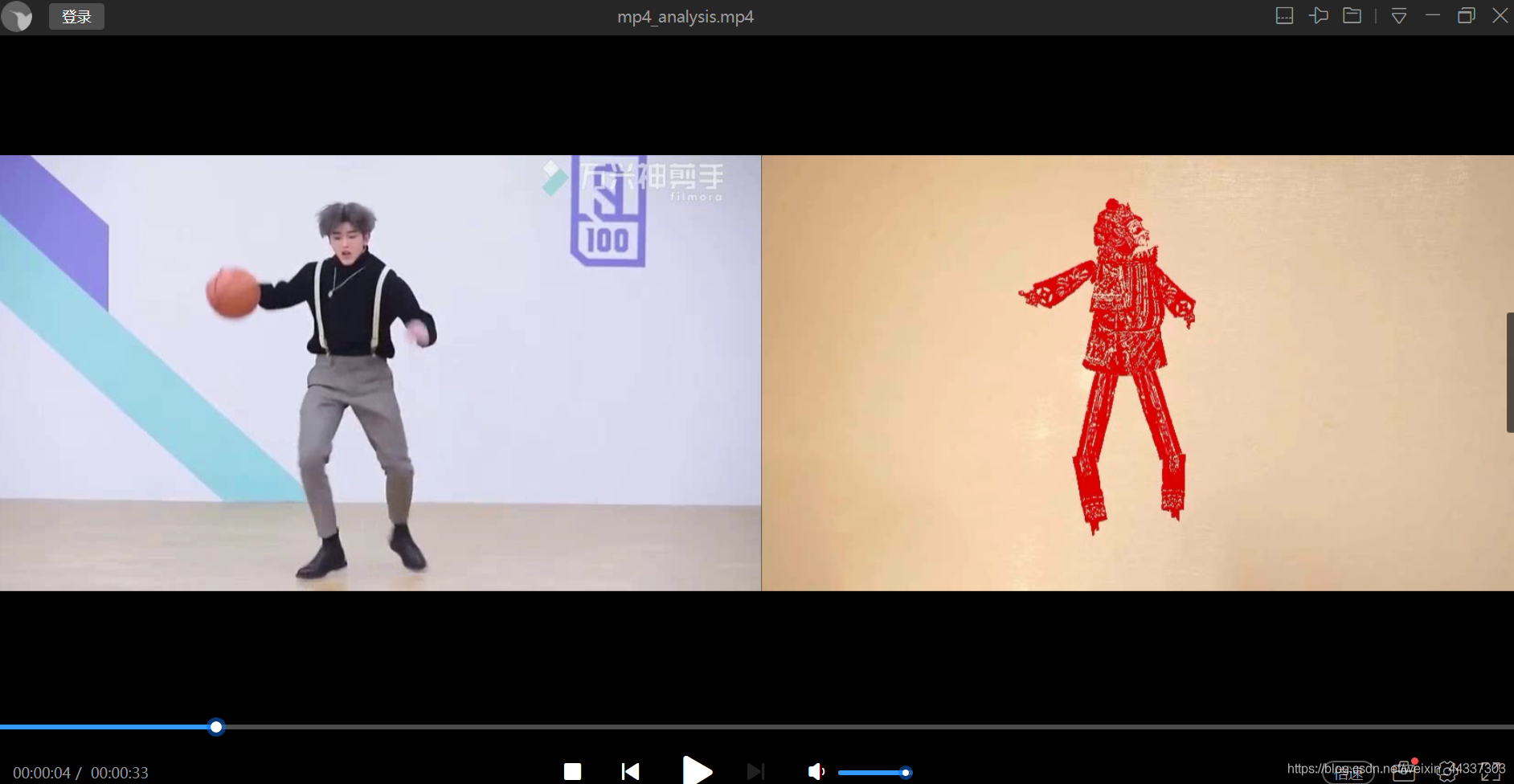
要形成动态皮影戏就需要对视频的每一帧画面进行人体姿态拼接处理,之后将处理过的每一帧皮影戏合成,就形成了动态皮影戏。
一、环境配置
本文使用的是Python3.7,需要安装PaddlePaddle和PaddleHub
安装命令:
PaddlePaddle
python -m pip install paddlepaddle==2.0.2 -i https://mirror.baidu.com/pypi/simple
PaddleHub
pip install PaddleHub
其他版本的安装请参考官网:
https://www.paddlepaddle.org.cn/install/quick?docurl=/documentation/docs/zh/install/pip/windows-pip.html
安装完后就可以通过PaddleHub来安装人体骨骼关键点检测模型human_pose_estimation_resnet50_mpii。
hub install human_pose_estimation_resnet50_mpii==1.1.1
二、目录与资源
创建Python项目,在该项目下创建work目录
work/imgs 是存放你所使用的图片素材
work/output_pose 是人体骨骼关键点识别后存放的图片目录
work/shadow_play_material 是皮影的素材图片,这里是皮影素材的下载地址:https://aistudio.baidu.com/aistudio/projectdetail/764130

work/mp4_img 是视频导出的图片
work/mp4_img_analysis 是视频每一帧图片的分析结果
work/background.jpg 是皮影戏的背景文件
下载地址同上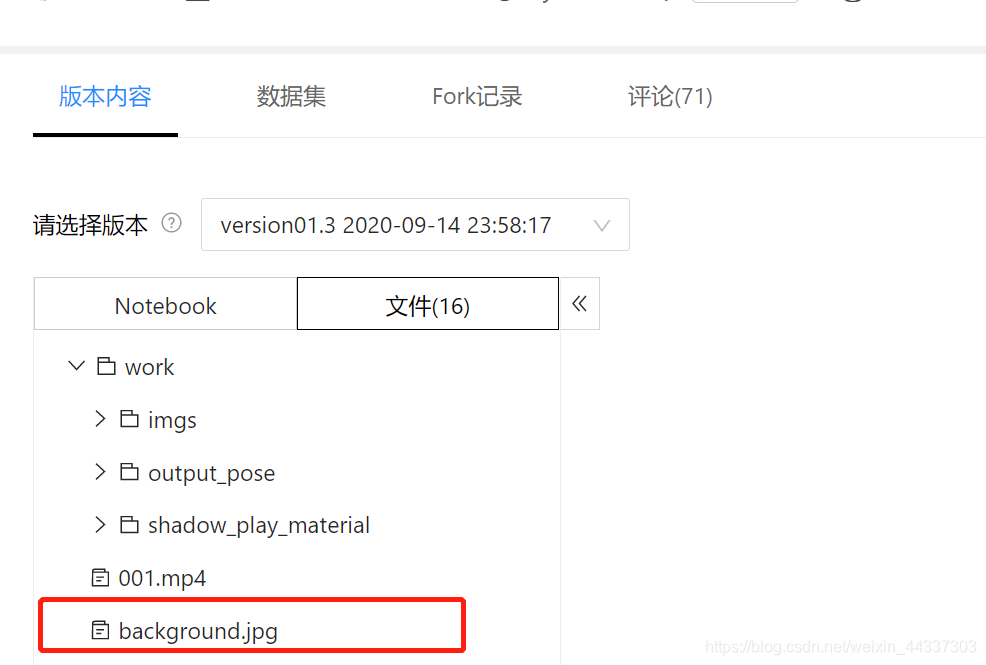
处理合成之后的视频将会保存在work目录下
三、查看单张图片的人体骨骼关键点检测效果
import os
import cv2
import paddlehub as hub
import matplotlib.pyplot as plt
from matplotlib.image import imread
import numpy as np

def show_img(img_path, size=8):
    '''
        文件读取图片显示
    '''
    im = imread(img_path)
    plt.figure(figsize=(size,size))
    plt.axis("off")
    plt.imshow(im)


def img_show_bgr(image,size=8):
    '''
        cv读取的图片显示
    '''
    image=cv2.cvtColor(image,cv2.COLOR_BGR2RGB)
    plt.figure(figsize=(size,size))
    plt.imshow(image)

    plt.axis("off")
    plt.show()

pose_estimation = hub.Module(name="human_pose_estimation_resnet50_mpii")
#注意图片素材的输入路径
result = pose_estimation.keypoint_detection(paths=['work/imgs/01.jpg'], visualization=True, output_dir="work/output_pose/")
result

show_img('work/output_pose/01.jpg')
运行,查看输出结果:
四、将单张人体骨骼检测结果与皮影素材拼接:
import os
import cv2
import paddlehub as hub
import matplotlib.pyplot as plt
from matplotlib.image import imread
import numpy as np

def show_img(img_path, size=8):
    '''
        文件读取图片显示
    '''
    im = imread(img_path)
    plt.figure(figsize=(size,size))
    plt.axis("off")
    plt.imshow(im)
def img_show_bgr(image,size=8):
    '''
        cv读取的图片显示
    '''
    image=cv2.cvtColor(image,cv2.COLOR_BGR2RGB)
    plt.figure(figsize=(size,size))
    plt.imshow(image)

    plt.axis("off")
    plt.show()

pose_estimation = hub.Module(name="human_pose_estimation_resnet50_mpii")


def get_true_angel(value):
    '''
    转转得到角度值
    '''
    return value/np.pi*180

def get_angle(x1, y1, x2, y2):
    '''
    计算旋转角度
    '''
    dx = abs(x1- x2)
    dy = abs(y1- y2)
    result_angele = 0
    if x1 == x2:
        if y1 > y2:
            result_angele = 180
    else:
        if y1!=y2:
            the_angle = int(get_true_angel(np.arctan(dx/dy)))
        if x1 < x2:
            if y1>y2:
                result_angele = -(180 - the_angle)
            elif y1<y2:
                result_angele = -the_angle
            elif y1==y2:
                result_angele = -90
        elif x1 > x2:
            if y1>y2:
                result_angele = 180 - the_angle
            elif y1<y2:
                result_angele = the_angle
            elif y1==y2:
                result_angele = 90

    if result_angele<0:
        result_angele = 360 + result_angele
    return result_angele

def rotate_bound(image, angle, key_point_y):
    '''
    旋转图像,并取得关节点偏移量
    '''
    #获取图像的尺寸
    (h,w) = image.shape[:2]
    #旋转中心
    (cx,cy) = (w/2,h/2)
    # 关键点必须在中心的y轴上
    (kx,ky) = cx, key_point_y
    d = abs(ky - cy)

    #设置旋转矩阵
    M = cv2.getRotationMatrix2D((cx,cy), -angle, 1.0)
    cos = np.abs(M[0,0])
    sin = np.abs(M[0,1])

    # 计算图像旋转后的新边界
    nW = int((h*sin)+(w*cos))
    nH = int((h*cos)+(w*sin))

    # 计算旋转后的相对位移
    move_x = nW/2 + np.sin(angle/180*np.pi)*d
    move_y = nH/2 - np.cos(angle/180*np.pi)*d

    # 调整旋转矩阵的移动距离(t_{x}, t_{y})
    M[0,2] += (nW/2) - cx
    M[1,2] += (nH/2) - cy

    return cv2.warpAffine(image,M,(nW,nH)), int(move_x), int(move_y)

def get_distences(x1, y1, x2, y2):
    return ((x1-x2)**2 + (y1-y2)**2)**0.5
def append_img_by_sk_points(img, append_img_path, key_point_y, first_point, second_point, append_img_reset_width=None,
                                        append_img_max_height_rate=1, middle_flip=False, append_img_max_height=None):
    '''
    将需要添加的肢体图片进行缩放
    '''
    append_image = cv2.imdecode(np.fromfile(append_img_path, dtype=np.uint8), cv2.IMREAD_UNCHANGED)

    # 根据长度进行缩放
    sk_height = int(get_distences(first_point[0], first_point[1], second_point[0], second_point[1])*append_img_max_height_rate)
    # 缩放制约
    if append_img_max_height:
        sk_height = min(sk_height, append_img_max_height)

    sk_width = int(sk_height/append_image.shape[0]*append_image.shape[1]) if append_img_reset_width is None else int(append_img_reset_width)
    if sk_width <= 0:
        sk_width = 1
    if sk_height <= 0:
        sk_height = 1

    # 关键点映射
    key_point_y_new = int(key_point_y/append_image.shape[0]*append_image.shape[1])
    # 缩放图片
    append_image = cv2.resize(append_image, (sk_width, sk_height))

    img_height, img_width, _ = img.shape
    # 是否根据骨骼节点位置在 图像中间的左右来控制是否进行 左右翻转图片
    # 主要处理头部的翻转, 默认头部是朝左
    if middle_flip:
        middle_x = int(img_width/2)
        if first_point[0] < middle_x and second_point[0] < middle_x:
            append_image = cv2.flip(append_image, 1)

    # 旋转角度
    angle = get_angle(first_point[0], first_point[1], second_point[0], second_point[1])
    append_image, move_x, move_y = rotate_bound(append_image, angle=angle, key_point_y=key_point_y_new)
    app_img_height, app_img_width, _ = append_image.shape

    zero_x = first_point[0] - move_x
    zero_y = first_point[1] - move_y

    (b, g, r) = cv2.split(append_image)
    for i in range(0, r.shape[0]):
        for j in range(0, r.shape[1]):
            if 230>r[i][j]>200 and 0<=zero_y+i<img_height and 0<=zero_x+j<img_width:
                img[zero_y+i][zero_x+j] = append_image[i][j]
    return img
body_img_path_map = {
    "right_hip" : "work/shadow_play_material/right_hip.jpg",
    "right_knee" : "work/shadow_play_material/right_knee.jpg",
    "left_hip" : "work/shadow_play_material/left_hip.jpg",
    "left_knee" : "work/shadow_play_material/left_knee.jpg",
    "left_elbow" : "work/shadow_play_material/left_elbow.jpg",
    "left_wrist" : "work/shadow_play_material/left_wrist.jpg",
    "right_elbow" : "work/shadow_play_material/right_elbow.jpg",
    "right_wrist" : "work/shadow_play_material/right_wrist.jpg",
    "head" : "work/shadow_play_material/head.jpg",
    "body" : "work/shadow_play_material/body.jpg"
}


def get_combine_img(img_path, pose_estimation=pose_estimation, body_img_path_map=body_img_path_map, backgroup_img_path= 'work/background.jpg'):
    '''
    识别图片中的关节点,并将皮影的肢体进行对应,最后与原图像拼接后输出
    '''
    result = pose_estimation.keypoint_detection(paths=[img_path])
    image=cv2.imread(img_path)

    # 背景图片
    backgroup_image = cv2.imread(backgroup_img_path)
    image_flag = cv2.resize(backgroup_image, (image.shape[1], image.shape[0]))

    # 最小宽度
    min_width = int(get_distences(result[0]['data']['head_top'][0], result[0]['data']['head_top'][1],
                result[0]['data']['upper_neck'][0], result[0]['data']['upper_neck'][1])/3)

    #右大腿
    append_img_reset_width = max(int(get_distences(result[0]['data']['pelvis'][0], result[0]['data']['pelvis'][1],
                                            result[0]['data']['left_hip'][0], result[0]['data']['right_hip'][1])*1.6), min_width)
    image_flag = append_img_by_sk_points(image_flag, body_img_path_map['right_hip'], key_point_y=10, first_point=result[0]['data']['right_hip'],
                                        second_point=result[0]['data']['right_knee'], append_img_reset_width=append_img_reset_width)

    # 右小腿
    append_img_reset_width = max(int(get_distences(result[0]['data']['pelvis'][0], result[0]['data']['pelvis'][1],
                                            result[0]['data']['left_hip'][0], result[0]['data']['right_hip'][1])*1.5), min_width)
    image_flag = append_img_by_sk_points(image_flag, body_img_path_map['right_knee'], key_point_y=10, first_point=result[0]['data']['right_knee'],
                                            second_point=result[0]['data']['right_ankle'], append_img_reset_width=append_img_reset_width)

    # 左大腿
    append_img_reset_width = max(int(get_distences(result[0]['data']['pelvis'][0], result[0]['data']['pelvis'][1],
                                            result[0]['data']['left_hip'][0], result[0]['data']['left_hip'][1])*1.6), min_width)
    image_flag = append_img_by_sk_points(image_flag, body_img_path_map['left_hip'], key_point_y=0, first_point=result[0]['data']['left_hip'],
                                        second_point=result[0]['data']['left_knee'], append_img_reset_width=append_img_reset_width)

    # 左小腿
    append_img_reset_width = max(int(get_distences(result[0]['data']['pelvis'][0], result[0]['data']['pelvis'][1],
                                            result[0]['data']['left_hip'][0], result[0]['data']['left_hip'][1])*1.5), min_width)
    image_flag = append_img_by_sk_points(image_flag, body_img_path_map['left_knee'], key_point_y=10, first_point=result[0]['data']['left_knee'],
                                            second_point=result[0]['data']['left_ankle'], append_img_reset_width=append_img_reset_width)

    # 右手臂
    image_flag = append_img_by_sk_points(image_flag, body_img_path_map['left_elbow'], key_point_y=25, first_point=result[0]['data']['right_shoulder'],
                                        second_point=result[0]['data']['right_elbow'], append_img_max_height_rate=1.2)

    # 右手肘
    append_img_max_height = int(get_distences(result[0]['data']['right_shoulder'][0], result[0]['data']['right_shoulder'][1],
                                            result[0]['data']['right_elbow'][0], result[0]['data']['right_elbow'][1])*1.6)
    image_flag = append_img_by_sk_points(image_flag, body_img_path_map['left_wrist'], key_point_y=10, first_point=result[0]['data']['right_elbow'],
                                            second_point=result[0]['data']['right_wrist'], append_img_max_height_rate=1.5,
                                            append_img_max_height=append_img_max_height)

    # 左手臂
    image_flag = append_img_by_sk_points(image_flag, body_img_path_map['right_elbow'], key_point_y=25, first_point=result[0]['data']['left_shoulder'],
                                        second_point=result[0]['data']['left_elbow'],  append_img_max_height_rate=1.2)

    # 左手肘
    append_img_max_height = int(get_distences(result[0]['data']['left_shoulder'][0], result[0]['data']['left_shoulder'][1],
                                        result[0]['data']['left_elbow'][0], result[0]['data']['left_elbow'][1])*1.6)
    image_flag = append_img_by_sk_points(image_flag, body_img_path_map['right_wrist'], key_point_y=10, first_point=result[0]['data']['left_elbow'],
                                        second_point=result[0]['data']['left_wrist'], append_img_max_height_rate=1.5,
                                         append_img_max_height=append_img_max_height)

    # 头
    image_flag = append_img_by_sk_points(image_flag, body_img_path_map['head'], key_point_y=10, first_point=result[0]['data']['head_top'],
                    second_point=result[0]['data']['upper_neck'], append_img_max_height_rate=1.2, middle_flip=True)

    # 身体
    append_img_reset_width = max(int(get_distences(result[0]['data']['left_shoulder'][0], result[0]['data']['left_shoulder'][1],
                                            result[0]['data']['right_shoulder'][0], result[0]['data']['right_shoulder'][1])*1.2), min_width*3)
    image_flag = append_img_by_sk_points(image_flag, body_img_path_map['body'], key_point_y=20, first_point=result[0]['data']['upper_neck'],
                    second_point=result[0]['data']['pelvis'], append_img_reset_width=append_img_reset_width, append_img_max_height_rate=1.2)

    result_img =  np.concatenate((image, image_flag), axis=1)

    return result_img
 #此目录下需要有处理过后的图片
pos_img_path = 'work/output_pose/01.jpg'

result_img =  get_combine_img(pos_img_path, pose_estimation, body_img_path_map)
img_show_bgr(result_img, size=10)
运行,查看结果: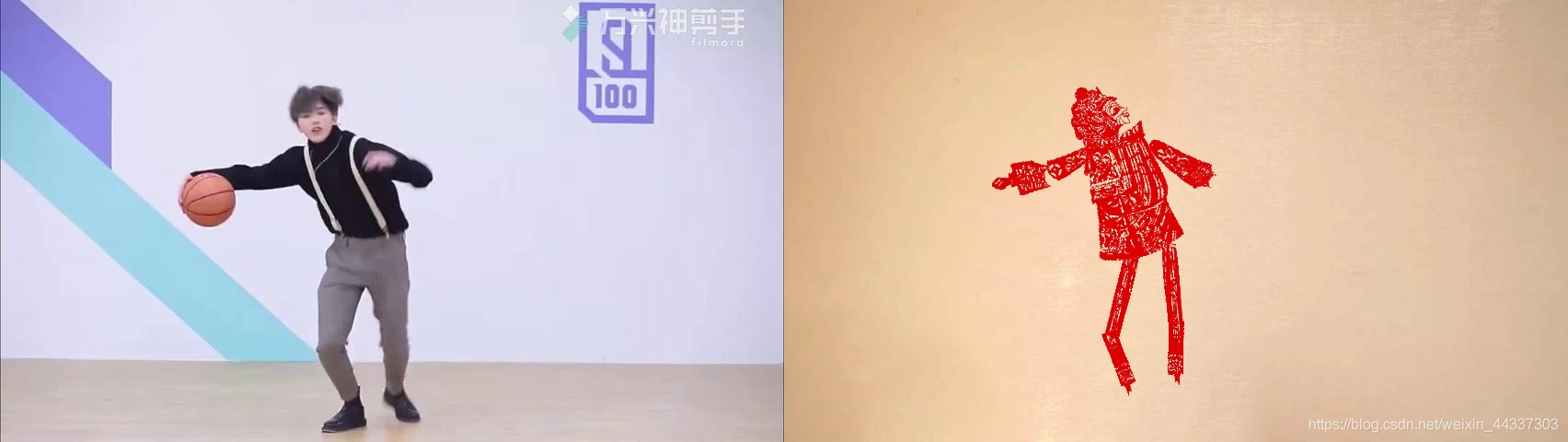
四、合成动态皮影戏:
import os
import cv2
import paddlehub as hub
import matplotlib.pyplot as plt
from matplotlib.image import imread
import numpy as np

def show_img(img_path, size=8):
    '''
        文件读取图片显示
    '''
    im = imread(img_path)
    plt.figure(figsize=(size,size))
    plt.axis("off")
    plt.imshow(im)
def img_show_bgr(image,size=8):
    '''
        cv读取的图片显示
    '''
    image=cv2.cvtColor(image,cv2.COLOR_BGR2RGB)
    plt.figure(figsize=(size,size))
    plt.imshow(image)

    plt.axis("off")
    plt.show()

pose_estimation = hub.Module(name="human_pose_estimation_resnet50_mpii")


def get_true_angel(value):
    '''
    转转得到角度值
    '''
    return value/np.pi*180

def get_angle(x1, y1, x2, y2):
    '''
    计算旋转角度
    '''
    dx = abs(x1- x2)
    dy = abs(y1- y2)
    result_angele = 0
    if x1 == x2:
        if y1 > y2:
            result_angele = 180
    else:
        if y1!=y2:
            the_angle = int(get_true_angel(np.arctan(dx/dy)))
        if x1 < x2:
            if y1>y2:
                result_angele = -(180 - the_angle)
            elif y1<y2:
                result_angele = -the_angle
            elif y1==y2:
                result_angele = -90
        elif x1 > x2:
            if y1>y2:
                result_angele = 180 - the_angle
            elif y1<y2:
                result_angele = the_angle
            elif y1==y2:
                result_angele = 90

    if result_angele<0:
        result_angele = 360 + result_angele
    return result_angele

def rotate_bound(image, angle, key_point_y):
    '''
    旋转图像,并取得关节点偏移量
    '''
    #获取图像的尺寸
    (h,w) = image.shape[:2]
    #旋转中心
    (cx,cy) = (w/2,h/2)
    # 关键点必须在中心的y轴上
    (kx,ky) = cx, key_point_y
    d = abs(ky - cy)

    #设置旋转矩阵
    M = cv2.getRotationMatrix2D((cx,cy), -angle, 1.0)
    cos = np.abs(M[0,0])
    sin = np.abs(M[0,1])

    # 计算图像旋转后的新边界
    nW = int((h*sin)+(w*cos))
    nH = int((h*cos)+(w*sin))

    # 计算旋转后的相对位移
    move_x = nW/2 + np.sin(angle/180*np.pi)*d
    move_y = nH/2 - np.cos(angle/180*np.pi)*d

    # 调整旋转矩阵的移动距离(t_{x}, t_{y})
    M[0,2] += (nW/2) - cx
    M[1,2] += (nH/2) - cy

    return cv2.warpAffine(image,M,(nW,nH)), int(move_x), int(move_y)

def get_distences(x1, y1, x2, y2):
    return ((x1-x2)**2 + (y1-y2)**2)**0.5
def append_img_by_sk_points(img, append_img_path, key_point_y, first_point, second_point, append_img_reset_width=None,
                                        append_img_max_height_rate=1, middle_flip=False, append_img_max_height=None):
    '''
    将需要添加的肢体图片进行缩放
    '''
    append_image = cv2.imdecode(np.fromfile(append_img_path, dtype=np.uint8), cv2.IMREAD_UNCHANGED)

    # 根据长度进行缩放
    sk_height = int(get_distences(first_point[0], first_point[1], second_point[0], second_point[1])*append_img_max_height_rate)
    # 缩放制约
    if append_img_max_height:
        sk_height = min(sk_height, append_img_max_height)

    sk_width = int(sk_height/append_image.shape[0]*append_image.shape[1]) if append_img_reset_width is None else int(append_img_reset_width)
    if sk_width <= 0:
        sk_width = 1
    if sk_height <= 0:
        sk_height = 1

    # 关键点映射
    key_point_y_new = int(key_point_y/append_image.shape[0]*append_image.shape[1])
    # 缩放图片
    append_image = cv2.resize(append_image, (sk_width, sk_height))

    img_height, img_width, _ = img.shape
    # 是否根据骨骼节点位置在 图像中间的左右来控制是否进行 左右翻转图片
    # 主要处理头部的翻转, 默认头部是朝左
    if middle_flip:
        middle_x = int(img_width/2)
        if first_point[0] < middle_x and second_point[0] < middle_x:
            append_image = cv2.flip(append_image, 1)

    # 旋转角度
    angle = get_angle(first_point[0], first_point[1], second_point[0], second_point[1])
    append_image, move_x, move_y = rotate_bound(append_image, angle=angle, key_point_y=key_point_y_new)
    app_img_height, app_img_width, _ = append_image.shape

    zero_x = first_point[0] - move_x
    zero_y = first_point[1] - move_y

    (b, g, r) = cv2.split(append_image)
    for i in range(0, r.shape[0]):
        for j in range(0, r.shape[1]):
            if 230>r[i][j]>200 and 0<=zero_y+i<img_height and 0<=zero_x+j<img_width:
                img[zero_y+i][zero_x+j] = append_image[i][j]
    return img
body_img_path_map = {
    "right_hip" : "work/shadow_play_material/right_hip.jpg",
    "right_knee" : "work/shadow_play_material/right_knee.jpg",
    "left_hip" : "work/shadow_play_material/left_hip.jpg",
    "left_knee" : "work/shadow_play_material/left_knee.jpg",
    "left_elbow" : "work/shadow_play_material/left_elbow.jpg",
    "left_wrist" : "work/shadow_play_material/left_wrist.jpg",
    "right_elbow" : "work/shadow_play_material/right_elbow.jpg",
    "right_wrist" : "work/shadow_play_material/right_wrist.jpg",
    "head" : "work/shadow_play_material/head.jpg",
    "body" : "work/shadow_play_material/body.jpg"
}


def get_combine_img(img_path, pose_estimation=pose_estimation, body_img_path_map=body_img_path_map, backgroup_img_path= 'work/background.jpg'):
    '''
    识别图片中的关节点,并将皮影的肢体进行对应,最后与原图像拼接后输出
    '''
    result = pose_estimation.keypoint_detection(paths=[img_path])
    image=cv2.imread(img_path)

    # 背景图片
    backgroup_image = cv2.imread(backgroup_img_path)
    image_flag = cv2.resize(backgroup_image, (image.shape[1], image.shape[0]))

    # 最小宽度
    min_width = int(get_distences(result[0]['data']['head_top'][0], result[0]['data']['head_top'][1],
                result[0]['data']['upper_neck'][0], result[0]['data']['upper_neck'][1])/3)

    #右大腿
    append_img_reset_width = max(int(get_distences(result[0]['data']['pelvis'][0], result[0]['data']['pelvis'][1],
                                            result[0]['data']['left_hip'][0], result[0]['data']['right_hip'][1])*1.6), min_width)
    image_flag = append_img_by_sk_points(image_flag, body_img_path_map['right_hip'], key_point_y=10, first_point=result[0]['data']['right_hip'],
                                        second_point=result[0]['data']['right_knee'], append_img_reset_width=append_img_reset_width)

    # 右小腿
    append_img_reset_width = max(int(get_distences(result[0]['data']['pelvis'][0], result[0]['data']['pelvis'][1],
                                            result[0]['data']['left_hip'][0], result[0]['data']['right_hip'][1])*1.5), min_width)
    image_flag = append_img_by_sk_points(image_flag, body_img_path_map['right_knee'], key_point_y=10, first_point=result[0]['data']['right_knee'],
                                            second_point=result[0]['data']['right_ankle'], append_img_reset_width=append_img_reset_width)

    # 左大腿
    append_img_reset_width = max(int(get_distences(result[0]['data']['pelvis'][0], result[0]['data']['pelvis'][1],
                                            result[0]['data']['left_hip'][0], result[0]['data']['left_hip'][1])*1.6), min_width)
    image_flag = append_img_by_sk_points(image_flag, body_img_path_map['left_hip'], key_point_y=0, first_point=result[0]['data']['left_hip'],
                                        second_point=result[0]['data']['left_knee'], append_img_reset_width=append_img_reset_width)

    # 左小腿
    append_img_reset_width = max(int(get_distences(result[0]['data']['pelvis'][0], result[0]['data']['pelvis'][1],
                                            result[0]['data']['left_hip'][0], result[0]['data']['left_hip'][1])*1.5), min_width)
    image_flag = append_img_by_sk_points(image_flag, body_img_path_map['left_knee'], key_point_y=10, first_point=result[0]['data']['left_knee'],
                                            second_point=result[0]['data']['left_ankle'], append_img_reset_width=append_img_reset_width)

    # 右手臂
    image_flag = append_img_by_sk_points(image_flag, body_img_path_map['left_elbow'], key_point_y=25, first_point=result[0]['data']['right_shoulder'],
                                        second_point=result[0]['data']['right_elbow'], append_img_max_height_rate=1.2)

    # 右手肘
    append_img_max_height = int(get_distences(result[0]['data']['right_shoulder'][0], result[0]['data']['right_shoulder'][1],
                                            result[0]['data']['right_elbow'][0], result[0]['data']['right_elbow'][1])*1.6)
    image_flag = append_img_by_sk_points(image_flag, body_img_path_map['left_wrist'], key_point_y=10, first_point=result[0]['data']['right_elbow'],
                                            second_point=result[0]['data']['right_wrist'], append_img_max_height_rate=1.5,
                                            append_img_max_height=append_img_max_height)

    # 左手臂
    image_flag = append_img_by_sk_points(image_flag, body_img_path_map['right_elbow'], key_point_y=25, first_point=result[0]['data']['left_shoulder'],
                                        second_point=result[0]['data']['left_elbow'],  append_img_max_height_rate=1.2)

    # 左手肘
    append_img_max_height = int(get_distences(result[0]['data']['left_shoulder'][0], result[0]['data']['left_shoulder'][1],
                                        result[0]['data']['left_elbow'][0], result[0]['data']['left_elbow'][1])*1.6)
    image_flag = append_img_by_sk_points(image_flag, body_img_path_map['right_wrist'], key_point_y=10, first_point=result[0]['data']['left_elbow'],
                                        second_point=result[0]['data']['left_wrist'], append_img_max_height_rate=1.5,
                                         append_img_max_height=append_img_max_height)

    # 头
    image_flag = append_img_by_sk_points(image_flag, body_img_path_map['head'], key_point_y=10, first_point=result[0]['data']['head_top'],
                    second_point=result[0]['data']['upper_neck'], append_img_max_height_rate=1.2, middle_flip=True)

    # 身体
    append_img_reset_width = max(int(get_distences(result[0]['data']['left_shoulder'][0], result[0]['data']['left_shoulder'][1],
                                            result[0]['data']['right_shoulder'][0], result[0]['data']['right_shoulder'][1])*1.2), min_width*3)
    image_flag = append_img_by_sk_points(image_flag, body_img_path_map['body'], key_point_y=20, first_point=result[0]['data']['upper_neck'],
                    second_point=result[0]['data']['pelvis'], append_img_reset_width=append_img_reset_width, append_img_max_height_rate=1.2)

    result_img =  np.concatenate((image, image_flag), axis=1)

    return result_img

 #下载一个舞蹈视频,保存在work目录下
 input_video = 'work/01.mp4'

def transform_video_to_image(video_file_path, img_path):
    '''
    将视频中每一帧保存成图片
    '''
    video_capture = cv2.VideoCapture(video_file_path)
    fps = video_capture.get(cv2.CAP_PROP_FPS)
    count = 0
    while(True):
        ret, frame = video_capture.read()
        if ret:
            cv2.imwrite(img_path + '%d.jpg' % count, frame)
            count += 1
        else:
            break
    video_capture.release()
    print('视频图片保存成功, 共有 %d 张' % count)
    return fps

fps = transform_video_to_image(input_video, 'work/mp4_img/')

def analysis_pose(input_frame_path, output_frame_path, is_print=True):
    '''
    分析图片中的人体姿势, 并转换为皮影姿势,输出结果
    '''
    file_items = os.listdir(input_frame_path)
    file_len = len(file_items)
    for i, file_item in enumerate(file_items):
        if is_print:
            print(i+1,'/', file_len, ' ', os.path.join(output_frame_path, file_item))
        combine_img = get_combine_img(os.path.join(input_frame_path, file_item))
        cv2.imwrite(os.path.join(output_frame_path, file_item), combine_img)


analysis_pose('work/mp4_img/', 'work/mp4_img_analysis/', is_print=False)


def combine_image_to_video(comb_path, output_file_path, fps=30, is_print=False):
    '''
        合并图像到视频
    '''
    fourcc = cv2.VideoWriter_fourcc(*'MP4V')

    file_items = os.listdir(comb_path)
    file_len = len(file_items)
    # print(comb_path, file_items)
    if file_len > 0:
        temp_img = cv2.imread(os.path.join(comb_path, file_items[0]))
        img_height, img_width = temp_img.shape[0], temp_img.shape[1]

        out = cv2.VideoWriter(output_file_path, fourcc, fps, (img_width, img_height))

        for i in range(file_len):
            pic_name = os.path.join(comb_path, str(i) + ".jpg")
            if is_print:
                print(i + 1, '/', file_len, ' ', pic_name)
            img = cv2.imread(pic_name)
            out.write(img)
        out.release()

combine_image_to_video('work/mp4_img_analysis/', 'work/mp4_analysis.mp4', fps)
运行,耗费时间跟视频长度有关,30s的视频耗费大概10-15分钟左右,你可以在mp4_img_analysis目录下看到每一帧画面的皮影拼接图片,视频合成完会保存在work目录下。
运行效果: