[Unity] 自定义AssetsManager进行资源加载与管理
问题的产生:
游戏通过AssetBundle读取资源,如预制体、图片等
AssetBundle有很多,并且Bundle之间可能存在依赖,如
Bundle A中的预制体使用了Bundle B中的资源同步加载可能造成进程卡死,如资源过大,解压速度慢等
思路:
使用协程进行异步加载
加载资源前,先检查Bundle是否被加载,如果没有被加载则先加载Bundle
加载Bundle前,先检查是否依赖其他Bundle,如果有有依赖与其他则先加载其他Bundle
Bundle加载完毕,再加载资源即可
本文实现:
准备:
首先准备一个记录资源映射的json文件,如下图,
key值为资源的路径,value值为资源所在的Bundle名称。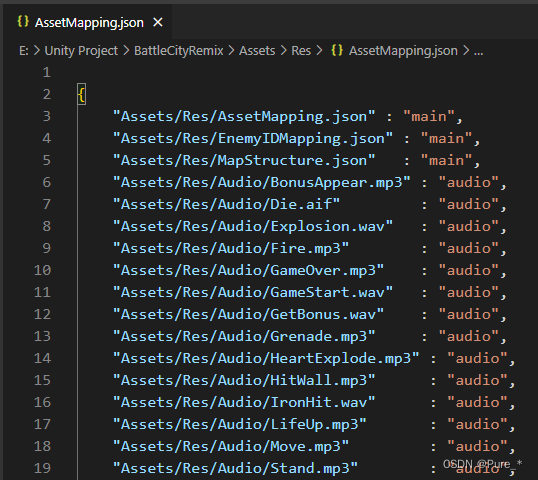
建立一个
ResConst.cs类,将Bundle中的资源路径填写进去,需要注意的是,此处的路径需要与json文件的key值一致,如下图。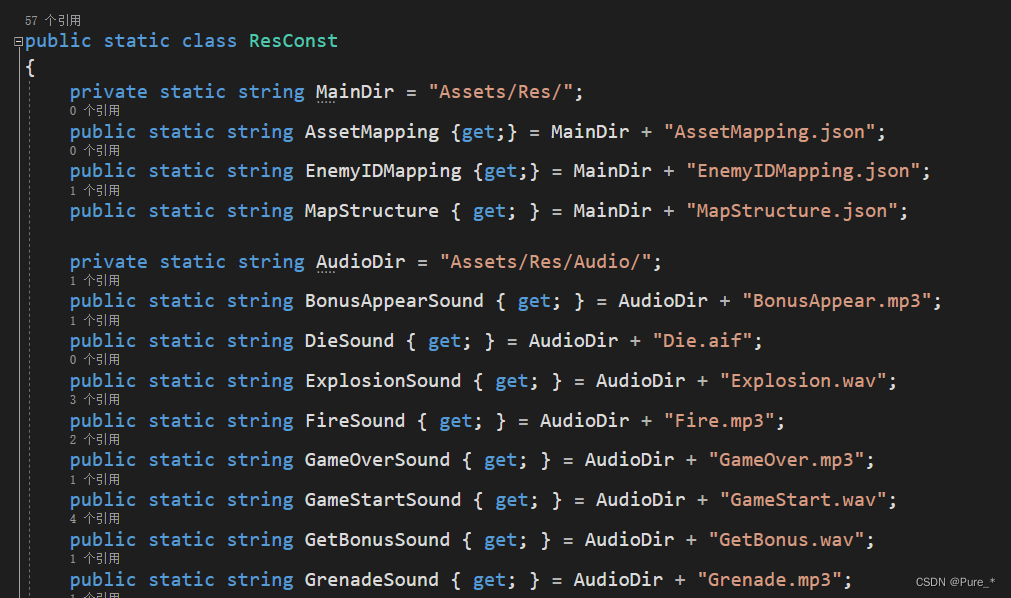
实现
新建一个
AssetsManager.cs作为资源管理器(不一定要叫这个名啊),需要注意的是因为需要使用协程,因此AssetsManager是需要继承自MonoBehavior的,主要有三个字段public class AssetsManager : MonoBehaviour { // 资源路径 -> Bundle名称 private Dictionary<string, string> path2bundle = new Dictionary<string, string>(); // Bundle名称 -> AssetBundle private Dictionary<string, AssetBundle> bundles = new Dictionary<string, AssetBundle>(); // 主Bundle的manifest文件 private AssetBundleManifest mainManifest; }首先读取主Bundle和它的
.manifest,也就是下图这两个文件(在Awake中执行)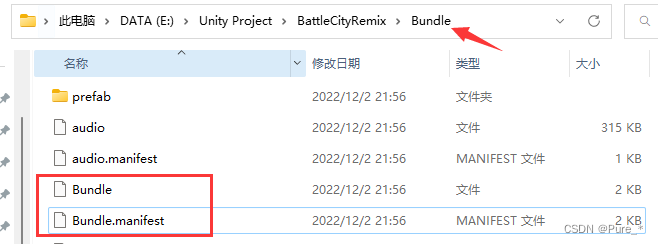
主Bundle的名称就为导出Bundle时,导出文件夹的名称(此处就叫Bundle)
主Bundle的
.manifest文件记录了所有Bundle以及其依赖,如下图,红色箭头所指Bundle的名称以及紫色方框中就为其依赖的Bundle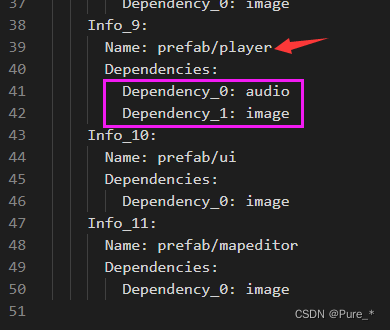
将主Bundle的manifest文件读取出来,需要注意的是主Bundle的manifest就叫
AssetBundleManifest// 初始化主Bundle 方便后续拿依赖 // 主AB包一定存在,而且与导出时的文件夹名相同 DirectoryInfo directory = new DirectoryInfo(GlobalConfig.AssetBundleDir); string mainPath = Path.Combine(GlobalConfig.AssetBundleDir, directory.Name); AssetBundle main = AssetBundle.LoadFromFile(mainPath); // 获取主AB包的配置文件 mainManifest = main.LoadAsset<AssetBundleManifest>("AssetBundleManifest");
利用LitJson读取出来并存储到字典中,此处我将资源映射文件
AssetMapping.json打到名称为main的Bundle中。(在Awake中执行)// 把资源路径与bundle映射先加载出来 string mappingFile = Path.Combine(GlobalConfig.AssetBundleDir, "main"); AssetBundle bundle = AssetBundle.LoadFromFile(mappingFile); // 加入到Bundle字典中 bundles.Add("main", bundle); TextAsset mappingText = bundle.LoadAsset<TextAsset>("AssetMapping.json"); JsonReader reader = new JsonReader(mappingText.ToString()); JsonData data = JsonMapper.ToObject(reader); foreach (string key in data.Keys) { path2bundle.Add(key, data[key].ToString()); } reader.Close();实现加载Bundle。
先检查依赖
如果没有依赖了,则代表所有包都已经加载完毕,就返回
否则开启协程加载所有包
private void LoadAssetBundle(string bundleName, Action<AssetBundle> onLoaded)
{
    // 检查出不存在的依赖
    List<string> deps = CheckNoneExistedDependencies(bundleName);
    // 如果没有不存在的直接返回
    if (deps.Count == 0)
    {
        onLoaded?.Invoke(bundles[bundleName]);
    }
    else
    {
        // 异步加载
        List<object> parameters = new List<object>()
        {
            deps,
            bundleName,
            onLoaded,
        };
        StartCoroutine(nameof(LoadAssetBundlesAsync), parameters);
    }
}
协程
LoadAssetBundlesAsync的实现,这一步的关键在于if条件为ture的分支中防止重复加载的yield return语句和false分支中占位的bundles.Add(deps[i], null)语句,主要是基于以下考量- 游戏资源加载是非常频繁的,当同一时间(帧)多个协程加载同一个还未加载的Bundle,如果不控制重复加载,就会报
The AssetBundle XXX can't be loaded because another AssetBundle with the same files is already loaded - 先占位,表明已经有协程在加载这个Bundle了,其他协程到这里只需要等待即可
- 游戏资源加载是非常频繁的,当同一时间(帧)多个协程加载同一个还未加载的Bundle,如果不控制重复加载,就会报
IEnumerator LoadAssetBundlesAsync(List<object> obj)
{
    List<string> deps = (List<string>)obj[0];
    string targetBundleName = (string)obj[1];
    Action<AssetBundle> onLoaded = (Action<AssetBundle>)obj[2];
    for (int i = 0; i < deps.Count; i++)
    {
        if (bundles.ContainsKey(deps[i]))
        {
            // 防止重复加载
            yield return new WaitUntil(() => bundles[deps[i]] != null);
        }
        else
        {
            string bundlePath = Path.Combine(GlobalConfig.AssetBundleDir, deps[i]);
            // 占位
            bundles.Add(deps[i], null);
            AssetBundleCreateRequest request = AssetBundle.LoadFromFileAsync(bundlePath);
            yield return request;
            bundles[deps[i]] = request.assetBundle;
        }
    }
    onLoaded?.Invoke(bundles[targetBundleName]);
}
检查依赖
CheckNoneExistedDependencies的实现,函数LoadAssetBundle、协程LoadAssetBundlesAsync和这个函数都是相扣的使用主Bundle的manifest,调用
GetAllDependencies就能拿到该bundle的所有依赖因为存在占位情况,如果此时需要的bundle没有加载出来则需要加入到不存在列表中
最后检查自己存在与否
private List<string> CheckNoneExistedDependencies(string bundleName)
{
    List<string> noneExisted = new List<string>();
    string[] dependencies = mainManifest.GetAllDependencies(bundleName);
    foreach (string dep in dependencies)
    {
        if (!bundles.ContainsKey(dep) || bundles[dep] == null)
        {
            noneExisted.Add(dep);
        }
    }
    // 也要检查自己存不存在
    if (!bundles.ContainsKey(bundleName) || bundles[bundleName] == null)
    {
        noneExisted.Add(bundleName);
    }
    return noneExisted;
}
加载资源。当完成上面Bundle的加载,就可以使用
ResConst.cs中设定好的路径加载资源了public void LoadAsset(string assetPath, Action<UnityEngine.Object> onLoaded = null) { if (string.IsNullOrEmpty(assetPath) || string.IsNullOrWhiteSpace(assetPath)) { throw new ArgumentException("Bad Argument: It was NULL , Empty or WhiteSpace"); } if (path2bundle.TryGetValue(assetPath, out string bundleName)) { LoadAssetBundle(bundleName, (bundle) => { FileInfo file = new FileInfo(assetPath); List<object> parameters = new List<object>() { file.Name, bundle, onLoaded, }; StartCoroutine(nameof(LoadAssetAsync), parameters); }); } else { throw new DirectoryNotFoundException("Bad Key: " + assetPath + " is not a key of bundle dictionary"); } } // 调用之前保证Bundle都有 IEnumerator LoadAssetAsync(List<object> list) { string assetName = (string)list[0]; AssetBundle bundle = (AssetBundle)list[1]; Action<UnityEngine.Object> onLoaded = (Action<UnityEngine.Object>)list[2]; AssetBundleRequest request = bundle.LoadAssetAsync<UnityEngine.Object>(assetName); yield return request; onLoaded?.Invoke(request.asset); }