图示: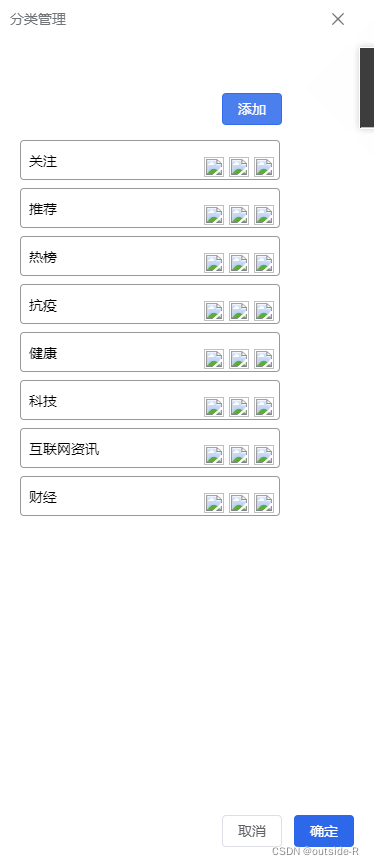
html
 <div class="type-tips">
      <el-drawer v-model="drawer2" :direction="direction">
        <template #title>
          <div class="tips-nav">
            <span>分类管理</span>
          </div>
        </template>
        <template #default>
          <ul>
            <div class="btns">
              <el-button type="primary"  class="typeAdd">添加</el-button>
            </div>
            <li v-for="(v,i) in typeDate" :key="v.id">
              <div class="txt">{{v.name}}</div>
              <div class="handle">
                <div class="iconImg" v-for="(v,i) in typeImg" :key="v.icon">
                  <img :src="v.icon" alt="">
                </div>
              </div>
            </li>
          </ul>
        </template>
        <template #footer>
          <div style="flex: auto">
            <el-button @click="cancelClick">取消</el-button>
            <el-button type="primary" @click="confirmClick">确定</el-button>
          </div>
        </template>
      </el-drawer>
    </div>
js
import index_1 from '@/assets/images/index_1.png'
import index_2 from '@/assets/images/index_2.png'
const drawer2 = ref(false)
const direction = ref('rtl')
const radio1 = ref('Option 1')
const typeImg=ref([
  {
    name:'编辑',
    icon:index_1
  },
   {
    name:'删除',
    icon:index_1
  },
   {
    name:'详情',
    icon:index_2
  }
])
function cancelClick() {
  drawer2.value = false
}
function confirmClick() {
  ElMessageBox.confirm(`Are you confirm to chose ${radio1.value} ?`)
    .then(() => {
      drawer2.value = false
    })
    .catch(() => {
      // catch error
    })
}
css
//侧边分类弹窗
.type-tips{
  :deep(.el-drawer){
    width: 20% !important;;
  }
  .el-drawer--header{
    background-color: #333!important;;
    color: #fff!important;;
  }
  ul{
    padding: 10px;
    width:300px;
    .btns{
      display: flex;
      justify-content: flex-end;
      margin:0 18px 15px 0;
    }
    li{
      border:1px solid #999;
      border-radius: 4px;
      margin-bottom: 8px;
      width:260px;
      height:40px;
      line-height: 40px;
      display:flex;
      flex-direction: row;
      .txt{
       margin-left: 8px;
      }
      .handle{
        display:flex;
        flex-direction: row;
        flex: 1;
        justify-content: flex-end;
        img{
          width:20px;
          height:20px;
          margin-right: 5px;
        }
      }
    }
  }
}
版权声明:本文为weixin_45044349原创文章,遵循CC 4.0 BY-SA版权协议,转载请附上原文出处链接和本声明。