USB 鼠标详解阅读顺序
1、枚举
2、设备描述符
3、设置地址
4、配置描述符
5、接口描述符
6、HID 描述符
7、端点描述符
8、字符串描述符
10、HID 报告的返回
设备描述符定义
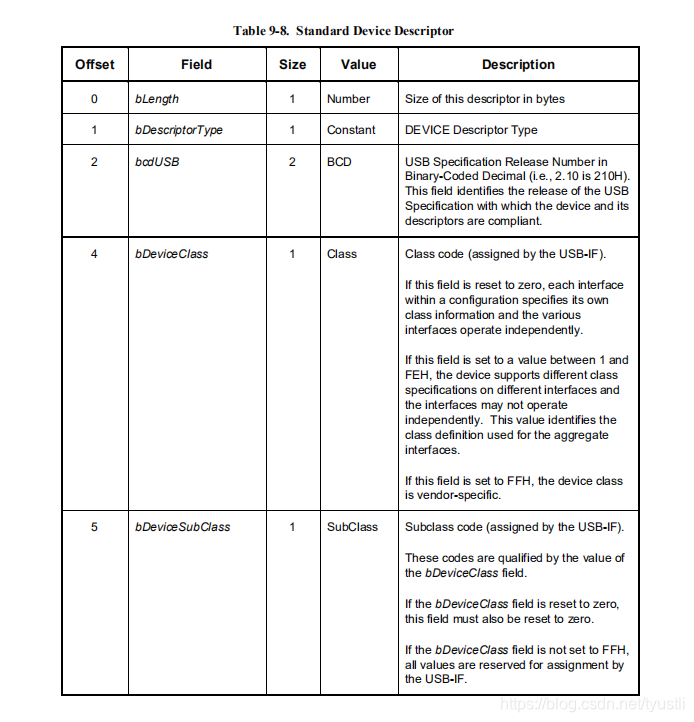

设备描述符定义linux 内核中对设备描述符的定义如下
typedef struct __attribute__ ((packed))
{
    uint8_t  bLength            ; ///< Size of this descriptor in bytes.
    uint8_t  bDescriptorType    ; ///< DEVICE Descriptor Type.
    uint16_t bcdUSB             ; ///< BUSB Specification Release Number in Binary-Coded Decimal (i.e., 2.10 is 210H). This field identifies the release of the USB Specification with which the device and its descriptors are compliant.

    uint8_t  bDeviceClass       ; ///< Class code (assigned by the USB-IF). \li If this field is reset to zero, each interface within a configuration specifies its own class information and the various interfaces operate independently. \li If this field is set to a value between 1 and FEH, the device supports different class specifications on different interfaces and the interfaces may not operate independently. This value identifies the class definition used for the aggregate interfaces. \li If this field is set to FFH, the device class is vendor-specific.
    uint8_t  bDeviceSubClass    ; ///< Subclass code (assigned by the USB-IF). These codes are qualified by the value of the bDeviceClass field. \li If the bDeviceClass field is reset to zero, this field must also be reset to zero. \li If the bDeviceClass field is not set to FFH, all values are reserved for assignment by the USB-IF.
    uint8_t  bDeviceProtocol    ; ///< Protocol code (assigned by the USB-IF). These codes are qualified by the value of the bDeviceClass and the bDeviceSubClass fields. If a device supports class-specific protocols on a device basis as opposed to an interface basis, this code identifies the protocols that the device uses as defined by the specification of the device class. \li If this field is reset to zero, the device does not use class-specific protocols on a device basis. However, it may use classspecific protocols on an interface basis. \li If this field is set to FFH, the device uses a vendor-specific protocol on a device basis.
    uint8_t  bMaxPacketSize0    ; ///< Maximum packet size for endpoint zero (only 8, 16, 32, or 64 are valid). For HS devices is fixed to 64.

    uint16_t idVendor           ; ///< Vendor ID (assigned by the USB-IF).
    uint16_t idProduct          ; ///< Product ID (assigned by the manufacturer).
    uint16_t bcdDevice          ; ///< Device release number in binary-coded decimal.
    uint8_t  iManufacturer      ; ///< Index of string descriptor describing manufacturer.
    uint8_t  iProduct           ; ///< Index of string descriptor describing product.
    uint8_t  iSerialNumber      ; ///< Index of string descriptor describing the device's serial number.

    uint8_t  bNumConfigurations ; ///< Number of possible configurations.
}usb_desc_device_t;
各个位的含义
- bLength:表示该描述符的长度。设备描述符的长度为 18 字节,写成十六进制就是 0x12
- bDescriptorType:描述符类型。设备描述符的编号为 0x01
- bcdUSB:2 字节,该设备所使用的 USB 协议的版本。如 USB2.0 就是 0x0200,USB1.1就是 0x0110。实际传输的时候是低字节在前的
- bDeviceClass:是设备所使用的类代码
- bDeviceSubClass:是设备所使用子类代码
- bDeviceProtocol:是设备所使用的协议,协议代码由 USB 协会规定。
- bMaxPacketSize0:端点 0 的最大包长。它的取值可以是 8 16 32 64
- idVender:2 字节,厂商 ID
- idProduct:2 字节,产品 ID
- bcdDevice:2 字节,设备的版本号
- iManufacturer:描述厂商的字符串的索引值
- iProduct:描述产品的字符串索引值
- iSerialNumber:设备的序列号字符串索引值
- bNumberConfigurations:表示该设备有多少种配置
设备描述符抓包
当主机检测到有 USB 设备插入时,首先会对设备进行复位,然后会获取设备描述符
例如一个 USB 复位和获取设备描述符的过程如下所示

//设备描述符为18字节
    {
        //bLength字段。设备描述符的长度为18(0x12)字节
        0x12,

        //bDescriptorType字段。设备描述符的编号为0x01
        0x01,

        //bcdUSB字段。这里设置版本为USB1.1,即0x0110。
        //由于是小端结构,所以低字节在先,即0x10,0x01。
        0x10,
        0x01,

        //bDeviceClass字段。我们不在设备描述符中定义设备类,
        //而在接口描述符中定义设备类,所以该字段的值为0。
        0x00,

        //bDeviceSubClass字段。bDeviceClass字段为0时,该字段也为0。
        0x00,

        //bDeviceProtocol字段。bDeviceClass字段为0时,该字段也为0。
        0x00,

        //bMaxPacketSize0字段。 的端点0大小的8字节。
        0x08,

        //idVender字段。
        //注意小端模式,低字节在先。
        0x5D,
        0x27,

        //idProduct字段。产品ID号。
        //注意小端模式,低字节应该在前。
        0xA6,
        0x0B,

        //bcdDevice字段。
        //小端模式,低字节在先。
        0x00,
        0x01,

        //iManufacturer字段。厂商字符串的索引
        0x00,

        //iProduct字段。产品字符串的索引值。
        //注意字符串索引值不要使用相同的值。
        0x01,

        //iSerialNumber字段。设备的序列号字符串索引值。
        0x00,

        //bNumConfigurations字段。该设备所具有的配置数。
        0x01
}版权声明:本文为tyustli原创文章,遵循CC 4.0 BY-SA版权协议,转载请附上原文出处链接和本声明。