一、前言
项目开发过程中,单一数据源不能满足开发需求或者需要用到主从数据库的时候,引入多数据源配置在项目中显得尤为必要。下面简单介绍一种在spingboot中结合mybatis针对同类型的数据源mysql进行多数据源配置和应用
环境准备:
JDK 1.8
SpringBoot 2.5.1
Maven 3.6.3
MySQL 5.7
二、目录结构
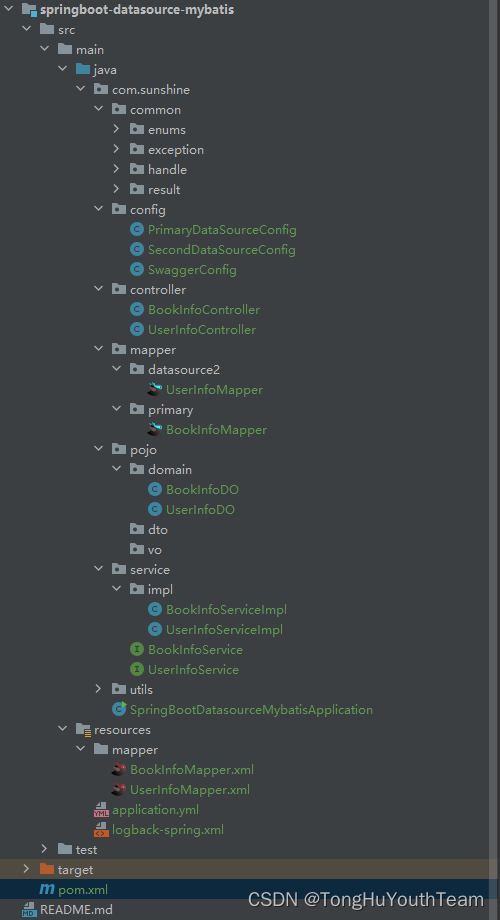
三、引入数据库依赖
        <!--数据库驱动-->
        <dependency>
            <groupId>mysql</groupId>
            <artifactId>mysql-connector-java</artifactId>
            <scope>runtime</scope>
        </dependency>
四、添加数据源(yml)
#数据源连接信息
spring:
  datasource:
    primary:
      username: root
      password: mima12345
      jdbc-url: jdbc:mysql://192.168.10.102:3306/mingqian?useUnicode=true&characterEncoding=UTF-8&autoReconnect=true&serverTimezone=Asia/Shanghai
      driver-class-name: com.mysql.jdbc.Driver
    datasource2:
      username: root
      password: mima12345
      jdbc-url: jdbc:mysql://192.168.10.102:3306/mingqianbak?useUnicode=true&characterEncoding=UTF-8&autoReconnect=true&serverTimezone=Asia/Shanghai
      driver-class-name: com.mysql.jdbc.Driver
五、添加数据源的配置文件
- 主数据源
@Configuration
@MapperScan(basePackages = {"com.sunshine.mapper.primary"}, sqlSessionFactoryRef = "sqlSessionFactory")
public class PrimaryDataSourceConfig {

    @Bean(name = "dataSource")
    @ConfigurationProperties(prefix = "spring.datasource.primary")
    @Primary
    public DataSource dataSource() {
        return DataSourceBuilder.create().build();
    }

    @Bean(name = "sqlSessionFactory")
    @Primary
    public SqlSessionFactory sqlSessionFactory(@Qualifier("dataSource") DataSource dataSource) throws Exception {
        SqlSessionFactoryBean bean = new SqlSessionFactoryBean();
        bean.setDataSource(dataSource);
        bean.setMapperLocations(new PathMatchingResourcePatternResolver().getResources("classpath:mapper/*.xml"));
        return bean.getObject();
    }

    @Bean(name = "transactionManager")
    @Primary
    public DataSourceTransactionManager transactionManager(@Qualifier("dataSource") DataSource dataSource) {
        return new DataSourceTransactionManager(dataSource);
    }

    @Bean(name = "sqlSessionTemplate")
    @Primary
    public SqlSessionTemplate sqlSessionTemplate(@Qualifier("sqlSessionFactory") SqlSessionFactory sqlSessionFactory) {
        return new SqlSessionTemplate(sqlSessionFactory);
    }
}
- 第二数据源
@Configuration
@MapperScan(basePackages = {"com.sunshine.mapper.datasource2"}, sqlSessionFactoryRef = "sqlSessionFactory2")
public class SecondDataSourceConfig {

   @Bean(name = "dataSource2")
   @ConfigurationProperties(prefix = "spring.datasource.datasource2")
   public DataSource dataSource() {
       return DataSourceBuilder.create().build();
   }

   @Bean(name = "sqlSessionFactory2")
   public SqlSessionFactory sqlSessionFactory(@Qualifier("dataSource2") DataSource dataSource) throws Exception {
       SqlSessionFactoryBean bean = new SqlSessionFactoryBean();
       bean.setDataSource(dataSource);
       bean.setMapperLocations(new PathMatchingResourcePatternResolver().getResources("classpath:mapper/*.xml"));
       return bean.getObject();
   }

   @Bean(name = "transactionManager2")
   public DataSourceTransactionManager transactionManager(@Qualifier("dataSource2") DataSource dataSource) {
       return new DataSourceTransactionManager(dataSource);
   }

   @Bean(name = "sqlSessionTemplate2")
   public SqlSessionTemplate sqlSessionTemplate(@Qualifier("sqlSessionFactory2") SqlSessionFactory sqlSessionFactory) {
       return new SqlSessionTemplate(sqlSessionFactory);
   }
}
六、测试
6-1:sql建表语句
-- mingqian
SET FOREIGN_KEY_CHECKS=0;

-- ----------------------------
-- Table structure for book_info :mingqian主库中的表
-- ----------------------------
DROP TABLE IF EXISTS `book_info`;
CREATE TABLE `book_info` (
  `id` int(11) NOT NULL AUTO_INCREMENT,
  `author` varchar(64) NOT NULL COMMENT '作者信息',
  `name` varchar(64) NOT NULL COMMENT '书籍名称',
  `price` decimal(10,0) NOT NULL COMMENT '价格',
  `createTime` datetime DEFAULT NULL COMMENT '上架时间',
  `description` varchar(128) DEFAULT NULL COMMENT '书籍描述',
  `updateTime` datetime DEFAULT NULL COMMENT '修改时间',
  PRIMARY KEY (`id`)
) ENGINE=InnoDB AUTO_INCREMENT=5 DEFAULT CHARSET=utf8;

-- ----------------------------
-- Records of book_info
-- ----------------------------
INSERT INTO `book_info` VALUES ('1', '雨果', '巴黎圣母院', '66', '2020-12-19 15:26:51', '巴黎圣母院是法国著名作家雨果的长篇小说。讲述的是丑聋人卡西莫多被巴黎圣母院的神父收养后作为撞钟人,神父内心丑恶,想要迫害吉ト赛女郎埃斯梅拉达。面目丑陋、心地善良的敲钟人卡西莫多为救女郎舍身的故事', '2022-08-21 13:37:14');
INSERT INTO `book_info` VALUES ('2', '列夫·托尔斯泰', '战争与和平', '98', '2020-12-19 15:28:36', '战争与和平是列夫·托尔斯泰写下的长篇小说。讲述的是俄、法两国再度交战时期,鲍尔康斯、别祖霍夫、罗斯托夫和库拉金四大贵族的经历为主线,在战争与和平的交替描写中把众多的事件和人物串联起来。战争和和平本来是反义词,单这本书却很好的描写了这两个词语背后的意义', '2022-08-21 13:37:17');
INSERT INTO `book_info` VALUES ('3', '高尔基', '童年', '56', '2022-08-21 14:35:02', '《童年》的作家是高尔基,这篇故事讲述的是小主人公阿廖沙在父亲去世之后,跟着母亲在外公家度过的岁月。他的外祖母十分爱他,为他讲了许多优美的童话,让他有了温暖的感觉,但他也目睹了舅舅为了争家产而打架,反应了一个家庭赤裸裸的生活故事', '2022-08-21 14:35:08');
INSERT INTO `book_info` VALUES ('4', '雨果', '悲惨世界', '48', '2022-08-21 14:35:05', '雨果以卓越的艺术魅力展示了资本主义社会奴役劳动人民、逼良为娼的残酷现实。雨果的这部传世之作,创造了一部反映法国现代社会生活和政治生活的长篇史话。', '2022-08-21 14:35:10');
-- mingqianbak
SET FOREIGN_KEY_CHECKS=0;

-- ----------------------------
-- Table structure for user_info:mingqianbak从库表
-- ----------------------------
DROP TABLE IF EXISTS `user_info`;
CREATE TABLE `user_info` (
  `id` int(11) NOT NULL AUTO_INCREMENT,
  `NAME` varchar(32) DEFAULT NULL COMMENT '用户名称',
  `birthday` date DEFAULT NULL COMMENT '出生日期',
  `createTime` datetime DEFAULT NULL COMMENT '创建时间',
  `updateTime` datetime DEFAULT NULL COMMENT '修改时间',
  PRIMARY KEY (`id`)
) ENGINE=InnoDB AUTO_INCREMENT=5 DEFAULT CHARSET=utf8mb4 COMMENT='用户信息表';

-- ----------------------------
-- Records of user_info
-- ----------------------------
INSERT INTO `user_info` VALUES ('1', '雨果', '1924-03-10', '2022-08-21 13:36:20', '2022-08-21 13:36:27');
INSERT INTO `user_info` VALUES ('2', '列夫·托尔斯泰', '1330-01-10', '2022-08-21 13:36:23', '2022-08-21 13:36:30');
INSERT INTO `user_info` VALUES ('3', '余华', '1960-04-03', '2022-08-21 14:37:21', '2022-08-21 14:37:29');
INSERT INTO `user_info` VALUES ('4', '刘慈欣', '1963-06-06', '2022-08-21 14:37:26', '2022-08-21 14:37:32');
6-2:po
@Data
@TableName("book_info")
@ApiModel(value = "book_info实体")
public class BookInfoDO {

    private Integer id;

    private String author;

    private String name;

    private Long price;

    private Date createtime;

    private Date updatetime;

    private String description;

}
@Data
@TableName("user_info")
@ApiModel(value = "user_info实体")
public class UserInfoDO {

    private Integer id;

    private String name;

    private Date birthday;

    private Date createtime;

    private Date updatetime;

}
6-3:mapper(接口)
@Repository
public interface UserInfoMapper {

    List<UserInfoDO> selectAll();


}
@Repository
public interface BookInfoMapper {


    List<BookInfoDO> selectAll();


}
6-4:mapper(xml)
<?xml version="1.0" encoding="UTF-8"?>
<!DOCTYPE mapper PUBLIC "-//mybatis.org//DTD Mapper 3.0//EN" "http://mybatis.org/dtd/mybatis-3-mapper.dtd">
<mapper namespace="com.sunshine.mapper.primary.BookInfoMapper">
    <resultMap id="BaseResultMap" type="com.sunshine.pojo.domain.BookInfoDO">

        <id column="id" jdbcType="INTEGER" property="id"/>
        <result column="author" jdbcType="VARCHAR" property="author"/>
        <result column="name" jdbcType="VARCHAR" property="name"/>
        <result column="price" jdbcType="DECIMAL" property="price"/>
        <result column="description" jdbcType="VARCHAR" property="description"/>
        <result column="createTime" jdbcType="TIMESTAMP" property="createtime"/>
        <result column="createTime" jdbcType="TIMESTAMP" property="updatetime"/>
    </resultMap>
    <select id="selectAll" resultMap="BaseResultMap">

        select id, author, name, price, createTime, description,updatetime
        from book_info
    </select>
</mapper>
<?xml version="1.0" encoding="UTF-8"?>
<!DOCTYPE mapper PUBLIC "-//mybatis.org//DTD Mapper 3.0//EN" "http://mybatis.org/dtd/mybatis-3-mapper.dtd">
<mapper namespace="com.sunshine.mapper.datasource2.UserInfoMapper">
    <resultMap id="BaseResultMap" type="com.sunshine.pojo.domain.UserInfoDO">

        <id column="id" jdbcType="INTEGER" property="id"/>
        <result column="name" jdbcType="VARCHAR" property="name"/>
        <result column="birthday" jdbcType="DATE" property="birthday"/>
        <result column="createTime" jdbcType="TIMESTAMP" property="createtime"/>
        <result column="createTime" jdbcType="TIMESTAMP" property="updatetime"/>
    </resultMap>
    <select id="selectAll" resultMap="BaseResultMap">

        select id, name, birthday ,createtime ,updatetime
        from user_info
    </select>
</mapper>
6-5:service
public interface BookInfoService {
    List<BookInfoDO> selectAll();
}
public interface UserInfoService {

    List<UserInfoDO> selectAll();
}
6-6:serviceImpl
@Service
public class BookInfoServiceImpl implements BookInfoService {

    @Autowired
    private BookInfoMapper bookInfoMapper;

    @Override
    public List<BookInfoDO> selectAll() {
        return bookInfoMapper.selectAll();
    }
}
@Service
public class UserInfoServiceImpl implements UserInfoService {

    @Autowired
    private UserInfoMapper userInfoMapper;

    @Override
    public List<UserInfoDO> selectAll() {
        return userInfoMapper.selectAll();
    }
}
6-7:controller
@RestController
@Api(tags = "用户-相关接口")
@RequestMapping(value = "/users", produces = MediaType.APPLICATION_JSON_VALUE)
public class UserInfoController {

    @Autowired
    private UserInfoService userInfoService;

    @ApiOperation(value = "列表查询")
    @ResponseBody
    @GetMapping(value = "/list")
    public Response selectAll() {
        List<UserInfoDO> userList = userInfoService.selectAll();
        return Response.success(userList);
    }
}
@RestController
@Api(tags = "书籍-相关接口")
@RequestMapping(value = "/books", produces = MediaType.APPLICATION_JSON_VALUE)
public class BookInfoController {

    @Autowired
    private BookInfoService bookInfoService;

    @ApiOperation(value = "列表查询")
    @GetMapping(value = "/list")
    public Response selectAll() throws Exception {
        List<BookInfoDO> books = bookInfoService.selectAll();
        return Response.success(books);
    }
}
6-8:postman测试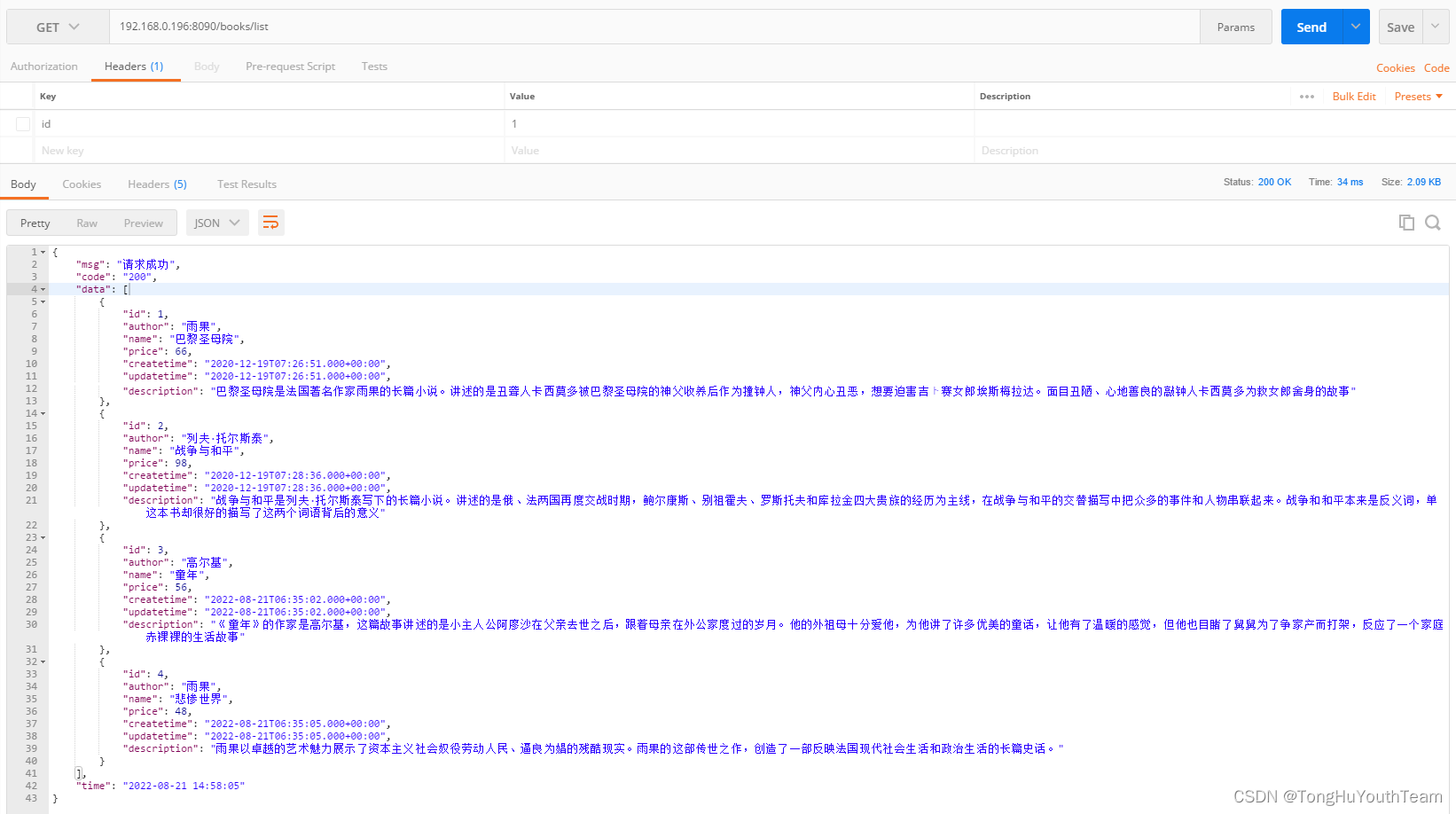
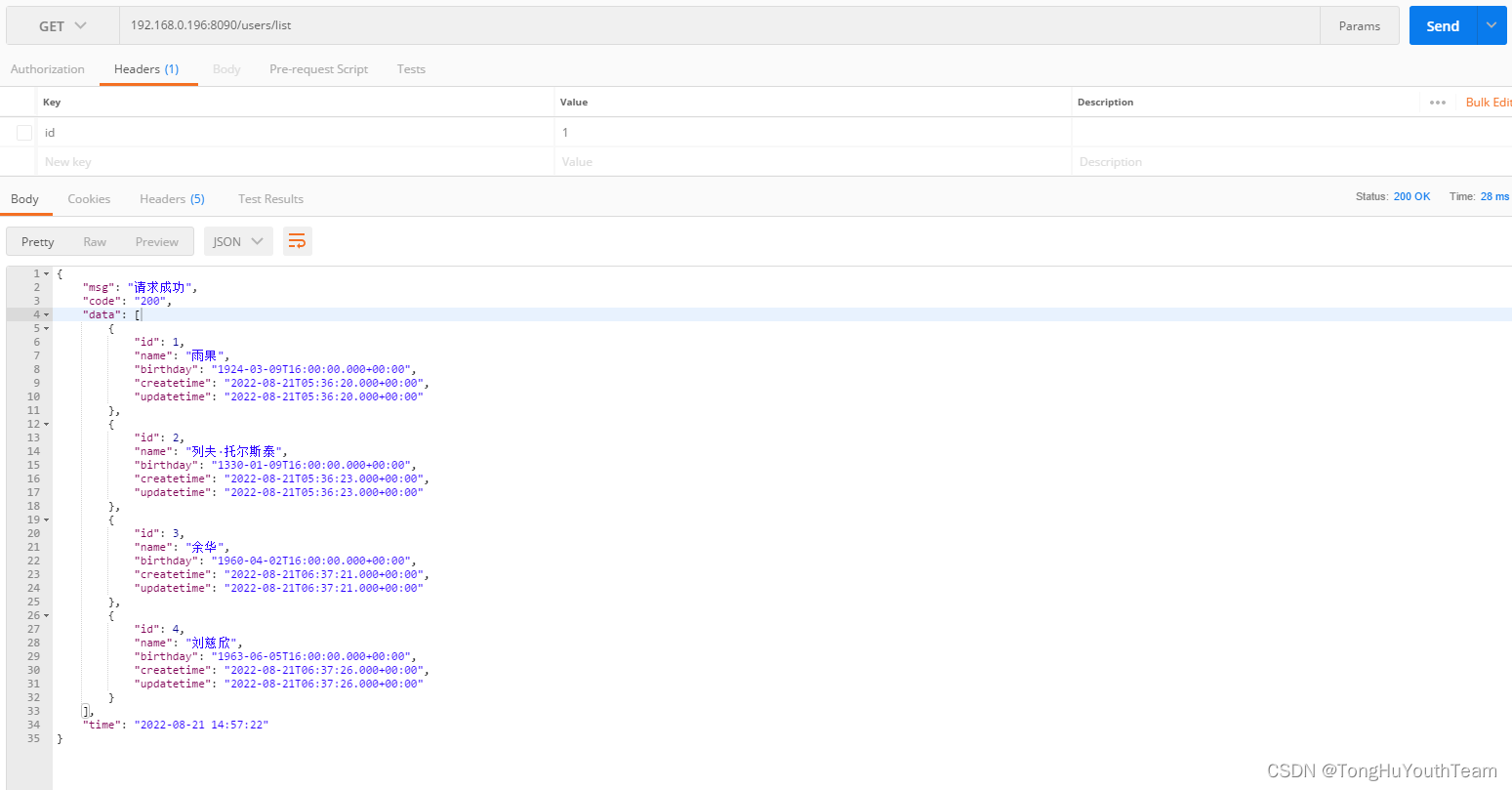
七、注意
特别注意在配置配置文件的时候注意两点
1、数据库链接url:要写成jdbc-url:
2、在创建SqlSessionFactoryBean bean = new SqlSessionFactoryBean();针对mybatis;若是项目中使用了mybatis,则需要替换成:MybatisSqlSessionFactoryBean bean = new MybatisSqlSessionFactoryBean(); 否则会报错:找不到baseMapper中的方法;
报错展示: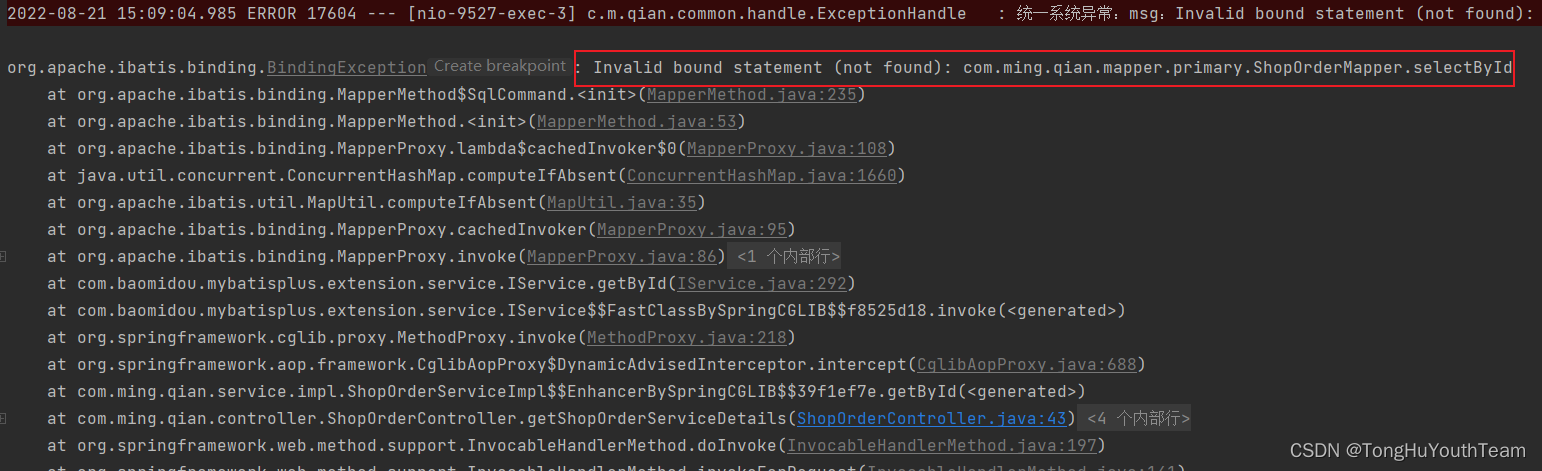
八、总结
以上方式单纯的使用JDBC的方式进行数据库链接,当实际项目开发过程中会使用池化思想,数据库连接池例如Druid
下篇研究Druid 连接池配置多数据源的情况。
版权声明:本文为TongHuYouthTeam原创文章,遵循CC 4.0 BY-SA版权协议,转载请附上原文出处链接和本声明。