Spring、SpringMVC与MyBatis集成
一、框架搭建流程
(一)拷贝相关jar包到工程目录
当前工程使用的JAR包,具体使用版本会有所区别
aopalliance-1.0.jar
aspectj-1.6.12.jar
aspectjweaver-1.6.2.jar
cglib-nodep-2.2.3.jar
commons-dbcp-1.4.jar
commons-logging-1.1.1.jar
commons-pool-1.6.jar
jquery-3.3.1.js
log4j-1.2.16.jar
mybatis-3.2.6.jar
mybatis-spring-1.3.2.jar
mysql-connector-java-5.1.20-bin.jar
org.springframework.aop-3.0.5.RELEASE.jar
org.springframework.asm-3.0.5.RELEASE.jar
org.springframework.aspects-3.0.5.RELEASE.jar
org.springframework.beans-3.0.5.RELEASE.jar
org.springframework.context-3.0.5.RELEASE.jar
org.springframework.context.support-3.0.5.RELEASE.jar
org.springframework.core-3.0.5.RELEASE.jar
org.springframework.expression-3.0.5.RELEASE.jar
org.springframework.instrument-3.0.5.RELEASE.jar
org.springframework.instrument.tomcat-3.0.5.RELEASE.jar
org.springframework.jdbc-3.0.5.RELEASE.jar
org.springframework.jms-3.0.5.RELEASE.jar
org.springframework.orm-3.0.5.RELEASE.jar
org.springframework.oxm-3.0.5.RELEASE.jar
org.springframework.test-3.0.5.RELEASE.jar
org.springframework.transaction-3.0.5.RELEASE.jar
org.springframework.web-3.0.5.RELEASE.jar
org.springframework.web.portlet-3.0.5.RELEASE.jar
org.springframework.web.servlet-3.0.5.RELEASE.jar
org.springframework.web.struts-3.0.5.RELEASE.jar
slf4j-api-1.6.1.jar
slf4j-log4j12-1.6.1.jar
(二)整合SpringMVC
1 . 配置web.xml文件
<?xml version="1.0" encoding="UTF-8"?>
<web-app xmlns:xsi="http://www.w3.org/2001/XMLSchema-instance" xmlns="http://xmlns.jcp.org/xml/ns/javaee" xsi:schemaLocation="http://xmlns.jcp.org/xml/ns/javaee http://xmlns.jcp.org/xml/ns/javaee/web-app_3_1.xsd" id="WebApp_ID" version="3.1">
  <display-name>ssm001</display-name>
  <welcome-file-list>
    <welcome-file>index.html</welcome-file>
  </welcome-file-list>

  <!-- 配置前端控制器DispatcherServlet -->

  <servlet>
    <servlet-name>springmvc</servlet-name>
    <servlet-class>org.springframework.web.servlet.DispatcherServlet</servlet-class>
  </servlet>
  <servlet-mapping>
    <servlet-name>springmvc</servlet-name>
    <url-pattern>*.do</url-pattern>
  </servlet-mapping>

  <!-- 配置编码过滤器 -->
  <filter>
  	<filter-name>CharacterEncodingFilter</filter-name>
  	<filter-class>org.springframework.web.filter.CharacterEncodingFilter</filter-class>
  	<init-param>
  		<!-- 配置编码格式 -->
  		<param-name>encoding</param-name>
  		<param-value>UTF-8</param-value>
  	</init-param>
  </filter>
  <filter-mapping>
  	<!-- 配置过滤范围 -->
  	<filter-name>CharacterEncodingFilter</filter-name>
  	<url-pattern>/*</url-pattern>
  </filter-mapping>

</web-app>
2 . 配置springmvc-servlet.xml核心配置文件
<?xml version="1.0" encoding="UTF-8"?>
<beans xmlns="http://www.springframework.org/schema/beans"
	xmlns:xsi="http://www.w3.org/2001/XMLSchema-instance"
	xmlns:mvc="http://www.springframework.org/schema/mvc"
	xmlns:context="http://www.springframework.org/schema/context"
	xmlns:aop="http://www.springframework.org/schema/aop"
	xmlns:tx="http://www.springframework.org/schema/tx"
	xsi:schemaLocation="http://www.springframework.org/schema/beans
	http://www.springframework.org/schema/beans/spring-beans-3.0.xsd
	http://www.springframework.org/schema/mvc
	http://www.springframework.org/schema/mvc/spring-mvc-3.0.xsd
	http://www.springframework.org/schema/context
	http://www.springframework.org/schema/context/spring-context-3.0.xsd
	http://www.springframework.org/schema/aop
	http://www.springframework.org/schema/aop/spring-aop-3.0.xsd
	http://www.springframework.org/schema/tx
	http://www.springframework.org/schema/tx/spring-tx-3.0.xsd ">

	<!-- springmvc注解驱动 -->
	<mvc:annotation-driven/>

	<!-- springmvc的扫描器 -->
	<context:component-scan base-package="com.pmzeroa.controller" />

	<!-- 配置默认的方法映射器 -->
	<bean id="handlerMapping" class="org.springframework.web.servlet.mvc.annotation.DefaultAnnotationHandlerMapping"/>
	<bean id="Adapter" class="org.springframework.web.servlet.mvc.annotation.AnnotationMethodHandlerAdapter"/>

	<!-- 配置视图解析器 -->
	<bean
		class="org.springframework.web.servlet.view.InternalResourceViewResolver">
		<!-- 前缀 -->
		<property name="prefix" value="/"></property>
		<!-- 后缀 -->
		<property name="suffix" value=".jsp"></property>
	</bean>

</beans>
3 . 编写测试类进行测试
package com.pmzeroa.controller;

import org.springframework.stereotype.Controller;
import org.springframework.web.bind.annotation.RequestMapping;

@Controller
public class TestController {

	@RequestMapping("/test.do")
	public String test() {

		System.out.println("-----我是控制器-----");

		return "index";

	}
}
4 . 编写index.jsp页面
<%@ page language="java" contentType="text/html; charset=UTF-8"
    pageEncoding="UTF-8"%>
<!DOCTYPE html>
<html>
<head>
<meta charset="UTF-8">
<title>PMZeroA</title>
</head>
<body>
	<a href="test.do">SpringMVC测试</a>
</body>
</html>
测试演示
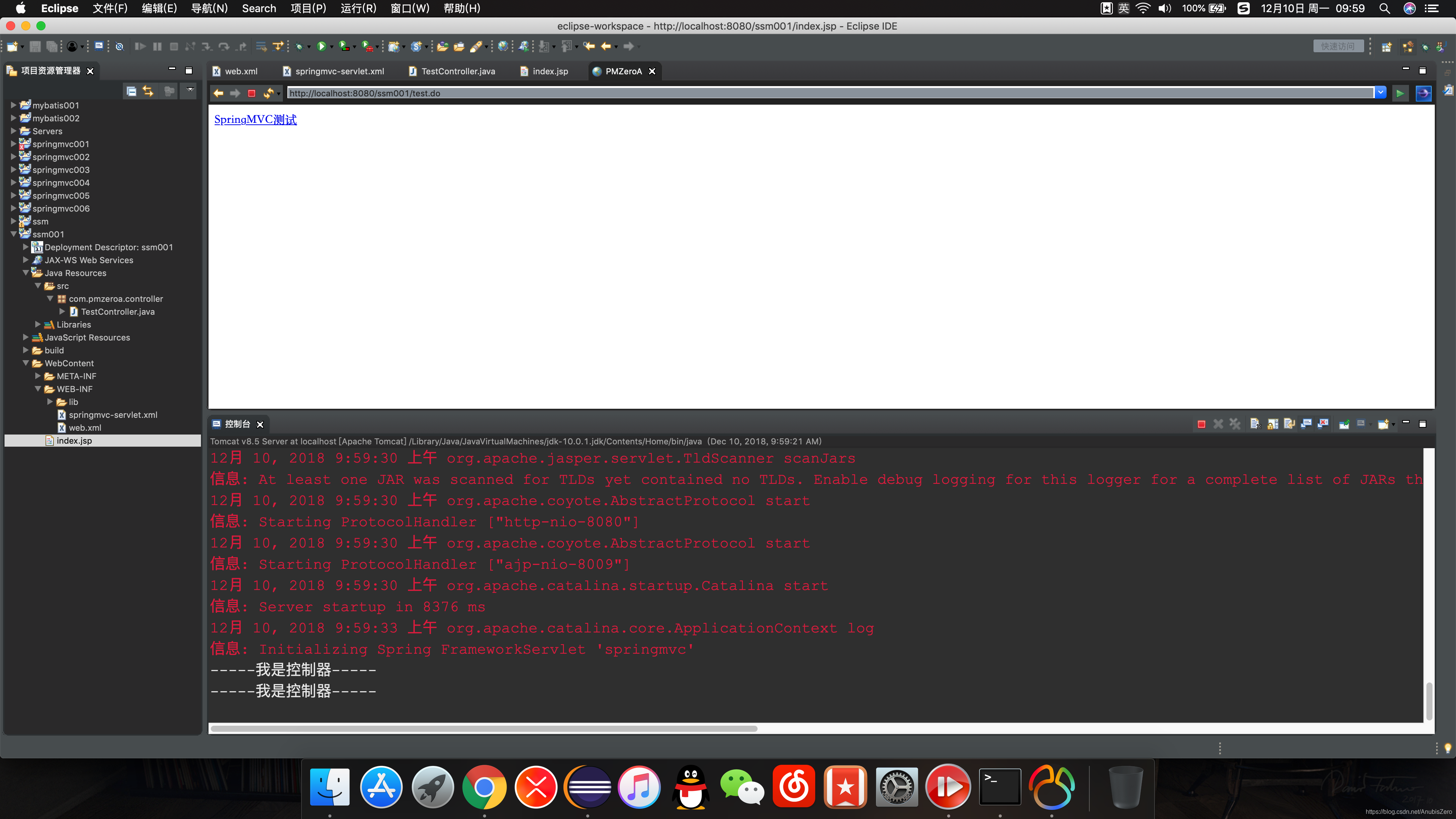
(二)配置MyBatis
1 . 创建MyBatis主配置文件mybatis.xml
<?xml version="1.0" encoding="UTF-8"?>
<!DOCTYPE configuration PUBLIC "-//mybatis.org//DTD Config 3.0//EN" "http://mybatis.org/dtd/mybatis-3-config.dtd">
<configuration>
	<!--  -->
	<typeAliases>
		<typeAlias type="com.pmzeroa.po.UserInfo" alias="userInfo"/>
	</typeAliases>
	<mappers>
		<mapper resource="com/pmzeroa/mapper/userinfo.xml"/>
	</mappers>
</configuration>
2 . 配置Spring主配置文件applicationContext.xml
- 配置数据源信息
- 创建SqlSessionFactory实例
- 指定数据源
- 指定MyBatis主配置文件
- 事务配置
- 配置事务处理方式
- 配置参与事务的类:AOP
<?xml version="1.0" encoding="UTF-8"?>
<beans xmlns="http://www.springframework.org/schema/beans"
	xmlns:xsi="http://www.w3.org/2001/XMLSchema-instance"
	xmlns:mvc="http://www.springframework.org/schema/mvc"
	xmlns:context="http://www.springframework.org/schema/context"
	xmlns:aop="http://www.springframework.org/schema/aop"
	xmlns:tx="http://www.springframework.org/schema/tx"
	xsi:schemaLocation="http://www.springframework.org/schema/beans
	http://www.springframework.org/schema/beans/spring-beans-3.0.xsd
	http://www.springframework.org/schema/mvc
	http://www.springframework.org/schema/mvc/spring-mvc-3.0.xsd
	http://www.springframework.org/schema/context
	http://www.springframework.org/schema/context/spring-context-3.0.xsd
	http://www.springframework.org/schema/aop
	http://www.springframework.org/schema/aop/spring-aop-3.0.xsd
	http://www.springframework.org/schema/tx
	http://www.springframework.org/schema/tx/spring-tx-3.0.xsd ">

	<!-- 配置注解驱动 -->
	<context:component-scan base-package="com.pmzeroa.service"></context:component-scan>

	<!-- 配置数据源信息 -->
	<bean id="dataSource" class="org.apache.commons.dbcp.BasicDataSource">
		<property name="driverClassName" value="com.mysql.jdbc.Driver"/>
		<property name="url" value="jdbc:mysql://localhost:3306/anubis"/>
		<property name="username" value="root"/>
		<property name="password" value="/"/>
	</bean>

	<!-- 创建SqlSessionFactory实例 -->
	<bean id="sqlSessionFactory" class="org.mybatis.spring.SqlSessionFactoryBean">
		<!-- dataSource属性指定需要的数据源 -->
		<property name="dataSource" ref="dataSource"/>
		<!-- configLocation属性指定mybatis主配置文件 -->
		<property name="configLocation" value="classpath:mybatis.xml"/>
	</bean>

	<!-- 映射接口basePackage指定需要扫描的包及其子包下的所有映射器接口都会被搜索 -->
	<bean class="org.mybatis.spring.mapper.MapperScannerConfigurer">
		<property name="basePackage" value="com.pmzeroa.mapper"></property>
	</bean>

	<!-- 事务配置 -->
	<bean id="transactionManager" class="org.springframework.jdbc.datasource.DataSourceTransactionManager">
		<property name="dataSource" ref="dataSource"></property>
	</bean>

	<!-- 配置事务处理方式 -->
	<tx:advice id="txAdvice" transaction-manager="transactionManager">
		<tx:attributes>
			<!-- 所有以find、get和query开头的方法都是只读的 -->
			<!-- REQUIRED支持当前事务,如果当前没有事务,就新建一个事务 -->
			<tx:method name="find*" read-only="true"/>
			<tx:method name="get*" read-only="true"/>
			<tx:method name="query*" read-only="true"/>
			<tx:method name="add*" propagation="REQUIRED"/>
			<tx:method name="update*" propagation="REQUIRED"/>
			<tx:method name="del*" propagation="REQUIRED"/>
		</tx:attributes>
	</tx:advice>

	<!-- 配置参与事务的类:AOP面向切面编程 -->
	<aop:config>
		<!-- pointcut元素定义了一个切入点,execution()是最常用的切入函数 -->
		<!-- 第一个星号匹配方法的返回类型,星号表名返回所有类型 -->
		<!-- com.pmzeroa.service.*.*(..)表明匹配com.pmzeroa.service包下面的所有类的所有方法 -->
		<!-- ..代表方法参数可以是任意的,包括0个参数 -->

		<aop:pointcut id="myPointcut" expression="execution(public * com.pmzeroa.service.impl.*.*(..))"/>
		<!-- 将定义好的事务处理策略应用到上述切入点中 -->
		<aop:advisor advice-ref="txAdvice" pointcut-ref="myPointcut"/>
	</aop:config>
</beans>
- 创建service包
- 创建UserInfo类
package com.pmzeroa.po;

import java.util.Date;

public class UserInfo {

	private Integer userId;

	private String userName;

	private Integer userAge;

	private String userSex;

	private Date userBrithday;

	public Integer getUserId() {
		return userId;
	}

	public void setUserId(Integer userId) {
		this.userId = userId;
	}

	public String getUserName() {
		return userName;
	}

	public void setUserName(String userName) {
		this.userName = userName;
	}

	public Integer getUserAge() {
		return userAge;
	}

	public void setUserAge(Integer userAge) {
		this.userAge = userAge;
	}

	public String getUserSex() {
		return userSex;
	}

	public void setUserSex(String userSex) {
		this.userSex = userSex;
	}

	public Date getUserBrithday() {
		return userBrithday;
	}

	public void setUserBrithday(Date userBrithday) {
		this.userBrithday = userBrithday;
	}

	@Override
	public String toString() {
		return "UserInfo [userId=" + userId + ", userName=" + userName + ", userAge=" + userAge + ", userSex=" + userSex
				+ ", userBrithday=" + userBrithday + "]";
	}
}
- 创建接口
package com.pmzeroa.service;

import com.pmzeroa.po.UserInfo;

public interface UserInfoService {

	/**
	 * 添加用户信息
	 * @param user 用户信息
	 * @return
	 */
	public boolean addUser(UserInfo user);

}
- 创建实体类用来实现接口
import org.springframework.stereotype.Service;

import com.pmzeroa.po.UserInfo;
import com.pmzeroa.service.UserInfoService;

/**
 * @Service 默认bean名称userInfoSerciceImpl
 * @author pmzeroa
 *
 */
@Service
public class UserInfoServiceImpl implements UserInfoService{

	@Override
	public boolean addUser(UserInfo user) {

		System.out.println("-----业务逻辑层测试-----");

		return false;
	}

}
3 . 测试Spring
- 加载applicationContext.xml配置文件获取BEAN
package com.test;

import org.springframework.context.ApplicationContext;
import org.springframework.context.support.ClassPathXmlApplicationContext;

import com.pmzeroa.service.UserInfoService;

public class UserTest {

	public void addUser() {

		//加载applicationContext.xml配置文件获取BEAN
		ApplicationContext context = new ClassPathXmlApplicationContext("applicationContext.xml");
		UserInfoService service = (UserInfoService)context.getBean("userInfoServiceImpl");

		service.addUser(null);

	}

}
- 在applicationContext.xml中添加注解驱动
- 可以通过将其他配置暂时清除,测试是否能够成功获取Bean
<?xml version="1.0" encoding="UTF-8"?>
<beans xmlns="http://www.springframework.org/schema/beans"
	xmlns:xsi="http://www.w3.org/2001/XMLSchema-instance"
	xmlns:mvc="http://www.springframework.org/schema/mvc"
	xmlns:context="http://www.springframework.org/schema/context"
	xmlns:aop="http://www.springframework.org/schema/aop"
	xmlns:tx="http://www.springframework.org/schema/tx"
	xsi:schemaLocation="http://www.springframework.org/schema/beans
	http://www.springframework.org/schema/beans/spring-beans-3.0.xsd
	http://www.springframework.org/schema/mvc
	http://www.springframework.org/schema/mvc/spring-mvc-3.0.xsd
	http://www.springframework.org/schema/context
	http://www.springframework.org/schema/context/spring-context-3.0.xsd
	http://www.springframework.org/schema/aop
	http://www.springframework.org/schema/aop/spring-aop-3.0.xsd
	http://www.springframework.org/schema/tx
	http://www.springframework.org/schema/tx/spring-tx-3.0.xsd ">

	<!-- 配置注解驱动 -->
	<context:component-scan base-package="com.pmzeroa.service"></context:component-scan>
</beans>
- 运行JUnit单元测试
- 测试结果示例:

(4)测试添加信息功能
- 创建Mapper接口用来实现添加用户信息的功能
package com.pmzeroa.mapper;

import com.pmzeroa.po.UserInfo;

public interface UserInfoMapper {

	/**
	 * 添加用户信息
	 * @param user 用户信息
	 * @return
	 */
	public int addUser(UserInfo user);

}
- 编写UserInfoServiceImpl实现类继承自UserInfoService
package com.pmzeroa.service.impl;

import javax.annotation.Resource;

import org.springframework.stereotype.Service;

import com.pmzeroa.mapper.UserInfoMapper;
import com.pmzeroa.po.UserInfo;
import com.pmzeroa.service.UserInfoService;

/**
 * @Service 默认bean名称userInfoSerciceImpl
 * @author pmzeroa
 *
 */
@Service
public class UserInfoServiceImpl implements UserInfoService{

	@Resource(name="userInfoMapper")
	private UserInfoMapper userInfoMapper;


	@Override
	public boolean addUser(UserInfo user) {

		System.out.println("-----业务逻辑层测试-----");

		int count = userInfoMapper.addUser(user);

		if(count > 0) {
			return true;
		}
		return false;
	}

}
- 编写UserInfo.xml映射文件
<?xml version="1.0" encoding="UTF-8" ?>
<!DOCTYPE mapper
PUBLIC "-//mybatis.org//DTD Mapper 3.0//EN"
"http://mybatis.org/dtd/mybatis-3-mapper.dtd">
<mapper namespace="com.pmzeroa.mapper.UserInfoMapper">

	<!-- 添加用户信息 -->
	<insert id="addUser" parameterType="userInfo">
			insert into user_info (user_id,user_name,user_age,user_sex)
			values(#{userId},#{userName},#{userAge},#{userSex})
	</insert>

</mapper>
- 编写测试代码
package com.test;


import org.junit.jupiter.api.Test;
import org.springframework.context.ApplicationContext;
import org.springframework.context.support.ClassPathXmlApplicationContext;

import com.pmzeroa.po.UserInfo;
import com.pmzeroa.service.UserInfoService;

public class UserTest {

	@Test
	public void addUser() {

		//加载applicationContext.xml配置文件获取BEAN
		ApplicationContext context = new ClassPathXmlApplicationContext("applicationContext.xml");
		UserInfoService service = (UserInfoService)context.getBean("userInfoServiceImpl");

		UserInfo user = new UserInfo();
		user.setUserId(5);
		user.setUserName("空中霸王");
		user.setUserAge(25);
		user.setUserSex("男");

		boolean mark = service.addUser(user);

		if(mark) {
			System.out.println("添加成功");
		} else {
			System.out.println("添加失败");
		}

	}

}
测试结果示例:

三、SSM集成实现信息查询功能
1 . 配置主页index.jsp
<%@ page language="java" contentType="text/html; charset=UTF-8"
    pageEncoding="UTF-8"%>
<!DOCTYPE html>
<html>
<head>
<meta charset="UTF-8">
<title>PMZeroA</title>
</head>
<body>
	<a href="test.do">SSM测试</a>
	<hr/>
	<a href="user/list.do">查询用户信息</a>
</body>
</html>
2 . 配置二级页面表单user_list.jsp
<%@ page language="java" contentType="text/html; charset=UTF-8"
    pageEncoding="UTF-8"%>
<%
String path = request.getContextPath();

String basePath = request.getScheme() + "://"
	+ request.getServerName() + ":"
	+ request.getServerPort() + path + "/";
%>
<!DOCTYPE html>
<%@taglib prefix="c" uri="http://java.sun.com/jsp/jstl/core" %>
<%@taglib prefix="fmt" uri="http://java.sun.com/jsp/jstl/fmt" %>
<html>
<head>
<meta charset="UTF-8">
<title>PMZeroA</title>
</head>
<base href="<%=basePath %>"/>
<body>

	<div align="center">
		<form action="user/list.do" method="post">
		<h1>用户信息查询</h1>
		编号:<input type="text" name="userId"/>
		姓名:<input type="text" name="userName"/>
		<input type="submit" value="查询"/>
		</form>


	</div>

	<table border="1" align="center" width="80%">
		<tr>
			<th>编号</th>
			<th>姓名</th>
			<th>年龄</th>
			<th>性别</th>
			<th>出生日期</th>
		</tr>
		<c:forEach items="${list }" var="user">
			<tr>
				<td>${user.userId }</td>
				<td>${user.userName }</td>
				<td>${user.userAge }</td>
				<td>${user.userSex }</td>
				<!-- 配置时间属性 -->
				<td>
				<fmt:formatDate value="${user.userBrithday }" pattern="yyyy年MM月dd日"/>
				</td>
			</tr>
		</c:forEach>
	</table>
</body>
</html>
3 . 编写业务逻辑类
package com.pmzeroa.service.impl;

import java.util.List;

import javax.annotation.Resource;

import org.springframework.stereotype.Service;

import com.pmzeroa.mapper.UserInfoMapper;
import com.pmzeroa.po.UserInfo;
import com.pmzeroa.service.UserInfoService;

/**
 * @Service 默认bean名称userInfoSerciceImpl
 * @author pmzeroa
 *
 */
@Service
public class UserInfoServiceImpl implements UserInfoService{

	@Resource(name="userInfoMapper")
	private UserInfoMapper userInfoMapper;


	@Override
	public boolean addUser(UserInfo user) {

		System.out.println("-----业务逻辑层测试-----");

		int count = userInfoMapper.addUser(user);

		if(count > 0) {
			return true;
		}
		return false;
	}

	@Override
	public List<UserInfo> getUserList(UserInfo user) {
		//进行条件判断,实现模糊查询
		if(user!=null) {
			if(user.getUserName()!=null && !user.getUserName().equals("")) {

				user.setUserName("%" + user.getUserName() + "%");

			}
		}


		return userInfoMapper.getUserList(user);
	}

}
4 . 配置服务类用于获取用户信息对象
package com.pmzeroa.service;

import java.util.List;

import com.pmzeroa.po.UserInfo;

public interface UserInfoService {

	/**
	 * 添加用户信息
	 * @param user 用户信息
	 * @return
	 */
	public boolean addUser(UserInfo user);

	/**
	 * 查询用户信息
	 * @param user 查询条件
	 * @return
	 */
	public List<UserInfo> getUserList(UserInfo user);
}
5 . 配置用户信息映射文件UserInfo.xml
<?xml version="1.0" encoding="UTF-8" ?>
<!DOCTYPE mapper
PUBLIC "-//mybatis.org//DTD Mapper 3.0//EN"
"http://mybatis.org/dtd/mybatis-3-mapper.dtd">
<mapper namespace="com.pmzeroa.mapper.UserInfoMapper">

	<resultMap type="UserInfo" id="userMap">
		<result property="userId" column="user_id"/>
		<result property="userName" column="user_name"/>
		<result property="userAge" column="user_age"/>
		<result property="userSex" column="user_sex"/>
		<result property="userBrithday" column="user_brithday"/>

	</resultMap>

	<!-- 查询用户信息 -->
	<select id="getUserList" parameterType="com.pmzeroa.po.UserInfo" resultMap="userMap">
		select * from user_info
		<where >
			<if test="userId!=null and userId!=''">
				and user_id = #{userId}
			</if>
			<!-- 使用LIKE子句实现了模糊查询功能 -->
			<if test="userName!=null and userName!=''">
				and user_name like #{userName}
			</if>
		</where>
	</select>


	<!-- 添加用户信息 -->
	<insert id="addUser" parameterType="UserInfo">
			insert into user_info (user_id,user_name,user_age,user_sex)
			values(#{userId},#{userName},#{userAge},#{userSex})
	</insert>

</mapper>
6 . 配置Mapper接口
package com.pmzeroa.mapper;

import java.util.List;

import com.pmzeroa.po.UserInfo;

public interface UserInfoMapper {

	/**
	 * 添加用户信息
	 * @param user 用户信息
	 * @return
	 */
	public int addUser(UserInfo user);

	/**
	 * 查询用户信息
	 * @param user 查询条件
	 * @return
	 */
	public List<UserInfo> getUserList(UserInfo user);
}
7 . 运行测试
- 主页面:

- 二级表单页面:

四、SSM集成实现数据添加的功能
1 . 编写添加用户信息页面user_add.jsp
<%@ page language="java" contentType="text/html; charset=UTF-8"
    pageEncoding="UTF-8"%>
<%
String path = request.getContextPath();

String basePath = request.getScheme() + "://"
	+ request.getServerName() + ":"
	+ request.getServerPort() + path + "/";
%>
<!DOCTYPE html PUBLIC "-//W3C//DTD HTML 4.01 Transitional//EN" "http://www.w3.org/TR/html4/loose.dtd">
<html>
<head>
<base href="<%=basePath %>"/>
<title>PMZeroa</title>
</head>
<body>
<div align="center">
	<form action="user/add.do" method="post">
		<h1>用户信息添加</h1>
编号:<input type="text" name="userId"/><br/>
姓名:<input type="text" name="userName"/><br/>
性别:<input type="radio" name="userSex" checked="checked" value="保密"/>保密
<input type="radio" name="userSex" value="男"/>男
<input type="radio" name="userSex" value="女"/>女<br/>
年龄:<input type="text" name="userAge"/><br/>
<input type="submit" value="添加"/>
	</form>
</div>
</body>
</html>
2 . 配置user_list.jsp表单页面
<%@ page language="java" contentType="text/html; charset=UTF-8"
    pageEncoding="UTF-8"%>
<%
String path = request.getContextPath();

String basePath = request.getScheme() + "://"
	+ request.getServerName() + ":"
	+ request.getServerPort() + path + "/";
%>
<!DOCTYPE html>
<%@taglib prefix="c" uri="http://java.sun.com/jsp/jstl/core" %>
<%@taglib prefix="fmt" uri="http://java.sun.com/jsp/jstl/fmt" %>
<html>
<head>
<meta charset="UTF-8">
<base href="<%=basePath %>"/>
<title>PMZeroA</title>
<!-- 跳转页面 -->
<script type="text/javascript">

function add(){
	window.location= "<%=basePath %>userinfo/user_add.jsp";
}

</script>
</head>
<body>

	<div align="center">
		<form action="user/list.do" method="post">
		<h1>用户信息查询</h1>
		编号:<input type="text" name="userId"/>
		姓名:<input type="text" name="userName"/>
		<input type="submit" value="查询"/>
		<input type="button" value="添加" onclick="add()"/>
		</form>
	</div>

	<table border="1" align="center" width="80%">
		<tr>
			<th>编号</th>
			<th>姓名</th>
			<th>年龄</th>
			<th>性别</th>
			<th>出生日期</th>
		</tr>
		<c:forEach items="${list }" var="user">
			<tr>
				<td>${user.userId }</td>
				<td>${user.userName }</td>
				<td>${user.userAge }</td>
				<td>${user.userSex }</td>
				<td>
				<fmt:formatDate value="${user.userBrithday }" pattern="yyyy年MM月dd日"/>
				</td>
			</tr>
		</c:forEach>
	</table>
</body>
</html>
3 . 配置控制器
- 编写业务逻辑代码
package com.pmzeroa.controller;

import java.util.List;

import javax.annotation.Resource;

import org.springframework.stereotype.Controller;
import org.springframework.ui.Model;
import org.springframework.web.bind.annotation.RequestMapping;

import com.pmzeroa.po.UserInfo;
import com.pmzeroa.service.UserInfoService;

@Controller
@RequestMapping("/user")
public class UserInfoController {

	//业务逻辑层
	@Resource(name="userInfoServiceImpl")
	private UserInfoService service;

	@RequestMapping("/list.do")
	public String list(UserInfo user, Model model) {

		System.out.println(user);

		List<UserInfo> list = service.getUserList(user);

		model.addAttribute("list", list);

		return "userinfo/user_list";

	}

	@RequestMapping("/add.do")
	public String add(UserInfo user, Model model) {

		boolean mark = false;
		try {
			mark = service.addUser(user);
		} catch (Exception e) {
			e.printStackTrace();
		}

		if(mark) {
			model.addAttribute("info", "用户信息添加成功");
		} else {
			model.addAttribute("info", "用户信息添加失败");
		}

		return "userinfo/user_info";

	}

}
4 . 配置user_info.jsp
- 弹出提示消息框
<%@ page language="java" contentType="text/html; charset=UTF-8"
    pageEncoding="UTF-8"%>
<%
String path = request.getContextPath();

String basePath = request.getScheme() + "://"
	+ request.getServerName() + ":"
	+ request.getServerPort() + path + "/";
%>
<!DOCTYPE html PUBLIC "-//W3C//DTD HTML 4.01 Transitional//EN" "http://www.w3.org/TR/html4/loose.dtd">
<html>
<head>
<base href="<%=basePath %>"/>
<title>PMZeroa</title>
<script type="text/javascript">
alert('${info}');
window.location="<%=basePath %>user/list.do"
</script>
</head>
<body>

</body>
</html>
5 . 配置UserInfo.xml
- 编写SQL语句执行页面跳转
- 让添加成功后的页面返回至查询结果主页面
<?xml version="1.0" encoding="UTF-8" ?>
<!DOCTYPE mapper
PUBLIC "-//mybatis.org//DTD Mapper 3.0//EN"
"http://mybatis.org/dtd/mybatis-3-mapper.dtd">
<mapper namespace="com.pmzeroa.mapper.UserInfoMapper">

	<resultMap type="UserInfo" id="userMap">
		<result property="userId" column="user_id"/>
		<result property="userName" column="user_name"/>
		<result property="userAge" column="user_age"/>
		<result property="userSex" column="user_sex"/>
		<result property="userBrithday" column="user_brithday"/>

	</resultMap>

	<!-- 查询用户信息 -->
	<select id="getUserList" parameterType="com.pmzeroa.po.UserInfo" resultMap="userMap">
		select * from user_info
		<where >
			<if test="userId!=null and userId!=''">
				and user_id = #{userId}
			</if>
			<if test="userName!=null and userName!=''">
				and user_name like #{userName}
			</if>
		</where>

		order by user_id desc
	</select>


	<!-- 添加用户信息 -->
	<insert id="addUser" parameterType="UserInfo">
			insert into user_info (user_id,user_name,user_age,user_sex,user_brithday)
			values(#{userId},#{userName},#{userAge},#{userSex},now())
	</insert>

</mapper>
五、SSM集成实现数据修改的功能
1. 在查询结果表单中添加修改属性
<%@ page language="java" contentType="text/html; charset=UTF-8"
    pageEncoding="UTF-8"%>
<%
String path = request.getContextPath();

String basePath = request.getScheme() + "://"
	+ request.getServerName() + ":"
	+ request.getServerPort() + path + "/";
%>
<!DOCTYPE html>
<%@taglib prefix="c" uri="http://java.sun.com/jsp/jstl/core" %>
<%@taglib prefix="fmt" uri="http://java.sun.com/jsp/jstl/fmt" %>
<html>
<head>
<meta charset="UTF-8">
<base href="<%=basePath %>"/>
<title>PMZeroA</title>
<!-- 跳转页面 -->
<script type="text/javascript">

function add(){
	window.location= "<%=basePath %>userinfo/user_add.jsp";
}

</script>
</head>
<body>

	<div align="center">
		<form action="user/list.do" method="post">
		<h1>用户信息查询</h1>
		编号:<input type="text" name="userId"/>
		姓名:<input type="text" name="userName"/>
		<input type="submit" value="查询"/>
		<input type="button" value="添加" onclick="add()"/>
		</form>
	</div>

	<table border="1" align="center" width="80%">
		<tr>
			<th>编号</th>
			<th>姓名</th>
			<th>年龄</th>
			<th>性别</th>
			<th>出生日期</th>
			<!-- 添加操作属性 -->
			<th>操作</th>
		</tr>
		<c:forEach items="${list }" var="user">
			<tr>
				<td>${user.userId }</td>
				<td>${user.userName }</td>
				<td>${user.userAge }</td>
				<td>${user.userSex }</td>
				<td>
				<fmt:formatDate value="${user.userBrithday }" pattern="yyyy年MM月dd日"/>
				<!-- 添加操作属性 -->
				</td>
				<td><a href="user/loadUser.do?userId=${user.userId }">修改</a></td>
			</tr>
		</c:forEach>
	</table>
</body>
</html>
2 . 编写用户信息修改界面user_update.jsp
<%@ page language="java" contentType="text/html; charset=UTF-8"
    pageEncoding="UTF-8"%>
<%
String path = request.getContextPath();

String basePath = request.getScheme() + "://"
	+ request.getServerName() + ":"
	+ request.getServerPort() + path + "/";
%>
<!DOCTYPE html PUBLIC "-//W3C//DTD HTML 4.01 Transitional//EN" "http://www.w3.org/TR/html4/loose.dtd">
<html>
<head>
<base href="<%=basePath %>"/>
<title>PMZeroa</title>
</head>
<body>
<div align="center">
	<form action="user/update.do" method="post">
		<h1>用户信息修改</h1>
编号:<input type="text" name="userId" value="${user.userId }"/><br/>
姓名:<input type="text" name="userName" value="${user.userName }"/><br/>
性别:<input type="radio" name="userSex" ${user.userSex=='保密'?'checked':'' }value="保密"/>保密
<input type="radio" name="userSex" ${user.userSex=='男'?'checked':'' } value="男"/>男
<input type="radio" name="userSex" ${user.userSex=='女'?'checked':'' } value="女"/>女<br/>
年龄:<input type="text" name="userAge" value="${user.userAge }"/><br/>
<input type="submit" value="修改"/>
	</form>
</div>
</body>
</html>
3 . 编写控制器代码获取数据
package com.pmzeroa.controller;

import java.util.List;

import javax.annotation.Resource;

import org.springframework.stereotype.Controller;
import org.springframework.ui.Model;
import org.springframework.web.bind.annotation.RequestMapping;

import com.pmzeroa.po.UserInfo;
import com.pmzeroa.service.UserInfoService;

@Controller
@RequestMapping("/user")
public class UserInfoController {

	//业务逻辑层
	@Resource(name="userInfoServiceImpl")
	private UserInfoService service;

	@RequestMapping("/list.do")
	public String list(UserInfo user, Model model) {

		System.out.println(user);

		List<UserInfo> list = service.getUserList(user);

		model.addAttribute("list", list);

		return "userinfo/user_list";

	}

	@RequestMapping("/add.do")
	public String add(UserInfo user, Model model) {

		boolean mark = false;
		try {
			mark = service.addUser(user);
		} catch (Exception e) {
			e.printStackTrace();
		}

		if(mark) {
			model.addAttribute("info", "用户信息添加成功");
		} else {
			model.addAttribute("info", "用户信息添加失败");
		}

		return "userinfo/user_info";

	}

	@RequestMapping("/loadUser.do")
	public String loadUser(Integer userId, Model model) {

		System.out.println("编号:+ userId");

		return "userinfo/user_update";

	}
	/**
	 * 修改用户数据
	 * @return
	 */
	@RequestMapping("/update.do")
	public String update(UserInfo user, Model model) {

		boolean mark = false;
		try {
			mark = service.updateUser(user);
		} catch ( Exception e ) {
			e.printStackTrace();
		}

		if(mark) {
			model.addAttribute("info", "用户信息修改成功");
		} else {
			model.addAttribute("info", "用户信息修改失败");
		}

		return "userinfo/user_info";

	}

}
4 . 配置Userinfo.xml,编写SQL语句
<?xml version="1.0" encoding="UTF-8" ?>
<!DOCTYPE mapper
PUBLIC "-//mybatis.org//DTD Mapper 3.0//EN"
"http://mybatis.org/dtd/mybatis-3-mapper.dtd">
<mapper namespace="com.pmzeroa.mapper.UserInfoMapper">

	<resultMap type="UserInfo" id="userMap">
		<result property="userId" column="user_id"/>
		<result property="userName" column="user_name"/>
		<result property="userAge" column="user_age"/>
		<result property="userSex" column="user_sex"/>
		<result property="userBrithday" column="user_brithday"/>

	</resultMap>

	<!-- 查询用户信息 -->
	<select id="getUserList" parameterType="com.pmzeroa.po.UserInfo" resultMap="userMap">
		select * from user_info
		<where >
			<if test="userId!=null and userId!=''">
				and user_id = #{userId}
			</if>
			<if test="userName!=null and userName!=''">
				and user_name like #{userName}
			</if>
		</where>

		order by user_id desc
	</select>


	<!-- 添加用户信息 -->
	<insert id="addUser" parameterType="UserInfo">
			insert into user_info (user_id,user_name,user_age,user_sex,user_brithday)
			values(#{userId},#{userName},#{userAge},#{userSex},now())
	</insert>

	<!-- 根据编号查询用户信息 -->
	<select id="getUser" parameterType="java.lang.Integer" resultMap="userMap">
		select * from user_info where user_id=#{userId}
	</select>

	<!-- 修改用户信息 -->
	<update id="updateUser" parameterType="UserInfo">
		update user_info
		<set>
			<if test="userName!=null">user_name=#{userName},</if>
			<if test="userAge!=null">user_age=#{userAge},</if>
			<if test="userSex!=null">user_sex=#{userSex},</if>
			<if test="userBrithday!=null">user_brithday=#{userBrithday},</if>
		</set>

		where user_id = #{userId}

	</update>

</mapper>
5 . 编写Mapper接口
package com.pmzeroa.mapper;

import java.util.List;

import com.pmzeroa.po.UserInfo;

public interface UserInfoMapper {

	/**
	 * 添加用户信息
	 * @param user 用户信息
	 * @return
	 */
	public int addUser(UserInfo user);

	/**
	 * 查询用户信息
	 * @param user 查询条件
	 * @return
	 */
	public List<UserInfo> getUserList(UserInfo user);

	/**
	 * 根据编号查询用户信息
	 * @param userId 用户编号
	 * @return
	 */
	public UserInfo getUser(Integer userId);

	/**
	 * 用户信息修改
	 * @param user 用户信息
	 * @return
	 */
	public int updateUser(UserInfo user) ;

}
6 . 配置映射文件UserInfoService
package com.pmzeroa.service;

import java.util.List;

import com.pmzeroa.po.UserInfo;

public interface UserInfoService {

	/**
	 * 添加用户信息
	 * @param user 用户信息
	 * @return
	 */
	public boolean addUser(UserInfo user) throws Exception;

	/**
	 * 查询用户信息
	 * @param user 查询条件
	 * @return
	 */
	public List<UserInfo> getUserList(UserInfo user);

	/**
	 * 根据编号查询用户信息
	 * @param userId 用户编号
	 * @return
	 * @throws Exception
	 */
	public UserInfo getUser(Integer userId) throws Exception;

	/**
	 * 修改用户信息
	 * @param user 用户信息
	 * @return
	 */
	public boolean updateUser(UserInfo user) ;
}
7 . 配置映射文件的实现类UserInfoSerciceImpl
package com.pmzeroa.service.impl;

import java.util.List;

import javax.annotation.Resource;

import org.springframework.stereotype.Service;

import com.pmzeroa.mapper.UserInfoMapper;
import com.pmzeroa.po.UserInfo;
import com.pmzeroa.service.UserInfoService;

/**
 * @Service 默认bean名称userInfoSerciceImpl
 * @author pmzeroa
 *
 */
@Service
public class UserInfoServiceImpl implements UserInfoService{

	@Resource(name="userInfoMapper")
	private UserInfoMapper userInfoMapper;


	@Override
	public boolean addUser(UserInfo user) {

		int count = userInfoMapper.addUser(user);

		if(count > 0) {
			return true;
		}
		return false;
	}

	@Override
	public List<UserInfo> getUserList(UserInfo user) {
		//进行条件判断,实现模糊查询
		if(user!=null) {
			if(user.getUserName()!=null && !user.getUserName().equals("")) {

				user.setUserName("%" + user.getUserName() + "%");

			}
		}


		return userInfoMapper.getUserList(user);
	}

	@Override
	public UserInfo getUser(Integer userId) throws Exception{

		if(userId != null) {

			return userInfoMapper.getUser(userId);

		}

		return null;
	}

	@Override
	public boolean updateUser(UserInfo user) {

		if(user!=null) {

			int count = userInfoMapper.updateUser(user);

			if(count>0) {
				return true;
			}
		}
		return false;
	}
}
六、SSM集成实现数据删除功能
1 . 编写查询结果表单
<%@ page language="java" contentType="text/html; charset=UTF-8"
    pageEncoding="UTF-8"%>
<%
String path = request.getContextPath();

String basePath = request.getScheme() + "://"
	+ request.getServerName() + ":"
	+ request.getServerPort() + path + "/";
%>
<!DOCTYPE html>
<%@taglib prefix="c" uri="http://java.sun.com/jsp/jstl/core" %>
<%@taglib prefix="fmt" uri="http://java.sun.com/jsp/jstl/fmt" %>
<html>
<head>
<meta charset="UTF-8">
<base href="<%=basePath %>"/>
<title>PMZeroA</title>
<!-- 跳转页面 -->
<script type="text/javascript">

function add(){
	window.location= "<%=basePath %>userinfo/user_add.jsp";
}

function delUser(){
	//判断是否选中
	var userIds = document.getElementsByName("userIds");
	var mark = false;
	for(var i = 0; i < userIds.length; i++){
		if(userIds[i].checked){
			mark = true;
			break;
		}
	}
	if(mark && confirm("确定要删除用户信息?")){
		//获取表单元素对象
		var f1 = document.getElementById("f1");
		f1.action="<%=basePath %>user/deleteUser.do";//改变提交目的地
		f1.submit();//提交表单
	} else {
		alert('请选择一个用户信息');
	}
}
</script>
</head>
<body><form action="user/list.do" method="post" id="f1">

	<div align="center">
		<h1>用户信息查询</h1>
		编号:<input type="text" name="userId"/>
		姓名:<input type="text" name="userName"/>
		<input type="submit" value="查询"/>
		<input type="button" value="添加" onclick="add()"/>
		<input type="button" value="删除" onclick="delUser()"/>

	</div>

	<table border="1" align="center" width="80%">
		<tr>
			<th></th>
			<th>编号</th>
			<th>姓名</th>
			<th>年龄</th>
			<th>性别</th>
			<th>出生日期</th>
			<th>操作</th>
		</tr>
		<c:forEach items="${list }" var="user">
			<tr>
				<td><input type="checkbox" name="userIds" value="${user.userId }"/></td>
				<td>${user.userId }</td>
				<td>${user.userName }</td>
				<td>${user.userAge }</td>
				<td>${user.userSex }</td>
				<td>
				<fmt:formatDate value="${user.userBrithday }" pattern="yyyy年MM月dd日"/>

				</td>
				<td><a href="user/loadUser.do?userId=${user.userId }">修改</a></td>


			</tr>
		</c:forEach>
	</table>
	</form>
</body>
</html>
2 . 编写控制器类
package com.pmzeroa.controller;

import java.util.List;

import javax.annotation.Resource;

import org.springframework.stereotype.Controller;
import org.springframework.ui.Model;
import org.springframework.web.bind.annotation.RequestMapping;

import com.pmzeroa.po.UserInfo;
import com.pmzeroa.service.UserInfoService;

@Controller
@RequestMapping("/user")
public class UserInfoController {

	//业务逻辑层
	@Resource(name="userInfoServiceImpl")
	private UserInfoService service;

	@RequestMapping("/list.do")
	public String list(UserInfo user, Model model) {

		System.out.println(user);

		List<UserInfo> list = service.getUserList(user);

		model.addAttribute("list", list);

		return "userinfo/user_list";

	}

	@RequestMapping("/add.do")
	public String add(UserInfo user, Model model) {

		boolean mark = false;
		try {
			mark = service.addUser(user);
		} catch (Exception e) {
			e.printStackTrace();
		}

		if(mark) {
			model.addAttribute("info", "用户信息添加成功");
		} else {
			model.addAttribute("info", "用户信息添加失败");
		}

		return "userinfo/user_info";

	}

	@RequestMapping("/loadUser.do")
	public String loadUser(Integer userId, Model model) {

		System.out.println("编号:+ userId");

		try {
			UserInfo user = service.getUser(userId);
			model.addAttribute("user", user);
		} catch (Exception e) {
			e.printStackTrace();
		}

		return "userinfo/user_update";

	}

	/**
	 * 修改用户数据
	 * @return
	 */
	@RequestMapping("/update.do")
	public String update(UserInfo user, Model model) {

		boolean mark = false;
		try {
			mark = service.updateUser(user);
		} catch ( Exception e ) {
			e.printStackTrace();
		}

		if(mark) {
			model.addAttribute("info", "用户信息修改成功");
		} else {
			model.addAttribute("info", "用户信息修改失败");
		}

		return "userinfo/user_info";

	}

	/**
	 * 删除用户信息
	 * @return
	 */
	@RequestMapping("/deleteUser.do")
	public String deleteUser(Integer[] userIds, Model model) {

		boolean mark = false;

		try {

			mark = service.deleteUser(userIds);

		} catch (Exception e) {
			e.printStackTrace();
		}
		System.out.println("长度" + userIds.length);

		if(mark) {
			model.addAttribute("info", "用户信息删除成功");
		} else {
			model.addAttribute("info", "用户信息删除失败");
		}

		return "userinfo/user_info";
	}

}
3 . 编写Mapper接口
package com.pmzeroa.mapper;

import java.util.List;

import com.pmzeroa.po.UserInfo;

public interface UserInfoMapper {

	/**
	 * 添加用户信息
	 * @param user 用户信息
	 * @return
	 */
	public int addUser(UserInfo user);

	/**
	 * 查询用户信息
	 * @param user 查询条件
	 * @return
	 */
	public List<UserInfo> getUserList(UserInfo user);

	/**
	 * 根据编号查询用户信息
	 * @param userId 用户编号
	 * @return
	 */
	public UserInfo getUser(Integer userId);

	/**
	 * 用户信息修改
	 * @param user 用户信息
	 * @return
	 */
	public int updateUser(UserInfo user) ;

	/**
	 * 根据编号删除用户信息
	 * @param userId 用户编号
	 * @return
	 */
	public int deleteUser(Integer userId);

}
4 . 编写SQL映射文件
<?xml version="1.0" encoding="UTF-8" ?>
<!DOCTYPE mapper
PUBLIC "-//mybatis.org//DTD Mapper 3.0//EN"
"http://mybatis.org/dtd/mybatis-3-mapper.dtd">
<mapper namespace="com.pmzeroa.mapper.UserInfoMapper">

	<resultMap type="UserInfo" id="userMap">
		<result property="userId" column="user_id"/>
		<result property="userName" column="user_name"/>
		<result property="userAge" column="user_age"/>
		<result property="userSex" column="user_sex"/>
		<result property="userBrithday" column="user_brithday"/>

	</resultMap>

	<!-- 查询用户信息 -->
	<select id="getUserList" parameterType="com.pmzeroa.po.UserInfo" resultMap="userMap">
		select * from user_info
		<where >
			<if test="userId!=null and userId!=''">
				and user_id = #{userId}
			</if>
			<if test="userName!=null and userName!=''">
				and user_name like #{userName}
			</if>
		</where>

		order by user_id desc
	</select>


	<!-- 添加用户信息 -->
	<insert id="addUser" parameterType="UserInfo">
			insert into user_info (user_id,user_name,user_age,user_sex,user_brithday)
			values(#{userId},#{userName},#{userAge},#{userSex},now())
	</insert>

	<!-- 根据编号查询用户信息 -->
	<select id="getUser" parameterType="java.lang.Integer" resultMap="userMap">
		select * from user_info where user_id=#{userId}
	</select>

	<!-- 修改用户信息 -->
	<update id="updateUser" parameterType="UserInfo">
		update user_info
		<set>
			<if test="userName!=null">user_name=#{userName},</if>
			<if test="userAge!=null">user_age=#{userAge},</if>
			<if test="userSex!=null">user_sex=#{userSex},</if>
			<if test="userBrithday!=null">user_brithday=#{userBrithday},</if>
		</set>

		where user_id = #{userId}

	</update>

	<!-- 根据编号删除用户信息 -->
	<delete id="deleteUser" parameterType="java.lang.Integer">
		delete from user_info where user_id=#{userId}
	</delete>
</mapper>
5 . 编写映射接口
package com.pmzeroa.service;

import java.util.List;

import com.pmzeroa.po.UserInfo;

public interface UserInfoService {

	/**
	 * 添加用户信息
	 * @param user 用户信息
	 * @return
	 */
	public boolean addUser(UserInfo user) throws Exception;

	/**
	 * 查询用户信息
	 * @param user 查询条件
	 * @return
	 */
	public List<UserInfo> getUserList(UserInfo user);

	/**
	 * 根据编号查询用户信息
	 * @param userId 用户编号
	 * @return
	 * @throws Exception
	 */
	public UserInfo getUser(Integer userId) throws Exception;

	/**
	 * 修改用户信息
	 * @param user 用户信息
	 * @return
	 */
	public boolean updateUser(UserInfo user) throws Exception;

	/**
	 * 根据用户编号删除用户信息
	 * @param userIds 多个用户编号
	 * @return
	 */
	public boolean deleteUser(Integer[] userIds)throws Exception;
}
6 . 编写映射接口的实现类
package com.pmzeroa.service.impl;

import java.util.List;

import javax.annotation.Resource;

import org.springframework.stereotype.Service;

import com.pmzeroa.mapper.UserInfoMapper;
import com.pmzeroa.po.UserInfo;
import com.pmzeroa.service.UserInfoService;

/**
 * @Service 默认bean名称userInfoSerciceImpl
 * @author pmzeroa
 *
 */
@Service
public class UserInfoServiceImpl implements UserInfoService{

	@Resource(name="userInfoMapper")
	private UserInfoMapper userInfoMapper;


	@Override
	public boolean addUser(UserInfo user) {

		int count = userInfoMapper.addUser(user);

		if(count > 0) {
			return true;
		}
		return false;
	}

	@Override
	public List<UserInfo> getUserList(UserInfo user) {
		//进行条件判断,实现模糊查询
		if(user!=null) {
			if(user.getUserName()!=null && !user.getUserName().equals("")) {

				user.setUserName("%" + user.getUserName() + "%");

			}
		}


		return userInfoMapper.getUserList(user);
	}

	@Override
	public UserInfo getUser(Integer userId) throws Exception{

		if(userId != null) {

			return userInfoMapper.getUser(userId);

		}

		return null;
	}

	@Override
	public boolean updateUser(UserInfo user) throws Exception{

		if(user!=null) {

			int count = userInfoMapper.updateUser(user);

			if(count>0) {
				return true;
			}
		}
		return false;
	}

	@Override
	public boolean deleteUser(Integer[] userIds) throws Exception {

		if(userIds!=null && userIds.length>0) {

			for(Integer userId:userIds) {
				userInfoMapper.deleteUser(userId);

			}
			return true;
		}
		return false;
	}
}
版权声明:本文为AnubisZero原创文章,遵循CC 4.0 BY-SA版权协议,转载请附上原文出处链接和本声明。