无法下载依赖库,将会一直无法同步成功,所以需要将maven的下载地址更换成国内阿里的库。
第一步:直接修改gradle.properties文件,并在该文件中的buildscript和allprojects代码处添加
maven {

    url 'http://maven.aliyun.com/nexus/content/groups/public/'
}
gradle.properties文件修改完成之后的整体代码
// Top-level build file where you can add configuration options common to all sub-projects/modules.
buildscript {
    repositories {
        google()
        //mavenCentral()
        maven {

            url 'http://maven.aliyun.com/nexus/content/groups/public/'
        }
    }
    dependencies {
        classpath "com.android.tools.build:gradle:4.2.1"

        // NOTE: Do not place your application dependencies here; they belong
        // in the individual module build.gradle files
    }
}

allprojects {
    repositories {
        google()
       // mavenCentral()
        maven {

            url 'http://maven.aliyun.com/nexus/content/groups/public/'

        }
        jcenter() // Warning: this repository is going to shut down soon
    }
}

task clean(type: Delete) {
    delete rootProject.buildDir
}
第二步:设置http proxy的代理链接:
大连东软信息学院镜像服务器地址:
- http://mirrors.neusoft.edu.cn 端口:80
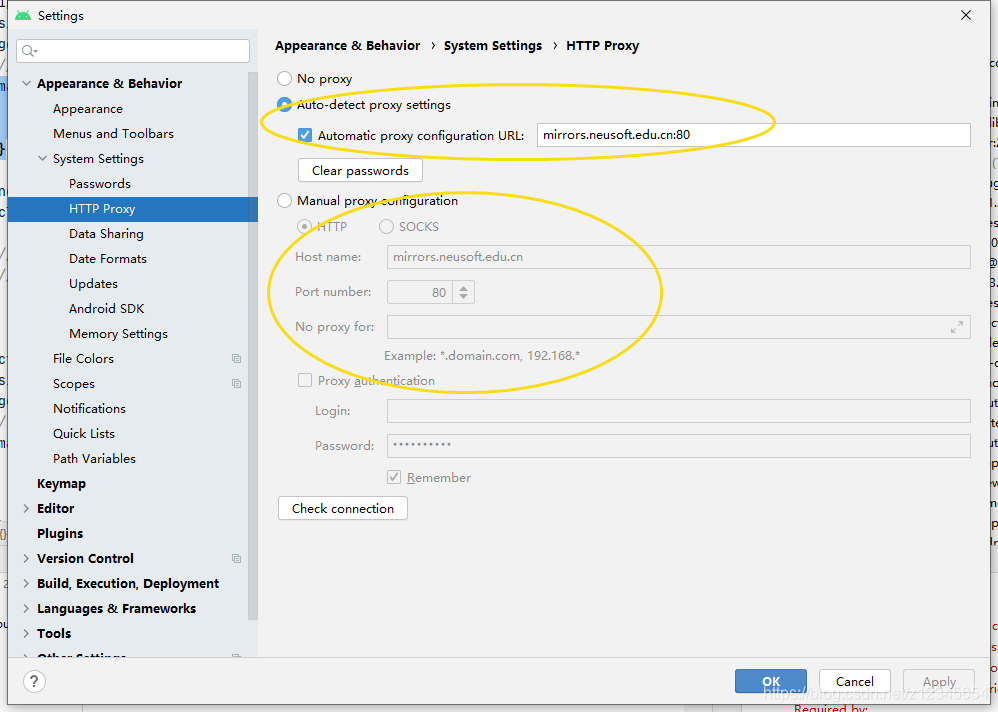
通过上述,就可以解决android studio 4.2.1 版本中关于gradle 一直无法同步成功的问题。
版权声明:本文为z12345654原创文章,遵循CC 4.0 BY-SA版权协议,转载请附上原文出处链接和本声明。