一:项目介绍
Java web实战项目中,采用了MVC,三层架构的设计模式,用到的技术有Java web+Servlet+mysql+jsp实现简单的增删改查,模糊查询等。(小项目,练手写的,没有美化,只实现了功能,可以自行美化)
本系统主要实现:帐户管理、取款机管理、用户查询、查统计等功能:
(1)登录页面:管理员账号登录,用户账号登录
(2)管理员界面:可以实现用户的增删改查,查询用户信息,销户等功能
(3)用户界面:用户可以查询余额,转账,取款等功能
开发语言:
Java,Html
开发工具:
Idea2019
数据库
Mysql
二:功能实现(部分)
01:项目结构
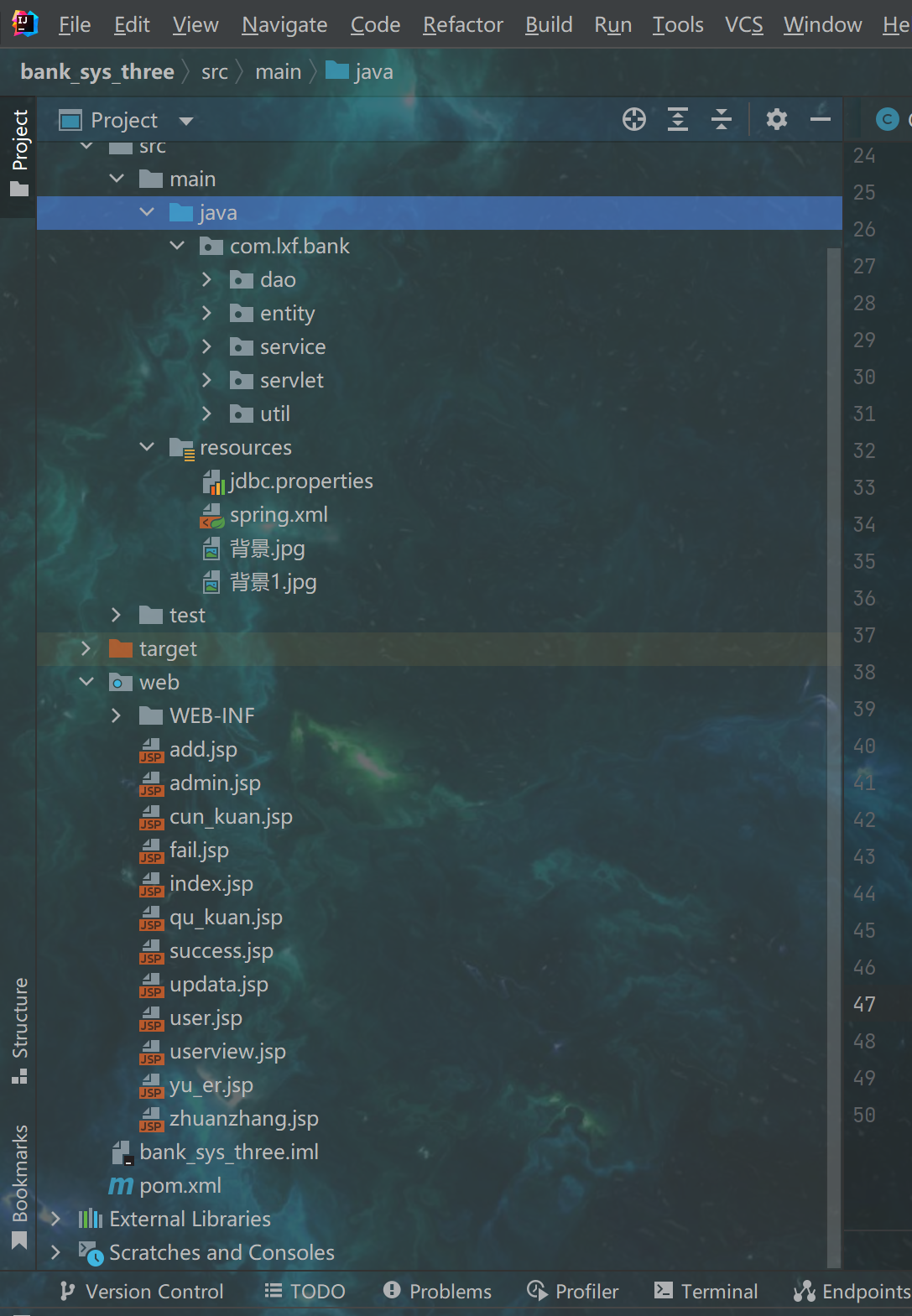

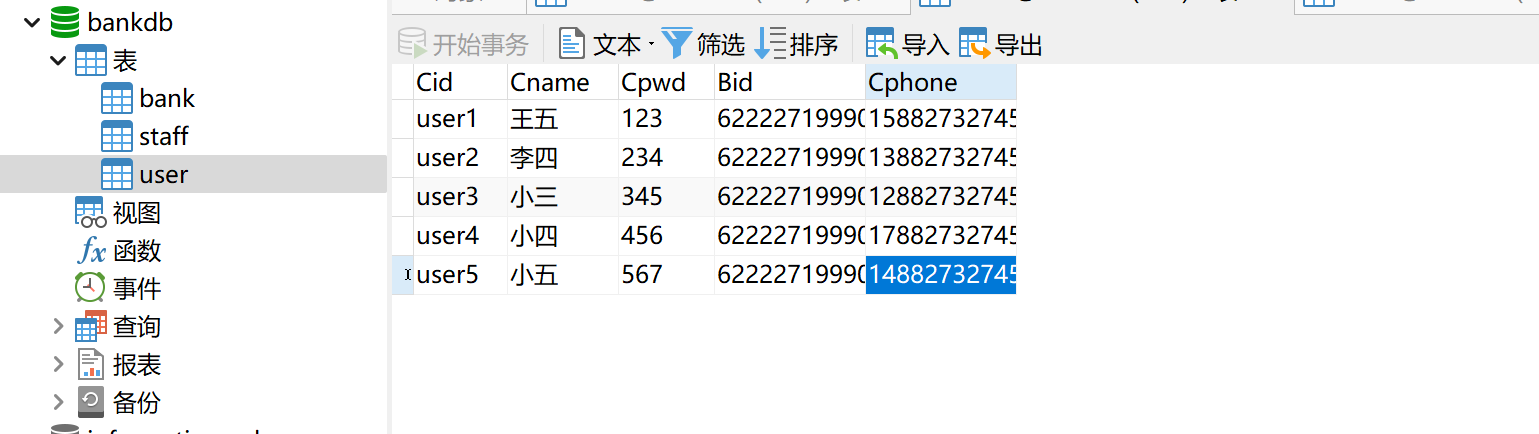
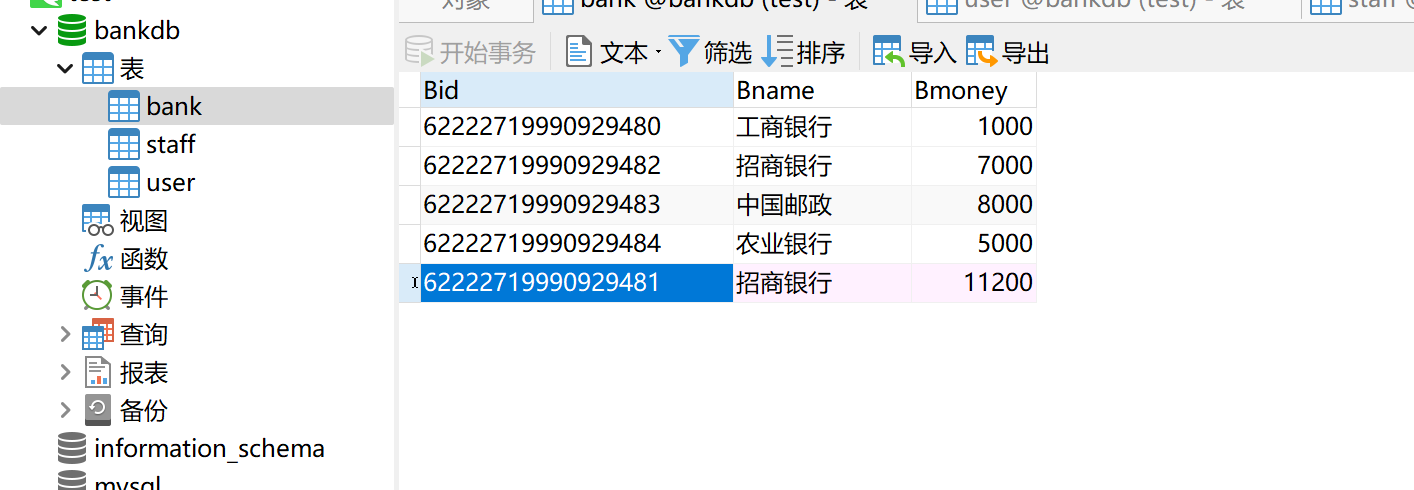
02:数据库设计
sql文件代码
SET NAMES utf8mb4;
SET FOREIGN_KEY_CHECKS = 0;

-- ----------------------------
-- Table structure for bank
-- ----------------------------
DROP TABLE IF EXISTS `bank`;
CREATE TABLE `bank`  (
  `Bid` varchar(20) CHARACTER SET utf8 COLLATE utf8_general_ci NOT NULL COMMENT '银行卡号',
  `Bname` varchar(255) CHARACTER SET utf8 COLLATE utf8_general_ci NULL DEFAULT NULL COMMENT '银行名(农行,邮政.......)',
  `Bmoney` int(10) NULL DEFAULT NULL COMMENT '账户余额',
  PRIMARY KEY (`Bid`) USING BTREE
) ENGINE = InnoDB CHARACTER SET = latin1 COLLATE = latin1_swedish_ci ROW_FORMAT = Compact;

-- ----------------------------
-- Table structure for staff
-- ----------------------------
DROP TABLE IF EXISTS `staff`;
CREATE TABLE `staff`  (
  `Sid` varchar(255) CHARACTER SET utf8 COLLATE utf8_general_ci NOT NULL COMMENT '系统管理员ID',
  `Spwd` varchar(255) CHARACTER SET utf8 COLLATE utf8_general_ci NULL DEFAULT NULL COMMENT '系统管理员密码',
  PRIMARY KEY (`Sid`) USING BTREE
) ENGINE = InnoDB CHARACTER SET = latin1 COLLATE = latin1_swedish_ci ROW_FORMAT = Compact;

-- ----------------------------
-- Table structure for user
-- ----------------------------
DROP TABLE IF EXISTS `user`;
CREATE TABLE `user`  (
  `Cid` varchar(255) CHARACTER SET utf8 COLLATE utf8_general_ci NOT NULL COMMENT '客户ID',
  `Cname` varchar(255) CHARACTER SET utf8 COLLATE utf8_general_ci NULL DEFAULT NULL COMMENT '客户名字',
  `Cpwd` varchar(255) CHARACTER SET utf8 COLLATE utf8_general_ci NULL DEFAULT NULL COMMENT '客户密码',
  `Bid` varchar(255) CHARACTER SET utf8 COLLATE utf8_general_ci NULL DEFAULT NULL COMMENT '客户银行卡号',
  `Cphone` varchar(255) CHARACTER SET utf8 COLLATE utf8_general_ci NULL DEFAULT NULL COMMENT '客户电话',
  PRIMARY KEY (`Cid`) USING BTREE
) ENGINE = InnoDB CHARACTER SET = latin1 COLLATE = latin1_swedish_ci ROW_FORMAT = Compact;

SET FOREIGN_KEY_CHECKS = 1;
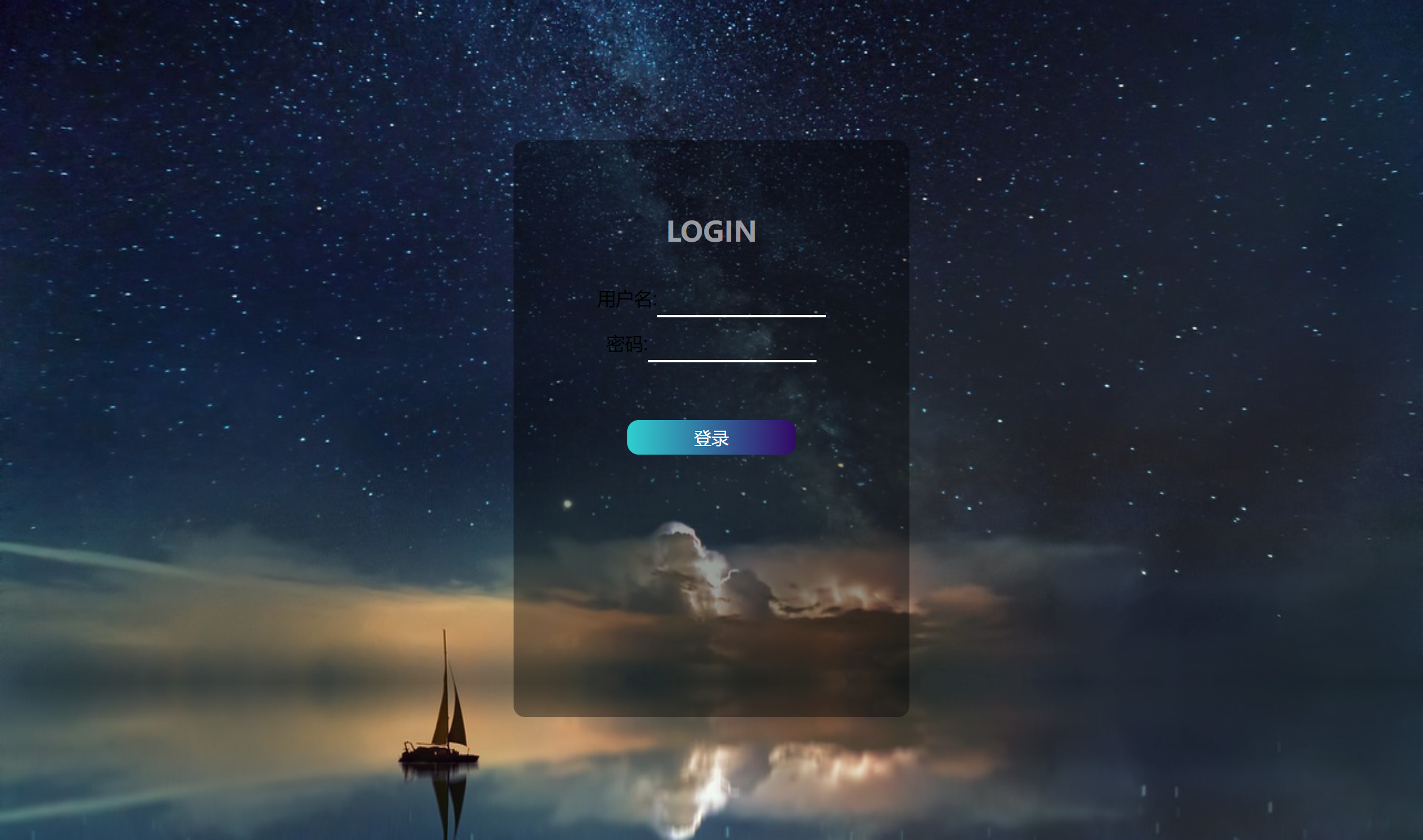
03:登录页面
index.html
<body >
<div id="login_box">
    <h2>LOGIN</h2>
    <div id="input_box">
        <form action="login">
            用户名:<input type="text" name="username"><br>
            密码:<input type="text" name="password"><br>
            <button>登录</button><br>
        </form>
    </div>

</div>
</body>
用Servlet(login.java)进行拦截,处理信息
 protected void doGet(HttpServletRequest req, HttpServletResponse resp) throws ServletException, IOException {
        req.setCharacterEncoding("utf-8");
        String use=req.getParameter("username");
        String pwd=req.getParameter("password");
        resp.setContentType("text/html;chartset=UTF-8");
        resp.setCharacterEncoding("utf-8");
        IBankService bankService=new BankServiceImpl();
        PrintWriter out=resp.getWriter();
        int flag=bankService.login(use,pwd);  //登录成功与否的一个标识
        switch (flag){
            case 1:
                resp.sendRedirect("admin.jsp");
//                req.getRequestDispatcher("admin.jsp").forward(req,resp);
                break;
            case 2:
                req.setAttribute("cid",use);
                req.getRequestDispatcher("user.jsp").forward(req,resp);
                break;
            default:
                out.println("账号或者密码输入错误");
        }
    }
    @Override
    protected void doPost(HttpServletRequest req, HttpServletResponse resp) throws ServletException, IOException {
        super.doPost(req, resp);
    }
04:管理员页面
<body>

    <table border="2px">
        <tr>
            <th>用户姓名</th>
            <th>用户账号</th>
            <th>用户密码</th>
            <th>银行卡号</th>
            <th>用户电话</th>
            <th>银行名字</th>
            <th>账户余额</th>
            <th>操作</th>
        </tr>
        <%
                List<UserPojo> userPojos=(List<UserPojo>) request.getAttribute("userPojos");
                for(UserPojo userpojo:userPojos){
        %>
        <tr>
            <td><%=userpojo.getCname()%></td>
            <td><%=userpojo.getCid()%></td>
            <td><%=userpojo.getCpwd()%></td>
            <td><%=userpojo.getBid()%></td>
            <td><%=userpojo.getCphone()%></td>
            <td><%=userpojo.getBname()%></td>
            <td><%=userpojo.getBmoney()%></td>
<%--            修改:先查询他的信息,后在信息基础上修改--%>
            <td ><a href="delete?bid=<%=userpojo.getBid()%>">注销</a>   <a href="selectOne?bid=<%=userpojo.getBid()%>">修改</a></td>
        </tr>
        <%
            }
        %>
    </table>
    <button><a href="add.jsp">新增</a></button>
</body>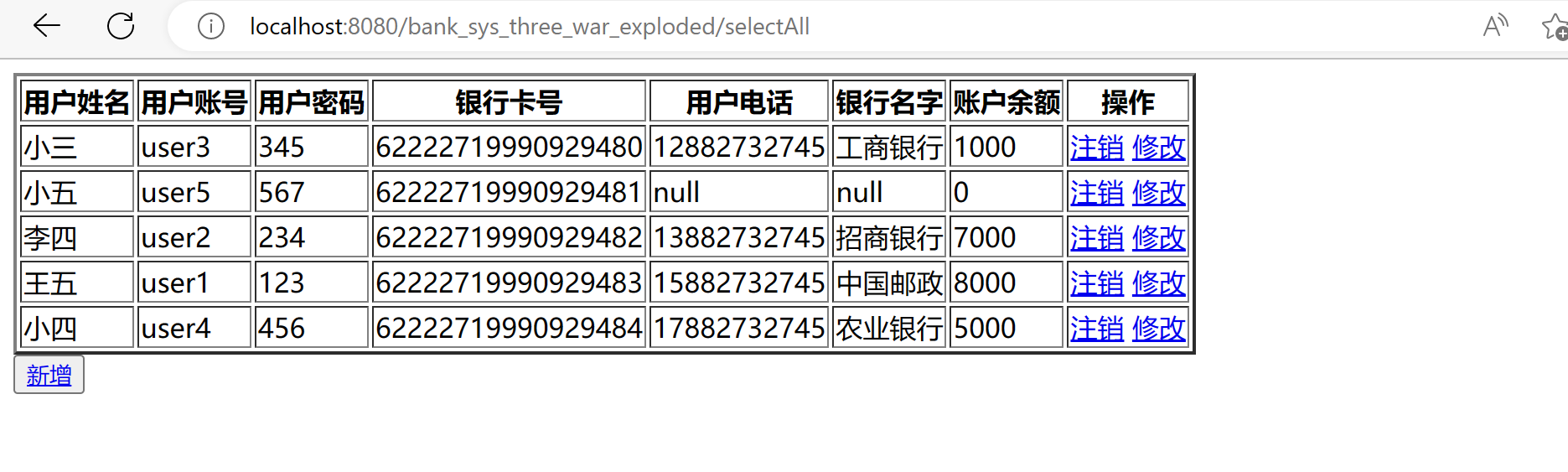
05:用户界面
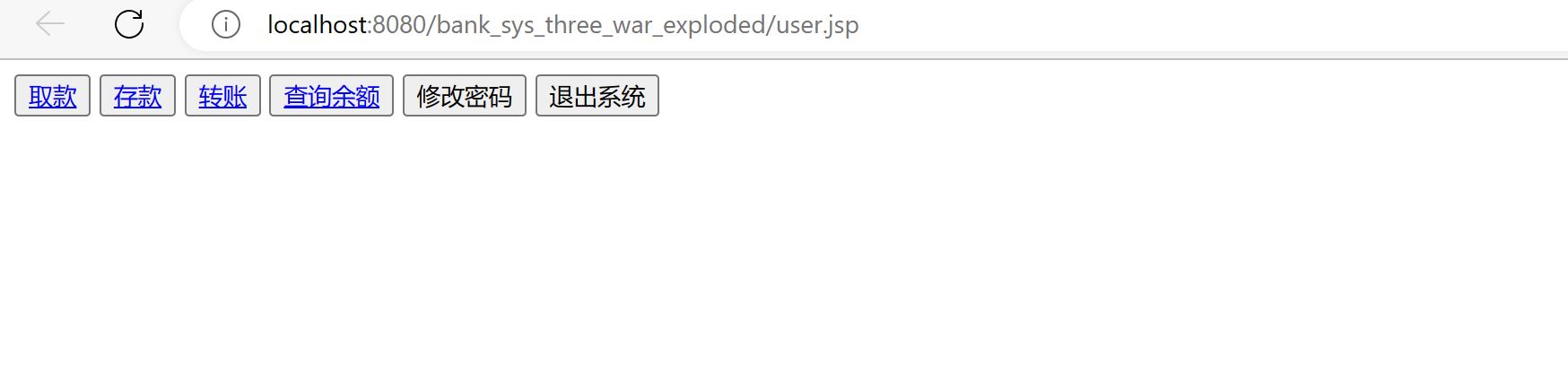
user.jsp(我没有美化,可自行把按钮分布再两边,再加一个background样式
<body>
<button> <a href="qu_kuan.jsp">取款</a> </button>
<button><a href="cun_kuan.jsp">存款</a></button>
<button><a href="zhuanzhang.jsp">转账</a></button>
<button><a href="cha_qian?cid=<%=request.getAttribute("cid")%>">查询余额</a></button>
<button>修改密码</button>
<button>退出系统</button>
</body>
06:用户转账
zhuan_zhang.jsp
<body>
<button> <a href="qu_kuan.jsp">取款</a> </button>
<button><a href="cun_kuan.jsp">存款</a></button>
<button><a href="zhuanzhang.jsp">转账</a></button>
<button><a href="cha_qian?cid=<%=request.getAttribute("cid")%>">查询余额</a></button>
<button>修改密码</button>
<button>退出系统</button>
</body>
servlet逻辑处理zhang_zhang.java
    protected void doGet(HttpServletRequest req, HttpServletResponse resp) throws ServletException, IOException {
        req.setCharacterEncoding("utf-8");
        String bid1=req.getParameter("bid1");
        String bid2=req.getParameter("bid2");
        String money=req.getParameter("money");
        resp.setContentType("text/html;chartset=UTF-8");
        resp.setCharacterEncoding("utf-8");
        IBankService iBankService=new BankServiceImpl();
        iBankService.zhuan_zhang(bid1,bid2,money);
        resp.sendRedirect("success.jsp");
    }

    @Override
    protected void doPost(HttpServletRequest req, HttpServletResponse resp) throws ServletException, IOException {
        super.doPost(req, resp);
    }
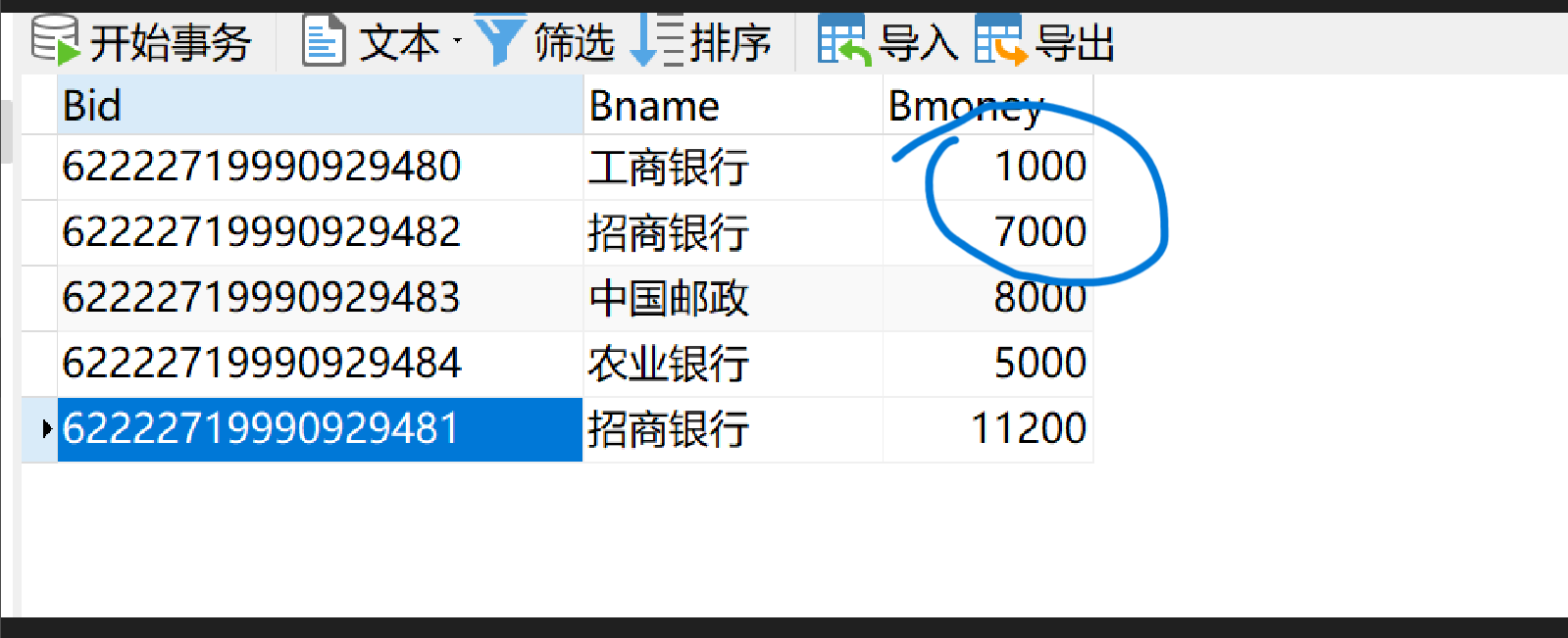
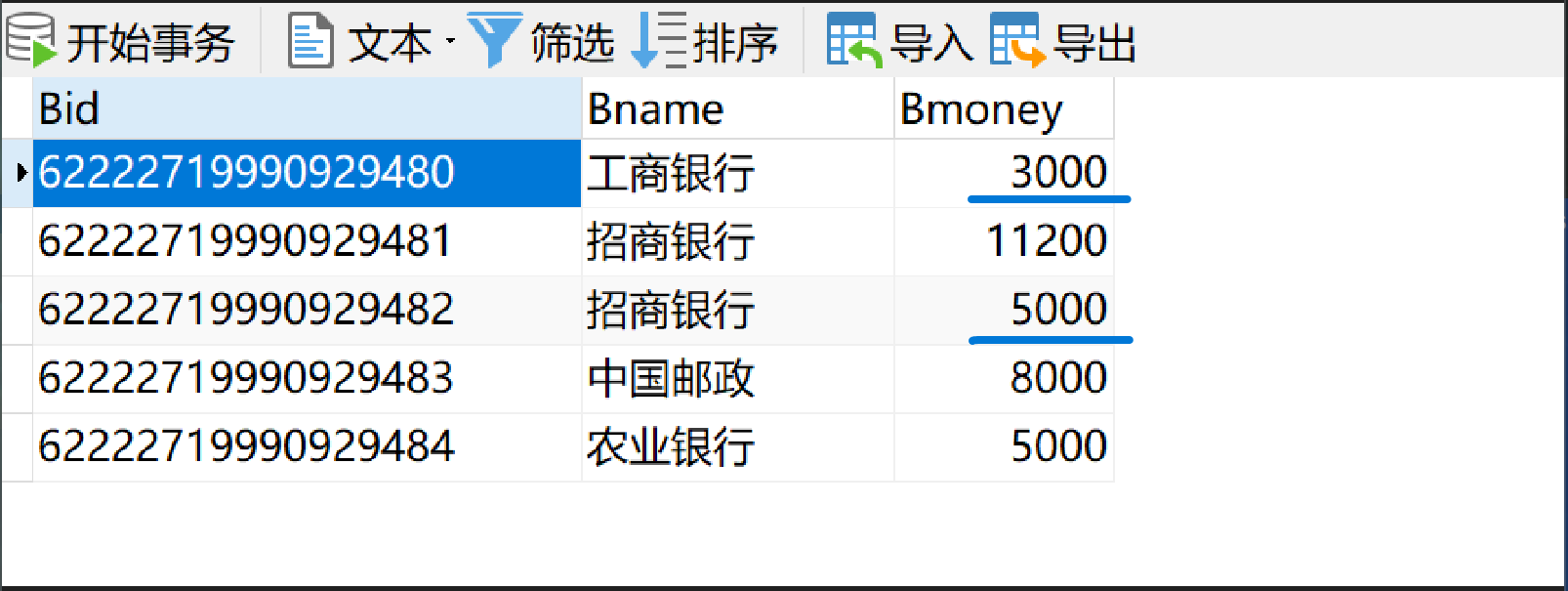
转账前
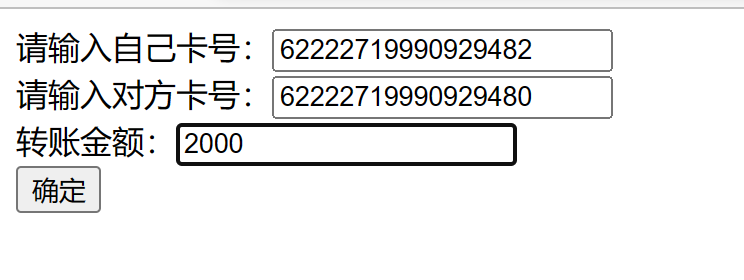
转账
转账后
07:查询余额
<html>
<head>
    <title>Title</title>
</head>
<body>
    <h1>你的账户余额为</h1>
    <%=request.getAttribute("money")%>
</body>
</html>
protected void doGet(HttpServletRequest req, HttpServletResponse resp) throws ServletException, IOException {
req.setCharacterEncoding("utf-8");
resp.setContentType("text/html;chartset=UTF-8");
resp.setCharacterEncoding("utf-8");
String cid=req.getParameter("cid");
IBankService iBankService=new BankServiceImpl();
String money = iBankService.select_money(cid);
req.setAttribute("money",money);
req.getRequestDispatcher("yu_er.jsp").forward(req,resp);
}
@Override
protected void doPost(HttpServletRequest req, HttpServletResponse resp) throws ServletException, IOException {
super.doPost(req, resp);
}08:存款
    protected void doGet(HttpServletRequest req, HttpServletResponse resp) throws ServletException, IOException {
        req.setCharacterEncoding("utf-8");
        resp.setContentType("text/html;chartset=UTF-8");
        resp.setCharacterEncoding("utf-8");
        String cid=req.getParameter("cid");
        String money=req.getParameter("money");
        IBankService iBankService=new BankServiceImpl();
        Boolean flag = iBankService.cu_kuan(cid, money);
        if(flag){
            resp.sendRedirect("success.jsp");
        }else{
            resp.sendRedirect("fail.jsp");
        }
    }
<html>
<head>
<title>Title</title>
</head>
<body>
<h1>存款功能</h1>
<form action="Cun_kuan">
请输入id:<input type="text" name="cid"><br>
请输入存款金额:<input type="text" name="money"><br>
<input type="submit" value="确定">
</form>
</body>
</html>以上为部分代码
三:总结
项目过程中碰到的问题:
创建数据库时,有多表,怎么建立关联,实现连表查询
解决:可以在多表中,设置一个共同的属性,例如ID,用来连接各表
连表查询的数据(一张新表),怎么在浏览器中显示出来
解决:把连表查询得到的新表,根据新表,再建立一个实体类entity,用来存储新表中的内容
3.浏览器输入信息,在数据库中乱码
解决:在数据库连接url中加上编码格式jdbc:mysql://localhost:3306/bankdb?useUnicode=true&characterEncoding=utf8
4.在jsp页面,不使用表单,怎么向servlet传递数据
解决:可以用超链接,再用?....来实现数据传递,eg:<a href="delete?bid=<%=userpojo.getBid()%>">注销</a>
5.怎么把servlet中的List数据传递到jsp页面的table表单中
解决:在jsp中写java代码,用来实现循环
eg:
    <table border="2px">
        <tr>
            <th>用户姓名</th>
            <th>用户账号</th>
            <th>用户密码</th>
            <th>银行卡号</th>
            <th>用户电话</th>
            <th>银行名字</th>
            <th>账户余额</th>
            <th>操作</th>
        </tr>
        <%
                List<UserPojo> userPojos=(List<UserPojo>) request.getAttribute("userPojos");
                for(UserPojo userpojo:userPojos){


        %>
        <tr>
            <td><%=userpojo.getCname()%></td>
            <td><%=userpojo.getCid()%></td>
            <td><%=userpojo.getCpwd()%></td>
            <td><%=userpojo.getBid()%></td>
            <td><%=userpojo.getCphone()%></td>
            <td><%=userpojo.getBname()%></td>
            <td><%=userpojo.getBmoney()%></td>
<%--            修改:先查询他的信息,后在信息基础上修改--%>
            <td ><a href="delete?bid=<%=userpojo.getBid()%>">注销</a>   <a href="selectOne?bid=<%=userpojo.getBid()%>">修改</a></td>
        </tr>
        <%
            }
        %>
    </table>
6.点击button按钮时,怎么跳转到servlet中进行处理
解决:可以在button里再加一个超链接<a>,来跳转到servlet中进行数据处理
eg:<button><a href="add.jsp">新增</a></button>
<button><a href="delete?cid=<%=request.getAtrribute("Cid")>">删除</a></button>