目录
三大组件简介
Channel,Buffer,Selector
Channel(通道)
有点类似于Stream。不过与Stream的单向通道不同,它是可以读写的双向通道。
常见的 Channel 有
- FileChannel
- DatagramChannel
- SocketChannel
- ServerSocketChannel
Buffer(缓冲区)
用于缓冲读写数据,是一块内存区。数据必须经过Buffer。Channel要和Buffer配合使用,数据要不从Buffer写入Channel,要不从Channel读入Buffer
常见的Buffer有
- ByteBuffer
- ShortBuffer
- IntBuffer
- LongBuffer
- FloatBuffer
- DoubleBuffer
- CharBuffer
Buffer和Channel例子如下
 public static void main(String[] args) throws IOException {
        FileChannel channel = new FileInputStream("test.txt").getChannel();//获取通道
        ByteBuffer byteBuffer = ByteBuffer.allocate(10);//获取缓存区
        while (true){
            long read = channel.read(byteBuffer);//从channel读取数据,向buffer写入
            if(read==-1){//没有内容了
                break;
            }
            byteBuffer.flip();//切换至 读模式
            while (byteBuffer.hasRemaining()){
                byte b = byteBuffer.get();
                System.out.println((char) b);
            }
            byteBuffer.clear();//切换至写模式
        }
    }
}
Buffer常见方法
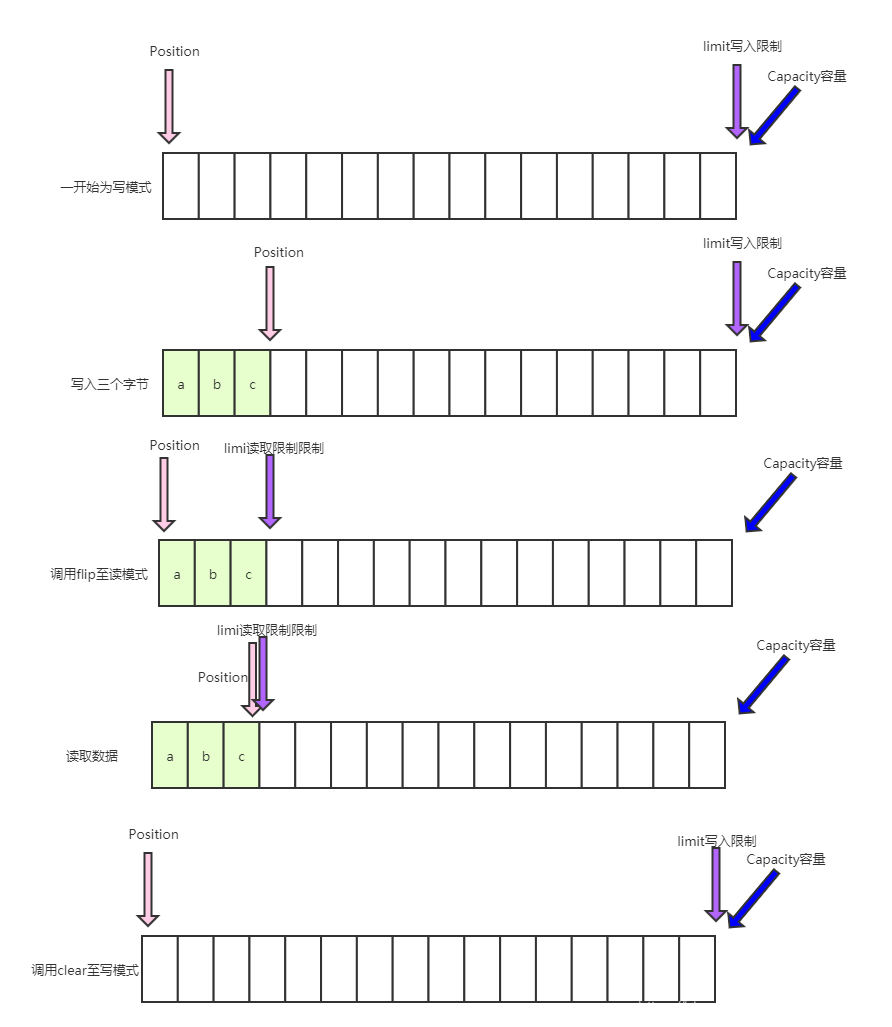
常用API
//为Buffer分配空间
Bytebuffer buf = ByteBuffer.allocate(16);
//向 buffer 写入数据:两种,调用channel的read或者buffer的put
int readBytes = channel.read(buf);
buf.put((byte)127);
//从 buffer 读取数据:两种,调用channel的write或者uffer的get
int writeBytes = channel.write(buf);
byte b = buf.get();
Selector(选择器)
允许单线程处理多个channel,获取这些channel上发送的事件,这些channel工作在非阻塞模式,不会让一个线程阻塞在一个channel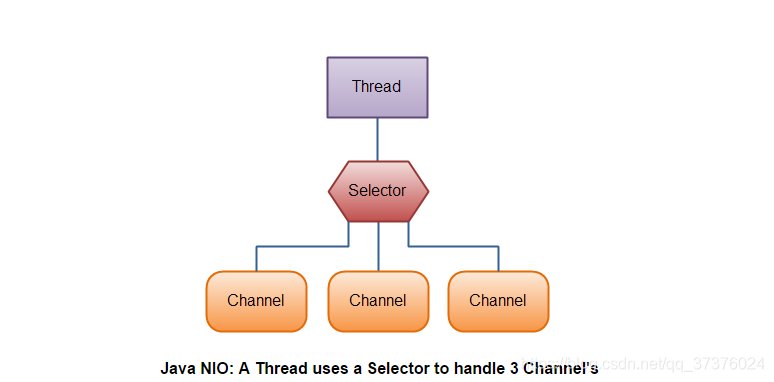
使用方法
创建:
Selector selector = Selector.open();
绑定channel事件
channel.configureBlocking(false);
SelectionKey key = channel.register(selector,SelectionKey.OP_ACCEPT);
//四种事件类型
SelectionKey.OP_ACCEPT 服务器端成功接受连接时触发
SelectionKey.OP_CONNECT  客户端连接成功时触发
SelectionKey.OP_READ  数据可读入时触发,有因为接收能力弱,数据暂不能读入的情况
SelectionKey.OP_WRITE 数据可写出时触发,有因为发送能力弱,数据暂不能写出的情况
监听 Channel 事件
int count = selector.select(); //阻塞直到绑定事件发生
int count = selector.select(long timeout); //阻塞直到绑定事件发生,或是超时(时间单位为 ms)
int count = selector.selectNow();//不会阻塞,也就是不管有没有事件,立刻返回,自己根据返回值检查是否有事件
处理Accept事件
例子
public class NIOSelectorAcceptServer {
    public static void main(String[] args) throws IOException {
        try (ServerSocketChannel channel = ServerSocketChannel.open()) {
            channel.bind(new InetSocketAddress(8080));
            System.out.println(channel);
            Selector selector = Selector.open();
            channel.configureBlocking(false);
            channel.register(selector, SelectionKey.OP_ACCEPT);

            while (true) {
                int count = selector.select();
                System.out.println("select count:" + count);
                // 获取所有事件
                Set<SelectionKey> keys = selector.selectedKeys();
                // 遍历所有事件,逐一处理
                Iterator<SelectionKey> iter = keys.iterator();
                while (iter.hasNext()) {
                    SelectionKey key = iter.next();
                    // 判断事件类型
                    if (key.isAcceptable()) {
                        ServerSocketChannel c = (ServerSocketChannel) key.channel();
                        // 必须处理
                        SocketChannel sc = c.accept();
                        System.out.println(sc);
                    }
                    // 处理完毕,必须将事件移除
                    iter.remove();
                }
            }
        } catch (IOException e) {
            e.printStackTrace();
        }
    }
}
处理read事件
public class NIOSelectorReadServer {

    public static void main(String[] args) throws IOException {

        ServerSocketChannel serverSocketChannel = ServerSocketChannel.open();
        serverSocketChannel.configureBlocking(false);

        Selector selector = Selector.open();
        SelectionKey selectionKey = serverSocketChannel.register(selector, SelectionKey.OP_ACCEPT);

        serverSocketChannel.bind(new InetSocketAddress(9000));

        System.out.println("服务器启动成功");
        while (true){
            selector.select();
            Set<SelectionKey> selectionKeys = selector.selectedKeys();
            Iterator<SelectionKey> iterator = selectionKeys.iterator();
            while (iterator.hasNext()){
                    SelectionKey key = iterator.next();
                    if(key.isAcceptable()){
                        ServerSocketChannel channel = (ServerSocketChannel)key.channel();
                        SocketChannel socketChannel = channel.accept();
                        socketChannel.configureBlocking(false);
                        socketChannel.register(selector,SelectionKey.OP_READ);
                        System.out.println("客户端连接成功");
                    }else if(key.isReadable()){
                        SocketChannel sc = (SocketChannel) key.channel();
                        ByteBuffer buffer = ByteBuffer.allocate(4);
                        int read = sc.read(buffer);
                        if(read == -1) {
                            key.cancel();
                            sc.close();
                        } else {
                            buffer.flip();
                            System.out.println("接收消息:" + new String(buffer.array()));
                        }
                    }
            }
            iterator.remove();
        }
    }
}
处理write事件
public class NIOSelectorWriteServer {
    public static void main(String[] args) throws IOException {
        ServerSocketChannel ssc = ServerSocketChannel.open();
        ssc.configureBlocking(false);
        Selector selector = Selector.open();
        ssc.register(selector, SelectionKey.OP_ACCEPT);

        ssc.bind(new InetSocketAddress(9000));
        while (true){
            selector.select();
            Iterator<SelectionKey> iterator = selector.selectedKeys().iterator();
            while (iterator.hasNext()){
                SelectionKey key = iterator.next();
                iterator.remove();
                if(key.isAcceptable()){
                    SocketChannel sc = ssc.accept();
                    sc.configureBlocking(false);
                    SelectionKey scKey = sc.register(selector, SelectionKey.OP_READ);
                    StringBuffer sb = new StringBuffer();
                    for (int i = 0;i<90000000;i++){
                        sb.append("a");
                    }
                    ByteBuffer buffer = Charset.defaultCharset().encode(sb.toString());
                    int write = sc.write(buffer);
                    // 3. write 表示实际写了多少字节
                    System.out.println("实际写入字节:" + write);
                    // 4. 如果有剩余未读字节,才需要关注写事件
                    if (buffer.hasRemaining()) {
                        // read 1  write 4
                        // 在原有关注事件的基础上,多关注 写事件
                        scKey.interestOps(scKey.interestOps() + SelectionKey.OP_WRITE);
                        // 把 buffer 作为附件加入 sckey
                        scKey.attach(buffer);
                    }
                }else if(key.isWritable()){
                    ByteBuffer buffer = (ByteBuffer) key.attachment();
                    SocketChannel sc = (SocketChannel) key.channel();
                    int write = sc.write(buffer);
                    System.out.println("实际写入字节:" + write);
                    if (!buffer.hasRemaining()) { // 写完了
                        key.interestOps(key.interestOps() - SelectionKey.OP_WRITE);
                        key.attach(null);
                    }
                }
            }
        }
    }
}
零拷贝
如果将一个文件通过socket写出
传统的IO
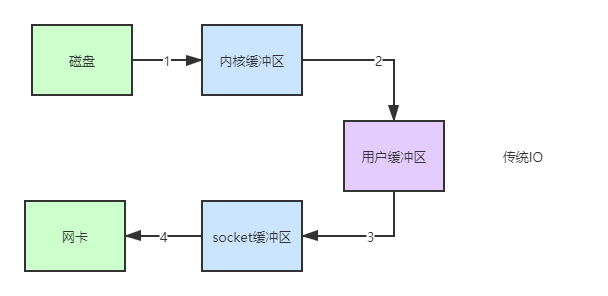
1:java本身不具备IO读写能力,需要从java程序的用户态转化到内核态,通过内核的读能力将数据读到内核缓冲区。操作系统通过DMA(Direct Memory Access)实现文件读。
2:用户态切换到内核态,将数据从内核缓冲区读到用户缓冲区(byte[] buf)
3:调用write方法,把数据从用户缓冲区读到socket缓冲区
4:往网卡写数据,由于java不具备该项能力,会将用户态转化到内核态,使用DMA将数据从socket缓冲区读到网卡
总结:
3次用户态和内核态的切换,比较重量级
4次数据的拷贝
NIO的优化
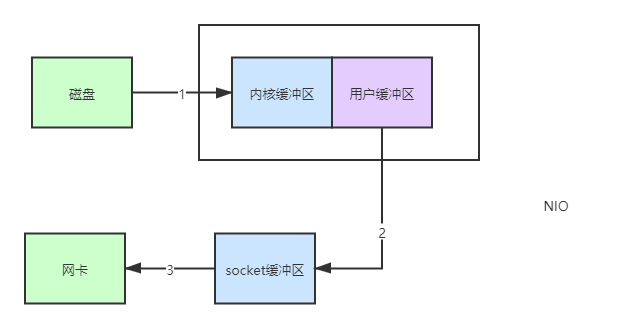
通过 DirectByteBuf
ByteBuffer.allocate(10)  HeapByteBuffer 使用的还是 java 内存
ByteBuffer.allocateDirect(10)  DirectByteBuffer 使用的是操作系统内存
与传统IO相比少了第2步。这是因为DirectByteBuf将堆外内存印射到jvm内存直接使用
总结
3次用户态和内核态的切换
3次数据的拷贝
NIO进一步优化
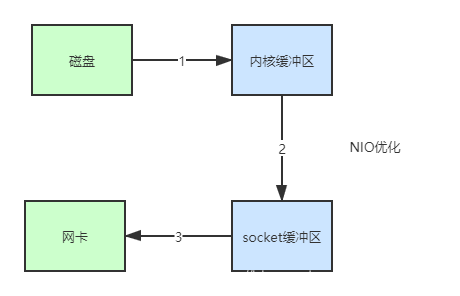
1:java 调用 transferTo 方法后,要从 java 程序的用户态切换至内核态,使用 DMA将数据读入内核缓冲区
2:数据从内核缓冲区传输到 socket 缓冲区
3:最后使用 DMA 将 socket 缓冲区的数据写入网卡
总结
1次用户态和内核态的切换
3次数据拷贝
NIO再进一步优化
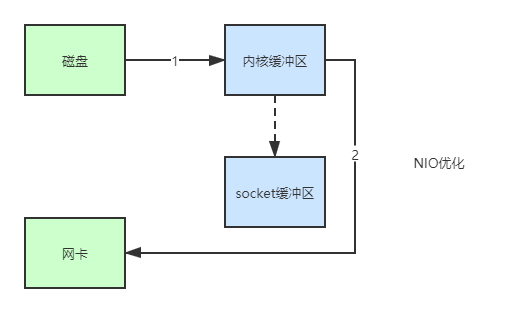
1: java 调用 transferTo 方法后,要从 java 程序的用户态切换至内核态,使用 DMA将数据读入内核缓冲区
2:只会将一些 offset 和 length 信息拷入 socket 缓冲区,几乎无消耗
3:使用 DMA 将 内核缓冲区的数据写入网卡
总结
1次用户态和内核态转化
2次数据拷贝
所谓的零拷贝不是真正的无拷贝,而是不会拷贝数据到jvm内存中,优点有:
更少的用户和内核态转化
不利用CPU计算
适合小文件传输