一、前言
本文通过SpringAop拦截controller接口层,实现打印请求参数、请求地址、响应、接口请求时间等信息,并显示链接可直接点击定位到controller代码。从而快速高效的分析日志和进入controller调试代码。
二、实现如下
1、SpringAOP所需pom
    <dependency>
        <groupId>org.springframework.boot</groupId>
        <artifactId>spring-boot-starter-aop</artifactId>
    </dependency>
2、新建切面类
package com.example.demo.testlog;

import com.alibaba.fastjson.JSON;
import com.alibaba.fastjson.JSONObject;
import org.aspectj.lang.JoinPoint;
import org.aspectj.lang.ProceedingJoinPoint;
import org.aspectj.lang.Signature;
import org.aspectj.lang.annotation.*;
import org.aspectj.lang.reflect.CodeSignature;
import org.aspectj.lang.reflect.MethodSignature;
import org.slf4j.Logger;
import org.slf4j.LoggerFactory;
import org.springframework.stereotype.Component;
import org.springframework.web.context.request.RequestContextHolder;
import org.springframework.web.context.request.ServletRequestAttributes;

import javax.servlet.http.HttpServletRequest;
import java.io.File;
import java.nio.charset.Charset;
import java.nio.file.Files;
import java.nio.file.Path;
import java.nio.file.Paths;
import java.util.*;

import static org.apache.commons.lang3.StringUtils.deleteWhitespace;


@Aspect
@Component
public class WebLogAspect {

    private final static Logger logger = LoggerFactory.getLogger(WebLogAspect.class);

    private final String lineBreak = System.getProperty("line.separator");

    /**
     *  以 controller 包下定义的所有请求为切入点
     */
    @Pointcut("execution(public * com.example.demo.controller..*.*(..))")
    public void webLog() {}

    /**
     * 环绕
     * @param proceedingJoinPoint
     * @return
     * @throws Throwable
     */
    @Around("webLog()")
    public Object doAround(ProceedingJoinPoint proceedingJoinPoint) throws Throwable {
        // 开始打印请求日志
        ServletRequestAttributes attributes = (ServletRequestAttributes) RequestContextHolder.getRequestAttributes();
        HttpServletRequest request = attributes.getRequest();
        Signature signature = proceedingJoinPoint.getSignature();
        MethodSignature methodSignature = (MethodSignature) signature;
        String[] returnNameArr = methodSignature.getReturnType().getName().split("\\.");
        Class clazz = signature.getDeclaringType();
        //请求url
        String url = request.getRequestURL().toString();
        //请求参数
        String param = getParam(proceedingJoinPoint);
        //方法名
        String method = signature.getName();
        //行数
        int num = lineNum("public" + returnNameArr[returnNameArr.length - 1] + method + "(", fileName(clazz));
        // 记录info日志
        StringBuilder logInfo = new StringBuilder();
        logInfo.append(":\n");
        logInfo.append("+========================================= Start ==========================================\n");
        // 记录请求源ip
        logInfo.append("| Request IP     : ").append(request.getRemoteAddr()).append("\n");
        // 记录请求url
        logInfo.append("| URL            : ").append(url).append("\n");
        // 记录请求的方式
        logInfo.append("| HTTP Method    : ").append(request.getMethod()).append("\n");
        // 记录类名和方法名
        logInfo.append("| Class Method   : ").append(signature.getDeclaringTypeName()).append(".").append(method).append("(").append(clazz.getSimpleName()).append(".java:")
                .append(num).append(")").append(lineBreak);
        // 记录请求参数
        logInfo.append("| Request Args   : ").append(param).append("\n");
        long startTime = System.currentTimeMillis();
        Object result = proceedingJoinPoint.proceed();
        // 打印出参
        logInfo.append("| Response Args  : ").append(JSON.toJSON(result)).append("\n");
        // 执行耗时
        logInfo.append("| Time-Consuming : ").append(System.currentTimeMillis() - startTime).append("ms").append("\n");
        logInfo.append("+========================================== End ===========================================\n");
        logger.info(logInfo.toString());
        return result;
    }

    @AfterThrowing(pointcut="execution(public * com.example.demo.controller..*.*(..))", throwing = "e")
    public void afterThrowingAdvice(JoinPoint joinpoint, Throwable e) throws Throwable {
        ServletRequestAttributes attributes = (ServletRequestAttributes) RequestContextHolder.getRequestAttributes();
        HttpServletRequest request = attributes.getRequest();
        // 记录info日志
        StringBuilder logInfo = new StringBuilder();
        logInfo.append(":\n");
        logInfo.append("+========================================= Start ==========================================\n");
        // 记录请求源ip
        logInfo.append("| IP             : ").append(request.getRemoteAddr()).append("\n");
        // 记录请求uri
        logInfo.append("| URL            : ").append( request.getRequestURL().toString()).append("\n");
        // 记录请求的方式
        logInfo.append("| HTTP Method    : ").append(request.getMethod()).append("\n");
        // 记录类名和方法名
        logInfo.append("| Class Method   : ").append(joinpoint.getSignature().getDeclaringTypeName())
                .append(".").append(joinpoint.getSignature().getName()).append("\n");
        // 记录请求参数
        logInfo.append("| Request Args   : ").append(getParam(joinpoint)).append("\n");
        logInfo.append("+===================================== Exception END ======================================\n");
        logger.info(logInfo.toString());
        throw e;
    }


    /**
     * @Description: 返回方法在该类的行数
     * @Param: codeFragment 方法名 fileName 类的文件名
     * @return: 所在行数
     */
    private static int lineNum(String codeFragment,String fileName) {
        int lineNum = 1;
        Path path = Paths.get(fileName);
        try {
            List<String> lines = Files.readAllLines(path, Charset.forName("utf-8"));
            for (int i = 0; i < lines.size(); i++) {
                String line = lines.get(i);
                lineNum = i + 1;
                if (deleteWhitespace(line).toLowerCase().startsWith(codeFragment.toLowerCase())) {
                    break;
                }
            }
        } catch (Exception e2) {
            e2.printStackTrace();
        }
        return lineNum;
    }

    /**
     * @Description: 获取类名
     * @Param: @clazz 类的字节码
     * @return: 返回文件名
     */
    private static String fileName(@SuppressWarnings("rawtypes") Class clazz) {
        StringBuilder classFile = new StringBuilder(System.getProperty("user.dir")).append(File.separator).append("src")
                .append(File.separator).append("main").append(File.separator).append("java");
        for (String temp : clazz.getName().split("\\.")) {
            classFile.append(File.separator).append(temp);
        }
        return classFile.append(".java").toString();
    }

    /**
     * 获取参数名和参数值
     * @param joinPoint
     * @return 返回JSON结构字符串
     */
    public String getParam(JoinPoint joinPoint) {
        LinkedHashMap<String, Object> map = new LinkedHashMap<>();
        Object[] values = joinPoint.getArgs();
        String[] names = ((CodeSignature) joinPoint.getSignature()).getParameterNames();
        for (int i = 0; i < names.length; i++) {
            map.put(names[i], values[i]);
        }
        return JSONObject.toJSONString(map);
    }

}
3、效果如图
POST请求:
GET请求: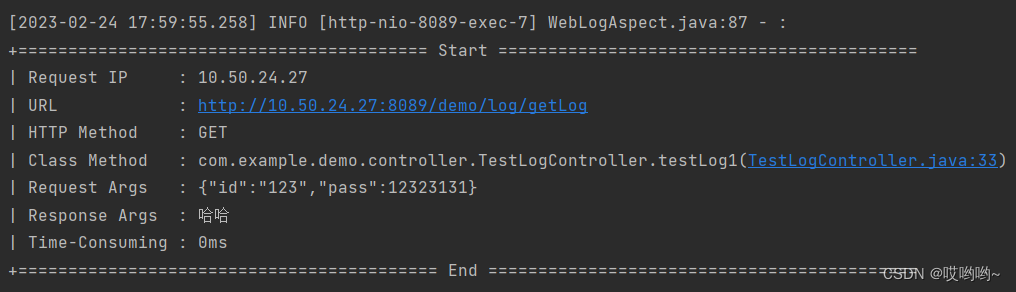
异常显示: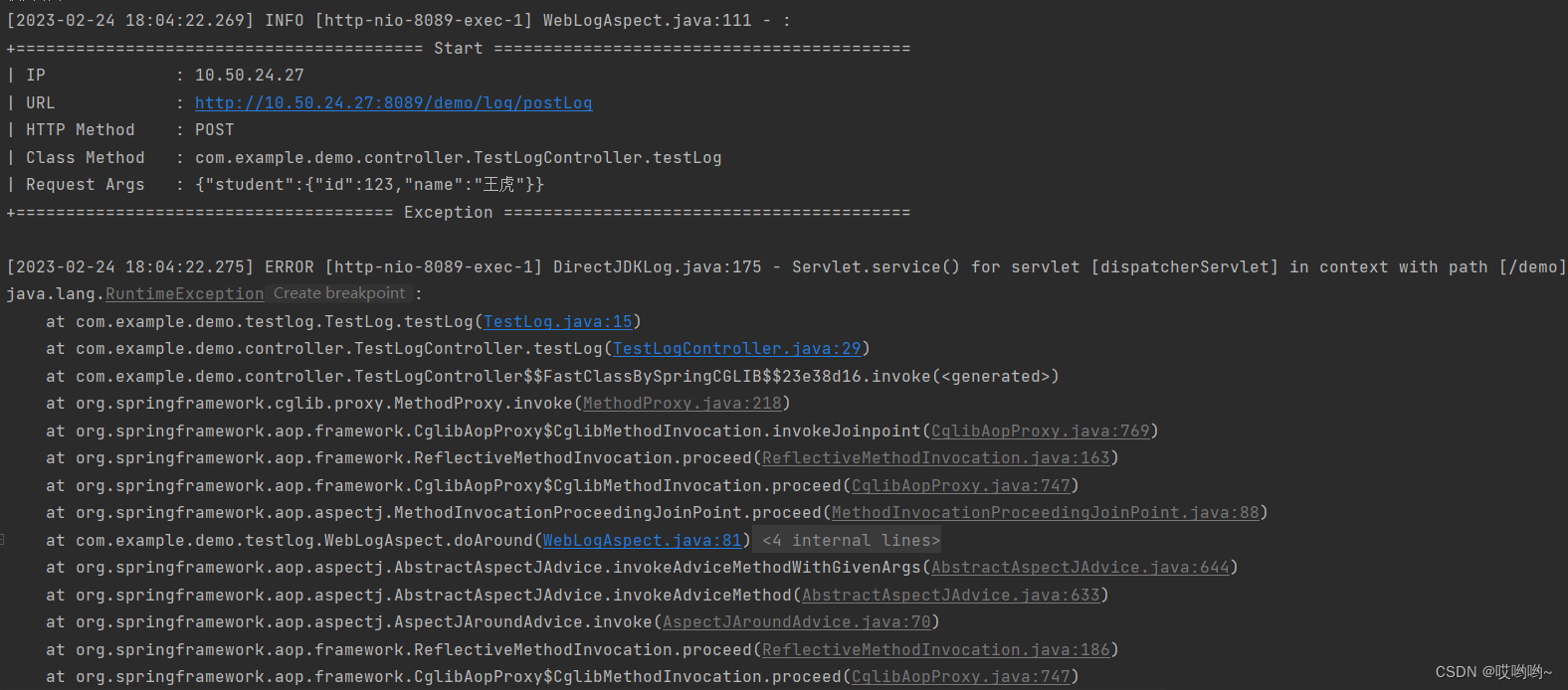
版权声明:本文为weixin_39106990原创文章,遵循CC 4.0 BY-SA版权协议,转载请附上原文出处链接和本声明。