git常用命令
主流程命令
1. 初始化
git init

2. 添加远程仓库
git remote add origin https://gitee.com/xxxxx.git
如果输入错误 移除:git remote rm origin

3. 同步远程仓库到本地
 git pull origin master

4. 添加远程仓库地址和同步远程仓库代码到本地两个步骤 可以用clone代替
git clone https://gitee.com/xxxxx.git

5. 添加要上传的文件到缓存区
git add . 或者 git add + 文件名


6. 上传代码到本地仓库
$ git commit -m "备注"

7. 将本地仓库推送到远程仓库(github/gitee/gitlab等远程)
git push origin master
其它命令
	#git状态
    git status

    # git暂存 要先暂存/提交 才能切换到其它分支
    git stash

	# 恢复暂存 并保留暂存
    git stash apply

	# 使用git pull/push等命令报错 提示Filename too long  输出下列命令并重新执行
    git config --global core.longpaths true

	# 同步远程分支列表
	git remote update origin --prune
.gitignore文件
#  排除所有class文件
*.class

# 排除 idea的 iml文件
*.iml

# 不排除A.class文件
!A.class

# 排除 springboot-core 模块下的 target目录
/springboot-core/target/
GitHub出现 Could not create SSL/TLS secure channel
上传gitee特别顺利 但是上传github时出现了这个问题 网上也没找到什么合理的解释 这里提供一种解决思路 记录一下
操作:
一开始是使用的https方式( git clone的默认方式),
我是手动添加的 $ git remote add origin https://gitee.com/xxxxx.git
一直到commit都是正常的 到了push的时候 各种问题 有可能反复弹出账号密码框(输入正确情况下) 弹出一个sign in your brower 然后弹出一个网页 接着就报错 fatal: An error occurred while sending the request Could not create SSL/TLS secure channel.
也是把.git反复清理过几次 ,git bash和idea都试过 push都是失败 (idea里面会报一个什么认证失败 应该就是因为Could not create SSL/TLS secure channel. 没有成功创建这个 所以认证失败吧)
解决方式:
既然https不行 那就换种方式 也不死磕了 换成ssh方式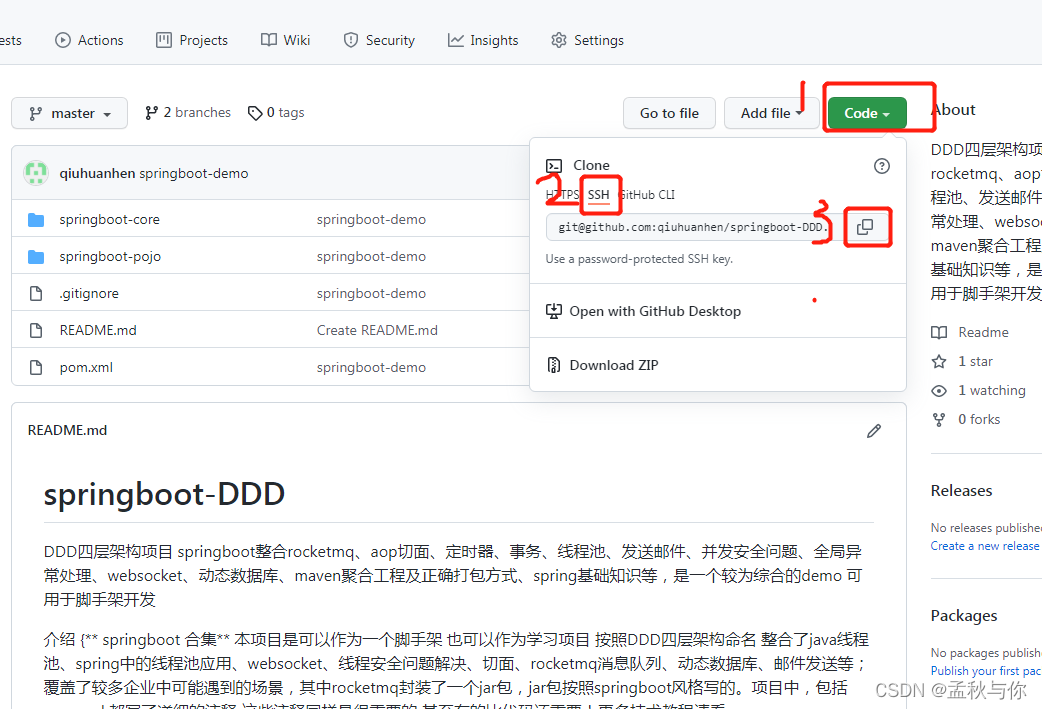
先把 .git文件夹删除掉
输入命令:
# 初始化
git init

# origin后面的地址 就是上图中 我们复制的地址
git  remote add origin git@github.com:xxxx/xxxxxx.git

# 同步远程仓库到本地(如果你的默认分支是main 就把master换成main)
git pull origin master

# 添加要上传的文件(注意add后面有一个 . ) 记得配置ignore
git add . 或者 git add + 文件名

# 提交
 git commit -m "取个备注"

# 推到远端 (master或main)
 git push -u origin master
我们在push的时候 有可能会出现报错
error: failed to push some refs to ‘github.com:xxx/xxxx.git’
输入命令:
# pull + merge
git pull --rebase origin main
会提示 Current branch master is up to date.
这时候我们提交到master分支就好了
git push -u origin master
我仓库默认分支是main 这时候需要去github设置一下 把master设为默认分支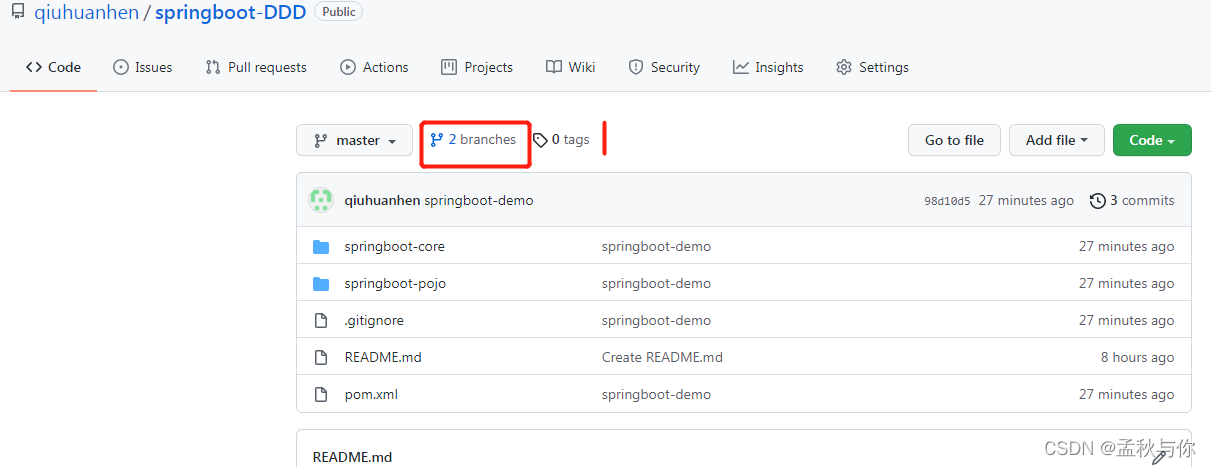
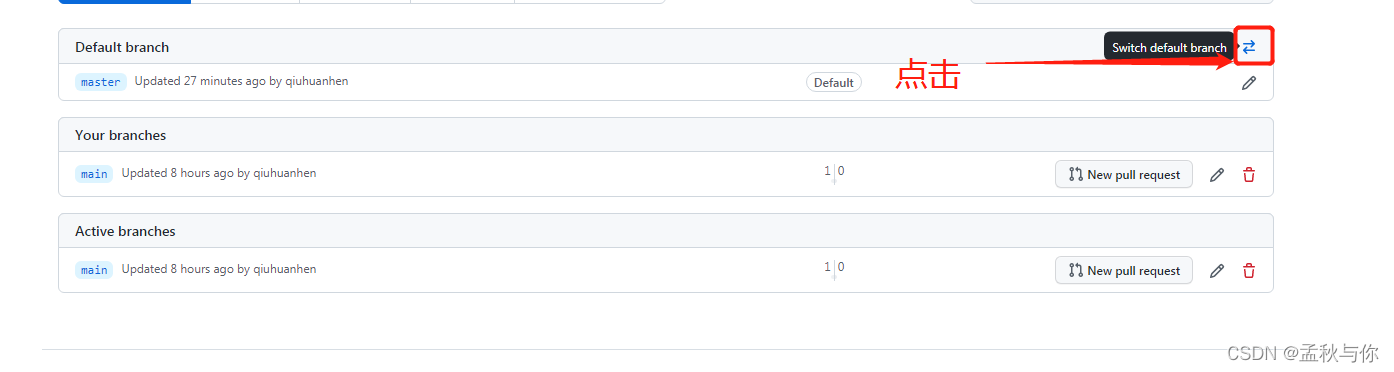
最后 截图中的demo也是写了很久的 喜欢的话点个star吧~
地址 https://github.com/qiuhuanhen/springboot-DDD