参考链接:
(1)微信小程序自动换行
https://blog.csdn.net/Hero_rong/article/details/100134634
(2)小程序 显示3个一排 自动换行
https://blog.csdn.net/fatong3/article/details/102903703
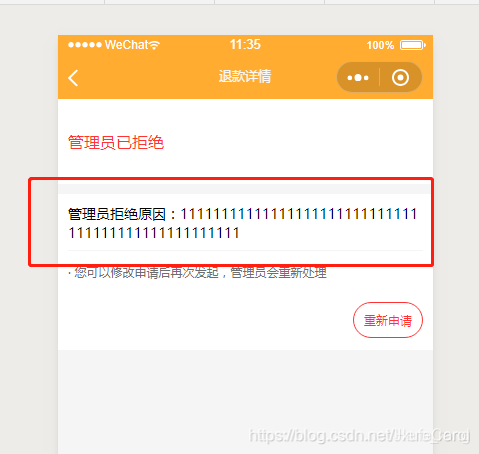
一、方法1:css word-break
word-break: break-all;
在需要换行的view上添加这个样式即可。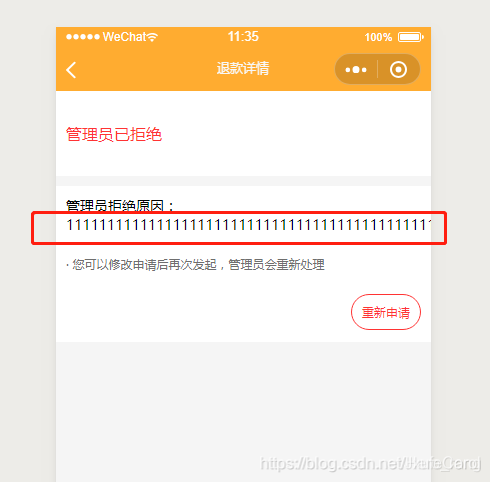
二、方法2:css width %
如显示3个一排。
使用的是width: 31%;
wxml文件
<!--3个一排,超过换行-->
<view class="link">
 <view class="link_child"> 1212 </view>
 <view class="link_child"> 1212 </view>
 <view class="link_child"> 1212 </view>
 <view class="link_child"> 1212 </view>
</view>
wxss文件
.link {
 display: flex; flex-direction: row;
 flex-wrap: wrap; width: 654rpx;
 margin: 0 auto; position: relative;
 left: 5rpx;
}
.link_child {
 width: 31%;
 background: red;
 border: 1rpx solid black;
}
.link_child:not(:nth-child(3n)){
 margin-right: 10rpx;
}
三、方法3:css width rpx
如显示3个一排。
使用的 width: 200rpx;(需要是3的倍数)
wxml文件
<view class="father">
 <view class="child test"> 1 </view>
 <view class="child test"> 2 </view>
 <view class="child test"> 3 </view>
 <view class="child test"> 4 </view>
 <view class="child test"> 5 </view>
 <view class="child test"> 6 </view>
</view>
wxss文件
.test {
 border: 2rpx solid black;
}
.father {
 width: 660rpx;
 display:flex;
 flex-wrap:wrap;
 justify-content:space-between;
}
.child{
 width: 200rpx;
}