iOS 涂鸦 我们已经讲过画直线 和画带箭头的线段
参考:http://blog.csdn.net/lwjok2007/article/details/50885376
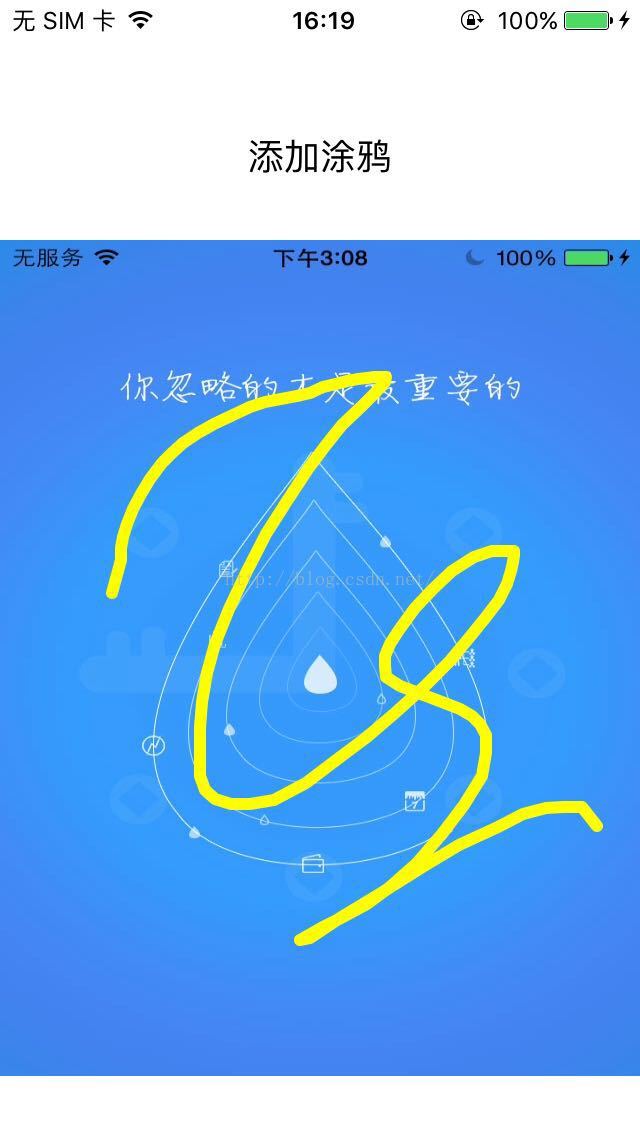
这节 我们尝试做一下 随意画 手指移动到哪里就在哪里画线 如下图所示:
使用Xcode创建项目,起名:TestFingerLine (详细的创建方法 参照 http://blog.csdn.net/lwjok2007/article/details/50865598)
首先我们 抽象出两个类
1,一个UIView专门负责接受手指滑动事件,显示涂鸦
2,一个类用来存储线段信息(我们可以把涂鸦理解成一堆直线组成的图形,每当手指挪动一点就是一条直线,整个涂鸦其实就是很多个很短的线段组成的) 具体我们可以通过代码来理解
第一个类 起名: FingerDrawLine (继承UIView)
第二个类 起名: FingerDrawLineInfo (继承NSObject)
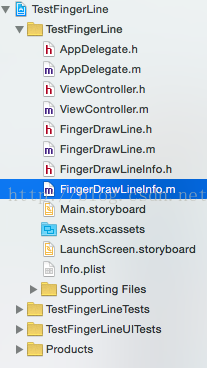
创建好 之后 如下图
我们先实现一下 FingerDrawLineInfo
#import <UIKit/UIKit.h>

@interface FingerDrawLineInfo : NSObject

@property (nonatomic,strong)NSMutableArray <__kindof NSValue *>*linePoints;//线条所包含的所有点
@property (nonatomic,strong)UIColor *lineColor;//线条的颜色
@property (nonatomic)float lineWidth;//线条的粗细

@end
#import "FingerDrawLineInfo.h"

@implementation FingerDrawLineInfo

- (instancetype)init {
    if (self=[super init]) {
        self.linePoints = [[NSMutableArray alloc] initWithCapacity:10];
    }

    return self;
}

@end#import <UIKit/UIKit.h>
#import "FingerDrawLineInfo.h"
@interface FingerDrawLine : UIView
//所有的线条信息,包含了颜色,坐标和粗细信息 @see DrawPaletteLineInfo
@property(nonatomic,strong) NSMutableArray *allMyDrawPaletteLineInfos;
//从外部传递的 笔刷长度和宽度,在包含画板的VC中 要是颜色、粗细有所改变 都应该将对应的值传进来
@property (nonatomic,strong)UIColor *currentPaintBrushColor;
@property (nonatomic)float currentPaintBrushWidth;
//外部调用的清空画板和撤销上一步
- (void)cleanAllDrawBySelf;//清空画板
- (void)cleanFinallyDraw;//撤销上一条线条
@end
#import "FingerDrawLine.h"

@implementation FingerDrawLine


#pragma mark - init
- (id)initWithFrame:(CGRect)frame {
    self = [super initWithFrame:frame];
    if (self) {
        _allMyDrawPaletteLineInfos = [[NSMutableArray alloc] initWithCapacity:10];
        self.currentPaintBrushColor = [UIColor blackColor];
        self.backgroundColor = [UIColor clearColor];
        self.currentPaintBrushWidth =  4.f;
    }
    return self;

}


#pragma  mark - draw event
//根据现有的线条 绘制相应的图画
- (void)drawRect:(CGRect)rect  {

    CGContextRef context=UIGraphicsGetCurrentContext();
    CGContextSetLineCap(context, kCGLineCapRound);
    CGContextSetLineJoin(context, kCGLineJoinRound);

    if (_allMyDrawPaletteLineInfos.count>0) {
        for (int i=0; i<[self.allMyDrawPaletteLineInfos count]; i++) {
            FingerDrawLineInfo *info = self.allMyDrawPaletteLineInfos[i];

            CGContextBeginPath(context);
            CGPoint myStartPoint=[[info.linePoints objectAtIndex:0] CGPointValue];
            CGContextMoveToPoint(context, myStartPoint.x, myStartPoint.y);

            if (info.linePoints.count>1) {
                for (int j=0; j<[info.linePoints count]-1; j++) {
                    CGPoint myEndPoint=[[info.linePoints objectAtIndex:j+1] CGPointValue];
                    CGContextAddLineToPoint(context, myEndPoint.x,myEndPoint.y);
                }
            }else {
                CGContextAddLineToPoint(context, myStartPoint.x,myStartPoint.y);
            }
            CGContextSetStrokeColorWithColor(context, info.lineColor.CGColor);
            CGContextSetLineWidth(context, info.lineWidth+1);
            CGContextStrokePath(context);
        }
    }
}


#pragma mark - touch event
//触摸开始
- (void)touchesBegan:(NSSet *)touches withEvent:(UIEvent *)event {

    UITouch* touch=[touches anyObject];

    [self drawPaletteTouchesBeganWithWidth:self.currentPaintBrushWidth andColor:self.currentPaintBrushColor andBeginPoint:[touch locationInView:self ]];
    [self setNeedsDisplay];
}
//触摸移动
- (void)touchesMoved:(NSSet *)touches withEvent:(UIEvent *)event {
    NSArray* MovePointArray=[touches allObjects];
    [self drawPaletteTouchesMovedWithPonit:[[MovePointArray objectAtIndex:0] locationInView:self]];
    [self setNeedsDisplay];
}

- (void)touchesEnded:(NSSet *)touches withEvent:(UIEvent *)event {

}


#pragma mark draw info edite event
//在触摸开始的时候 添加一条新的线条 并初始化
- (void)drawPaletteTouchesBeganWithWidth:(float)width andColor:(UIColor *)color andBeginPoint:(CGPoint)bPoint {
    FingerDrawLineInfo *info = [FingerDrawLineInfo new];
    info.lineColor = color;
    info.lineWidth = width;

    [info.linePoints addObject:[NSValue valueWithCGPoint:bPoint]];

    [self.allMyDrawPaletteLineInfos addObject:info];
}

//在触摸移动的时候 将现有的线条的最后一条的 point增加相应的触摸过的坐标
- (void)drawPaletteTouchesMovedWithPonit:(CGPoint)mPoint {
    FingerDrawLineInfo *lastInfo = [self.allMyDrawPaletteLineInfos lastObject];
    [lastInfo.linePoints addObject:[NSValue valueWithCGPoint:mPoint]];
}

- (void)cleanAllDrawBySelf {
    if ([self.allMyDrawPaletteLineInfos count]>0)  {
        [self.allMyDrawPaletteLineInfos removeAllObjects];
        [self setNeedsDisplay];
    }
}

- (void)cleanFinallyDraw {
    if ([self.allMyDrawPaletteLineInfos count]>0) {
        [self.allMyDrawPaletteLineInfos  removeLastObject];
    }
    [self setNeedsDisplay];
}
接下来 我们在ViewController中添加一个ImageView 试试看
- (void)viewDidLoad {
    [super viewDidLoad];
    // Do any additional setup after loading the view, typically from a nib.

    imageV = [[UIImageView alloc]initWithFrame:CGRectMake(0, 120, screen_Width, screen_Height-150)];
    imageV.image = [UIImage imageNamed:@"640-960-1.jpg"];
    [self.view addSubview:imageV];

    UIButton *testBtn = [[UIButton alloc]initWithFrame:CGRectMake(screen_Width/2.0-60, 60, 120, 36)];
    [testBtn setTitleColor:[UIColor blackColor] forState:UIControlStateNormal];
    [testBtn setTitle:@"添加涂鸦" forState:UIControlStateNormal];
    [testBtn addTarget:self action:@selector(addLineAct:) forControlEvents:UIControlEventTouchUpInside];
    [self.view addSubview:testBtn];

}

- (void)addLineAct:(id)sender{
    NSLog(@"测试按钮");


    FingerDrawLine *touchdrawView = [[FingerDrawLine alloc]initWithFrame:imageV.frame];

    touchdrawView.currentPaintBrushColor = [UIColor yellowColor];
    touchdrawView.currentPaintBrushWidth = 5.0;
    [self.view addSubview:touchdrawView];


}
好了 我们运行项目试试
点击添加涂鸦
在图片上画一画试试 是不是出来了
好了 这个代码中没有做撤销,和清除涂鸦 但是方法已经写好了 大家有兴趣去自己写写
下节我们讲一讲图片上添加文字 http://blog.csdn.net/lwjok2007/article/details/50896455
源代码我们将上传到群空间
demo:【60314手指涂鸦FingerLine.zip】
苹果开发群 :414319235 欢迎加入,共同学习
版权声明:本文为lwjok2007原创文章,遵循CC 4.0 BY-SA版权协议,转载请附上原文出处链接和本声明。