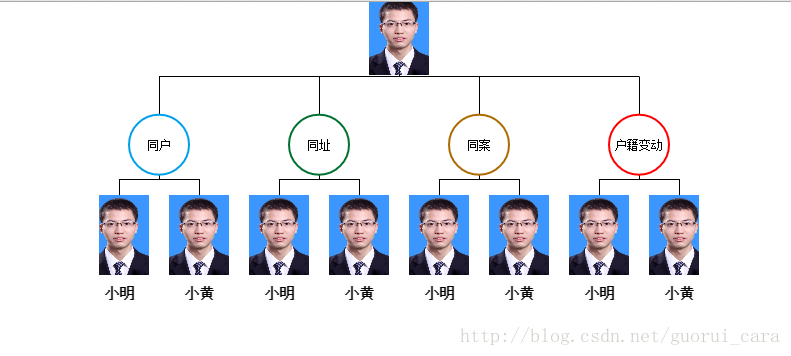
写这个栗子的时候主要因为是刚刚做一个项目,要用到人物关系图,所以一直在找合适插件,最后选择echarts2.0的tree图最合适这个关系图了。哈哈,话不多少,现在就把效果图献上吧。
ps:照片是网上下载的,莫要见外啊。
这个使用的是echarts2.X版本
HTML代码
<style type="text/css">
    *{
        margin: 0;
        padding: 0;
    }
    .a{
        width: 600px;
        height: 327px;
        margin: auto;
    }
</style>
<div class="a" id="a"></div>
下面是js代码:
require.config({paths:{echarts:"plugins/echarts"}});
require(
["echarts","echarts/chart/tree"],
function(ec){
var myChart=ec.init(document.getElementById('a'));
var option={
title : {
show:false
},
tooltip : {
trigger: 'item',
formatter: "{b}"
//formatter: "{b}: {c}"
},
//那个右上角的工具栏
toolbox: {
show : false,
},
calculable : false,
series : [
{
name:'树图',
type:'tree',
//排列方式,横向、纵向
orient: 'vertical',
//根节点的位置
rootLocation: {x: 'center',y: '10%'},
//连接线长度
layerPadding: 30,
//结点间距
nodePadding: 20,
//图形形状
symbol: 'circle',
//尺寸大小
symbolSize: 40,
//图的一些样式设置
itemStyle: {
//正常情况显示
normal: {
label: {
show: true,
position: 'inside',
textStyle: {
//字体颜色、大小、加粗
color: '#000',
fontSize: 15,
fontWeight: 'bolder'
}
},
color:'#fff',
lineStyle: {
color: '#000',
width: 1,
type: 'broken'
}
},
//鼠标移上去样式
emphasis: {
label: {
show: false,
textStyle:{
align:'center',
verticalAlign:'middle'
}
},
color:'#fff',
borderWidth: 1
}
},
data: [
{
name: '张三',
//图片大小
symbolSize: [60, 80],
//图片
symbol: 'image://img/zjz.jpg',
itemStyle: {
normal: {
label: {
show: false
}
}
},
children: [
{
name: '同户',
value: 4,
symbol: 'circle',
color:'#fff',
itemStyle: {
normal: {
label: {
show: true,
textStyle:{
align:'center',
verticalAlign:'middle'
}
},
color:'#fff',
borderWidth: 2,
borderColor: '#00A0E9'
}
},
symbolSize: [60, 60],
children: [
{
name: '小明',
symbol: 'image://img/zjz.jpg',
symbolSize: [60, 80],
//value: 4,
itemStyle: {
normal: {
label: {
show: true,
position: 'bottom'
}
}
}
},
{
name: '小黄',
symbol: 'image://img/zjz.jpg',
symbolSize: [60, 80],
value: 4,
itemStyle: {
normal: {
label: {
show: true,
position: 'bottom'
}
}
}
}
]
},
{
name: '同址',
symbol: 'circle',
symbolSize: [60, 60],
itemStyle: {
normal: {
label: {
show: true,
textStyle:{
align:'center',
verticalAlign:'middle'
}
},
color:'#fff',
borderWidth: 2,
borderColor: '#007130'
}
},
children: [
{
name: '小明',
symbol: 'image://img/zjz.jpg',
symbolSize: [60, 80],
value: 4,
itemStyle: {
normal: {
label: {
show: true,
position: 'bottom'
}
}
}
},
{
name: '小黄',
symbol: 'image://img/zjz.jpg',
symbolSize: [60, 80],
value: 4,
itemStyle: {
normal: {
label: {
show: true,
position: 'bottom'
}
}
}
}
]
},
{
name: '同案',
symbol: 'circle',
symbolSize: [60, 60],
itemStyle: {
normal: {
label: {
show: true,
textStyle:{
align:'center',
verticalAlign:'middle'
}
},
color:'#fff',
borderWidth: 2,
borderColor: '#AC6A00'
}
},
children: [
{
name: '小明',
symbol: 'image://img/zjz.jpg',
symbolSize: [60, 80],
value: 4,
itemStyle: {
normal: {
label: {
show: true,
position: 'bottom'
}
}
}
},
{
name: '小黄',
symbol: 'image://img/zjz.jpg',
symbolSize: [60, 80],
value: 4,
itemStyle: {
normal: {
label: {
show: true,
position: 'bottom'
}
}
}
}
]
},
{
name: '户籍变动',
symbol: 'circle',
symbolSize: [60, 60],
itemStyle: {
normal: {
label: {
show: true,
textStyle:{
align:'center',
verticalAlign:'middle'
}
},
color:'#fff',
borderWidth: 2,
borderColor: '#FF0000'
}
},
children: [
{
name: '小明',
symbol: 'image://img/zjz.jpg',
symbolSize: [60, 80],
value: 4,
itemStyle: {
normal: {
label: {
show: true,
position: 'bottom'
}
}
}
},
{
name: '小黄',
symbol: 'image://img/zjz.jpg',
symbolSize: [60, 80],
value: 4,
itemStyle: {
normal: {
label: {
show: true,
position: 'bottom'
}
}
}
}
]
}
]
}
]
}
]
};
myChart.setOption(option);
var ecConfig = require('echarts/config');
})好了,这就是全部代码,可以查看echarts文档查看一下属性配置。
版权声明:本文为guorui_cara原创文章,遵循CC 4.0 BY-SA版权协议,转载请附上原文出处链接和本声明。