WPF登录界面
1.前端代码
<Window
x:Class="GetMarried.LoginWindow"
xmlns="http://schemas.microsoft.com/winfx/2006/xaml/presentation"
xmlns:x="http://schemas.microsoft.com/winfx/2006/xaml"
xmlns:mc="http://schemas.openxmlformats.org/markup-compatibility/2006"
xmlns:d="http://schemas.microsoft.com/expression/blend/2008"
xmlns:local="clr-namespace:GetMarried"
mc:Ignorable="d"
ResizeMode="NoResize"
Background="Transparent"
AllowsTransparency="True"
WindowStyle="None"
WindowStartupLocation="CenterScreen"
Height="300" Width="400"
Title="LoginWindow">
<!--窗口资源-->
<Window.Resources>
<!--定义按钮样式-->
<Style TargetType="Button">
<Setter Property="Foreground" Value="Black"/>
<!--修改模板属性-->
<Setter Property="Template">
<Setter.Value>
<!--控件模板-->
<!--(1)其实WPF的每一个控件都有一个默认的模板,该模板描述了控件的外观以及外观对外界刺激所做出的反应。
我们可以自定义一个模板来替换掉控件的默认模板以便打造个性化的控件
(2)与Style不同,Style只能改变控件的已有属性值(比如颜色字体)来定制控件,
但控件模板可以改变控件的内部结构(VisualTree,视觉树)来完成更为复杂的定制,
比如我们可以定制这样的按钮:在它的左办部分显示一个小图标而它的右半部分显示文本。
(3)要替换控件的模板,我们只需要声明一个ControlTemplate对象,并对该ControlTemplate对象做相应的配置,
然后将该ControlTemplate对象赋值给控件的Template属性就可以了
(4)ControlTemplate包含两个重要的属性:
1,VisualTree,该模板的视觉树,其实我们就是使用这个属性来描述控件的外观的
2,Triggers,触发器列表,里面包含一些触发器Trigger,我们可以定制这个触发器列表来使控件对外界的刺激发生反应,比如鼠标经过时文本变成粗体等。-->
<ControlTemplate TargetType="Button">
<!--定义视觉树-->
<!--背景色-->
<Border x:Name="back" Opacity="0.8" CornerRadius="3">
<Border.BitmapEffect>
<DropShadowBitmapEffect
Color="{Binding
RelativeSource={RelativeSource TemplatedParent},
Path=(Button.Background).(SolidColorBrush.Color)}"
Direction="20" ShadowDepth="0" Opacity="2" Softness="0"></DropShadowBitmapEffect>
</Border.BitmapEffect>
<Border.Background>
<!--使用LinearGradientBrush渐变画刷:定义一个渐变画刷,然后需要定义渐变颜色,颜色已直线形式渐变-->
<LinearGradientBrush StartPoint="0,0" EndPoint="0,1.5">
<GradientBrush.GradientStops>
<GradientStopCollection>
<!--GradientStop:定义渐变颜色与颜色渐变始点-->
<GradientStop Color="{Binding RelativeSource={RelativeSource TemplatedParent}, Path=(Button.Background).(SolidColorBrush.Color)}" Offset="0"/>
<GradientStop Color="{Binding RelativeSource={RelativeSource TemplatedParent}, Path=(Button.Background).(SolidColorBrush.Color)}" Offset="0.4"/>
<GradientStop Color="#FFF" Offset="1"/>
</GradientStopCollection>
</GradientBrush.GradientStops>
</LinearGradientBrush>
</Border.Background>
<!--前景色及边框-->
<Border x:Name="fore" BorderThickness="1" CornerRadius="3" BorderBrush="#5555">
<Border.Background>
<LinearGradientBrush StartPoint="0,0" EndPoint="0,1">
<GradientBrush.GradientStops>
<!--<GradientStop Color="#6FFF" Offset="0.5"/>
<GradientStop Color="#1111" Offset="0.51"/>-->
<GradientStop Color="#FF5D88C7" Offset="0.5"/>
<GradientStop Color="#FF4375BD" Offset="0.51"/>
</GradientBrush.GradientStops>
</LinearGradientBrush>
</Border.Background>
<!--按钮内容-->
<ContentPresenter x:Name="content" HorizontalAlignment="Center" VerticalAlignment="Center">
<ContentPresenter.BitmapEffect>
<DropShadowBitmapEffect Color="#000" Direction="-90" ShadowDepth="2" Softness="0.1" Opacity="0.3" />
</ContentPresenter.BitmapEffect>
</ContentPresenter>
</Border>
</Border>
<!--定义视觉树_end-->
<!--定义触发器-->
<ControlTemplate.Triggers>
<!--属性触发器: 鼠标移入移出-->
<Trigger Property="IsMouseOver" Value="True">
<Trigger.EnterActions>
<BeginStoryboard>
<Storyboard>
<!--依赖属性 Storyboard.TargetName-->
<DoubleAnimation To="1" Duration="0:0:0.2" Storyboard.TargetName="back" Storyboard.TargetProperty="(Border.BitmapEffect).(DropShadowBitmapEffect.Opacity)" />
<DoubleAnimation To="1" Duration="0:0:0.2" Storyboard.TargetName="back" Storyboard.TargetProperty="(Border.BitmapEffect).(DropShadowBitmapEffect.Softness)" />
<ColorAnimation To="#AFFF" BeginTime="0:0:0.2" Duration="0:0:0.2" Storyboard.TargetName="fore" Storyboard.TargetProperty="(Border.Background).(LinearGradientBrush.GradientStops)[0].(GradientStop.Color)" />
<ColorAnimation To="#3FFF" BeginTime="0:0:0.2" Duration="0:0:0.2" Storyboard.TargetName="fore" Storyboard.TargetProperty="(Border.Background).(LinearGradientBrush.GradientStops)[1].(GradientStop.Color)" />
</Storyboard>
</BeginStoryboard>
</Trigger.EnterActions>
<Trigger.ExitActions>
<BeginStoryboard>
<Storyboard>
<DoubleAnimation To="0" Duration="0:0:0.2" Storyboard.TargetName="back" Storyboard.TargetProperty="(Border.BitmapEffect).(DropShadowBitmapEffect.Opacity)" />
<DoubleAnimation To="0" Duration="0:0:0.2" Storyboard.TargetName="back" Storyboard.TargetProperty="(Border.BitmapEffect).(DropShadowBitmapEffect.Softness)" />
<ColorAnimation Duration="0:0:0.2" Storyboard.TargetName="fore" Storyboard.TargetProperty="(Border.Background).(LinearGradientBrush.GradientStops)[0].(GradientStop.Color)" />
<ColorAnimation Duration="0:0:0.2" Storyboard.TargetName="fore" Storyboard.TargetProperty="(Border.Background).(LinearGradientBrush.GradientStops)[1].(GradientStop.Color)" />
</Storyboard>
</BeginStoryboard>
</Trigger.ExitActions>
</Trigger>
<!--按钮按下弹起-->
<Trigger Property="IsPressed" Value="True">
<Trigger.EnterActions>
<BeginStoryboard>
<Storyboard>
<DoubleAnimation To="3" Duration="0:0:0.1" Storyboard.TargetName="back" Storyboard.TargetProperty="(Border.BitmapEffect).(OuterGlowBitmapEffect.GlowSize)" />
<ColorAnimation To="#3AAA" Duration="0:0:0.1" Storyboard.TargetName="fore" Storyboard.TargetProperty="(Border.Background).(LinearGradientBrush.GradientStops)[0].(GradientStop.Color)" />
<ColorAnimation To="#2111" Duration="0:0:0.1" Storyboard.TargetName="fore" Storyboard.TargetProperty="(Border.Background).(LinearGradientBrush.GradientStops)[1].(GradientStop.Color)" />
</Storyboard>
</BeginStoryboard>
</Trigger.EnterActions>
<Trigger.ExitActions>
<BeginStoryboard>
<Storyboard>
<DoubleAnimation Duration="0:0:0.1" Storyboard.TargetName="back" Storyboard.TargetProperty="(Border.BitmapEffect).(OuterGlowBitmapEffect.GlowSize)" />
<ColorAnimation Duration="0:0:0.1" Storyboard.TargetName="fore" Storyboard.TargetProperty="(Border.Background).(LinearGradientBrush.GradientStops)[0].(GradientStop.Color)" />
<ColorAnimation Duration="0:0:0.1" Storyboard.TargetName="fore" Storyboard.TargetProperty="(Border.Background).(LinearGradientBrush.GradientStops)[1].(GradientStop.Color)" />
</Storyboard>
</BeginStoryboard>
</Trigger.ExitActions>
</Trigger>
<!--按钮失效-->
<Trigger Property="IsEnabled" Value="False">
<Setter Property="Foreground" Value="#B444"/>
<Trigger.EnterActions>
<BeginStoryboard>
<Storyboard>
<DoubleAnimation To="0" Duration="0:0:0.3" Storyboard.TargetName="back" Storyboard.TargetProperty="(Border.BitmapEffect).(OuterGlowBitmapEffect.GlowSize)" />
<DoubleAnimation To="1" Duration="0:0:0.1" Storyboard.TargetName="content" Storyboard.TargetProperty="(ContentPresenter.BitmapEffect).(DropShadowBitmapEffect.Opacity)" />
<DoubleAnimation To="-135" Duration="0:0:0.1" Storyboard.TargetName="content" Storyboard.TargetProperty="(ContentPresenter.BitmapEffect).(DropShadowBitmapEffect.Direction)" />
<ColorAnimation To="#FFF" Duration="0:0:0.3" Storyboard.TargetName="content" Storyboard.TargetProperty="(ContentPresenter.BitmapEffect).(DropShadowBitmapEffect.Color)" />
<ColorAnimation To="#D555" Duration="0:0:0.3" Storyboard.TargetName="fore" Storyboard.TargetProperty="(Border.BorderBrush).(SolidColorBrush.Color)" />
<ColorAnimation To="#CEEE" Duration="0:0:0.3" Storyboard.TargetName="fore" Storyboard.TargetProperty="(Border.Background).(LinearGradientBrush.GradientStops)[0].(GradientStop.Color)" />
<ColorAnimation To="#CDDD" Duration="0:0:0.3" Storyboard.TargetName="fore" Storyboard.TargetProperty="(Border.Background).(LinearGradientBrush.GradientStops)[1].(GradientStop.Color)" />
</Storyboard>
</BeginStoryboard>
</Trigger.EnterActions>
<Trigger.ExitActions>
<BeginStoryboard>
<Storyboard>
<DoubleAnimation Duration="0:0:0.1" Storyboard.TargetName="back" Storyboard.TargetProperty="(Border.BitmapEffect).(OuterGlowBitmapEffect.GlowSize)" />
<DoubleAnimation Duration="0:0:0.1" Storyboard.TargetName="content" Storyboard.TargetProperty="(ContentPresenter.BitmapEffect).(DropShadowBitmapEffect.Opacity)" />
<DoubleAnimation Duration="0:0:0.1" Storyboard.TargetName="content" Storyboard.TargetProperty="(ContentPresenter.BitmapEffect).(DropShadowBitmapEffect.Direction)" />
<ColorAnimation Duration="0:0:0.1" Storyboard.TargetName="content" Storyboard.TargetProperty="(ContentPresenter.BitmapEffect).(DropShadowBitmapEffect.Color)" />
<ColorAnimation Duration="0:0:0.1" Storyboard.TargetName="fore" Storyboard.TargetProperty="(Border.BorderBrush).(SolidColorBrush.Color)" />
<ColorAnimation Duration="0:0:0.1" Storyboard.TargetName="fore" Storyboard.TargetProperty="(Border.Background).(LinearGradientBrush.GradientStops)[0].(GradientStop.Color)" />
<ColorAnimation Duration="0:0:0.1" Storyboard.TargetName="fore" Storyboard.TargetProperty="(Border.Background).(LinearGradientBrush.GradientStops)[1].(GradientStop.Color)" />
</Storyboard>
</BeginStoryboard>
</Trigger.ExitActions>
</Trigger>
</ControlTemplate.Triggers>
<!--定义触发器_End-->
</ControlTemplate>
</Setter.Value>
</Setter>
</Style>
<!--故事版-->
<!--资源定义需要有一个在ResourceDictionary中唯一的关键字x:Key(单独的ResourceDictionary中的键名不可以重复,多个ResourceDictionary中键名可以重复,会根据在逻辑数上的lookup的顺序来就近生效-->
<!--窗口放大和缩小动画-->
<!--窗口放大-->
<Storyboard x:Key="Storyboard1" BeginTime="0:0:0">
<!--控制窗体透明度-->
<DoubleAnimationUsingKeyFrames Storyboard.TargetProperty="(UIElement.Opacity)" Storyboard.TargetName="dp">
<EasingDoubleKeyFrame KeyTime="0" Value="0.0"/>
<EasingDoubleKeyFrame KeyTime="0:0:0.3" Value="0.5"/>
<EasingDoubleKeyFrame KeyTime=" 0:0:1" Value="0.83"/>
</DoubleAnimationUsingKeyFrames>
<!--控制窗体内容文本左移动-->
<!--标题-->
<ThicknessAnimationUsingKeyFrames Storyboard.TargetProperty="Margin" Storyboard.TargetName="tbZhangHaos">
<LinearThicknessKeyFrame KeyTime="0:0:0" Value="418,84,-108,0"></LinearThicknessKeyFrame>
<LinearThicknessKeyFrame KeyTime="0:0:0.2" Value="0,84,-108,0"></LinearThicknessKeyFrame>
<LinearThicknessKeyFrame KeyTime="0:0:0.22" Value="70,40,-108,0"></LinearThicknessKeyFrame>
</ThicknessAnimationUsingKeyFrames>
<!--账号-->
<ThicknessAnimationUsingKeyFrames Storyboard.TargetProperty="Margin" Storyboard.TargetName="tbZhangHao">
<LinearThicknessKeyFrame KeyTime="0:0:0" Value="418,84,-108,0"></LinearThicknessKeyFrame>
<LinearThicknessKeyFrame KeyTime="0:0:0.2" Value="0,84,-108,0"></LinearThicknessKeyFrame>
<LinearThicknessKeyFrame KeyTime="0:0:0.22" Value="70,84,-108,0"></LinearThicknessKeyFrame>
</ThicknessAnimationUsingKeyFrames>
<!--账号文本输入框-->
<ThicknessAnimationUsingKeyFrames Storyboard.TargetProperty="Margin" Storyboard.TargetName="txt_ZhangHao">
<LinearThicknessKeyFrame KeyTime="0:0:0.22" Value="520,81,-273,0"></LinearThicknessKeyFrame>
<LinearThicknessKeyFrame KeyTime="0:0:0.42" Value="102,81,-273,0"></LinearThicknessKeyFrame>
<LinearThicknessKeyFrame KeyTime="0:0:0.44" Value="172,81,-273,0"></LinearThicknessKeyFrame>
</ThicknessAnimationUsingKeyFrames>
<!--密码-->
<ThicknessAnimationUsingKeyFrames Storyboard.TargetProperty="Margin"
Storyboard.TargetName="tbMiMa">
<LinearThicknessKeyFrame KeyTime="0:0:0.44" Value="410,134,-109,0"></LinearThicknessKeyFrame>
<LinearThicknessKeyFrame KeyTime="0:0:0.64" Value="0,134,-109,0"></LinearThicknessKeyFrame>
<LinearThicknessKeyFrame KeyTime="0:0:0.66" Value="70,134,-109,0"></LinearThicknessKeyFrame>
</ThicknessAnimationUsingKeyFrames>
<!--密码输入框-->
<ThicknessAnimationUsingKeyFrames Storyboard.TargetProperty="Margin"
Storyboard.TargetName="pwd_MiMa">
<LinearThicknessKeyFrame KeyTime="0:0:0.66" Value="520,134,-273,0"></LinearThicknessKeyFrame>
<LinearThicknessKeyFrame KeyTime="0:0:0.86" Value="110,134,-273,0"></LinearThicknessKeyFrame>
<LinearThicknessKeyFrame KeyTime="0:0:0.88" Value="172,134,-273,0"></LinearThicknessKeyFrame>
</ThicknessAnimationUsingKeyFrames>
<!--登录按钮-->
<ThicknessAnimationUsingKeyFrames Storyboard.TargetProperty="Margin"
Storyboard.TargetName="btn_Login">
<LinearThicknessKeyFrame KeyTime="0:0:0.88" Value="455,182,-131,0"></LinearThicknessKeyFrame>
<LinearThicknessKeyFrame KeyTime="0:0:1.08" Value="0,182,-131,0"></LinearThicknessKeyFrame>
<LinearThicknessKeyFrame KeyTime="0:0:1.10" Value="100,200,-131,0"></LinearThicknessKeyFrame>
</ThicknessAnimationUsingKeyFrames>
<!--取消按钮-->
<ThicknessAnimationUsingKeyFrames Storyboard.TargetProperty="Margin"
Storyboard.TargetName="btn_Cancel">
<LinearThicknessKeyFrame KeyTime="0:0:1.10" Value="569,182,-249,0"></LinearThicknessKeyFrame>
<LinearThicknessKeyFrame KeyTime="0:0:1.12" Value="114,182,-249,0"></LinearThicknessKeyFrame>
<LinearThicknessKeyFrame KeyTime="0:0:1.32" Value="214,200,-249,0"></LinearThicknessKeyFrame>
</ThicknessAnimationUsingKeyFrames>
<!--控制窗体放大和缩小-->
<Storyboard BeginTime="0:0:1.35">
<DoubleAnimationUsingKeyFrames Storyboard.TargetName="dp"
Storyboard.TargetProperty="RenderTransform.ScaleX">
<LinearDoubleKeyFrame KeyTime="0:0:0" Value="0.7"></LinearDoubleKeyFrame>
<SplineDoubleKeyFrame KeyTime="0:0:0.5" Value="1" KeySpline="0.98,0.1 1,1"></SplineDoubleKeyFrame>
</DoubleAnimationUsingKeyFrames>
<DoubleAnimationUsingKeyFrames Storyboard.TargetName="dp"
Storyboard.TargetProperty="RenderTransform.ScaleY">
<LinearDoubleKeyFrame KeyTime="0:0:0" Value="0.6"></LinearDoubleKeyFrame>
<SplineDoubleKeyFrame KeyTime="0:0:0.5" Value="1" KeySpline="0.98,0.1 1,1"></SplineDoubleKeyFrame>
</DoubleAnimationUsingKeyFrames>
</Storyboard>
</Storyboard>
</Window.Resources>
<!--窗体触发器-->
<Window.Triggers>
<!--事件触发器-->
<EventTrigger RoutedEvent="Window.Loaded">
<!--窗体触发的时候调用故事版 Storyboard1-->
<!--StaticResource 引用资源。-->
<BeginStoryboard Storyboard="{StaticResource Storyboard1}"/>
</EventTrigger>
</Window.Triggers>
<!--停靠面板:布局页面-->
<DockPanel Name="dp">
<!--设置停靠面板变形-->
<DockPanel.RenderTransform>
<!--能够让某对象产生缩放变化。包括属性ScaleX、ScaleY、CenterX、CenterY,其中ScaleX、ScaleY属性表示对象在X、Y轴进行缩放的倍数,使用CenterX 和 CenterY属性指定一个中心点。-->
<ScaleTransform ScaleX="0.8" ScaleY="0.8"/>
</DockPanel.RenderTransform>
<!--页面构成-->
<Grid x:Name="grdLogin">
<Image Source="Images/59.jpg" Stretch="Fill" Margin="0,0,0,10"/>
<TextBlock
Name="tbZhangHaos"
Text="全 国 结 婚 信 息 管 理 系 统"
Height="28"
Margin="418,20,-108,0"
HorizontalAlignment="Left"
VerticalAlignment="Top"
FontSize="20" FontFamily="Vivaldi" Foreground="#e8c36a" >
</TextBlock>
<TextBlock
Name="tbZhangHao"
Text="Account(账号):"
Height="28"
Margin="418,64,-108,0"
HorizontalAlignment="Left"
VerticalAlignment="Top"
FontSize="16" FontFamily="Vivaldi" >
</TextBlock>
<!--MaxLength属性:输入值的最大长度,不包含硬编码中Text的字符长度-->
<!--TextWrapping:如果设置成wrap ,就表示当文本长度超过容器长度时可以自动换行。
默认为no wrap,即当文本长度超过容器长度时,文本超出部分被遮挡。-->
<!--AcceptsReturn:允许回车换行操作-->
<TextBox Name="txt_ZhangHao"
MaxLength="20"
TextWrapping="NoWrap"
Height="31" Width="149"
HorizontalAlignment="Left"
VerticalAlignment="Top"
Text="SL007"
Margin="520,91,-273,0"
AcceptsReturn="True" Foreground="Gray">
</TextBox>
<TextBlock
Name="tbMiMa"
Text="Password(密码):"
Height="23"
FontSize="16"
Margin="410,114,-109,0"
HorizontalAlignment="Left"
VerticalAlignment="Top" FontFamily="Vivaldi" />
<!--Password属性:与TextBox的Text属性一样-->
<!--HorizontalAlignment:水平方向对齐方式 -->
<!--VerticalAlignment:垂直方向对齐方式-->
<PasswordBox Opacity="0.6"
x:Name="pwd_MiMa"
Height="28"
Width="149"
Foreground="Black"
Password="123"
HorizontalAlignment="Left"
VerticalAlignment="Top"
Margin="520,134,-273,0" SelectionOpacity="0.8"/>
<!--Content:作用与TextBox的Text属性一样,但其数据类型为object,即可放任何对象,但只能存放一个对象-->
<Button
Name="btn_Login"
Content="登录"
Height="33"
Width="72"
FontSize="19"
Background="SkyBlue"
Cursor="Hand"
Foreground="Black"
HorizontalAlignment="Left"
VerticalAlignment="Top"
Margin="455,182,-131,0"
FontFamily="Vivaldi"
Click="btn_Login_Click"/>
<!--Cursor:当光标进入控件范围时使用的鼠标指针-->
<Button
Name="btn_Cancel"
Content="退出"
Height="33"
Width="76"
FontSize="19"
Foreground="Black"
Background="SkyBlue"
HorizontalAlignment="Left"
VerticalAlignment="Top"
Margin="569,182,-249,0"
Cursor="Hand"
FontFamily="Vivaldi"
Click="btn_Cancel_Click">
</Button>
</Grid>
</DockPanel>
</Window>
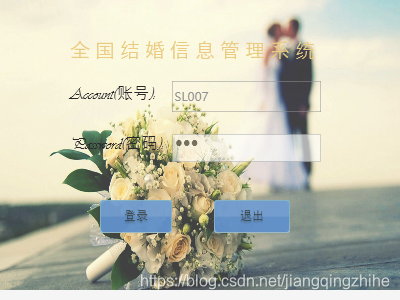
结果:
这个界面利用窗口放大和缩小动画还有控制窗体透明度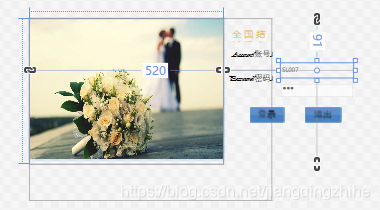
后台代码:
   //登录页面
        private void btn_Login_Click(object sender, RoutedEventArgs e)
        {
            try
            {
                if (txt_ZhangHao.Text.Trim() != string.Empty && pwd_MiMa.Password.Trim() != string.Empty)
                {
                    //2.获取页面数据
                    string strAccount = txt_ZhangHao.Text.Trim();//账号赋值给strAccount
                    string strPassword = pwd_MiMa.Password.Trim();//密码赋值给strPassword
                    if (!string.IsNullOrEmpty(strAccount) && !string.IsNullOrEmpty(strPassword))
                    {
                         //查询数据库账号和密码是否根你在页面填写的密码和账号是否一致
                           SY_User userInfo = (from UserTable in myMode.SY_User
                                            where UserTable.Password == strPassword && UserTable.UserName == strAccount
                                            select UserTable).SingleOrDefault();
                        if (userInfo != null)
                        {
                             //加入自已所需要的参数,可以不一样。
                            string strName = userInfo.Name;
                            string strWeddingPrintedNumber = userInfo.WeddingPrintedNumber;
                            string strDivorcePrintNumber = userInfo.DivorcePrintNumber;
                            string strNameAuthority = userInfo.NameAuthority;
                            int strUser = userInfo.UserID;
                            string img = userInfo.picture;
                            MainWindow mainWindow = new MainWindow(strName, strWeddingPrintedNumber, strDivorcePrintNumber, strNameAuthority, strUser, img);
                            mainWindow.Show();
                            this.Close();
                        }
                        else
                        {
                            MessageBox.Show("您输入的账号或密码出错了,请检查!", "提示", MessageBoxButton.OK, MessageBoxImage.Error);
                        }
                    }
                }
                else
                {
                    MessageBox.Show("请输入账号和密码", "提示", MessageBoxButton.OK, MessageBoxImage.Error);
                }
            }
            catch (Exception)
            {
                throw;
            }
        }

        private void btn_Cancel_Click(object sender, RoutedEventArgs e)
        {
            //关闭应用程序
            Application.Current.Shutdown();
        }
版权声明:本文为jiangqingzhihe原创文章,遵循CC 4.0 BY-SA版权协议,转载请附上原文出处链接和本声明。