今天是实现基于Haar特征的小车人脸识别,但是实际上看处理的速度比较慢,跟踪的不太行。反正,功能是实现了,也能够实现云台的俯仰等运动。
检测效果如图: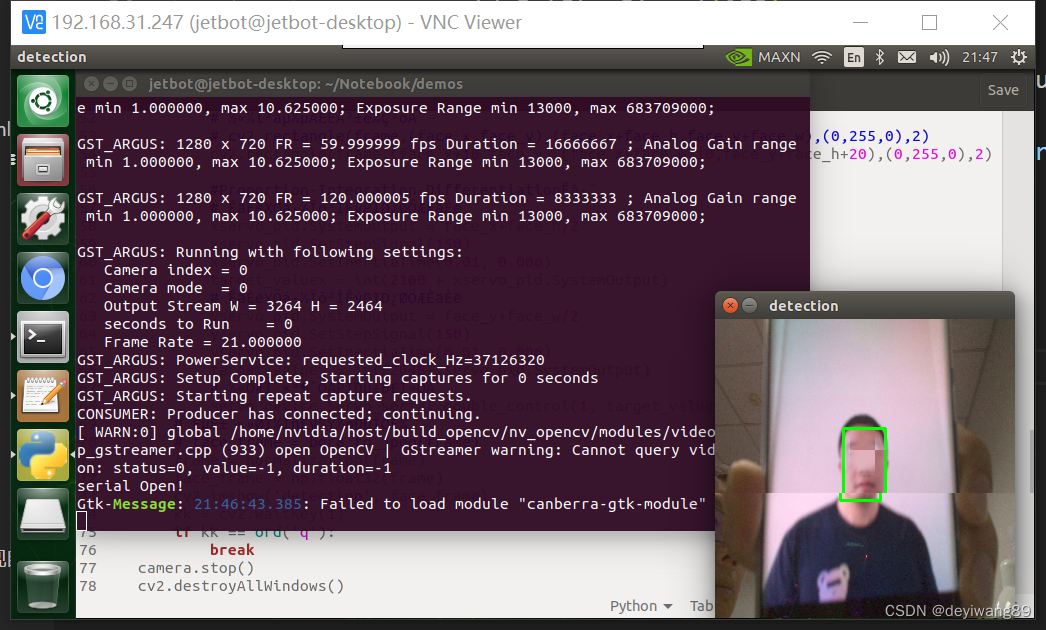
这里因为摄像头景深的问题,使用手机展示的人脸进行识别。具体代码如下:
from jetbot import Camera
import PID
import cv2
from servoserial import ServoSerial
import numpy as np

global face_x, face_y, face_w, face_h
face_x = face_y = face_w = face_h = 0
global target_valuex
target_valuex = 2100
global target_valuey
target_valuey = 2048

def normalization(data):
    _range = np.max(data) - np.min(data)
    return (data - np.min(data))/ _range

if __name__ == "__main__":

    camera = Camera.instance(width=320, height=320)
    # PID控制,调整X Y 坐标
    xservo_pid = PID.PositionalPID(1.9, 0.3, 0.35)
    yservo_pid = PID.PositionalPID(1.5, 0.2, 0.3)
    servo_device = ServoSerial()
    # 这个地址要填写对,最好是绝对地址,否则会报错
    face_cascade = cv2.CascadeClassifier('/usr/share/opencv4/haarcascades/haarcascade_frontalface_default.xml')
'''
整体思路是利用opencv自带的haar人脸检测
检测出方框坐标,得到方框中心坐标
将云台转到该坐标上
'''
    while 1:
        frame = camera.value
        frame = cv2.resize(frame, (300, 300))
        gray = cv2.cvtColor(frame,cv2.COLOR_BGR2GRAY)
        faces = face_cascade.detectMultiScale( gray )
        if len(faces)>0:
            (face_x, face_y, face_w, face_h) = faces[0]
            # 将检测到的人脸标记出来
            # cv2.rectangle(frame,(face_x,face_y),(face_x+face_h,face_y+face_w),(0,255,0),2)
            cv2.rectangle(frame,(face_x+10,face_y),(face_x+face_w-10,face_y+face_h+20),(0,255,0),2)

            #Proportion-Integration-Differentiation算法
            # 输入X轴方向参数PID控制输入
            xservo_pid.SystemOutput = face_x+face_h/2
            xservo_pid.SetStepSignal(150)
            xservo_pid.SetInertiaTime(0.01, 0.006)
            target_valuex = int(2100 + xservo_pid.SystemOutput)
            # 输入Y轴方向参数PID控制输入
            yservo_pid.SystemOutput = face_y+face_w/2
            yservo_pid.SetStepSignal(150)
            yservo_pid.SetInertiaTime(0.01, 0.006)
            target_valuey = int(2048+yservo_pid.SystemOutput)
            # 将云台转动至PID调校位置
            servo_device.Servo_serial_double_control(1, target_valuex, 2, target_valuey)
        # 实时传回图像数据进行显示
        frame = normalization(frame)# 需要归一化,否则是一片白色
        face_frame = np.float32(frame)
        cv2.imshow('detection', face_frame)
        kk = cv2.waitKey(1)
        if kk == ord('q'):
            break
    camera.stop()
    cv2.destroyAllWindows()
为了控制云台,采用了PID控制,具体PID的代码如下:
'''
@Copyright (C): 2010-2019, Shenzhen Yahboom Tech
@Author: Malloy.Yuan
@Date: 2019-07-30 20:34:09
@LastEditors: Malloy.Yuan
@LastEditTime: 2019-08-08 16:10:46
'''
#  PID控制一阶惯性系统测试程序
#*****************************************************************#
#                      增量式PID系统                              #
#*****************************************************************#
class IncrementalPID:
    def __init__(self, P, I, D):
        self.Kp = P
        self.Ki = I
        self.Kd = D

        self.PIDOutput = 0.0             #PID控制器输出
        self.SystemOutput = 0.0          #系统输出值
        self.LastSystemOutput = 0.0      #上次系统输出值

        self.Error = 0.0                 #输出值与输入值的偏差
        self.LastError = 0.0
        self.LastLastError = 0.0

    #设置PID控制器参数
    def SetStepSignal(self,StepSignal):
        self.Error = StepSignal - self.SystemOutput
        IncrementValue = self.Kp * (self.Error - self.LastError) +\
        self.Ki * self.Error +\
        self.Kd * (self.Error - 2 * self.LastError + self.LastLastError)

        self.PIDOutput += IncrementValue
        self.LastLastError = self.LastError
        self.LastError = self.Error

    #设置一阶惯性环节系统  其中InertiaTime为惯性时间常数
    def SetInertiaTime(self,InertiaTime,SampleTime):
        self.SystemOutput = (InertiaTime * self.LastSystemOutput + \
            SampleTime * self.PIDOutput) / (SampleTime + InertiaTime)

        self.LastSystemOutput = self.SystemOutput


# *****************************************************************#
#                      位置式PID系统                              #
# *****************************************************************#
class PositionalPID:
    def __init__(self, P, I, D):
        self.Kp = P
        self.Ki = I
        self.Kd = D

        self.SystemOutput = 0.0
        self.ResultValueBack = 0.0
        self.PidOutput = 0.0
        self.PIDErrADD = 0.0
        self.ErrBack = 0.0

    #设置PID控制器参数
    def SetStepSignal(self,StepSignal):
        Err = StepSignal - self.SystemOutput
        KpWork = self.Kp * Err
        KiWork = self.Ki * self.PIDErrADD
        KdWork = self.Kd * (Err - self.ErrBack)
        self.PidOutput = KpWork + KiWork + KdWork
        self.PIDErrADD += Err
        self.ErrBack = Err

    #设置一阶惯性环节系统  其中InertiaTime为惯性时间常数
    def SetInertiaTime(self, InertiaTime,SampleTime):
       self.SystemOutput = (InertiaTime * self.ResultValueBack + \
           SampleTime * self.PidOutput) / (SampleTime + InertiaTime)
       self.ResultValueBack = self.SystemOutput
版权声明:本文为weixin_38757163原创文章,遵循CC 4.0 BY-SA版权协议,转载请附上原文出处链接和本声明。