allure的标记装饰器
BDD样式的标记装饰器
优先级(严重程度)标记装饰器
自定义标记装饰器
| 使用方法 | 参数值 | 参数说明 |
|---|---|---|
| @allure.epic() | epic描述 | 敏捷里面的概念,定义史诗,往下是feature |
| @allure.feature() | 模块名称 | 功能点的描述,往下是story |
| @allure.story() | 用户故事 | 用户故事,往下是title |
| @allure.title(用例的标题) | 用例的标题 | 重命名html报告名称 |
| @allure.testcase() | 测试用例的链接地址 | 对应功能测试用例系统里面的case |
| @allure.issue() | 缺陷 | 对应缺陷管理系统里面的链接 |
| @allure.description() | 用例描述 | 测试用例的描述 |
| @allure.step() | 操作步骤 | 测试用例的步骤 |
| @allure.severity() | 用例等级 | blocker,critical,normal,minor,trivial |
| @allure.link() | 链接 | 定义一个链接,在测试报告展现 |
| @allure.attachment() | 附件 | 报告添加附件 |
实例一(story+feature)
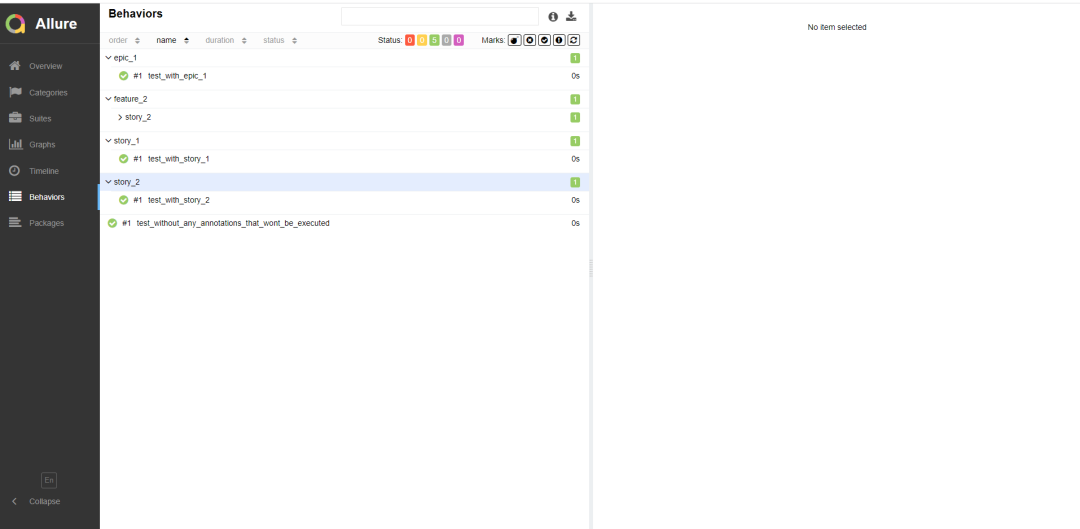
测试代码
#!/usr/bin/env python# -*- coding:utf-8 -*-# @Time : 2021/11/20 15:00# @Author : lion# @File : Test7.py# @Software: PyCharmimport osimport allureimport pytestdef test_without_any_annotations_that_wont_be_executed():pass@allure.story('epic_1')def test_with_epic_1():pass@allure.story('story_1')def test_with_story_1():pass@allure.story('story_2')def test_with_story_2():pass@allure.feature('feature_2')@allure.story('story_2')def test_with_story_2_and_feature_2():passif __name__ == '__main__':pytest.main(["-s", "-q", "-reruns=1", "./Test8.py", '--alluredir=./datas/test' ])os.system('allure generate --clean ./datas/test -o ./datas/html')os.system('allure open ./datas/html')
生成报告如下图:

知识点
story 是 feature 的子集,当测试用例有 @allure.feature、@allure.story 时,直销百晓生在报告上会先显示 feature,点开之后再显示 story【可以想象成,安徒生童话(feature)有很多个童话故事(story)】
如果不加 @allure.feature、@allure.story 时,在Behaviors栏目下,测试用例都不会分类显示,当用例多的时候可能看的花里胡哨
实例二
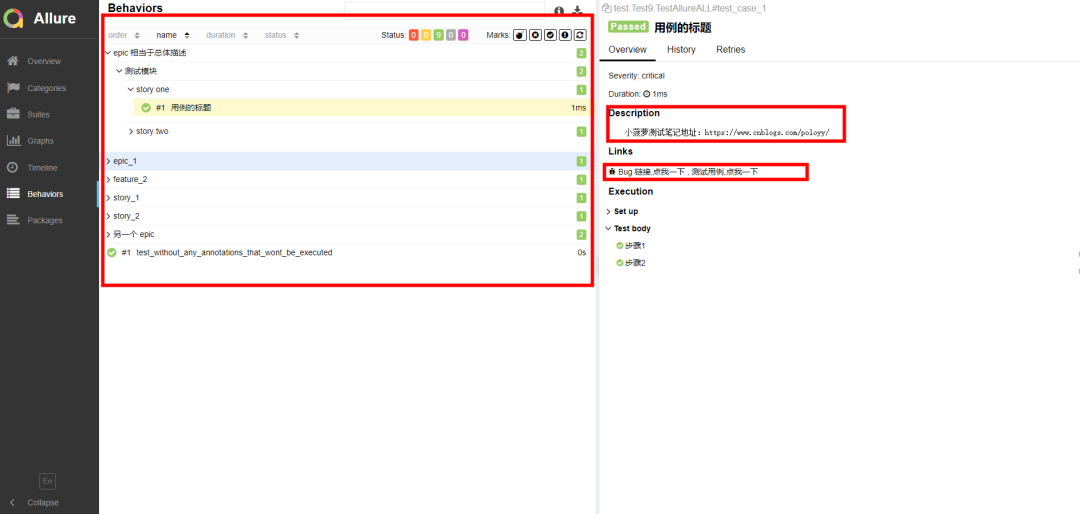
这里应用了包括前面所讲的全部装饰器(故事,特征,标题等)
测试代码
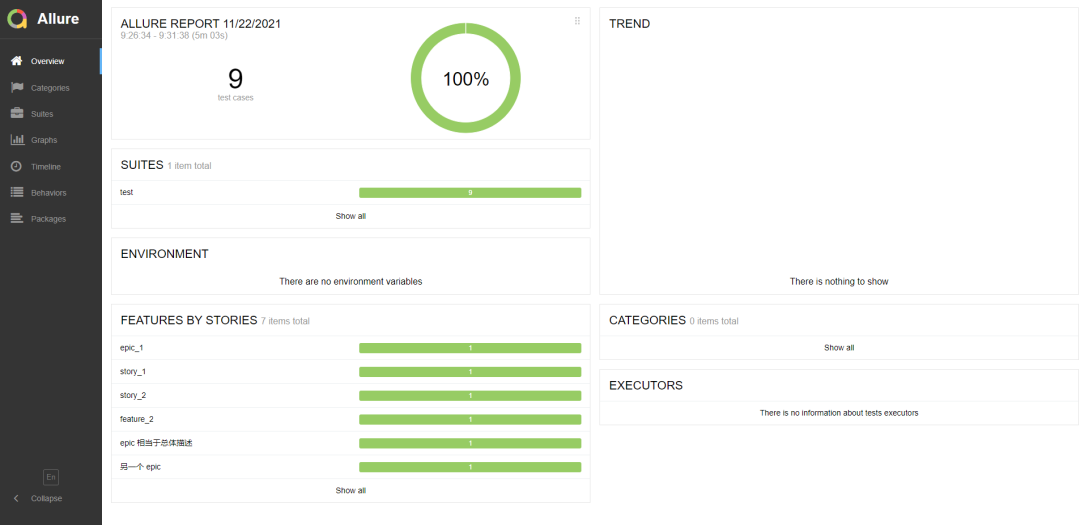
#!/usr/bin/env python# -*- coding:utf-8 -*-# @Time : 2021/11/20 15:00# @Author : lion# @File : Test9.py# @Software: PyCharmimport osimport allureimport pytestimport osimport allureimport pytest@pytest.fixture(scope="session")def login_fixture():print("=== 前置登录 ===")@allure.step("步骤1")def step_1():print("操作步骤---------------1")@allure.step("步骤2")def step_2():print("操作步骤---------------2")@allure.step("步骤3")def step_3():print("操作步骤---------------3")@allure.epic("epic 相当于总体描述")@allure.feature("测试模块")class TestAllureALL:@allure.testcase("https://www.cnblogs.com/poloyy/", '测试用例,点我一下')@allure.issue("https://www.cnblogs.com/poloyy/p/12219145.html", 'Bug 链接,点我一下')@allure.title("用例的标题")@allure.story("story one")@allure.severity("critical")def test_case_1(self, login_fixture):"""小菠萝测试笔记地址:https://www.cnblogs.com/poloyy/"""print("测试用例1")step_1()step_2()@allure.story("story two")def test_case_2(self, login_fixture):print("测试用例2")step_1()step_3()@allure.epic("另一个 epic")@allure.feature("查找模块")class TestAllureALL2:@allure.story("story three")def test_case_3(self, login_fixture):print("测试用例3")step_1()@allure.story("story four")def test_case_4(self, login_fixture):print("测试用例4")step_3()if __name__ == '__main__':pytest.main(["-s", "-q", "-reruns=1", "./Test9.py", '--alluredir=./datas/test' ])os.system('allure generate --clean ./datas/test -o ./datas/html')os.system('allure open ./datas/html')
运行报告如图:
上面介绍了allure常用装饰器,下面介绍命令行参数
命令行参数
pytest运行用例的时候可以加上allure标记用例的参数
--allure-severities=SEVERITIES_SETComma-separated list of severity names. Tests onlywith these severities will be run. Possible valuesare: blocker, critical, normal, minor, trivial.--allure-epics=EPICS_SETComma-separated list of epic names. Run tests thathave at least one of the specified feature labels.--allure-features=FEATURES_SETComma-separated list of feature names. Run tests thathave at least one of the specified feature labels.--allure-stories=STORIES_SETComma-separated list of story names. Run tests thathave at least one of the specified story labels.--allure-link-pattern=LINK_TYPE:LINK_PATTERNUrl pattern for link type. Allows short links in test,like 'issue-1'. Text will be formatted to full urlwith python str.format().
选择运行你要执行epic的用例
pytest --alluredir ./report/allure --allure-epics=epic对大Story的一个描述性标签选择运行你要执行features的用例
pytest --alluredir ./report/allure --allure-features=模块2选择运行你要执行features的用例
pytest --alluredir ./report/allure --allure-stories="用户故事:1"关于allure的使用基本上就是这些了
版权声明:本文为li49665原创文章,遵循CC 4.0 BY-SA版权协议,转载请附上原文出处链接和本声明。