方法
使用函数
SetConsoleTextAttribute()
样例程序
#include<iostream>
#include<windows.h>
using namespace std;


void SetColor(int fore=7,int back=0)
{
	unsigned char m_color = fore;
	m_color += (back << 4);
	SetConsoleTextAttribute(GetStdHandle(STD_OUTPUT_HANDLE), m_color);
	return;
}


int main() {
	SetColor();
	cout << "这是默认的颜色/This is default color config." << endl<<endl;

	cout << "字体颜色 foreColor: ";
	for (int i = 0; i < 16; ++i) {
		if (i == 0) { SetColor(0,7); cout << ' ' << 0 << ' '; continue; }

		SetColor(i,0);
		cout << ' ' << i << ' ';
	}

	SetColor(); cout << endl << "背景颜色 backColor: ";
	for (int i = 0; i < 16; ++i) {
		if (i == 0) { SetColor(7,0); cout << ' ' << 0 << ' '; continue; }

		SetColor(0,i);
		cout << ' ' << i << ' ';
	}
// 以上代码输出颜色表
	cout << endl << endl;

	int foreColor = 7, backColor = 0;
	SetColor();
	cout << "请输入字体颜色、背景颜色" << endl;
	cin >> foreColor >> backColor;

	cout << "foreColor=" << foreColor << ", backColor=" << backColor<<endl;

	SetColor(); system("pause");
	return 0;
}
执行结果
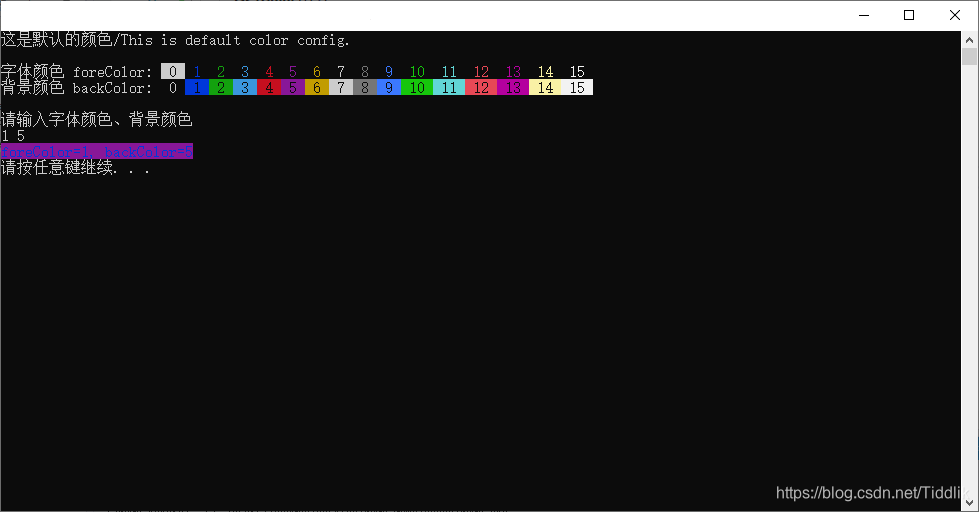
解释
函数SetConsoleTextAttribute()接收一个8位二进制数ABH来控制颜色。其中高四位A为背景色,低四位B为字体色,它们的值和颜色的对应关系为
| 16进制值 | 0 | 1 | 2 | 3 | 4 | 5 | 6 | 7 |
|---|---|---|---|---|---|---|---|---|
| 颜色 | 黑色 | 蓝色 | 绿色 | 浅蓝 | 红色 | 紫色 | 黄色 | 白色 |
| 16进制值 | 8 | 9 | A | B | C | D | E | F |
|---|---|---|---|---|---|---|---|---|
| 颜色 | 灰色 | 浅蓝 | 浅绿 | 淡绿 | 浅红 | 浅紫 | 浅黄 | 亮白 |
默认值为0000 0111B=07H,即黑底白字。
版权声明:本文为Tiddlik原创文章,遵循CC 4.0 BY-SA版权协议,转载请附上原文出处链接和本声明。