一、先了解一下envoy
Envoy是Lyft开源的一个C++实现的代理(Proxy),和Nginx及HAProxy类似,可代理L3/L4层和L7层。
代理是它最核心和基础的功能,它也是服务网格框架Istio的Sidecar。
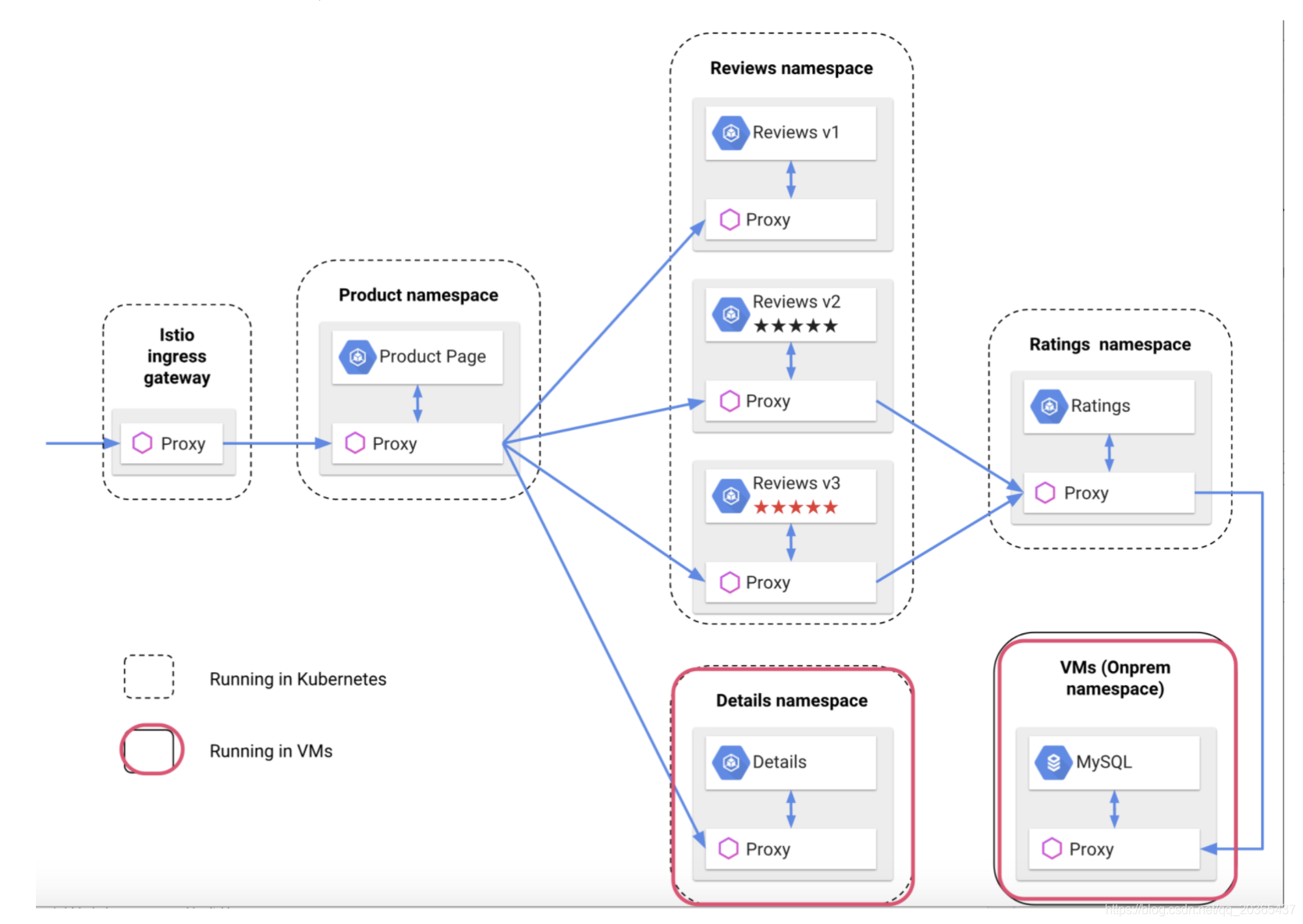
重点推荐文章:服务网格代理Envoy入门
二、envoy的静态配置和动态配置(运行时配置)
最好是跟着后面的试跑体验在本地跑一下,对与理解envoy的静态配置和动态配置(运行时配置)很有帮助。
(go build的二进制文件在容器里面跑不起来 报错: cannot execute binary file: Exec format error, 解决办法 env GOOS=linux GOARCH=amd64 go build eds.go)
envoy 混合配置(EDS动态配置)
admin:
  access_log_path: /tmp/admin_access.log
  address:
    socket_address:
      protocol: TCP
      address: 0.0.0.0 # 管理地址
      port_value: 8081 # 管理端口

static_resources:
  listeners: # 监听器数组
  - name: listener_0 # 监听器
    address:
      socket_address:
        protocol: TCP
        address: 0.0.0.0 # 监听地址
        port_value: 8080 # 监听端口
    filter_chains: # 过滤器链
    - filters: # 过滤器数组
      - name: envoy.http_connection_manager # 过滤器名
        typed_config:
          "@type": type.googleapis.com/envoy.config.filter.network.http_connection_manager.v2.HttpConnectionManager
          stat_prefix: ingress_http
          route_config: # 路由配置
            name: local_route # 路由配置名
            virtual_hosts: # 虚拟主机数组
            - name: local_service
              domains: ["*"] # 需代理的域名数组
              routes: # 定义路由
              - match:
                  prefix: "/" # 匹配规则
                route:
                  host_rewrite: www.baidu.com # 将HOST重写为
                  cluster: bd_service # 下游集群名,通过它找到下游集群的配置
          http_filters:
          - name: envoy.router

  clusters: # 下游集群数组
  - name: bd_service # 下游集群名
    connect_timeout: 0.25s # 连接下游的超时时长
    type: eds
    lb_policy: ROUND_ROBIN # 负载均衡策略
    eds_cluster_config:
      eds_config:
        api_config_source:
          api_type: rest
          refresh_delay: "10s" # 动态一定要有这个配置
          cluster_names: [xds_cluster] # 这里并不提供静态的endpoints,需访问EDS服务得到
    transport_socket:
      name: envoy.transport_sockets.tls
      typed_config:
        "@type": type.googleapis.com/envoy.api.v2.auth.UpstreamTlsContext
        sni: www.baidu.com
  - name: xds_cluster
    connect_timeout: 0.25s
    type: static
    lb_policy: ROUND_ROBIN
    load_assignment:
      cluster_name: xds_cluster
      endpoints:
      - lb_endpoints:
        - endpoint:
            address:
              socket_address:
                address: 127.0.0.1 # EDS的服务地址
port_value: 2020 # EDS的服务端口 |
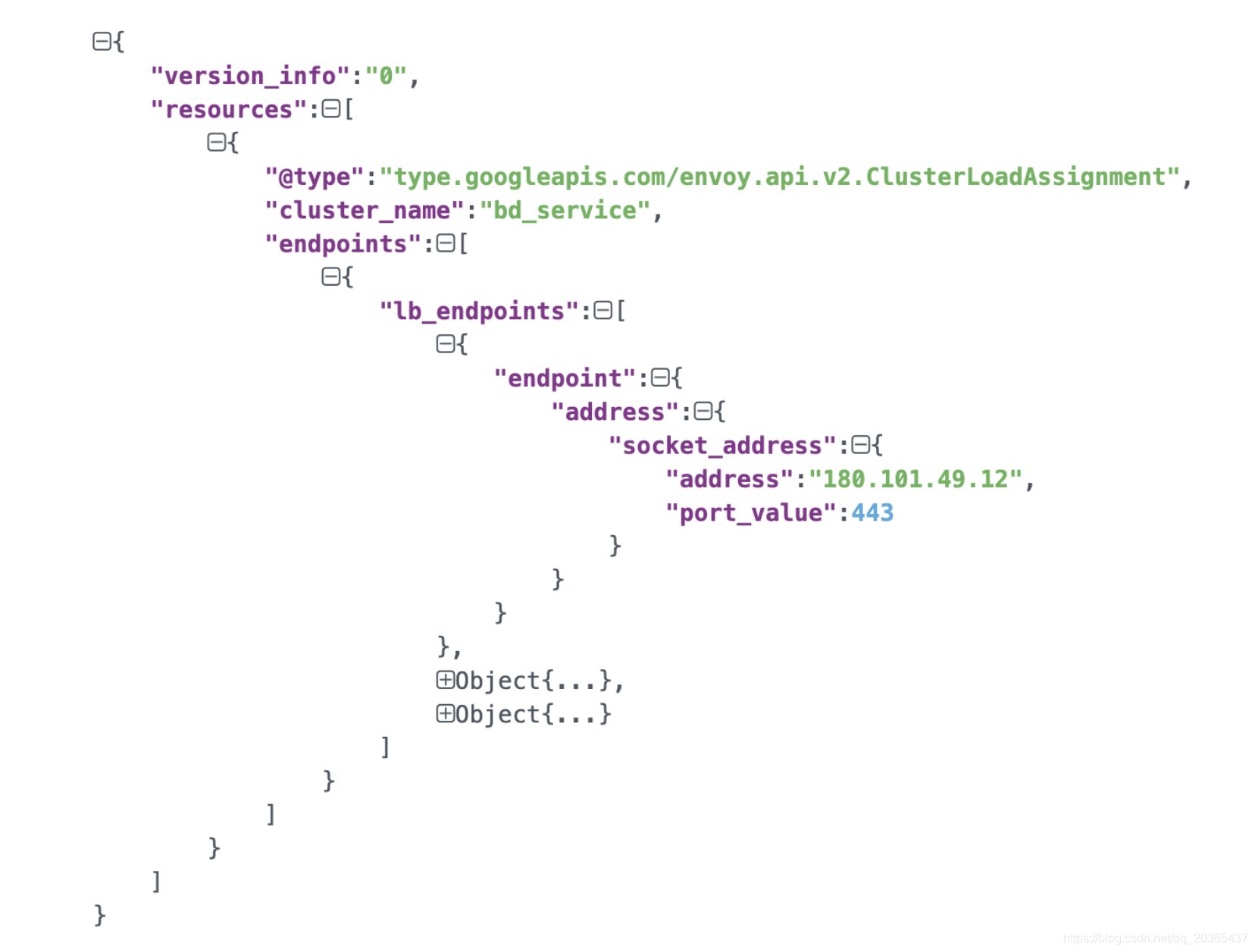
envoy访问127.0.0.1:2020获取EDS动态配置信息,上图为配置信息结构
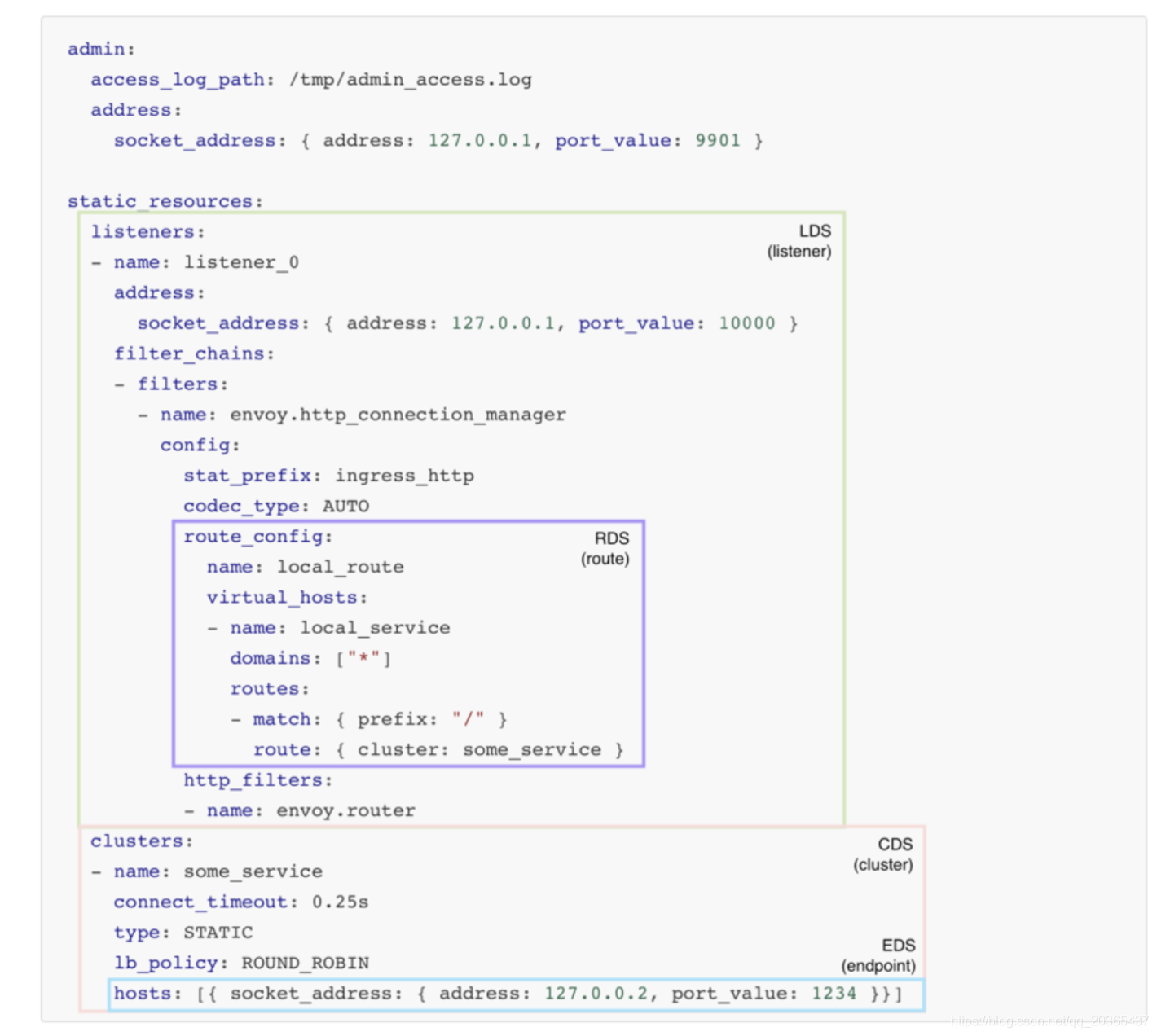
上图为动态配置静态配置的对应位置方便立即
参考资料:
- envoy实践 https://www.jianshu.com/p/90f9ee98ce70
- 官方文档 envoy的配置示例 https://www.envoyproxy.io/docs/envoy/latest/configuration/overview/examples
- 官方文档 envoy的配置中字段的说明 https://www.envoyproxy.io/docs/envoy/latest/api-v2/api
三、查看线上的配置环境
进入容器
kubectl exec -it api-v2-v13-d45f8544d-cfgpc -n sqkb-istio-qa -c istio-proxy -- /bin/bash
查看进程

或者直接查看
kubectl exec -it api-v2-v13-d45f8544d-cfgpc -n sqkb-istio-qa -c istio-proxy -- cat /etc/istio/proxy/envoy-rev0.json > /tmp/envoy.json
---
node:
  id: "sidecar~172.25.11.236~api-v2-v13-d45f8544d-cfgpc.sqkb-istio-qa~sqkb-istio-qa.svc.cluster.local"
  cluster: "api-v2.sqkb-istio-qa"
  locality:
  metadata:
    CLUSTER_ID: "Kubernetes"
    CONFIG_NAMESPACE: "sqkb-istio-qa"
    EXCHANGE_KEYS: "NAME,NAMESPACE,INSTANCE_IPS,LABELS,OWNER,PLATFORM_METADATA,WORKLOAD_NAME,CANONICAL_TELEMETRY_SERVICE,MESH_ID,SERVICE_ACCOUNT"
    INCLUDE_INBOUND_PORTS: "8312"
    INSTANCE_IPS: "172.25.11.236"
    INTERCEPTION_MODE: "REDIRECT"
    ISTIO_PROXY_SHA: "istio-proxy:f777dd13e28edc4ff394e98cd82c82ca4a2bcc71"
    ISTIO_VERSION: "1.4.6"
    LABELS:
      app: "api-v2"
      pod-template-hash: "d45f8544d"
      version: "v13"
    NAME: "api-v2-v13-d45f8544d-cfgpc"
    NAMESPACE: "sqkb-istio-qa"
    OWNER: "kubernetes://apis/apps/v1/namespaces/sqkb-istio-qa/deployments/api-v2-v13"
    POD_NAME: "api-v2-v13-d45f8544d-cfgpc"
    POD_PORTS: "[{"containerPort":8312,"protocol":"TCP"}]"
    SERVICE_ACCOUNT: "default"
    WORKLOAD_NAME: "api-v2-v13"
    app: "api-v2"
    pod-template-hash: "d45f8544d"
    version: "v13"
stats_config:
  use_all_default_tags: "false"
  stats_tags:
  - tag_name: "cluster_name"
    regex: "^cluster\.((.+?(\..+?\.svc\.cluster\.local)?)\.)"
  - tag_name: "tcp_prefix"
    regex: "^tcp\.((.*?)\.)\w+?$"
  - regex: "(response_code=\.=(.+?);\.;)|_rq(_(\.d{3}))$"
    tag_name: "response_code"
  - tag_name: "response_code_class"
    regex: "_rq(_(\dxx))$"
  - tag_name: "http_conn_manager_listener_prefix"
    regex: "^listener(?=\.).*?\.http\.(((?:[_.[:digit:]]*|[_\[\]aAbBcCdDeEfF[:digit:]]*))\.)"
  - tag_name: "http_conn_manager_prefix"
    regex: "^http\.(((?:[_.[:digit:]]*|[_\[\]aAbBcCdDeEfF[:digit:]]*))\.)"
  - tag_name: "listener_address"
    regex: "^listener\.(((?:[_.[:digit:]]*|[_\[\]aAbBcCdDeEfF[:digit:]]*))\.)"
  - tag_name: "mongo_prefix"
    regex: "^mongo\.(.+?)\.(collection|cmd|cx_|op_|delays_|decoding_)(.*?)$"
  - regex: "(reporter=\.=(.+?);\.;)"
    tag_name: "reporter"
  - regex: "(source_namespace=\.=(.+?);\.;)"
    tag_name: "source_namespace"
  - regex: "(source_workload=\.=(.+?);\.;)"
    tag_name: "source_workload"
  - regex: "(source_workload_namespace=\.=(.+?);\.;)"
    tag_name: "source_workload_namespace"
  - regex: "(source_principal=\.=(.+?);\.;)"
    tag_name: "source_principal"
  - regex: "(source_app=\.=(.+?);\.;)"
    tag_name: "source_app"
  - regex: "(source_version=\.=(.+?);\.;)"
    tag_name: "source_version"
  - regex: "(destination_namespace=\.=(.+?);\.;)"
    tag_name: "destination_namespace"
  - regex: "(destination_workload=\.=(.+?);\.;)"
    tag_name: "destination_workload"
  - regex: "(destination_workload_namespace=\.=(.+?);\.;)"
    tag_name: "destination_workload_namespace"
  - regex: "(destination_principal=\.=(.+?);\.;)"
    tag_name: "destination_principal"
  - regex: "(destination_app=\.=(.+?);\.;)"
    tag_name: "destination_app"
  - regex: "(destination_version=\.=(.+?);\.;)"
    tag_name: "destination_version"
  - regex: "(destination_service=\.=(.+?);\.;)"
    tag_name: "destination_service"
  - regex: "(destination_service_name=\.=(.+?);\.;)"
    tag_name: "destination_service_name"
  - regex: "(destination_service_namespace=\.=(.+?);\.;)"
    tag_name: "destination_service_namespace"
  - regex: "(request_protocol=\.=(.+?);\.;)"
    tag_name: "request_protocol"
  - regex: "(response_flags=\.=(.+?);\.;)"
    tag_name: "response_flags"
  - regex: "(connection_security_policy=\.=(.+?);\.;)"
    tag_name: "connection_security_policy"
  - regex: "(permissive_response_code=\.=(.+?);\.;)"
    tag_name: "permissive_response_code"
  - regex: "(permissive_response_policyid=\.=(.+?);\.;)"
    tag_name: "permissive_response_policyid"
  - regex: "(cache\.(.+?)\.)"
    tag_name: "cache"
  - regex: "(component\.(.+?)\.)"
    tag_name: "component"
  - regex: "(tag\.(.+?)\.)"
    tag_name: "tag"
  stats_matcher:
    inclusion_list:
      patterns:
      - prefix: "reporter="
      - prefix: "component"
      - prefix: "cluster_manager"
      - prefix: "listener_manager"
      - prefix: "http_mixer_filter"
      - prefix: "tcp_mixer_filter"
      - prefix: "server"
      - prefix: "cluster.xds-grpc"
      - suffix: "ssl_context_update_by_sds"
admin:
  access_log_path: "/dev/null"
  address:
    socket_address:
      address: "127.0.0.1"   #本地admin地址和端口
      port_value: "15000"
dynamic_resources:
  lds_config:
    ads:
  cds_config:
    ads:
  ads_config:
    api_type: "GRPC"
    grpc_services:
    -
      envoy_grpc:
        cluster_name: "xds-grpc"
static_resources:
  clusters:
  - name: "prometheus_stats"
    type: "STATIC"
    connect_timeout: "0.250s"
    lb_policy: "ROUND_ROBIN"
    hosts:
    -
      socket_address:
        protocol: "TCP"
        address: "127.0.0.1"
        port_value: "15000"
  - name: "xds-grpc"
    type: "STRICT_DNS"
    dns_refresh_rate: "300s"
    dns_lookup_family: "V4_ONLY"
    connect_timeout: "10s"
    lb_policy: "ROUND_ROBIN"
    hosts:
    -
      socket_address:
        address: "istio-pilot.istio-system"
        port_value: "15010"
    circuit_breakers:
      thresholds:
      - priority: "DEFAULT"
        max_connections: "100000"
        max_pending_requests: "100000"
        max_requests: "100000"
      - priority: "HIGH"
        max_connections: "100000"
        max_pending_requests: "100000"
        max_requests: "100000"
    upstream_connection_options:
      tcp_keepalive:
        keepalive_time: "300"
    http2_protocol_options:
  listeners:
  -
    address:
      socket_address:
        protocol: "TCP"
        address: "0.0.0.0"
        port_value: "15090"
    filter_chains:
    -
      filters:
      - name: "envoy.http_connection_manager"
        config:
          codec_type: "AUTO"
          stat_prefix: "stats"
          route_config:
            virtual_hosts:
            - name: "backend"
              domains:
              - "*"
              routes:
              -
                match:
                  prefix: "/stats/prometheus"
                route:
                  cluster: "prometheus_stats"
          http_filters:
name: "envoy.router" |
四、查看istio-proxy中的admin
进入容器
kubectl exec -it api-v2-v13-d45f8544d-cfgpc -n sqkb-istio-qa -c istio-proxy -- /bin/bash
访问admin
curl 127.0.0.1:15000/help
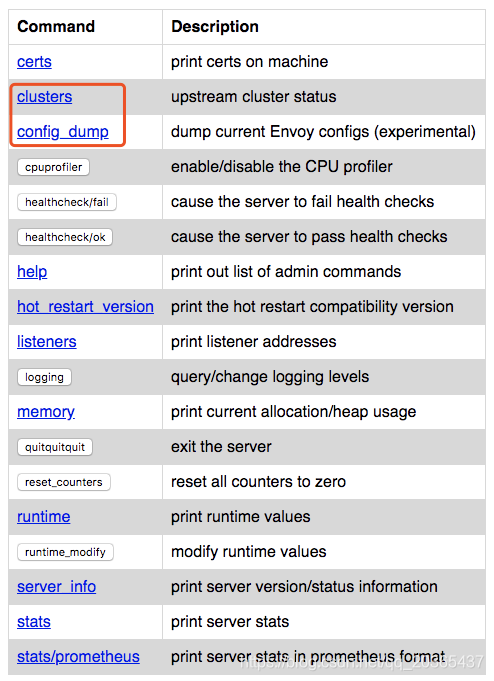
其中 /clusters 和 /config_dump 端点提供了大量有用的信息(例如, /clusters 端点中的所有动态配置的 Cluster 和 Endpoint,以及 /config_dump 端点中的所有其他当前状态的配置,稍后我会详细介绍)。
参考资料:官方文档关于admin的说明 https://www.envoyproxy.io/docs/envoy/latest/operations/admin
中文文档关于admin的说明(旧版本) https://www.envoyproxy.cn/operationsandadministration/administrationinterface
扩展 Envoy 的管理界面 https://www.codercto.com/a/34384.html
五、istio注入配置(在本地环境测试)
istio-proxy是在pod生成的时候注入的所以在deploy里面看不到,只有在pod yaml中看到
apiVersion: v1
kind: Pod
metadata:
  annotations:
    sidecar.istio.io/status: '{"version":"64f53c7f7e9dca50ddb9767390392872119f042c4a541dbbb6a973d5638bd264","initContainers":["istio-init"],"containers":["istio-proxy"],"volumes":["istio-envoy","podinfo","istiod-ca-cert"],"imagePullSecrets":null}'
  creationTimestamp: "2020-05-21T10:52:11Z"
  generateName: reviews-v1-5b5487467c-
  labels:
    app: reviews
    pod-template-hash: 5b5487467c
    security.istio.io/tlsMode: istio
    service.istio.io/canonical-name: reviews
    service.istio.io/canonical-revision: v1
    version: v1
    vsrsion-test: v1
  name: reviews-v1-5b5487467c-wx68h
  namespace: default
  ownerReferences:
  - apiVersion: apps/v1
    blockOwnerDeletion: true
    controller: true
    kind: ReplicaSet
    name: reviews-v1-5b5487467c
    uid: 71052348-8933-11ea-a225-080027a55461
  resourceVersion: "1325096"
  selfLink: /api/v1/namespaces/default/pods/reviews-v1-5b5487467c-wx68h
  uid: 1faf9643-9b51-11ea-a304-080027a55461
spec:
  containers:
  - env:
    - name: LOG_DIR
      value: /tmp/logs
    image: istio/examples-bookinfo-reviews-v1:1.15.0
    imagePullPolicy: IfNotPresent
    name: reviews
    ports:
    - containerPort: 9080
      protocol: TCP
    resources: {}
    terminationMessagePath: /dev/termination-log
    terminationMessagePolicy: File
    volumeMounts:
    - mountPath: /tmp
      name: tmp
    - mountPath: /opt/ibm/wlp/output
      name: wlp-output
    - mountPath: /var/run/secrets/kubernetes.io/serviceaccount
      name: bookinfo-reviews-token-spw2r
      readOnly: true
  - args:
    - proxy
    - sidecar
    - --domain
    - $(POD_NAMESPACE).svc.cluster.local
    - --configPath
    - /etc/istio/proxy
    - --binaryPath
    - /usr/local/bin/envoy
    - --serviceCluster
    - reviews.$(POD_NAMESPACE)
    - --drainDuration
    - 45s
    - --parentShutdownDuration
    - 1m0s
    - --discoveryAddress
    - istiod.istio-system.svc:15012
    - --zipkinAddress
    - zipkin.istio-system:9411
    - --proxyLogLevel=warning
    - --proxyComponentLogLevel=misc:error
    - --connectTimeout
    - 10s
    - --proxyAdminPort
    - "15000"
    - --concurrency
    - "2"
    - --controlPlaneAuthPolicy
    - NONE
    - --dnsRefreshRate
    - 300s
    - --statusPort
    - "15020"
    - --trust-domain=cluster.local
    - --controlPlaneBootstrap=false
    env:
    - name: JWT_POLICY
      value: first-party-jwt
    - name: PILOT_CERT_PROVIDER
      value: istiod
    - name: CA_ADDR
      value: istio-pilot.istio-system.svc:15012
    - name: POD_NAME
      valueFrom:
        fieldRef:
          apiVersion: v1
          fieldPath: metadata.name
    - name: POD_NAMESPACE
      valueFrom:
        fieldRef:
          apiVersion: v1
          fieldPath: metadata.namespace
    - name: INSTANCE_IP
      valueFrom:
        fieldRef:
          apiVersion: v1
          fieldPath: status.podIP
    - name: SERVICE_ACCOUNT
      valueFrom:
        fieldRef:
          apiVersion: v1
          fieldPath: spec.serviceAccountName
    - name: HOST_IP
      valueFrom:
        fieldRef:
          apiVersion: v1
          fieldPath: status.hostIP
    - name: ISTIO_META_POD_PORTS
      value: |-
        [
            {"containerPort":9080,"protocol":"TCP"}
        ]
    - name: ISTIO_META_CLUSTER_ID
      value: Kubernetes
    - name: ISTIO_META_POD_NAME
      valueFrom:
        fieldRef:
          apiVersion: v1
          fieldPath: metadata.name
    - name: ISTIO_META_CONFIG_NAMESPACE
      valueFrom:
        fieldRef:
          apiVersion: v1
          fieldPath: metadata.namespace
    - name: ISTIO_META_INTERCEPTION_MODE
      value: REDIRECT
    - name: ISTIO_META_WORKLOAD_NAME
      value: reviews-v1
    - name: ISTIO_META_OWNER
      value: kubernetes://apis/apps/v1/namespaces/default/deployments/reviews-v1
    - name: ISTIO_META_MESH_ID
      value: cluster.local
    image: docker.io/istio/proxyv2:1.5.1
    imagePullPolicy: IfNotPresent
    name: istio-proxy
    ports:
    - containerPort: 15090
      name: http-envoy-prom
      protocol: TCP
    readinessProbe:
      failureThreshold: 30
      httpGet:
        path: /healthz/ready
        port: 15020
        scheme: HTTP
      initialDelaySeconds: 1
      periodSeconds: 2
      successThreshold: 1
      timeoutSeconds: 1
    resources:
      limits:
        cpu: "2"
        memory: 1Gi
      requests:
        cpu: 100m
        memory: 128Mi
    securityContext:                         #————————————————————————————————————————————————————————————————————————————
      allowPrivilegeEscalation: false
      capabilities:
        drop:
        - ALL
      privileged: false							    中间部分需要修改configmap才能以root的身份进入容器,修改过程在下文
      procMount: Default
      readOnlyRootFilesystem: true
      runAsGroup: 1337
      runAsNonRoot: true
      runAsUser: 1337						#————————————————————————————————————————————————————————————————————————————
    terminationMessagePath: /dev/termination-log
    terminationMessagePolicy: File
    volumeMounts:
    - mountPath: /var/run/secrets/istio
      name: istiod-ca-cert
    - mountPath: /etc/istio/proxy
      name: istio-envoy
    - mountPath: /etc/istio/pod
      name: podinfo
    - mountPath: /var/run/secrets/kubernetes.io/serviceaccount
      name: bookinfo-reviews-token-spw2r
      readOnly: true
  dnsPolicy: ClusterFirst
  enableServiceLinks: true
  initContainers:
  - command:
    - istio-iptables
    - -p
    - "15001"
    - -z
    - "15006"
    - -u
    - "1337"
    - -m
    - REDIRECT
    - -i
    - '*'
    - -x
    - ""
    - -b
    - '*'
    - -d
    - 15090,15020
    image: docker.io/istio/proxyv2:1.5.1
    imagePullPolicy: IfNotPresent
    name: istio-init
    resources:
      limits:
        cpu: 100m
        memory: 50Mi
      requests:
        cpu: 10m
        memory: 10Mi
    securityContext:
      allowPrivilegeEscalation: false
      capabilities:
        add:
        - NET_ADMIN
        - NET_RAW
        drop:
        - ALL
      privileged: false
      procMount: Default
      readOnlyRootFilesystem: false
      runAsGroup: 0
      runAsNonRoot: false
      runAsUser: 0
    terminationMessagePath: /dev/termination-log
    terminationMessagePolicy: File
  nodeName: minikube
  priority: 0
  restartPolicy: Always
  schedulerName: default-scheduler
  securityContext:
    fsGroup: 1337
  serviceAccount: bookinfo-reviews
  serviceAccountName: bookinfo-reviews
  terminationGracePeriodSeconds: 30
  tolerations:
  - effect: NoExecute
    key: node.kubernetes.io/not-ready
    operator: Exists
    tolerationSeconds: 300
  - effect: NoExecute
    key: node.kubernetes.io/unreachable
    operator: Exists
    tolerationSeconds: 300
  volumes:
  - emptyDir: {}
    name: wlp-output
  - emptyDir: {}
    name: tmp
  - name: bookinfo-reviews-token-spw2r
    secret:
      defaultMode: 420
      secretName: bookinfo-reviews-token-spw2r
  - emptyDir:
      medium: Memory
    name: istio-envoy
  - downwardAPI:
      defaultMode: 420
      items:
      - fieldRef:
          apiVersion: v1
          fieldPath: metadata.labels
        path: labels
      - fieldRef:
          apiVersion: v1
          fieldPath: metadata.annotations
        path: annotations
    name: podinfo
  - configMap:
      defaultMode: 420
      name: istio-ca-root-cert
name: istiod-ca-cert |
上文中的pod注入的sidecar需要很多配置信息 这些配置信息存放在 configmap中
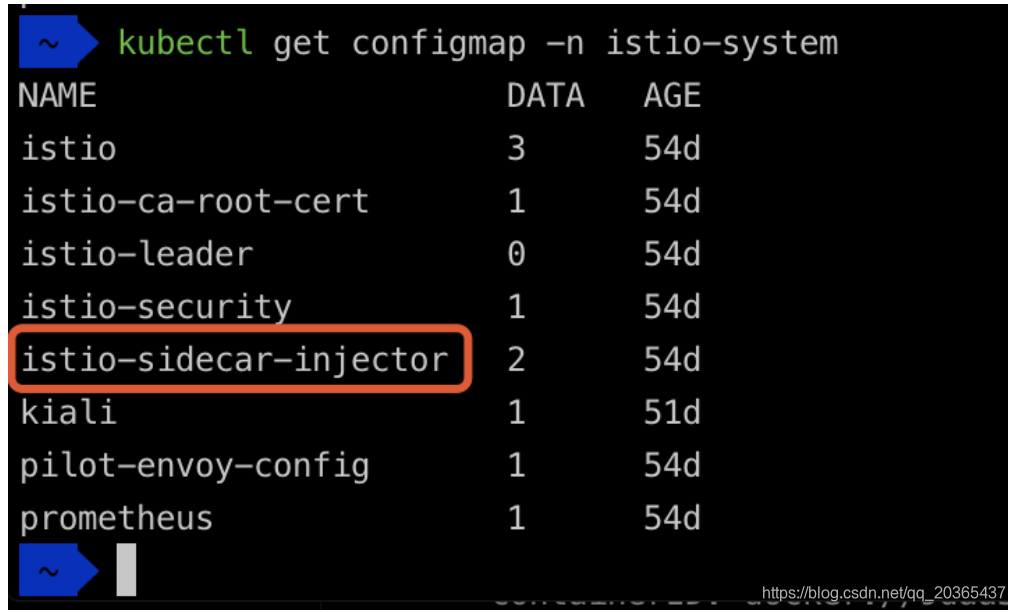
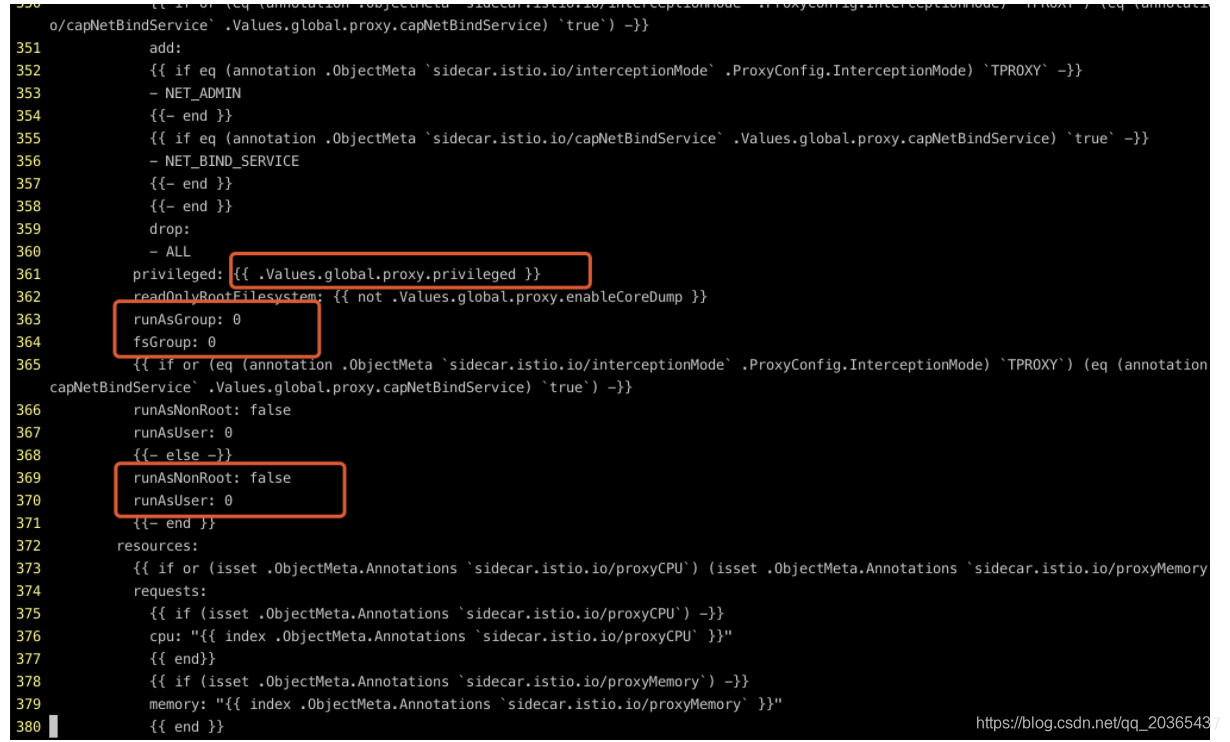
修改上面三处之后就可以用root身份登录了
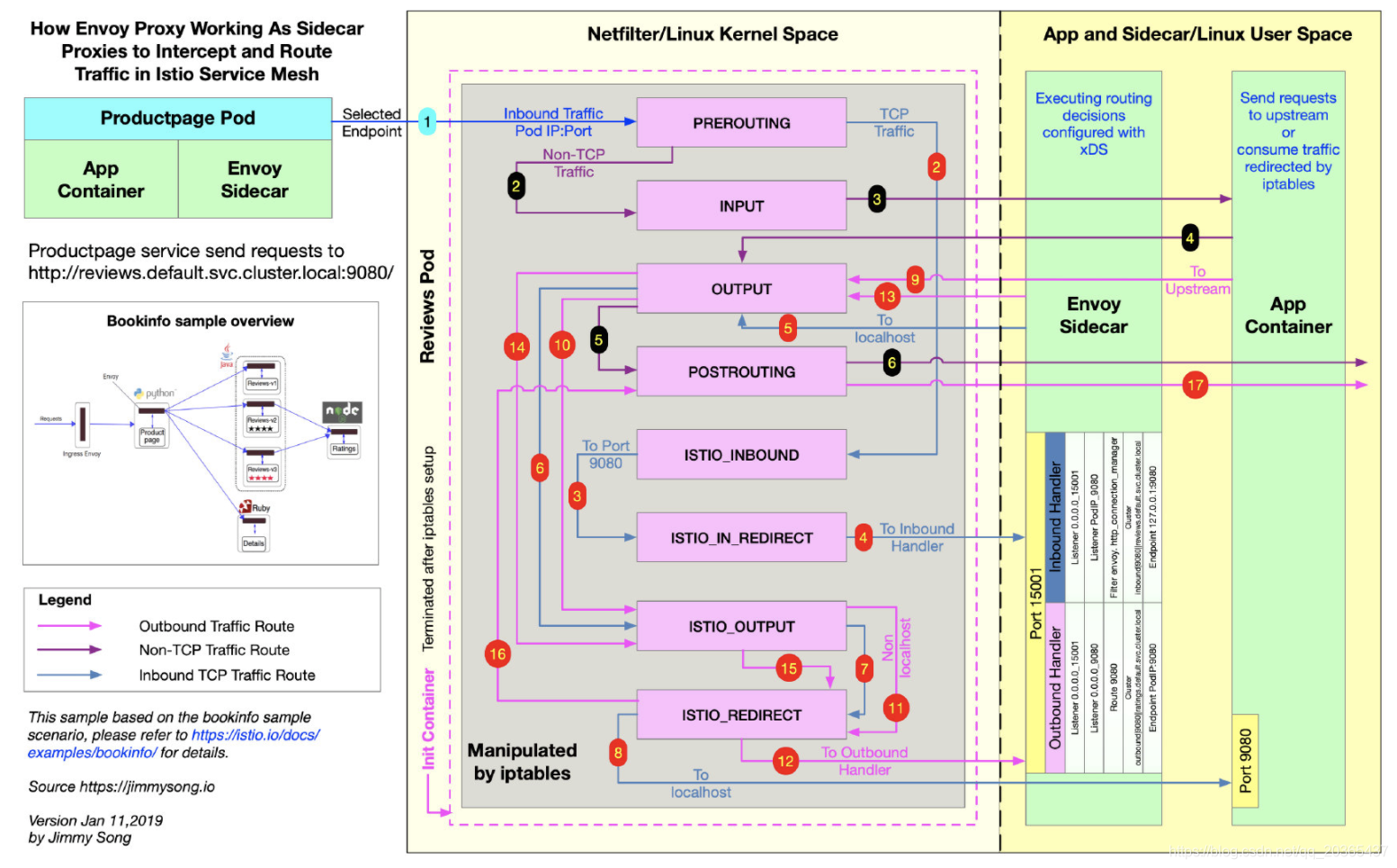
Envoy被部署在istio-proxy容器中。以Sidecar 的模式和应用容器部署在同一个pod中,在pod内通过iptables转发流量。
如果不是root身份就看不到 iptables

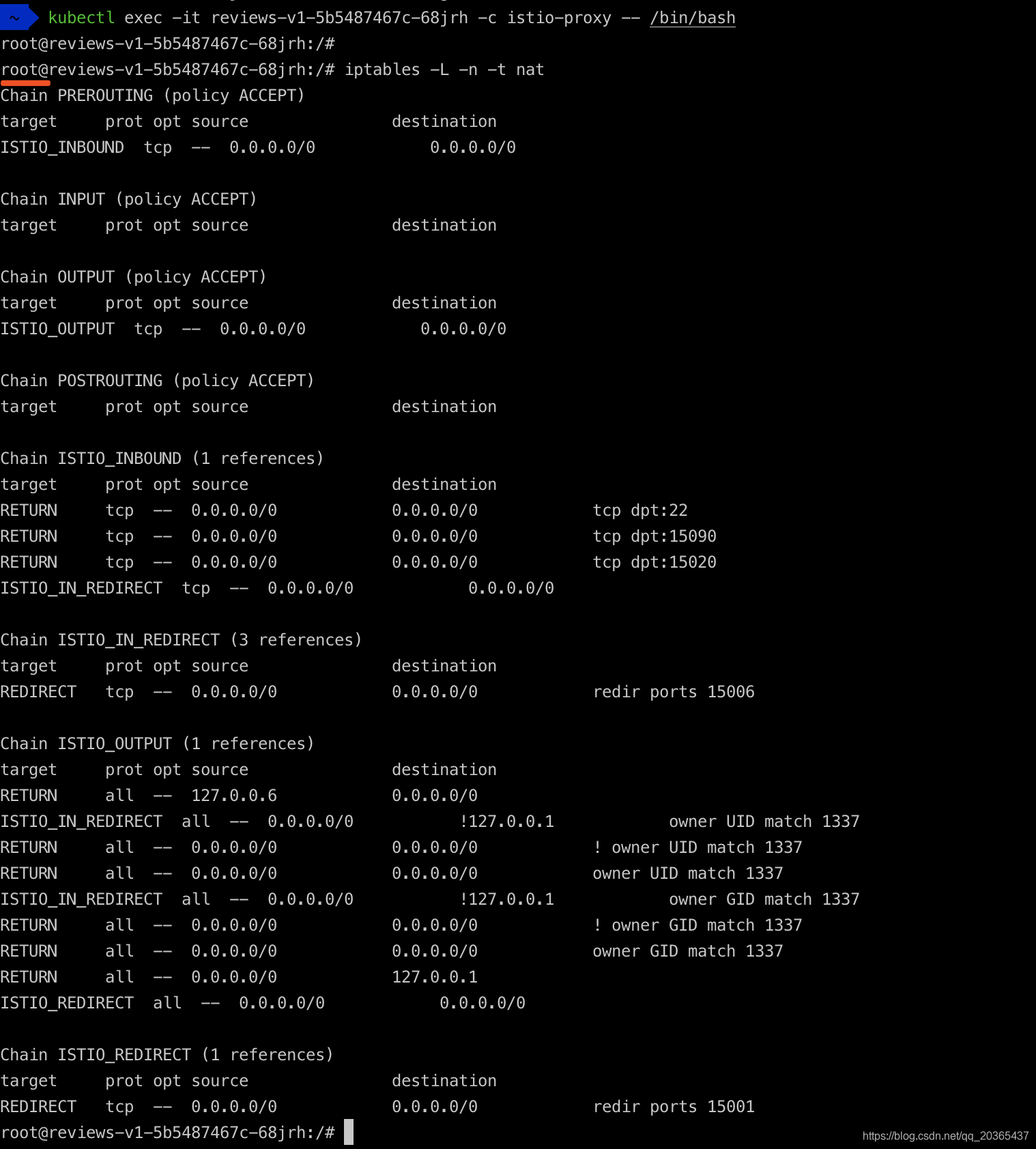
接下来是安装yum的流程作为个人记录不是重点分享
查看系统 lsb_release -a
CentOS 安装软件 rpm
Ubuntu 安装软件 apt-get
问题:
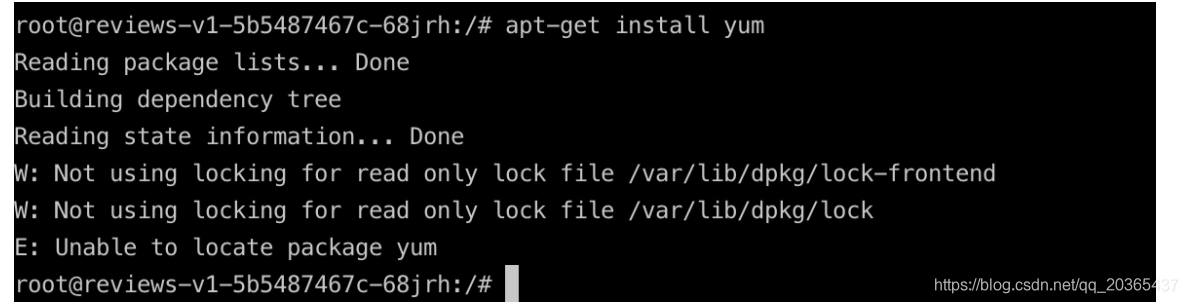
解决方案:
root@reviews-v1-5b5487467c-68jrh:/# cd /var/lib/dpkg/
root@reviews-v1-5b5487467c-68jrh:/var/lib/dpkg# mount -o remount rw /
问题:

解决方案:
sudo apt-get update
问题:
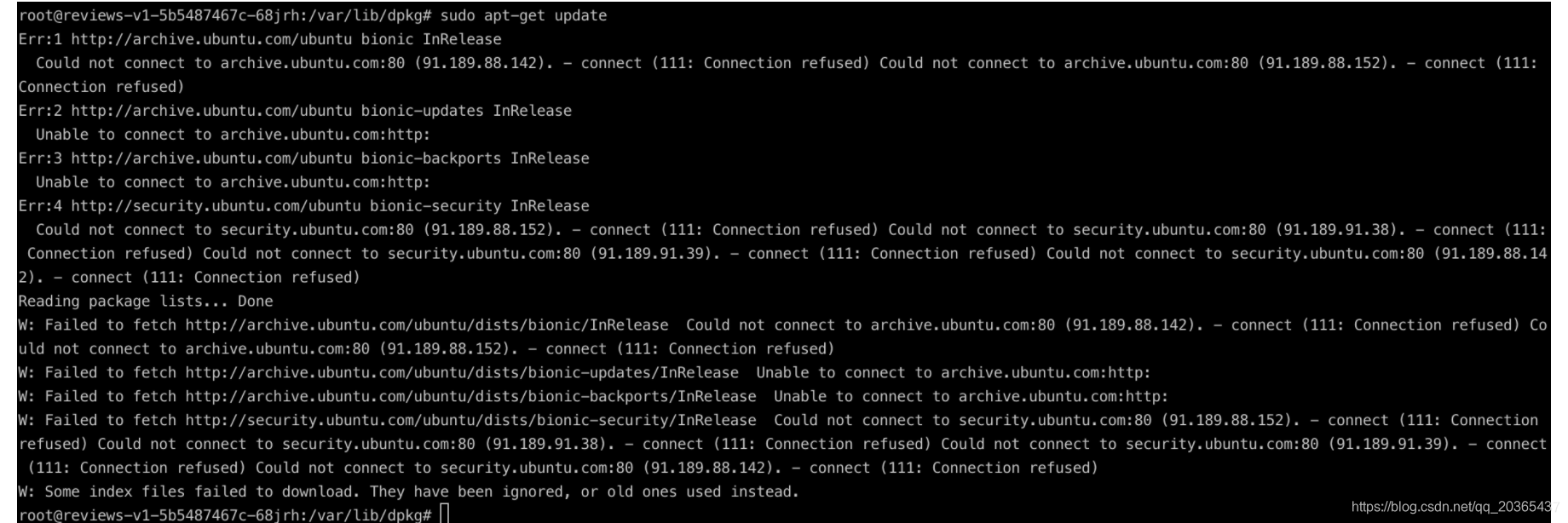
解决方案:
更新源+删除iptables 中的限制
echo "deb http://mirrors.aliyun.com/ubuntu/ bionic main restricted universe multiverse" > sources.list (我找的源有点问题好像不是最新的 又改回去了 但是下载比较慢)
iptables -t nat -D ISTIO_REDIRECT 1
最后安装apt-get install yum ,之后可以用tcpdump实时监控查看

参考资料:
- kubernetes高级之pod安全策略 https://www.cnblogs.com/tylerzhou/p/11078128.html
- 如何清理掉iptables的NAT的POSTROUTING规则 http://www.openskill.cn/question/365
- Linux基础:用tcpdump抓包
六、其他参考资料:
envoy实践 https://www.jianshu.com/p/90f9ee98ce70
浅谈Service Mesh体系中的Envoy https://yq.aliyun.com/articles/606655
理解 Istio Service Mesh 中 Envoy Sidecar 代理的路由转发 https://jimmysong.io/blog/envoy-sidecar-routing-of-istio-service-mesh-deep-dive/
Envoy 官方文档中文版 https://www.servicemesher.com/envoy/