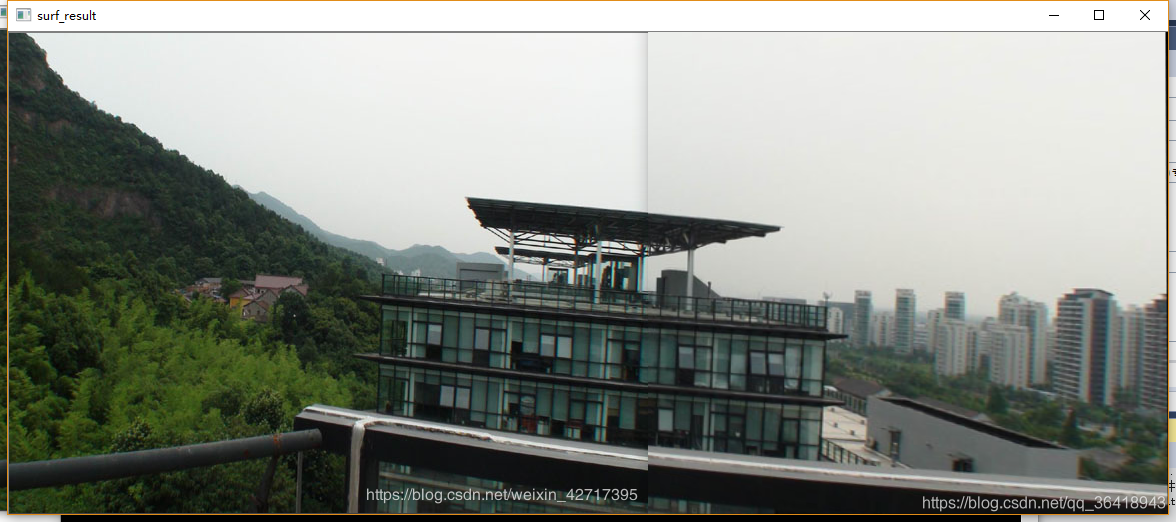
对于具有重复区域的两张至多张图像的拼接过程主要分为四步:
1、对源图像特征点提取;
2、对不同图像进行特征点匹配;
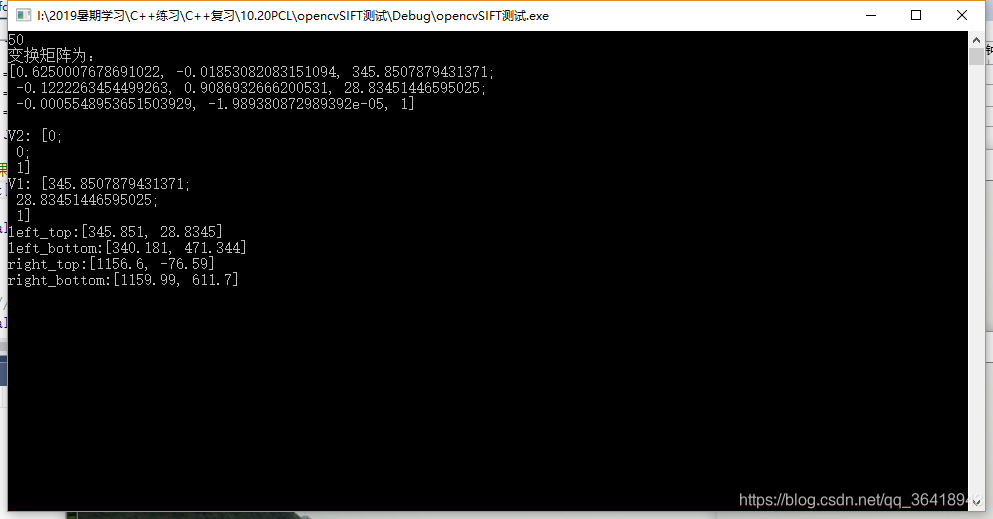
3、图像配准;配准也就两张图片,一幅图片相对于另一幅图片的外参,也就是单应矩阵
4、图像拼接;拼接也就是配准后的相加
4、合成边界融合处理;
#include <opencv2/opencv.hpp>
#include <opencv2/xfeatures2d.hpp>
#include <iostream>
#include <math.h>

using namespace cv;
using namespace std;
using namespace cv::xfeatures2d;

int main(int argc, char** argv)
{
	//1、载入两张图片
	Mat img1 = imread("1.jpg", IMREAD_GRAYSCALE);
	Mat img2 = imread("2.jpg", IMREAD_GRAYSCALE);
	if (!img1.data || !img2.data) {
		return -1;
	}
	imshow("object image", img1);
	imshow("object in scene", img2);

	//2、使用SURF算子检测关键点和特征描述子
	int minHessian = 400;
	Ptr<SURF> detector = SURF::create(minHessian);
	vector<KeyPoint> keypoints_obj;
	vector<KeyPoint> keypoints_scene;
	Mat descriptor_obj, descriptor_scene;
	detector->detectAndCompute(img1, Mat(), keypoints_obj, descriptor_obj);
	detector->detectAndCompute(img2, Mat(), keypoints_scene, descriptor_scene);

	//3、使用FLANN匹配算子进行匹配
	FlannBasedMatcher matcher;
	vector<DMatch> matches;
	matcher.match(descriptor_obj, descriptor_scene, matches);

	//4、计算出关键点之间距离的最大值和最小值
	double minDist = 1000;
	double maxDist = 0;
	for (int i = 0; i < descriptor_obj.rows; i++) {
		double dist = matches[i].distance;
		if (dist > maxDist) {
			maxDist = dist;
		}
		if (dist < minDist) {
			minDist = dist;
		}
	}
	printf("max distance : %f\n", maxDist);
	printf("min distance : %f\n", minDist);

	//5、存下匹配距离小于3 * minDist的点对
	vector<DMatch> goodMatches;
	for (int i = 0; i < descriptor_obj.rows; i++) {
		double dist = matches[i].distance;
		if (dist < max(3 * minDist, 0.02)) {
			goodMatches.push_back(matches[i]);
		}
	}

	//6、绘制出匹配到的关键点
	Mat matchesImg;
	drawMatches(img1, keypoints_obj, img2, keypoints_scene, goodMatches, matchesImg, Scalar::all(-1),
		Scalar::all(-1), vector<char>(), DrawMatchesFlags::NOT_DRAW_SINGLE_POINTS
	);

	//定义两个局部变量,从匹配成功的匹配对中获取关键点
	vector<Point2f> obj;
	vector<Point2f> objInScene;
	for (size_t t = 0; t < goodMatches.size(); t++) {
		obj.push_back(keypoints_obj[goodMatches[t].queryIdx].pt);
		objInScene.push_back(keypoints_scene[goodMatches[t].trainIdx].pt);
	}

	//计算单应矩阵
	Mat H = findHomography(obj, objInScene, RANSAC);

	vector<Point2f> obj_corners(4);
	vector<Point2f> scene_corners(4);
	obj_corners[0] = Point(0, 0);
	obj_corners[1] = Point(img1.cols, 0);
	obj_corners[2] = Point(img1.cols, img1.rows);
	obj_corners[3] = Point(0, img1.rows);


	//透视变换就是  H乘上每一个点的齐次坐标
	perspectiveTransform(obj_corners, scene_corners, H);

	/*Mat image1;
	warpPerspective(img1, image1, H, Size(MAX(scene_corners[2].x, scene_corners[3].x), MAX(scene_corners[1].y, scene_corners[3].y)));
	imshow("直接经过透视矩阵变换", image1);*/

	//将透视变换后的坐标画出来
	line(matchesImg, scene_corners[0] + Point2f(img1.cols, 0), scene_corners[1] + Point2f(img1.cols, 0), Scalar(0, 0, 255), 2, 8, 0);
	line(matchesImg, scene_corners[1] + Point2f(img1.cols, 0), scene_corners[2] + Point2f(img1.cols, 0), Scalar(0, 0, 255), 2, 8, 0);
	line(matchesImg, scene_corners[2] + Point2f(img1.cols, 0), scene_corners[3] + Point2f(img1.cols, 0), Scalar(0, 0, 255), 2, 8, 0);
	line(matchesImg, scene_corners[3] + Point2f(img1.cols, 0), scene_corners[0] + Point2f(img1.cols, 0), Scalar(0, 0, 255), 2, 8, 0);

	Mat dst;
	cvtColor(img2, dst, COLOR_GRAY2BGR);
	line(dst, scene_corners[0], scene_corners[1], Scalar(0, 0, 255), 2, 8, 0);
	line(dst, scene_corners[1], scene_corners[2], Scalar(0, 0, 255), 2, 8, 0);
	line(dst, scene_corners[2], scene_corners[3], Scalar(0, 0, 255), 2, 8, 0);
	line(dst, scene_corners[3], scene_corners[0], Scalar(0, 0, 255), 2, 8, 0);

	imshow("find known object demo", matchesImg);
	imshow("Draw object", dst);

	waitKey(0);
	return 0;
}



版权声明:本文为qq_36418943原创文章,遵循CC 4.0 BY-SA版权协议,转载请附上原文出处链接和本声明。