开发工具与关键技术:Visual Studio 2017
作者:邓崇富
撰写时间:2019年 8 月 17 日
~~~~~~~~~~~~~~~~~~~~~~~~~~~~~~~~~~~~~~~~~~~~~~~~~~~~~~~~~~~~~~~~~~~~~~~~~~~~~~~~~~~~~~
在一些的数据报表中经常用到的就是时间短的查询来筛选所需要的数据,在斯
筛选数据时有两种方法,一种是在后台用Linq语句来赛选数据,另外一种就是在数据库的存储过中写,当然如果要考虑到查询数据的性能方面的话,就用数据库的存储过程比较好。
下面是在后台用Linq语句来赛选数据的详细代码:
string startdatestr = startdate.ToString("yyyy-MM-dd") + " 00:00:00";
string enddatestr = enddate.ToString("yyyy-MM-dd") + " 23:59:59";
string sql = string.Format(" BETWEEN '{0}' AND '{1}' ", startdate, enddate);
因为 datetimepicker控件的时分秒是当前时间的,所以你要重设时分秒,用最大的可能,这样就不会少数据了;
只要年月的话同理把“日”加上,startdate用1日,enddate...(28,29,30,31)都有可能
下面是数据库存储过程时间段查询的详细代码:
--查询船名/船次信息
IF(@Type='SelectShip')
BEGIN
SELECT
RTRIM(PW_ShipsName.ShipsNameID) as ShipsNameID,--船名ID
RTRIM(PW_ShipsName.ShipsName) as ShipsName,--船名名称
RTRIM(PW_ShipsName.Voyage) as Voyage,--船次
RTRIM(PW_ShipDate.SailingDate) as SailingDate--开船日期
FROM PW_ShipsName
left join PW_ShipDate on PW_ShipsName.ShipsNameID = PW_ShipDate.ShipsNameID
where PW_ShipDate.SailingDate between @StartDate and @StopDate
END
在存储过程里首先必须声明项目里面传来的两个数据值(@StartDate,@StopDate)这两个值的默认值为空,然后在存储过程语句中的FROM后面=添加一条Where条件语句(where PW_ShipDate.SailingDate between @StartDate and @StopDate)SailingDate是数据表里的日期列名;between……and语句是包括首尾的两个日期的,如果需要不包括首尾两个日期,可以这样写:where PW_ShipDate.SailingDate > @StartDate and PW_ShipDate.SailingDate < @StopDate
下面是页面的代码:
<TextBlockHorizontalAlignment="Left"Margin="331,4,0,0"Text="开船日期:" VerticalAlignment="Top"Height="20" Width="62"FontSize="14"Foreground="Gray"/>
<DatePicker x:Name="StartShipDate" HorizontalAlignment="Left"Height="24" Margin="398,2,0,0"VerticalAlignment="Top"Width="115"/>
<TextBlockHorizontalAlignment="Left"Margin="518,6,0,0"Text="~"VerticalAlignment="Top"Height="20" Width="22"FontSize="14"Foreground="Gray"/>
<DatePickerx:Name="StopShipDate" HorizontalAlignment="Left"Height="24"Margin="545,4,0,0"VerticalAlignment="Top"Width="109"/>
页面效果如下图:
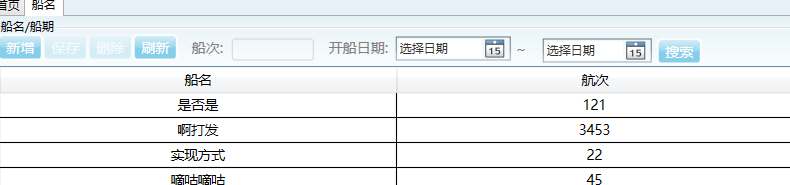
下面是页面后台的代码:
/// <summary>
/// 搜索按钮事件
/// </summary>
/// <param name="sender"></param>
/// <param name="e"></param>
private voidbtn_SelectShip(objectsender, System.Windows.RoutedEventArgs e)
{
DateTime StartDate = Convert.ToDateTime(StartShipDate.Text.ToString());
DateTime StopDate = Convert.ToDateTime(StopShipDate.Text.ToString());
//获取全部数据
DataTable dtselect = myClient.UC_SelectShip(StartDate, StopDate).Tables[0];
//绑定表格数据
dgData.ItemsSource = dtselect.DefaultView;
}
下面是服务层的代码:
//(操作契约)查询船名/船次信息数据
[OperationContract]
publicDataSet UC_SelectShip(DateTime StartDate, DateTime StopDate)
{
//1.0实例化对象数组(序列化参数)
SqlParameter[] mySqlParameters = {
//定义传递参数,以及传递参数的类型
newSqlParameter("@type",SqlDbType.NChar),
newSqlParameter("@StartDate",SqlDbType.DateTime),
newSqlParameter("@StopDate",SqlDbType.DateTime),
};
mySqlParameters[0].Value ="SelectShip";//获取执行的存储过程名称
mySqlParameters[1].Value = StartDate;
mySqlParameters[2].Value = StopDate;
DataSet ds = myDALMethod.QueryDataSet("SelectBasicData", mySqlParameters);
//返回值
returnds;
}