el-table属性cell-style
<el-table
      v-loading="loading"
      :data="List"
      @selection-change="handleSelectionChange"
      height="600"
      max-height="600"
      :cell-style="cellStyle"
    >
 <el-table-column label="颜色" align="center" key="color" prop="color" />
 </el-table>
在methods中定义方法cellStyle
这里的List是数据源
通过label判断当前单元格
通过rowIndex来获取List中的颜色并设置颜色
cellStyle({ row, column, rowIndex, columnIndex }) {
      if (column.label == "颜色") {
        return `background-color:${this.List[rowIndex].color};color:#fff`;
      }
    }
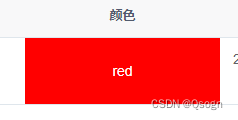
效果
总结:console.log('总结')
版权声明:本文为m0_66877959原创文章,遵循CC 4.0 BY-SA版权协议,转载请附上原文出处链接和本声明。