共享模型之工具
1 线程池
1. 自定义线程池
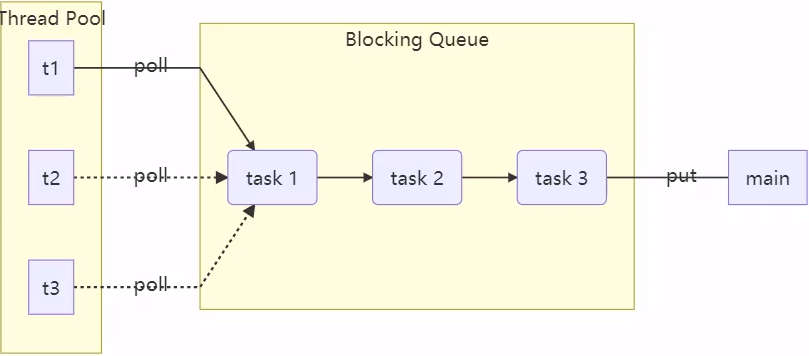
步骤1:自定义拒绝策略接口
@FunctionalInterface // 拒绝策略
interface RejectPolicy<T>{
    void reject(BlockingQueue<T> queue,T task);
}
步骤2:自定义任务队列
class BlockingQueue<T> {
    // 1. 任务队列
    private Deque<T> queue = new ArrayDeque<>();
    // 2. 锁
    private ReentrantLock lock = new ReentrantLock();
    // 3. 生产者条件变量
    private Condition fullWaitSet = lock.newCondition();
    // 4. 消费者条件变量
    private Condition emptyWaitSet = lock.newCondition();
    // 5. 容量
    private int capacity;

    public BlockingQueue(int capacity) {
        this.capacity = capacity;
    }

    // 阻塞获取
    public T take() {
        lock.lock();
        try {
            while (queue.isEmpty()) {
                try {
                    emptyWaitSet.await();
                } catch (InterruptedException e) {
                    e.printStackTrace();
                }
            }
            T result = queue.removeFirst();
            fullWaitSet.signal();
            return result;
        } finally {
            lock.unlock();
        }
    }

    // 带超时的阻塞获取
    public T take(long timeout, TimeUnit unit) {
        lock.lock();
        try {
            //将超时时间统一转换为纳秒
            long nanos = unit.toNanos(timeout);
            while (queue.isEmpty()) {
                try {
                    // 返回的是剩余的等待时间
                    // 例如:原来是 1 秒 等待了 0.3 秒 返回值就是 0.7 秒
                    if (nanos <= 0) {
                        return null;
                    }
                    nanos = emptyWaitSet.awaitNanos(nanos);
                } catch (InterruptedException e) {
                    e.printStackTrace();
                }
            }
            T result = queue.removeFirst();
            fullWaitSet.signal();
            return result;
        } finally {
            lock.unlock();
        }

    }

    // 阻塞添加
    public void put(T task) {
        lock.lock();
        try {
            while (queue.size() == capacity) {
                log.debug("等待加入任务队列{}...", task);
                fullWaitSet.await();
            }
            log.debug("加入任务队列{}", task);
            queue.addLast(task);
            emptyWaitSet.signal();
        } catch (InterruptedException e) {
            e.printStackTrace();
        } finally {
            lock.unlock();
        }
    }

    // 带超时时间阻塞添加
    public boolean put(T task,long timeout,TimeUnit timeUnit) {
        lock.lock();
        try {
            long nanos = timeUnit.toNanos(timeout);
            while (queue.size() == capacity) {
                try {
                    log.debug("等待加入任务队列{}...", task);
                    if(nanos <= 0) {
                        return false;
                    }
                    nanos = fullWaitSet.awaitNanos(nanos);
                } catch (InterruptedException e) {
                    e.printStackTrace();
                }
            }
            log.debug("加入任务队列{}", task);
            queue.addLast(task);
            emptyWaitSet.signal();
            return true;
        } finally {
            lock.unlock();
        }
    }
    // 获取大小
    public int size() {
        lock.lock();
        try {
            return queue.size();
        } finally {
            lock.unlock();
        }
    }

    public void tryPut(RejectPolicy<T> rejectPolicy, T task) {
        lock.lock();
        try{
            //判读队列是否已满
            if(queue.size() >= capacity){
                rejectPolicy.reject(this,task);
            }else { // 有空闲
                log.debug("加入任务队列{}", task);
                queue.addLast(task);
                emptyWaitSet.signal();
            }
        }finally {
            lock.unlock();
        }
    }
}
步骤3:自定义线程池
class ThreadPool {
    // 任务队列
    private BlockingQueue<Runnable> taskQueue;
    // 线程集合
    private HashSet<Worker> workers = new HashSet<>();
    // 核心线程数
    private int coreThreadSize;
    //获取任务的超时时间
    private long timeout;
    private TimeUnit timeUnit;
    private RejectPolicy<Runnable> rejectPolicy;
    public ThreadPool(int coreThreadSize, long timeout, TimeUnit timeUnit, int queueCapacity,RejectPolicy<Runnable> rejectPolicy) {
        this.coreThreadSize = coreThreadSize;
        this.timeout = timeout;
        this.timeUnit = timeUnit;
        this.rejectPolicy = rejectPolicy;
        this.taskQueue = new BlockingQueue<>(queueCapacity);
    }

    // 执行任务
    public void execute(Runnable task) {
        // 当任务数没有超过 coreSize 时,直接交给 worker 对象执行
        // 如果任务数超过 coreSize 时,加入任务队列暂存
        synchronized (workers) {
            if (workers.size() < coreThreadSize) {
                Worker worker = new Worker(task);
                log.debug("新增 worker{},{}", worker, task);
                workers.add(worker);
                worker.start();
            } else {
                //taskQueue.put(task);
                // 1) 死等
                // 2) 带超时等待
                // 3) 让调用者放弃任务等待
                // 4) 让调用者抛出异常
                // 5) 让调用者自己执行任务
                taskQueue.tryPut(rejectPolicy,task);
            }
        }
    }

    class Worker extends Thread {
        private Runnable task;

        public Worker(Runnable task) {
            this.task = task;
        }

        @Override
        public void run() {
            // 执行任务
            // 1)当 task 不为空,执行任务
            // 2)当 task 执行完毕,再接着从任务队列获取任务并执行
            while (task != null || (task = taskQueue.take(timeout, timeUnit)) != null) {
                try {
                    log.debug("正在执行...{}", task);
                    task.run();
                } catch (Exception e) {

                } finally {
                    task = null;
                }
            }
            synchronized (workers) {
                log.debug("worker 被移除{}", this);
                workers.remove(this);
            }
        }
    }
}
步骤4:测试
public static void main(String[] args) {
    ThreadPool threadPool = new ThreadPool(1, 1000, TimeUnit.MILLISECONDS, 1,(queue,task)->{
        // 1) 死等
        //queue.put(task);
        // 2) 带超时等待
        //queue.put(task,1500,TimeUnit.MILLISECONDS);
        // 3) 让调用者放弃任务等待
        // 什么都不写就相当于放弃
        // 4) 让调用者抛出异常
        //throw new RuntimeException("任务执行失败,{}" + task);
        // 5) 让调用者自己执行任务
        //task.run();
    });
    for (int i = 0; i < 4; i++) {
        int j = i;
        threadPool.execute(() -> {
            try {
                Thread.sleep(1000);
            } catch (InterruptedException e) {
                e.printStackTrace();
            }
            log.debug("{}", j);
        });
    }
}
2. ThreadPoolExecutor
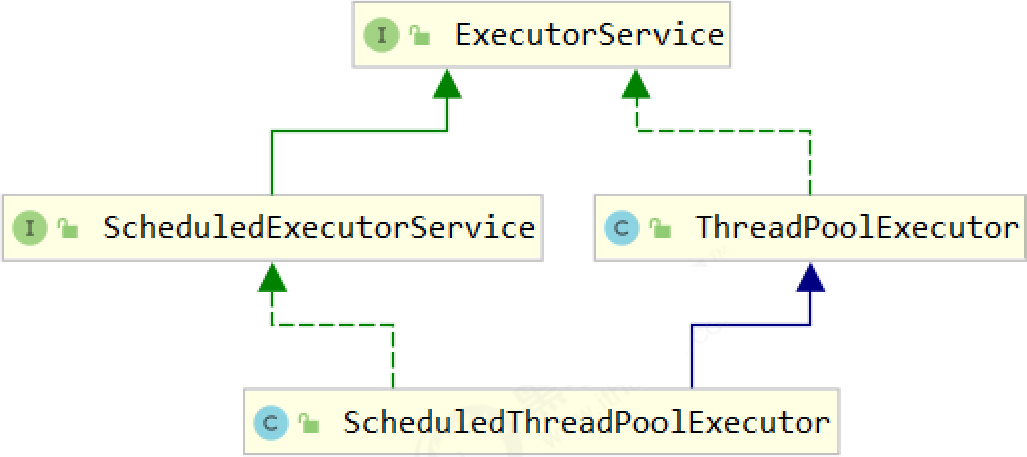
1) 线程池状态
ThreadPoolExecutor 使用 int 的高 3 位来表示线程池状态,低 29 位表示线程数量
| 状态名 | 高 3 位 | 接收新任务 | 处理阻塞队列任务 | 说明 |
|---|---|---|---|---|
| RUNNING | 111 | Y | Y | |
| SHUTDOWN | 000 | N | Y | 不会接收新任务,但会处理阻塞队列剩余任务 |
| STOP | 001 | N | N | 会中断正在执行的任务,并抛弃阻塞队列任务 |
| TIDYING | 010 | - | - | 任务全执行完毕,活动线程为 0 即将进入终结 |
| TERMINATED | 011 | - | - | 终结状态 |
从数字上比较,TERMINATED > TIDYING > STOP > SHUTDOWN > RUNNING
这些信息存储在一个原子变量 ctl 中,目的是将线程池状态与线程个数合二为一,这样就可以用一次 cas 原子操作进行赋值
// c 为旧值, ctlOf 返回结果为新值
ctl.compareAndSet(c, ctlOf(targetState, workerCountOf(c))));

// rs 为高 3 位代表线程池状态, wc 为低 29 位代表线程个数,ctl 是合并它们
private static int ctlOf(int rs, int wc) { return rs | wc; }
2) 构造方法
public ThreadPoolExecutor(int corePoolSize,
                              int maximumPoolSize,
                              long keepAliveTime,
                              TimeUnit unit,
                              BlockingQueue<Runnable> workQueue,
                              ThreadFactory threadFactory,
                              RejectedExecutionHandler handler)
- corePoolSize 核心线程数目 (最多保留的线程数)
- maximumPoolSize 最大线程数目(救急线程数 = 最大线程数 - 核心线程数)
- keepAliveTime 生存时间 - 针对救急线程
- unit 时间单位 - 针对救急线程
- workQueue 阻塞队列
- threadFactory 线程工厂 - 可以为线程创建时起个好名字
- handler 拒绝策略
工作方式: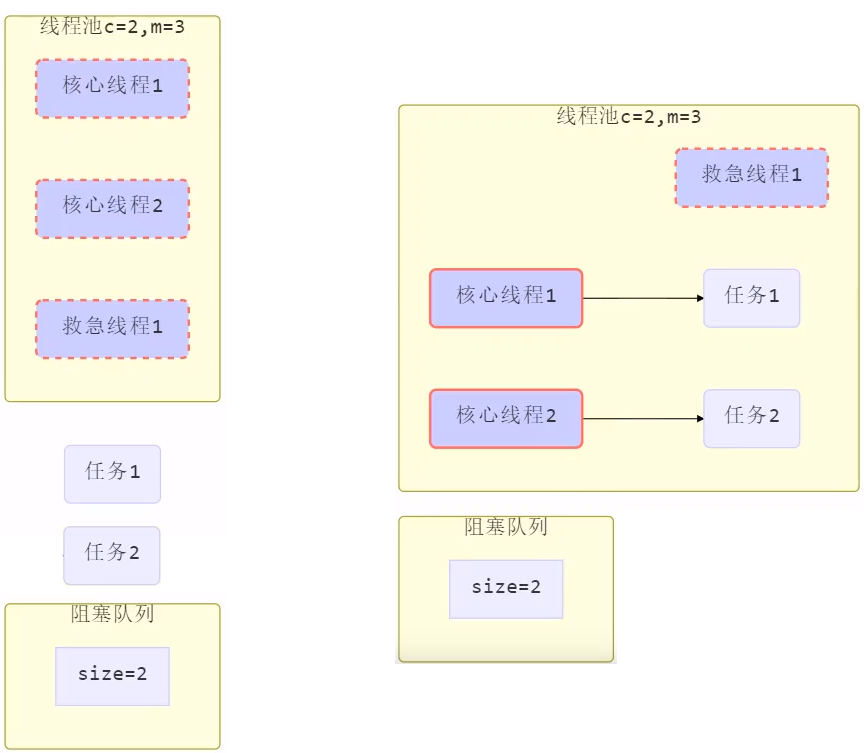
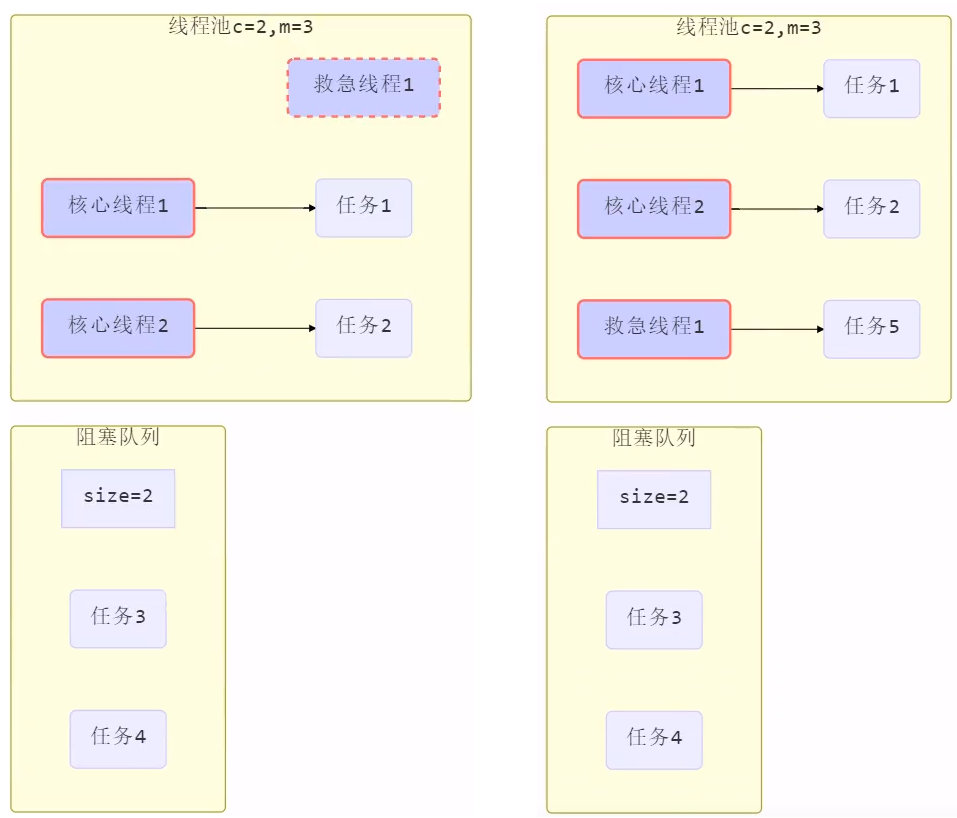
- 线程池中刚开始没有线程,当一个任务提交给线程池后,线程池会创建一个新线程来执行任务。
- 当线程数达到 corePoolSize 并没有线程空闲,这时再加入任务,新加的任务会被加入workQueue 队列排队,直到有空闲的线程。
- 如果队列选择了有界队列,那么任务超过了队列大小时,会创建 maximumPoolSize - corePoolSize 数目的线程来救急(救急线程)。
- 如果线程到达 maximumPoolSize 仍然有新任务这时会执行拒绝策略。拒绝策略 jdk 提供了 4 种实现,其它著名框架也提供了实现
- AbortPolicy 让调用者抛出 RejectedExecutionException 异常,这是默认策略
- CallerRunsPolicy 让调用者运行任务
- DiscardPolicy 放弃本次任务
- DiscardOldestPolicy 放弃队列中最早的任务,本任务取而代之
- Dubbo 的实现,在抛出 RejectedExecutionException 异常之前会记录日志,并 dump 线程栈信息,方便定位问题
- Netty 的实现,是创建一个新线程来执行任务
- ActiveMQ 的实现,带超时等待(60s)尝试放入队列,类似我们之前自定义的拒绝策略
- PinPoint 的实现,它使用了一个拒绝策略链,会逐一尝试策略链中每种拒绝策略
- 当高峰过去后,超过corePoolSize 的救急线程如果一段时间没有任务做,需要结束节省资源,这个时间由 keepAliveTime 和 unit 来控制。

根据这个构造方法,JDK Executors 类中提供了众多工厂方法来创建各种用途的线程池
3) newFixedThreadPool
创建固定大小的线程池(这里的 Fixed 就是固定的意思)
public static ExecutorService newFixedThreadPool(int nThreads) {
    return new ThreadPoolExecutor(nThreads, nThreads,
            0L, TimeUnit.MILLISECONDS,
            new LinkedBlockingQueue<Runnable>());
}
特点
- 核心线程数 == 最大线程数(没有救急线程被创建),因此也无需超时时间
- 阻塞队列是无界的,可以放任意数量的任务
评价 适用于任务量已知,相对耗时的任务
4) newCachedThreadPool
带缓冲的线程池
public static ExecutorService newCachedThreadPool() {
    return new ThreadPoolExecutor(0, Integer.MAX_VALUE,
            60L, TimeUnit.SECONDS,
            new SynchronousQueue<Runnable>());
}
特点
- 核心线程数是 0, 最大线程数是 Integer.MAX_VALUE,救急线程的空闲生存时间是 60s,意味着
- 全部都是救急线程(60s 后可以回收)
- 救急线程可以无限创建
- 队列采用了 SynchronousQueue 实现特点是,它没有容量,没有线程来取是放不进去的(一手交钱、一手交货)
public static void main(String[] args) {
    SynchronousQueue<Integer> integers = new SynchronousQueue<>();
    new Thread(() -> {
        try {
            log.debug("putting {} ", 1);
            integers.put(1);
            log.debug("{} putted...", 1);
            log.debug("putting...{} ", 2);
            integers.put(2);
            log.debug("{} putted...", 2);
        } catch (InterruptedException e) {
            e.printStackTrace();
        }
    },"t1").start();
    sleep(1);
    new Thread(() -> {
        try {
            log.debug("taking {}", 1);
            integers.take();
        } catch (InterruptedException e) {
            e.printStackTrace();
        }
    },"t2").start();
    sleep(1);
    new Thread(() -> {
        try {
            log.debug("taking {}", 2);
            integers.take();
        } catch (InterruptedException e) {
            e.printStackTrace();
        }
    },"t3").start();
}
输出
16:49:13:323 [t1] c.NewTest - putting 1
16:49:14:322 [t2] c.NewTest - taking 1
16:49:14:323 [t1] c.NewTest - 1 putted...
16:49:14:323 [t1] c.NewTest - putting...2
16:49:15:323 [t3] c.NewTest - taking 2
16:49:15:323 [t1] c.NewTest - 2 putted...
评价
整个线程池表现为线程数会根据任务量不断增长,没有上限,当任务执行完毕,空闲 1分钟后释放线程。
适合任务数比较密集,但每个任务执行时间较短的情况
5) newSingleThreadExecutor
public static ExecutorService newSingleThreadExecutor() {
    return new FinalizableDelegatedExecutorService
            (new ThreadPoolExecutor(1, 1,
                    0L, TimeUnit.MILLISECONDS,
                    new LinkedBlockingQueue<Runnable>()));
}
使用场景:
希望多个任务排队执行。线程数固定为 1,任务数多于 1 时,会放入无界队列排队。任务执行完毕,这唯一的 线程也不会被释放。
区别:
- 自己创建一个单线程串行执行任务,如果任务执行失败而终止那么没有任何补救措施,而线程池还会新建一个线程,保证池的正常工作
- Executors.newSingleThreadExecutor() 线程个数始终为1,不能修改
- FinalizableDelegatedExecutorService 应用的是装饰器模式,只对外暴露了 ExecutorService 接口,因此不能调用 ThreadPoolExecutor 中特有的方法
- Executors.newFixedThreadPool(1) 初始时为1,以后还可以修改
- 对外暴露的是 ThreadPoolExecutor 对象,可以强转后调用 setCorePoolSize 等方法进行修改
6) 提交任务
// 执行任务
void execute(Runnable command);

// 提交任务 task,用返回值 Future 获得任务执行结果
<T> Future<T> submit(Callable<T> task);

// 提交 tasks 中所有任务
<T> List<Future<T>> invokeAll(Collection<? extends Callable<T>> tasks)
        throws InterruptedException;

// 提交 tasks 中所有任务,带超时时间
<T> List<Future<T>> invokeAll(Collection<? extends Callable<T>> tasks,
                              long timeout, TimeUnit unit)
        throws InterruptedException;

// 提交 tasks 中所有任务,哪个任务先成功执行完毕,返回此任务执行结果,其它任务取消
<T> T invokeAny(Collection<? extends Callable<T>> tasks)
        throws InterruptedException, ExecutionException;

// 提交 tasks 中所有任务,哪个任务先成功执行完毕,返回此任务执行结果,其它任务取消,带超时时间
<T> T invokeAny(Collection<? extends Callable<T>> tasks,
                long timeout, TimeUnit unit)
        throws InterruptedException, ExecutionException, TimeoutException;
7) 关闭线程池
shutdown
/*
线程池状态变为 SHUTDOWN
- 不会接收新任务
- 但已提交任务会执行完
- 此方法不会阻塞调用线程的执行
*/
void shutdown();
public void shutdown() {
    final ReentrantLock mainLock = this.mainLock;
    mainLock.lock();
    try {
        checkShutdownAccess();
        // 修改线程池状态
        advanceRunState(SHUTDOWN);
        // 仅会打断空闲线程
        interruptIdleWorkers();
        onShutdown(); // 扩展点 ScheduledThreadPoolExecutor
    } finally {
        mainLock.unlock();
    }
    // 尝试终结(没有运行的线程可以立刻终结,如果还有运行的线程也不会等)
    tryTerminate();
}
shutdownNow
/*
    线程池状态变为 STOP
    - 不会接收新任务
    - 会将队列中的任务返回
    - 并用 interrupt 的方式中断正在执行的任务
    */
    List<Runnable> shutdownNow();
public List<Runnable> shutdownNow() {
    List<Runnable> tasks;
    final ReentrantLock mainLock = this.mainLock;
    mainLock.lock();
    try {
        checkShutdownAccess();
        // 修改线程池状态
        advanceRunState(STOP);
        // 打断所有线程
        interruptWorkers();
        // 获取队列中剩余任务
        tasks = drainQueue();
    } finally {
        mainLock.unlock();
    }
    // 尝试终结
    tryTerminate();
    return tasks;
}
其它方法
// 不在 RUNNING 状态的线程池,此方法就返回 true
boolean isShutdown();

// 线程池状态是否是 TERMINATED
boolean isTerminated();

// 调用 shutdown 后,由于调用线程并不会等待所有任务运行结束,因此如果它想在线程池 TERMINATED 后做些事情,可以利用此方法等待
boolean awaitTermination(long timeout, TimeUnit unit) throws InterruptedException;
* 模式之 Worker Thread (模式)
8) 任务调度线程池
在『任务调度线程池』功能加入之前,可以使用 java.util.Timer 来实现定时功能,Timer 的优点在于简单易用,但由于所有任务都是由同一个线程来调度,因此所有任务都是串行执行的,同一时间只能有一个任务在执行,前一个任务的延迟或异常都将会影响到之后的任务。
public static void main(String[] args) {
    Timer timer = new Timer();
    TimerTask task1 = new TimerTask() {
        @Override
        public void run() {
            log.debug("task 1");
            sleep(2);
        }
    };
    TimerTask task2 = new TimerTask() {
        @Override
        public void run() {
            log.debug("task 2");
        }
    };
    // 使用 timer 添加两个任务,希望它们都在 1s 后执行
    // 但由于 timer 内只有一个线程来顺序执行队列中的任务,因此『任务1』的延时,影响了『任务2』的执行
    timer.schedule(task1, 1000);
    timer.schedule(task2, 1000);
}
输出
20:46:09.444 c.TestTimer [main] - start...
20:46:10.447 c.TestTimer [Timer-0] - task 1
20:46:12.448 c.TestTimer [Timer-0] - task 2
使用 ScheduledExecutorService 改写:
ScheduledExecutorService executor = Executors.newScheduledThreadPool(2);
// 添加两个任务,希望它们都在 1s 后执行
executor.schedule(() -> {
    System.out.println("任务1,执行时间:" + new Date());
    try { Thread.sleep(2000); } catch (InterruptedException e) { }
}, 1000, TimeUnit.MILLISECONDS);
executor.schedule(() -> {
    System.out.println("任务2,执行时间:" + new Date());
}, 1000, TimeUnit.MILLISECONDS);
输出
任务1,执行时间:Thu Jan 03 12:45:17 CST 2019
任务2,执行时间:Thu Jan 03 12:45:17 CST 2019
以固定间隔时间执行
scheduleAtFixedRate 例子:
ScheduledExecutorService pool = Executors.newScheduledThreadPool(1);
log.debug("start...");
pool.scheduleAtFixedRate(() -> {
    log.debug("running...");
}, 1, 1, TimeUnit.SECONDS);// 初始延时,时间间隔,时间单位
输出
21:45:43.167 c.TestTimer [main] - start...
21:45:44.215 c.TestTimer [pool-1-thread-1] - running...
21:45:45.215 c.TestTimer [pool-1-thread-1] - running...
21:45:46.215 c.TestTimer [pool-1-thread-1] - running...
21:45:47.215 c.TestTimer [pool-1-thread-1] - running...
......
scheduleAtFixedRate 例子(任务执行时间超过了间隔时间):
ScheduledExecutorService pool = Executors.newScheduledThreadPool(1);
log.debug("start...");
pool.scheduleAtFixedRate(() -> {
    log.debug("running...");
    sleep(2);
}, 1, 1, TimeUnit.SECONDS);
输出分析:一开始,延时 1s,接下来,由于任务执行时间 > 间隔时间,间隔被『撑』到了 2s
21:44:30.311 c.TestTimer [main] - start...
21:44:31.360 c.TestTimer [pool-1-thread-1] - running...
21:44:33.361 c.TestTimer [pool-1-thread-1] - running...
21:44:35.362 c.TestTimer [pool-1-thread-1] - running...
21:44:37.362 c.TestTimer [pool-1-thread-1] - running...
scheduleWithFixedDelay 例子:
ScheduledExecutorService pool = Executors.newScheduledThreadPool(1);
log.debug("start...");
pool.scheduleWithFixedDelay(()-> {
    log.debug("running...");
    sleep(2);
}, 1, 1, TimeUnit.SECONDS);
输出分析:一开始,延时 1s,scheduleWithFixedDelay 的间隔是 上一个任务结束 <-> 延时 <-> 下一个任务开始 所以间隔都是 3s
21:40:55.078 c.TestTimer [main] - start...
21:40:56.140 c.TestTimer [pool-1-thread-1] - running...
21:40:59.143 c.TestTimer [pool-1-thread-1] - running...
21:41:02.145 c.TestTimer [pool-1-thread-1] - running...
21:41:05.147 c.TestTimer [pool-1-thread-1] - running...
评价 整个线程池表现为:线程数固定,任务数多于线程数时,会放入无界队列排队。任务执行完毕,这些线程也不会被释放。用来执行延迟或反复执行的任务
9) 正确处理执行任务异常
方法1:主动捉异常
ExecutorService pool = Executors.newFixedThreadPool(1);
pool.submit(() -> {
    try {
        log.debug("task1");
        int i = 1 / 0;
    } catch (Exception e) {
        log.error("error:", e);
    }
});
输出
21:59:04.558 c.TestTimer [pool-1-thread-1] - task1
21:59:04.562 c.TestTimer [pool-1-thread-1] - error:
java.lang.ArithmeticException: / by zero
......
方法2:使用 Future
ExecutorService pool = Executors.newFixedThreadPool(1);
Future<Boolean> f = pool.submit(() -> {
    log.debug("task1");
    int i = 1 / 0;
    return true;
});
log.debug("result:{}", f.get());
输出
21:54:58.208 c.TestTimer [pool-1-thread-1] - task1
Exception in thread "main" java.util.concurrent.ExecutionException:
java.lang.ArithmeticException: / by zero
......
* 应用之定时任务
10) Tomcat 线程池
Tomcat 在哪里用到了线程池呢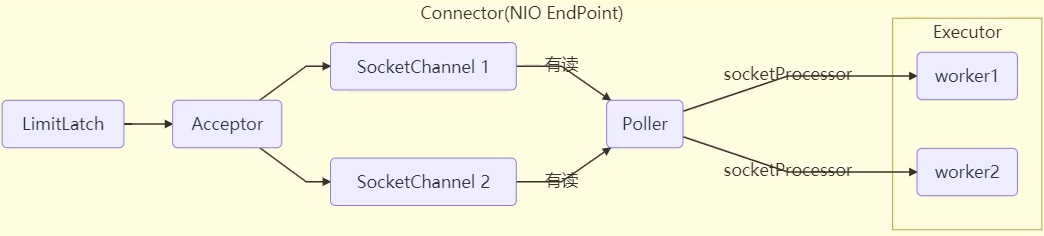
- LimitLatch 用来限流,可以控制最大连接个数,类似 J.U.C 中的 Semaphore
- Acceptor 只负责【接收新的 socket 连接】
- Poller 只负责监听 socket channel 是否有【可读的 I/O 事件】
- 一旦可读,封装一个任务对象(socketProcessor),提交给 Executor 线程池处理
- Executor 线程池中的工作线程最终负责【处理请求】
Tomcat 线程池扩展了 ThreadPoolExecutor,行为稍有不同
- 如果总线程数达到 maximumPoolSize
- 这时不会立刻抛 RejectedExecutionException 异常
- 而是再次尝试将任务放入队列,如果还失败,才抛出 RejectedExecutionException 异常
源码 tomcat-7.0.42
public void execute(Runnable command, long timeout, TimeUnit unit) {
    submittedCount.incrementAndGet();
    try {
        super.execute(command);
    } catch (RejectedExecutionException rx) {
        if (super.getQueue() instanceof TaskQueue) {
            final TaskQueue queue = (TaskQueue)super.getQueue();
            try {
                if (!queue.force(command, timeout, unit)) {
                    submittedCount.decrementAndGet();
                    throw new RejectedExecutionException("Queue capacity is full.");
                }
            } catch (InterruptedException x) {
                submittedCount.decrementAndGet();
                Thread.interrupted();
                throw new RejectedExecutionException(x);
            }
        } else {
            submittedCount.decrementAndGet();
            throw rx;
        }
    }
}
TaskQueue.java
public boolean force(Runnable o, long timeout, TimeUnit unit) throws InterruptedException {
    if ( parent.isShutdown() )
        throw new RejectedExecutionException(
                "Executor not running, can't force a command into the queue"
        );
    return super.offer(o,timeout,unit); //forces the item onto the queue, to be used if the task is rejected
}
Connector 配置
| 配置项 | 默认值 | 说明 |
|---|---|---|
| acceptorThreadCount | 1 | acceptor 线程数量 |
| pollerThreadCount | 1 | poller 线程数量 |
| minSpareThreads | 10 | 核心线程数,即 corePoolSize |
| maxThreads | 200 | 最大线程数,即 maximumPoolSize |
| executorv | - | Executor 名称,用来引用下面的 Executor |
Executor 线程配置
| 配置项 | 默认值 | 说明 |
|---|---|---|
| threadPriority | 5 | 线程优先级 |
| daemon | true | 是否守护线程 |
| minSpareThreads | 25 | 核心线程数,即 corePoolSize |
| maxThreads | 200 | 最大线程数,即 maximumPoolSize |
| maxIdleTime | 60000 | 线程生存时间,单位是毫秒,默认值即 1 分钟 |
| maxQueueSize | Integer.MAX_VALUE | 队列长度 |
| prestartminSpareThreads | false | 核心线程是否在服务器启动时启动 |

3. Fork/Join
1) 概念
Fork/Join 是 JDK 1.7 加入的新的线程池实现,它体现的是一种分治思想,适用于能够进行任务拆分的 cpu 密集型运算
所谓的任务拆分,是将一个大任务拆分为算法上相同的小任务,直至不能拆分可以直接求解。跟递归相关的一些计算,如归并排序、斐波那契数列、都可以用分治思想进行求解
Fork/Join 在分治的基础上加入了多线程,可以把每个任务的分解和合并交给不同的线程来完成,进一步提升了运算效率
Fork/Join 默认会创建与 cpu 核心数大小相同的线程池
2) 使用
提交给 Fork/Join 线程池的任务需要继承 RecursiveTask(有返回值)或 RecursiveAction(没有返回值),例如下面定义了一个对 1~n 之间的整数求和的任务
class AddTask1 extends RecursiveTask<Integer> {
    int n;
    public AddTask1(int n) {
        this.n = n;
    }
    @Override
    public String toString() {
        return "{" + n + '}';
    }
    @Override
    protected Integer compute() {
        // 如果 n 已经为 1,可以求得结果了
        if (n == 1) {
            log.debug("join() {}", n);
            return n;
        }
        // 将任务进行拆分(fork)
        AddTask1 t1 = new AddTask1(n - 1);
        t1.fork();
        log.debug("fork() {} + {}", n, t1);
        // 合并(join)结果
        int result = n + t1.join();
        log.debug("join() {} + {} = {}", n, t1, result);
        return result;
    }
}
然后提交给 ForkJoinPool 来执行
public static void main(String[] args) {
	ForkJoinPool pool = new ForkJoinPool(4);
	System.out.println(pool.invoke(new AddTask1(5)));
}
结果
[ForkJoinPool-1-worker-0] - fork() 2 + {1}
[ForkJoinPool-1-worker-1] - fork() 5 + {4}
[ForkJoinPool-1-worker-0] - join() 1
[ForkJoinPool-1-worker-0] - join() 2 + {1} = 3
[ForkJoinPool-1-worker-2] - fork() 4 + {3}
[ForkJoinPool-1-worker-3] - fork() 3 + {2}
[ForkJoinPool-1-worker-3] - join() 3 + {2} = 6
[ForkJoinPool-1-worker-2] - join() 4 + {3} = 10
[ForkJoinPool-1-worker-1] - join() 5 + {4} = 15
15
用图来表示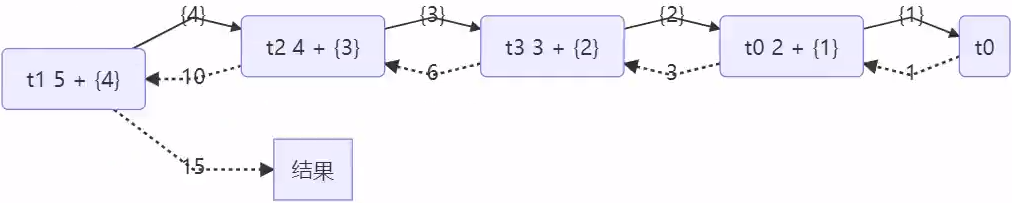
改进
class AddTask3 extends RecursiveTask<Integer> {
    int begin;
    int end;
    public AddTask3(int begin, int end) {
        this.begin = begin;
        this.end = end;
    }
    @Override
    public String toString() {
        return "{" + begin + "," + end + '}';
    }
    @Override
    protected Integer compute() {
        // 5, 5
        if (begin == end) {
            log.debug("join() {}", begin);
            return begin;
        }
        // 4, 5
        if (end - begin == 1) {
            log.debug("join() {} + {} = {}", begin, end, end + begin);
            return end + begin;
        }

        // 1 5
        int mid = (end + begin) / 2; // 3

        AddTask3 t1 = new AddTask3(begin, mid); // 1,3
        t1.fork();
        AddTask3 t2 = new AddTask3(mid + 1, end); // 4,5
        t2.fork();
        log.debug("fork() {} + {} = ?", t1, t2);

        int result = t1.join() + t2.join();
        log.debug("join() {} + {} = {}", t1, t2, result);
        return result;
    }
}
然后提交给 ForkJoinPool 来执行
public static void main(String[] args) {
	ForkJoinPool pool = new ForkJoinPool(4);
	System.out.println(pool.invoke(new AddTask3(1, 10)));
}
结果
[ForkJoinPool-1-worker-0] - join() 1 + 2 = 3
[ForkJoinPool-1-worker-3] - join() 4 + 5 = 9
[ForkJoinPool-1-worker-0] - join() 3
[ForkJoinPool-1-worker-1] - fork() {1,3} + {4,5} = ?
[ForkJoinPool-1-worker-2] - fork() {1,2} + {3,3} = ?
[ForkJoinPool-1-worker-2] - join() {1,2} + {3,3} = 6
[ForkJoinPool-1-worker-1] - join() {1,3} + {4,5} = 15
15
用图来表示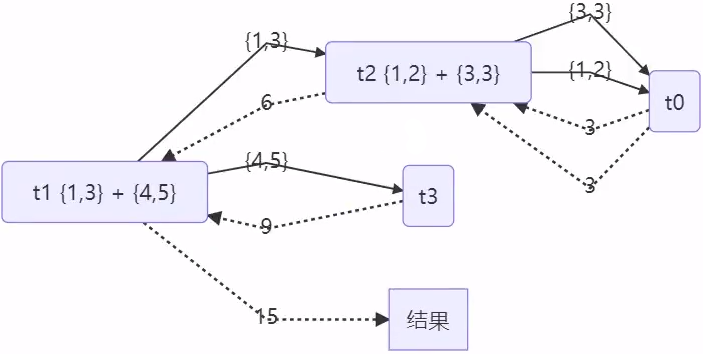
2 J.U.C
1.* AQS 原理
2.* ReentrantLock 原理
3. 读写锁
3.1 ReentrantReadWriteLock
当读操作远远高于写操作时,这时候使用 读写锁 让 读-读 可以并发,提高性能。 类似于数据库中的 select … from … lock in share mode
提供一个 数据容器类 内部分别使用读锁保护数据的 read() 方法,写锁保护数据的 write() 方法
@Slf4j(topic = "c.DataContainer")
class DataContainer {
    private Object data;
    private ReentrantReadWriteLock rw = new ReentrantReadWriteLock();
    private ReentrantReadWriteLock.ReadLock r = rw.readLock();
    private ReentrantReadWriteLock.WriteLock w = rw.writeLock();
    public Object read() {
        log.debug("获取读锁...");
        r.lock();
        try {
            log.debug("读取");
            sleep(1);
            return data;
        } finally {
            log.debug("释放读锁...");
            r.unlock();
        }
    }
    public void write() {
        log.debug("获取写锁...");
        w.lock();
        try {
            log.debug("写入");
            sleep(1);
        } finally {
            log.debug("释放写锁...");
            w.unlock();
        }
    }
}
测试读锁-读锁 可以并发
测试 读锁-写锁 相互阻塞
写锁-写锁 也是相互阻塞的,这里就不测试了
DataContainer dataContainer = new DataContainer();
new Thread(() -> {
    dataContainer.write();
}, "t1").start();
new Thread(() -> {
    dataContainer.write();
}, "t2").start();
14:05:14.341 c.DataContainer [t2] - 获取读锁...
14:05:14.341 c.DataContainer [t1] - 获取读锁...
14:05:14.345 c.DataContainer [t1] - 读取
14:05:14.345 c.DataContainer [t2] - 读取
14:05:15.365 c.DataContainer [t2] - 释放读锁...
14:05:15.386 c.DataContainer [t1] - 释放读锁...
注意事项
- 读锁不支持条件变量
- 重入时升级不支持:即持有读锁的情况下去获取写锁,会导致获取写锁永久等待
r.lock();
try {
        // ...
    w.lock();
    try {
        // ...
    } finally{
        w.unlock();
    }
} finally{
    r.unlock();
}
- 重入时降级支持:即持有写锁的情况下去获取读锁
class CachedData {
    Object data;
    // 是否有效,如果失效,需要重新计算 data
    volatile boolean cacheValid;
    final ReentrantReadWriteLock rwl = new ReentrantReadWriteLock();
    void processCachedData() {
        rwl.readLock().lock();
        if (!cacheValid) {
            // 获取写锁前必须释放读锁
            rwl.readLock().unlock();
            rwl.writeLock().lock();
            try {
                // 判断是否有其它线程已经获取了写锁、更新了缓存, 避免重复更新
                if (!cacheValid) {
                    data = ...
                    cacheValid = true;
                }
                // 降级为读锁, 释放写锁, 这样能够让其它线程读取缓存
                rwl.readLock().lock();
            } finally {
                rwl.writeLock().unlock();
            }
        }
        // 自己用完数据, 释放读锁
        try {
            use(data);
        } finally {
            rwl.readLock().unlock();
        }
    }
}
* 应用之缓存
* 读写锁原理
3.2 StampedLock
该类自 JDK 8 加入,是为了进一步优化读性能,它的特点是在使用读锁、写锁时都必须配合【戳】使用
加解读锁
long stamp = lock.readLock();
lock.unlockRead(stamp);
加解写锁
long stamp = lock.writeLock();
lock.unlockWrite(stamp);
乐观读,StampedLock 支持 tryOptimisticRead() 方法(乐观读),读取完毕后需要做一次 戳校验 如果校验通过,表示这期间确实没有写操作,数据可以安全使用,如果校验没通过,需要重新获取读锁,保证数据安全。
long stamp = lock.tryOptimisticRead();
// 验戳
if(!lock.validate(stamp)){
	// 锁升级
}
提供一个 数据容器类 内部分别使用读锁保护数据的 read() 方法,写锁保护数据的 write() 方法
class DataContainerStamped {
    private int data;
    private final StampedLock lock = new StampedLock();
    public DataContainerStamped(int data) {
        this.data = data;
    }
    public int read(int readTime) {
        long stamp = lock.tryOptimisticRead();
        log.debug("optimistic read locking...{}", stamp);
        sleep(readTime);
        if (lock.validate(stamp)) {
            log.debug("read finish...{}, data:{}", stamp, data);
            return data;
        }
        // 锁升级 - 读锁
        log.debug("updating to read lock... {}", stamp);
        try {
            stamp = lock.readLock();
            log.debug("read lock {}", stamp);
            sleep(readTime);
            log.debug("read finish...{}, data:{}", stamp, data);
            return data;
        } finally {
            log.debug("read unlock {}", stamp);
            lock.unlockRead(stamp);
        }
    }
    public void write(int newData) {
        long stamp = lock.writeLock();
        log.debug("write lock {}", stamp);
        try {
            sleep(2);
            this.data = newData;
        } finally {
            log.debug("write unlock {}", stamp);
            lock.unlockWrite(stamp);
        }
    }
}
测试读-读可以优化
public static void main(String[] args) {
    DataContainerStamped dataContainer = new DataContainerStamped(1);
    new Thread(() -> {
        dataContainer.read(1);
    }, "t1").start();
    sleep(0.5);
    new Thread(() -> {
        dataContainer.read(0);
    }, "t2").start();
}
输出结果,可以看到实际没有加读锁
15:58:50.217 c.DataContainerStamped [t1] - optimistic read locking...256
15:58:50.717 c.DataContainerStamped [t2] - optimistic read locking...256
15:58:50.717 c.DataContainerStamped [t2] - read finish...256, data:1
15:58:51.220 c.DataContainerStamped [t1] - read finish...256, data:1
测试读-写 时优化读补加读锁
public static void main(String[] args) {
    DataContainerStamped dataContainer = new DataContainerStamped(1);
    new Thread(() -> {
        dataContainer.read(1);
    }, "t1").start();
    sleep(0.5);
    new Thread(() -> {
        dataContainer.write(100);
    }, "t2").start();
}
输出结果
15:57:00.219 c.DataContainerStamped [t1] - optimistic read locking...256
15:57:00.717 c.DataContainerStamped [t2] - write lock 384
15:57:01.225 c.DataContainerStamped [t1] - updating to read lock... 256
15:57:02.719 c.DataContainerStamped [t2] - write unlock 384
15:57:02.719 c.DataContainerStamped [t1] - read lock 513
15:57:03.719 c.DataContainerStamped [t1] - read finish...513, data:1000
15:57:03.719 c.DataContainerStamped [t1] - read unlock 513
注意
- StampedLock 不支持条件变量
- StampedLock 不支持可重入
4. Semaphore
基本使用
[ˈsɛməˌfɔr]
信号量,用来限制能同时访问共享资源的线程上限
public static void main(String[] args) {
    // 1. 创建 semaphore 对象
    Semaphore semaphore = new Semaphore(3);
    // 2. 10个线程同时运行
    for (int i = 0; i < 10; i++) {
        new Thread(() -> {
            // 3. 获取许可
            try {
                semaphore.acquire();
            } catch (InterruptedException e) {
                e.printStackTrace();
            }
            try {
                log.debug("running...");
                sleep(1);
                log.debug("end...");
            } finally {
                // 4. 释放许可
                semaphore.release();
            }
        }).start();
    }
}
输出
07:35:15.485 c.TestSemaphore [Thread-2] - running...
07:35:15.485 c.TestSemaphore [Thread-1] - running...
07:35:15.485 c.TestSemaphore [Thread-0] - running...
07:35:16.490 c.TestSemaphore [Thread-2] - end...
07:35:16.490 c.TestSemaphore [Thread-0] - end...
07:35:16.490 c.TestSemaphore [Thread-1] - end...
07:35:16.490 c.TestSemaphore [Thread-3] - running...
07:35:16.490 c.TestSemaphore [Thread-5] - running...
07:35:16.490 c.TestSemaphore [Thread-4] - running...
07:35:17.490 c.TestSemaphore [Thread-5] - end...
07:35:17.490 c.TestSemaphore [Thread-4] - end...
07:35:17.490 c.TestSemaphore [Thread-3] - end...
07:35:17.490 c.TestSemaphore [Thread-6] - running...
07:35:17.490 c.TestSemaphore [Thread-7] - running...
07:35:17.490 c.TestSemaphore [Thread-9] - running...
07:35:18.491 c.TestSemaphore [Thread-6] - end...
07:35:18.491 c.TestSemaphore [Thread-7] - end...
07:35:18.491 c.TestSemaphore [Thread-9] - end...
07:35:18.491 c.TestSemaphore [Thread-8] - running...
07:35:19.492 c.TestSemaphore [Thread-8] - end...
* Semaphore 应用
* Semaphore 原理
5. CountdownLatch
countdown(倒计时) Latch(锁)
用来进行线程同步协作,等待所有线程完成倒计时。
其中构造参数用来初始化等待计数值,await() 用来等待计数归零,countDown() 用来让计数减一
public static void main(String[] args) throws InterruptedException {
    CountDownLatch latch = new CountDownLatch(3);
    new Thread(() -> {
        log.debug("begin...");
        sleep(1);
        latch.countDown();
        log.debug("end...{}", latch.getCount());
    }).start();
    new Thread(() -> {
        log.debug("begin...");
        sleep(2);
        latch.countDown();
        log.debug("end...{}", latch.getCount());
    }).start();
    new Thread(() -> {
        log.debug("begin...");
        sleep(1.5);
        latch.countDown();
        log.debug("end...{}", latch.getCount());
    }).start();
    log.debug("waiting...");
    latch.await();
    log.debug("wait end...");
}
输出
18:44:00.778 c.TestCountDownLatch [main] - waiting...
18:44:00.778 c.TestCountDownLatch [Thread-2] - begin...
18:44:00.778 c.TestCountDownLatch [Thread-0] - begin...
18:44:00.778 c.TestCountDownLatch [Thread-1] - begin...
18:44:01.782 c.TestCountDownLatch [Thread-0] - end...2
18:44:02.283 c.TestCountDownLatch [Thread-2] - end...1
18:44:02.782 c.TestCountDownLatch [Thread-1] - end...0
18:44:02.782 c.TestCountDownLatch [main] - wait end...
可以配合线程池使用,改进如下
public static void main(String[] args) throws InterruptedException {
    CountDownLatch latch = new CountDownLatch(3);
    ExecutorService service = Executors.newFixedThreadPool(4);
    service.submit(() -> {
        log.debug("begin...");
        sleep(1);
        latch.countDown();
        log.debug("end...{}", latch.getCount());
    });
    service.submit(() -> {
        log.debug("begin...");
        sleep(1.5);
        latch.countDown();
        log.debug("end...{}", latch.getCount());
    });
    service.submit(() -> {
        log.debug("begin...");
        sleep(2);
        latch.countDown();
        log.debug("end...{}", latch.getCount());
    });
    service.submit(()->{
        try {
            log.debug("waiting...");
            latch.await();
            log.debug("wait end...");
        } catch (InterruptedException e) {
            e.printStackTrace();
        }
    });
}
输出
18:52:25.831 c.TestCountDownLatch [pool-1-thread-3] - begin...
18:52:25.831 c.TestCountDownLatch [pool-1-thread-1] - begin...
18:52:25.831 c.TestCountDownLatch [pool-1-thread-2] - begin...
18:52:25.831 c.TestCountDownLatch [pool-1-thread-4] - waiting...
18:52:26.835 c.TestCountDownLatch [pool-1-thread-1] - end...2
18:52:27.335 c.TestCountDownLatch [pool-1-thread-2] - end...1
18:52:27.835 c.TestCountDownLatch [pool-1-thread-3] - end...0
18:52:27.835 c.TestCountDownLatch [pool-1-thread-4] - wait end...
* 应用之同步等待多线程准备完毕
AtomicInteger num = new AtomicInteger(0);
ExecutorService service = Executors.newFixedThreadPool(10, (r) -> {
    return new Thread(r, "t" + num.getAndIncrement());
});
CountDownLatch latch = new CountDownLatch(10);
String[] all = new String[10];
Random r = new Random();
for (int j = 0; j < 10; j++) {
    int x = j;
    service.submit(() -> {
        for (int i = 0; i <= 100; i++) {
            try {
                Thread.sleep(r.nextInt(100));
            } catch (InterruptedException e) {
            }
            all[x] = Thread.currentThread().getName() + "(" + (i + "%") + ")";
            System.out.print("\r" + Arrays.toString(all));
        }
        latch.countDown();
    });
}
latch.await();
System.out.println("\n游戏开始...");
service.shutdown();
中间输出
[t0(52%), t1(47%), t2(51%), t3(40%), t4(49%), t5(44%), t6(49%), t7(52%), t8(46%), t9(46%)]
最后输出
[t0(100%), t1(100%), t2(100%), t3(100%), t4(100%), t5(100%), t6(100%), t7(100%), t8(100%),t9(100%)]
游戏开始...
* 应用之同步等待多个远程调用结束
@RestController
public class TestCountDownlatchController {
    @GetMapping("/order/{id}")
    public Map<String, Object> order(@PathVariable int id) {
        HashMap<String, Object> map = new HashMap<>();
        map.put("id", id);
        map.put("total", "2300.00");
        sleep(2000);
        return map;
    }

    @GetMapping("/product/{id}")
    public Map<String, Object> product(@PathVariable int id) {
        HashMap<String, Object> map = new HashMap<>();
        if (id == 1) {
            map.put("name", "小爱音箱");
            map.put("price", 300);
        } else if (id == 2) {
            map.put("name", "小米手机");
            map.put("price", 2000);
        }
        map.put("id", id);
        sleep(1000);
        return map;
    }

    @GetMapping("/logistics/{id}")
    public Map<String, Object> logistics(@PathVariable int id) {
        HashMap<String, Object> map = new HashMap<>();
        map.put("id", id);
        map.put("name", "中通快递");
        sleep(2500);
        return map;
    }

    private void sleep(int millis) {
        try {
            Thread.sleep(millis);
        } catch (InterruptedException e) {
            e.printStackTrace();
        }
    }
}
rest 远程调用
RestTemplate restTemplate = new RestTemplate();
log.debug("begin");
ExecutorService service = Executors.newCachedThreadPool();
CountDownLatch latch = new CountDownLatch(4);
Future<Map<String, Object>> f1 = service.submit(() -> {
    Map<String, Object> r =
            restTemplate.getForObject("http://localhost:8080/order/{1}", Map.class, 1);
    return r;
});
Future<Map<String, Object>> f2 = service.submit(() -> {
    Map<String, Object> r =
            restTemplate.getForObject("http://localhost:8080/product/{1}", Map.class, 1);
    return r;
});
Future<Map<String, Object>> f3 = service.submit(() -> {
    Map<String, Object> r =
            restTemplate.getForObject("http://localhost:8080/product/{1}", Map.class, 2);
    return r;
});
Future<Map<String, Object>> f4 = service.submit(() -> {
    Map<String, Object> r =
            restTemplate.getForObject("http://localhost:8080/logistics/{1}", Map.class, 1);
    return r;
});
System.out.println(f1.get());
System.out.println(f2.get());
System.out.println(f3.get());
System.out.println(f4.get());
log.debug("执行完毕");
service.shutdown();
执行结果
19:51:39.711 c.TestCountDownLatch [main] - begin
{total=2300.00, id=1}
{price=300, name=小爱音箱, id=1}
{price=2000, name=小米手机, id=2}
{name=中通快递, id=1}
19:51:42.407 c.TestCountDownLatch [main] - 执行完毕
6. CyclicBarrier
[ˈsaɪklɪk ˈbæriɚ] 循环栅栏,用来进行线程协作,等待线程满足某个计数。构造时设置『计数个数』,每个线程执行到某个需要“同步”的时刻调用 await() 方法进行等待,当等待的线程数满足『计数个数』时,继续执行
CyclicBarrier cb = new CyclicBarrier(2); // 个数为2时才会继续执行
new Thread(() -> {
    System.out.println("线程1开始.." + new Date());
    try {
        cb.await(); // 当个数不足时,等待
    } catch (InterruptedException | BrokenBarrierException e) {
        e.printStackTrace();
    }
    System.out.println("线程1继续向下运行..." + new Date());
}).start();
new Thread(() -> {
    System.out.println("线程2开始.." + new Date());
    try {
        Thread.sleep(2000);
    } catch (InterruptedException e) {
    }
    try {
        cb.await(); // 2 秒后,线程个数够2,继续运行
    } catch (InterruptedException | BrokenBarrierException e) {
        e.printStackTrace();
    }
    System.out.println("线程2继续向下运行..." + new Date());
}).start();
注意 CyclicBarrier 与 CountDownLatch 的主要区别在于 CyclicBarrier 是可以重用的 CyclicBarrier 可以被比喻为『人满发车』
7. 线程安全集合类概述

线程安全集合类可以分为三大类:
- 遗留的线程安全集合如 Hashtable , Vector
- 使用 Collections 装饰的线程安全集合,如:
- Collections.synchronizedCollection
- Collections.synchronizedList
- Collections.synchronizedMap
- Collections.synchronizedSet
- Collections.synchronizedNavigableMap
- Collections.synchronizedNavigableSet
- Collections.synchronizedSortedMap
- Collections.synchronizedSortedSet
- java.util.concurrent.*
重点介绍 java.util.concurrent.* 下的线程安全集合类,可以发现它们有规律,里面包含三类关键词:Blocking、CopyOnWrite、Concurrent
- Blocking 大部分实现基于锁,并提供用来阻塞的方法
- CopyOnWrite 之类容器修改开销相对较重
- Concurrent 类型的容器
- 内部很多操作使用 cas 优化,一般可以提供较高吞吐量
- 弱一致性
- 遍历时弱一致性,例如,当利用迭代器遍历时,如果容器发生修改,迭代器仍然可以继续进行遍历,这时内容是旧的
- 求大小弱一致性,size 操作未必是 100% 准确
- 读取弱一致性
遍历时如果发生了修改,对于非安全容器来讲,使用 fail-fast 机制也就是让遍历立刻失败,抛出 ConcurrentModificationException,不再继续遍历
8. ConcurrentHashMap
练习:单词计数
生成测试数据
static final String ALPHA = "abcedfghijklmnopqrstuvwxyz";
public static void main(String[] args) {
    int length = ALPHA.length();
    int count = 200;
    List<String> list = new ArrayList<>(length * count);
    for (int i = 0; i < length; i++) {
        char ch = ALPHA.charAt(i);
        for (int j = 0; j < count; j++) {
            list.add(String.valueOf(ch));
        }
    }
    Collections.shuffle(list);
    for (int i = 0; i < 26; i++) {
        try (PrintWriter out = new PrintWriter(
                new OutputStreamWriter(
                        new FileOutputStream("tmp/" + (i+1) + ".txt")))) {
            String collect = list.subList(i * count, (i + 1) * count).stream()
                    .collect(Collectors.joining("\n"));
            out.print(collect);
        } catch (IOException e) {
        }
    }
}
模版代码,模版代码中封装了多线程读取文件的代码
private static <V> void demo(Supplier<Map<String, V>> supplier,
                             BiConsumer<Map<String, V>, List<String>> consumer) {
    Map<String, V> counterMap = supplier.get();
    List<Thread> ts = new ArrayList<>();
    for (int i = 1; i <= 26; i++) {
        int idx = i;
        Thread thread = new Thread(() -> {
            List<String> words = readFromFile(idx);
            consumer.accept(counterMap, words);
        });
        ts.add(thread);
    }
    ts.forEach(t -> t.start());
    ts.forEach(t -> {
        try {
            t.join();
        } catch (InterruptedException e) {
            e.printStackTrace();
        }
    });
    System.out.println(counterMap);
}

public static List<String> readFromFile(int i) {
    ArrayList<String> words = new ArrayList<>();
    try (BufferedReader in = new BufferedReader(new InputStreamReader(new FileInputStream("tmp/"
            + i + ".txt")))) {
        while (true) {
            String word = in.readLine();
            if (word == null) {
                break;
            }
            words.add(word);
        }
        return words;
    } catch (IOException e) {
        throw new RuntimeException(e);
    }
}
你要做的是实现两个参数
- 一是提供一个 map 集合,用来存放每个单词的计数结果,key 为单词,value 为计数
- 二是提供一组操作,保证计数的安全性,会传递 map 集合以及 单词 List
正确结果输出应该是每个单词出现 200 次
{a=200, b=200, c=200, d=200, e=200, f=200, g=200, h=200, i=200, j=200, k=200, l=200, m=200,n=200, o=200, p=200, q=200, r=200, s=200, t=200, u=200, v=200, w=200, x=200, y=200, z=200}
下面的实现为:
demo(
    // 创建 map 集合
    // 创建 ConcurrentHashMap 对不对?
    () ->new HashMap<String, Integer>(),

    // 进行计数
    (map,words)->{
        for (String word : words) {
            Integer counter = map.get(word);
            int newValue = counter == null ? 1 : counter + 1;
            map.put(word, newValue);
        }
    }
);
有没有问题?请改进
参考解答1
demo(
    () -> new ConcurrentHashMap<String, LongAdder>(),
    (map, words) -> {
        for (String word : words) {
            // 注意不能使用 putIfAbsent,此方法返回的是上一次的 value,首次调用返回 null
            map.computeIfAbsent(word, (key) -> new LongAdder()).increment();
        }
    }
);
参考解答2
demo(
    () -> new ConcurrentHashMap<String, Integer>(),
    (map, words) -> {
        for (String word : words) {
            // 函数式编程,无需原子变量
            map.merge(word, 1, Integer::sum);
        }
    }
);
* ConcurrentHashMap 原理
9. BlockingQueue
* BlockingQueue 原理
10. ConcurrentLinkedQueue
ConcurrentLinkedQueue 的设计与 LinkedBlockingQueue 非常像,也是
- 两把【锁】,同一时刻,可以允许两个线程同时(一个生产者与一个消费者)执行
- dummy 节点的引入让两把【锁】将来锁住的是不同对象,避免竞争
- 只是这【锁】使用了 cas 来实现
事实上,ConcurrentLinkedQueue 应用还是非常广泛的
例如之前讲的 Tomcat 的 Connector 结构时,Acceptor 作为生产者向 Poller 消费者传递事件信息时,正是采用了 ConcurrentLinkedQueue 将 SocketChannel 给 Poller 使用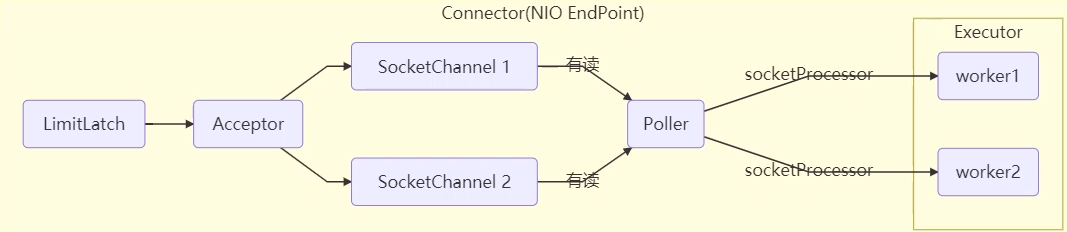
11. CopyOnWriteArrayList(写入时拷贝)
CopyOnWriteArraySet 是它的马甲 底层实现采用了 写入时拷贝 的思想,增删改操作会将底层数组拷贝一份,更改操作在新数组上执行,这时不影响其它线程的并发读,读写分离。 以新增为例:
public boolean add(E e) {
    synchronized (lock) {
        // 获取旧的数组
        Object[] es = getArray();
        int len = es.length;
        // 拷贝新的数组(这里是比较耗时的操作,但不影响其它读线程)
        es = Arrays.copyOf(es, len + 1);
        // 添加新元素
        es[len] = e;
        // 替换旧的数组
        setArray(es);
        return true;
    }
}
这里的源码版本是 Java 11,在 Java 1.8 中使用的是可重入锁而不是 synchronized
其它读操作并未加锁,例如:
适合『读多写少』的应用场景
get 弱一致性
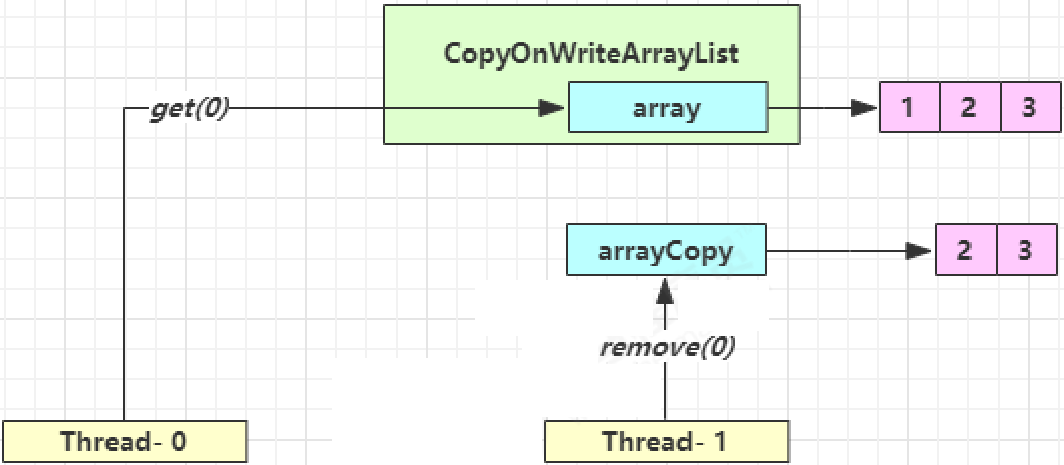
| 时间点 | 操作 |
|---|---|
| 1 | Thread-0 getArray() |
| 2 | Thread-1 getArray() |
| 3 | Thread-1 setArray(arrayCopy) |
| 4 | Thread-0 array[index] |
不容易测试,但问题确实存在
迭代器弱一致性
CopyOnWriteArrayList<Integer> list = new CopyOnWriteArrayList<>();
list.add(1);
list.add(2);
list.add(3);
Iterator<Integer> iter = list.iterator();
new Thread(() -> {
    list.remove(0);
    System.out.println(list);
}).start();
sleep1s();
while (iter.hasNext()) {
    System.out.println(iter.next());
}
不要觉得弱一致性就不好
- 数据库的 MVCC 都是弱一致性的表现
- 并发高和一致性是矛盾的,需要权衡