一、文献参考
Spring Security认证与授权的原理(源码分析,超详细)_Zystem-CSDN博客_springsecurity认证原理
最简单易懂的Spring Security 身份认证流程讲解 - 曾俊杰的专栏 - 博客园
二、认证流程
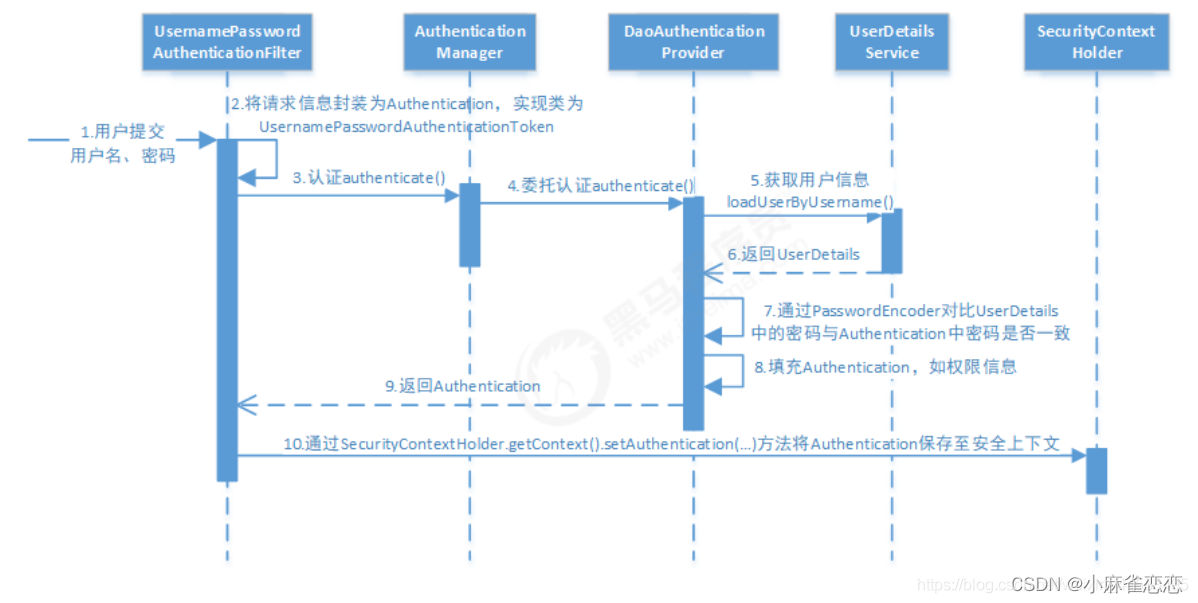
2.1、AbstractAuthenticationProcessingFilter 用户名密码表单登录过滤器
是处理表单登陆的过滤器,与 表单登陆有关的所有操作都是在该类中及其子类中进行的。
public void doFilter(ServletRequest req, ServletResponse res, FilterChain chain)
      throws IOException, ServletException {

   HttpServletRequest request = (HttpServletRequest) req;
   HttpServletResponse response = (HttpServletResponse) res;

   if (!requiresAuthentication(request, response)) {
      chain.doFilter(request, response);

      return;
   }

   if (logger.isDebugEnabled()) {
      logger.debug("Request is to process authentication");
   }

   Authentication authResult;

   try {
      authResult = attemptAuthentication(request, response);//在此处调用 的是`UsernamePasswordAuthenticationFilter`实现的方法。
      if (authResult == null) {
         // return immediately as subclass has indicated that it hasn't completed
         // authentication
         return;
      }
      sessionStrategy.onAuthentication(authResult, request, response);
   }
   catch (InternalAuthenticationServiceException failed) {
      logger.error(
            "An internal error occurred while trying to authenticate the user.",
            failed);
      unsuccessfulAuthentication(request, response, failed);

      return;
   }
   catch (AuthenticationException failed) {
      // Authentication failed
      unsuccessfulAuthentication(request, response, failed);

      return;
   }

   // Authentication success
   if (continueChainBeforeSuccessfulAuthentication) {
      chain.doFilter(request, response);
   }

   successfulAuthentication(request, response, chain, authResult);//验证成功后调用此方法
}
protected void successfulAuthentication(HttpServletRequest request,
HttpServletResponse response, FilterChain chain, Authentication authResult)
throws IOException, ServletException {
if (logger.isDebugEnabled()) {
logger.debug("Authentication success. Updating SecurityContextHolder to contain: "
+ authResult);
}
SecurityContextHolder.getContext().setAuthentication(authResult);//将返回的用户对象放置到全局对象SecurityContext中
rememberMeServices.loginSuccess(request, response, authResult);
// Fire event
if (this.eventPublisher != null) {
eventPublisher.publishEvent(new InteractiveAuthenticationSuccessEvent(
authResult, this.getClass()));
}
successHandler.onAuthenticationSuccess(request, response, authResult);
}在验证成功后上面这个方法会将返回的Authentication放置到SecurityContext中,我们可以通过 SecurityContextHolder.getContext().getAuthentication()获取用户信息。
2.2、UsernamePasswordAuthenticationFilter
UsernamePasswordAuthenticationFilter 继承自AbstractAuthenticationProcessingFilter。
public UsernamePasswordAuthenticationFilter() {
   super(new AntPathRequestMatcher("/login", "POST"));
}
用于拦截/login路径且为post的请求。其他请求不会走UsernamePasswordAuthenticationFilter拦截器。 此处的/login路径也可以进行修改。
public Authentication attemptAuthentication(HttpServletRequest request,
      HttpServletResponse response) throws AuthenticationException {
   if (postOnly && !request.getMethod().equals("POST")) {
      throw new AuthenticationServiceException(
            "Authentication method not supported: " + request.getMethod());
   }

   String username = obtainUsername(request);//从request中获取用户名,
   String password = obtainPassword(request);//从request中国获取密码。

   if (username == null) {
      username = "";
   }

   if (password == null) {
      password = "";
   }

   username = username.trim();

   UsernamePasswordAuthenticationToken authRequest = new UsernamePasswordAuthenticationToken(
         username, password);//将用户名和密码封装程一个UsernamePasswordAuthenticationToken

   // Allow subclasses to set the "details" property
   setDetails(request, authRequest);

   return this.getAuthenticationManager().authenticate(authRequest);//将封装好的UsernamePasswordAuthenticationToken交给AuthenticationManager去认证
}
attemptAuthentication方法实现父类的方法。用于具体的表单操作。
2.3、UsernamePasswordAuthenticationFilter是什么时候被加入到拦截器链中的呢?
protected void configure(HttpSecurity http) throws Exception {
   http.formLogin()
                .loginPage("/login/goLogin")   // 指定登录页面(当我们未登录状态访问一个页面时会自动跳转到此处指定的页面)
                .loginProcessingUrl("/my2/login")   // 指定登录url(默认为/login,此处和表单的action要一致,即登录信息提交到此处指定的url后security才可进行登录处理)
                .usernameParameter("username")  // 指定登录用户名参数名称(默认为username)
                .passwordParameter("password")  // 指定密码参数名称(默认为password)
                .successHandler(new LoginSuccessHandler(dataSource)) //登录成功后处理类
//                .defaultSuccessUrl("/login/noPermit")  // 指定登录成功后跳转页 可以在此接口处做一些其他的操作比如进行认证获取token,successHandler与defaultSuccessUrl只可选择其中一个方式
                .failureUrl("/other/loginError") // 指定登录失败URL,可在该接口中抛出异常。(默认为/login?error,就是在controller中写一个接口,登录失败会跳转那个接口)
                .permitAll();
}
这个方放不陌生吧。这是我们自己继承WebSecurityConfigurerAdapter并且重写的一个方法。在此方法中我们可以配置登录相关的东西。 http.formLogin()返回的是一个FormLoginConfigurer对象。
public FormLoginConfigurer<HttpSecurity> formLogin() throws Exception {
   return getOrApply(new FormLoginConfigurer<>());
}
在formLogin()方法中new了一个FormLoginConfigurer对象。接下来往下看FormLoginConfigurer类的构造方法
public FormLoginConfigurer() {
		super(new UsernamePasswordAuthenticationFilter(), null);
		usernameParameter("username");
		passwordParameter("password");
	}
在这个构造方法中调用了父类的有参构造方法,并且传入了一个UsernamePasswordAuthenticationFilter过滤器。此处便是添加UsernamePasswordAuthenticationFilter过滤器的关键。再次进入父类的构造方法中
protected AbstractAuthenticationFilterConfigurer(F authenticationFilter,
			String defaultLoginProcessingUrl) {
		this();
		this.authFilter = authenticationFilter;
		if (defaultLoginProcessingUrl != null) {
			loginProcessingUrl(defaultLoginProcessingUrl);
		}
	}
将UsernamePasswordAuthenticationFilter对象传递进来了
在configure(HttpSecurity http)中http.formLogin()的配置都会传值到AbstractAuthenticationFilterConfigurer对象中。也就是说。当你调用http.formLogin()时UsernamePasswordAuthenticationFilter就会被当成一个拦截器加入到拦截器链中。
2.4、attemptAuthentication方法中的this.getAuthenticationManager().authenticate(authRequest);是怎么进行认证的?
public class ProviderManager implements AuthenticationManager, MessageSourceAware,
      InitializingBean {

   private static final Log logger = LogFactory.getLog(ProviderManager.class);

   private AuthenticationEventPublisher eventPublisher = new NullEventPublisher();
   private List<AuthenticationProvider> providers = Collections.emptyList();
   protected MessageSourceAccessor messages = SpringSecurityMessageSource.getAccessor();
   private AuthenticationManager parent;
   private boolean eraseCredentialsAfterAuthentication = true;

   public ProviderManager(List<AuthenticationProvider> providers) {
      this(providers, null);
   }

   public ProviderManager(List<AuthenticationProvider> providers,
         AuthenticationManager parent) {
      Assert.notNull(providers, "providers list cannot be null");
      this.providers = providers;
      this.parent = parent;
      checkState();
   }

   public void afterPropertiesSet() throws Exception {
      checkState();
   }

   private void checkState() {
      if (parent == null && providers.isEmpty()) {
         throw new IllegalArgumentException(
               "A parent AuthenticationManager or a list "
                     + "of AuthenticationProviders is required");
      }
   }

   /**
	 *
	 * 实际调用的是此方法
	 */
   public Authentication authenticate(Authentication authentication)
         throws AuthenticationException {
      Class<? extends Authentication> toTest = authentication.getClass();
      AuthenticationException lastException = null;
      AuthenticationException parentException = null;
      Authentication result = null;
      Authentication parentResult = null;
      boolean debug = logger.isDebugEnabled();
	  //遍历认证代理器,具体的认证有交给了具体的认证代理器
      for (AuthenticationProvider provider : getProviders()) {
          //如果找到对应的认证代理器就会往下执行。
         if (!provider.supports(toTest)) {
            continue;
         }

         if (debug) {
            logger.debug("Authentication attempt using "
                  + provider.getClass().getName());
         }

         try {
            result = provider.authenticate(authentication);//调用找到的认证代理器的认证方法。执行认证操作

            if (result != null) {
               copyDetails(authentication, result);
               break;
            }
         }
         catch (AccountStatusException e) {
            prepareException(e, authentication);
            // SEC-546: Avoid polling additional providers if auth failure is due to
            // invalid account status
            throw e;
         }
         catch (InternalAuthenticationServiceException e) {
            prepareException(e, authentication);
            throw e;
         }
         catch (AuthenticationException e) {
            lastException = e;
         }
      }

      if (result == null && parent != null) {
         // Allow the parent to try.
         try {
            result = parentResult = parent.authenticate(authentication);
         }
         catch (ProviderNotFoundException e) {
            // ignore as we will throw below if no other exception occurred prior to
            // calling parent and the parent
            // may throw ProviderNotFound even though a provider in the child already
            // handled the request
         }
         catch (AuthenticationException e) {
            lastException = parentException = e;
         }
      }

      if (result != null) {
         if (eraseCredentialsAfterAuthentication
               && (result instanceof CredentialsContainer)) {
            // Authentication is complete. Remove credentials and other secret data
            // from authentication
            ((CredentialsContainer) result).eraseCredentials();
         }

         // If the parent AuthenticationManager was attempted and successful than it will publish an AuthenticationSuccessEvent
         // This check prevents a duplicate AuthenticationSuccessEvent if the parent AuthenticationManager already published it
         if (parentResult == null) {
            eventPublisher.publishAuthenticationSuccess(result);
         }
         return result;
      }

      // Parent was null, or didn't authenticate (or throw an exception).

      if (lastException == null) {
         lastException = new ProviderNotFoundException(messages.getMessage(
               "ProviderManager.providerNotFound",
               new Object[] { toTest.getName() },
               "No AuthenticationProvider found for {0}"));
      }

      // If the parent AuthenticationManager was attempted and failed than it will publish an AbstractAuthenticationFailureEvent
      // This check prevents a duplicate AbstractAuthenticationFailureEvent if the parent AuthenticationManager already published it
      if (parentException == null) {
         prepareException(lastException, authentication);
      }

      throw lastException;
   }
}
2.4.1、AuthenticationProvider 认证代理抽象接口
所有实现认证逻辑的类都要实现此接口,方便管理和可以自动的加入到ProviderManager 管理器中 2.4.2、ProviderManager 认证代理管理器
authenticate 此方法是具体的实现 核对认证 用户的账户和密码与数据库中的是否一致 成功则返回一个Authentication接口的实现类,否则失败。
support 方法检查authentication的类型是不是这个AuthenticationProvider支持的
public interface AuthenticationProvider {

    /**
     * 具体处理认证的
	 */
    Authentication authenticate(Authentication authentication)
         throws AuthenticationException;

    /**
     * 辨别是否由自己这个认证胆量器进行认证 对应ProviderManager#authenticate方法中的遍历认证代理器下的provider.supports(toTest)
     * 具体是怎么辨别的,还记得attemptAuthentication方法中的this.getAuthenticationManager().authenticate(authRequest);传入的UsernamePasswordAuthenticationToken吗?二接收的对象就是authentication。也是authRequest=authentication;可以找到一个具体的实现类看看
	 */
   boolean supports(Class<?> authentication);
}
例如:AbstractUserDetailsAuthenticationProvider是 speing-scurity自带的一种用户密码登录实现方式
AbstractUserDetailsAuthenticationProvider implements AuthenticationProvider
authenticate(Authentication authentication)方法
UserDetails retrieveUser(String username,UsernamePasswordAuthenticationToken authentication) throws AuthenticationException;
retrieveUser方法是从数据库中获取用户信息的方法,具体的获取的方式它有交给了它的一个子类DaoAuthenticationProvider,
在DaoAuthenticationProvider中实现了UserDetails retrieveUser(String username,UsernamePasswordAuthenticationToken authentication) throws AuthenticationException;
找到AbstractUserDetailsAuthenticationProvider这个类,此类是是处理UsernamePasswordAuthenticationToken的认证类
public boolean supports(Class<?> authentication) {
   return (UsernamePasswordAuthenticationToken.class
         .isAssignableFrom(authentication));
}
从supports方法中可以看出AbstractUserDetailsAuthenticationProvider这个类是针对UsernamePasswordAuthenticationToken进行认证的。其他的AbstractAuthenticationToken对象不会进入此类中的authenticate认证方法。也就是说在前面attemptAuthentication方法中的this.getAuthenticationManager().authenticate(authRequest);传入的UsernamePasswordAuthenticationToken对象最后会进入到AbstractUserDetailsAuthenticationProvider的authenticate认证方法中,执行认证
public Authentication authenticate(Authentication authentication)
      throws AuthenticationException {
   Assert.isInstanceOf(UsernamePasswordAuthenticationToken.class, authentication,
         () -> messages.getMessage(
               "AbstractUserDetailsAuthenticationProvider.onlySupports",
               "Only UsernamePasswordAuthenticationToken is supported"));

   // Determine username
   String username = (authentication.getPrincipal() == null) ? "NONE_PROVIDED"
         : authentication.getName();

   boolean cacheWasUsed = true;
   UserDetails user = this.userCache.getUserFromCache(username);

   if (user == null) {
      cacheWasUsed = false;

      try {
         user = retrieveUser(username,
               (UsernamePasswordAuthenticationToken) authentication);//从子类DaoAuthenticationProvider中获取用户信息。
      }
      catch (UsernameNotFoundException notFound) {
         logger.debug("User '" + username + "' not found");

         if (hideUserNotFoundExceptions) {
            throw new BadCredentialsException(messages.getMessage(
                  "AbstractUserDetailsAuthenticationProvider.badCredentials",
                  "Bad credentials"));
         }
         else {
            throw notFound;
         }
      }

      Assert.notNull(user,
            "retrieveUser returned null - a violation of the interface contract");
   }

   try {
      preAuthenticationChecks.check(user);
      additionalAuthenticationChecks(user,
            (UsernamePasswordAuthenticationToken) authentication);
   }
   catch (AuthenticationException exception) {
      if (cacheWasUsed) {
         // There was a problem, so try again after checking
         // we're using latest data (i.e. not from the cache)
         cacheWasUsed = false;
         user = retrieveUser(username,
               (UsernamePasswordAuthenticationToken) authentication);
         preAuthenticationChecks.check(user);
         additionalAuthenticationChecks(user,
               (UsernamePasswordAuthenticationToken) authentication);
      }
      else {
         throw exception;
      }
   }

   postAuthenticationChecks.check(user);

   if (!cacheWasUsed) {
      this.userCache.putUserInCache(user);
   }

   Object principalToReturn = user;

   if (forcePrincipalAsString) {
      principalToReturn = user.getUsername();
   }

   return createSuccessAuthentication(principalToReturn, authentication, user);//认证成功后从新封装一个Authentication对象。
}
2.4.3、DaoAuthenticationProvider类
DaoAuthenticationProvider类继承了AbstractUserDetailsAuthenticationProvider父类并从写了retrieveUser,additionalAuthenticationChecks
//此放发是获取用户信息的。
protected final UserDetails retrieveUser(String username,
      UsernamePasswordAuthenticationToken authentication)
      throws AuthenticationException {
   prepareTimingAttackProtection();
   try {
       //this.getUserDetailsService()是获取一个UserDetailsService接口的实现类对象。是不是很熟悉。auth.userDetailsService(userDetailsService);就是它
       //在这个接口中有一个方法就是loadUserByUsername,我们可以实现这个方法来从我们的数据库中查询用户信息。美中不足的是这个方法只能传递一个参数就是username.
      UserDetails loadedUser = this.getUserDetailsService().loadUserByUsername(username);
      if (loadedUser == null) {
         throw new InternalAuthenticationServiceException(
               "UserDetailsService returned null, which is an interface contract violation");
      }
      return loadedUser;
   }
   catch (UsernameNotFoundException ex) {
      mitigateAgainstTimingAttack(authentication);
      throw ex;
   }
   catch (InternalAuthenticationServiceException ex) {
      throw ex;
   }
   catch (Exception ex) {
      throw new InternalAuthenticationServiceException(ex.getMessage(), ex);
   }
}
在上面的代码中我们可以看到UserDetails loadedUser = this.getUserDetailsService().loadUserByUsername(username);这行代码获取一个UserDetailsService的对象,然后调用UserDetails loadUserByUsername(String username);获取用户信息。
UserDetailsService接口,侧接口中有一个方法UserDetails loadUserByUsername(String username) throws UsernameNotFoundException;
我们可以通过实现UserDetailsService重写 loadUserByUsername方法来和我们的数据库结合起来。
//校验密码是否正确
@SuppressWarnings("deprecation")
protected void additionalAuthenticationChecks(UserDetails userDetails,
      UsernamePasswordAuthenticationToken authentication)
      throws AuthenticationException {
   if (authentication.getCredentials() == null) {
      logger.debug("Authentication failed: no credentials provided");

      throw new BadCredentialsException(messages.getMessage(
            "AbstractUserDetailsAuthenticationProvider.badCredentials",
            "Bad credentials"));
   }

   String presentedPassword = authentication.getCredentials().toString();

   if (!passwordEncoder.matches(presentedPassword, userDetails.getPassword())) {
      logger.debug("Authentication failed: password does not match stored value");

      throw new BadCredentialsException(messages.getMessage(
            "AbstractUserDetailsAuthenticationProvider.badCredentials",
            "Bad credentials"));
   }
}
三、自定义认证方式
在实际的运用场景中,spring-security自带的用户名密码登录认证方式并不能完全符合我们的需求。比如说需要一个手机号验证码登入,或者游客登录,自带的实现方式就不能友好解决这个问题。需要我们自定认证方式。
那么就需要手动重新实现一套类似 与用户名密码登录认证的认证流程。从上面的认证流程中可以看出实际实现认证的是AbstractUserDetailsAuthenticationProvider和DaoAuthenticationProvider父子类。那么就可以建一个新的认证代理类 LoginAuthenticationProvider。在ProviderManager代理认证管理器中可以看出在多个认证代理类中要确定具体要走哪个代理器取决于AuthenticationProvider#supports的实现方法。在supports中需要一个AbstractAuthenticationToken的子类来做适配对应的 认证代理对象。所以我们要在LoginAuthenticationProvider#supports中定义一个LoginAuthenticationToken来适配LoginAuthenticationProvider。在UsernamePasswordAuthenticationFilter#attemptAuthentication中向下传递的是UsernamePasswordAuthenticationToken,那么最后执行的 认证代理器还是AbstractUserDetailsAuthenticationProvider认证代理器。所以需要新建一个过滤器LoginAuthenticationProcessingFilter向下传递LoginAuthenticationToken,那么ProviderManager会根据upports传递的LoginAuthenticationToken执行LoginAuthenticationProvider。
3.1、LoginAuthenticationToken代码
public class LoginAuthenticationToken extends AbstractAuthenticationToken {

    // ~ Instance fields
    // ================================================================================================

    private final Object principal;//提交登录表单时为用户名或手机号,登录成功用户信息
    private Object credentials;//提交登录表单时为用户密码或手机号验证码,
    private String loginType;//登录方式。1:用户名登录,2:手机号验证码登录,3:手机号密码登录
    private String ip;//客户ip
    private String serviceId;//服务id
    private Long timeMillis;//时间戳

    // ~ Constructors
    // ===================================================================================================

    /**
     * This constructor can be safely used by any code that wishes to create a
     * <code>UsernamePasswordAuthenticationToken</code>, as the {@link #isAuthenticated()}
     * will return <code>false</code>.
     *
     */
    public LoginAuthenticationToken(Object principal, Object credentials) {
        super(null);
        this.principal = principal;
        this.credentials = credentials;
        setAuthenticated(false);
    }

    /**
     * This constructor should only be used by <code>AuthenticationManager</code> or
     * <code>AuthenticationProvider</code> implementations that are satisfied with
     * producing a trusted (i.e. {@link #isAuthenticated()} = <code>true</code>)
     * authentication token.
     *
     * @param principal
     * @param credentials
     * @param authorities
     */
    public LoginAuthenticationToken(Object principal, Object credentials,
                                    Collection<? extends GrantedAuthority> authorities) {
        super(authorities);
        this.principal = principal;
        this.credentials = credentials;
        super.setAuthenticated(true); // must use super, as we override
    }

    // ~ Methods
    // ========================================================================================================

    public Object getCredentials() {
        return this.credentials;
    }

    public Object getPrincipal() {
        return this.principal;
    }

    public String getLoginType() {
        return loginType;
    }

    public void setLoginType(String loginType) {
        this.loginType = loginType;
    }

    public String getIp() {
        return ip;
    }

    public void setIp(String ip) {
        this.ip = ip;
    }

    public String getServiceId() {
        return serviceId;
    }

    public void setServiceId(String serviceId) {
        this.serviceId = serviceId;
    }

    public Long getTimeMillis() {
        return timeMillis;
    }

    public void setTimeMillis(Long timeMillis) {
        this.timeMillis = timeMillis;
    }

    public void setAuthenticated(boolean isAuthenticated) throws IllegalArgumentException {
        if (isAuthenticated) {
            throw new IllegalArgumentException(
                    "Cannot set this token to trusted - use constructor which takes a GrantedAuthority list instead");
        }

        super.setAuthenticated(false);
    }

    @Override
    public void eraseCredentials() {
        super.eraseCredentials();
        credentials = null;
    }
}
3.2、LoginAuthenticationProvider代码
注意supports方法中使用的是LoginAuthenticationToken
public class LoginAuthenticationProvider implements AuthenticationProvider {
    protected final Log logger = LogFactory.getLog(getClass());
    protected MessageSourceAccessor messages = SpringSecurityMessageSource.getAccessor();
    private GrantedAuthoritiesMapper authoritiesMapper = new NullAuthoritiesMapper();

    @Autowired
    private UserDetailsService userDetailsService;

    @Autowired
    private IUserService userServiceImpl;

    private PasswordEncoder passwordEncoder;

    public LoginAuthenticationProvider(){
        setPasswordEncoder(PasswordEncoderFactories.createDelegatingPasswordEncoder());
    }


    /**
     * 进行校验
     * @param authentication
     * @return
     * @throws AuthenticationException
     */
    @Override
    public Authentication authenticate(Authentication authentication) throws AuthenticationException {
        LoginAuthenticationToken loginToken = (LoginAuthenticationToken)authentication;
        String loginType = loginToken.getLoginType();
        Users users = null;
        try {
            if ("2".equals(loginType)){//手机号登录
                String mobile = loginToken.getName();
               users = userServiceImpl.findUserByMobile(mobile);

            }else if ("1".equals(loginType)){//用户名密码登录
                String username = loginToken.getName();
                users = userServiceImpl.findUserByName(username);
            }
        } catch (UsernameNotFoundException notFound) {//查询失败抛出未找到用户异常
            logger.debug("User '" + loginToken.getName() + "' not found");
            throw new BadCredentialsException(messages.getMessage(
                    "AbstractUserDetailsAuthenticationProvider.badCredentials",
                    "Bad credentials"));
        }
        if (users == null){//未找到用户抛出未找到用户异常
            logger.debug("User '" + loginToken.getName() + "' not found");
            throw new BadCredentialsException(messages.getMessage(
                    "AbstractUserDetailsAuthenticationProvider.badCredentials",
                    "Bad credentials"));
        }
        //验证
        try {
            if ("2".equals(loginType)){//手机号登录
                additionalAuthenticationChecks2(users.getPassword(),authentication.getCredentials().toString());
            }else if ("1".equals(loginType)){//用户名密码登录
                additionalAuthenticationChecks1(users.getPassword(),authentication.getCredentials().toString());
            }
        } catch (AuthenticationException e) {
            e.printStackTrace();
            throw e;
        }
        Object principalToReturn = users;
        UserDetails user = new User(users.getUsername(),users.getPassword(),null);
        return createSuccessAuthentication(principalToReturn, authentication, user);
    }

    protected Authentication createSuccessAuthentication(Object principal,
                                                         Authentication authentication, UserDetails user) {
        LoginAuthenticationToken result = new LoginAuthenticationToken(
                principal, authentication.getCredentials(),
                authoritiesMapper.mapAuthorities(user.getAuthorities()));
        result.setDetails(authentication.getDetails());

        return result;
    }

    /**
     * 用户密码校验
     * @param pasword 数据库中查询到的密码
     * @param presentedPassword 前台传递的密码
     * @throws AuthenticationException
     */
    protected void additionalAuthenticationChecks1(String pasword,String presentedPassword)
            throws AuthenticationException {
        if (StringUtils.isEmpty(presentedPassword)) {
            logger.debug("Authentication failed: no credentials provided");

            throw new BadCredentialsException(messages.getMessage(
                    "AbstractUserDetailsAuthenticationProvider.badCredentials",
                    "Bad credentials"));
        }

        if (!passwordEncoder.matches(presentedPassword, pasword)) {
            logger.debug("Authentication failed: password does not match stored value");

            throw new BadCredentialsException(messages.getMessage(
                    "AbstractUserDetailsAuthenticationProvider.badCredentials",
                    "Bad credentials"));
        }
    }

    /**
     * 用户密码校验
     * @param mobile 手机号
     * @param code 手机号验证码
     * @throws AuthenticationException
     */
    protected void additionalAuthenticationChecks2(String mobile,String code)
            throws AuthenticationException {
        if (StringUtils.isEmpty(code)) {
            logger.debug("Authentication failed: no code");

            throw new BadCredentialsException(messages.getMessage(
                    "AbstractUserDetailsAuthenticationProvider.badCredentials",
                    "Bad credentials"));
        }
        //校验手机号验证码是否超过了有效期

        //校验手机号验证码是否正确

    }

    @Override
    public boolean supports(Class<?> authentication) {
        return (LoginAuthenticationToken.class
                .isAssignableFrom(authentication));//注意此处使用的是LoginAuthenticationToken
    }

    public PasswordEncoder getPasswordEncoder() {
        return passwordEncoder;
    }

    public void setPasswordEncoder(PasswordEncoder passwordEncoder) {
        this.passwordEncoder = passwordEncoder;
    }
}
3.3、LoginAuthenticationProcessingFilter 代码
public class LoginAuthenticationProcessingFilter extends AbstractAuthenticationProcessingFilter {

    public static final String SPRING_SECURITY_FORM_USERNAME_KEY = "username";
    public static final String SPRING_SECURITY_FORM_PASSWORD_KEY = "password";
    public static final String SPRING_SECURITY_FORM_MOBILE_KEY = "mobile";
    public static final String SPRING_SECURITY_FORM_MOBILECODE_KEY = "mobileCode";
    public static final String SPRING_SECURITY_FORM_LOGINTYPE_KEY = "logintype";

    private String usernameParameter = SPRING_SECURITY_FORM_USERNAME_KEY;
    private String passwordParameter = SPRING_SECURITY_FORM_PASSWORD_KEY;
    private String mobileParameter = SPRING_SECURITY_FORM_MOBILE_KEY;
    private String mobilecodeParameter = SPRING_SECURITY_FORM_MOBILECODE_KEY;
    private String loginTypeParameter = SPRING_SECURITY_FORM_LOGINTYPE_KEY;
    private boolean postOnly = true;
    public LoginAuthenticationProcessingFilter() {
        super(new AntPathRequestMatcher("/my/login", "POST"));//LoginAuthenticationProcessingFilter过滤的路径为/my/login,其他路径不走此过滤器
    }

    @Override
    public Authentication attemptAuthentication(HttpServletRequest request, HttpServletResponse response) throws AuthenticationException, IOException, ServletException {
        String loginType = request.getParameter(loginTypeParameter);
        String username = request.getParameter(usernameParameter);
        Authentication authRequest=null;
        if (loginType.equals("1")){//用户名密码登录
//            String username = request.getHeader(usernameParameter);
            String password = request.getParameter(passwordParameter);
            authRequest = new LoginAuthenticationToken(
                    username, password);
        }else if (loginType.equals("2")){//手机号短信登录
            String mobile = request.getParameter(mobileParameter);
            String mobilecode = request.getParameter(mobilecodeParameter);
            authRequest =new LoginAuthenticationToken(mobile, mobilecode);
        }
        return  this.getAuthenticationManager().authenticate(authRequest);
    }
}
3.4、LoginSuccessHandler 代码
/**
 * 登录成功后处理实现类
 */
public class LoginSuccessHandler implements AuthenticationSuccessHandler {

    private DataSource dataSource;
    public LoginSuccessHandler(DataSource dataSource){
        this.dataSource = dataSource;
    }

    @Override
    public void onAuthenticationSuccess(HttpServletRequest httpServletRequest, HttpServletResponse httpServletResponse, Authentication authentication) throws IOException, ServletException {
        System.out.println("===================>>>>>>进入登录成功处理类");
        Authentication authentication1 = SecurityContextHolder.getContext().getAuthentication();
        Object details = authentication1.getDetails();
        Object principal = authentication1.getPrincipal();
        return;
    }
}
3.5、SecurityConfiger 配置类代码
@Configuration
public class SecurityConfiger extends WebSecurityConfigurerAdapter {

    @Resource
    private UserDetailsService userDetailsService;

    @Autowired
    private DataSource dataSource;

    @Bean
    public LoginAuthenticationProvider loginAuthenticationProvider(){
        LoginAuthenticationProvider loginAuthenticationProvider = new LoginAuthenticationProvider();
        loginAuthenticationProvider.setPasswordEncoder(passwordEncoder());
        return loginAuthenticationProvider;
    }
    /**
     * 注册⼀个认证管理器对象到容器
     */
    @Bean
    @Override
    public AuthenticationManager authenticationManagerBean() throws Exception {
        AuthenticationManager authenticationManager = super.authenticationManagerBean();
        return authenticationManager;
    }

    /**
     * 密码编码对象(密码不进⾏加密处理)
     * @return
     */
    @Bean
    public PasswordEncoder passwordEncoder() {
        return NoOpPasswordEncoder.getInstance();
    }

    @Bean
    public LoginAuthenticationProcessingFilter myAuthenticationProcessingFilter() throws Exception {
        LoginAuthenticationProcessingFilter filter = new LoginAuthenticationProcessingFilter();
        filter.setAuthenticationManager(authenticationManagerBean());
        filter.setFilterProcessesUrl("/auth/login");//重新 定义登录路径
        filter.setAuthenticationSuccessHandler(new LoginSuccessHandler(dataSource));//登录成功后处理类
//        filter.setAuthenticationFailureHandler(new AuthenticationFailureHandler() {
//            @Override
//            public void onAuthenticationFailure(HttpServletRequest request, HttpServletResponse response, AuthenticationException e) throws IOException, ServletException {
//                response.setContentType("application/json;charset=utf-8");
//                response.getWriter().write(JSON.toJSONString(Respon.failed("登录失败!")));
//            }
//        });
        return filter;
    }
    @Autowired
    private PasswordEncoder passwordEncoder;
    /**
     * 处理⽤户名和密码验证事宜
     * 1)客户端传递username和password参数到认证服务器
     * 2)⼀般来说,username和password会存储在数据库中的⽤户表中
     * 3)根据⽤户表中数据,验证当前传递过来的⽤户信息的合法性
     */
    @Override
    protected void configure(AuthenticationManagerBuilder auth)
            throws Exception {
//        AbstractSecurityBuilder
        /*System.out.println("auth==>>");
        // 在这个⽅法中就可以去关联数据库了,当前我们先把⽤户信息配置在内存中
        // 实例化⼀个⽤户对象(相当于数据表中的⼀条⽤户记录)
        UserDetails user = new User("admin","123456",new
                ArrayList<>());
        auth.inMemoryAuthentication()

                .withUser(user).passwordEncoder(passwordEncoder);*/
//        FormLoginConfigurer configurer = auth.getConfigurer(FormLoginConfigurer.class);
//        configurer.configure();
//        auth.parentAuthenticationManager(authenticationManagerBean());
        auth.userDetailsService(userDetailsService)
        .and()
        .authenticationProvider(loginAuthenticationProvider());
    }


    @Override
    protected void configure(HttpSecurity http) throws Exception {
        /*http    // 设置session的创建策略(根据需要创建即可)
                .sessionManagement().sessionCreationPolicy(SessionCreationPolicy.IF_REQUIRED)
                .and()
                .authorizeRequests()
                .antMatchers("/demo/**").authenticated()  // demo为前缀的请求需要认证
                .anyRequest().permitAll(); */ //  其他请求不认证

        // 配置拦截规则
//        WebAsyncManagerIntegrationFilter
        http.authorizeRequests()
                .antMatchers("/login/goLogin","/login","/login/goIndex", "/other/**").permitAll()  // "/login.html"是登录页面,"/api/login"是登录url,  "/visitor/**"游客访问相关的页面和接口所以我们直接不拦截
                .antMatchers("/demo/**").authenticated()  // demo为前缀的请求需要认证
                .anyRequest().permitAll(); // 其他所有的页面和请求登录成功后才可以访问
        http.addFilterAt(myAuthenticationProcessingFilter(),UsernamePasswordAuthenticationFilter.class);//添加过滤器
        // 配置登录相关信息
 //       FormLoginConfigurer<HttpSecurity> httpSecurityFormLoginConfigurer = http.formLogin();

//        http.formLogin().init(http);
//        http.formLogin()
//                .loginPage("/login/goLogin")   // 指定登录页面(当我们未登录状态访问一个页面时会自动跳转到此处指定的页面)
//                .loginProcessingUrl("/my2/login")   // 指定登录url(默认为/login,此处和表单的action要一致,即登录信息提交到此处指定的url后security才可进行登录处理)
//                .usernameParameter("username")  // 指定登录用户名参数名称(默认为username)
//                .passwordParameter("password")  // 指定密码参数名称(默认为password)
//                .successHandler(new LoginSuccessHandler(dataSource)) //登录成功后处理类
//                .defaultSuccessUrl("/login/noPermit")  // 指定登录成功后跳转页 可以在此接口处做一些其他的操作比如进行认证获取token,successHandler与defaultSuccessUrl只可选择其中一个方式
//                .failureUrl("/other/loginError") // 指定登录失败URL,可在该接口中抛出异常。(默认为/login?error,就是在controller中写一个接口,登录失败会跳转那个接口)
//                .permitAll();


        // 配置注销相关信息
        http.logout()
                .logoutUrl("/api/loginout") // 指定注销URL(默认为/login,即需要注销时需要调用此处指定的url后security才可进行注销处理)
                .permitAll();

        // 关闭CSRF跨域
        http.csrf().disable();
    }
}
3.6、Users实体类
import com.baomidou.mybatisplus.annotation.TableField;
import com.baomidou.mybatisplus.annotation.TableId;
import com.baomidou.mybatisplus.annotation.TableName;
import lombok.Data;
@Data
@TableName("users")
public class Users{
    @TableId("id")
    private Long id;
    @TableField("username")
    private String username;
    @TableField("password")
    private String password;

    @TableField("mobile")
    private String mobile;
}
3.7、IUserService接口代码
查询用户信息服务接口。
import com.baomidou.mybatisplus.extension.service.IService;
import com.maque.cloud.pojo.Users;

public interface IUserService extends IService<Users> {

    Users findUserByName(String username);

    Users findUserByMobile(String mobile);
}
3.8、UserServiceImpl 代码
查询用户信息实现类,此处并不是实现了 UserDetailsService的对象,而是自己定义的接口实现类。
import com.baomidou.mybatisplus.core.conditions.query.QueryWrapper;
import com.baomidou.mybatisplus.extension.service.impl.ServiceImpl;
import com.maque.cloud.oauth.dao.UserDetailsMapper;
import com.maque.cloud.oauth.server.IUserService;
import com.maque.cloud.pojo.Users;
import org.springframework.beans.factory.annotation.Autowired;
import org.springframework.stereotype.Service;

@Service
public class UserServiceImpl extends ServiceImpl<UserDetailsMapper, Users> implements IUserService {
    @Autowired
    public UserDetailsMapper userDetailsMapper;

    @Override
    public Users findUserByName(String username) {
        QueryWrapper<Users> ew = new QueryWrapper<Users>();
        ew
                .eq("username",username);
        Users users = userDetailsMapper.selectOne(ew);
        return users;
    }

    @Override
    public Users findUserByMobile(String mobile) {
        QueryWrapper<Users> ew = new QueryWrapper<Users>();
        ew
                .eq("mobile",mobile);
        Users users = userDetailsMapper.selectOne(ew);
        return users;
    }
}
3.9、UserDetailsMapper
import com.baomidou.mybatisplus.core.mapper.BaseMapper;
import com.maque.cloud.pojo.Users;

public interface UserDetailsMapper extends BaseMapper<Users> {

}