flink之Time概念
flink中Time的概念
对流失数据处理,最大的特点是数据上具有时间的属性特征
flink根据时间产生的位置不同,可以将时间区分为三种时间概念
- Event Time(事件生成时间)
- 事件产生的时间,它通常由事件中的时间戳描述
- Ingestion time(事件接入时间)
- 事件进入Flink程序的时间
- Processing Time(事件处理时间)
- 事件被处理时当前系统的时间
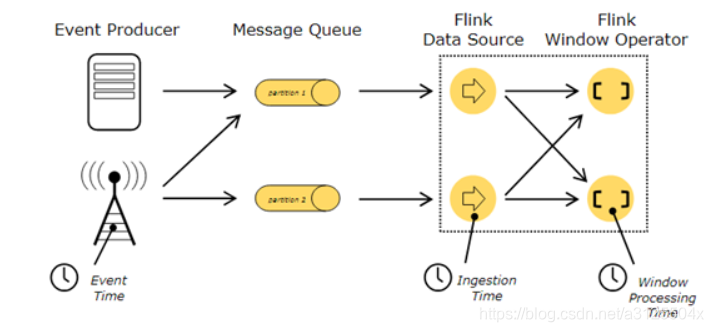
- Flink在流处理程序中支持不同的时间概念。
EventTime
- 1、事件生成时的时间,在进入Flink之前就已经存在,可以从event的字段中抽取
- 2、必须指定watermarks(水位线)的生成方式
- 3、优势:确定性,乱序、延时、或者数据重放等情况,都能给出正确的结果
- 4、弱点:处理无序事件时性能和延迟受到影响
IngestTime
1、事件进入flink的时间,即在source里获取的当前系统的时间,后续操作统一使用该时间。
2、不需要指定watermarks的生成方式(自动生成)
3、弱点:不能处理无序事件和延迟数据
ProcessingTime(默认时间)
1、执行操作的机器的当前系统时间(每个算子都不一样)
2、不需要流和机器之间的协调
3、优势:最佳的性能和最低的延迟
4、弱点:不确定性 ,容易受到各种因素影像(event产生的速度、到达flink的速度、在算子之间传输速度等),压根就不管顺序和延迟
三种时间的综合比较
性能
- ProcessingTime > IngestTime > EventTime
延迟
- ProcessingTime < IngestTime < EventTime
确定性
- EventTime > IngestTime > ProcessingTime
设置 Time 类型
可以你的流处理程序是以哪一种时间为标志的。
- 在我们创建StreamExecutionEnvironment的时候可以设置Time类型,不设置Time类型,默认是ProcessingTime。
- 如果设置Time类型为EventTime或者IngestTime,需要在创建StreamExecutionEnvironment中调用setStreamTimeCharacteristic() 方法指定。
val environment: StreamExecutionEnvironment = StreamExecutionEnvironment.getExecutionEnvironment

//不设置Time 类型,默认是processingTime。
environment.setStreamTimeCharacteristic(TimeCharacteristic.ProcessingTime);

//指定流处理程序以IngestionTime为准
//environment.setStreamTimeCharacteristic(TimeCharacteristic.IngestionTime);

//指定流处理程序以EventTime为准
//environment.setStreamTimeCharacteristic(TimeCharacteristic.EventTime);
示例:ProcessWindowFunction实现时间确定
- 通过process实现处理时间的确定,包括数据时间、window时间等
import org.apache.commons.lang3.time.FastDateFormat
import org.apache.flink.api.java.tuple.Tuple
import org.apache.flink.streaming.api.scala.{DataStream, StreamExecutionEnvironment}
import org.apache.flink.streaming.api.scala.function.ProcessWindowFunction
import org.apache.flink.streaming.api.windowing.time.Time
import org.apache.flink.streaming.api.windowing.windows.TimeWindow
import org.apache.flink.util.Collector

object TimeWindowWordCount {
  def main(args: Array[String]): Unit = {
    val env: StreamExecutionEnvironment = StreamExecutionEnvironment.getExecutionEnvironment
    import org.apache.flink.api.scala._
    val environment: StreamExecutionEnvironment = StreamExecutionEnvironment.getExecutionEnvironment
    import org.apache.flink.api.scala._

    val socketSource: DataStream[String] = environment.socketTextStream("node01",9999)
    //对数据进行处理
    socketSource.flatMap(x => x.split(" "))
      .map(x =>(x,1))
      .keyBy(0)
      .timeWindow(Time.seconds(2),Time.seconds(1))
      .process(new SumProcessFunction)
      .print()

    environment.execute()
  }

}

/*
*  * @tparam IN The type of the input value.
  * @tparam OUT The type of the output value.
  * @tparam KEY The type of the key.
  * @tparam W The type of the window.
  * abstract class ProcessWindowFunction[IN, OUT, KEY, W <: Window]
  */
class SumProcessFunction extends ProcessWindowFunction[(String,Int),(String,Int),Tuple,TimeWindow]{
  private val format: FastDateFormat = FastDateFormat.getInstance("HH:MM:SS")

  /**
    * Evaluates the window and outputs none or several elements.
    *
    * @param key      The key for which this window is evaluated.
    * @param context  The context in which the window is being evaluated.
    * @param elements The elements in the window being evaluated.
    * @param out      A collector for emitting elements.
    * @throws Exception The function may throw exceptions to fail the program and trigger recovery.
    *
    *def process(key: KEY, context: Context, elements: Iterable[IN], out: Collector[OUT])
    */

  override def process(key: Tuple, context: Context, elements: Iterable[(String, Int)], out: Collector[(String, Int)]): Unit = {
    println("当前系统时间为:"+format.format(System.currentTimeMillis()))
    println("window的处理时间为:"+format.format(context.currentProcessingTime))
    println("window的开始时间为:"+format.format(context.window.getStart))
    println("window的结束时间为:"+format.format(context.window.getEnd))
    var sum:Int = 0
    //统计每个窗口的数据出现次数
    for(eachElement <- elements){
      sum += eachElement._2
    }
    //输出 key和key出现的次数
    out.collect((key.getField(0),sum))
  }
}
输入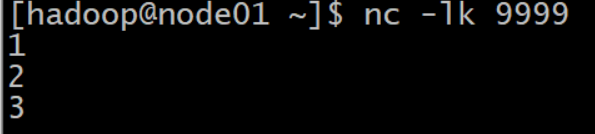
输出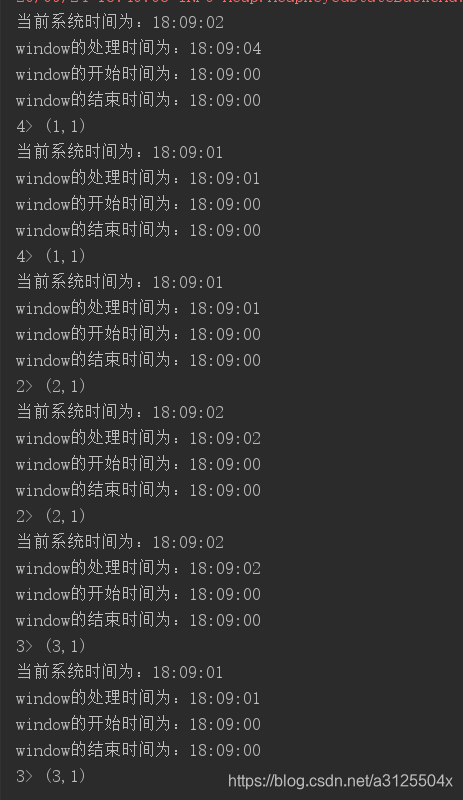
分析
因为是滑动窗口,没1秒处理2秒的数据,所以数据处理有重叠。
版权声明:本文为a3125504x原创文章,遵循CC 4.0 BY-SA版权协议,转载请附上原文出处链接和本声明。