前端小白实习项目,仅供参考
相关参考:vue登陆注册
登录页面:
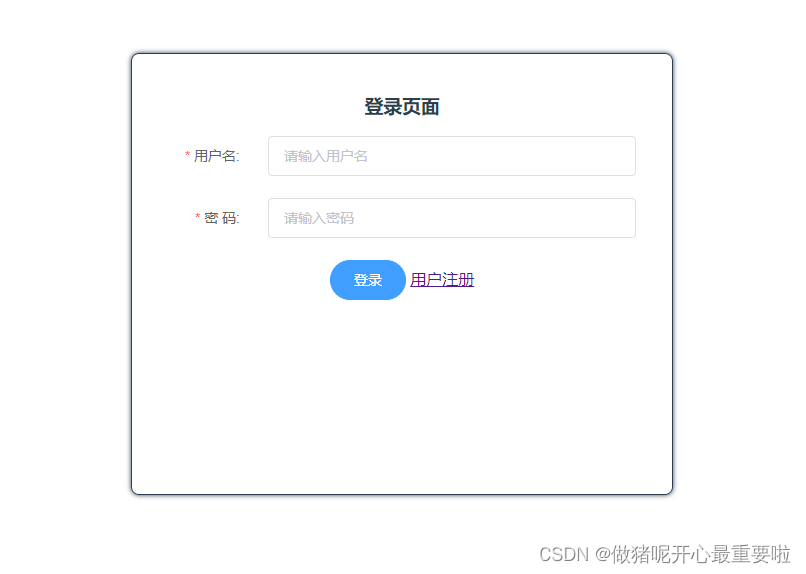
通过axios的post方法连接后端,进行select数据库表单内数据
具体代码:
<template>
    <div id="login" class="box">
      <h3>登录页面</h3>
      <el-form ref="loginForm" :rules="rules" :model="loginForm" label-width="20%">
        <el-form-item label="用户名:" prop="username">
          <el-input v-model="loginForm.username" placeholder="请输入用户名"></el-input>
        </el-form-item>
        <el-form-item prop="password" label="密  码:">
          <el-input v-model="loginForm.password" type="password" placeholder="请输入密码"></el-input>
        </el-form-item>
      </el-form>
      <el-button type="primary" round @click="submitForm('loginForm')" class="btn">登录</el-button>
      <router-link to="/register">用户注册</router-link>
    </div>
</template>

<script>
/* eslint-disable */
import axios from "axios";
export default {
  data() {
    return {
      loginForm: {
        username: "",
        password: "",
      },
      rules: {
        username: [
          { required: true, message: "用户名不能为空", trigger: "blur" },
          { min: 3, max: 10, message: "用户名长度需在3-10", trigger: "blur" },
        ],
        password: [
          { required: true, message: "密码不能为空", trigger: "blur" },
          { min: 3, max: 10, message: "密码长度需在3-10", trigger: "blur" },
        ],
      },
    };
  },

  methods: {
    submitForm(formName) {
      this.$refs[formName].validate((valid) => {
        if (valid) {
          this.$axios
            .post("http://127.0.0.1/login", {
              params: {
                // 传递参数
                name: this.loginForm.username,
                password: this.loginForm.password,
              },
            })
            .then((res) => {
              if (res.data.length) {
                console.log(res.data);
                this.$alert("登录成功"); // 获取返回数组长度,判断数据库中是否有对应用户名和密码,用于判断是否登录成功
                this.$router.push({
                  path: "/home"          // 登录成功,路由跳转至/home页面(提前写好home页面),并携带用户名
                });
              } else {
                this.$alert("用户名或密码错误", "登录失败", {
                  // 登录失败,出现提示框,并清空输入框
                  confirmButtonText: "确定",
                  callback: (action) => {
                    (this.loginForm.username = ""),
                      (this.loginForm.password = "");
                  },
                });
              }
            })
            .catch((error) => {
              console.log("登录失败" + err);
            });
        }
      });
    },
  },
};
</script>
<style>
.box {
  width: 500px;
  height: 400px;
  margin: 100px auto;
  padding: 20px;
  border: 1px solid;
  border-radius: 8px;
  box-shadow: 0 0 5px;
}
h3 {
  text-align: center;
}
.el-input {
  width: 92%;
}
.btn {
  text-align: center;
}
</style>
注册页面:
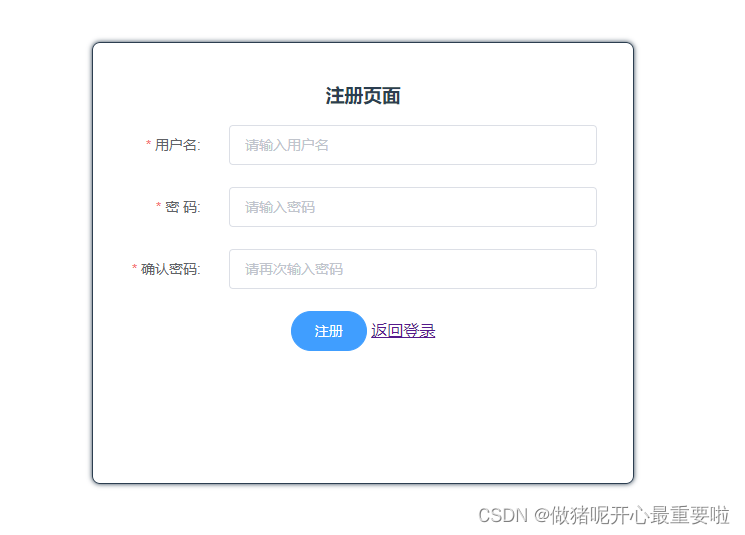
post方法连接后端register.js,将表单中绑定的数据传输过去,register.js中主要功能是查询数据库表中数据是否重复,不重复则进行插入insert这条数据。
具体代码:
<template>
<div>
  <div id="register" class="box" >
    <h3>注册页面</h3>
    <el-form ref="registerForm" :rules="rules" :model="loginForm" label-width="20%">
    <el-form-item label="用户名:" prop="username">
            <el-input v-model="loginForm.username" placeholder="请输入用户名"></el-input>
    </el-form-item>
    <el-form-item prop="password" label="密  码:">
            <el-input v-model="loginForm.password" type="password" placeholder="请输入密码"></el-input>
    </el-form-item>
    <el-form-item prop="password2" label="确认密码:">
            <el-input v-model="loginForm.password2" type="password" placeholder="请再次输入密码"></el-input>
    </el-form-item>
    </el-form>
    <el-button type="primary" round @click="submitForm('registerForm')" class="btn">注册</el-button>
    <router-link to="/">返回登录</router-link>
  </div>
</div>
</template>

<script>
/* eslint-disable */
import axios from 'axios'
export default {
  data () {
    var validatePass = (rule, value, callback) => {
      if (value === '') {
        callback(new Error('请再次输入密码'))
      } else if (value !== this.loginForm.password) {
        callback(new Error('两次输入密码不一致!'))
      } else {
        callback()
      }
    }
    return {
      loginForm: {
        username: '',
        password: '',
        password2: ''
      },
      rules: {
        username: [
          { required: true, message: '用户名不能为空', trigger: 'blur'},
          {min: 3, max: 10, message: '用户名长度需在3-10', trigger: 'blur'}
        ],
        password: [
          { required: true, message: '密码不能为空', trigger: 'blur'},
          {min: 3, max: 10, message: '密码长度需在3-10', trigger: 'blur'}
        ],
        password2: [
          { required: true, message: '密码不能为空', trigger: 'blur'},
          {min: 3, max: 10, message: '密码长度需在3-10', trigger: 'blur'},
          { validator: validatePass, trigger: 'blur' }
        ]
      }
    }
  },

  methods: {
    submitForm (formName) {
      this.$refs[formName].validate((valid) => {
        if (valid) {
          this.$axios
            .post('http://127.0.0.1/register', {
              name: this.loginForm.username,
              password: this.loginForm.password
            })
            .then(res => {
              if (res.data == 2) {
                console.log(res.data)
                this.$alert('注册成功')
              } else {
                console.log(res.data)
                this.$alert('用户名重复', '注册失败', {
                  confirmButtonText: '确定',
                  callback: action => {
                    this.loginForm.username = '',
                    this.loginForm.password = '',
                    this.loginForm.password2 = ''
                  }
                })
              }
            })
        }
      })
    }
  }
}
</script>

<style>
.box{
    width:500px;
    height:400px;
    margin:100px auto;
    padding:20px;
    border:1px solid;
    border-radius:8px;
    box-shadow:0 0 5px;
}
h3{
  text-align: center;
}
.el-input{
  width:92%;
}
.btn{
  text-align: center;
}
</style>
Home页:
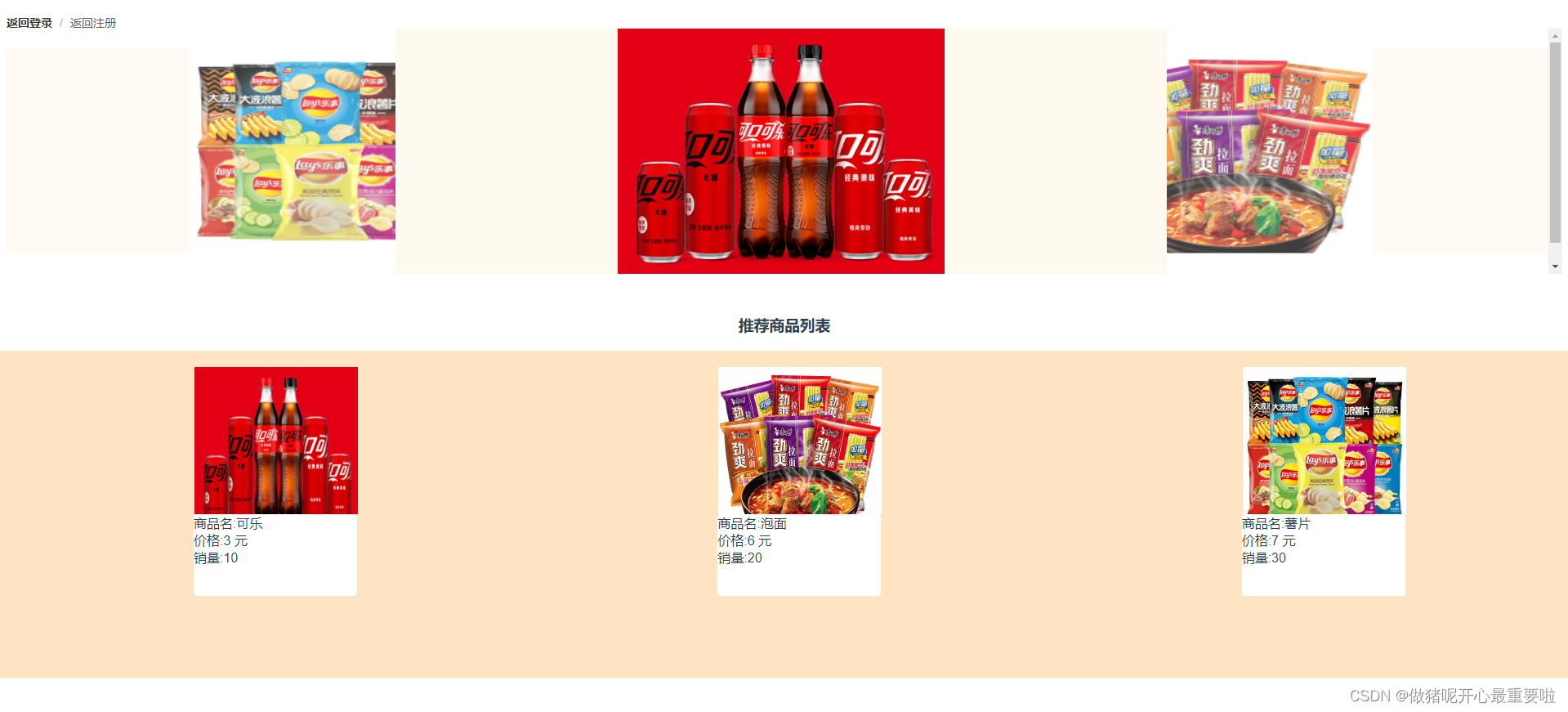
图片获取是通过后端将图片的相对路径传到前端(图片存在后端中),前端将路径进行拼接然后渲染。我创了一个单独的数据库表去存图片路径,再通过后端传入前端。有尝试过传图片流,但是没成功。
具体代码:
<template>
<div class="goods">
<el-breadcrumb separator="/">
  <el-breadcrumb-item :to="{ path: '/' }">返回登录</el-breadcrumb-item>
  <el-breadcrumb-item :to="{ path: '/register' }">返回注册</el-breadcrumb-item>
</el-breadcrumb>
<!-- 面包屑END -->
  <el-carousel :interval="4000" type="card">
    <el-carousel-item v-for="item in pictureList" :key="item.src">
      <img class="pic" :src="item.src" alt="图片丢失了"/>
    </el-carousel-item>
  </el-carousel>
<!-- 轮播图END -->
<div class="list">
  <h3>推荐商品列表</h3>
  <!-- 商品 -->
  <el-row :gutter="20" type="flex" justify="space-around">
    <el-col :span="10" :offset="1" v-for="item in pictureList" :key="item.src">
    <div class="picBox">
      <img class="listPic"  :src="item.src"/>
    </div>
    </el-col>
  </el-row>
  <!-- 图片栏END -->
  <el-row :gutter="20" type="flex" justify="space-around">
    <div v-for="item in goodList" :key="item.name">
    <el-col :span="50" :offset="2">
      <div class="infoBox">
      <span>商品名:{{item.name}}</span><br>
      <span>价格:{{item.price}} 元</span><br>
      <span>销量:{{item.sales}}</span>
      </div>
    </el-col>
    </div>
  </el-row>
  <!-- 信息栏END -->
</div>
  <!-- 商品END -->
</div>
</template>

<script>
export default {
  components: {},
  data () {
    return {
      goodList: [],
      pictureList: []
    }
  },
  created () {},
  mounted () {
    this.getList()
    this.getpicList()
    this.timedRefresh()
  },
  computed: {},
  beforeDestroy () {
    clearInterval(this.timer) // 清楚定时刷新,不清除会一直运行,关闭页面也会定时刷新
  },
  methods: {
    timedRefresh () {
      clearInterval(this.timer)
      this.timer = setInterval(() => {
        window.location.reload() // 每隔6s刷新整个页面
      }, 6000)
    },
    getpicList () {
      this.$axios
        .get('http://127.0.0.1/picture') // {responseType: 'blob'}
        .then((res) => {
          res.data = res.data.map((item) => {
            item.src = 'http://127.0.0.1/' + item.src
            return item
          })
          console.log(res.data)
          this.pictureList = res.data
          console.log('图片' + res.data)
          console.log(this.pictureList)
        })
    },
    getList () {
      this.$axios
        .get('http://127.0.0.1/goods', {

        }).then((res) => {
          if (res.data.length) {  // 判断是否有意义
            console.log(res.data)
            this.goodList = res.data
            // console.log('数据传输成功')
          } else {
            // console.log('数据传输失败')
          }
        })
    }
  }
}
</script>

<style>
.goods {
  margin-top: -30px;
}
.goods .pic {
  height:300px;
  width:400px;
}
.goods .el-breadcrumb {
  margin-top: 5px
}
.goods .el-carousel{
  height: 300px;
}
.goods .el-carousel__item{
  background-color:floralwhite;
}
.goods .list {
    margin-top: 50px;
}
.goods .list .listPic {
  height:200px;
  width:200px;
}
.goods .list .picBox{
  background-color: blue;
  margin-top: 20px;
  margin-left: 150px;
  height:200px;
  width:200px;
}
.goods .list .infoBox{
    background-color:white;
    border-radius: 4px;
    height:100px;
    width:200px;
    text-align:left;
}
.goods .el-row{
    background-color:bisque;
    height: 200px;
}
.goods .el-col{
  background-color:bisque;
}
</style>
main.js
import Vue from 'vue'
import App from './App'
import router from './router'
import axios from 'axios'
import ElementUI from 'element-ui'
import 'element-ui/lib/theme-chalk/index.css'

Vue.prototype.HOST = 'http://localhost:8080'
Vue.config.productionTip = false
Vue.prototype.$axios = axios
Vue.use(ElementUI)

/* eslint-disable no-new */
new Vue({
  el: '#app',
  router,
  components: { App },
  template: '<App/>'

})
router/index.js
import Vue from 'vue'
import Router from 'vue-router'
import login from '@/components/login'
import register from '@/components/register'
import home from '@/components/home'

Vue.use(Router)

export default new Router({
  routes: [
    {
      path: '/',
      name: 'denglu',
      component: login
    },
    {
      path: '/register',
      name: 'zhuce',
      component: register
    },
    {
      path: '/home',
      name: 'home',
      component: home
    }
  ]
})版权声明:本文为weixin_43413645原创文章,遵循CC 4.0 BY-SA版权协议,转载请附上原文出处链接和本声明。