springBoot下用java代码创建表
- 首先找到application.yml配置文件进行数据库连接配置
 2…编写初始化数据库表类
这里就先写个demo用作测试
在项目目下新建一个包,报名任意,在包下新建一个类,类名称为”CreateTableTest.java"(类名称也可以自己命名)。
import org.springframework.beans.factory.annotation.Value;
import org.springframework.context.annotation.PropertySource;
import org.springframework.scheduling.annotation.Scheduled;
import org.springframework.stereotype.Repository;

import javax.annotation.PostConstruct;
import java.sql.*;
import java.text.SimpleDateFormat;
import java.util.Calendar;
import java.util.Date;


@Repository
@PropertySource({"classpath:application.yml"})
public class CreateTableTest {

    @Value(value = "com.mysql.jdbc.Driver")
    private String driver;
    @Value(value = "${custom.datasource.gateway.url}")
    private String url;

    @Value(value = "${custom.datasource.gateway.username}")
    private String userName;

    @Value(value = "${custom.datasource.gateway.password}")
    private String password;

    @PostConstruct
    public void init() throws SQLException, ClassNotFoundException{
        System.out.println("开始执行新建数据库了"+url+"  "+userName+"  "+password);
        //连接数据库
        Class.forName(driver);
        //测试url中是否包含useSSL字段,没有则添加设该字段且禁用
        if( url.indexOf("?") == -1 ){
            url = url + "?useSSL=false" ;
        }
        else if( url.indexOf("useSSL=false") == -1 || url.indexOf("useSSL=true") == -1 )
        {
            url = url + "&useSSL=false";
        }
        Connection conn = DriverManager.getConnection(url, userName, password);
        Statement stat = conn.createStatement();
        //获取数据库表名

        ResultSet rs = conn.getMetaData().getTables(null, null, "test_sche", null);
        // 判断表是否存在,如果存在则什么都不做,否则创建表
        if( rs.next() ){
            System.out.println("数据库已存在");
            return;
        }
        else{
            stat.executeUpdate("CREATE TABLE test_sche("
            +"`id` int(11) NOT NULL,"
            +"`counts` int(11) DEFAULT NULL,"
            +"PRIMARY KEY (`id`)"
            +") ENGINE=InnoDB DEFAULT CHARSET=utf8"
            );

        }
        // 释放资源
        stat.close();
        conn.close();
    }
}
3.运行查看结果
找到项目中的Application.java类,运行该类,等运行完毕后再打开sqlyog查看自己的数据库,发现数据库中已经创建好了一个表为"test_ache"的表和表中的相关字段。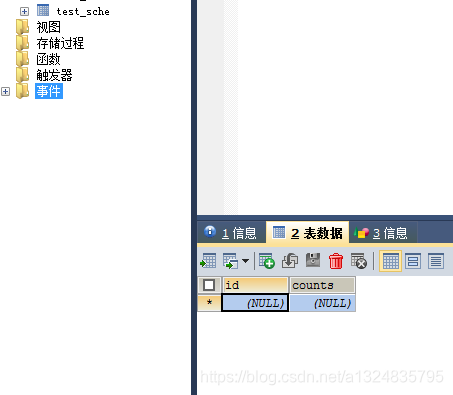
用定时任务创建表(一分钟创建一个)
刚刚演示了最基本的java代码创建表,现在进阶一下写个定时任务创建表这里要用到
@Scheduled这个注解
1.在Application.java加上@EnableScheduling注解
2.编写新的创建表代码这里用的test_+时+分做表名
import org.springframework.beans.factory.annotation.Value;
import org.springframework.context.annotation.PropertySource;
import org.springframework.scheduling.annotation.Scheduled;
import org.springframework.stereotype.Repository;

import javax.annotation.PostConstruct;
import java.sql.*;
import java.text.SimpleDateFormat;
import java.util.Calendar;
import java.util.Date;


@Repository
public class CreateTableTest {

   @Value(value = "com.mysql.jdbc.Driver")
    private String driver;
    @Value(value = "${custom.datasource.gateway.url}")
    private String url;

    @Value(value = "${custom.datasource.gateway.username}")
    private String userName;

    @Value(value = "${custom.datasource.gateway.password}")
    private String password;
    @Scheduled(cron = "0 */1 * * * ?")
    //@PostConstruct
    public void init() throws SQLException, ClassNotFoundException{
        Calendar now = Calendar.getInstance();
        System.out.println("时: " + now.get(Calendar.HOUR_OF_DAY));
        System.out.println("分: " + now.get(Calendar.MINUTE));
        System.out.println("开始执行新建数据库了"+url+"  "+userName+"  "+password);
        //连接数据库
        Class.forName(driver);
        //测试url中是否包含useSSL字段,没有则添加设该字段且禁用
        if( url.indexOf("?") == -1 ){
            url = url + "?useSSL=false" ;
        }
        else if( url.indexOf("useSSL=false") == -1 || url.indexOf("useSSL=true") == -1 )
        {
            url = url + "&useSSL=false";
        }
        Connection conn = DriverManager.getConnection(url, userName, password);
        Statement stat = conn.createStatement();
        //获取数据库表名
        String tableName ="test_"+now.get(Calendar.HOUR_OF_DAY)+now.get(Calendar.MINUTE);

        ResultSet rs = conn.getMetaData().getTables(null, null, tableName, null);
        // 判断表是否存在,如果存在则什么都不做,否则创建表
        if( rs.next() ){
            System.out.println("数据库已存在");
            return;
        }
        else{

            //创建行政区划表
            // String table2 ="test"+now.get(Calendar.YEAR)+""+(now.get(Calendar.MONTH) + 1)+""+now.get(Calendar.DAY_OF_MONTH);
            String test = "CREATE TABLE "+tableName+" (";
            stat.executeUpdate(test
            +"`id` int(11) NOT NULL,"
            +"`counts` int(11) DEFAULT NULL,"
            +"PRIMARY KEY (`id`)"
            +") ENGINE=InnoDB DEFAULT CHARSET=utf8"

            );
            System.out.println("成功创建"+tableName);

        }
        // 释放资源
        stat.close();
        conn.close();
    }
}
3.找到项目中的Application.java类,运行该类,等运行完毕后再打开sqlyog查看自己的数据库每隔一分钟会看到新表创建成功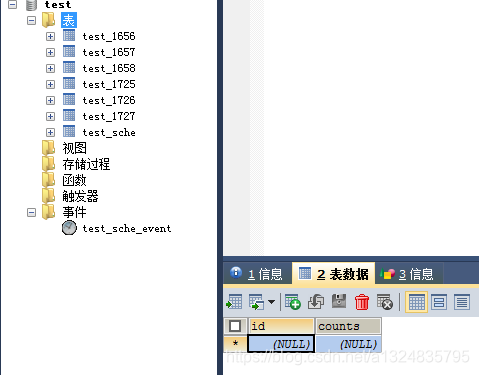 可以看到每一分钟创建一个表成功了
注解及作用
- @Scheduled
- @PostConstruct
- 每天凌晨2点 0 0 2 * * ?和每天隔一小时 0 * */1 * * ?
例1:每隔5秒执行一次:*/5 * * * * ?
例2:每隔5分执行一次:0 */5 * * * ?
在26分、29分、33分执行一次:0 26,29,33 * * * ?
例3:每天半夜12点30分执行一次:0 30 0 * * ? (注意日期域为0不是24)
每天凌晨1点执行一次:0 0 1 * * ?
每天上午10:15执行一次: 0 15 10 ? * * 或 0 15 10 * * ? 或 0 15 10 * * ? *
每天中午十二点执行一次:0 0 12 * * ?
每天14点到14:59分,每1分钟执行一次:0 * 14 * * ?
每天14点到14:05分,每1分钟执行一次:0 0-5 14 * * ?
每天14点到14:55分,每5分钟执行一次:0 0/5 14 * * ?
每天14点到14:55分,和18点到18点55分,每5分钟执行一次:0 0/5 14,18 * * ?
每天18点执行一次:0 0 18 * * ?
每天18点、22点执行一次:0 0 18,22 * * ?
每天7点到23点,每整点执行一次:0 0 7-23 * * ?
每个整点执行一次:0 0 0/1 * * ?
每天凌晨2点 0 0 2 * * ?和每天隔一小时 0 * */1 * * ?
例1:每隔5秒执行一次:*/5 * * * * ?
例2:每隔5分执行一次:0 */5 * * * ?
在26分、29分、33分执行一次:0 26,29,33 * * * ?
例3:每天半夜12点30分执行一次:0 30 0 * * ? (注意日期域为0不是24)
每天凌晨1点执行一次:0 0 1 * * ?
每天上午10:15执行一次: 0 15 10 ? * * 或 0 15 10 * * ? 或 0 15 10 * * ? *
每天中午十二点执行一次:0 0 12 * * ?
每天14点到14:59分,每1分钟执行一次:0 * 14 * * ?
每天14点到14:05分,每1分钟执行一次:0 0-5 14 * * ?
每天14点到14:55分,每5分钟执行一次:0 0/5 14 * * ?
每天14点到14:55分,和18点到18点55分,每5分钟执行一次:0 0/5 14,18 * * ?
每天18点执行一次:0 0 18 * * ?