本文是对《Python Qt GUI快速编程》的第9章的窗口切分条例子News Reader 用Python3+PyQt5进行改写。
注:import qrc_resources,资源文件resources.qrc如下:
===========================
<!DOCTYPE RCC><RCC version="1.0">
<qresource>
<file alias="icon.png">images/icon.png</file>
<file alias="filenew.png">images/filenew.png</file>
<file alias="fileopen.png">images/fileopen.png</file>
<file alias="filesave.png">images/filesave.png</file>
<file alias="filesaveas.png">images/filesaveas.png</file>
<file alias="fileclose.png">images/filequit.png</file>
<file alias="filequit.png">images/filequit.png</file>
<file alias="editcut.png">images/editcut.png</file>
<file alias="editcopy.png">images/editcopy.png</file>
<file alias="editpaste.png">images/editpaste.png</file>
<file alias="editadd.png">images/editadd.png</file>
<file alias="editedit.png">images/editedit.png</file>
<file alias="editdelete.png">images/editdelete.png</file>
</qresource>
</RCC>
======
sudo pyrcc5 -o qrc_resources.py resources.qrc 生成qrc_resources.py
import sys
from PyQt5.QtCore import (QSettings, Qt,QByteArray)
from PyQt5.QtWidgets import (QAction, QApplication, QListWidget,
QMainWindow, QSplitter, QTextBrowser)
from PyQt5.QtGui import QIcon
import qrc_resources
__version__ = "1.0.0"
class MainWindow(QMainWindow):
def __init__(self, parent=None):
super(MainWindow, self).__init__(parent)
self.groupsList = QListWidget()
self.messagesList = QListWidget()
self.messageView = QTextBrowser()
self.messageSplitter = QSplitter(Qt.Vertical)
self.messageSplitter.addWidget(self.messagesList)
self.messageSplitter.addWidget(self.messageView)
self.mainSplitter = QSplitter(Qt.Horizontal)
self.mainSplitter.addWidget(self.groupsList)
self.mainSplitter.addWidget(self.messageSplitter)
self.setCentralWidget(self.mainSplitter)
self.mainSplitter.setStretchFactor(0, 1)
self.mainSplitter.setStretchFactor(1, 3)
self.messageSplitter.setStretchFactor(0, 1)
self.messageSplitter.setStretchFactor(1, 2)
self.createMenusAndToolbars()
settings = QSettings()
if settings.value("MainWindow/Geometry") or \
settings.value("MainWindow/State") or \
settings.value("MainSplitter"):
self.restoreGeometry(
QByteArray(settings.value("MainWindow/Geometry")))
self.restoreState(
QByteArray(settings.value("MainWindow/State")))
self.messageSplitter.restoreState(
QByteArray(settings.value("MessageSplitter")))
self.mainSplitter.restoreState(
QByteArray(settings.value("MainSplitter")))
status = self.statusBar()
status.setSizeGripEnabled(False)
status.showMessage("Ready", 5000)
self.setWindowTitle("News Reader")
self.generateFakeData()
def createMenusAndToolbars(self):
fileMenu = self.menuBar().addMenu("&File")
fileToolbar = self.addToolBar("File")
fileToolbar.setObjectName("FileToolbar")
for icon, text in (("new", "&New..."), ("open", "&Open..."),
("save", "&Save"), ("save", "Save &As..."),
(None, None), ("quit", "&Quit")):
if icon is None:
fileMenu.addSeparator()
else:
action = QAction(QIcon(":/file{0}.png".format(icon)),
text, self)
if icon == "quit":
action.triggered.connect(self.close)
elif text != "Save &As...":
fileToolbar.addAction(action)
fileMenu.addAction(action)
editMenu = self.menuBar().addMenu("&Edit")
editToolbar = self.addToolBar("Edit")
editToolbar.setObjectName("EditToolbar")
for icon, text in (("add", "&Add..."), ("edit", "&Edit..."),
("delete", "&Remove")):
action = QAction(QIcon(":/edit{0}.png".format(icon)),
text, self)
editToolbar.addAction(action)
editMenu.addAction(action)
def closeEvent(self, event):
if self.okToContinue():
settings = QSettings()
settings.setValue("MainWindow/Geometry",
self.saveGeometry())
settings.setValue("MainWindow/State",
self.saveState())
settings.setValue("MessageSplitter",
self.messageSplitter.saveState())
settings.setValue("MainSplitter",
self.mainSplitter.saveState())
else:
event.ignore()
def okToContinue(self):
return True
def generateFakeData(self):
for group in ("ada", "apl", "asm.*", "asm370", "awk", "basic.*",
"beta", "c.*", "c++.*", "clarion", "clipper.*", "clos",
"clu", "cobol", "dylan", "eiffel", "forth.*",
"fortran.*", "functional", "haskell", "hermes", "icon",
"idl", "idl-pvwave", "java.*", "javascript", "labview",
"limbo", "lisp.*", "logo", "misc", "ml.*", "modula2",
"modula3", "mumps", "oberon", "objective-c", "pascal.*",
"perl.*", "php.*", "pl1", "pop", "postscript",
"prograph", "prolog", "python.*", "rexx.*", "ruby",
"sathe", "scheme.*", "sigplan", "smalltalk.*", "tcl.*",
"verilog", "vhdl", "visual.*", "vrml"):
self.groupsList.addItem("comp.lang.{0}".format(group))
for topic, author in (
("ANN: Einf\u00FChrung in die Programmierung mit Python",
"Ian Ozsvald",),
("SQLObject 0.7.3", "Oleg Broytmann",),
("ANN: Pyrex 0.9.5.1", "greg",),
("ANN: gozerbot IRC and JABBER bot", "bthate",),
("Extended deadline: CfP IEEE Software Special Issue on "
"Rapid Application Development with Dynamically Typed "
"Languages", "Laurence Tratt",),
("ANN: New python software community website in Chinese, "
"PythonNet.com", "Wenshan Du",),
("ANN: Plex 1.1.5 (Repost)", "greg",),
("ANN: Pyrex 0.9.5", "greg",),
("ftputil 2.2.1", "Stefan Schwarzer",),
("FlightFeather Social Networking Platform 0.3.1",
"George Belotsky",),
("OSCON 2007 Call for Participation Ends Soon",
"Kevin Altis",),
("ANN: tl.googlepagerank", "Thomas Lotze",),
("Dejavu 1.5.0RC1", "Robert Brewer",),
("PyCon: one week left for hotel registration",
"A.M. Kuchling",),
("FlightFeather Social Networking Platform 0.3.0",
"George Belotsky",),
("SQLObject 0.8.0b2", "Oleg Broytmann",),
("SQLObject 0.7.3b1", "Oleg Broytmann",),
("ANN: Updated TkTreectrl wrapper module", "klappnase",),
("PyPy Trillke Sprints Feb/March 2007", "holger krekel",),
("wxPython 2.8.1.1", "Robin Dunn",),
("Movable Python 2.0.0 Final Available", "Fuzzyman",),
("ANN: Phebe 0.1.1", "Thomas Lotze",),
("Exception #03. Python seminar in Kiev city (Ukraine).",
"Mkdir",),
("FlightFeather Social Networking Platform 0.2.8",
"George Belotsky",),
("ANN: Python Installation", "Ian Ozsvald",),
("ANN: pyGame Basics", "Ian Ozsvald",),
("PythonTidy 1.10", "Chuck Rhode",),
("Shed Skin Optimizing Python-to-C++ Compiler 0.0.10",
"Mark Dufour",),
("ANN : Karrigell 2.3.3", "Pierre Quentel",),
("ANN: amplee 0.4.0", "Sylvain Hellegouarch")):
self.messagesList.addItem("{0} from {1}".format(topic, author))
self.messageView.setHtml("""<table bgcolor=yellow>
<tr><td>Groups:</td><td>comp.lang.python.announce</td></tr>
<tr><td>From:</td><td>"Fuzzyman" <fuzzy...@gmail.com></td></tr>
<tr><td>Subject:</td><td><b>[ANN] Movable Python 2.0.0 Final
Available</b></td></tr>
</table>
<h3>Movable Python 2.0.0 Final</h3>
<p>
<a href="http://www.voidspace.org.uk/python/movpy/">
http://www.voidspace.org.uk/python/movpy/</a>
is now available.
<p>
The new binaries are available for download from the groups page :
<p>Movable Python Groups Page
<a href="http://voidspace.tradebit.com/groups.php">
http://voidspace.tradebit.com/groups.php</a>
<p>
Binaries are uploaded for Python 2.2.3, 2.3.5, 2.4.4, 2.5 and the
MegaPack
<a href="http://www.voidspace.org.uk/python/movpy/megapack.html">
http://www.voidspace.org.uk/python/movpy/megapack.html</a>.
<p>
There is also a fresh version of the free demo, based on Python 2.3.5:
<p>Movable Python Trial Version
<a href="http://voidspace.tradebit.com/files.php/7007">
http://voidspace.tradebit.com/files.php/7007</a>
<h3>What is Movable Python</h3>
<p>
<b><i>Movable Python</i></b> is a distribution of Python, for Windows,
that can run without being installed. It means you can carry a full
development environment round on a USB stick.
<p>
It is also useful for testing programs with a 'clean Python install',
and testing programs with multiple versions of Python.
<p>
The GUI program launcher makes it a useful programmers tool, including
features like :
<ul>
<li>Log the output of all Python scripts run
<li>Enable Psyco for all scripts
<li>Quick Launch buttons for commonly used programs
<li>Configure multiple interpreters for use from a single interface
</ul>
<p>
It comes with the Pythonwin IDE and works fine with other IDEs like
SPE
<a href="http://developer.berlios.de/projects/python/">
http://developer.berlios.de/projects/python/</a>.
<p>
Plus many other features and bundled libraries.""")
if __name__ == "__main__":
app = QApplication(sys.argv)
app.setOrganizationName("Qtrac Ltd.")
app.setOrganizationDomain("qtrac.eu")
app.setApplicationName("News Reader")
form = MainWindow()
form.show()
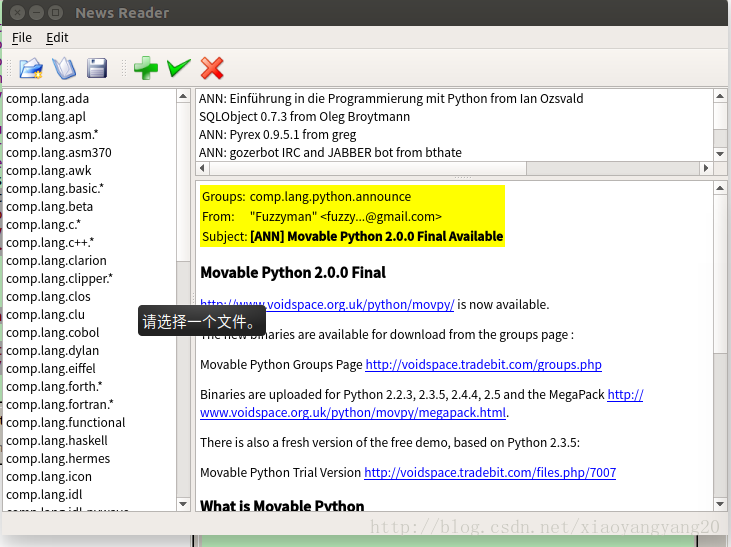
app.exec_()运行结果:
版权声明:本文为xiaoyangyang20原创文章,遵循CC 4.0 BY-SA版权协议,转载请附上原文出处链接和本声明。