官方网站
1、权限管理
1.1 什么是权限管理
- 基本上涉及到用户参与的系统都要进行权限管理,权限管理属于系统安全的范畴,权限管理实现对用户访问系统的控制,按照安全规则或者安全策略控制用户可以访问而且只能访问自己被授权的资源。
- 权限管理包括用户身份认证和授权两部分,简称认证授权。对于需要访问控制的资源用户首先经过身份认证认证通过后用户具有该资源的访问权限方可访问。
1.2 什么是身份认证
- 身份认证,就是判断一个用户是否为合法用户的处理过程。最常用的简单认证方式就是系统通过核对用户输入的用户名和口令,看其是否与系统中存储的该用户的用户名和口令一致,用来判断用户身份是否正确。对于采用指纹等系统,则出示指纹;对于硬件
Key等刷卡系统,则需要刷卡。
1.3 什么是授权
授权,即访问控制,控制谁能访问哪些资源。主体进行身份认证后,需要分配权限方可访问那系统的资源,对于某些资源没有权限是无法访问的。
2、什么是Shiro
Apache Shiro™ is a powerful and easy-to-use Java security framework that performs authentication, authorization, cryptography, and session management. With shiro’s easy-to-understand API, you can quickly and easily secure any application – from the smallest mobile applications to the largest web and enterprise applications.
Shiro是一个功能强大且易于使用的Java安全框架,它执行身份验证,授权,加密和会话管理。实用Shiro易于理解的API,您可以快速轻松地保护任何应用程序从最小的移动应用程序到最大的web和企业应用程序
3、Shiro的核心架构
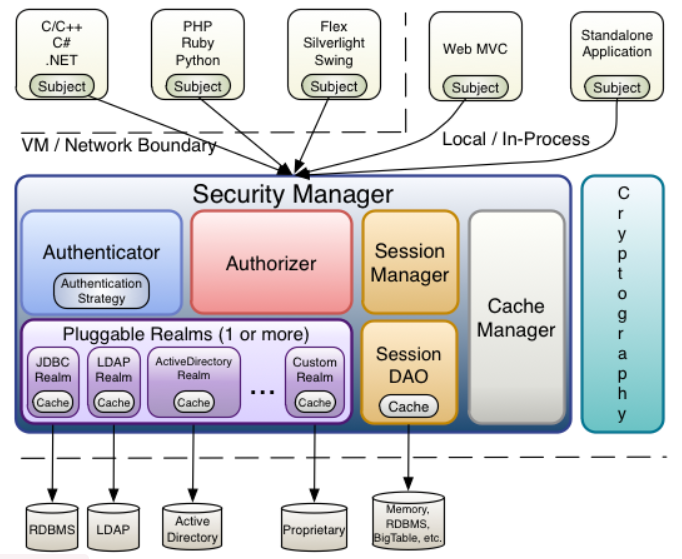
3.1、Subject
Subject即主体,外部应用与Subject进行交互,Subject记录了当前操作用户,将用户的概念理解为当前操作的主体,可能是一个通过浏览器请求的用户,也可能是一个运行的程序,Subject在Shiro中是一个接口,接口中定义了很多认证授权相关的方法吗,外部程序通过Subject进行认证授权,而Subject是通过SecurityManager安全管理器进行认证授权。
3.2、SecurityManager
SecurityManager即安全管理器,对全部的Subject进行安全管理,它是Shiro的核心,负责对所有的Subject进行安全管理。通过SecurityManager可以完成Subject的认证、授权等,实质上SecurityManager是通过Authenticator进行认证,通过Authorizer进行授权,通过SessionManager进行会话管理等。SecurityManager是一个接口,继承了Authenticator,Authorizer,SessionManager这三个接口。
3.3、Authenticator
Authenticator即认证器,对用户身份进行认证,Authenticator是一个接口,Shiro提供ModularRealmAuthenticator实现类,通过ModularRealmAuthenticator基本上可以满足大多数需求,也可以自定义认证器。
3.4、Authorizer
Authorizer即授权器,用户通过认证器认证通过,在访问功能时需要通过授权器判断用户是否有此功能的操作权限。
3.5、Realm
Realm即领域,相当于datasource数据源,SecurityManager进行安全认证需要通过Realm获取用户权限数据,比如:如果用户身份数据在数据库,那么Realm就需要从数据库获取用户身份信息。
注意:不要把Realm理解成只是从数据源取数据,在Realm中还有认证授权校验相关的代码。
3.6、SessionManager
SessionManager即会话管理,Shiro框架定义了一套会话管理,它不依赖Web容器的Session,所以Shiro可以使用在非Web应用上,也可以将分布式应用的会话集中在一点管理,此特性可以使它实现单点登录。
3.7、SessionDAO
SessionDAO即会话Dao,是对Session会话操作的一套接口,比如要将Session存储到数据库,可以通过Jdbc将会话存储到数据库。
3.8、CacheManager
CacheManager即缓存管理,将用户权限数据存储在缓存,这样可以提高性能
3.9、Cryptography
Cryptography即密码管理,Shiro提供了一套加密解密的组件,方便开发。比如提供常用的散列、加密解密等功能。
4、Shiro中的认证
4.1、认证
- 身份认证,就是判断一个用户是否为合法用户的处理过程。最常用的简单身份认证方式是系统通过核对用户输入的用户名和口令,看其是否与系统中存储的该用户的用户名和口令一致,来判断用户身份是否正确。
4.2、Shiro中认证的关键对象
- Subject:主体
访问系统的用户,主体可以是用户、程序等,进行认证的都称为主体;
- Principal:身份信息----用户名
是主体(
Subject)进行身份认证的标识,标识必须具有唯一性,如用户名、手机号、邮箱地址等,一个主体可以有多个身份,但是必须有一个主身份(Primary Principal)。
- credential:凭证信息-----密码
是只有主体自己知道的安全信息,如密码、证书等
4.3、认证流程
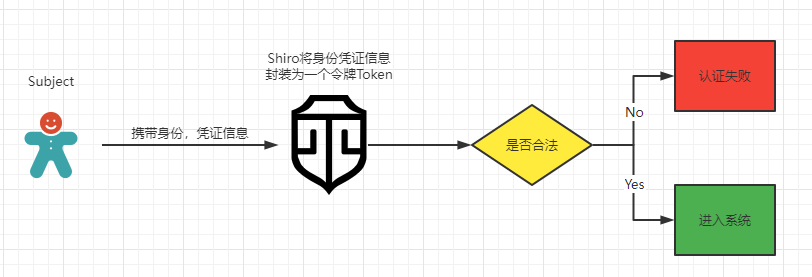
5、单机Shiro认证
5.1、引入依赖
自行进入
Maven中央仓库查找依赖坐标
<dependency>
    <groupId>org.apache.shiro</groupId>
    <artifactId>shiro-core</artifactId>
    <version>1.8.0</version>
</dependency>
<dependency>
    <groupId>log4j</groupId>
    <artifactId>log4j</artifactId>
    <version>1.2.17</version>
</dependency>
<dependency>
    <groupId>org.slf4j</groupId>
    <artifactId>slf4j-log4j12</artifactId>
    <version>1.7.32</version>
    <scope>test</scope>
</dependency>
<dependency>
    <groupId>org.slf4j</groupId>
    <artifactId>slf4j-jdk14</artifactId>
    <version>1.7.32</version>
</dependency>
5.2、添加Shiro配置文件
Shiro配置文件后缀名为.ini,文件名称没有限制,文件位置需要在项目的resources目录下方,具体目录也没有限制
Shiro的ini配置文件中主要配置有四大类:main,users,roles,urls,这是死的,不能改
[main]
#提供了对根对象 securityManager 及其依赖的配置
securityManager=org.apache.shiro.mgt.DefaultSecurityManager
…………
securityManager.realms=$jdbcRealm


[users]
#提供了对用户/密码及其角色的配置,用户名=密码,角色 1,角色 2
username=password,role1,role2


[roles]
#提供了角色及权限之间关系的配置,角色=权限 1,权限 2
role1=permission1,permission2


[urls]
#用于 web,提供了对 web url 拦截相关的配置,url=拦截器[参数],拦截器
/index.html = anon
/admin/** = authc, roles[admin], perms["permission1"]
所以这里我们初始化三个账号
[users]
Jack=123
Marry=123456
Lily=789
5.3、测试
@Test
public void testAuthenticator(){
    //1、创建安全管理器对象
    DefaultSecurityManager securityManager = new DefaultSecurityManager();
    //2、给安全管理器设置Realm
    securityManager.setRealm(new IniRealm("classpath:shiro.ini"));
    //3、SecurityUtils给全局安全工具类设置安全管理器
    SecurityUtils.setSecurityManager(securityManager);
    //4、关键对象 Subject 主体
    Subject subject = SecurityUtils.getSubject();
    System.out.println("认证状态:" + subject.isAuthenticated());
    //5、创建令牌,用于用户认证
    UsernamePasswordToken token = new UsernamePasswordToken("Jack", "123");
    try {
        subject.login(token);
    } catch (UnknownAccountException e) {
        System.out.println("账户不存在");
    } catch (IncorrectCredentialsException e) {
        System.out.println("密码错误");
    }
    System.out.println("认证状态:" + subject.isAuthenticated());
}
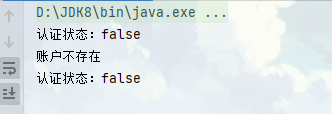
认证通过,不会有提示

如果账户不存在,会报
UnknownAccountException,如果账户存在,但是密码错误,会报IncorrectCredentialsException
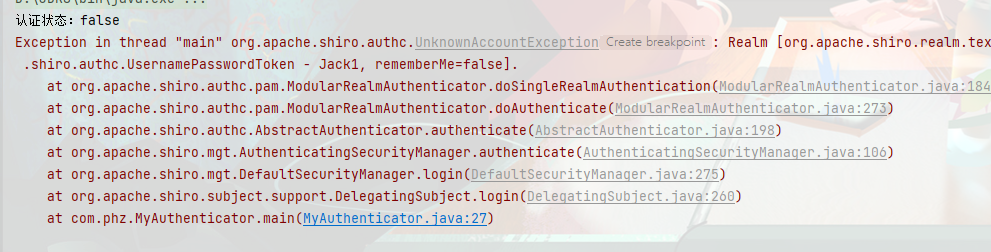
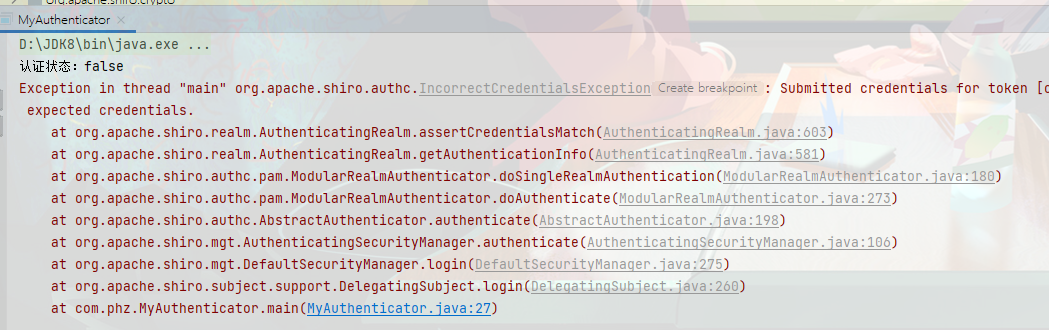
所以我们可以改造一下代码,让报错看着好看点
try {
    subject.login(token);
} catch (UnknownAccountException e) {
    System.out.println("账户不存在");
} catch (IncorrectCredentialsException e) {
    System.out.println("密码错误");
}
5.4、认证流程梳理
5.4.1、断点分析
根据
Shiro的核心架构图观察可以看到,对认证数据的处理操作都是由各个Realms类去处理的,现在尝试对整个认证流程做一个梳理。
开启程序断点调试,调试入口为
subject接口的login方法,进入方法后可以看到当前调用的login方法来自DelegatingSubject类==—①—==,这个类实现了Subject方法,记下来
public void login(AuthenticationToken token) throws AuthenticationException {
    this.clearRunAsIdentitiesInternal();
    //可以看到内部仍然是用的安全管理器去进行的login操作
    Subject subject = this.securityManager.login(this, token);
    (...)
}
进入
securityManager.login方法,因为SecurityManager本身也是一个接口,所以具体执行login方法的还是它的实现类,断点进去后可以知道,这个实现类为DefaultSecurityManager,而DefaultSecurityManager则是继承于AuthenticatingSecurityManager,其中AuthenticatingSecurityManager类也实现了SecurityManager接口
public Subject login(Subject subject, AuthenticationToken token) throws AuthenticationException {
    AuthenticationInfo info;
    try {
        info = this.authenticate(token);
	(...)
}
然后再次观察
authenticate方法,这个方法并不是DefaultSecurityManager类实现的,而是其父类AuthenticatingSecurityManager==—②—==实现的,拿小本本记下来
public AuthenticationInfo authenticate(AuthenticationToken token) throws AuthenticationException {
    return this.authenticator.authenticate(token);
}
到这一步发现了,
SecurityManager终于开始调用authenticator认证器对token进行认证了,继续深入,执行authenticate的类为AbstractAuthenticator,这是一个带有abstract关键字的类,说明是一个抽象类
public final AuthenticationInfo authenticate(AuthenticationToken token) throws AuthenticationException {
    if (token == null) {
        throw new IllegalArgumentException("Method argument (authentication token) cannot be null.");
    } else {
        log.trace("Authentication attempt received for token [{}]", token);

        AuthenticationInfo info;
        try {
            info = this.doAuthenticate(token);
(...)
}
那么自然进行
doAuthenticate认证的类应该是其子类,经调试,代码走到了ModularRealmAuthenticator类==—③—==中,显然它继承自AbstractAuthenticator,小本本记下来
protected AuthenticationInfo doAuthenticate(AuthenticationToken authenticationToken) throws AuthenticationException {
    this.assertRealmsConfigured();
    //这一步便拿到我们配置的Realms,其中便有我们的认证信息
    Collection<Realm> realms = this.getRealms();
    //根据Realms的数量判断执行哪个认证方法,这里我们只配置了iniReaml,所以应该是1,走doSingleRealmAuthentication
    return realms.size() == 1 ? this.doSingleRealmAuthentication((Realm)realms.iterator().next(), authenticationToken) : this.doMultiRealmAuthentication(realms, authenticationToken);
}
doSingleRealmAuthentication方法中,认证器开始拿到认证信息info
protected AuthenticationInfo doSingleRealmAuthentication(Realm realm, AuthenticationToken token) {
    if (!realm.supports(token)) {
		(...)
    } else {
        AuthenticationInfo info = realm.getAuthenticationInfo(token);
        //获取的认证信息如果是空,则会抛出UnknownAccountException未知账户的错误
        if (info == null) {
            String msg = "Realm [" + realm + "] was unable to find account data for the submitted AuthenticationToken [" + token + "].";
            throw new UnknownAccountException(msg);
        } else {
            return info;
        }
    }
}
进入
getAuthenticationInfo方法,此方法来自于另一个抽象类AuthenticatingRealm
public final AuthenticationInfo getAuthenticationInfo(AuthenticationToken token) throws AuthenticationException {
    //先从缓存中拿,但是现在还没有配置缓存,以后配置缓存后再看
    AuthenticationInfo info = this.getCachedAuthenticationInfo(token);
    if (info == null) {
        info = this.doGetAuthenticationInfo(token);
        log.debug("Looked up AuthenticationInfo [{}] from doGetAuthenticationInfo", info);
        //做了一个缓存操作
        if (token != null && info != null) {
            this.cacheAuthenticationInfoIfPossible(token, info);
        }
    } else {
        log.debug("Using cached authentication info [{}] to perform credentials matching.", info);
    }

    //用户名认证通过,进入密码认证
    if (info != null) {
        this.assertCredentialsMatch(token, info);
    } else {
        log.debug("No AuthenticationInfo found for submitted AuthenticationToken [{}].  Returning null.", token);
    }

    return info;
}
找到执行
getAuthenticationInfo方法的具体子类为SimpleAccountRealm—④—,此时看到,当前已经不再进入循环调用认证了,真正的认证操作开始,开始拿账号名称对应的AuthenticationInfo对象,如果为空则会在ModularRealmAuthenticator类中抛出UnknownAccountException异常,小本本记下来
protected AuthenticationInfo doGetAuthenticationInfo(AuthenticationToken token) throws AuthenticationException {
    UsernamePasswordToken upToken = (UsernamePasswordToken)token;
    //拿到当前用户名对应的Account对象
    SimpleAccount account = this.getUser(upToken.getUsername());
    if (account != null) {
        //判断用户是否被锁定
        if (account.isLocked()) {
            throw new LockedAccountException("Account [" + account + "] is locked.");
        }

        //判断用户密码是否过期
        if (account.isCredentialsExpired()) {
            String msg = "The credentials for account [" + account + "] are expired";
            throw new ExpiredCredentialsException(msg);
        }
    }
	//这里可能为空
    return account;
}

//users便是从Reaml中拿到的认证信息
protected SimpleAccount getUser(String username) {
    this.USERS_LOCK.readLock().lock();

    SimpleAccount var2;
    try {
        var2 = (SimpleAccount)this.users.get(username);
    } finally {
        this.USERS_LOCK.readLock().unlock();
    }

    return var2;
}
到这里,用户名的认证走完了,回到
AuthenticatingRealm类的getAuthenticationInfo方法,在拿到的用户信息不为空的情况下,执行assertCredentialsMatch方法,看到这个方法会拿到一个CredentialsMatcher密码匹配器对象,拿到后对token中的密码和认证信息中正确的密码进行匹配,如果匹配失败则表示密码错误,抛出IncorrectCredentialsException异常
protected void assertCredentialsMatch(AuthenticationToken token, AuthenticationInfo info) throws AuthenticationException {
    CredentialsMatcher cm = this.getCredentialsMatcher();
    if (cm != null) {
        if (!cm.doCredentialsMatch(token, info)) {
            String msg = "Submitted credentials for token [" + token + "] did not match the expected credentials.";
            throw new IncorrectCredentialsException(msg);
		(...)
}
这里的执行密码是否匹配的操作用的是
CredentialsMatcher密码匹配器接口下方的实现类SimpleCredentialsMatcher中的方法,这里就对密码是否一致进行了比较,因为我们没有对密码进行加密,所以这里只是进行了简单的equals判断
public boolean doCredentialsMatch(AuthenticationToken token, AuthenticationInfo info) {
    Object tokenCredentials = this.getCredentials(token);
    Object accountCredentials = this.getCredentials(info);
    return this.equals(tokenCredentials, accountCredentials);
}
流程到此分析完了,注意到了几个比较重要的类:
DelegatingSubject,AuthenticatingSecurityManager,ModularRealmAuthenticator,SimpleAccountRealm
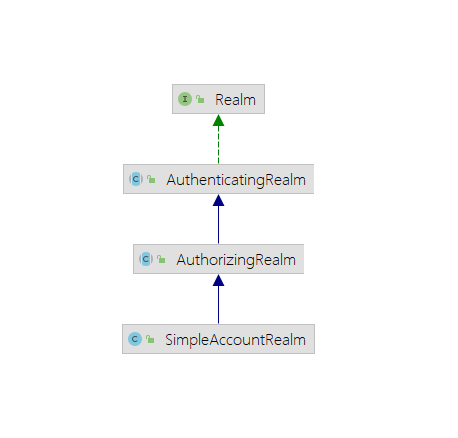
5.4.2、关系梳理
SimpleAccountRealm继承了AuthorizingRealm类,这个类中定义了doGetAuthorizationInfo抽象方法,这个方法刚才我们查看过,用于认证,AuthorizingRealm类继承了AuthenticatingRealm,而这个类中又定义了doGetAuthenticationInfo抽象方法,这个方法用于授权,所以日后我们自定义Reaml的时候,就需要去继承AuthorizingRealm这个类,只有继承这个类,我们才能同时去按照我们自己想要的方式去实现授权和认证这两个抽象的方法
//授权
protected AuthenticationInfo doGetAuthenticationInfo(AuthenticationToken token) throws AuthenticationException {
    UsernamePasswordToken upToken = (UsernamePasswordToken)token;
    SimpleAccount account = this.getUser(upToken.getUsername());
    if (account != null) {
        if (account.isLocked()) {
            throw new LockedAccountException("Account [" + account + "] is locked.");
        }

        if (account.isCredentialsExpired()) {
            String msg = "The credentials for account [" + account + "] are expired";
            throw new ExpiredCredentialsException(msg);
        }
    }

    return account;
}

//认证,相当于只对用户进行校验了,判断密码是否正确在授权流程做
protected AuthorizationInfo doGetAuthorizationInfo(PrincipalCollection principals) {
    String username = this.getUsername(principals);
    this.USERS_LOCK.readLock().lock();

    AuthorizationInfo var3;
    try {
        var3 = (AuthorizationInfo)this.users.get(username);
    } finally {
        this.USERS_LOCK.readLock().unlock();
    }

    return var3;
}
而以后只需要在这个认证授权的时候到我们想要的地方去获取数据就可以了
5.5、自定义Realm的实现
上面提到了,如果要自定义
Realm,需要去继承AuhorizingRealm类,同时重写认证doGetAuthorization方法和授权doGetAuthentication方法,如下,这里就实现一个基础的授权,了解即可,后面做SpringBoot集成的时候再详细实现
/**
 * @author PengHuAnZhi
 * @ProjectName ShiroStandaloneDemo
 * @Description 自定义Realm的实现
 * @time 2021/10/29 14:33
 */
public class CustomRealm extends AuthorizingRealm {

    //授权
    @Override
    protected AuthorizationInfo doGetAuthorizationInfo(PrincipalCollection principalCollection) {
        return null;
    }


    //认证
    @Override
    protected AuthenticationInfo doGetAuthenticationInfo(AuthenticationToken authenticationToken) throws AuthenticationException {
        //获取Token中的用户名
        String principal = (String) authenticationToken.getPrincipal();
        System.out.println(principal);
        /*
         * 根据身份信息查询相关数据库
         */
        if ("Jack".equals(principal)) {
            //参数1:返回数据库中正确的用户名
            //参数2:返回数据库中正确密码
            //参数3:当前Realm名称,报错会打印这个名称,方便找错
            return new SimpleAuthenticationInfo(principal, "123", this.getName());
        }
        return null;
    }
}
使用自定义
Realm和之前差别并不大
@Test
public void testCustomRealmAuthenticator(){
    //1、创建安全管理器对象
    DefaultSecurityManager securityManager = new DefaultSecurityManager();
    //2、给安全管理器设置Realm
    securityManager.setRealm(new CustomRealm());
    //3、SecurityUtils给全局安全工具类设置安全管理器
    SecurityUtils.setSecurityManager(securityManager);
    //4、关键对象 Subject 主体
    Subject subject = SecurityUtils.getSubject();
    System.out.println("认证状态:" + subject.isAuthenticated());
    //5、创建令牌,用于用户认证
    UsernamePasswordToken token = new UsernamePasswordToken("Jack", "123");
    try {
        subject.login(token);
    } catch (UnknownAccountException e) {
        System.out.println("账户不存在");
    } catch (IncorrectCredentialsException e) {
        System.out.println("密码错误");
    }
    System.out.println("认证状态:" + subject.isAuthenticated());
}
5.6、使用MD5和随机盐Salt
MD5算法一般用来加密或者签名(校验和),MD5算法不可逆,如果内容相同无论执行多少次MD5生成结果始终都是一致的,且始终是一个16进制32位长度的字符串。
对于网上的在线解密网站,都是采用的穷举的方式解密,即预先在自己的网站存储一些常用的字段对应的
MD5码,当用户输入MD5码的时候,去自己数据库查询对应的原文。所以为了防止这种穷举的情况,我们就会在原文中多加一些自定义的字符啥的,来防止被穷举出来
- 使用
MD5
@Test
public void testShiroMD5() {
    Md5Hash md5Hash = new Md5Hash("123");
    System.out.println(md5Hash.toHex());
}
- 使用MD5+Salt
@Test
public void testShiroMD5() {
    Md5Hash md5Hash = new Md5Hash("123","X0*7ps");
    System.out.println(md5Hash.toHex());
}
- 使用MD5+Salt+hash散列
@Test
public void testShiroMD5() {
    //Shiro提供的MD5算法类,在MD5算法的基础上,还给我们增加了一步做了一个Hash散列
    Md5Hash md5Hash = new Md5Hash("123", "X0*7ps", 1024);
    System.out.println(md5Hash.toHex());
}
改造自定义
Realm
/**
 * @author PengHuAnZhi
 * @ProjectName ShiroStandaloneDemo
 * @Description TODO
 * @time 2021/10/29 15:39
 */
public class CustomMd5Realm extends AuthorizingRealm {
    @Override
    protected AuthorizationInfo doGetAuthorizationInfo(PrincipalCollection principalCollection) {
        return null;
    }

    //认证
    @Override
    protected AuthenticationInfo doGetAuthenticationInfo(AuthenticationToken authenticationToken) throws AuthenticationException {
        //获取Token中的用户名
        String principal = (String) authenticationToken.getPrincipal();
        System.out.println(principal);
        /*
         * 根据身份信息查询相关数据库
         */
        if ("Jack".equals(principal)) {
            //参数1:返回数据库中正确的用户名
            //参数2:返回数据库中正确密码的MD5码
            //参数3:随机盐
            //参数4:当前Realm名称,报错会打印这个名称,方便找错
            return new SimpleAuthenticationInfo(principal, "e4f9bf3e0c58f045e62c23c533fcf633", ByteSource.Util.bytes("X0*7ps"), this.getName());
        }
        return null;
    }
}
使用
@Test
public void testCustomMd5RealmAuthenticator() {
    //1、创建安全管理器对象
    DefaultSecurityManager securityManager = new DefaultSecurityManager();
    //2、创建自定义的MD5Realm
    CustomMd5Realm customMd5Realm = new CustomMd5Realm();
    //3、创建MD5匹配器
    HashedCredentialsMatcher matcher = new HashedCredentialsMatcher("md5");
    //4、设置散列次数
    matcher.setHashIterations(1024);
    customMd5Realm.setCredentialsMatcher(matcher);
    //5、给安全管理器设置Realm
    securityManager.setRealm(customMd5Realm);
    //6、SecurityUtils给全局安全工具类设置安全管理器
    SecurityUtils.setSecurityManager(securityManager);
    //7、关键对象 Subject 主体
    Subject subject = SecurityUtils.getSubject();
    System.out.println("认证状态:" + subject.isAuthenticated());
    //8、创建令牌,用于用户认证
    UsernamePasswordToken token = new UsernamePasswordToken("Jack", "123");
    try {
        subject.login(token);
    } catch (UnknownAccountException e) {
        System.out.println("账户不存在");
    } catch (IncorrectCredentialsException e) {
        System.out.println("密码错误");
    }
    System.out.println("认证状态:" + subject.isAuthenticated());
}
6、Shiro中的授权
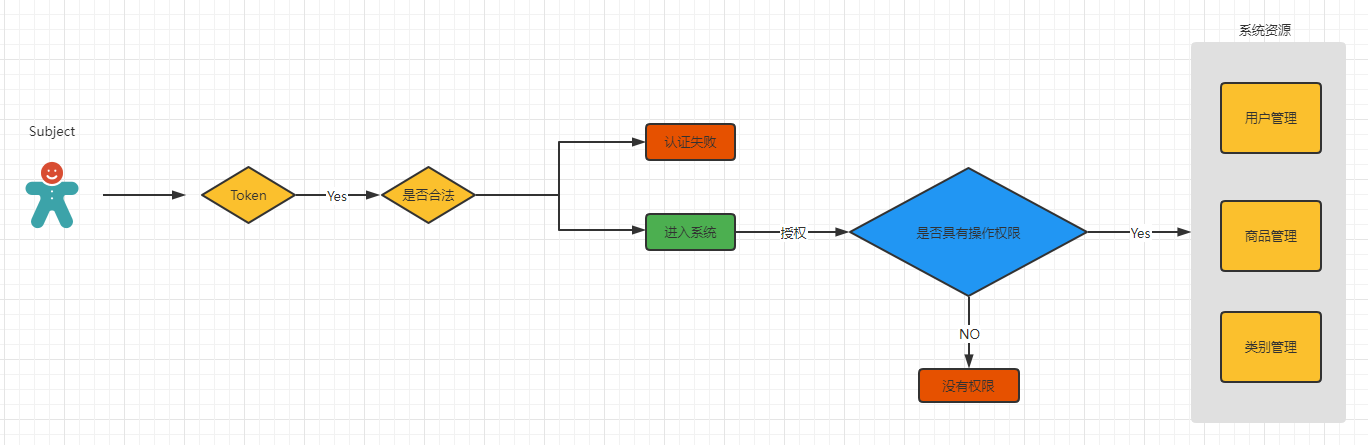
6.1、授权
授权,即访问控制,控制谁能访问哪些资源。主体进行身份认证后需要分配权限方可访问系统的资源。对于某些资源没有权限是无法访问的。
6.2、关键对象
授权可简单理解为谁对什么东西进行什么操作
- 主体(
Subject):需要访问系统中的资源 - 资源(
Resource):如系统菜单、页面、按钮、类方法、系统商品信息等。资源包括资源类型和资源实例,比如商品信息为资源类型,类型为t01的商品为资源实例,编号为001的商品信息也属于资源实例 - 权限/许可(
Permission):规定了主体对资源的操作许可,权限离开资源没有意义,如用户查询权限、用户添加权限、某个类方法的调用权限、编号为001用户的修改权限等,通过权限可知主体对那些资源都有哪些操作许可
6.3、授权流程
6.4、授权方式
基于角色的访问控制
RBAC基于角色的访问控制(Role-Based Access Control)是以角色为中心进行访问控制
if(subject.hasRole("admin")){
	//操作什么资源
}
基于资源的访问控制
RBAC基于资源的访问控制(Resource-Based Access Control)是以资源为中心进行访问控制
if(subject.isPermission("user:update:01")){ //资源实例
  //对01用户进行修改
}
if(subject.isPermission("user:update:*")){  //资源类型
  //对01用户进行修改
}
6.5、权限字符串
权限字符串的规则是:
- 资源标识符:操作:资源实例标识符
意思是对哪个资源的哪个实例具有什么操作,
:是资源/操作/实例的分割符,权限字符串也可以使用*通配符。如:
用户创建权限:user : create,user : create:*
用户修改实例001的权限:user : update : 001
用户实例001的所有权限:user : * :001
A : B : C,A通过B来操作C
6.6、Shiro中授权编程实现方式
- 编程式
Subject subject = SecurityUtils.getSubject();
if(subject.hasRole(“admin”)) {
	//有权限
} else {
	//无权限
}
- 注解式
@RequiresRoles("admin")
public void hello() {
	//有权限
}
- 标签式
JSP/GSP 标签:在JSP/GSP 页面通过相应的标签完成:
<shiro:hasRole name="admin">
	<!— 有权限—>
</shiro:hasRole>
注意: Thymeleaf 中使用shiro需要额外集成!
6.7、授权实现
自定义
Realm重写doGetAuthorizationInfo方法,在其中添加角色,以及角色所具有的权限
@Override
protected AuthorizationInfo doGetAuthorizationInfo(PrincipalCollection principalCollection) {
    //获取主身份,也就是用户名
    String primaryPrincipal = (String) principalCollection.getPrimaryPrincipal();
    System.out.println("primaryPrincipal = " + primaryPrincipal);

    SimpleAuthorizationInfo simpleAuthorizationInfo = new SimpleAuthorizationInfo();
    //添加角色
    simpleAuthorizationInfo.addRole("admin");

    simpleAuthorizationInfo.addStringPermission("user:update:*");
    simpleAuthorizationInfo.addStringPermission("product:*:*");

    return simpleAuthorizationInfo;
}
授权
@Test
public void testCustomMd5RealmAuthenticator() {
    //1、创建安全管理器对象
    DefaultSecurityManager securityManager = new DefaultSecurityManager();
    //2、创建自定义的MD5Realm
    CustomMd5Realm customMd5Realm = new CustomMd5Realm();
    //3、创建MD5匹配器
    HashedCredentialsMatcher matcher = new HashedCredentialsMatcher("md5");
    //4、设置散列次数
    matcher.setHashIterations(1024);
    customMd5Realm.setCredentialsMatcher(matcher);
    //5、给安全管理器设置Realm
    securityManager.setRealm(customMd5Realm);
    //6、SecurityUtils给全局安全工具类设置安全管理器
    SecurityUtils.setSecurityManager(securityManager);
    //7、关键对象 Subject 主体
    Subject subject = SecurityUtils.getSubject();
    System.out.println("认证状态:" + subject.isAuthenticated());
    //8、创建令牌,用于用户认证
    UsernamePasswordToken token = new UsernamePasswordToken("Jack", "123");
    try {
        subject.login(token);
    } catch (UnknownAccountException e) {
        System.out.println("账户不存在");
    } catch (IncorrectCredentialsException e) {
        System.out.println("密码错误");
    }
    System.out.println("认证状态:" + subject.isAuthenticated());
    //认证通过
    if (subject.isAuthenticated()) {
        //基于角色权限管理
        boolean admin = subject.hasRole("admin");
        System.out.println(admin);

        //基于多角色权限控制,hasAllRoles只要有一个该subject不含有,就返回false
        boolean roles = subject.hasAllRoles(Arrays.asList("admin", "super"));
        System.out.println(roles);

        //是否具有其中一个角色,返回布尔数组,含有就是t,不含有就是f
        boolean[] booleans = subject.hasRoles(Arrays.asList("admin", "super", "user"));
        for (boolean aBoolean : booleans) {
            System.out.println(aBoolean);
        }

        boolean permitted = subject.isPermitted("product:create:001");
        System.out.println(permitted);
    }
}
7、整合SpringBoot
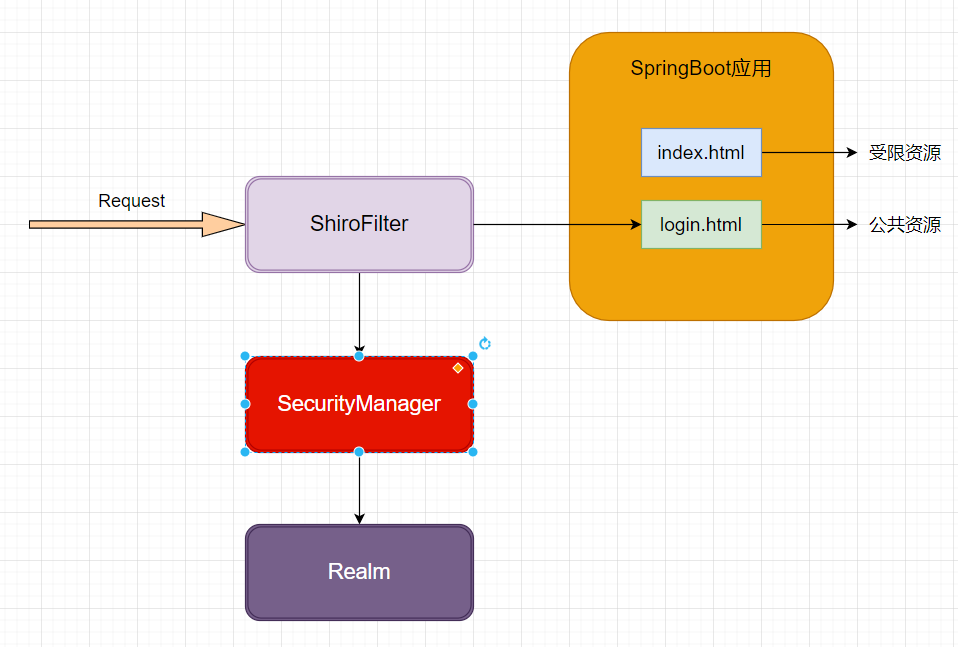
7.1、思路
7.2、创建SpringBoot项目
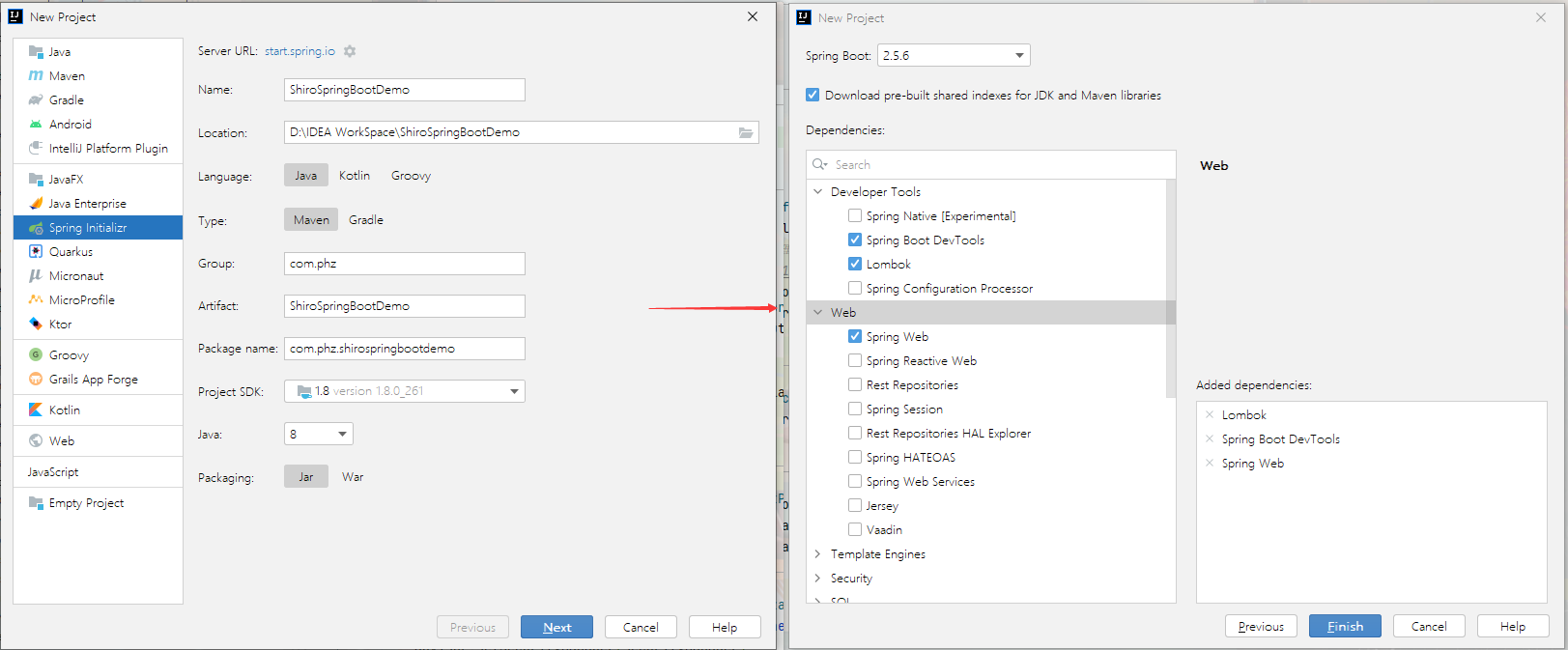
配置端口,视图解析器
server.port=8888
spring.application.name=shiro
server.servlet.context-path=/shiro

spring.mvc.view.prefix==/
spring.mvc.view.suffix=.jsp
引入
JSP解析依赖
<!--引入jsp解析依赖-->
<dependency>
    <groupId>org.apache.tomcat.embed</groupId>
    <artifactId>tomcat-embed-jasper</artifactId>
</dependency>

<dependency>
    <groupId>jstl</groupId>
    <artifactId>jstl</artifactId>
    <version>1.2</version>
</dependency>
index.jsp
<!doctype html>
<%@page language="java" contentType="text/html; charset=UTF-8" pageEncoding="UTF-8" %>
<html lang="en">
    <head>
        <meta charset="UTF-8">
        <meta name="viewport"
              content="width=device-width, user-scalable=no, initial-scale=1.0, maximum-scale=1.0, minimum-scale=1.0">
        <meta http-equiv="X-UA-Compatible" content="ie=edge">
        <title>Document</title>
    </head>
    <body>

        <h1>系统主页V1.0</h1>
        <ul>
            <li><a href="">用户管理</a></li>
            <li><a href="">商品管理</a></li>
            <li><a href="">订单管理</a></li>
            <li><a href="">物流管理</a></li>
        </ul>
    </body>
</html>
访问测试
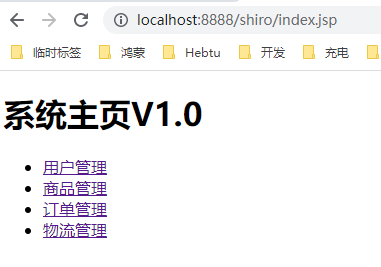
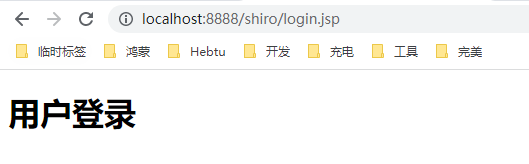
按照预先设计好的思路,我们规定
index.jsp便是一个受限资源,再定义一个login.jsp
<!doctype html>
<%@page language="java" contentType="text/html; charset=UTF-8" pageEncoding="UTF-8" isELIgnored="false" %>
<html lang="en">
    <head>
        <meta charset="UTF-8">
        <meta name="viewport"
              content="width=device-width, user-scalable=no, initial-scale=1.0, maximum-scale=1.0, minimum-scale=1.0">
        <meta http-equiv="X-UA-Compatible" content="ie=edge">
        <title>Document</title>
    </head>
    <body>

        <h1>用户登录</h1>

    </body>
</html>
7.3、引入Shiro依赖
<!-- https://mvnrepository.com/artifact/org.apache.shiro/shiro-spring-boot-web-starter -->
<dependency>
    <groupId>org.apache.shiro</groupId>
    <artifactId>shiro-spring-boot-web-starter</artifactId>
    <version>1.8.0</version>
</dependency>
7.3、Shiro配置类
/**
 * @author PengHuAnZhi
 * @ProjectName ShiroSpringBootDemo
 * @Description 整合Shiro相关
 * @time 2021/11/4 20:34
 */
@Configuration
public class ShiroConfig {
    /**
     * authc表示请求这个资源需要认证和授权
     */
    private static final String AUTHC = "authc";

    /**
     * @param defaultWebSecurityManager
     * @return ShiroFilterFactoryBean
     * @description 1、创建ShiroFilter,拦截所有请求
     * @author PengHuAnZhi
     * @date 2021/11/4 20:43
     */
    @Bean("shiroFilterFactoryBean")
    public ShiroFilterFactoryBean getShiroFilterFactoryBean(DefaultWebSecurityManager defaultWebSecurityManager) {
        ShiroFilterFactoryBean shiroFilterFactoryBean = new ShiroFilterFactoryBean();
        //给filter设置安全管理器
        shiroFilterFactoryBean.setSecurityManager(defaultWebSecurityManager);
        //配置系统受限资源和公共资源
        Map<String, String> map = new HashMap<>();
        map.put("/index.jsp", AUTHC);
        shiroFilterFactoryBean.setFilterChainDefinitionMap(map);
        //不设置默认也是login.jsp
        shiroFilterFactoryBean.setLoginUrl("/login.jsp");
        return shiroFilterFactoryBean;
    }

    /**
     * @param realm
     * @return DefaultWebSecurityManager
     * @description 2、创建安全管理器
     * @author PengHuAnZhi
     * @date 2021/11/4 20:50
     */
    @Bean("defaultWebSecurityManager")
    public DefaultWebSecurityManager getDefaultWebSecurityManager(CustomRealm realm) {
        DefaultWebSecurityManager defaultSecurityManager = new DefaultWebSecurityManager();
        defaultSecurityManager.setRealm(realm);
        return defaultSecurityManager;
    }
}
其中自定义
Realm先做一个空实现
@Component
public class CustomRealm extends AuthorizingRealm {
    @Override
    protected AuthorizationInfo doGetAuthorizationInfo(PrincipalCollection principalCollection) {
        return null;
    }

    @Override
    protected AuthenticationInfo doGetAuthenticationInfo(AuthenticationToken authenticationToken) throws AuthenticationException {
        return null;
    }
}
因为自定义
Realm我们做了空实现,所以这个时候访问index.jsp就会自动跳转到login.jsp
7.4、常见过滤器
上面出现了一个
authc的配置,它是用来配置过滤器的,过滤器还有很多种,下方列出常用的过滤器
| 配置缩写 | 对应的过滤器 | 功能 |
|---|---|---|
| anon | AnonymousFilter | 指定url可以匿名访问 |
| authc | FormAuthenticationFilter | 指定url需要form表单登录,默认会从请求中获取username、password,rememberMe等参数并尝试登录,如果登录不了就会跳转到loginUrl配置的路径。我们也可以用这个过滤器做默认的登录逻辑,但是一般都是我们自己在控制器写登录逻辑的,自己写的话出错返回的信息都可以定制嘛。 |
| authcBasic | BasicHttpAuthenticationFilter | 指定url需要basic登录 |
| logout | LogoutFilter | 登出过滤器,配置指定url就可以实现退出功能,非常方便 |
| noSessionCreation | NoSessionCreationFilter | 禁止创建会话 |
| perms | PermissionsAuthorizationFilter | 需要指定权限才能访问 |
| port | PortFilter | 需要指定端口才能访问 |
| rest | HttpMethodPermissionFilter | 将http请求方法转化成相应的动词来构造一个权限字符串,这个感觉意义不大,有兴趣自己看源码的注释 |
| roles | RolesAuthorizationFilter | 需要指定角色才能访问 |
| ssl | SslFilter | 需要https请求才能访问 |
| user | UserFilter | 需要已登录或“记住我”的用户才能访问 |
7.5、认证和退出
现在在登录页面创建一个表单
<!doctype html>
<%@page language="java" contentType="text/html; charset=UTF-8" pageEncoding="UTF-8" isELIgnored="false" %>
<html lang="en">
    <head>
        <meta charset="UTF-8">
        <meta name="viewport"
              content="width=device-width, user-scalable=no, initial-scale=1.0, maximum-scale=1.0, minimum-scale=1.0">
        <meta http-equiv="X-UA-Compatible" content="ie=edge">
        <title>Document</title>
    </head>
    <body>

        <h1>用户登录</h1>
        <form action="${pageContext.request.contextPath}/user/login" method="post">
            用户名:<input type="text" name="userName"> <br/>
            密码 : <input type="text" name="password"> <br>
            <input type="submit" value="登录">
        </form>
    </body>
</html>
首页创建一个登出按钮
<!doctype html>
<%@page language="java" contentType="text/html; charset=UTF-8" pageEncoding="UTF-8" %>
<html lang="en">
    <head>
        <meta charset="UTF-8">
        <meta name="viewport"
              content="width=device-width, user-scalable=no, initial-scale=1.0, maximum-scale=1.0, minimum-scale=1.0">
        <meta http-equiv="X-UA-Compatible" content="ie=edge">
        <title>Document</title>
    </head>
    <body>

        <h1>系统主页V1.0</h1>
        <ul>
            <li><a href="">用户管理</a></li>
            <li><a href="">商品管理</a></li>
            <li><a href="">订单管理</a></li>
            <li><a href="">物流管理</a></li>
        </ul>
        <a href="${pageContext.request.contextPath}/user/logout">退出用户</a>
    </body>
</html>
对应的
Controller
/**
 * @author PengHuAnZhi
 * @ProjectName ShiroSpringBootDemo
 * @Description TODO
 * @time 2021/11/5 10:13
 */
@Controller
@RequestMapping("/user")
public class UserController {

    @RequestMapping("/login")
    public String login(String userName, String password) {
        //获取主体对象
        Subject subject = SecurityUtils.getSubject();
        try {
            subject.login(new UsernamePasswordToken(userName, password));
        } catch (IncorrectCredentialsException e) {
            e.printStackTrace();
            System.out.println("密码错误");
            return "redirect:/login.jsp";
        } catch (UnknownAccountException e) {
            e.printStackTrace();
            System.out.println("用户名错误");
            return "redirect:/login.jsp";
        }
        return "redirect:/index.jsp";
    }

    @RequestMapping("/logout")
    public String logout() {
        Subject subject = SecurityUtils.getSubject();
        subject.logout();
        return "redirect:/login.jsp";
    }
}
自定义
Realm
/**
 * @author PengHuAnZhi
 * @ProjectName ShiroSpringBootDemo
 * @Description TODO
 * @time 2021/11/4 20:44
 */
@Component
public class CustomRealm extends AuthorizingRealm {
    @Override
    protected AuthorizationInfo doGetAuthorizationInfo(PrincipalCollection principalCollection) {
        return null;
    }

    @Override
    protected AuthenticationInfo doGetAuthenticationInfo(AuthenticationToken authenticationToken) throws AuthenticationException {
        String principal = (String) authenticationToken.getPrincipal();
        if ("xiaochen".equals(principal)) {
            return new SimpleAuthenticationInfo(principal, "123456", this.getName());
        }
        return null;
    }
}
最后将登录页面定义为公共资源
map.put("/login.jsp", ANON);
map.put("/user/login", ANON);
7.6、连接数据库基于MD5和salt
7.6.1、注册功能
创建主页
jsp页面
<!doctype html>
<%@page contentType="text/html; UTF-8" isELIgnored="false" pageEncoding="UTF-8" %>
<html lang="en">
<head>
    <meta charset="UTF-8">
    <meta name="viewport"
          content="width=device-width, user-scalable=no, initial-scale=1.0, maximum-scale=1.0, minimum-scale=1.0">
    <meta http-equiv="X-UA-Compatible" content="ie=edge">
    <title>Document</title>
</head>
<body>
<h1>用户注册</h1>
<form action="${pageContext.request.contextPath}/user/register" method="post">
    用户名:<input type="text" name="userName"> <br/>
    密码 : <input type="text" name="password"> <br>
    <input type="submit" value="注册">
</form>
</body>
</html>
创建数据库表
CREATE TABLE `user`  (
  `id` int(11) NOT NULL COMMENT '主键',
  `username` varchar(40) CHARACTER SET utf8 COLLATE utf8_general_ci NULL DEFAULT NULL COMMENT '用户名',
  `password` varchar(40) CHARACTER SET utf8 COLLATE utf8_general_ci NULL DEFAULT NULL COMMENT '密码',
  `salt` varchar(255) CHARACTER SET utf8 COLLATE utf8_general_ci NULL DEFAULT NULL COMMENT '随机盐',
  PRIMARY KEY (`id`) USING BTREE
) ENGINE = InnoDB CHARACTER SET = utf8 COLLATE = utf8_general_ci ROW_FORMAT = Dynamic;
导入相关依赖
<dependency>
    <groupId>org.mybatis.spring.boot</groupId>
    <artifactId>mybatis-spring-boot-starter</artifactId>
    <version>2.2.0</version>
</dependency>
<dependency>
    <groupId>mysql</groupId>
    <artifactId>mysql-connector-java</artifactId>
    <version>5.1.49</version>
</dependency>
<dependency>
    <groupId>com.alibaba</groupId>
    <artifactId>druid</artifactId>
    <version>1.2.8</version>
</dependency>
添加相关配置
spring.datasource.driver-class-name=com.mysql.jdbc.Driver
spring.datasource.type=com.alibaba.druid.pool.DruidDataSource
spring.datasource.url=jdbc:mysql:///shiro?characterEncoding=UTF-8
spring.datasource.username=root
spring.datasource.password=123456

mybatis.type-aliases-package=com.phz.shirospringbootdemo.entity
mybatis.mapper-locations=classpath:mapper/*.xml
实体类
/**
 * @author PengHuAnZhi
 * @ProjectName ShiroSpringBootDemo
 * @Description TODO
 * @time 2021/11/5 11:23
 */
@Data
@NoArgsConstructor
@AllArgsConstructor
@Accessors(chain = true)
public class User {
    private Integer id;
    private String userName;
    private String password;
    private String salt;
}
Dao
/**
 * @author PengHuAnZhi
 * @ProjectName ShiroSpringBootDemo
 * @Description TODO
 * @time 2021/11/5 11:30
 */
@Mapper
public interface UserDao {
    /**
     * 保存用户
     *
     * @param user 用户对象
     * @author PengHuAnZhi
     * @date 2021/11/5 11:31
     */
    void save(User user);
}
Mapper
<?xml version="1.0" encoding="utf-8" ?>
<!DOCTYPE mapper PUBLIC "-//mybatis.org//DTD Mapper 3.0//EN" "http://mybatis.org/dtd/mybatis-3-mapper.dtd" >
<mapper namespace="com.phz.shirospringbootdemo.dao.UserDao">
    <insert id="save" parameterType="user" useGeneratedKeys="true" keyProperty="id">
        insert into user
        values (#{id}, #{userName}, #{password}, #{salt})
    </insert>
</mapper>
Service
/**
 * @author PengHuAnZhi
 * @ProjectName ShiroSpringBootDemo
 * @Description TODO
 * @time 2021/11/5 11:40
 */
public interface UserService {
    /**
     * 注册用户
     *
     * @param user 用户对象
     * @description TODO
     * @author PengHuAnZhi
     * @date 2021/11/5 11:40
     */
    void register(User user);
}
随机盐工具类
/**
 * @author PengHuAnZhi
 * @ProjectName ShiroSpringBootDemo
 * @Description TODO
 * @time 2021/11/5 11:46
 */
public class SaltUtil {
    /**
     * @param n 取几位Salt
     * @return String
     * @description 生成一个随机Salt的静态方法
     * @author PengHuAnZhi
     * @date 2021/11/5 11:49
     */
    public static String getSalt(int n) {
        char[] chars = "ABCDEFGHIJKLMNOPQRSTUVWXYZabcdefghijklmnopqrstuvwxyz0123456789!@#$%^&*()".toCharArray();
        StringBuilder stringBuilder = new StringBuilder();
        for (int i = 0; i < n; i++) {
            char aChar = chars[new Random().nextInt(chars.length)];
            stringBuilder.append(aChar);
        }
        return stringBuilder.toString();
    }
}
impl
/**
 * @author PengHuAnZhi
 * @ProjectName ShiroSpringBootDemo
 * @Description TODO
 * @time 2021/11/5 11:46
 */
public class SaltUtil {
    /**
     * @param n 取几位Salt
     * @return String
     * @description 生成一个随机Salt的静态方法
     * @author PengHuAnZhi
     * @date 2021/11/5 11:49
     */
    public static String getSalt(int n) {
        char[] chars = "ABCDEFGHIJKLMNOPQRSTUVWXYZabcdefghijklmnopqrstuvwxyz0123456789!@#$%^&*()".toCharArray();
        StringBuilder stringBuilder = new StringBuilder();
        for (int i = 0; i < n; i++) {
            char aChar = chars[new Random().nextInt(chars.length)];
            stringBuilder.append(aChar);
        }
        return stringBuilder.toString();
    }
}
impl
/**
 * @author PengHuAnZhi
 * @ProjectName ShiroSpringBootDemo
 * @Description TODO
 * @time 2021/11/5 11:41
 */
@Service
@Transactional
public class UserServiceImpl implements UserService {

    @Resource
    UserDao userDao;

    /**
     * @param user
     * @description TODO
     * @author PengHuAnZhi
     * @date 2021/11/5 11:41
     */
    @Override
    public void register(User user) {
        //处理业务调用Dao,铭文密码需要md5+salt+hash散列
        String salt = SaltUtil.getSalt(8);
        user.setSalt(salt);
        Md5Hash md5Hash = new Md5Hash(user.getPassword(), salt, 1024);
        user.setPassword(md5Hash.toHex());
        userDao.save(user);
    }
}
对应
Controller
@RequestMapping("/register")
public String register(User user) {
    try {
        userService.register(user);
    } catch (Exception e) {
        e.printStackTrace();
        return "redirect:/register.jsp";
    }
    return "redirect:/login.jsp";
}
测试注册两个账号

7.6.2、认证功能
也就是修改自定义
Realm代码实现,从数据库获取用户信息,在此之前,需要在UserDao中定义改方法
UserDao
/**
 * @author PengHuAnZhi
 * @ProjectName ShiroSpringBootDemo
 * @Description TODO
 * @time 2021/11/5 11:30
 */
@Mapper
public interface UserDao {
    /**
     * 保存用户
     *
     * @param user 用户对象
     * @author PengHuAnZhi
     * @date 2021/11/5 11:31
     */
    void save(User user);

    /**
     * 根据用户名查询用户
     *
     * @param userName 用户名
     * @return 返回一个对象
     * @author PengHuAnZhi
     * @date 2021/11/5 19:42
     */
    User findByUserName(String userName);
}
UserService
/**
 * @author PengHuAnZhi
 * @ProjectName ShiroSpringBootDemo
 * @Description TODO
 * @time 2021/11/5 11:40
 */
public interface UserService {
    /**
     * 注册用户
     *
     * @param user 用户对象
     * @description TODO
     * @author PengHuAnZhi
     * @date 2021/11/5 11:40
     */
    void register(User user);

    /**
     * 根据用户名查询用户
     *
     * @param userName 用户名
     * @return 返回一个用户
     * @description TODO
     * @author PengHuAnZhi
     * @date 2021/11/5 19:46
     */
    User findByUserName(String userName);
}
UserServiceImpl
@Override
public User findByUserName(String userName) {
    return userDao.findByUserName(userName);
}
CustomRealm
/**
 * @author PengHuAnZhi
 * @ProjectName ShiroSpringBootDemo
 * @Description TODO
 * @time 2021/11/4 20:44
 */
@Component
public class CustomRealm extends AuthorizingRealm {
    @Resource
    UserServiceImpl userServiceImpl;

    @Override
    protected AuthorizationInfo doGetAuthorizationInfo(PrincipalCollection principalCollection) {
        return null;
    }

    @Override
    protected AuthenticationInfo doGetAuthenticationInfo(AuthenticationToken authenticationToken) throws AuthenticationException {
        String principal = (String) authenticationToken.getPrincipal();
        User user = userServiceImpl.findByUserName(principal);
        if (ObjectUtils.isEmpty(user)) {
            return null;
        } else {
            return new SimpleAuthenticationInfo(principal, user.getPassword(), ByteSource.Util.bytes(user.getSalt()), this.getName());
        }
    }
}
最后,在创建安全管理器的时候,传入的自定义
Realm,对其设置加密算法以及散列次数
/**
 * @param realm
 * @return DefaultWebSecurityManager
 * @description 2、创建安全管理器
 * @author PengHuAnZhi
 * @date 2021/11/4 20:50
 */
@Bean("defaultWebSecurityManager")
public DefaultWebSecurityManager getDefaultWebSecurityManager(CustomRealm realm) {
    DefaultWebSecurityManager defaultSecurityManager = new DefaultWebSecurityManager();
    HashedCredentialsMatcher matcher = new HashedCredentialsMatcher("md5");
    matcher.setHashIterations(1024);
    realm.setCredentialsMatcher(matcher);
    defaultSecurityManager.setRealm(realm);
    return defaultSecurityManager;
}
7.7、授权功能之标签式
在获取用户的权限角色信息的时候,会走我们自定义的
Realm类中的doGetAuthorizationInfo方法
- 现在先给
phz用户设置一个普通用户的角色user
@Override
protected AuthorizationInfo doGetAuthorizationInfo(PrincipalCollection principalCollection) {
    String primaryPrincipal = (String) principalCollection.getPrimaryPrincipal();
    System.out.println(primaryPrincipal + "-》调用授权验证");
    if ("phz".equals(primaryPrincipal)) {
        SimpleAuthorizationInfo simpleAuthorizationInfo = new SimpleAuthorizationInfo();
        simpleAuthorizationInfo.addRole("user");
        return simpleAuthorizationInfo;
    }
    return null;
}
然后在
jsp页面 中添加Shiro的授权标签予以支持,在具体的需要得到授权的内容外面嵌套上标签即可
<!doctype html>
<%@page language="java" contentType="text/html; charset=UTF-8" pageEncoding="UTF-8" %>
<%@taglib prefix="shiro" uri="http://shiro.apache.org/tags" %>
<%@ taglib prefix="shir" uri="http://shiro.apache.org/tags" %>
<html lang="en">
    <head>
        <meta charset="UTF-8">
        <meta name="viewport"
              content="width=device-width, user-scalable=no, initial-scale=1.0, maximum-scale=1.0, minimum-scale=1.0">
        <meta http-equiv="X-UA-Compatible" content="ie=edge">
        <title>Document</title>
    </head>
    <body>

        <h1>系统主页V1.0</h1>
        <ul>
            <li><a href="">用户管理</a></li>
            <shiro:hasRole name="admin">
                <li><a href="">商品管理</a></li>
                <li><a href="">订单管理</a></li>
                <li><a href="">物流管理</a></li>
            </shiro:hasRole>

        </ul>
        <a href="${pageContext.request.contextPath}/user/logout">退出用户</a>

    </body>
</html>
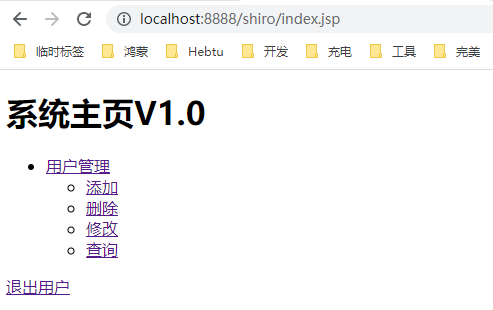
访问测试就会发现,只能看见一个用户管理标签了
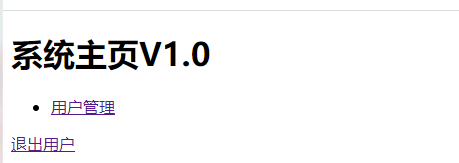
那现在再修改
phz用户的角色为admin,再次测试一下,就能看见全部了
- 现在给
phz这个角色修改回user,并添加用户的操作权限
@Override
protected AuthorizationInfo doGetAuthorizationInfo(PrincipalCollection principalCollection) {
    String primaryPrincipal = (String) principalCollection.getPrimaryPrincipal();
    System.out.println(primaryPrincipal + "-》调用授权验证");
    if ("phz".equals(primaryPrincipal)) {
        SimpleAuthorizationInfo simpleAuthorizationInfo = new SimpleAuthorizationInfo();
        simpleAuthorizationInfo.addRole("user");
        simpleAuthorizationInfo.addStringPermission("user:*:*");
        return simpleAuthorizationInfo;
    }
    return null;
}
添加
Jsp支持
<!doctype html>
<%@page language="java" contentType="text/html; charset=UTF-8" pageEncoding="UTF-8" %>
<%@taglib prefix="shiro" uri="http://shiro.apache.org/tags" %>
<%@ taglib prefix="shir" uri="http://shiro.apache.org/tags" %>
<html lang="en">
    <head>
        <meta charset="UTF-8">
        <meta name="viewport"
              content="width=device-width, user-scalable=no, initial-scale=1.0, maximum-scale=1.0, minimum-scale=1.0">
        <meta http-equiv="X-UA-Compatible" content="ie=edge">
        <title>Document</title>
    </head>
    <body>

        <h1>系统主页V1.0</h1>
        <ul>
            <li><a href="">用户管理</a></li>
            <ul>
                <shiro:hasPermission name="user:add:*">
                    <li><a href="">添加</a></li>
                </shiro:hasPermission>
                <shiro:hasPermission name="user:delete:*">
                    <li><a href="">删除</a></li>
                </shiro:hasPermission>
                <shiro:hasPermission name="user:update:*">
                    <li><a href="">修改</a></li>
                </shiro:hasPermission>
                <shiro:hasPermission name="user:find:*">
                    <li><a href="">查询</a></li>
                </shiro:hasPermission>
            </ul>
            <shiro:hasRole name="admin">
                <li><a href="">商品管理</a></li>
                <li><a href="">订单管理</a></li>
                <li><a href="">物流管理</a></li>
            </shiro:hasRole>

        </ul>
        <a href="${pageContext.request.contextPath}/user/logout">退出用户</a>

    </body>
</html>
测试一下:
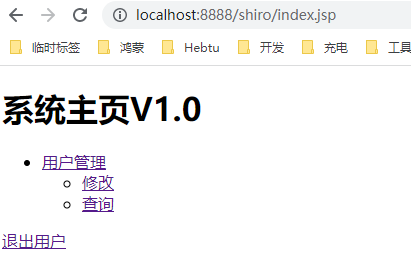
修改用户只有查询和更新的权限
simpleAuthorizationInfo.addStringPermission("user:find:*");
simpleAuthorizationInfo.addStringPermission("user:update:*");
7.7.1、常用JSP标签
- guest 标签
<shiro:guest>
欢迎游客访问,<a href="${pageContext.request.contextPath}/login.jsp">登录</a>
</shiro:guest>
用户没有身份验证时显示相应信息,即游客访问信息。
- user 标签
<shiro:guest>
欢迎游客访问,<a href="${pageContext.request.contextPath}/login.jsp">登录</a>
</shiro:guest>
用户已经身份验证 / 记住我登录后显示相应的信息。
- authenticated 标签
<shiro:authenticated>
    用户[<shiro:principal/>]已身份验证通过
</shiro:authenticated>
用户已经身份验证通过,即 Subject.login 登录成功,不是记住我登录的。
- notAuthenticated 标签
<shiro:notAuthenticated>
    未身份验证(包括记住我)
</shiro:notAuthenticated>
用户已经身份验证通过,即没有调用
Subject.login进行登录,包括记住我自动登录的也属于未进行身份验证。
- principal 标签
<shiro: principal/>
显示用户身份信息,默认调用
Subject.getPrincipal()获取,即Primary Principal。
<shiro:principal type="java.lang.String"/>
相当于
Subject.getPrincipals().oneByType(String.class)
<shiro:principal type="java.lang.String"/>
相当于
Subject.getPrincipals().oneByType(String.class)。
<shiro:principal property="username"/>
相当于
((User)Subject.getPrincipals()).getUsername()。
- hasRole 标签
<shiro:hasRole name="admin">
    用户[<shiro:principal/>]拥有角色admin<br/>
</shiro:hasRole>
如果当前
Subject有角色将显示body体内容。
- hasAnyRoles 标签
<shiro:hasAnyRoles name="admin,user">
    用户[<shiro:principal/>]拥有角色admin或user<br/>
</shiro:hasAnyRoles>
如果当前 Subject 有任意一个角色(或的关系)将显示 body 体内容。
- lacksRole 标签
<shiro:lacksRole name="abc">
    用户[<shiro:principal/>]没有角色abc<br/>
</shiro:lacksRole>
如果当前
Subject没有角色将显示body体内容。
- hasPermission 标签
<shiro:hasPermission name="user:create">
    用户[<shiro:principal/>]拥有权限user:create<br/>
</shiro:hasPermission>
如果当前
Subject有权限将显示body体内容。
- lacksPermission 标签
<shiro:lacksPermission name="org:create">
    用户[<shiro:principal/>]没有权限org:create<br/>
</shiro:lacksPermission>
如果当前
Subject没有权限将显示body体内容。
7.8、授权功能之编程式
新创建一个
OrderController
/**
 * @author PengHuAnZhi
 * @ProjectName ShiroSpringBootDemo
 * @Description TODO
 * @time 2021/11/6 13:35
 */
@Controller
@RequestMapping("/order")
public class OrderController {
    @RequestMapping("/save")
    public String save() {
        Subject subject = SecurityUtils.getSubject();
        if (subject.hasRole("admin")) {
            System.out.println("保存订单");
        } else {
            System.out.println("无权访问");
        }
        return "redirect:/index.jsp";
    }
}
访问测试一下
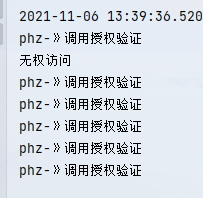
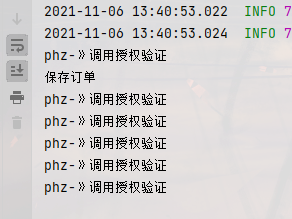
修改
phz为admin
还可以来判断权限
subject.isPermitted("order:*:*");
7.9、授权功能之注解式
如果需要用户同时具有某几个角色,逗号隔开即可
@RequestMapping("/save")
@RequiresRoles(value = {"user"})
public String save() {
    Subject subject = SecurityUtils.getSubject();
    if (subject.hasRole("admin")) {
        System.out.println("保存订单");
    } else {
        System.out.println("无权访问");
    }
    return "redirect:/index.jsp";
}
再次访问方法都不会再进入了,直接报错
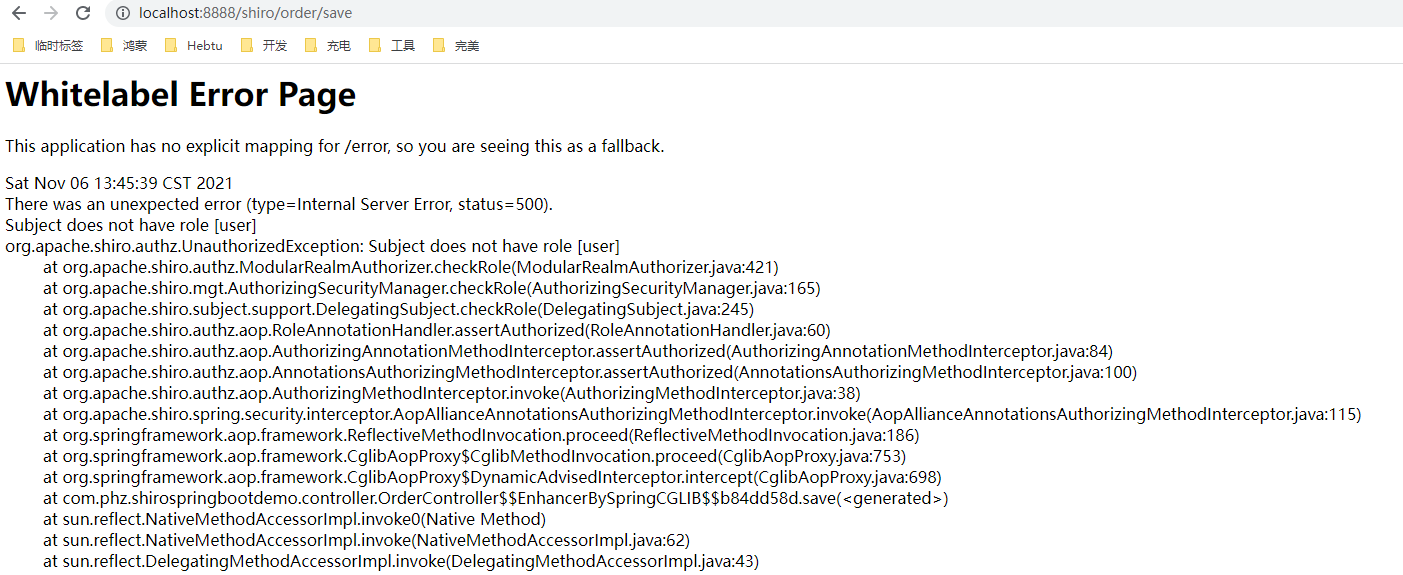
权限同样也有注解
@RequiresPermissions(value = "order:*:*")
7.10、授权方式持久化
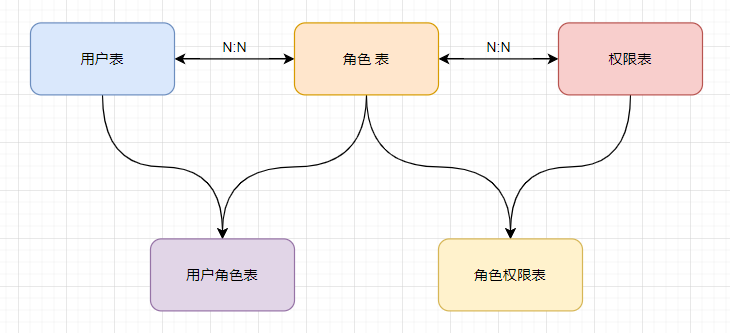
按照图示创建数据库
/*
 Navicat Premium Data Transfer

 Source Server         : mysql
 Source Server Type    : MySQL
 Source Server Version : 50735
 Source Host           : localhost:3306
 Source Schema         : shiro

 Target Server Type    : MySQL
 Target Server Version : 50735
 File Encoding         : 65001

 Date: 06/11/2021 15:14:28
*/

SET NAMES utf8mb4;
SET FOREIGN_KEY_CHECKS = 0;

-- ----------------------------
-- Table structure for perms
-- ----------------------------
DROP TABLE IF EXISTS `perms`;
CREATE TABLE `perms`  (
  `id` int(6) NOT NULL AUTO_INCREMENT,
  `name` varchar(80) CHARACTER SET utf8 COLLATE utf8_general_ci NULL DEFAULT NULL,
  `url` varchar(255) CHARACTER SET utf8 COLLATE utf8_general_ci NULL DEFAULT NULL,
  PRIMARY KEY (`id`) USING BTREE
) ENGINE = InnoDB AUTO_INCREMENT = 1 CHARACTER SET = utf8 COLLATE = utf8_general_ci ROW_FORMAT = Dynamic;

-- ----------------------------
-- Table structure for role
-- ----------------------------
DROP TABLE IF EXISTS `role`;
CREATE TABLE `role`  (
  `id` int(6) NOT NULL AUTO_INCREMENT,
  `name` varchar(60) CHARACTER SET utf8 COLLATE utf8_general_ci NULL DEFAULT NULL,
  PRIMARY KEY (`id`) USING BTREE
) ENGINE = InnoDB AUTO_INCREMENT = 1 CHARACTER SET = utf8 COLLATE = utf8_general_ci ROW_FORMAT = Dynamic;

-- ----------------------------
-- Table structure for role_perms
-- ----------------------------
DROP TABLE IF EXISTS `role_perms`;
CREATE TABLE `role_perms`  (
  `id` int(6) NOT NULL,
  `roleid` int(6) NULL DEFAULT NULL,
  `permsid` int(6) NULL DEFAULT NULL,
  PRIMARY KEY (`id`) USING BTREE
) ENGINE = InnoDB CHARACTER SET = utf8 COLLATE = utf8_general_ci ROW_FORMAT = Dynamic;

-- ----------------------------
-- Table structure for user
-- ----------------------------
DROP TABLE IF EXISTS `user`;
CREATE TABLE `user`  (
  `id` int(6) NOT NULL AUTO_INCREMENT,
  `username` varchar(40) CHARACTER SET utf8 COLLATE utf8_general_ci NULL DEFAULT NULL,
  `password` varchar(40) CHARACTER SET utf8 COLLATE utf8_general_ci NULL DEFAULT NULL,
  `salt` varchar(255) CHARACTER SET utf8 COLLATE utf8_general_ci NULL DEFAULT NULL,
  PRIMARY KEY (`id`) USING BTREE
) ENGINE = InnoDB AUTO_INCREMENT = 2 CHARACTER SET = utf8 COLLATE = utf8_general_ci ROW_FORMAT = Dynamic;

-- ----------------------------
-- Table structure for user_role
-- ----------------------------
DROP TABLE IF EXISTS `user_role`;
CREATE TABLE `user_role`  (
  `id` int(6) NOT NULL,
  `userid` int(6) NULL DEFAULT NULL,
  `roleid` int(6) NULL DEFAULT NULL,
  PRIMARY KEY (`id`) USING BTREE
) ENGINE = InnoDB CHARACTER SET = utf8 COLLATE = utf8_general_ci ROW_FORMAT = Dynamic;

SET FOREIGN_KEY_CHECKS = 1;
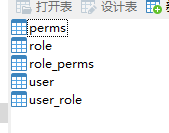
初始化两个用户
phzxiaochen
初始化三个角色
adminuserproduct
建立用户和角色对应关系
phz只有admin角色xiaochen有user和product权限
初始化两个权限
user:*:*product:*:01
建立角色和权限的关系
admin角色,user和product权限都有user角色,只有user权限product角色,只有product权限
创建相关实体类
/**
 * @author PengHuAnZhi
 * @ProjectName ShiroSpringBootDemo
 * @Description TODO
 * @time 2021/11/6 15:24
 */
@Data
@NoArgsConstructor
@AllArgsConstructor
@Accessors(chain = true)
public class Perms {
    private String id;
    private String name;
    private String url;
}
/**
 * @author PengHuAnZhi
 * @ProjectName ShiroSpringBootDemo
 * @Description TODO
 * @time 2021/11/6 15:24
 */
@Data
@NoArgsConstructor
@AllArgsConstructor
@Accessors(chain = true)
public class Role {
    private String id;
    private String name;

    /**
     * 定义权限的集合
     */
    private List<Perms> permsList;
}
/**
 * @author PengHuAnZhi
 * @ProjectName ShiroSpringBootDemo
 * @Description TODO
 * @time 2021/11/5 11:23
 */
@Data
@NoArgsConstructor
@AllArgsConstructor
@Accessors(chain = true)
public class User {
    private Integer id;
    private String userName;
    private String password;
    private String salt;

    /**
     * 定义角色集合
     */
    private List<Role> roles;
}
UserDAO新增方法
/**
 * 根据用户名查询角色
 *
 * @param userName 用户名
 * @return 返回角色集合
 * @author PengHuAnZhi
 * @date 2021/11/6 15:27
 */
User findRolesByUserName(String userName);
对应
mapper
<resultMap id="userMap" type="User">
    <id column="uid" property="id"/>
    <result column="username" property="userName"/>
    <!--角色信息-->
    <collection property="roles" javaType="list" ofType="Role">
        <id column="id" property="id"/>
        <result column="rname" property="name"/>
    </collection>
</resultMap>
<select id="findRolesByUserName" parameterType="string" resultMap="userMap">
    SELECT u.id   uid,
    u.username,
    r.id,
    r.NAME rname
    FROM USER u
    LEFT JOIN user_role ur ON u.id = ur.userid
    LEFT JOIN role r ON ur.roleid = r.id
    WHERE u.username = #{username}
</select>
对应
Service
/**
 * 根据用户名查询角色
 *
 * @param userName 用户名
 * @return 返回角色集合
 * @author PengHuAnZhi
 * @date 2021/11/6 15:27
 */
User findRolesByUserName(String userName);
对应
Impl
@Override
public User findRolesByUserName(String userName) {
    return userDao.findRolesByUserName(userName);
}
RoleDao
/**
 * @author PengHuAnZhi
 * @ProjectName ShiroSpringBootDemo
 * @Description TODO
 * @time 2021/11/6 15:54
 */
@Mapper
public interface RoleDao {
    /**
     * 根据角色id查询权限集合
     *
     * @param id
     * @return List<Perms>
     * @description TODO
     * @author PengHuAnZhi
     * @date 2021/11/6 15:54
     */
    List<Perms> findPermsByRoleId(String id);
}
对应
Mapper
<?xml version="1.0" encoding="utf-8" ?>
<!DOCTYPE mapper PUBLIC "-//mybatis.org//DTD Mapper 3.0//EN" "http://mybatis.org/dtd/mybatis-3-mapper.dtd" >
<mapper namespace="com.phz.shirospringbootdemo.dao.RoleDao">
    <select id="findPermsByRoleId" parameterType="String" resultType="Perms">
        SELECT p.id, p.NAME, p.url, r.NAME
        FROM role r
                 LEFT JOIN role_perms rp
                           ON r.id = rp.roleid
                 LEFT JOIN perms p ON rp.permsid = p.id
        WHERE r.id = #{id}
    </select>
</mapper>
RoleService
/**
 * @author PengHuAnZhi
 * @ProjectName ShiroSpringBootDemo
 * @Description TODO
 * @time 2021/11/6 15:57
 */
public interface RoleService {
    /**
     * 根据角色id查询权限集合
     *
     * @param id
     * @return List<Perms>
     * @description TODO
     * @author PengHuAnZhi
     * @date 2021/11/6 15:57
     */
    List<Perms> findPermsByRoleId(String id);
}
RoleServiceImpl
/**
 * @author PengHuAnZhi
 * @ProjectName ShiroSpringBootDemo
 * @Description TODO
 * @time 2021/11/6 15:57
 */
@Service
@Transactional
public class RoleServiceImpl implements RoleService {
    @Resource
    RoleDao roleDao;

    @Override
    public List<Perms> findPermsByRoleId(String id) {
        return roleDao.findPermsByRoleId(id);
    }
}
自定义
Realm
@Override
protected AuthorizationInfo doGetAuthorizationInfo(PrincipalCollection principalCollection) {
    String primaryPrincipal = (String) principalCollection.getPrimaryPrincipal();
    System.out.println(primaryPrincipal + "-》调用授权验证");
    List<Role> roles = userServiceImpl.findRolesByUserName(primaryPrincipal).getRoles();
    if (!CollectionUtils.isEmpty(roles)) {
        SimpleAuthorizationInfo simpleAuthorizationInfo = new SimpleAuthorizationInfo();
        roles.forEach(role -> {
            simpleAuthorizationInfo.addRole(role.getName());
        });
        return simpleAuthorizationInfo;
    }
    return null;
}
phz登录
[外链图片转存失败,源站可能有防盗链机制,建议将图片保存下来直接上传(img-cI7qQZj3-1636190609645)(C:\Users\Administrator\AppData\Roaming\Typora\typora-user-images\image-20211106161719363.png)]
xiaochen登录
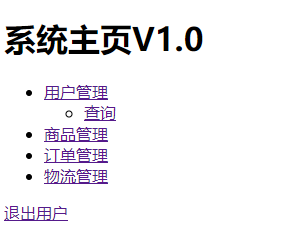
8、Shiro缓存的使用
在前面的案例中,我们能观察到控制台中做权限授权验证的时候,频繁的前往数据库查询
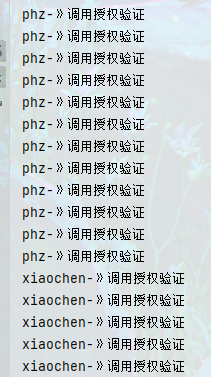
在实际生产中,权限数据一般情况是不会发生变化的,一旦系统中出现了
n多的权限标签,那么会给数据库带来很大的压力,所以这个时候结合缓存来做权限验证无疑是最好的
8.1、基于EhCache使用CacheManager
Shiro中的CacheManager默认使用的是EhCache
引入依赖
<dependency>
    <groupId>org.apache.shiro</groupId>
    <artifactId>shiro-ehcache</artifactId>
    <version>1.8.0</version>
</dependency>
开启缓存管理
/**
 * @param realm
 * @return DefaultWebSecurityManager
 * @description 2、创建安全管理器
 * @author PengHuAnZhi
 * @date 2021/11/4 20:50
 */
@Bean("defaultWebSecurityManager")
public DefaultWebSecurityManager getDefaultWebSecurityManager(CustomRealm realm) {
    DefaultWebSecurityManager defaultSecurityManager = new DefaultWebSecurityManager();
    HashedCredentialsMatcher matcher = new HashedCredentialsMatcher("md5");
    matcher.setHashIterations(1024);
    realm.setCredentialsMatcher(matcher);

    //开启全局缓存
    realm.setCachingEnabled(true);
    //开启认证缓存
    realm.setAuthenticationCachingEnabled(true);
    realm.setAuthenticationCacheName("authenticationCache");
    //开启授权缓存
    realm.setAuthorizationCachingEnabled(true);
    realm.setAuthorizationCacheName("authorizationCache");
    realm.setCacheManager(new EhCacheManager());

    defaultSecurityManager.setRealm(realm);
    return defaultSecurityManager;
}
8.2、基于Redis使用CacheManager
引入依赖
<dependency>
    <groupId>org.springframework.boot</groupId>
    <artifactId>spring-boot-starter-data-redis</artifactId>
    <version>2.5.6</version>
</dependency>
配置
Redis
spring.redis.port=6379
spring.redis.host=localhost
spring.redis.database=0
创建
Redis缓存管理器,需要实现CacheManager,其中需要返回一个Cache对象,这也需要我们自定义创建一个RedisCache
/**
 * @author PengHuAnZhi
 * @ProjectName ShiroSpringBootDemo
 * @Description TODO
 * @time 2021/11/6 16:50
 */
public class RedisCacheManager implements CacheManager {
    @Override
    public <K, V> Cache<K, V> getCache(String cacheName) throws CacheException {
        System.out.println("缓存名称: "+cacheName);
        return new RedisCache<>(cacheName);
    }
}
/**
 * @author PengHuAnZhi
 * @ProjectName ShiroSpringBootDemo
 * @Description TODO
 * @time 2021/11/6 16:54
 */
public class RedisCache<K, V> implements Cache<K, V> {

    @Resource
    RedisTemplate redisTemplate;

    private String cacheName;

    public RedisCache() {
    }

    public RedisCache(String cacheName) {
        this.cacheName = cacheName;
    }

    @Override
    public V get(K k) throws CacheException {
        System.out.println("获取缓存:" + k);
        return (V) redisTemplate.opsForHash().get(this.cacheName, k.toString());
    }

    @Override
    public V put(K k, V v) throws CacheException {
        System.out.println("设置缓存key: " + k + " value:" + v);
        redisTemplate.opsForHash().put(this.cacheName, k.toString(), v);
        return null;
    }

    @Override
    public V remove(K k) throws CacheException {
        return (V) redisTemplate.opsForHash().delete(this.cacheName, k.toString());
    }

    @Override
    public void clear() throws CacheException {
        redisTemplate.delete(this.cacheName);
    }

    @Override
    public int size() {
        return redisTemplate.opsForHash().size(this.cacheName).intValue();
    }

    @Override
    public Set<K> keys() {
        return redisTemplate.opsForHash().keys(this.cacheName);
    }

    @Override
    public Collection<V> values() {
        return redisTemplate.opsForHash().values(this.cacheName);
    }
}
容器中注入一个
RedisTemplate
@Bean
public RedisTemplate redisTemplate() {
    RedisTemplate rt = new RedisTemplate();
    rt.setKeySerializer(new StringRedisSerializer());
    rt.setValueSerializer(new StringRedisSerializer());
    return rt;
}
缓存中的数据是经过序列化的,如果我们使用
ByteSource没有实现序列化,所以我们还需要手动实现序列化
/**
 * @author PengHuAnZhi
 * @ProjectName ShiroSpringBootDemo
 * @Description TODO
 * @time 2021/11/6 17:15
 */
public class MyByteSource implements ByteSource, Serializable {

    private byte[] bytes;
    private String cachedHex;
    private String cachedBase64;

    //加入无参数构造方法实现序列化和反序列化
    public MyByteSource() {

    }

    public MyByteSource(byte[] bytes) {
        this.bytes = bytes;
    }

    public MyByteSource(char[] chars) {
        this.bytes = CodecSupport.toBytes(chars);
    }

    public MyByteSource(String string) {
        this.bytes = CodecSupport.toBytes(string);
    }

    public MyByteSource(ByteSource source) {
        this.bytes = source.getBytes();
    }

    public MyByteSource(File file) {
        this.bytes = (new MyByteSource.BytesHelper()).getBytes(file);
    }

    public MyByteSource(InputStream stream) {
        this.bytes = (new MyByteSource.BytesHelper()).getBytes(stream);
    }

    public static boolean isCompatible(Object o) {
        return o instanceof byte[] || o instanceof char[] || o instanceof String || o instanceof ByteSource || o instanceof File || o instanceof InputStream;
    }

    @Override
    public byte[] getBytes() {
        return this.bytes;
    }

    @Override
    public boolean isEmpty() {
        return this.bytes == null || this.bytes.length == 0;
    }

    @Override
    public String toHex() {
        if (this.cachedHex == null) {
            this.cachedHex = Hex.encodeToString(this.getBytes());
        }

        return this.cachedHex;
    }

    @Override
    public String toBase64() {
        if (this.cachedBase64 == null) {
            this.cachedBase64 = Base64.encodeToString(this.getBytes());
        }

        return this.cachedBase64;
    }

    @Override
    public String toString() {
        return this.toBase64();
    }

    @Override
    public int hashCode() {
        return this.bytes != null && this.bytes.length != 0 ? Arrays.hashCode(this.bytes) : 0;
    }

    @Override
    public boolean equals(Object o) {
        if (o == this) {
            return true;
        } else if (o instanceof ByteSource) {
            ByteSource bs = (ByteSource) o;
            return Arrays.equals(this.getBytes(), bs.getBytes());
        } else {
            return false;
        }
    }

    private static final class BytesHelper extends CodecSupport {
        private BytesHelper() {
        }

        public byte[] getBytes(File file) {
            return this.toBytes(file);
        }

        public byte[] getBytes(InputStream stream) {
            return this.toBytes(stream);
        }
    }
}
最后在自定义
Realm中使用自定义的MyByteSource
return new SimpleAuthenticationInfo(principal, user.getPassword(), new MyByteSource(user.getSalt()), this.getName());